

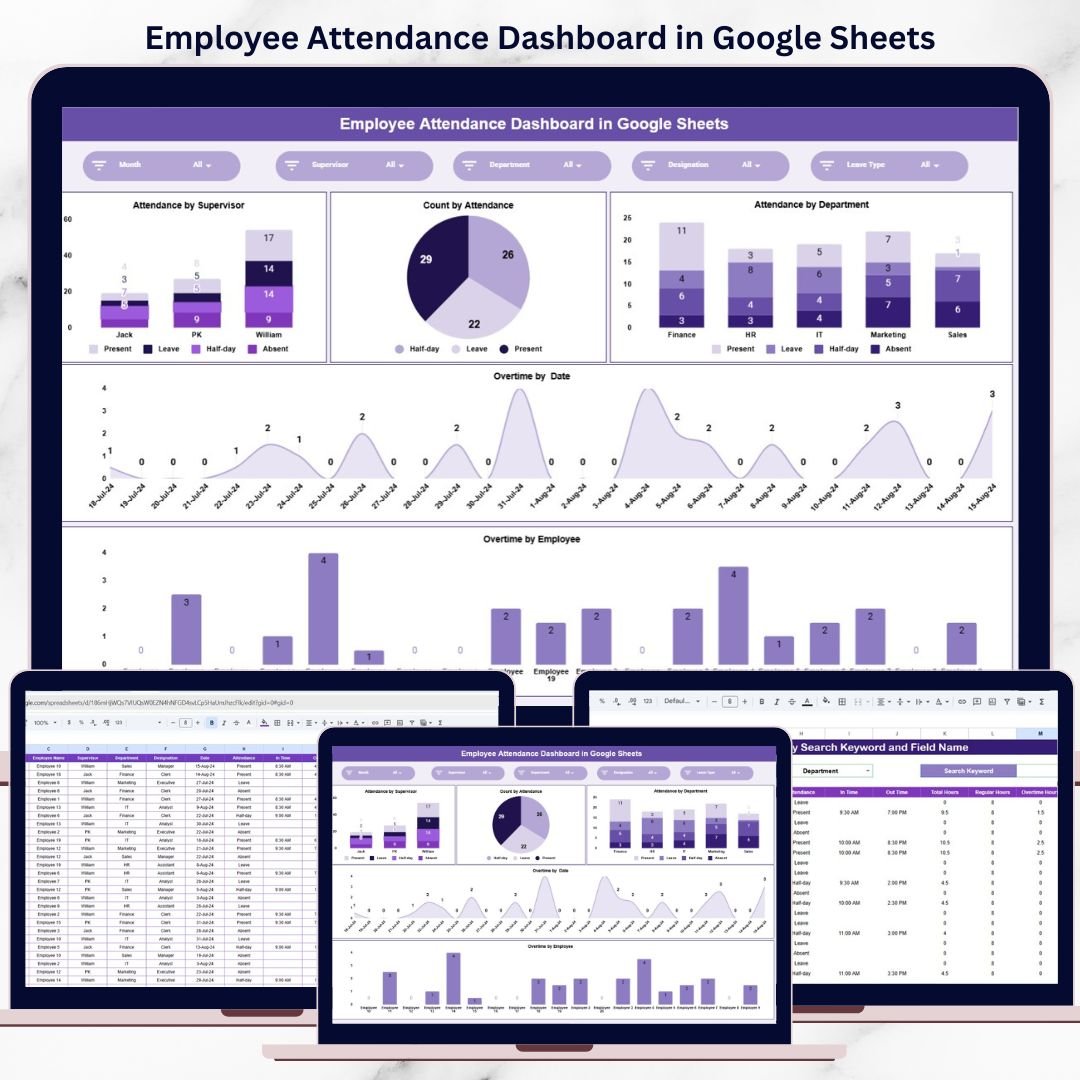



Employee attendance directly impacts productivity, payroll accuracy, workforce planning, and overall operational efficiency. When attendance data is managed through raw spreadsheets, manual registers, or disconnected files, organizations lose valuable time and visibility. Attendance trends remain hidden, overtime usage goes unchecked, and department-wise accountability becomes difficult to maintain.
That is exactly why the Employee Attendance Dashboard in Google Sheets becomes an essential workforce management solution.
This ready-to-use dashboard transforms daily attendance records into clear, visual, and actionable insights. Instead of manually reviewing rows of data, HR teams and managers can instantly understand attendance behavior, absenteeism patterns, overtime trends, and supervisor-wise performance through interactive charts and a smart search feature. Because it is built entirely in Google Sheets, the dashboard remains easy to use, collaborative, and cost-effective—without requiring expensive attendance software.
✨ Key Features of the Employee Attendance Dashboard in Google Sheets
🧾 1. Centralized Attendance Data Management
All employee attendance records are maintained in one structured dashboard, eliminating scattered files and manual consolidation.
📊 2. Visual Attendance & Overtime Insights
Pre-built charts convert raw attendance data into meaningful patterns that support faster decision-making.
🔍 3. Smart Search Functionality
Quickly locate specific attendance records using keyword and field-based search.
⚡ 4. Real-Time Updates
Any update to attendance data instantly refreshes all charts and summaries.
🤝 5. Google Sheets-Based Collaboration
HR teams, supervisors, and managers can access and review attendance data together in real time.
📦 What’s Inside the Employee Attendance Dashboard in Google Sheets
🖥️ Overview Sheet Tab (Attendance Snapshot)
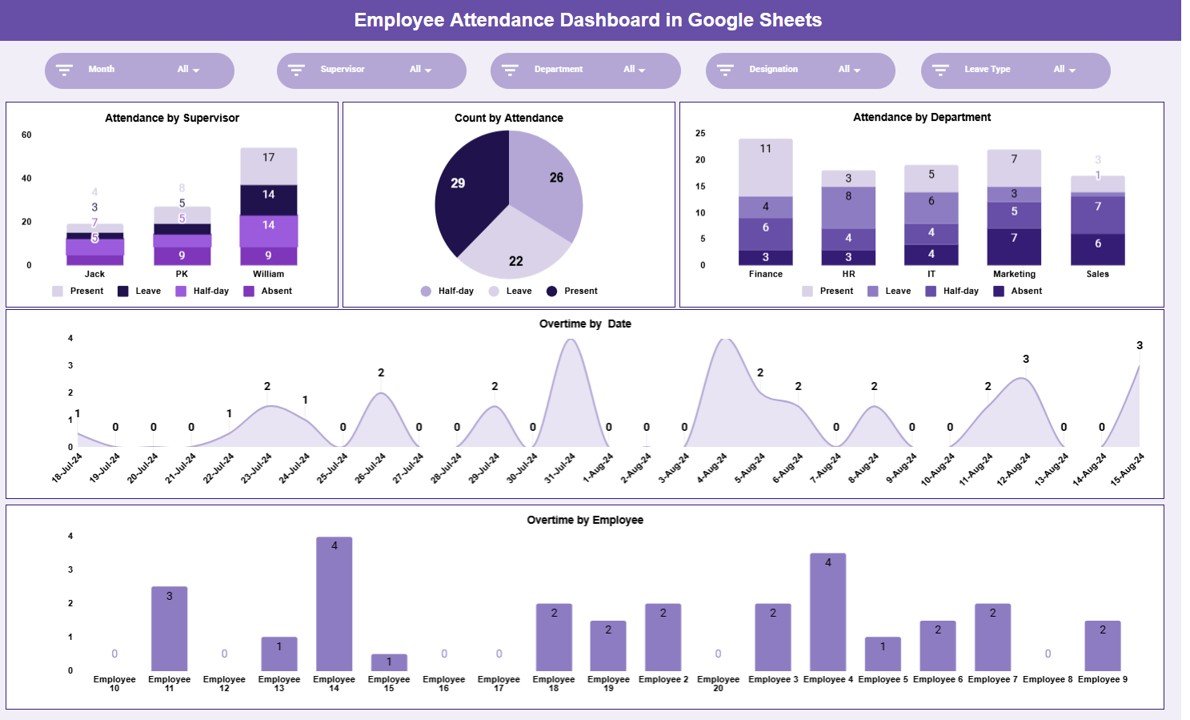
The Overview Sheet provides a high-level summary of attendance and overtime performance. Instead of scanning individual records, users get instant clarity on overall attendance behavior across the organization.
This overview supports:
Attendance discipline monitoring
Supervisor-wise attendance evaluation
Overtime usage analysis
Quick HR and management reviews
📈 Charts Included in the Attendance Dashboard
👨💼 Attendance by Supervisor
This chart shows attendance distribution under each supervisor. It helps organizations:
Identify supervisors managing attendance effectively
Detect teams with frequent attendance issues
Provide targeted guidance and support
📋 Count by Attendance Status
This chart displays attendance counts such as:
Present
Absent
Late
Leave
It provides a quick understanding of overall attendance behavior and absenteeism trends.
🏢 Attendance by Department
This chart compares attendance performance across departments. It helps management:
Identify departments with higher absenteeism
Monitor attendance discipline department-wise
Take corrective actions through policy changes or training
⏱️ Overtime by Date
This chart tracks overtime hours recorded by date. It helps organizations:
Identify peak workload periods
Monitor overtime trends over time
Control overtime costs proactively
👤 Overtime by Employee
This chart shows overtime hours by employee. It helps HR and managers:
Identify overworked employees
Ensure fair overtime distribution
Reduce burnout and compliance risks
🔍 Smart Search Feature – Find Attendance Records Instantly
The dashboard includes a powerful search section that allows users to filter attendance records by:
Employee Name
Employee ID
Department
Supervisor
Attendance Status
Date
By entering a Search Keyword and selecting the Field Name, matching records appear instantly.
This feature is especially useful for:
Attendance audits
Payroll verification
HR reviews
Manager discussions
It eliminates manual filtering and saves significant time.
🎯 Who Can Benefit from This Employee Attendance Dashboard
👥 HR Teams
Track attendance trends, absenteeism, and overtime easily.
👨💼 Supervisors & Managers
Monitor team attendance discipline and workload.
💰 Payroll Teams
Verify attendance data quickly for payroll processing.
🏢 Operations & Leadership
Improve workforce planning and accountability.
📊 Organizations of Any Size
Manage attendance efficiently without complex systems.
🛠️ How to Use the Employee Attendance Dashboard Effectively
Update attendance data daily
Standardize attendance status values
Review overtime charts weekly
Share insights with supervisors
Restrict edit access where required
Following these steps ensures accurate and reliable attendance reporting.
### Click here to read the Detailed blog post
Watch the step-by-step video tutorial:
Visit our YouTube channel to learn step-by-step video tutorials — Youtube.com/@NeotechNavigators
Compatibility and Requirements
- Works in Google Sheets with a free Google account and a web browser.
- The charts refresh when you update the attendance data. Google’s guide shows how to add and edit a chart if you want to change one.
Frequently Asked Questions
Which charts are in the Employee Attendance Dashboard?
Five: Attendance by Supervisor, Count by Attendance Status, Attendance by Department, Overtime by Date and Overtime by Employee.
How does the search feature work?
Enter a search keyword and pick the field name. Matching attendance records appear right away.
Which fields can I search by?
Employee Name, Employee ID, Department, Supervisor, Attendance Status and Date.
Which attendance statuses does it count?
Present, Absent, Late and Leave, shown in the Count by Attendance Status chart.
Can my team work in the file together?
Yes. It is a Google Sheets file, so HR, supervisors and managers can open and review it at the same time.
Related Attendance and HR Templates
- Employee Attendance Tracker in Google Sheets: log daily attendance
- Employee Attendance Data Entry System in Excel: attendance entry in Excel
- Employee Attendance Payroll Management System: an HR web app for attendance and payroll
- HR Google Sheets Pack: 10 HR templates for Google Sheets
- HR & Workforce Analytics Bundle: 10 HR templates in one bundle
Browse all Google Sheets dashboards or the Google Sheets HR and payroll templates.







Reviews
There are no reviews yet.