


In today’s data-driven healthcare world, dental practices must go beyond intuition — they need measurable insights to improve patient care, optimize operations, and increase profitability. The Dental Services KPI Dashboard in Power BI is a powerful, ready-to-use analytical solution designed to help dental clinics, hospitals, and multi-branch chains track performance and make informed, real-time decisions.
Built entirely in Microsoft Power BI and powered by Excel data, this dashboard transforms raw numbers into interactive visuals and KPI cards. It provides a 360° view of your clinic’s performance, covering financial, operational, and clinical dimensions — all within one sleek, intuitive interface.
Whether you manage a single dental office or a multi-location network, this Power BI dashboard delivers clarity, transparency, and control over your entire dental ecosystem.
⚙️ Key Features of the Dental Services KPI Dashboard in Power BI
📊 3 Analytical Pages: Summary | KPI Trend | KPI Definition
📅 Slicers & Filters: Instantly filter by Month or KPI Group.
🎯 KPI Cards: Track Total KPIs, MTD Target Met, and Target Missed.
📈 Actual vs Target vs Previous Year: Measure MTD and YTD performance.
🟢🔴 Visual Indicators: Arrows & colors show immediate status.
📉 Trend Charts: Analyze progress with combo visuals over time.
🧩 Excel Integration: Easy to update and refresh — no coding needed.
💻 Fully Interactive: Drill through for details or return with one click.
📊 Dashboard Structure and Pages
🦷 1️⃣ Summary Page — Your Performance Command Center

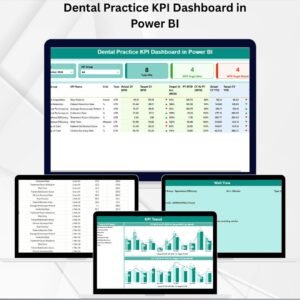
This is the dashboard’s main control hub — giving you instant access to all critical KPIs.
Features:
Month and KPI Group Slicers for focused analysis.
Summary Cards display Total KPI Count, MTD Target Met, and MTD Target Missed.
Detailed KPI Table showing KPI Group, Name, Unit, Type (LTB/UTB), Actual vs Target (MTD/YTD), Previous Year data, and trend icons.
💡 Purpose: Quickly identify high-performing areas and address underperforming KPIs in seconds.
📈 2️⃣ KPI Trend Page — Visualizing Progress Over Time
Understand how your practice is evolving month by month.
Combo Charts for MTD and YTD comparisons of Actual, Target, and Previous Year values.
Interactive Slicer to select specific KPIs for trend review.
💡 Purpose: Spot patterns in treatment success, patient satisfaction, or revenue growth and plan improvements accordingly.
📘 3️⃣ KPI Definition Page — Your KPI Dictionary
Provides formula and definition details for each metric.
Columns for KPI Name, Group, Formula, Definition, Unit, and Type.
Drill-through capability from the Summary Page and a Back Button for easy navigation.
💡 Purpose: Ensure consistent understanding of KPI logic across departments.
📂 Excel Data Source Structure
The dashboard connects to a structured Excel file with three worksheets:
1️⃣ Input Actual: Monthly Actual MTD & YTD values.
2️⃣ Input Target: Target MTD & YTD values for each KPI.
3️⃣ KPI Definition: Core metadata (KPI Number, Group, Formula, Definition, Type).
💡 Purpose: Update the Excel file, refresh Power BI, and instantly see live changes — no technical setup required.
🌟 Advantages of the Dental Services KPI Dashboard in Power BI
✅ Real-Time Insights: Get instant updates as data changes.
✅ Improved Patient Care: Analyze satisfaction and treatment success rates.
✅ Operational Excellence: Track appointments, doctor efficiency, and staff utilization.
✅ Financial Transparency: Monitor revenue, costs, and profit trends.
✅ Data Centralization: All KPIs in one place for team-wide visibility.
✅ Time Efficiency: Automated Power BI visuals replace manual reporting.
✅ Scalable: Perfect for single clinics or multi-branch dental chains.
💡 Best Practices for Using This Dashboard
📌 Refresh Excel data monthly for accurate insights.
📌 Standardize KPI formulas across locations.
📌 Use conditional formatting for variance > ±10 %.
📌 Combine clinical and financial data for holistic reporting.
📌 Encourage staff engagement with KPI visibility.
📌 Apply Power BI security controls for patient data protection.
🧠 How It Drives Dental Business Growth
💰 Optimize resources and reduce idle chair time.
🧾 Track revenue streams and profit per treatment.
🧑⚕️ Boost patient retention through satisfaction analysis.
📊 Improve marketing ROI with data-backed insights.
🦷 Ensure regulatory and quality compliance with clear metrics.
🧩 Conclusion
The Dental Services KPI Dashboard in Power BI is more than a dashboard — it’s a complete performance intelligence solution for modern dental practices.
It empowers you to visualize KPIs, identify opportunities, and make data-driven decisions that improve patient outcomes and financial performance.
With seamless Excel integration, real-time visuals, and customizable KPIs, it’s the ultimate tool for clinics aiming to be efficient, profitable, and patient-focused.
🦷 Measure success. Maximize efficiency. Deliver smiles with NextGen Templates’ Dental Services KPI Dashboard in Power BI.
🔗 Click Here to Read the Detailed Blog Post
📺 Visit our YouTube Channel for step-by-step tutorials.
Watch the step-by-step video tutorial:
Compatibility and Requirements
- Opens in Power BI Desktop, which is free from Microsoft. See Get Power BI Desktop.
- The data source is an Excel file, so you also need Excel or another app that edits .xlsx files to update the inputs.
How to Use the Dental Services KPI Dashboard
- Check or add your KPIs in the KPI Definition sheet of the Excel file.
- Enter MTD and YTD targets in the Input Target sheet.
- Enter MTD and YTD actuals in the Input Actual sheet each month.
- Refresh the report in Power BI Desktop.
- Use the Month and KPI Group slicers on the Summary page, then open KPI Trend for detail.
Frequently Asked Questions
Which pages are in the report?
Three pages: Summary, KPI Trend and KPI Definition.
What do the summary cards show?
Total KPI Count, MTD Target Met and MTD Target Missed.
What does the KPI table compare?
Actual against target for MTD and YTD, plus previous year values, with trend icons.
What do LTB and UTB mean?
LTB means lower the better and UTB means upper the better, so each KPI is judged the right way.
Related Dental Templates
- Dental Services KPI Dashboard in Excel: the same KPIs in Excel
- Dental Practice KPI Dashboard in Google Sheets: dental KPIs in the browser
- Dental Services Dashboard in Power BI: a full dental services dashboard
- Dental Practice Dashboard in Power BI: practice level analysis in Power BI
- Healthcare and Hospital Management Bundle: a bundle of healthcare templates
Browse all Power BI KPI Dashboards.










Reviews
There are no reviews yet.