

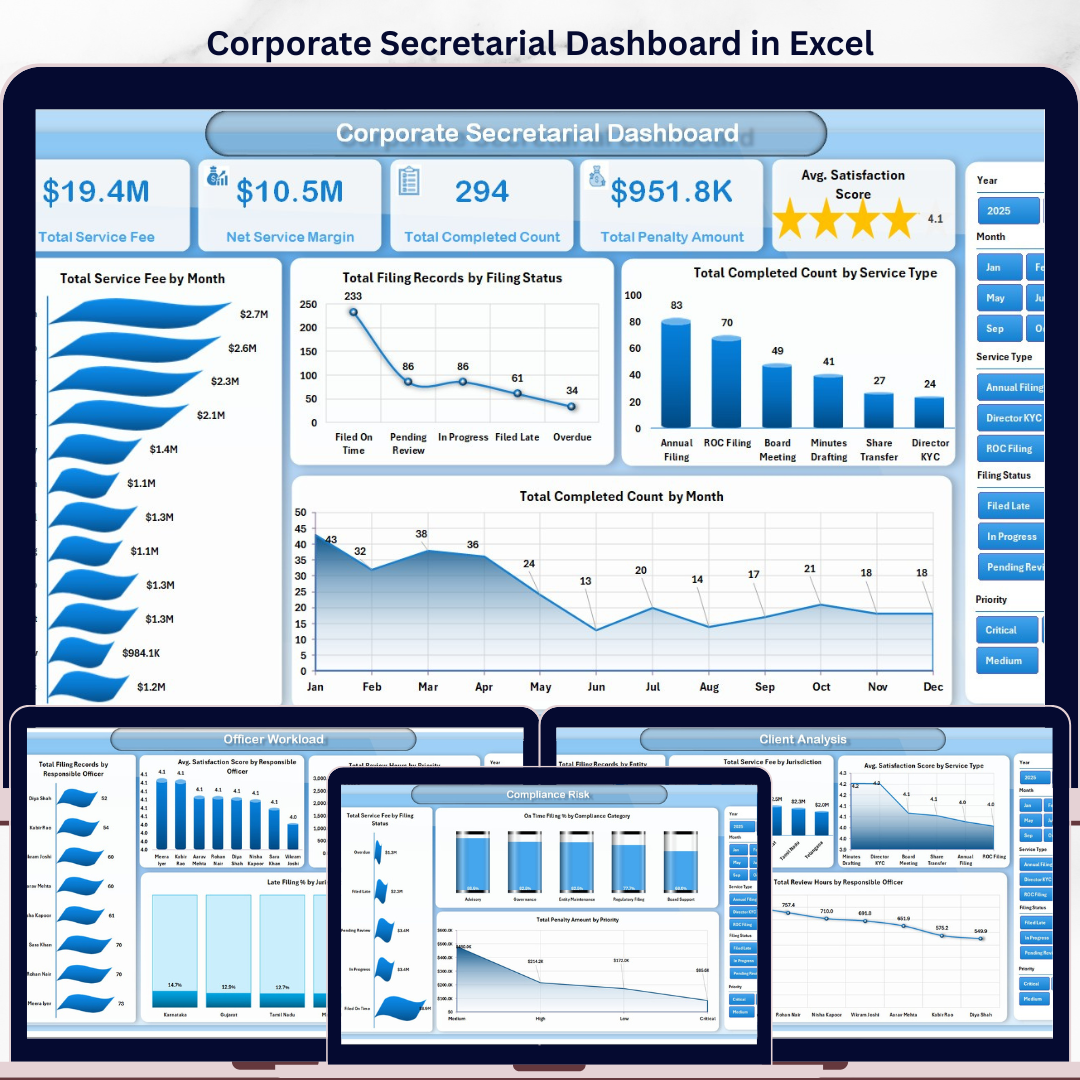


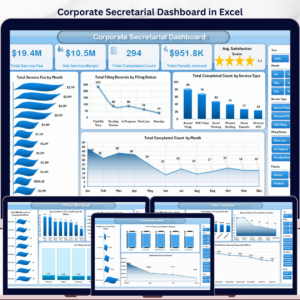
The Corporate Secretarial Dashboard in Excel gives company secretaries, compliance teams, legal operations managers, and governance leaders a 7-sheet Excel reporting system for filing activity, service fees, review workload, late filing risk, penalties, and client satisfaction. It includes 5 analytical dashboard pages, 5 headline KPI cards, multiple slicers, a structured Data Sheet, and a Support Sheet with pivot tables that refresh the full dashboard. For $17.99 one-time, it gives teams an editable Excel alternative to recurring compliance reporting software while keeping the data under their control.
Instant download. One-time payment. No subscription. No per-user fees. Lifetime access.
Key Features of Corporate Secretarial Dashboard in Excel
- 5 executive KPI cards showing Total Service Fee, Net Service Margin, Total Completed Count, Total Penalty Amount, and Avg. Satisfaction Score.
- 5 dashboard pages covering Overview, Filing Trends, Client Analysis, Officer Workload, and Compliance Risk.
- 19 chart views for monthly fees, filing status, service type, quarters, priority, jurisdiction, entity, officer workload, compliance category, and penalties.
- Multiple slicers help users filter filings quickly by period, client type, officer, service type, status, priority, and other dashboard dimensions.
- Data Sheet included so you can paste corporate secretarial records in the same format and refresh the dashboard.
- Support Sheet with pivot tables powers the charts and can be hidden after setup.
- Excel-native workflow with no login, no monthly SaaS cost, and no complex implementation project.
What’s Inside the Corporate Secretarial Dashboard in Excel
1. Overview Page
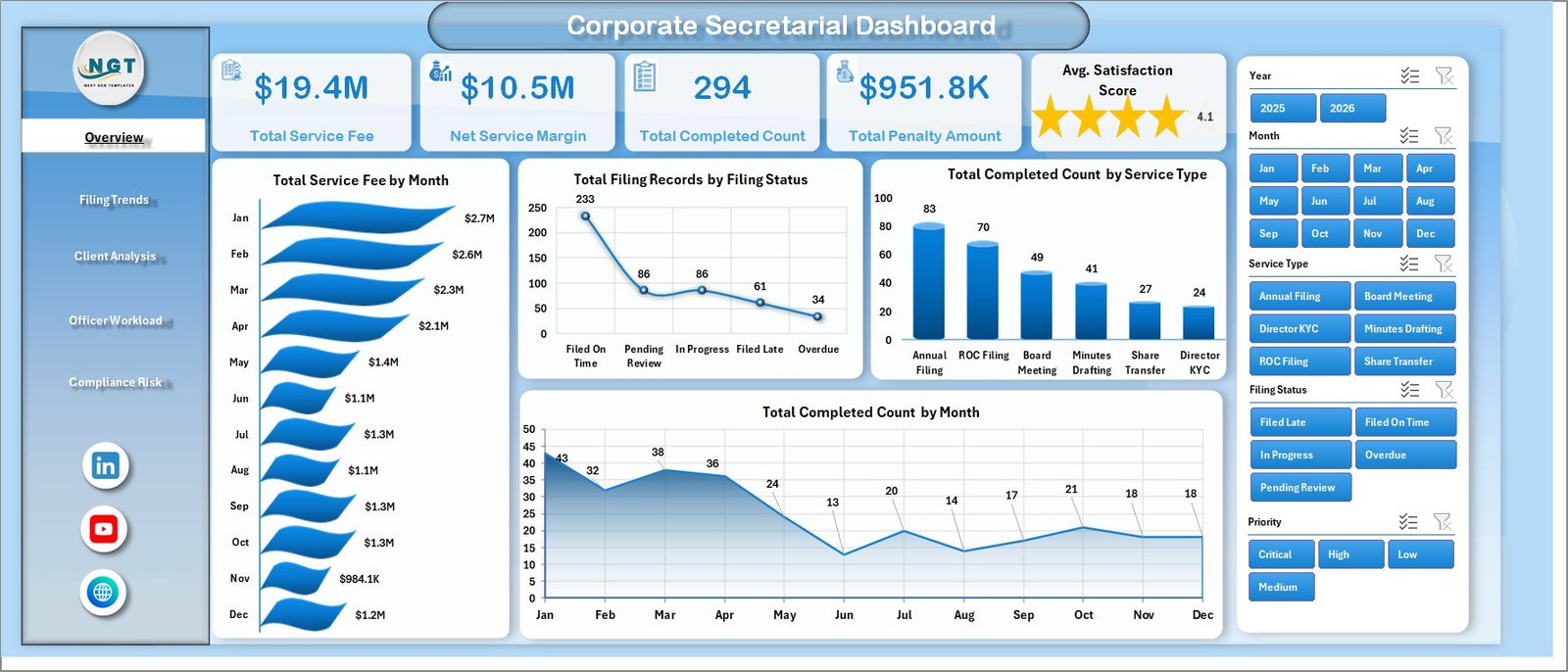
The Overview Page is the main management view. It starts with cards for Total Service Fee, Net Service Margin, Total Completed Count, Total Penalty Amount, and Avg. Satisfaction Score, then combines charts and slicers for a fast summary of filing performance.
Total Service Fee by Month: This chart shows how service fee volume changes month by month. It helps leaders identify seasonal filing demand and spot months where billable secretarial activity is unusually high or low.
Total Filing Records by Filing Status: This chart compares filings across statuses such as completed, pending, late, or in review. It makes backlog and risk areas visible without scanning raw records.
Total Completed Count by Service Type: This view explains which secretarial service types are being completed most often. It supports capacity planning and helps teams understand where recurring operational effort is going.
Total Completed Count by Month: This chart tracks monthly completion output. It helps compare workload delivery over time and quickly highlights months where completion activity dropped.
2. Filing Trends
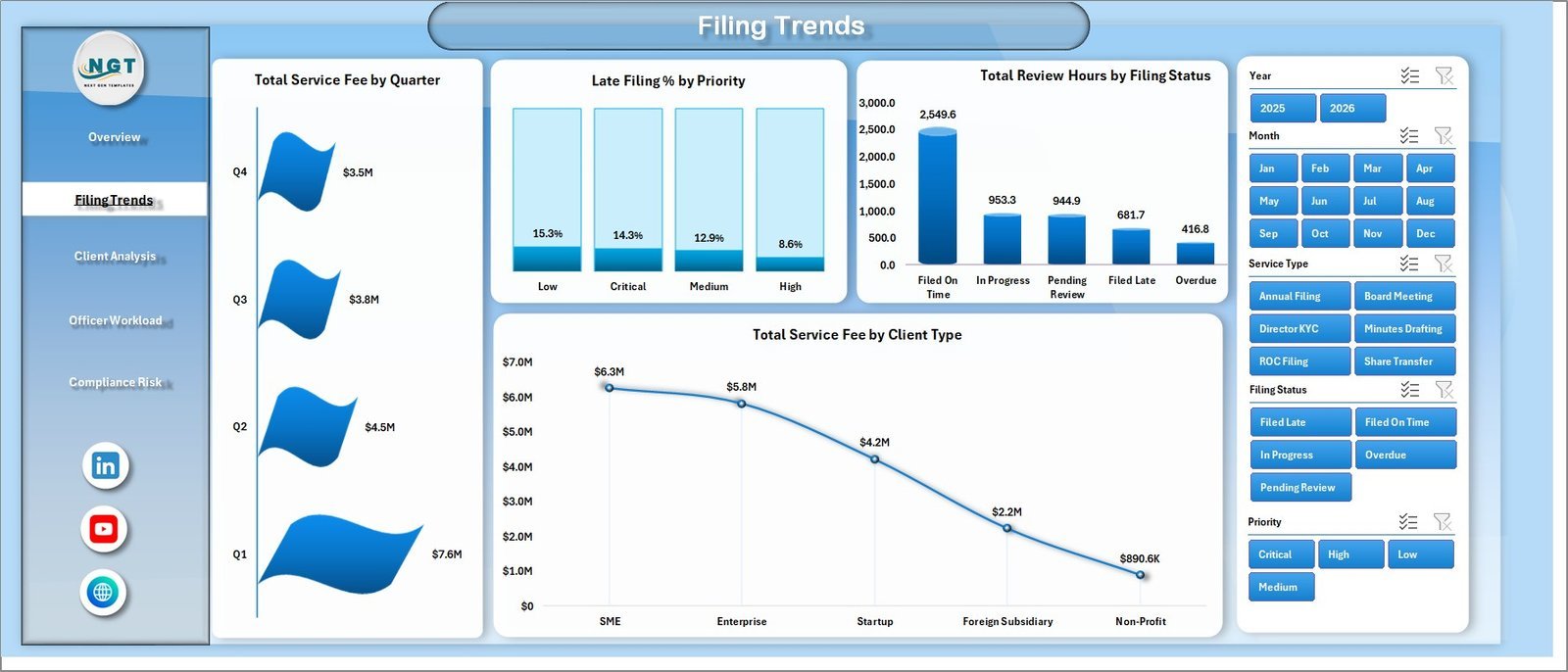
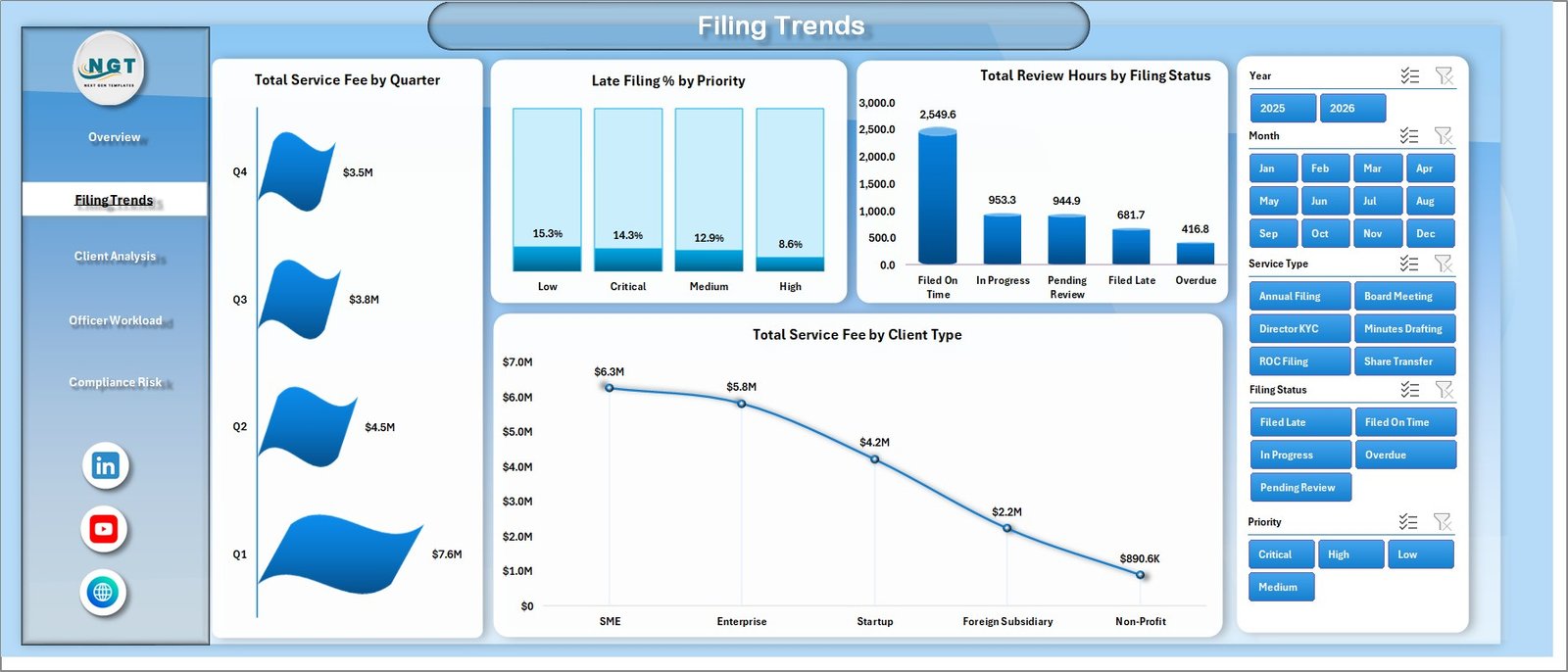
The Filing Trends page focuses on time-based and process-based filing analysis. It includes Total Service Fee by Quarter, Late Filing % by Priority, Total Review Hours by Filing Status, and Total Service Fee by Client Type. These charts help users connect revenue, workload, status, and risk patterns in one sheet.
3. Client Analysis
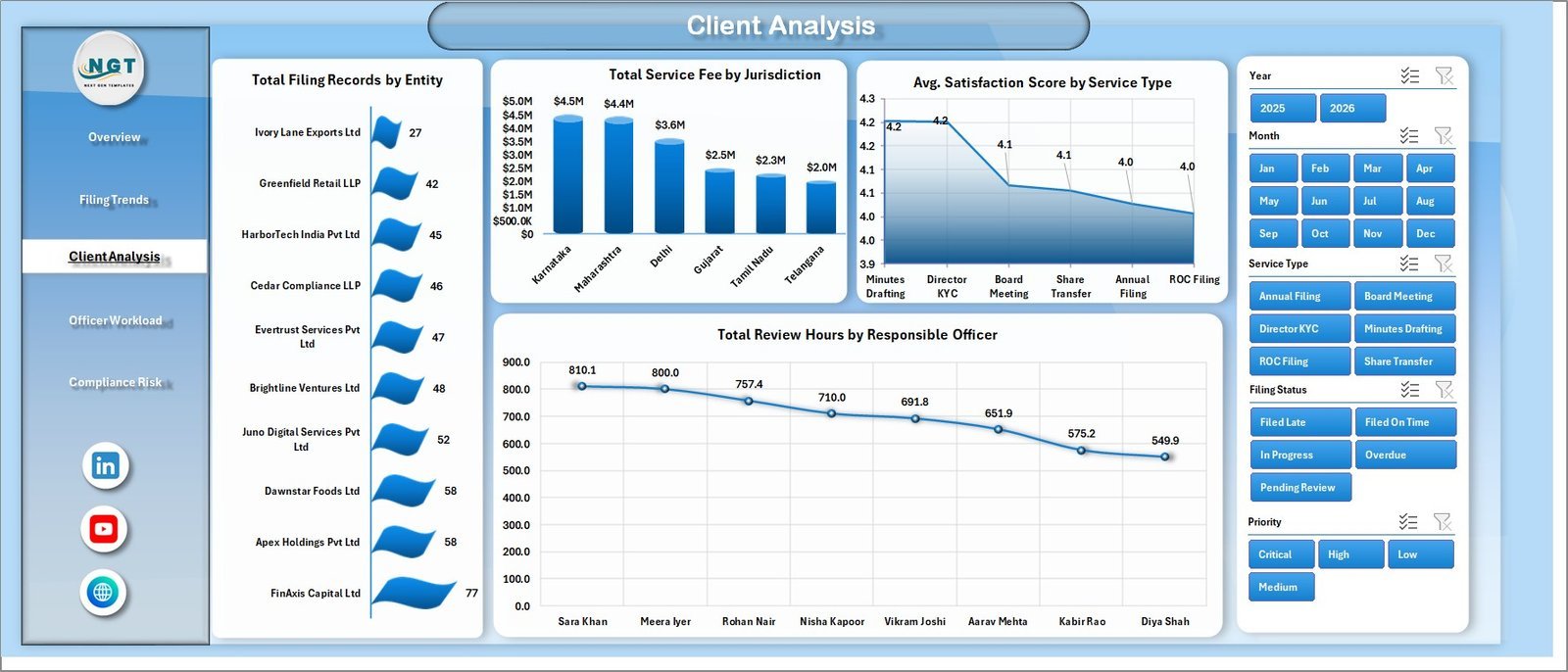
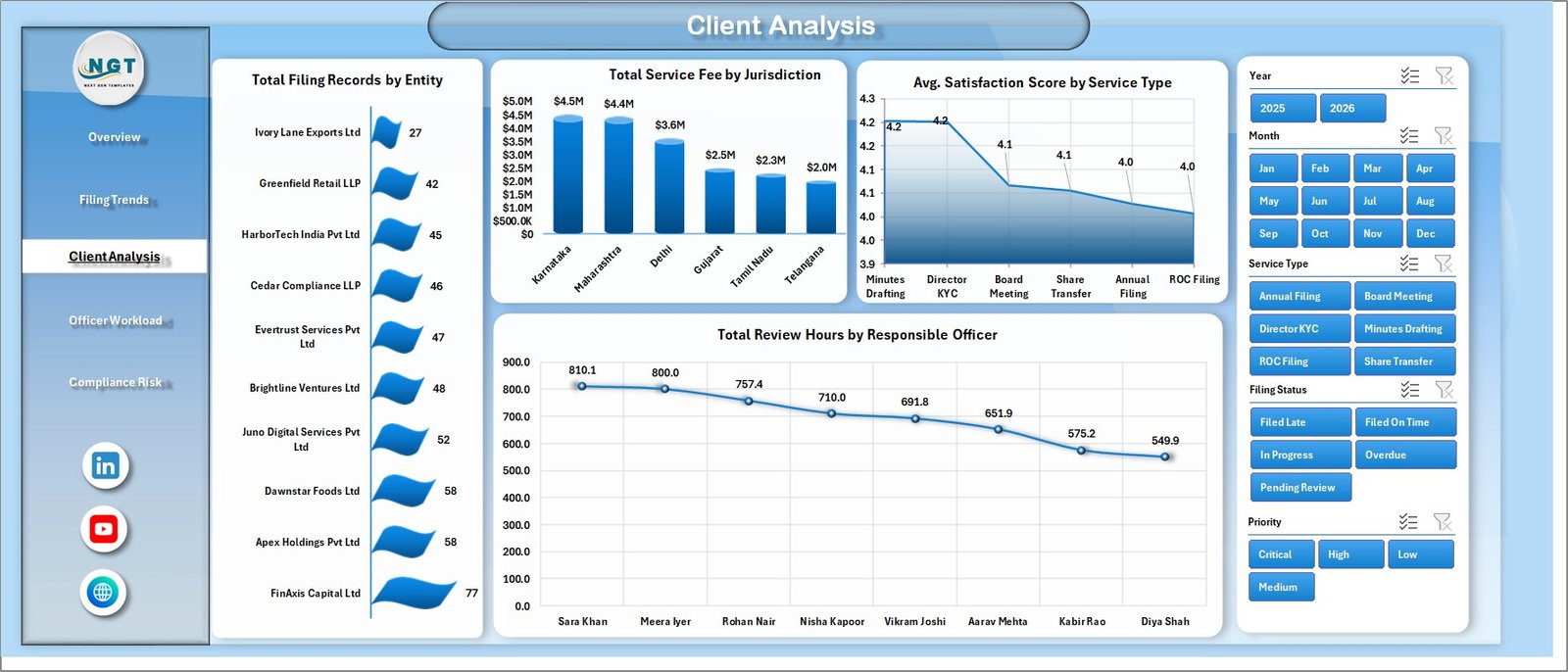
The Client Analysis tab helps teams understand client, entity, jurisdiction, service, and officer-level patterns. It includes Total Filing Records by Entity, Total Service Fee by Jurisdiction, Avg. Satisfaction Score by Service Type, and Total Review Hours by Responsible Officer.
4. Officer Workload
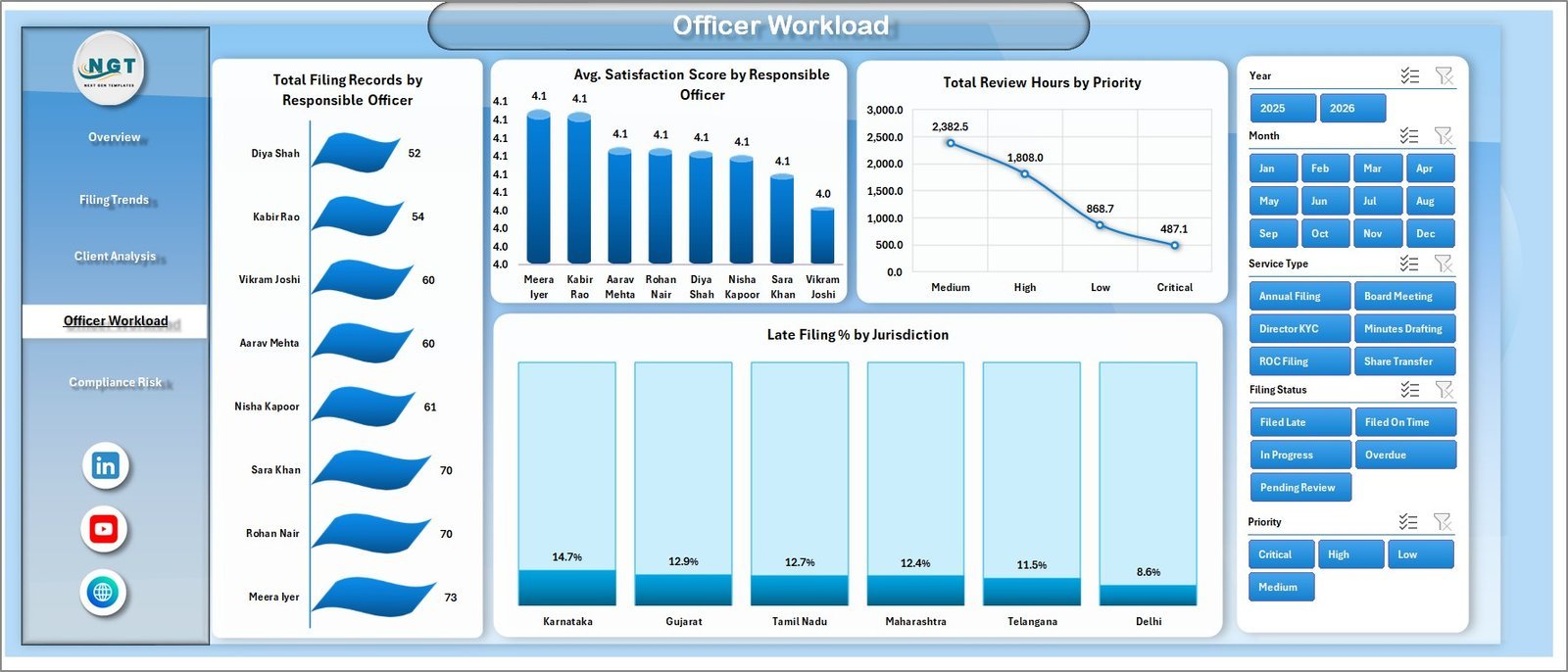
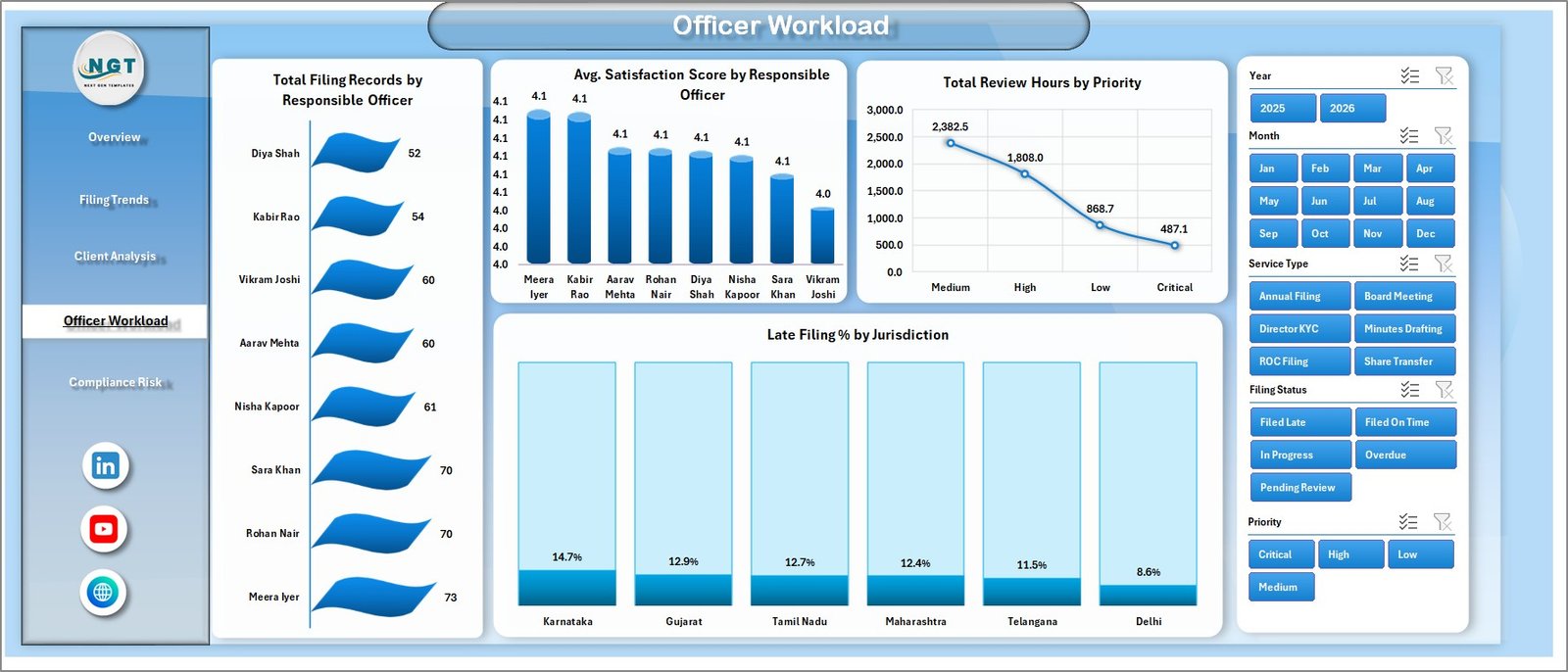
The Officer Workload page is built for internal capacity review. It shows Total Filing Records by Responsible Officer, Avg. Satisfaction Score by Responsible Officer, Total Review Hours by Priority, and Late Filing % by Jurisdiction so managers can balance workload and watch service quality.
5. Compliance Risk
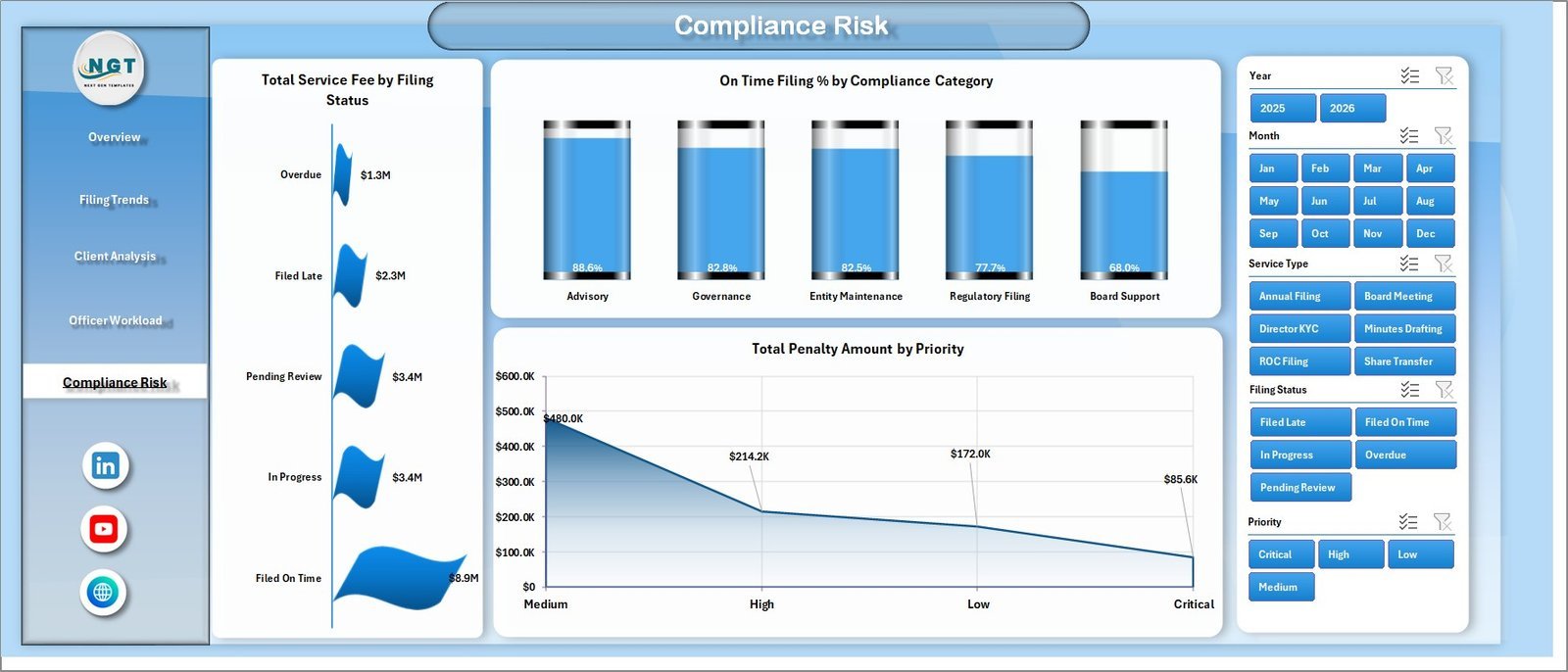
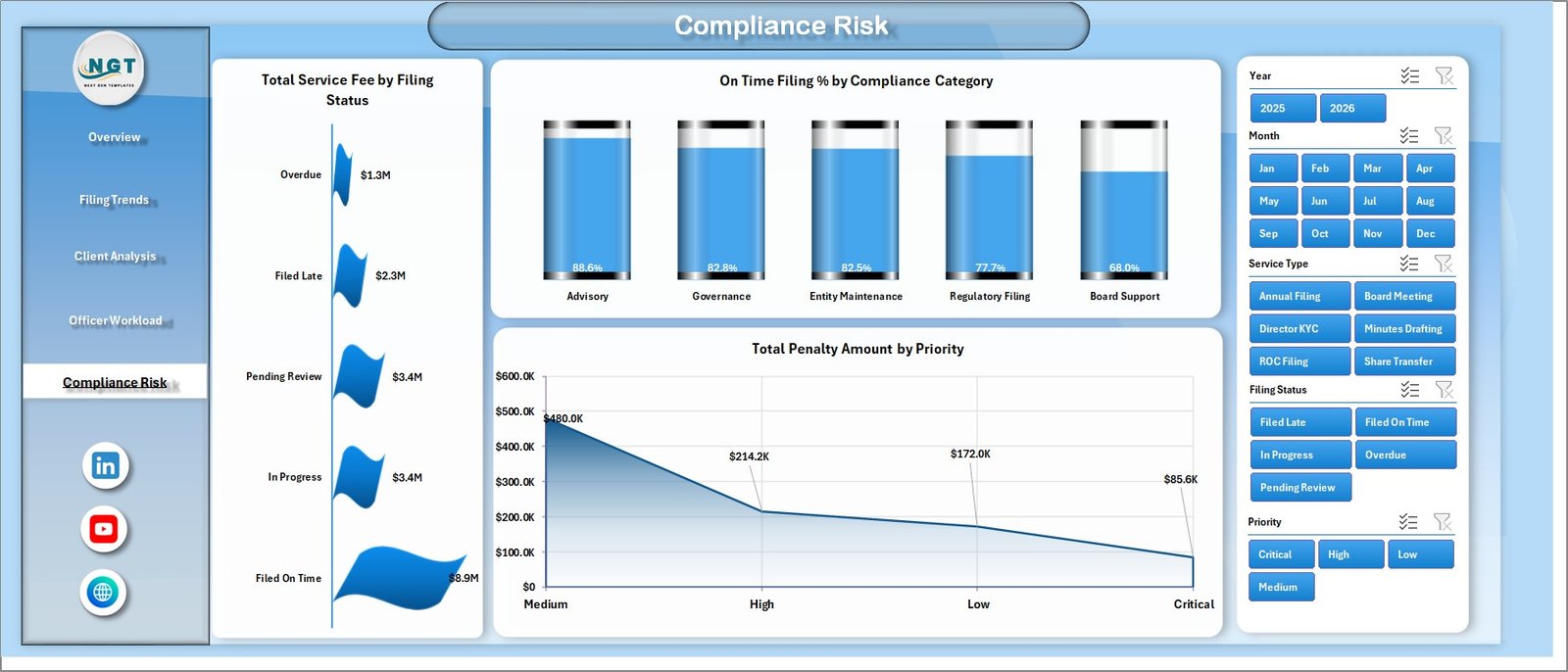
The Compliance Risk page highlights financial and statutory exposure. It includes Total Service Fee by Filing Status, On Time Filing % by Compliance Category, and Total Penalty Amount by Priority, making it useful for compliance meetings, governance reviews, and audit preparation.
6. Data Sheet Tab
The Data Sheet is the structured input table. Add or replace your corporate secretarial data in the same format, then refresh the workbook to update all pivot tables, slicers, cards, and charts.

7. Support Sheet
The Support Sheet contains the pivot tables used to create the dynamic dashboard. After updating the Data Sheet, go to the Data tab in the Excel Ribbon and click Refresh All. The pivots and dashboard charts will refresh together, and you can keep this support sheet hidden.

Corporate Secretarial Dashboard in Excel vs. Google Sheets vs. Paid CRM/SaaS – Where This Fits
| Feature | This Excel Dashboard | Google Sheets Alternative | Paid Compliance SaaS |
|---|---|---|---|
| Cost | $17.99 one-time | One-time template or manual build | $50-$500+ per month |
| Platform | Microsoft Excel | Google Sheets browser workflow | Vendor cloud app |
| Setup time | Open, replace data, refresh | Copy sheet and configure sharing | Onboarding and permissions setup |
| Real-time team collaboration | Possible with OneDrive or SharePoint | Native Google Drive collaboration | Usually seat-based |
| Mobile access | Excel mobile with limits | Google Sheets app | Usually available |
| Customizable fields | Fully editable workbook | Editable sheet structure | Limited by vendor settings |
| Share with link | Possible through cloud storage | Yes | Often login required |
| Year-1 cost at 5 users | $17.99 total | Template cost or internal build time | $3,000-$30,000+ |
| Filing and penalty tracking | Included | Possible with custom setup | Often included in higher plans |
Who This Template Is For – and Who It’s Not For
This template is built for company secretaries, corporate compliance teams, legal operations teams, secretarial service providers, governance consultants, and finance leaders who need a clear Excel dashboard for filing activity and risk reporting.
It is not a replacement for a legal entity management system with automated government filing integrations, role-based approval workflows, e-signatures, or live regulatory updates. It works best when your team can maintain a structured filing data table and refresh the dashboard for periodic reviews.
How to Use the Corporate Secretarial Dashboard in Excel
- Download and unzip the file.
- Open the workbook in Microsoft Excel.
- Go to the Data Sheet and replace the sample records with your own filing records.
- Keep the same column structure for clean refresh behavior.
- Click Data > Refresh All in the Excel Ribbon.
- Use slicers on the dashboard pages to filter by period, status, service type, officer, priority, client type, or jurisdiction.
- Hide the Support Sheet if you want a cleaner user-facing workbook.
Real-World Use Cases
Aisha, company secretary: She uses the Overview and Compliance Risk pages before monthly governance meetings to explain late filing exposure, penalties, and on-time filing performance.
Daniel, legal operations manager: He reviews Officer Workload to understand review hours, officer-level filing records, and satisfaction scores before reallocating work.
Meera, compliance consultant: She uses Client Analysis to compare entities, jurisdictions, service types, and responsible officers across multiple client accounts.
Frequently Asked Questions
What does the Corporate Secretarial Dashboard in Excel track?
It tracks service fees, margin, completed filings, penalty amount, satisfaction score, filing status, service type, jurisdiction, entity, responsible officer, priority, compliance category, and review hours.
Do I need advanced Excel skills?
No. The dashboard is designed for data replacement, slicer filtering, and Refresh All. Basic Excel knowledge is enough for day-to-day use.
Can I add more corporate secretarial records?
Yes. Add records in the Data Sheet using the same table format, then refresh the workbook.
Can I customize the dashboard pages?
Yes. Since it is an Excel workbook, you can adjust charts, colors, fields, formulas, pivot tables, and labels if you are comfortable editing Excel dashboards.
Does this connect directly to government filing portals?
No. This is an Excel dashboard template for structured reporting and analysis. It does not include live portal integrations.
Can the Support Sheet be hidden?
Yes. The Support Sheet powers the pivot tables and can be hidden after setup. Keep it available for advanced edits and troubleshooting.
About the Author
Built by PK – Microsoft Certified Professional with 15+ years of Excel, Google Sheets, and Power BI experience. Founder of NextGenTemplates, reaching 300K+ subscribers across YouTube channels. Every template is hand-built and tested before release.
Explore Related Templates
Corporate Secretarial KPI Dashboard in Excel – KPI-focused performance tracking for secretarial teams.
Legal Research KPI Dashboard in Power BI – Power BI analytics for legal research performance.
Browse more MS Excel templates and Excel Dashboard templates.
Ready to turn corporate secretarial records into clear management reporting? Download the Corporate Secretarial Dashboard in Excel and start reviewing filings, workload, penalties, and compliance risk from one workbook.
Last updated: May 2026
🔗 Click here to read the Detailed blog post





















Reviews
There are no reviews yet.