

The best Zoho CRM alternative for a small team is a set of one-time-purchase Excel, Google Sheets and Power BI templates that cover the reports you actually use — pipeline, customer service, engagement and journey KPIs — for a flat $4.99 to $14.99 each instead of $14 to $52 per user every month. For teams under ten people, template CRM tracking removes seat fees, unused modules and admin overhead in one move.
Last updated: August 2026
Related reading: 10 CRM metrics to track in 2026, with formulas and benchmark ranges, mapped to eight ready-made dashboard templates.
Key takeaways
- Zoho CRM’s paid tiers run $14 (Standard), $23 (Professional), $40 (Enterprise) and $52 (Ultimate) per user per month billed annually — a 5-seat team on Professional pays about $1,380 a year, every year.
- A one-time NGT template such as the Customer Journey Mapping KPI Dashboard in Excel ($14.99) is bought once and never renews — no seat count, no billing cycle.
- Small teams churn off Zoho for three reasons: per-seat cost, modules they never open, and the admin time to keep workflows and custom fields running.
- These 8 CRM templates span Excel, Google Sheets and Power BI, so you can match the format your team already lives in.
- Zoho still wins when you need automated lead capture, multi-user permissions and native email sync — this post says so plainly in the “when Zoho still wins” section.
 Launch offer
SUMIFS, XLOOKUP, FILTER, LAMBDA and checking AI-written formulas, with real business projects. 11h 47m of video by PK, with practice files, quizzes and a capstone.
Zoho CRM alternative templates compared
| Template | Format | Best for | Price |
|---|---|---|---|
| Customer Journey Mapping KPI Dashboard (Best overall) | Excel | Mapping the full lead-to-loyalty journey | $14.99 |
| Customer Service KPI Dashboard (Best value) | Google Sheets | Support ticket and SLA tracking | $9.99 |
| Customer Engagement KPI Dashboard | Google Sheets | Retention and activity scoring | $9.99 |
| Customer Experience (CX) KPI Dashboard | Power BI | NPS, CSAT and CX reporting | $11.99 |
| Customer Complaint Resolution KPI Dashboard | Power BI | Escalation and resolution SLAs | $11.99 |
| Technology Sales Customer Experience Calendar | Excel | Tech-sector sales cadence planning | $4.99 |
| Finance Sales Customer Experience Calendar | Excel | Finance-sector touchpoint scheduling | $4.99 |
| Education Sales Customer Experience Calendar | Excel | Education-sector outreach planning | $4.99 |
Why small teams leave Zoho CRM
Zoho CRM is a capable platform, and for a scaling sales org it earns its price. But the reason small teams search for a Zoho CRM alternative in Excel almost always comes down to the same three costs, and none of them are the software’s fault — they are just what a per-seat SaaS platform costs a five-person team.
1. Seat cost compounds. Per the official Zoho CRM pricing page, paid editions are $14 (Standard), $23 (Professional), $40 (Enterprise) and $52 (Ultimate) per user per month, billed annually; monthly billing runs higher still. A 5-person team on Professional is roughly $1,380 a year — recurring forever. A one-time template is bought once at $4.99 to $14.99.
2. Unused modules. Small teams typically use pipeline, contacts and a handful of reports. Automation blueprints, AI (Zia), inventory, and the deeper analytics that justify the Enterprise and Ultimate tiers sit unopened. You are paying the higher tier to unlock one or two features.
3. Admin overhead. Someone has to build the custom fields, wire the workflow rules, manage permissions and keep it tidy. On a team without a dedicated admin, that time is the hidden cost — and it is exactly the work a pre-built template skips.
Zoho CRM feature vs the NGT template that covers it
Here is the honest head-to-head. Templates do not replicate a live database or automation — they replace the reporting and tracking layer most small teams actually use Zoho for, at a fraction of the cost.
| What you use Zoho for | NGT template that covers it | Format | One-time price |
|---|---|---|---|
| Customer journey & lifecycle reports | Customer Journey Mapping KPI Dashboard | Excel | $14.99 |
| Support desk / SLA dashboards | Customer Service KPI Dashboard | Google Sheets | $9.99 |
| Engagement & retention scoring | Customer Engagement KPI Dashboard | Google Sheets | $9.99 |
| CX / NPS / CSAT analytics | Customer Experience (CX) KPI Dashboard | Power BI | $11.99 |
| Case / complaint resolution tracking | Customer Complaint Resolution KPI Dashboard | Power BI | $11.99 |
| Sales cadence & follow-up calendar | Sales Customer Experience Calendar (by sector) | Excel | $4.99 |
How we picked these
NextGenTemplates publishes roughly 6,900 spreadsheet and dashboard products across Excel, Google Sheets and Power BI. From that catalog we filtered to templates that map directly onto the modules a small team actually runs in Zoho CRM — customer tracking, service, engagement, experience and sales cadence — then kept only those priced inside the $4.99 to $14.99 band so the whole stack costs less than a single month of one Zoho Professional seat. We excluded full multi-user database apps and anything requiring a subscription, because the entire point of a Zoho CRM alternative for a small team is to stop paying per user, per month.
The 8 best Zoho CRM alternative templates for 2026
1. Customer Journey Mapping KPI Dashboard in Excel — best overall
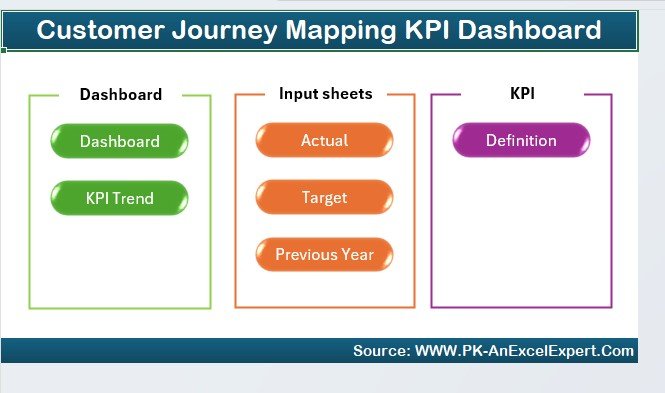
What it is: A ready-built Excel dashboard that tracks the customer lifecycle from first touch to loyalty, with KPI cards, stage funnels and trend charts already wired to a data sheet.
Who it is for: Small sales and success teams who use Zoho mainly to see where customers sit in the journey and where they drop off.
What is inside:
- Stage-by-stage journey funnel with conversion rates
- KPI tiles for acquisition, activation, retention and advocacy
- Cohort and trend charts that refresh when you paste new data
- A clean input sheet — no formulas to rebuild
Use it to spot that, say, 62% of leads clear the demo stage but only 30% convert to paid, so you know exactly where to focus. A 5-seat team replaces the journey reports they were paying Professional-tier seats for, and owns this outright for $14.99. It earns the top spot because it is the closest single-file stand-in for Zoho’s lifecycle reporting.
Price: $14.99 — view the Customer Journey Mapping KPI Dashboard. Best for: teams that live and die by funnel visibility.
2. Customer Service KPI Dashboard in Google Sheets — best value

What it is: A Google Sheets support dashboard that tracks ticket volume, response and resolution times, SLA compliance and agent performance in one shareable tab.
Who it is for: Small support desks that used Zoho Desk or CRM cases just for service metrics.
What is inside:
- Ticket status and volume KPIs with month-picker
- Average first-response and resolution-time tracking
- SLA compliance percentage with traffic-light flags
- Per-agent breakdown for workload balancing
Because it lives in Google Sheets, the whole team can open it from a browser with no license — the same collaboration Zoho charges per seat for. If your support team fields 400 tickets a month, you can watch resolution time trend down week over week without a paid help-desk seat. At $9.99 for unlimited viewers, it is the best value on this list.
Price: $9.99 — view the Customer Service KPI Dashboard. Best for: browser-based support teams that hate per-seat pricing.
3. Customer Engagement KPI Dashboard in Google Sheets
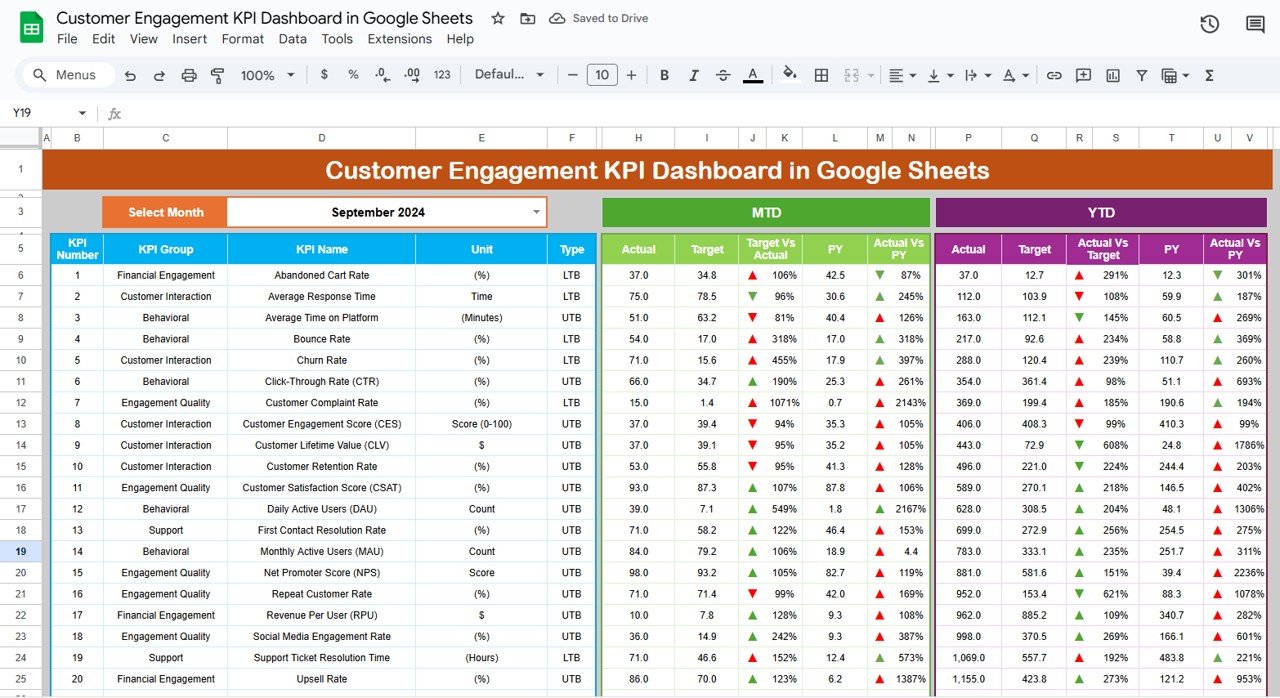
What it is: A Google Sheets dashboard for measuring how active and engaged your customer base is — logins, usage, repeat activity and retention scoring.
Who it is for: SaaS and subscription teams who need engagement signals Zoho’s base tiers do not surface without add-ons.
What is inside:
- Engagement score and active-customer KPIs
- Retention and churn-risk indicators
- Activity trend charts over time
- Segment comparison for high- vs low-engagement cohorts
Feed it your usage export and it flags the accounts trending toward churn before they cancel — the kind of proactive signal that normally sits behind Zoho’s higher tiers. A team of six sharing one Google Sheet pays $9.99 once instead of six recurring seats. It pairs naturally with the Customer Service dashboard above for a full retention view.
Price: $9.99 — view the Customer Engagement KPI Dashboard. Best for: subscription businesses watching churn.
4. Customer Experience (CX) KPI Dashboard in Power BI
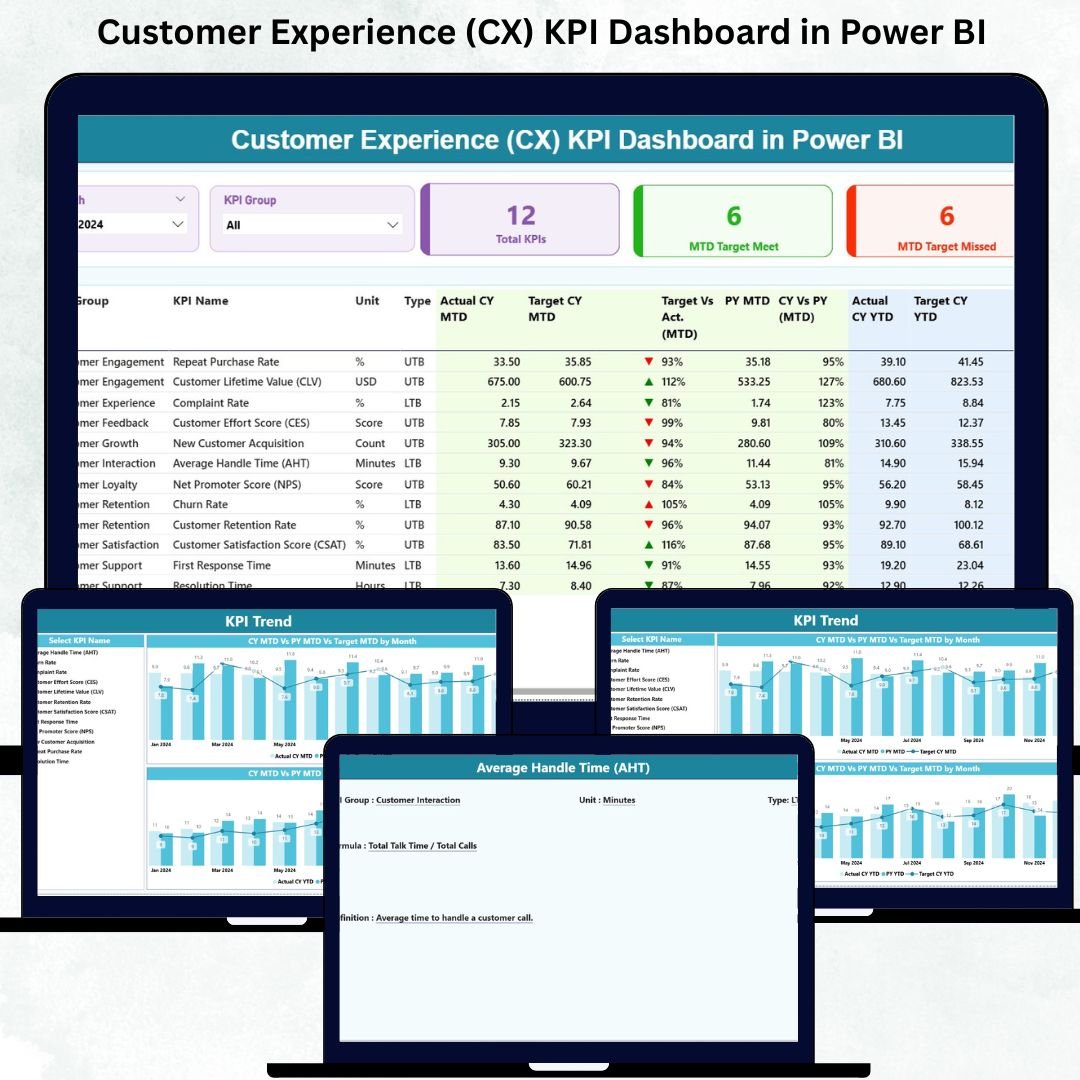
What it is: A Power BI report that consolidates NPS, CSAT, CES and other experience metrics into an interactive, filterable dashboard.
Who it is for: Teams that already have Power BI and want CX analytics deeper than Zoho’s standard reports.
What is inside:
- NPS, CSAT and CES KPI visuals with targets
- Slicers for segment, region and time period
- Trend and distribution charts
- A data model you can point at your own survey exports
If you send quarterly NPS surveys, this turns the raw responses into a board-ready view with drill-down by segment — analytics that would push you into Zoho’s Enterprise tier at $40 per user. Because Power BI Desktop is free to author in, the only cost is the $11.99 template. It is the strongest pick when leadership wants proper CX reporting, not just a metric.
Price: $11.99 — view the CX KPI Dashboard. Best for: Power BI shops reporting NPS and CSAT to leadership.
5. Customer Complaint Resolution KPI Dashboard in Power BI
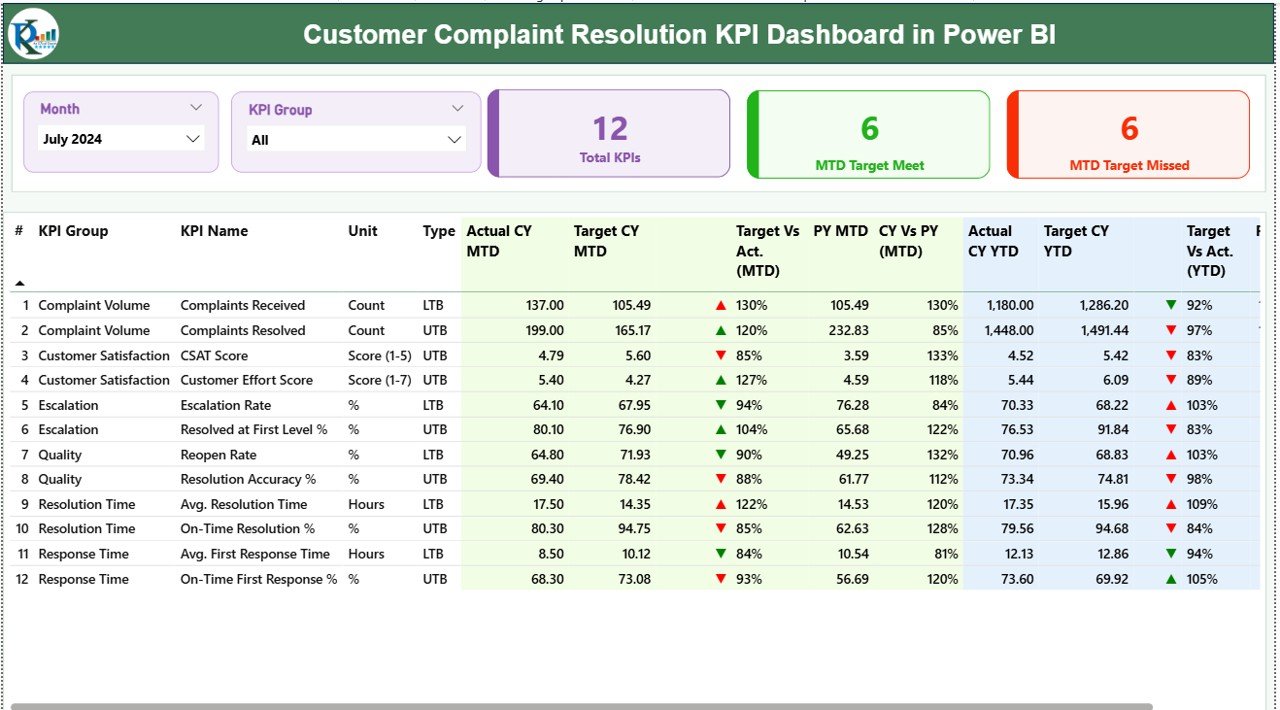
What it is: A Power BI dashboard focused on complaint intake, escalation, resolution time and SLA adherence.
Who it is for: Quality and service teams that track complaints as a formal process rather than ad-hoc tickets.
What is inside:
- Complaint volume and category breakdown
- Resolution-time and escalation-rate KPIs
- SLA-breach flags and aging analysis
- Root-cause category charts for continuous improvement
Track that first-contact resolution sits at 68% and average resolution takes 2.4 days, then work those numbers down — the reporting rigor an ISO or quality program needs. This is more specialized than a general CRM case view, which is exactly why it is worth owning as a standalone $11.99 file rather than paying for a heavier Zoho tier. It slots alongside the CX dashboard for a complete service-quality picture.
Price: $11.99 — view the Complaint Resolution KPI Dashboard. Best for: quality-driven complaint management.
6. Technology Sales Customer Experience Calendar in Excel

What it is: An Excel calendar built for planning sales and customer touchpoints across a tech-sector sales cycle — the cadence layer of a CRM without the platform.
Who it is for: Small tech sales teams that mostly used Zoho to schedule follow-ups and plan outreach.
What is inside:
- Monthly and quarterly touchpoint planning grid
- Sales-stage and activity color coding
- Follow-up cadence tracking per account
- Editable for any product-launch or renewal cycle
At $4.99 it is almost impulse-priced, and for a two- or three-person team whose real Zoho use was “remind me to follow up,” it removes the subscription entirely. Map a 90-day launch sequence across accounts and never lose a follow-up. It is the cheapest way to test whether your team even needs a full CRM.
Price: $4.99 — view the Technology Sales Calendar. Best for: lean tech sales teams that just need cadence.
7. Finance Sales Customer Experience Calendar in Excel
What it is: The same touchpoint-planning calendar tuned for financial-services sales cycles, where compliance windows and renewal dates drive the cadence.
Who it is for: Advisors, brokers and finance sales teams managing scheduled client outreach.
What is inside:
- Client review and renewal-date scheduling
- Quarterly outreach cadence grid
- Activity and priority color coding
- Simple, auditable structure with no macros
Finance teams often cannot put client data in a foreign SaaS tool anyway — a local Excel file keeps the schedule in-house. Plan every quarterly review and policy-renewal call for a book of 80 clients on one sheet. For $4.99 it covers the one Zoho feature many finance micro-teams used: a disciplined follow-up calendar they control.
Price: $4.99 — view the Finance Sales Calendar. Best for: compliance-conscious finance outreach.
8. Education Sales Customer Experience Calendar in Excel
What it is: A customer-experience calendar shaped around the education sector’s enrolment-driven, term-based outreach rhythm.
Who it is for: Admissions, ed-tech and training teams that plan outreach around academic terms.
What is inside:
- Term- and intake-aligned planning grid
- Prospect and enrolment touchpoint tracking
- Color-coded activity stages
- Reusable across multiple intake cycles
Line up open-day reminders, application-deadline nudges and enrolment follow-ups across a September and January intake without a per-seat tool. For a small admissions office whose Zoho use was really a shared calendar, this $4.99 file does the job and belongs to the school forever. It rounds out the sector-specific calendars in this list.
Price: $4.99 — view the Education Sales Calendar. Best for: term-based admissions outreach.
How to choose between them
Match the template to the job you actually used Zoho for:
| Your main need | Pick this | Format |
|---|---|---|
| See the full lead-to-loyalty funnel | Customer Journey Mapping KPI Dashboard | Excel |
| Track support tickets and SLAs | Customer Service KPI Dashboard | Google Sheets |
| Watch retention and churn risk | Customer Engagement KPI Dashboard | Google Sheets |
| Report NPS/CSAT to leadership | CX KPI Dashboard | Power BI |
| Run a formal complaint process | Complaint Resolution KPI Dashboard | Power BI |
| Just need a disciplined follow-up cadence | Sales Customer Experience Calendar | Excel |
If you are unsure, start with the $4.99 calendar for your sector — it is the cheapest way to see whether a template stack covers your needs before you buy a dashboard. Teams that want the full tracking layer usually pair the Journey Mapping dashboard with one service or engagement dashboard.
When Zoho CRM is still the right call
Templates are not a full CRM, and pretending otherwise would cost you money later. Choose Zoho CRM (or a comparable platform) over templates when any of these are true:
- You need automated lead capture. Web forms, email parsing and auto-assignment are platform features. A spreadsheet needs manual entry.
- Multiple people edit the same records live, all day. Beyond a handful of concurrent editors, a shared sheet gets messy; a real database with permissions does not.
- You want native email, calendar and phone sync. Two-way email logging and click-to-call live in the CRM, not a template.
- Your pipeline drives commissions or forecasting. When money depends on a single source of truth with an audit trail, pay for the platform.
- You are scaling fast. If headcount is doubling, the per-seat cost buys automation that saves more than it costs.
In short: if your Zoho usage was mostly reporting and follow-up tracking, templates replace it cleanly. If it was automation and a live shared database, keep the platform. Many small teams land in the middle and run templates now, upgrading to a CRM only when growth actually demands it. For a closer look at spreadsheet-based pipelines, see our guide to tracking leads and opportunities in Excel and our CRM KPI dashboard templates.
Running inventory alongside your CRM? Our roundup of Fishbowl alternatives with Excel inventory templates covers stock, fulfillment and order-cycle dashboards from $9.99.
Comparing e-commerce reporting tools? See our guide to Shopify Analytics alternatives in Excel & Sheets for 8 affordable dashboard templates from $6.99.
Frequently asked questions
What is the best Zoho CRM alternative for a small team?
For teams under ten people, a one-time template stack beats a subscription. The Customer Journey Mapping KPI Dashboard in Excel ($14.99) covers lifecycle reporting, and a $9.99 Google Sheets service or engagement dashboard covers the rest — all bought once, with no per-user fees, versus $14 to $52 per user per month for Zoho.
How much does Zoho CRM cost in 2026?
Per Zoho’s official pricing page, paid editions are $14 (Standard), $23 (Professional), $40 (Enterprise) and $52 (Ultimate) per user per month billed annually; monthly billing costs more. There is a free edition for up to 3 users. A 5-seat Professional plan is roughly $1,380 a year, renewing indefinitely.
Can a spreadsheet really replace Zoho CRM?
For reporting, tracking and follow-up planning, yes — that is what most small teams use a CRM for. Spreadsheets cannot automate lead capture, sync email, or manage a live multi-user database with permissions. If those matter, keep Zoho. If they do not, templates do the same job for a one-time $4.99 to $14.99.
Is there a free Zoho CRM alternative?
Zoho itself offers a free edition for up to 3 users, and you can track basic contacts in a plain spreadsheet at no cost. The paid templates here are not free, but at $4.99 to $14.99 one-time they cost less than a single month of one Zoho paid seat and never renew.
Do these templates work in Excel and Google Sheets?
The list spans all three formats: Excel dashboards and calendars, Google Sheets dashboards, and Power BI reports. Choose the format your team already uses. Google Sheets versions are best when several people need browser access without buying licenses, which is where Zoho’s per-seat model gets expensive.
Will I lose my data if I switch from Zoho to templates?
No — export your Zoho records to CSV first, then paste them into the template’s data sheet. Because the file lives on your own drive or Google account, you own the data outright. Keep your Zoho export as a backup until you are confident the template covers your reporting needs.
Are one-time templates cheaper than Zoho over time?
Dramatically. A full template stack from this list totals well under $80 once. A 5-seat Zoho Professional plan is about $1,380 every year. Even one year of a single Zoho seat ($276 on Professional) buys the entire template set several times over, with nothing to renew.
What if I outgrow the templates later?
That is the ideal path. Run templates while you are small, keep your data in clean spreadsheets, and migrate to Zoho or another CRM when automation and a live shared database genuinely pay for themselves. Because your data is already structured, the eventual import is straightforward — you lose nothing by starting with templates.
Which template should I buy first?
Start with the one matching your heaviest Zoho use. Sales-led teams should begin with the Customer Journey Mapping KPI Dashboard ($14.99); support teams with the Customer Service KPI Dashboard ($9.99); and anyone who only needs follow-up discipline with the $4.99 sector calendar. You can add the others as needs grow.
Get more CRM and customer templates
You do not have to pay per user, per month to run disciplined customer tracking. These 8 templates cover the journey, service, engagement, experience and cadence layers of a CRM for a one-time $4.99 to $14.99 each — the whole stack costs less than one month of a single Zoho seat. Start with the Customer Journey Mapping KPI Dashboard in Excel ($14.99), then add a service or engagement dashboard as you grow.
Want to bundle your whole back office? See the Small Business Template Bundle, or browse related tools: project management dashboard templates, task and to-do management templates, performance review templates, and inventory management templates. For walkthroughs of every dashboard, subscribe to the NextGenTemplates YouTube channel.
Weighing other software switches? Our guide to Airtable alternatives covers 8 tracker and database templates in Excel and Google Sheets that replace a per-seat subscription.
Weighing an all-in-one workspace too? See our Notion alternatives in Excel & Sheets for workspace and planner templates that replace Notion for a one-time fee.
Managing your workforce too? Compare our Workday alternatives — 8 HR and workforce templates in Excel, Google Sheets and Power BI.
Cutting HR software costs too? See our BambooHR alternatives in Excel & Sheets — 8 one-time HR templates that replace per-seat HRIS billing.
Also worth reading: Zoho Books on the finance side of the stack? See Xero alternatives — 8 accounting templates in Excel & Sheets for the one-time accounting workbooks that replace it.
Switching business tools to cut subscription costs? See our guide to Cin7 alternatives – 6 inventory and order templates in Excel & Sheets for the same template-versus-SaaS approach applied to inventory management.
Cutting procurement software costs too? Compare our Coupa alternatives – eight affordable Excel and Google Sheets procurement templates.