

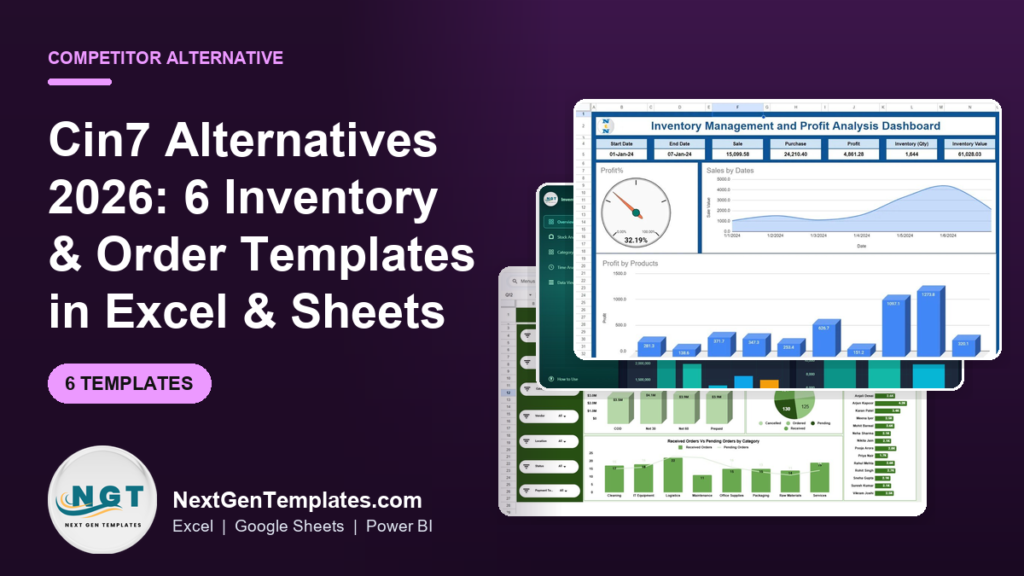
The best Cin7 alternatives for small teams are spreadsheet-based inventory and order templates that replace the modules you actually use without the seat fees. For $6.99 to $17.99 one-time, tools like the Inventory Management and Profit Analysis Dashboard in Google Sheets cover stock, purchase orders and supplier tracking – versus Cin7 Core, which starts at $349/month.
Last updated: August 2026
Key takeaways
- Cin7 Core starts at $349/month (Standard) and climbs to $599 and $1,199/month – roughly $4,188 a year before add-ons and extra seats.
- Small teams churn off Cin7 for three reasons: per-seat pricing, paying for modules they never open, and heavy admin overhead.
- All six templates here are one-time purchases from $6.99 to $17.99 – no subscription, no per-user billing, no annual renewal.
- The Inventory Management and Profit Analysis Dashboard in Google Sheet ($17.99) is our best overall pick because it covers stock levels, margins and reorder points in one file.
- Templates come in Excel, Google Sheets, Power BI and HTML, so you keep working in tools your team already knows.
Cin7 alternatives compared
| Template | Format | Best For | Price |
|---|---|---|---|
| Inventory Management and Profit Analysis Dashboard (Best overall) | Google Sheets | Stock levels + margin tracking in one file | $17.99 |
| Inventory Management Dashboard in HTML | HTML | A lightweight, browser-based stock view | $12.99 |
| Purchase Order Management Dashboard (Best value) | Google Sheets | Raising and tracking POs | $6.99 |
| Supplier Performance KPI Dashboard | Excel | Scoring vendors on lead time & quality | $12.99 |
| Supplier Performance KPI Dashboard | Power BI | Interactive supplier analytics | $11.99 |
| Out-of-Stock Rate KPI Dashboard | Excel | Tracking stockouts & availability | $14.99 |
Why small teams leave Cin7
Cin7 is a capable inventory and order management platform – but it is built and priced for growing mid-market brands. Its published pricing tells the story. Cin7 Core starts at $349/month for the Standard plan (5 users, 6,000 sales orders a year), rises to $599/month for Pro (10 users, 24,000 orders) and $1,199/month for Advanced (15 users, 120,000 orders). Cin7 Omni is custom-quoted enterprise pricing. Even the entry tier is about $4,188 a year before you add users or modules.
Three things push smaller teams to look for a Cin7 alternative:
- Seat cost. Plans bundle a fixed number of users and bill extra seats on top. A four-person operation that grows to seven pays for every additional login, month after month.
- Unused modules. Material requirements planning, advanced warehouse management, B2B portals and forecasting are powerful – and mostly idle if you ship a few hundred orders a month. You still pay for the tier that unlocks them.
- Admin overhead. Implementation, integration mapping and ongoing configuration often need a dedicated operator or a paid partner. For a lean team, that is real time and money spent managing the tool instead of the stock.
The real cost is easy to underestimate. Take a five-person team on Cin7 Core Standard: $349/month is $4,188 a year. Add two extra seats and a forecasting add-on and the same team can clear $6,000 annually – every year, indefinitely. Buying all six templates in this guide costs $77.94 once. Even the two-tool starter set (inventory plus purchase orders) is $24.98 total. Put differently, a full year of Cin7 Core Standard buys the entire template library roughly 53 times over, and you never pay a renewal.
That gap only matters, of course, if the templates cover what you use. If you only use the inventory ledger, purchase orders and a supplier list, a focused spreadsheet template does the same job for a one-time price. Below is how Cin7’s core features map to each template.
Cin7 feature vs the template that covers it
| Cin7 feature | Template that covers it | Price |
|---|---|---|
| Inventory ledger & valuation | Inventory Management and Profit Analysis Dashboard (Google Sheets) | $17.99 |
| Stock dashboard / real-time view | Inventory Management Dashboard (HTML) | $12.99 |
| Purchase order management | Purchase Order Management Dashboard (Google Sheets) | $6.99 |
| Supplier / vendor scorecards | Supplier Performance KPI Dashboard (Excel / Power BI) | $11.99-$12.99 |
| Stock availability & fill rate | Out-of-Stock Rate KPI Dashboard (Excel) | $14.99 |
How we picked these
We searched the NextGenTemplates catalog of 1,000+ paid spreadsheet products and shortlisted only tools that replace a module a Cin7 user genuinely relies on: inventory tracking, purchase orders, supplier management and stock availability. We required each pick to be a self-contained, paid template with real formulas – not a blank grid – and priced under $18 so the whole set costs less than one month of Cin7. We deliberately excluded generic finance dashboards, single-use trackers and anything that needed its own database to run. Multi-format coverage (Excel, Sheets, Power BI, HTML) was a tie-breaker so teams can pick the tool they already live in.
The 6 best Cin7 alternatives for 2026
1. Inventory Management and Profit Analysis Dashboard in Google Sheet – best overall

This is the closest single-file replacement for Cin7’s core: it tracks stock quantity and value, sales and purchases, and turns them into a live profit and margin view. It earns best overall because it answers the two questions a Cin7 user cares about most – “what do I have?” and “what is it making me?” – in one connected sheet.
Who it is for: product businesses that need inventory and profitability in one place without a subscription.
What is inside:
- Inventory register with quantity, cost and inventory value
- Profit % gauge and sales-by-date trend
- Profit-by-product ranking to spot your winners
- Category and time-period analysis views
A homeware seller with 400 SKUs can drop in opening stock, log daily sales and purchases, and immediately see that 32% gross margin is being dragged down by three loss-leading lines – the kind of read that takes several clicks inside Cin7. Runs in Google Sheets, so the whole team can open it from a browser at no extra seat cost.
Price: $17.99 one-time. View the Inventory Management and Profit Analysis Dashboard.
Best for: the team that wants one file to run stock and margin.
2. Inventory Management Dashboard in HTML – lightest to deploy
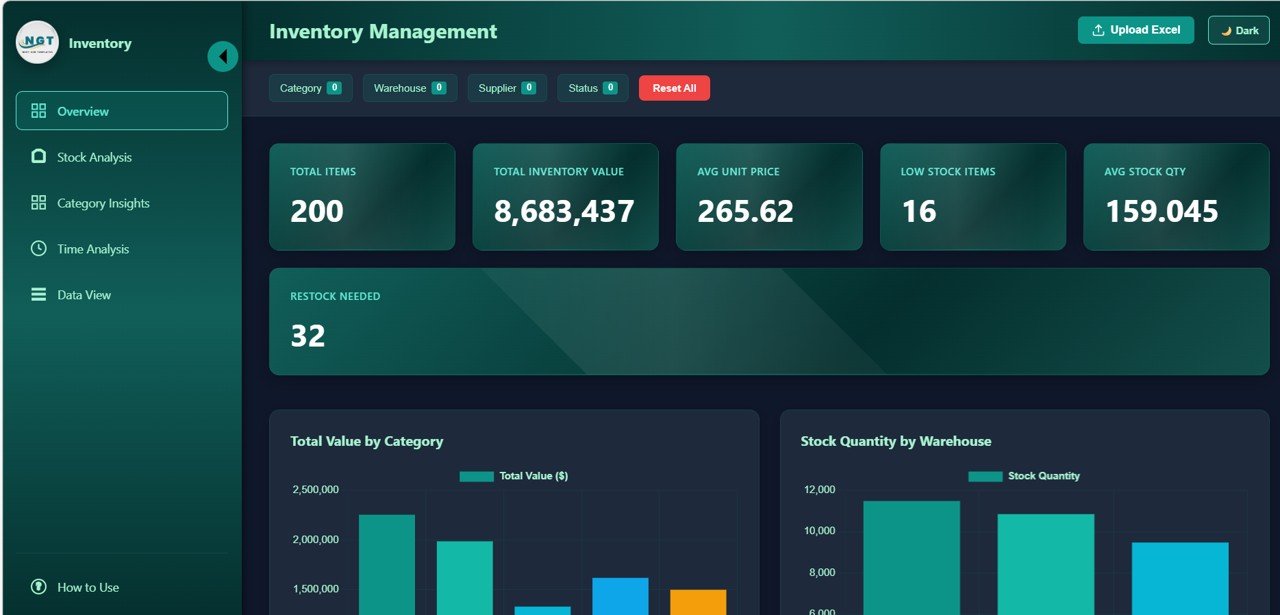
A browser-based inventory dashboard that opens with a double-click – no spreadsheet app, no login, no cloud account. It gives you a clean visual stock view you can host internally or run locally, which is useful when part of your team lives outside Excel or Sheets.
Who it is for: teams that want a fast, shareable stock screen without any SaaS sign-up.
What is inside:
- Product and category stock breakdown
- Visual KPI cards for stock on hand and value
- Charts that render in any modern browser
- Self-contained file – nothing to install
A pop-up retailer running three market stalls can load the HTML file on a cheap tablet at each location and glance at stock without paying for three Cin7 seats. It is a read-and-monitor tool rather than a full ledger, which is exactly why it is cheap and instant.
Price: $12.99 one-time. See the HTML inventory management dashboard.
Best for: a zero-setup stock screen anyone can open.
3. Purchase Order Management Dashboard in Google Sheets – best value
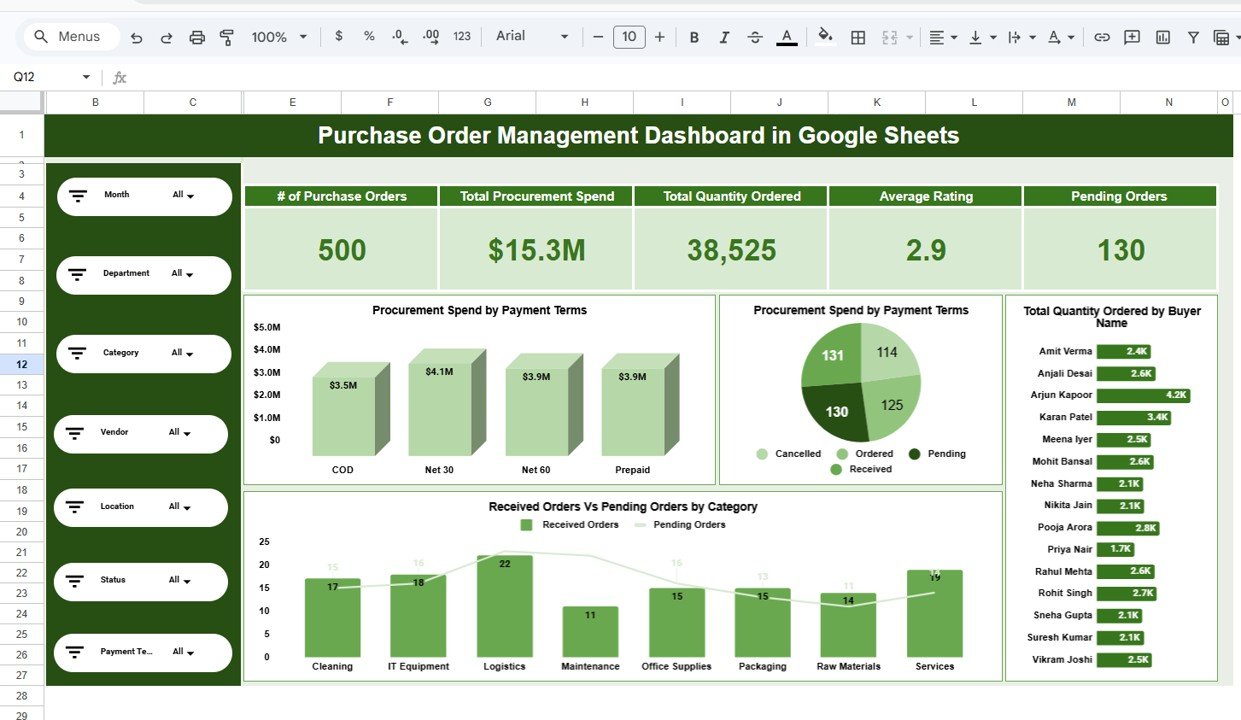
At $6.99 this is the best-value pick and a direct swap for Cin7’s purchase-order module. It handles raising POs, tracking received versus pending orders, and watching vendor and payment status – the daily buying workflow most small teams actually need.
Who it is for: anyone managing suppliers and inbound stock who does not want a $349/month platform to do it.
What is inside:
- Purchase order register with vendor, location and payment filters
- Received vs pending orders by category
- Order-value and status KPIs
- Google Sheets dropdowns that expand as you add vendors
A cafe chain ordering from 15 suppliers can log every PO here, filter to “pending – Net 30” and instantly see $8,300 of stock still owed. That is the PO visibility teams pay Cin7 Pro for, at a one-time $6.99.
Price: $6.99 one-time. Get the Purchase Order Management Dashboard.
Best for: tight budgets that still need real PO tracking.
4. Supplier Performance KPI Dashboard in Excel – scoring your vendors
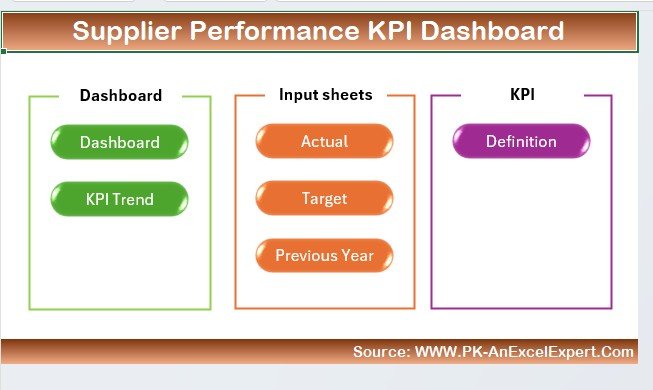
Cin7 tracks suppliers; this template judges them. It scores vendors on lead time, on-time delivery, defect rate and cost so you can see which supplier is quietly costing you stockouts. That analysis lives behind Cin7’s higher tiers – here it is a $12.99 Excel file.
Who it is for: buyers and ops leads who want to hold suppliers accountable with numbers.
What is inside:
- Vendor scorecards with weighted KPIs
- On-time delivery and lead-time trends
- Defect / return rate tracking
- Ranked supplier comparison
A furniture importer can rank eight suppliers and discover that the “cheapest” factory has a 6% defect rate and a 21-day lead time – the true cost that flat POs hide. Pair it with the PO dashboard above for a full buying workflow.
Price: $12.99 one-time. Open the Supplier Performance KPI Dashboard in Excel.
Best for: Excel teams that want a hard vendor scorecard.
5. Supplier Performance KPI Dashboard in Power BI – interactive vendor analytics
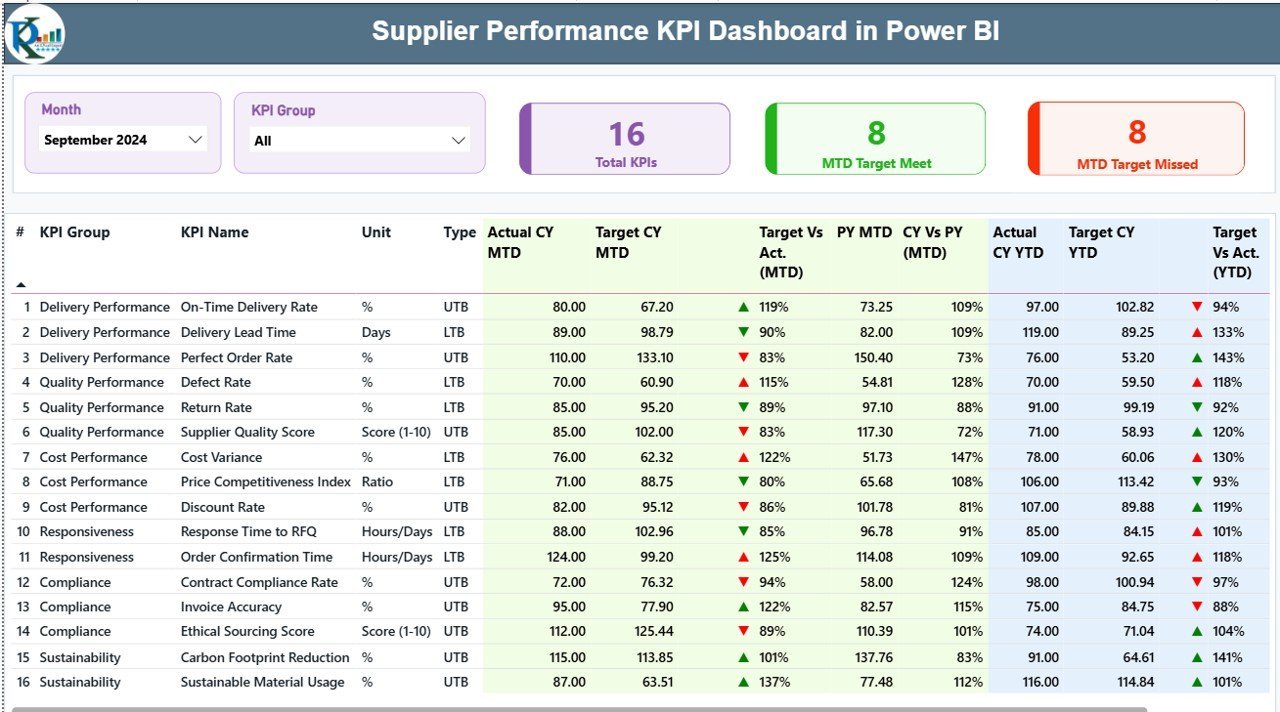
The same supplier analysis for teams that have standardised on Power BI. It brings slicers, drill-through and refreshable data so you can filter thousands of PO lines by supplier, region or period without rebuilding a report each month.
Who it is for: data-led operations already using Power BI for reporting.
What is inside:
- Interactive supplier KPI cards and slicers
- Lead-time and delivery-reliability visuals
- Refreshable model you point at your own data
- Drill-through to individual vendor detail
A distributor pulling PO data from accounting can refresh this weekly and let three buyers each slice to their own supplier set – the multi-user analytics Cin7 charges per seat for, delivered inside a BI tool you already pay for. If you are weighing BI tools, our Qlik Sense alternatives guide and Domo alternatives roundup compare more options.
Price: $11.99 one-time. Get the Supplier Performance KPI Dashboard in Power BI.
Best for: Power BI shops that want refreshable supplier analytics.
6. Out-of-Stock Rate KPI Dashboard in Excel – protecting availability
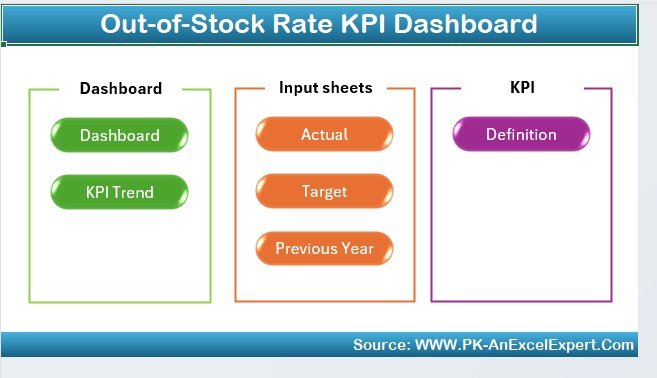
Stockouts are where inventory tools earn their keep, and this dashboard puts one number front and centre: your out-of-stock rate. It tracks availability, lost-sale risk and which SKUs keep hitting zero – the early-warning layer that stops you finding out about a stockout from an angry customer.
Who it is for: teams whose revenue depends on staying in stock on their best sellers.
What is inside:
- Out-of-stock rate and availability KPIs
- Stockout frequency by product and category
- Lost-sales estimate to size the problem
- Trend view to see if availability is improving
An online seller can watch their out-of-stock rate creep from 2% to 5% and trace it to two fast movers, then adjust reorder points before the next dip. It is the metric Cin7 buries in reporting, isolated into one $14.99 Excel view.
Price: $14.99 one-time. See the Out-of-Stock Rate KPI Dashboard.
Best for: availability-critical sellers who must not run dry.
How to choose between them
Match the template to the Cin7 module you would miss most:
- Need stock + profit in one file? Start with the Inventory Management and Profit Analysis Dashboard ($17.99).
- Buying is your pain point? The Purchase Order Management Dashboard ($6.99) is the cheapest high-impact swap.
- Suppliers letting you down? Add the Supplier Performance KPI Dashboard – Excel ($12.99) or Power BI ($11.99).
- Stockouts hurting sales? The Out-of-Stock Rate KPI Dashboard ($14.99) is your watchtower.
- Want a no-login screen? The HTML Inventory Dashboard ($12.99) opens in any browser.
Most small teams buy two or three and still spend under $40 total – less than one-tenth of a single month of Cin7 Core Standard.
When Cin7 is still the right call
These templates replace Cin7’s core for a lean team, but they are not a like-for-like swap for everyone. Cin7 is still the better choice when:
- You need real-time, multi-channel sync. If stock has to update live across Shopify, Amazon, a B2B portal and a 3PL at once, you need a connected platform, not a spreadsheet.
- You run true warehouse operations. Barcode picking, bin locations, wave picking and MRP are what Cin7’s Advanced tier exists for.
- Order volume is high. Past a few thousand orders a month, manual entry becomes the bottleneck a template cannot solve.
- You need audited, role-based access. Regulated inventory and strict user permissions are a software job, not a shared sheet.
Be honest about which camp you are in. If you are shipping hundreds of orders and using three of Cin7’s ten modules, the templates win on cost and simplicity. If you are shipping thousands across many channels, keep the platform. Many teams also run a hybrid: Cin7 for live operations, these dashboards for the analysis its reporting makes hard.
Moving off Cin7 is also low-risk to trial. Export your current product list, open stock and supplier list to CSV, paste them into the Inventory and Purchase Order dashboards, and run both alongside Cin7 for a month. If the spreadsheets keep pace with your real order flow, you cancel the subscription with your data already living safely on your own drive. If they do not, you have lost $25, not a year of lock-in – which is exactly why a cheap template is a sensible way to test whether you have outgrown your software or simply over-bought it.
Frequently asked questions
How much does Cin7 cost per month?
Cin7 Core is published at $349/month for Standard (5 users, 6,000 orders/year), $599/month for Pro (10 users, 24,000 orders) and $1,199/month for Advanced (15 users, 120,000 orders). Cin7 Omni is custom enterprise pricing. Extra users and add-ons cost more on top.
What is the cheapest Cin7 alternative?
The cheapest capable alternative here is the Purchase Order Management Dashboard in Google Sheets at $6.99 one-time. For full stock plus profit tracking, the Inventory Management and Profit Analysis Dashboard at $17.99 is still less than one-fifteenth of a single month of Cin7 Core Standard.
Can a spreadsheet really replace Cin7?
For a small team using inventory tracking, purchase orders and supplier management, yes. These templates cover those modules with working formulas. What a spreadsheet cannot do is live multi-channel sync, barcode warehouse picking or high-volume automation – if you need those, keep Cin7.
Do these templates work in Excel and Google Sheets?
Coverage spans both. The Inventory and Profit dashboard and the Purchase Order dashboard are built for Google Sheets; the Supplier Performance and Out-of-Stock Rate dashboards are Excel. There is also an HTML dashboard and a Power BI supplier report, so you can match the tool your team already uses.
Are these one-time purchases or subscriptions?
Every template is a one-time purchase between $6.99 and $17.99. There is no monthly fee, no per-user billing and no annual renewal – the opposite of Cin7’s subscription model. You own the file and can reuse it indefinitely.
How many users can open these templates?
As many as you like. Google Sheets and Excel files can be shared with your whole team at no extra cost, unlike Cin7, which bundles a fixed number of seats and charges for additional users. This is the single biggest saving for a growing team.
Which Cin7 alternative is best for purchase orders?
The Purchase Order Management Dashboard in Google Sheets ($6.99). It handles raising POs, tracking received versus pending orders, and filtering by vendor and payment status – the core of Cin7’s PO module – as a one-time purchase.
Can I track supplier performance without Cin7?
Yes. The Supplier Performance KPI Dashboard scores vendors on lead time, on-time delivery, defect rate and cost. It comes in Excel ($12.99) and Power BI ($11.99), giving you the vendor accountability that sits in Cin7’s higher tiers for a fraction of the price.
What happens to my data if I stop paying Cin7?
With a SaaS platform, losing access can mean exporting and migrating your data under time pressure. A spreadsheet template lives on your own drive – there is nothing to cancel and nothing to lose. That data ownership is a common reason teams move to templates.
Are there other software alternatives worth comparing?
If you are auditing your whole stack, our comparison guides for Salesforce alternatives, Zoho CRM alternatives and Jira alternatives apply the same template-versus-subscription logic to CRM and project tools.
Get more inventory and order templates
Ready to leave the monthly bill behind? Start with the Inventory Management and Profit Analysis Dashboard ($17.99) for stock and margin, then add the Purchase Order Management Dashboard ($6.99) for buying – together under $25, one-time. Browse the full range at NextGenTemplates and see them in action on our YouTube channel. For more software-to-spreadsheet switches, see our Sisense alternatives guide.