

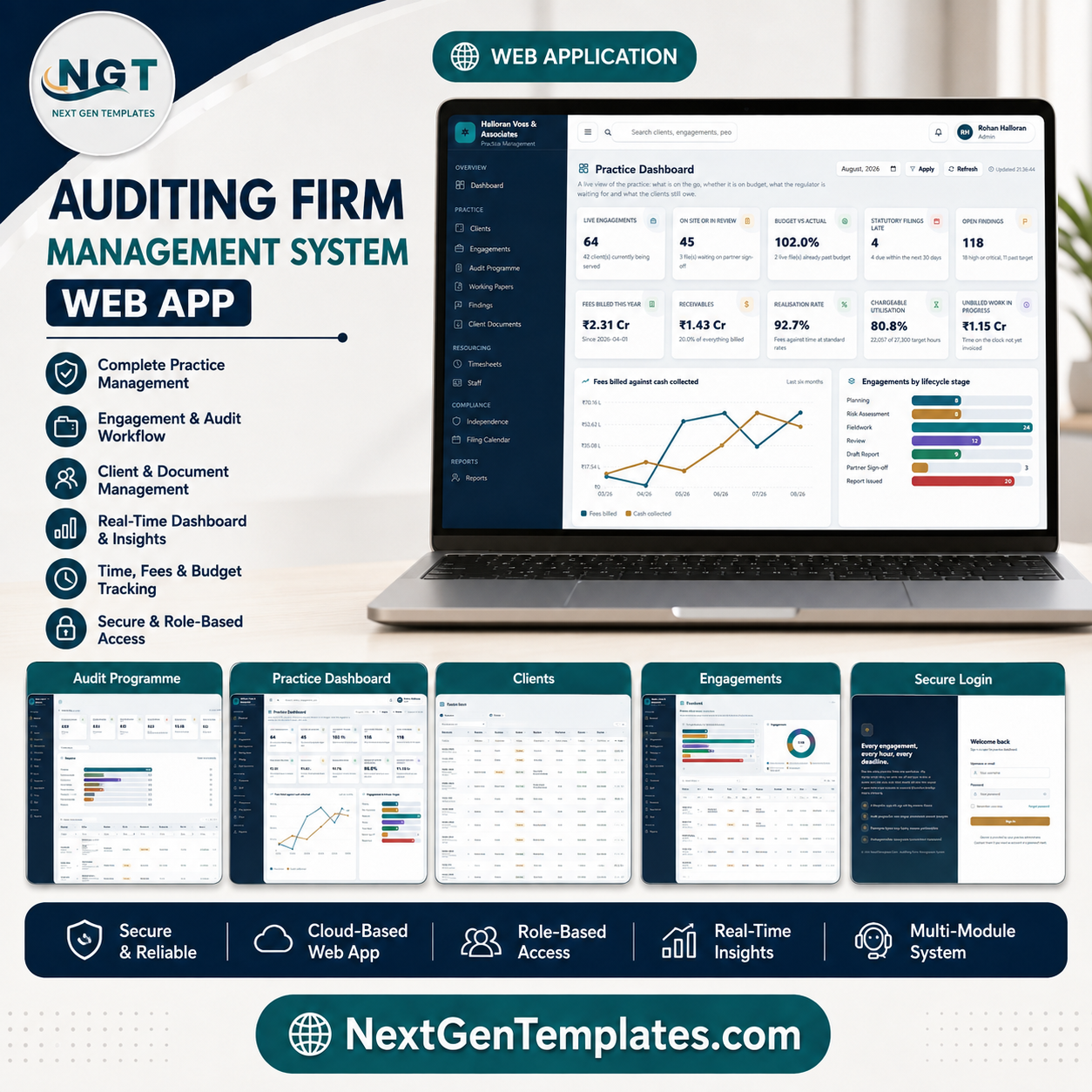
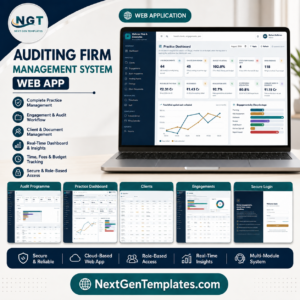
The Auditing Firm Management System is a practice-management web app for audit and accountancy firms that runs entirely inside your own Google account. It ships seeded with a complete demo practice – 19 sheets and 13,109 rows covering 46 clients, 125 engagements, 2,180 audit programme steps, 1,497 working papers, 298 findings, 1,129 client document requests and 6,176 timesheet lines – so you can see exactly how it behaves before you enter a single record of your own. Six roles, twenty pages, twelve exportable reports, and five sign-off gates enforced on the server rather than in the browser. Try every role in the live demo below before you spend anything, and if it is not the right fit, tell us within 30 days. Auditing Firm Management System Web App
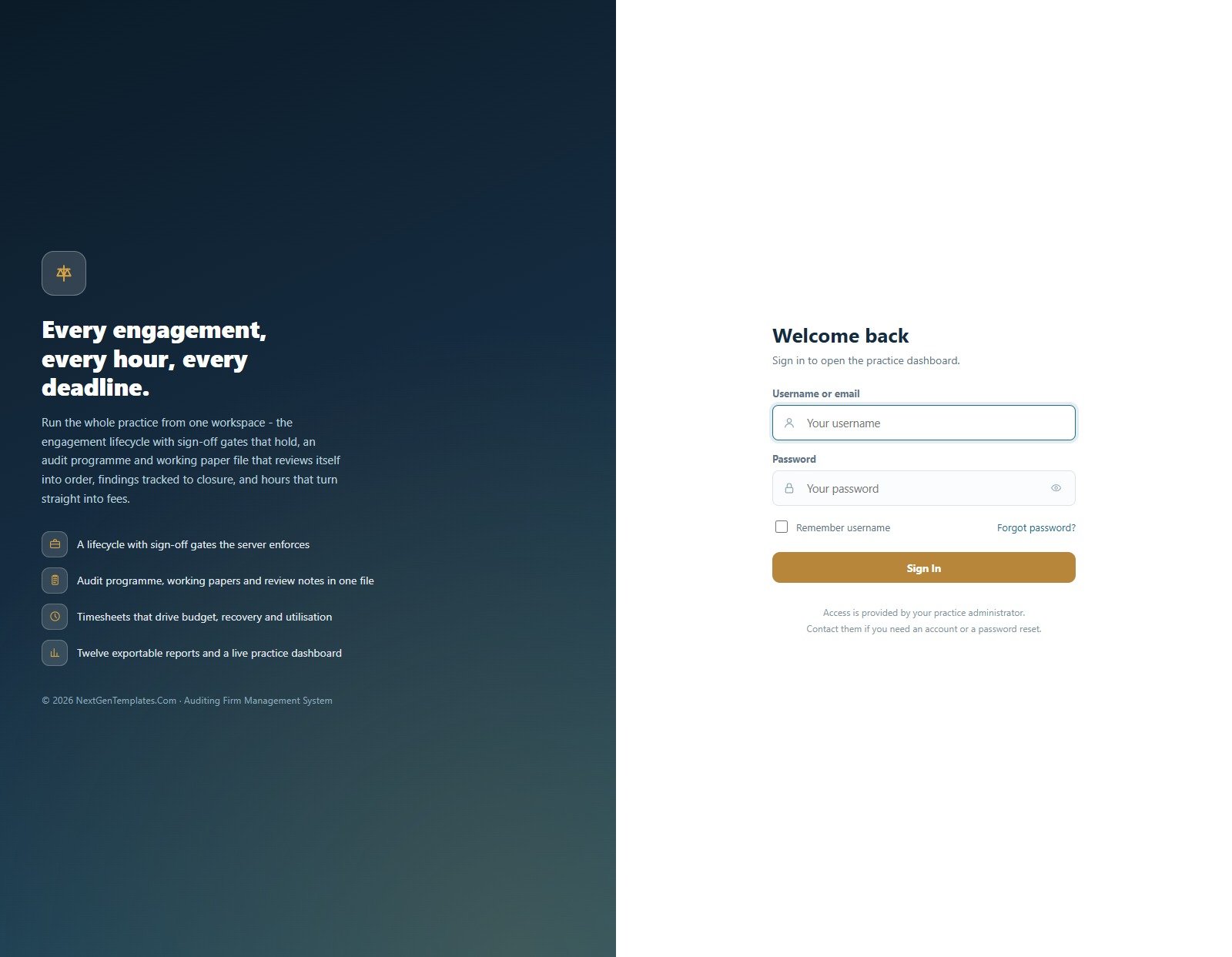
Sign-in and role-based access
Access is granted by your practice administrator. Every account is linked to a person on the staff roster, so “my engagements” and timesheets work from the first sign-in.
Try the Live Demo Before You Buy
We have deployed this web app in our own Google account so you can test every page, every role and every one of the five server-enforced sign-off gates – with the full sample practice loaded – before purchasing. No signup, no email required.
Test Login Credentials
Sign in as admin to see the whole practice including User Management, Settings and the Activity Log. Then sign in as associate to see how tightly a junior is locked down – no fee data, no client register, no export and no approval rights. Compare manager and partner to watch the review, delete and sign-off rights change. That contrast is the product.
These credentials are public on purpose. They are the seeded logins of a shared demo instance that resets periodically, not a customer’s live deployment, and every client, person and number in it is invented sample data. What you get after purchase: the full source code (Code.gs plus Index.html) and a step-by-step deployment guide, so you can stand up your own private instance in your own Google account in under 15 minutes.
Key Features of the Auditing Firm Management System Web App
- Six roles with a permission matrix you can edit. The Admin role is deliberately locked so a practice can never accidentally lock itself out; everything else is adjustable at User Management > Role permissions.
- Five rules enforced in Code.gs, not in the browser. Fieldwork cannot start without a recorded signed engagement letter; fieldwork cannot start unless the engagement partner and audit manager both hold a current independence declaration for that client and year; an engagement cannot reach Partner Sign-off while any programme step is open or any paper is unreviewed; a report cannot be issued before partner sign-off; and actual hours and invoice balances are derived, never typed. Two of the five can be relaxed in Settings if your firm works differently.
- An eight-stage engagement lifecycle – Planning, Risk Assessment, Fieldwork, Review, Draft Report, Partner Sign-off, Report Issued, Archived – with a board view for the whole season at a glance.
- Derived numbers everywhere. Budget-versus-actual comes from the timesheet and receivables come from the receipts, so the two always reconcile.
- 229 dropdown values in 20-plus lists, all editable and reorderable from List Management, including the eight financial-statement assertions used to tag programme steps.
- 57 settings across nine tabs – Business, Finance, Numbering, Operations, Print, Email, Theme, Security and Archive – plus a backup copy, an integrity check and a rebuild routine.
- Excel and CSV export on every table, and a print size of 3 inch, 4 inch or A4 that every printed document follows.
- An optional daily email digest that mails the statutory filing position and chases outstanding client documents. Auditing Firm Management System Web App
What’s Inside the Auditing Firm Management System Web App
Twenty pages, grouped in the sidebar as Overview, Practice, The Engagement File, Resourcing, Compliance, Money, Insights, Administration and Support.Auditing Firm Management System Web App
Practice Dashboard
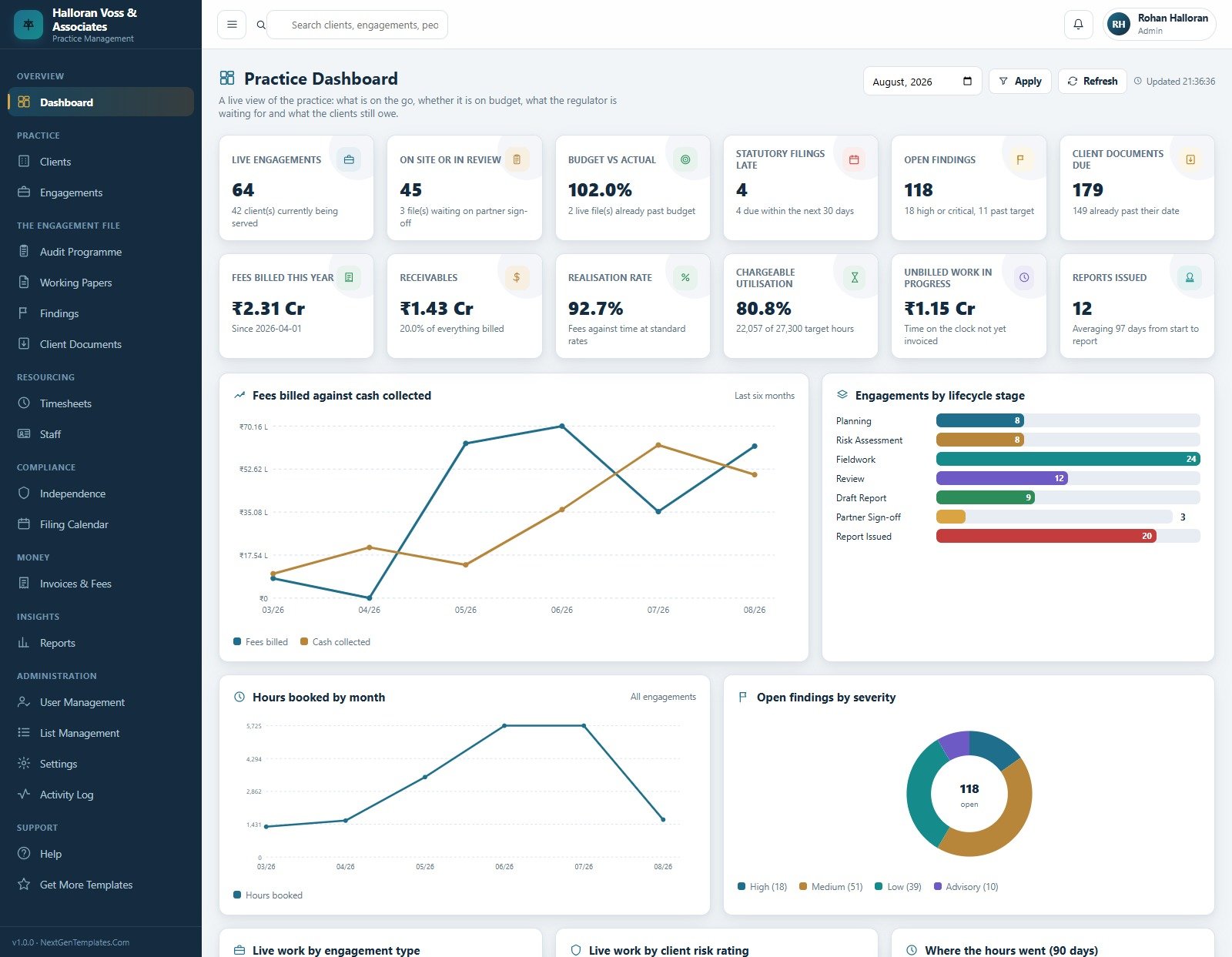
Twelve KPI cards over a month picker: Live Engagements, On Site or In Review, Budget vs Actual, Statutory Filings Late, Open Findings, Client Documents Due, Fees Billed This Year, Receivables, Realisation Rate, Chargeable Utilisation, Unbilled Work in Progress and Reports Issued. Below them sit Fees billed against cash collected, Engagements by lifecycle stage, Hours booked by month, Open findings by severity, Live work by engagement type, Live work by client risk rating and Where the hours went.
Clients
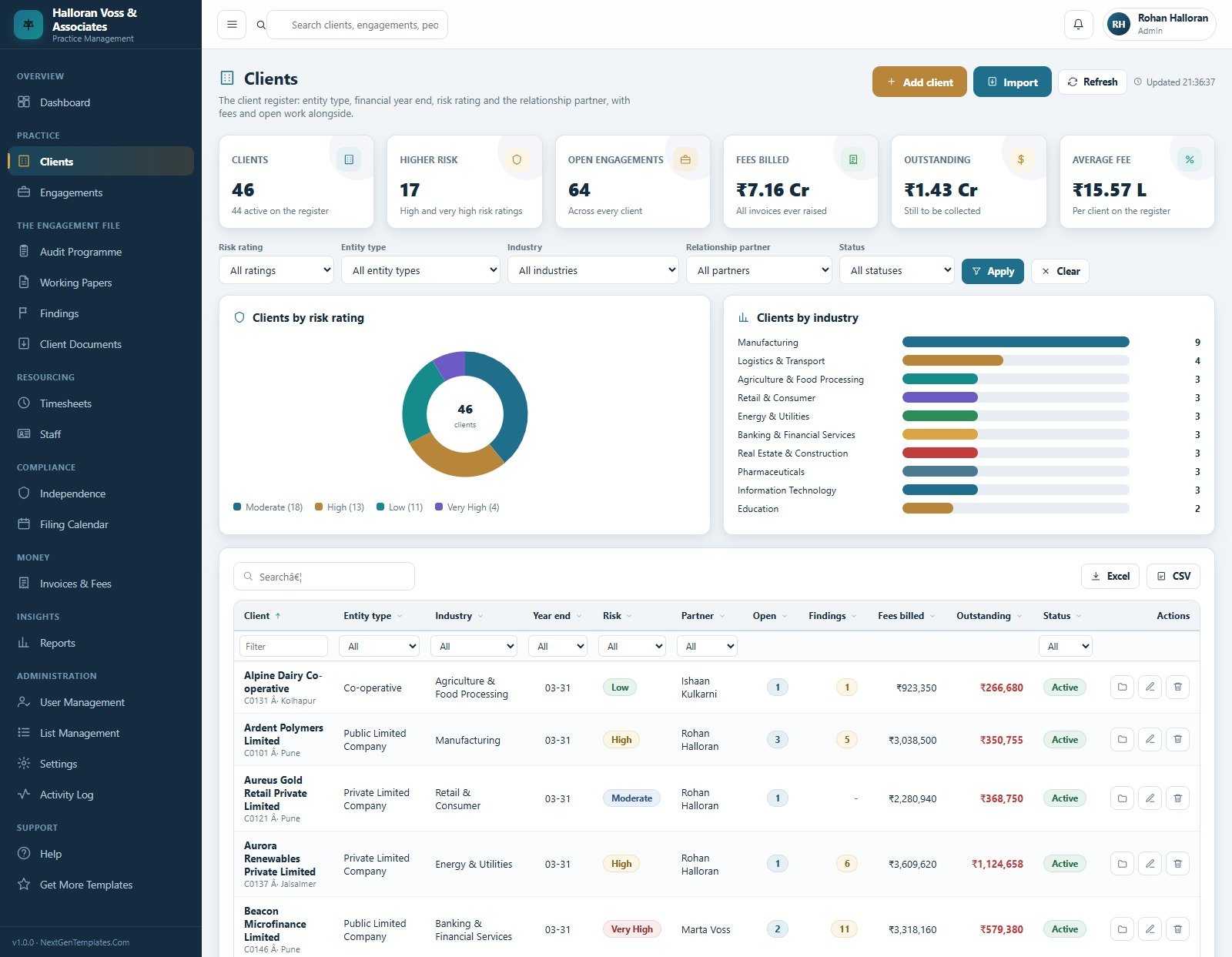
The client register – entity type, industry, financial year end, risk rating and relationship partner – with fees billed and outstanding alongside. Clients by risk rating and Clients by industry sit above a filterable table with an Import button. Auditing Firm Management System Web App
Engagements
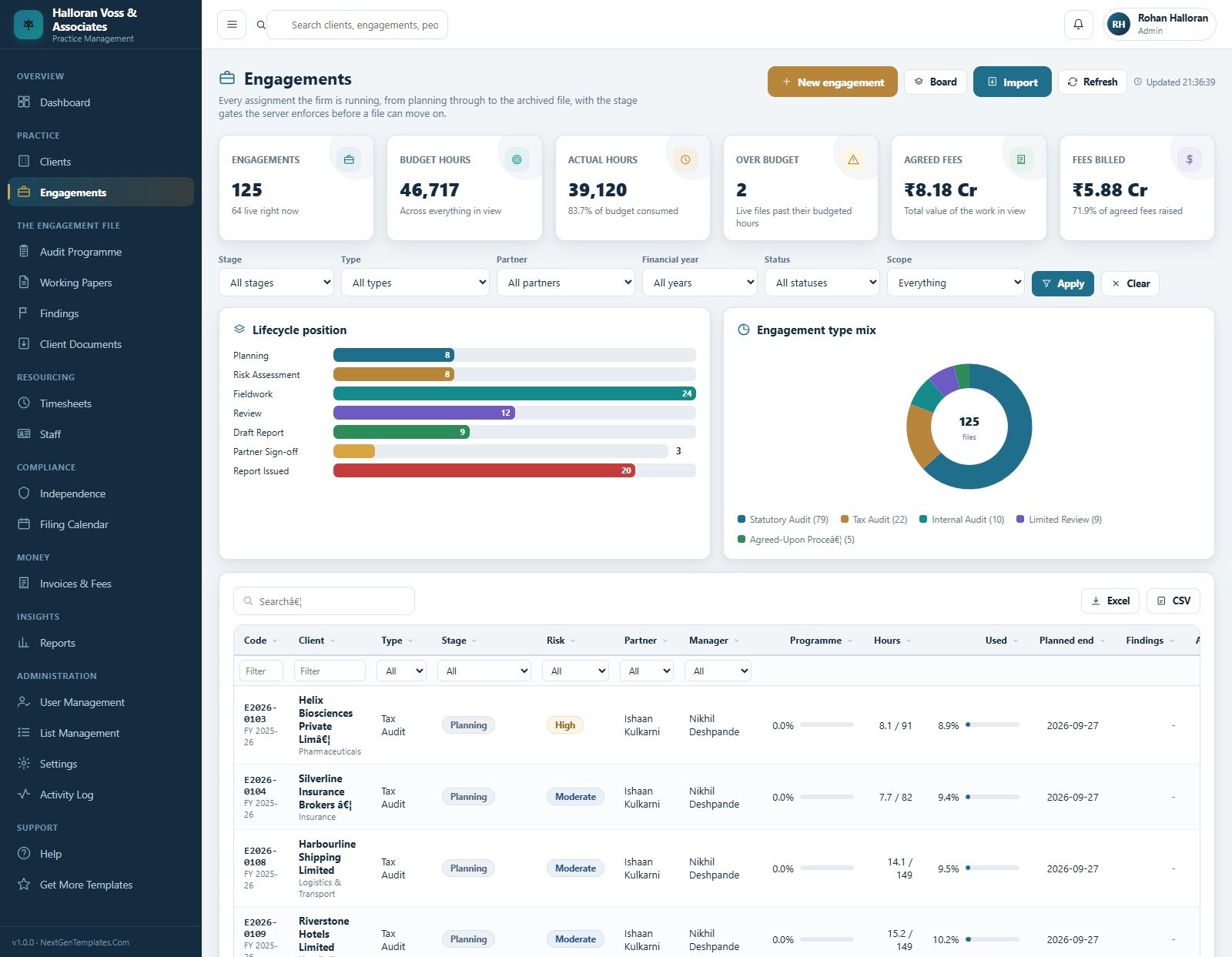
Every assignment the firm is running, with budget hours against actual hours, agreed fees against fees billed, and an over-budget count. Lifecycle position and Engagement type mix – statutory audit, tax audit, internal audit, limited review and agreed-upon procedures – show where the season actually is.
Audit Programme
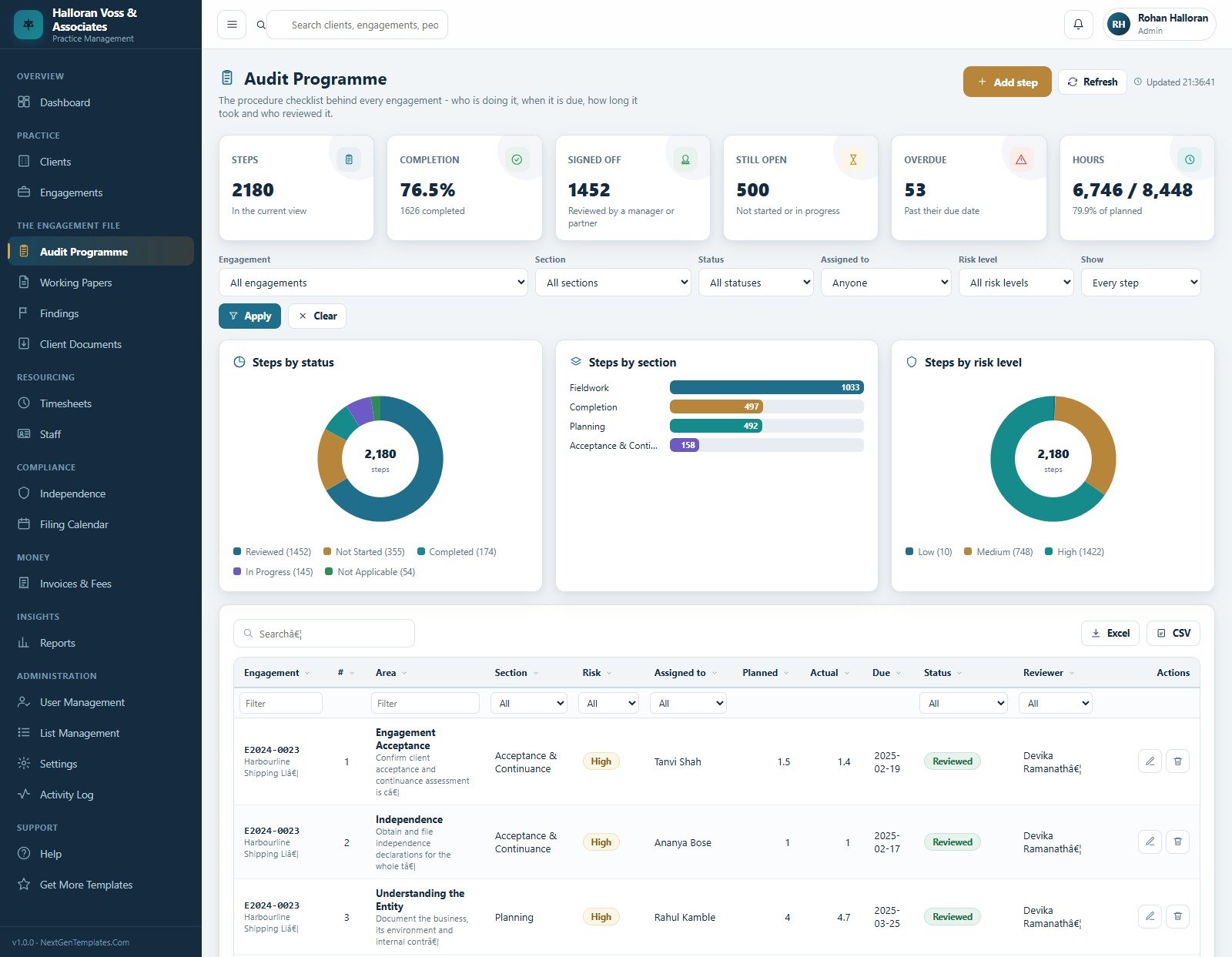
The procedure checklist behind each engagement: who is doing it, when it is due, how long it took and who reviewed it. Steps by status, Steps by section and Steps by risk level, with completion percentage and an overdue count.
Working Papers
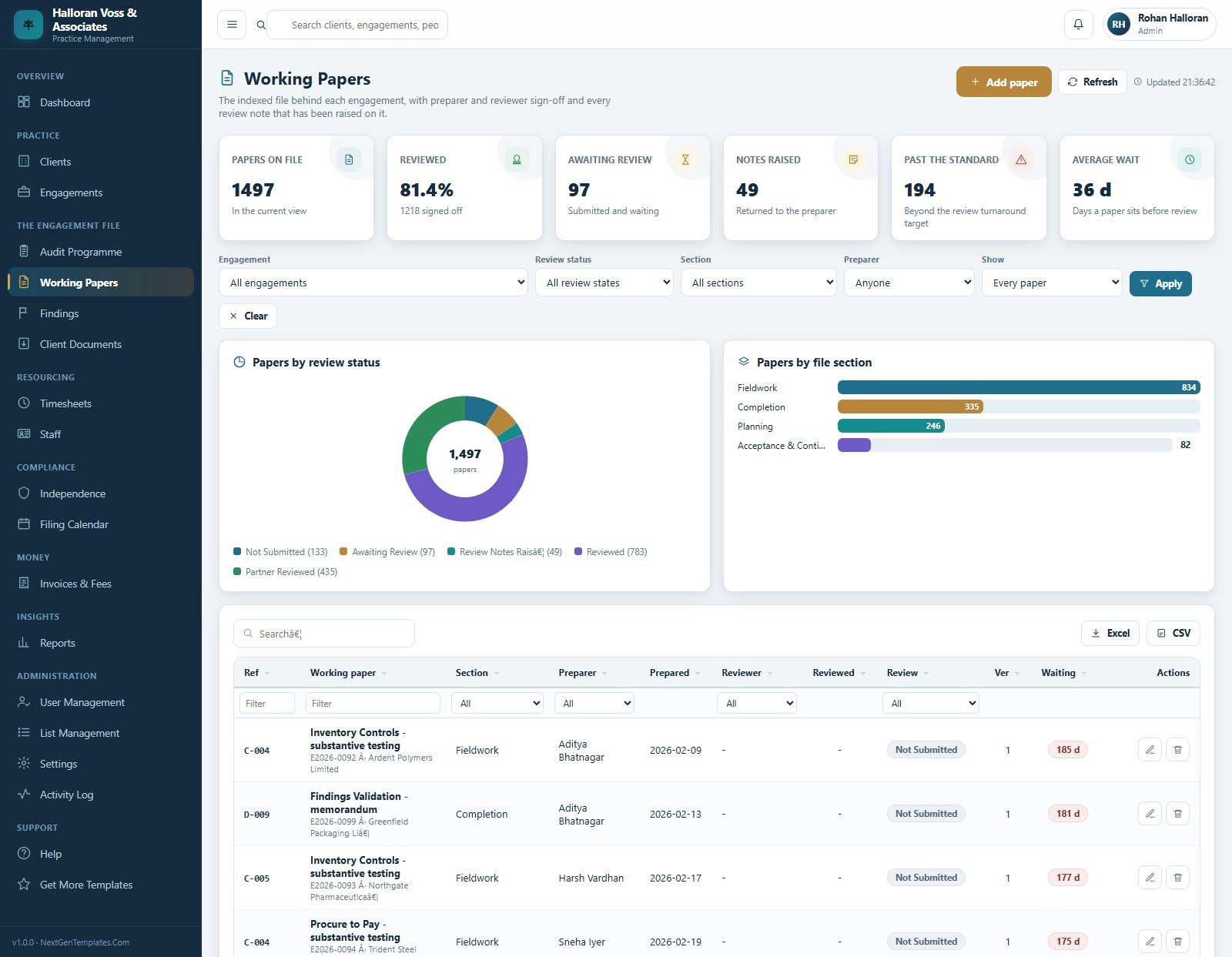
The indexed file with preparer, reviewer and a review status that moves Awaiting Review to Review Notes Raised to Reviewed to Partner Reviewed. Raising a review note bumps the version, returns the paper to draft and emails the preparer. Average wait and papers past the review standard are tracked.
Findings
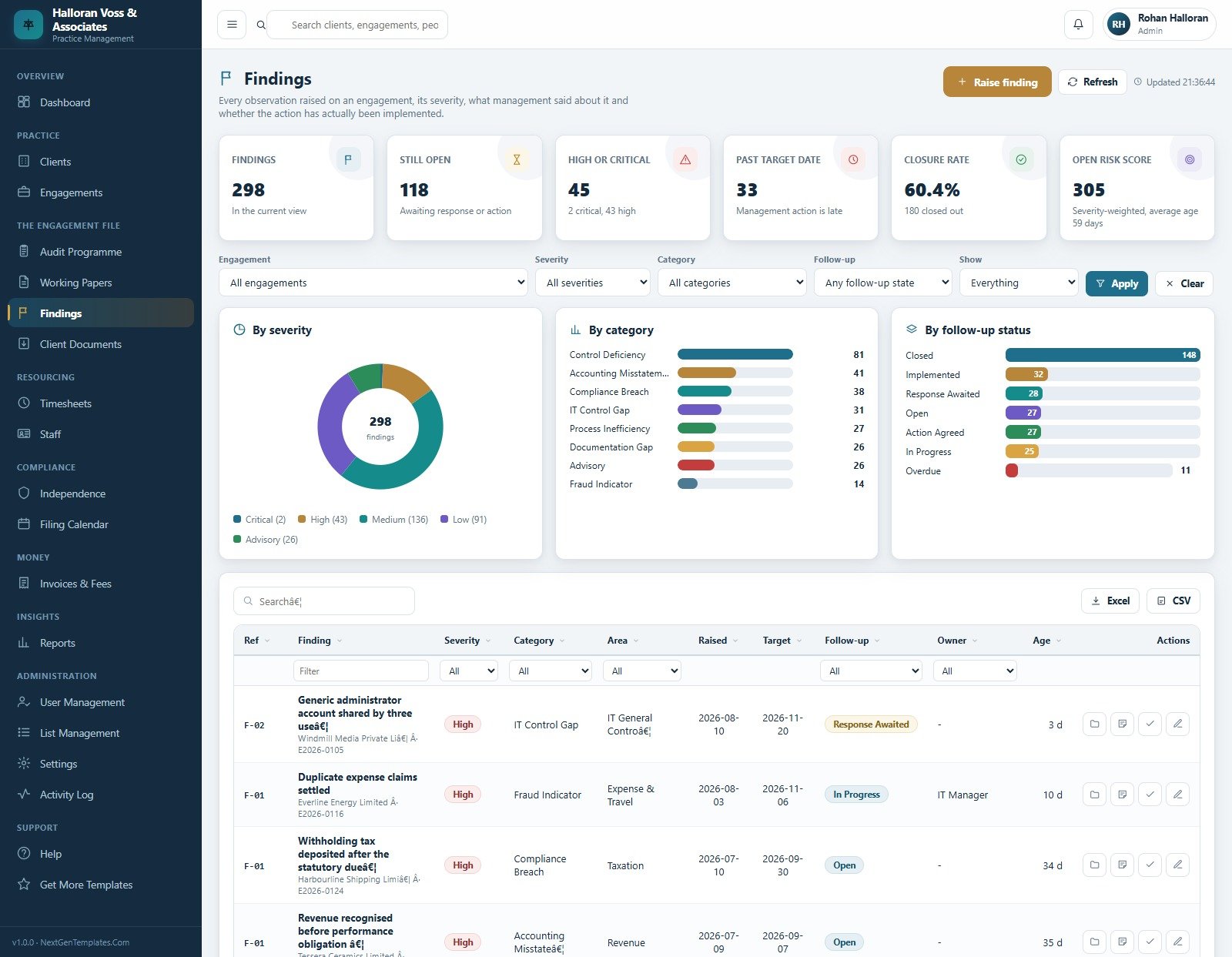
Every observation raised on an engagement, with severity, category, the management response and whether the action was actually implemented. Findings by severity, by category and by follow-up status, plus a closure rate and a severity-weighted open risk score.
Timesheets
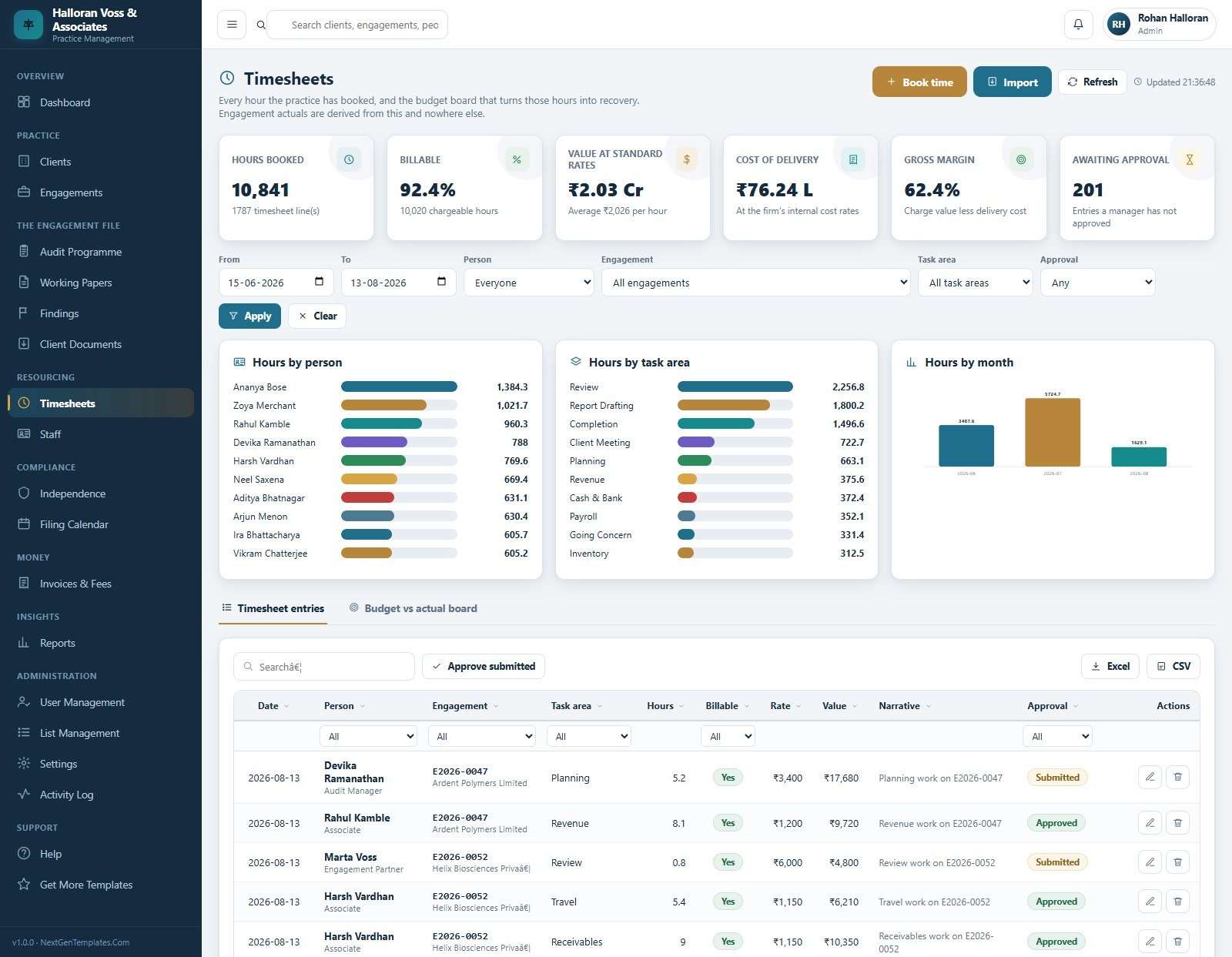
Every hour the practice has booked, priced at the charge-out rate and costed at the internal rate, giving value at standard rates, cost of delivery and gross margin. Hours by person, by task area and by month, plus a Budget vs actual board and a bulk approve action.
Invoices and Fees
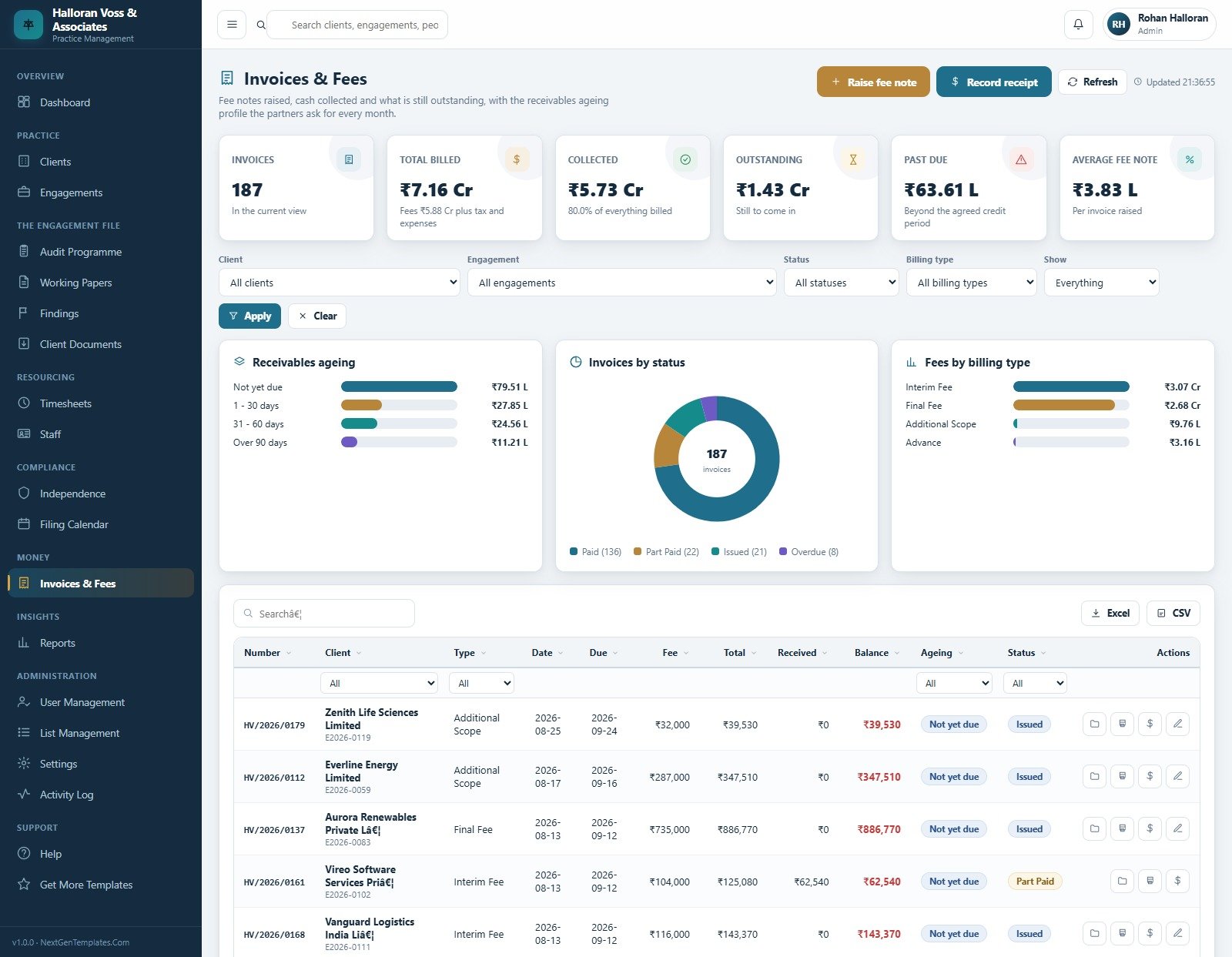
Fee notes with professional fee, out-of-pocket expenses and tax, receipts recorded against them, and the receivables ageing profile partners ask for every month. Fees split by interim, final, advance and additional scope. An invoice that has been part paid can no longer be edited – raise a credit instead.
Reports
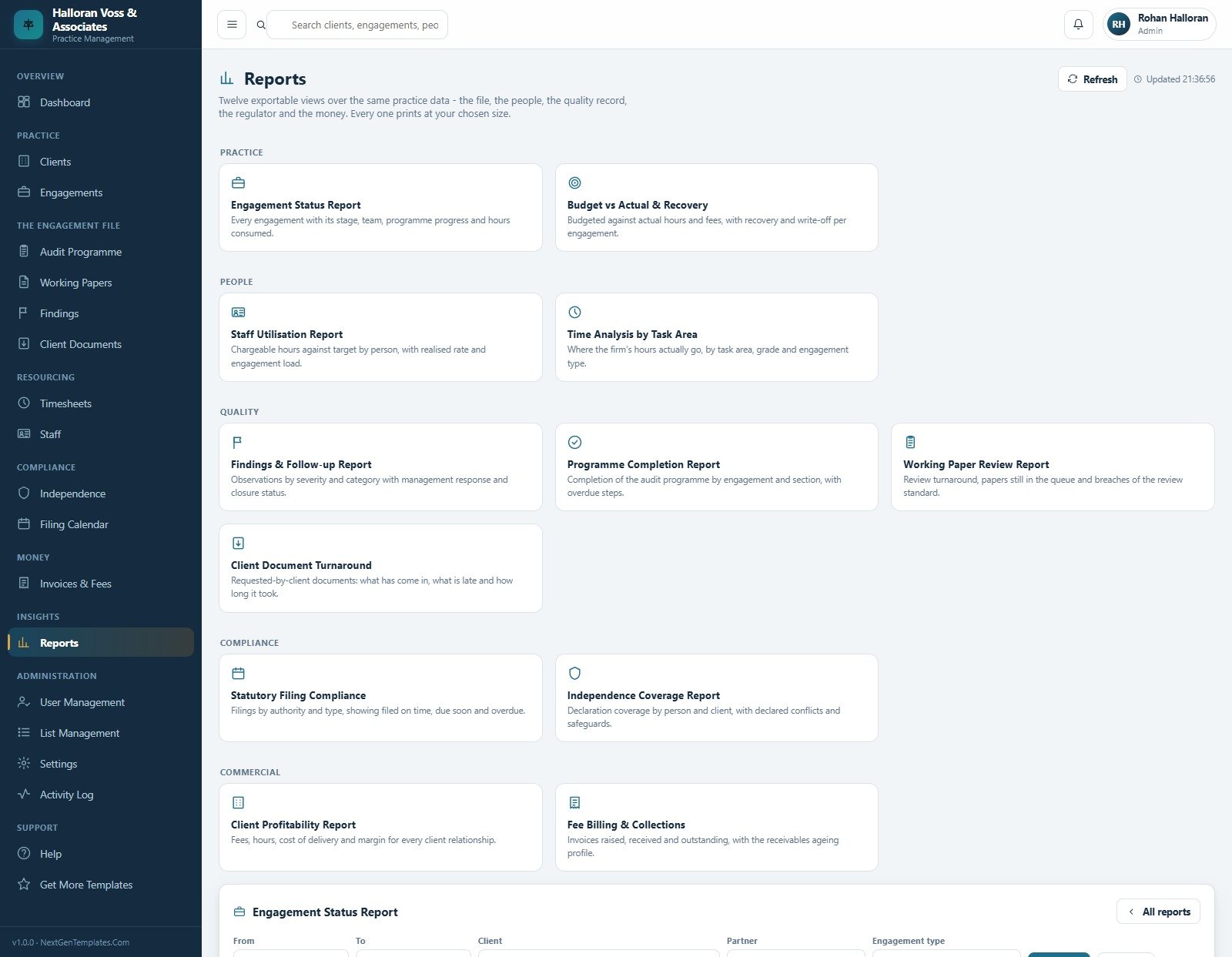
Twelve exportable views over the same data, grouped as Practice (Engagement Status, Budget vs Actual and Recovery), People (Staff Utilisation, Time Analysis by Task Area), Quality (Findings and Follow-up, Programme Completion, Working Paper Review, Client Document Turnaround), Compliance (Statutory Filing Compliance, Independence Coverage) and Commercial (Client Profitability, Fee Billing and Collections). Auditing Firm Management System Web App
The remaining ten pages
Client Documents is the provided-by-client request list, tracking what was asked for, what arrived, what is late and how many times it has been chased, with one reminder email covering everything outstanding on an engagement. Staff holds the roster with grade, charge-out rate, internal cost rate and chargeable target against what each person actually delivered. Independence and Conflicts is the declaration register plus an exceptions panel listing live engagements whose named team has no valid declaration – the same list the server uses to block fieldwork. Filing Calendar tracks every statutory filing by client, type and authority, with overdue and due-soon flags derived from the dates and a penalty-risk column. User Management holds accounts and the role-permission matrix. List Management owns every dropdown. Settings carries the nine configuration tabs and the database and maintenance tools. Activity Log is the software’s own security trail of who did what and when. Help documents every module in the app itself, and Get More Templates points back to the catalogue.
Auditing Firm Management System vs. a Spreadsheet Stack vs. Paid Practice-Management SaaS
| This Web App | Spreadsheets and shared folders | Paid practice-management SaaS | |
|---|---|---|---|
| Cost | $39.99 once | Free, plus the hours spent maintaining it | $25-$70 per user per month |
| Platform | Google Apps Script, in your own Google account | Excel or Sheets files | Vendor’s cloud |
| Setup time | Under 15 minutes | Days to build, forever to maintain | Days, plus onboarding calls |
| Real-time team collaboration | Yes, one shared database | Conflicting copies | Yes |
| Mobile access | Yes, responsive browser app | Awkward | Yes, usually a native app |
| Customisable fields and lists | Yes, 229 list values plus editable source | Yes, but nothing is enforced | Only what the vendor exposes |
| Share with a link | Yes, your deployment URL | File sharing | Yes |
| Year-1 cost at 5 users | $39.99 | $0 in licences | $1,500-$4,200 |
| Sign-off gates enforced server-side | Yes, five of them | No | Varies by product |
| You own and can edit the source | Yes, unminified | Yes | No |
Who This Template Is For – and Who It’s Not For
It is a good fit for small and mid-size audit and accountancy practices of roughly 5 to 60 people who currently run engagements out of spreadsheets, shared drives and email; practice administrators who need one place to see what is late; managing partners who want recovery, utilisation and receivables without a month-end scramble; and internal audit teams tracking a programme, findings and follow-up.
It is not for you if you need any of the following. Read this list carefully before buying – we would rather lose the sale.
- An audit working-paper or documentation system. This is a job-tracking and practice-management tool. It records that a paper exists and who reviewed it; it is not audit documentation, does not hold or evidence audit evidence, and does not meet any working-paper or file-assembly standard.
- Compliance with a professional standard. The product makes no claim of conformity with ISA, ISQM 1 or ISQM 2, ISQC 1 or SQC 1, PCAOB standards, GAAS, SOX, or any national auditing, ethics or quality-management framework. Nothing in it has been reviewed, accredited or approved by any regulator, oversight body or professional institute.
- Independence assessment. The Independence module stores declarations that your people record and flags engagements that have none on file. It does not evaluate independence, identify threats, judge whether a safeguard is adequate, or make any determination about objectivity.
- Audit quality or assurance. Configuring the sign-off gates does not improve, measure or evidence audit quality, and passing them is not evidence that any procedure was properly performed.
- A statutory record-retention archive. The Archive feature moves rows between sheets for housekeeping. It is not a records-retention or archive-integrity solution and makes no claim about retention periods or evidential weight.
- Audit, accounting, tax or legal advice. The seeded filing types, authorities and assertion lists are editable sample values, not guidance about what your firm must file or test.
- An offline desktop application, or one that runs outside Google Workspace. It needs a Google account and an internet connection.
How to Use the Auditing Firm Management System Web App
- Try the live demo first. Sign in above as at least two different roles before you buy – admin and associate show the widest contrast.
- Deploy your own copy. Paste Code.cs.txt into a Google Apps Script file named Code.gs, add an HTML file named exactly Index and paste Index.txt into it, then Deploy > New deployment > Web app, executing as you, with access set to suit your firm.
- Run setup once. Either press “Set up the database” on the first-run panel, or run the setup function from the editor. It is idempotent – run it again any time and it adds what is missing without overwriting your data.
- Change every seeded password immediately in User Management, then have each person set their own at next sign-in.
- Configure Settings. Firm details, currency and tax, credit period, standard charge-out rate, realisation target, budget-overrun threshold, deadline warning days, review turnaround target, print size, and the two enforcement switches.
- Replace the seeded roster and register with your own people and clients, then use Audit Practice > Reseed Practice Data to clear the demo engagements.
- Run the integrity check from Settings > Maintenance. It should report no issues.
Real-World Use Cases
Priya, practice administrator at an 18-person firm. Every Monday she opened four spreadsheets to answer one question: what is late? Now the Filing Calendar shows overdue and due-soon filings with the responsible person against each, the Client Documents page shows what is still with clients and how many times it has been chased, and one reminder email covers everything outstanding on an engagement.
Devika, audit manager running eleven concurrent files. She used to find out a job was over budget when the invoice was drafted. The Budget vs actual board now shows consumption against budget as hours are booked, and the Working Papers queue tells her which papers have been waiting longest and which are past the firm’s review turnaround target.
Rohan, managing partner. His month-end pack used to take two days to assemble. The Client Profitability and Fee Billing and Collections reports export in seconds, realisation and utilisation sit on the dashboard, and because actual hours and receipts are derived rather than typed, budget-versus-actual and receivables reconcile without a manual tie-out.
Frequently Asked Questions
Does this make my firm compliant, and is it an audit working-paper system?
No – to both. This is a practice-management and job-tracking tool. It does not make your firm compliant with ISA, ISQM, ISQC, SQC, PCAOB, GAAS, SOX or any other auditing, ethics or quality-management standard; it is not an audit working-paper, documentation or file-assembly system; and no regulator, oversight body or professional institute has reviewed, accredited or approved it or the records it keeps. Nothing it stores is evidence that any audit procedure was properly performed. Your firm’s methodology, quality-management system and professional judgement remain entirely your own responsibility. Auditing Firm Management System Web App
Can I try it before buying?
Yes. The live demo above is a fully seeded instance with all six roles enabled. Sign in as any of them, click through all twenty pages and try to break the sign-off gates – no signup, no email, no card.
What exactly do the five “enforced rules” do?
They are server-side checks in Code.gs, so no amount of clicking gets round them: no fieldwork without a recorded signed engagement letter; no fieldwork unless the engagement partner and audit manager both hold a current independence declaration for that client and financial year; no partner sign-off while a programme step is open or a paper is unreviewed; no report issued before partner sign-off; and actual hours and invoice balances are always derived from timesheets and receipts. They enforce your firm’s chosen workflow. They are not a compliance control and do not represent any external standard. Two of them can be switched off in Settings > Operations.
Where is my data stored, and who can see it?
In a Google Sheets spreadsheet in your own Google Drive, created on first run. Nothing is sent to us or to any third party. You control who the web app is shared with and who holds an account.
Can I change the modules, wording or colours?
Yes. The source is plain, commented JavaScript in one Code.gs file and one Index.html file – nothing is minified, obfuscated or licence-locked. Rename the product, recolour it from Settings > Theme, add a stage to the lifecycle or extend the standard programme.
Does it work on phones and tablets?
Yes. It is a responsive browser application, so field staff can book time and update programme steps from a phone.
The demo shows amounts in rupees. Can I change the currency?
Yes. The seeded practice is an Indian firm, so the sample data uses the rupee, but the currency symbol and code are settings – change them in Settings > Finance along with the tax percentage, credit period and standard charge-out rate.
Is there a support contact if I get stuck deploying it?
Yes. The download includes a PDF user manual covering deployment, every module and the role matrix, and you can reach us at [email protected]. Auditing Firm Management System Web App
Built by PK – Microsoft Certified Professional with 15+ years of Excel, Google Sheets, and Power BI experience. Founder of NextGenTemplates, reaching 300K+ subscribers across YouTube channels. Every template is hand-built and tested before release. Auditing Firm Management System Web App
Explore Related Templates
- Accounting Firm Client Management System Web App – the closest sibling, built for accountancy client work rather than the engagement file.
- Consulting Project and Billing Management System Web App – the same time-to-fee model for consulting engagements.
- Audit and Internal Controls Dashboard in Google Sheets – a reporting dashboard rather than an operational system.
- HR Employee Management System Web App – for the people side of the practice.
- Payroll and Salary Management System Web App – pairs with the staff roster and charge-out rates. Auditing Firm Management System Web App
Browse the whole Web Apps category, or the wider Google Sheets collection.
A full walkthrough of the system is on our channel: watch the Auditing Firm Management System video tutorial. There is also a detailed write-up on the blog: Auditing Firm Management System Web App – full walkthrough.
Launch the demo, sign in as an associate and then as the managing partner, and see the whole practice change shape. One payment, your own Google account, your own data, no per-seat pricing. Last updated: 17 August 2026. Auditing Firm Management System Web App





























Reviews
There are no reviews yet.