

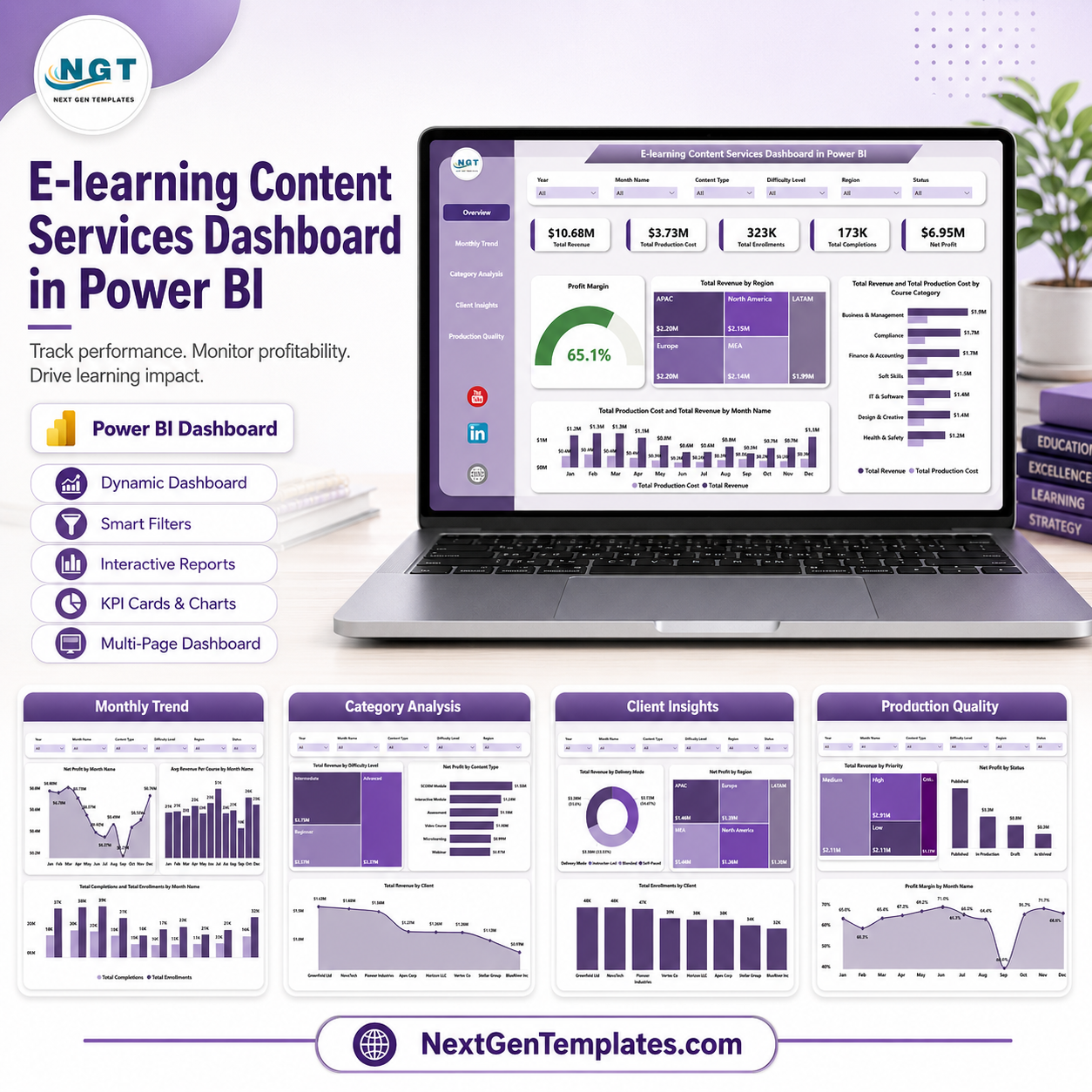
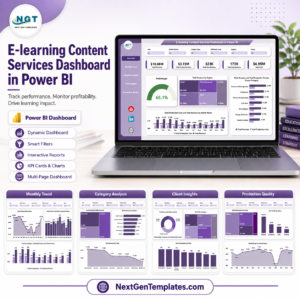
E-learning Content Services Dashboard in Power BI helps training teams, education service providers, and content operations managers track revenue, production cost, enrollments, completions, profit, client activity, course categories, delivery modes, and production quality in one editable Power BI report. Instead of rebuilding charts every month, users can open the .pbix file, replace the sample data, refresh, and review five analysis pages. The template is a one-time download at $17.99, with no monthly SaaS subscription or per-user dashboard fee. Built by PK, a Microsoft Certified Professional with 15+ years of Excel, Google Sheets, and Power BI experience.
Key Features of E-learning Content Services Dashboard in Power BI
- 5 Power BI report pages covering Overview, Monthly Trend, Category Analysis, Client Insights, and Production Quality.
- Executive KPI cards for Total Revenue, Total Production Cost, Total Enrollments, Total Completions, and Net Profit.
- Interactive slicers so users can filter the report quickly by course, client, region, month, delivery mode, priority, status, and other fields.
- Revenue, cost, profit, enrollment, completion, and margin visuals for faster management reporting.
- Editable .pbix file that can be customized in Power BI Desktop.
- Built for education businesses, e-learning agencies, course production teams, and training service providers.
- One-time purchase with lifetime access to the downloadable template file.
What’s Inside the E-learning Content Services Dashboard in Power BI
1. Overview Page
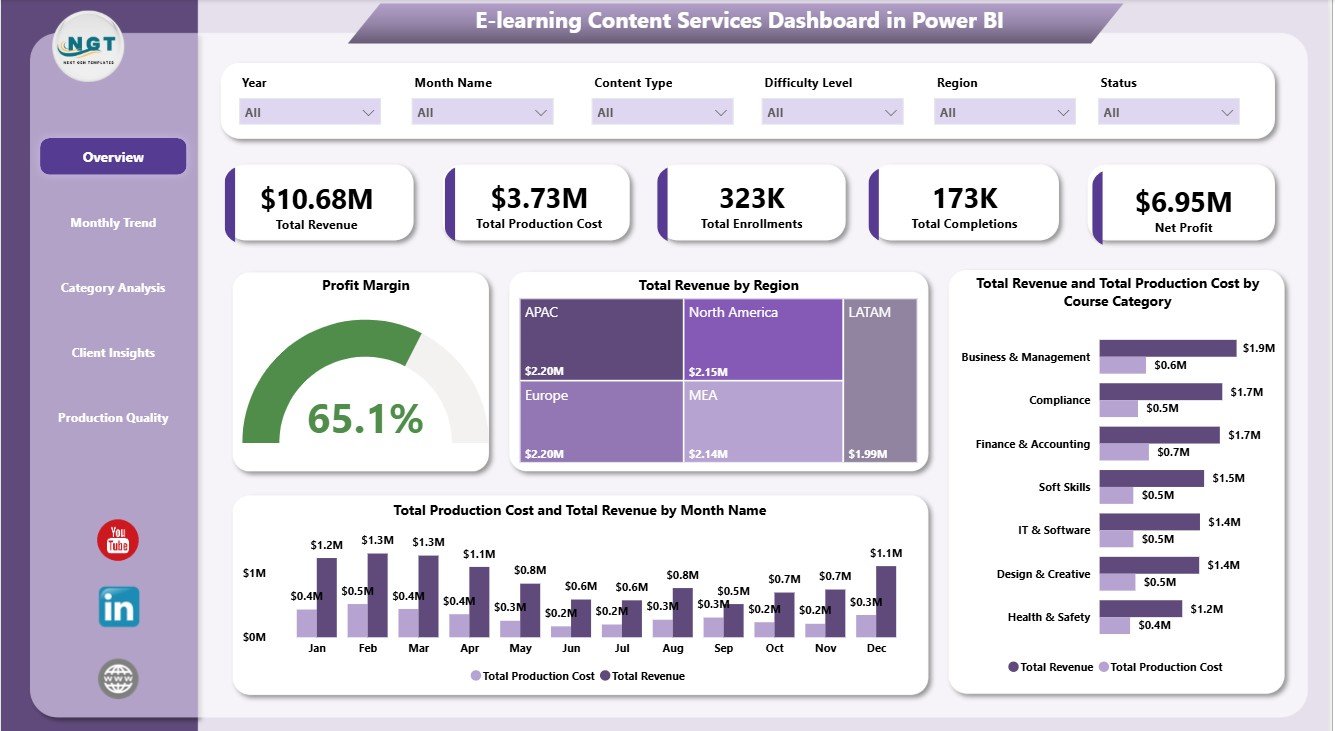
The Overview page gives a high-level view of the complete e-learning content services operation. KPI cards summarize Total Revenue, Total Production Cost, Total Enrollments, Total Completions, and Net Profit so leaders can review financial and learner activity before checking detailed pages.
Profit Margin by Selected Filters: This visual shows the margin result after slicers are applied. It helps users see whether a filtered group of courses, clients, regions, or months is profitable enough.
Total Revenue by Region: This chart compares revenue across regions. It helps teams identify high-performing markets and regions that may need sales or delivery support.
Total Revenue and Total Production Cost by Course Category: This comparison shows income and cost by category. It helps managers understand which course categories generate value and which may need pricing or production changes.
Total Production Cost and Total Revenue by Month Name: This monthly visual compares cost and revenue over time. It is useful for spotting profitable months, cost spikes, and seasonality in content services work.
E-learning Content Services Dashboard in Power BI
2. Monthly Trend
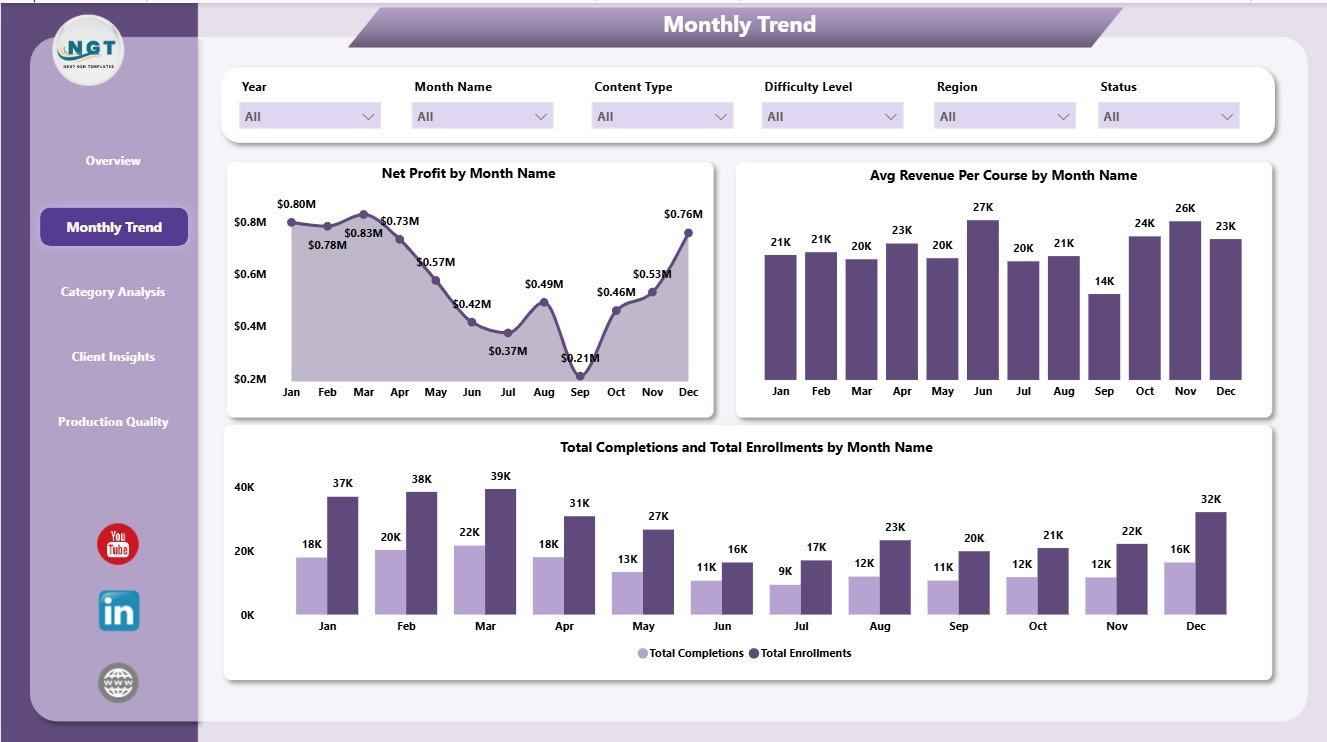
The Monthly Trend page explains how the business changes across months. Net Profit by Month Name shows the profit pattern over time, helping teams identify strong months and periods that need cost control.
Avg Revenue Per Course by Month Name tracks monthly average revenue at course level. Total Completions and Total Enrollments by Month Name compares learner activity and helps users see whether enrollment growth is converting into completions.
Monthly Trend
3. Category Analysis
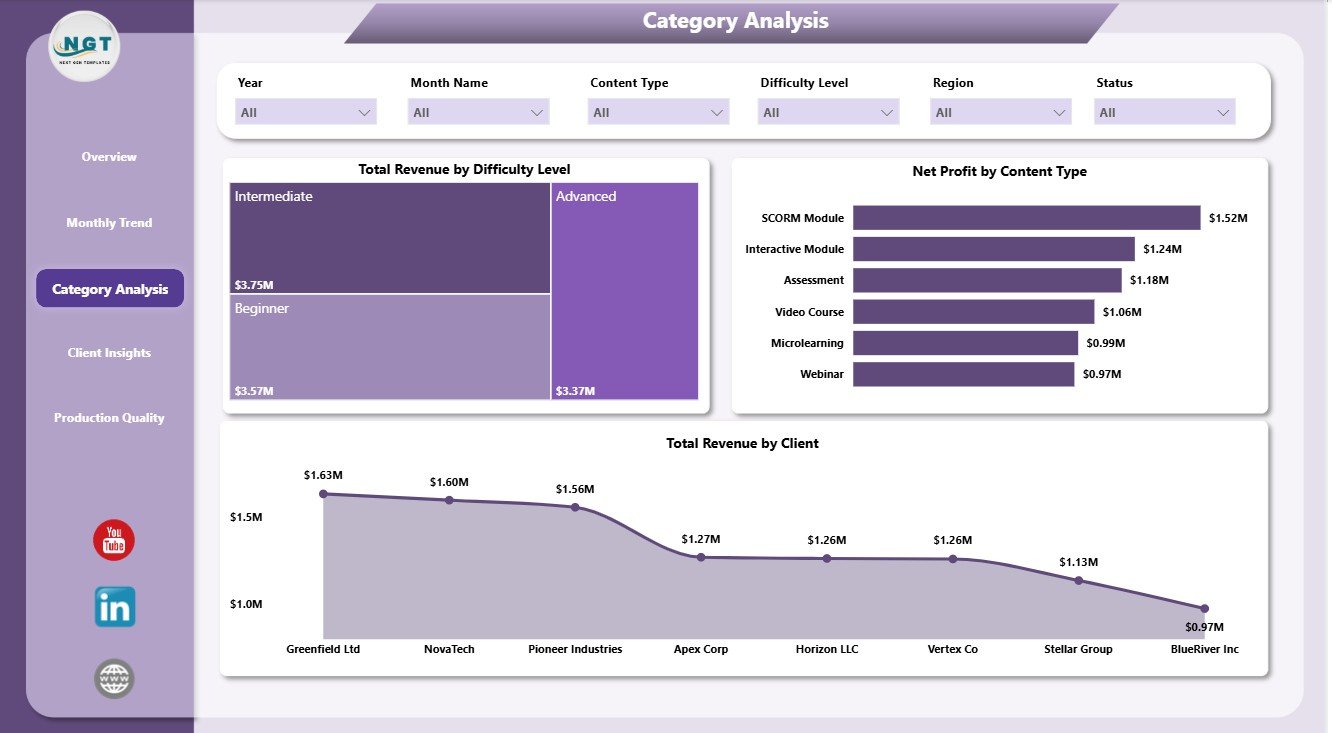
The Category Analysis page reviews performance by learning and content segments. Total Revenue by Difficulty Level helps users compare beginner, intermediate, advanced, or other levels by revenue contribution.
Net Profit by Content Type shows which content formats produce stronger profit. Total Revenue by Client identifies the clients contributing the highest revenue.
Category Analysis
4. Client Insights
The Client Insights page focuses on revenue, profit, and enrollment by client-related dimensions. Total Revenue by Delivery Mode compares how online, blended, live, recorded, or other delivery modes perform financially.
Net Profit by Region highlights geographic profitability. Total Enrollments by Client helps account managers see which clients are driving learner volume.
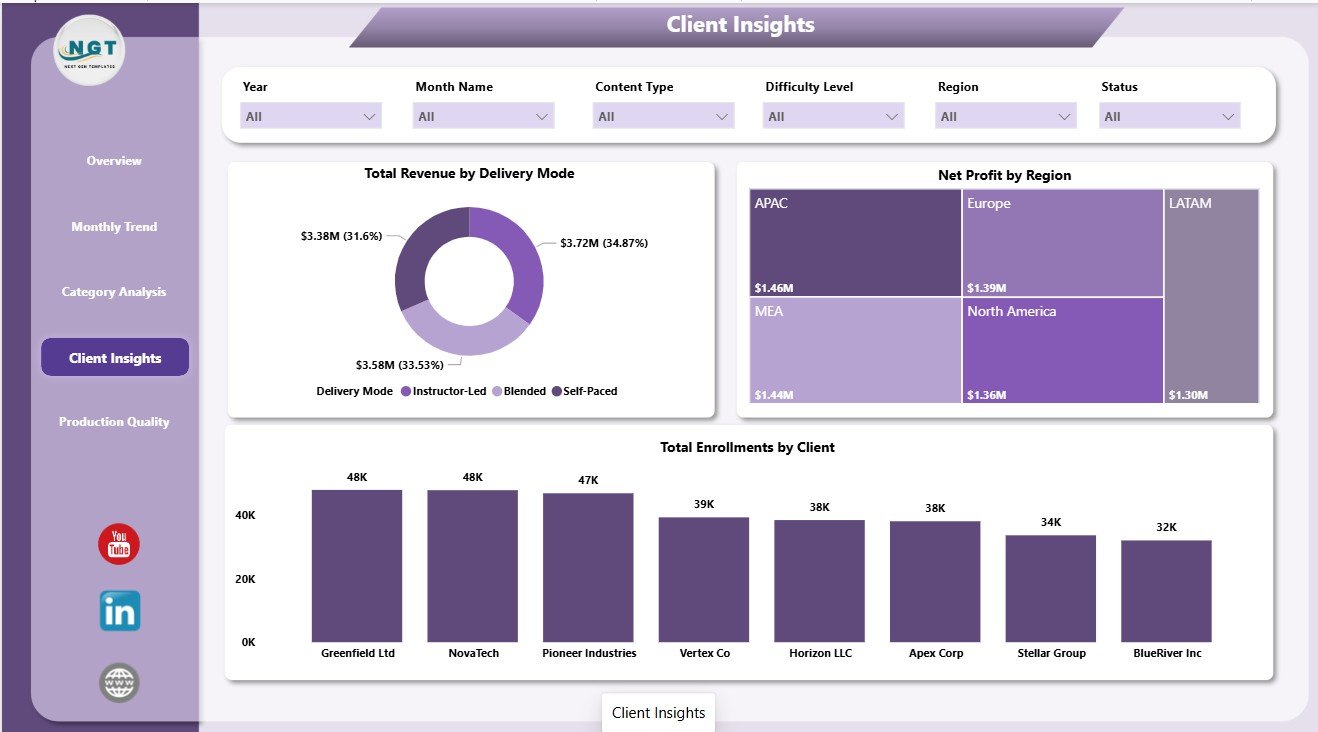
Client Insights
5. Production Quality
The Production Quality page helps teams connect production workflow with commercial performance. Total Revenue by Priority shows revenue by priority level so teams can understand the financial weight of urgent or high-priority work.
Net Profit by Status compares profit across production status values. Profit Margin by Month Name tracks margin movement across months and helps spot quality, delivery, or cost issues early.
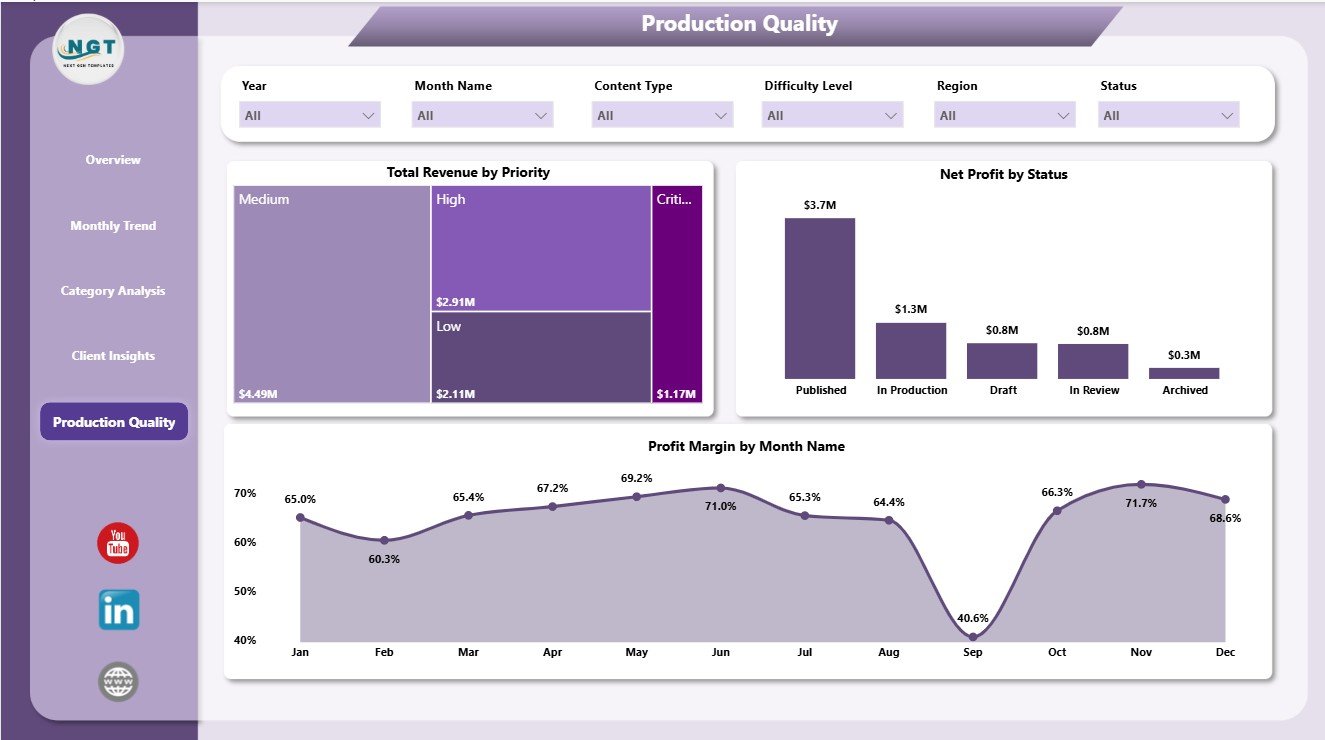
Production Quality
E-learning Content Services Dashboard in Power BI vs. Tableau vs. Paid CRM/SaaS – Where This Fits
| Feature | This Power BI Template | Tableau Alternative | Paid SaaS Alternative |
|---|---|---|---|
| Cost | $17.99 one-time | Requires Tableau licensing | Monthly or annual subscription |
| Platform | Power BI Desktop | Tableau Desktop or Cloud | Vendor cloud platform |
| Setup time | Open .pbix, replace sample data, refresh | Build workbook and data model | Requires onboarding and configuration |
| Real-time team collaboration | Available through Power BI Service | Available through Tableau Cloud | Usually included by paid plan |
| Mobile access | Available after publishing to Power BI Service | Available through Tableau Cloud | Depends on vendor app |
| Customizable fields | Editable report, visuals, model, and measures | Editable if you build it | Limited by vendor settings |
| Share with link | Possible through Microsoft Power BI sharing | Possible through Tableau sharing | Usually account based |
| Year-1 cost at 5 users | $17.99 plus any Microsoft licensing | Usually higher license cost | Often hundreds or thousands |
| E-learning revenue and cost analysis | Pre-built across 5 pages | Must be designed | Depends on module or plan |
Who This Template Is For – and Who It’s Not For
This template is for e-learning agencies, course production companies, education service providers, training teams, client success managers, and operations analysts who need a reusable Power BI dashboard for revenue, costs, enrollments, completions, profit, clients, categories, regions, delivery modes, and production quality.
It is not a learning management system, course authoring tool, CRM, invoice system, or live production workflow platform. It works best when your source data is already organized in a table and you want a reporting layer in Power BI.
How to Use the E-learning Content Services Dashboard in Power BI
- Download and unzip the template file.
- Open the .pbix file in Power BI Desktop.
- Replace the sample data with your own e-learning content services data source.
- Refresh the report and review each page.
- Use slicers to filter by month, region, course category, client, delivery mode, priority, and status.
- Customize colors, fields, visuals, labels, or data connections as needed.
Real-World Use Cases
Aisha, content operations manager: Aisha uses the Overview and Production Quality pages to explain revenue, cost, profit, and production status during weekly delivery meetings.
Rahul, client success lead: Rahul uses Client Insights to compare enrollment volume and profitability by client before account review calls.
Meera, finance analyst: Meera uses Monthly Trend and Category Analysis to monitor net profit, course category revenue, and average revenue per course.
Frequently Asked Questions
What is included in this Power BI dashboard?
The .pbix file includes 5 report pages, KPI cards, slicers, and visuals for revenue, production cost, enrollments, completions, net profit, categories, clients, regions, delivery modes, priority, status, and margins.
Do I need Power BI Desktop?
Yes. Open the report in Power BI Desktop, which is free from Microsoft. Sharing through Power BI Service may require Microsoft licensing.
Can I use my own data?
Yes. Replace the sample data with your own structured data and refresh the report.
Can I customize the report?
Yes. You can edit visuals, fields, colors, slicers, measures, and source connections in Power BI Desktop.
Is this only for e-learning companies?
It is designed for e-learning content services, but training providers, education vendors, and course production teams with similar data can adapt it.
Does it replace an LMS?
No. It is an analytics dashboard, not a learning management system, student portal, or course delivery platform.
About the Author
Built by PK – Microsoft Certified Professional with 15+ years of Excel, Google Sheets, and Power BI experience. Founder of NextGenTemplates, reaching 300K+ subscribers across YouTube channels. Every template is hand-built and tested before release.
Explore Related Templates
- Educational NGOs Dashboard in Power BI
- Employee Training KPI Dashboard in Power BI
- Corporate Training Dashboard in Power BI
- E-learning Content Services Dashboard in Excel
- Browse Power BI Dashboard Templates
Download the E-learning Content Services Dashboard in Power BI and turn revenue, production cost, enrollments, completions, profit, client, category, and quality data into clear Power BI reporting.
Watch the step-by-step video tutorial:











Reviews
There are no reviews yet.