


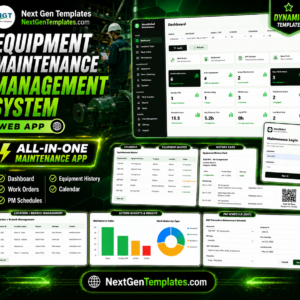
The Equipment Maintenance Management System is a Google Sheets web app that runs 21 connected screens, tracks 12 live dashboard KPIs, and auto-generates preventive maintenance work orders on a daily trigger. Setup takes under 15 minutes – copy the sheet, deploy the script, add your equipment, and your whole maintenance operation runs from a single secure login.
🌍 Join 8,400+ teams in 40+ countries using NextGenTemplates to replace paid SaaS tools with one-time-purchase Excel, Google Sheets, Power BI and HTML templates. Browse more multi-user tools in our Google Sheets Web Apps collection.
✅ Instant download · One-time payment · No subscription · No per-user fees · Lifetime access
🔑 Key Features of the Equipment Maintenance Management System
This system packs the core of a commercial CMMS into a Google Sheets web app any team can copy and deploy in minutes. It ships with 21 connected screens, tracks 12 dashboard KPIs, and links every spare-part issue directly to a work order, so maintenance cost per asset is always accurate.
🔹 Secure multi-user login with roles – every user signs in with their own username and password and sees only what their Admin or User role allows, so technicians and managers each get the right access.
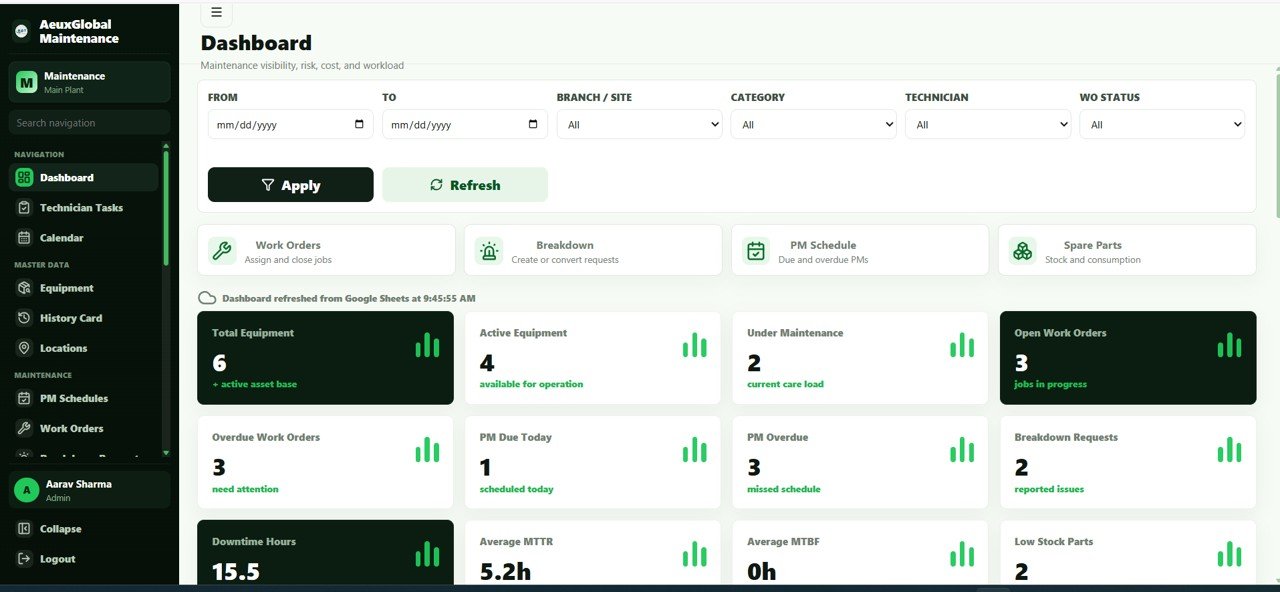
🔹 Live dashboard with 12 KPIs – total equipment, active equipment, under maintenance, open work orders, overdue work orders, PM due today, PM overdue, breakdown requests, downtime hours, average MTTR, average MTBF and low-stock parts.
🔹 Automatic PM work-order generation – preventive maintenance schedules create due work orders on a daily trigger, so recurring tasks are never forgotten.
🔹 Mobile technician task view – technicians start a job, hold for parts, or complete work from their phone without touching the back-end sheets.
🔹 Breakdown reporting that converts to work orders – issues reported from the floor become tracked, assignable jobs in seconds.
🔹 Spare-parts inventory and transactions – stock levels, reorder points, purchase prices, vendors and low-stock alerts, with full inward, issue and return history.
🔹 Vendor and AMC management – service partners plus AMC coverage, expiry, renewal alerts and reminder dates.
🔹 Downtime log powering MTTR and MTBF – each downtime entry records reason, duration and impact, then drives reliability reporting.
🔹 Google Calendar sync and email reminders – PM schedules, AMC renewals and overdue work orders are pushed to your calendar and inbox.
📦 What’s Inside the Equipment Maintenance Management System
The system is organised as a connected workflow – from the login screen, through daily technician work, all the way to admin settings. Here is every screen.
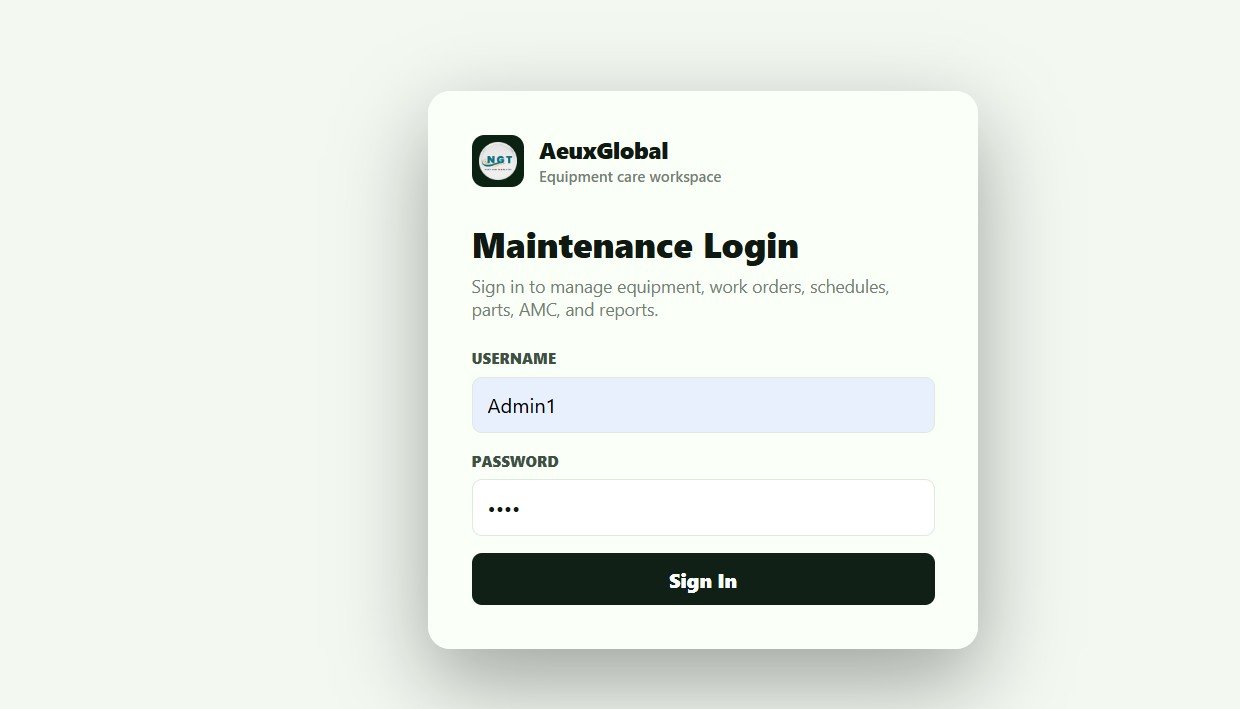
Login Page
The secure login screen of the application. Every user signs in with their own username and password and gets access based on their assigned role.
Dashboard
The main dashboard. Filters and quick-action cards sit across the top, with KPI cards below showing Total Equipment, Active Equipment, Under Maintenance, Open Work Orders, Overdue Work Orders, PM Due Today, PM Overdue, Breakdown Requests, Downtime Hours, Average MTTR, Average MTBF and Low Stock Parts.
Equipment web app code:
🚀 Try the Live Demo Before You Buy
We have deployed this web app in our own Google account so you can test every page, every role — with real sample data — before purchasing. No signup, no email required.
🔑 Test Login Credentials
Sign in as Admin1 to manage equipment, schedule maintenance, assign technicians and manage users, or as User1 to view assigned maintenance jobs and update their status.
💡 What you get after purchase: The full source code (Code.gs + Index.html) plus a step-by-step deployment guide so you can deploy your own private instance in your own Google account in under 15 minutes.
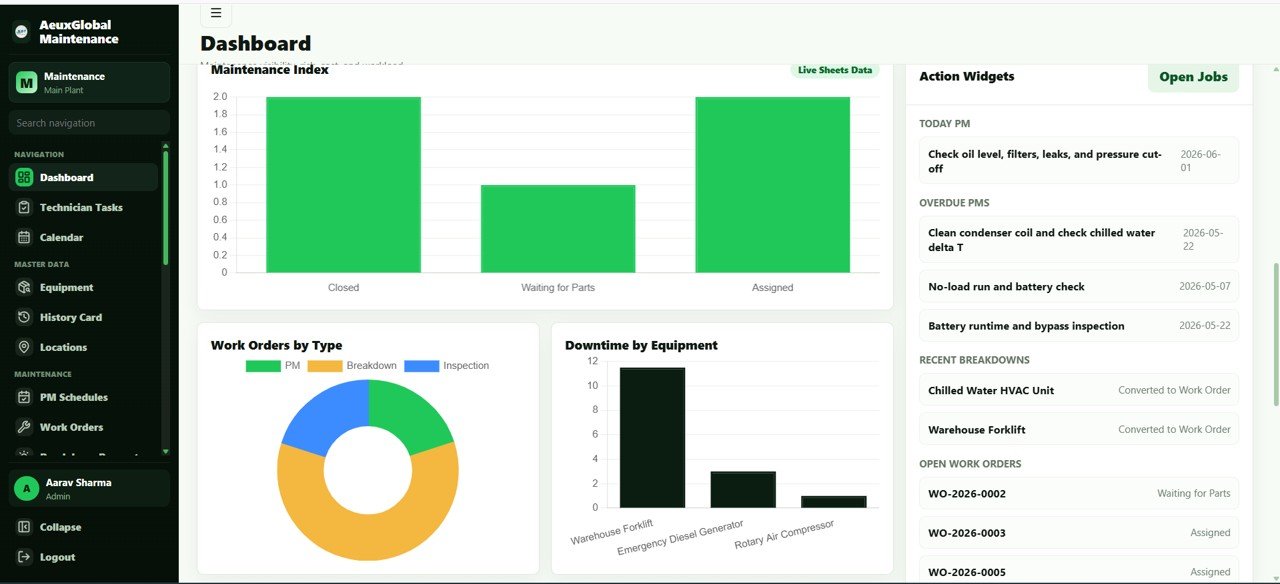
Dashboard Charts and Widgets
Visual widgets and action lists including Work Orders by Status, Work Orders by Type, Downtime by Equipment, Today PM Tasks, Overdue PMs, Recent Breakdowns and Open Work Orders.
Technician Task View
A mobile-friendly screen for technicians. It shows assigned work and lets them start, hold for parts, or complete each job, with cards for Open Assigned Tasks, Today, Overdue and Waiting Parts.

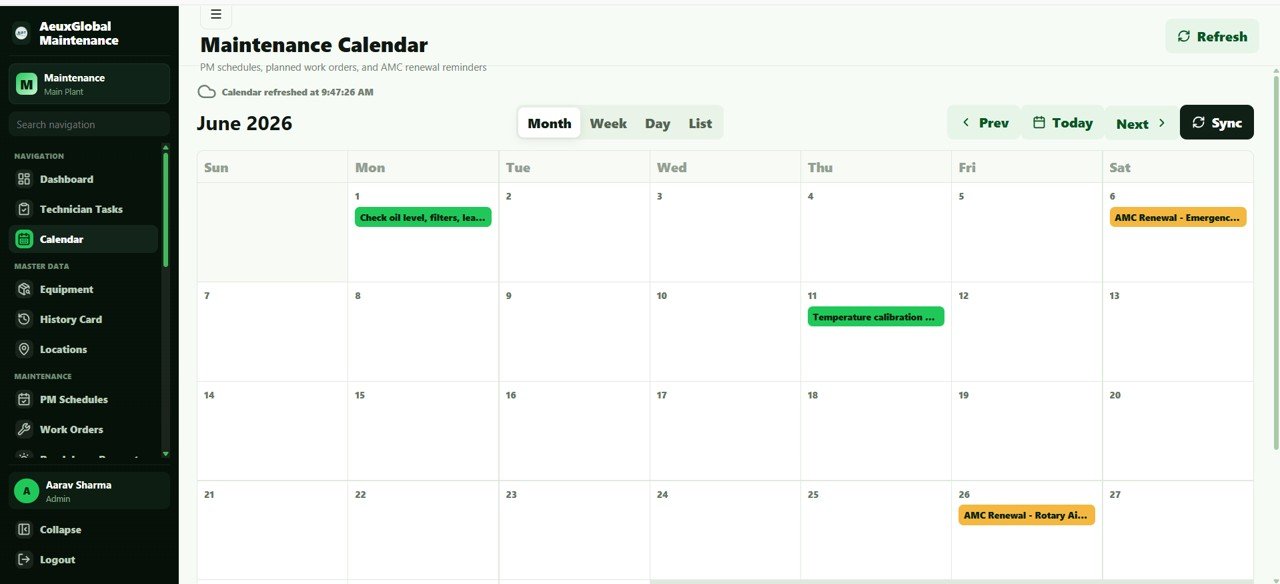
Maintenance Calendar
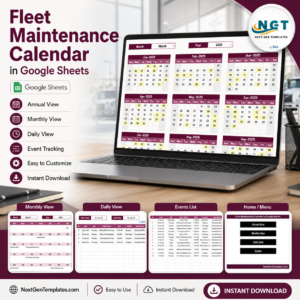
The maintenance calendar shows all planned work in month, week, day and list views and can sync with Google Calendar. It displays PM Schedules, Planned Work Orders and AMC Renewal Reminders.
Equipment Master
Your complete asset register with QR labels, status and maintenance due dates. Columns include Equipment Code / Asset Tag, Equipment Name, Category, Location, Criticality, Current Status, Next Maintenance Due Date and AMC Expiry Date.

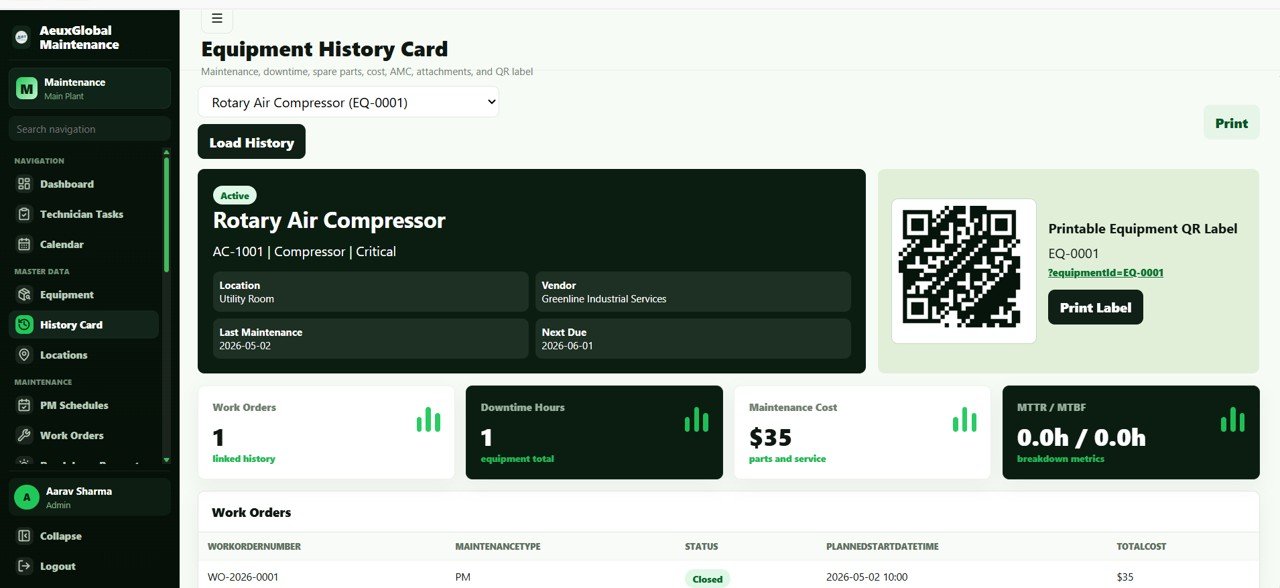
Equipment History Card
The complete history of a single asset along with a printable QR label. It summarises Work Orders, Downtime Hours, Maintenance Cost, MTTR / MTBF and full Work Order History.
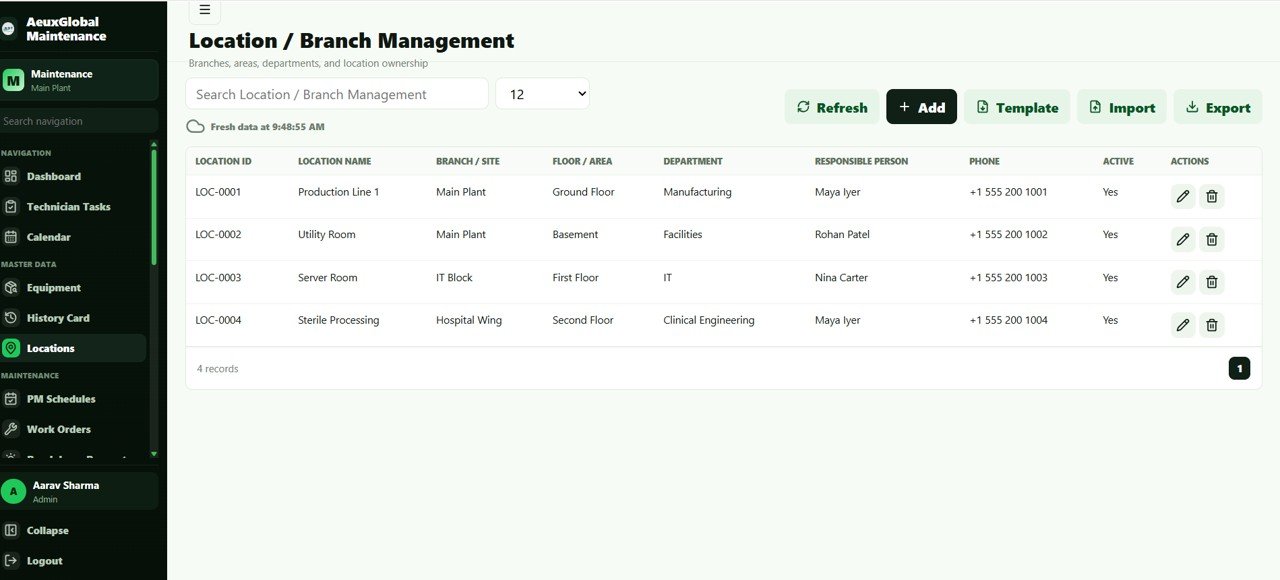
Location / Branch Management
Manages all branches, areas, departments and location ownership. Columns include Location Name, Branch / Site, Floor / Area, Department, Responsible Person, Phone and Active status.
PM Schedules
The preventive maintenance schedule page. It defines each recurring task and is used to auto-generate due work orders, capturing Equipment Name, Maintenance Task Name, Maintenance Type, Frequency, Last Done Date and Priority.

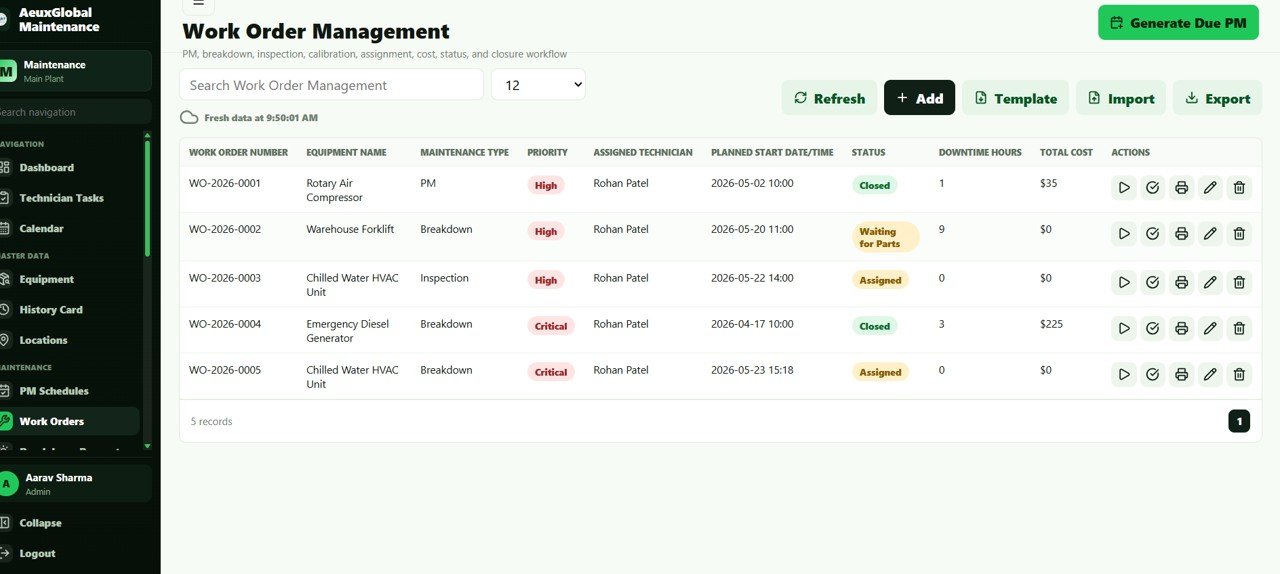
Work Order Management
The work order page covering PM, breakdown, inspection, calibration, assignment, cost, status and closure. Columns include Work Order Number, Equipment Name, Maintenance Type, Priority, Assigned Technician, Planned Start Date / Time, Status, Downtime Hours and Total Cost.
Breakdown Maintenance Request
A mobile-friendly breakdown request page where issues are reported and converted into work orders. Columns include Equipment Name, Location, Reported By, Request Date / Time, Priority, Status and Linked Work Order.

Downtime Log
Logs downtime hours, reasons and impact, and powers the MTTR and MTBF reporting. Columns include Equipment Name, Work Order, Location, Downtime Start, Downtime End, Downtime Hours and Downtime Reason.

Spare Parts Management
Manages spare-parts stock, reorder levels, purchase prices, vendors and low-stock alerts. Columns include Part Code, Part Name, Category, Current Stock, Minimum Stock, Reorder Level, Purchase Price, Vendor and Active status.

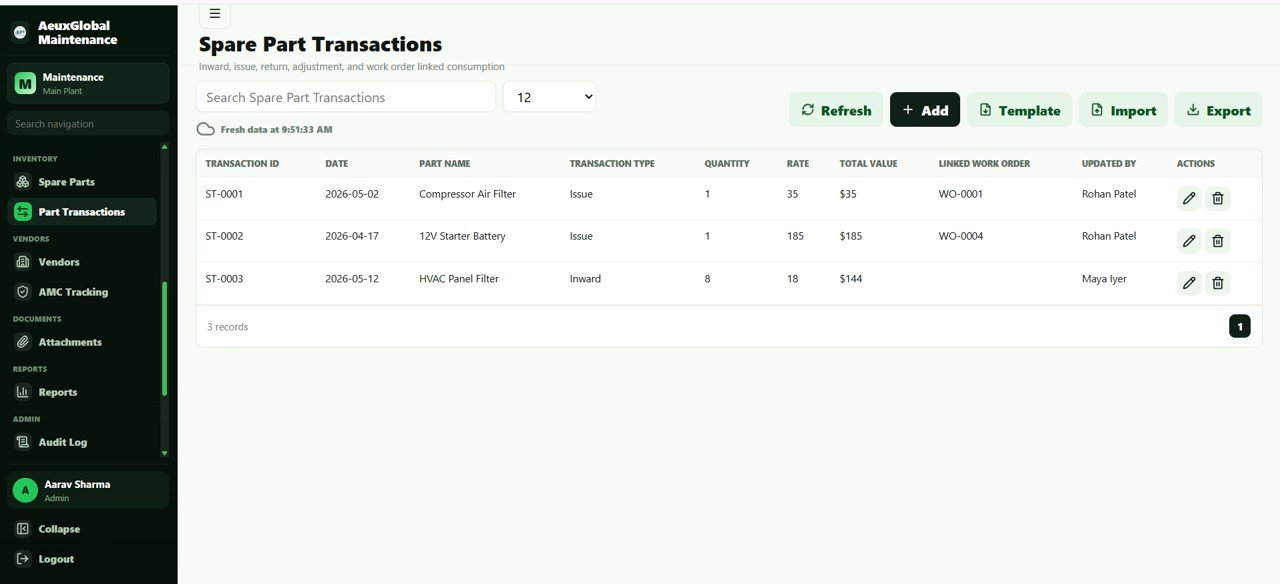
Spare Part Transactions
Records inward, issue, return, adjustment and work-order-linked consumption of parts. Columns include Date, Part Name, Transaction Type, Quantity, Rate, Total Value, Linked Work Order and Updated By.
Vendor Management
Stores service partners, contacts, service types and vendor performance inputs. Columns include Vendor Name, Contact Person, Phone, Email, Service Type and Active status.

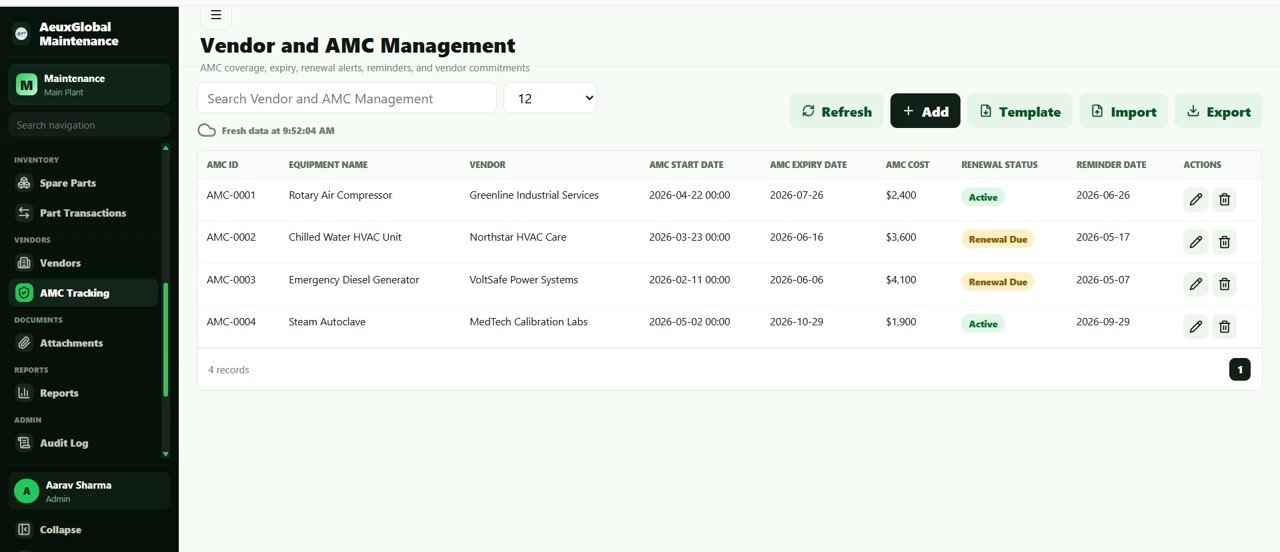
Vendor and AMC Management
Manages AMC coverage, expiry, renewal alerts and reminders. Columns include Equipment Name, Vendor, AMC Start Date, AMC Expiry Date, AMC Cost, Renewal Status and Reminder Date.
Attachments and Documents
A central document library for manuals, AMC documents, maintenance photos, breakdown photos and completion evidence. Columns include Module, Record ID, File Name, File URL, Uploaded By, Uploaded At and Notes.

Reports
Runs filtered maintenance reports with Excel export and a clean print layout. Options include Report Type, From and To Date, Location, Technician, Run Report, and Export and Print.

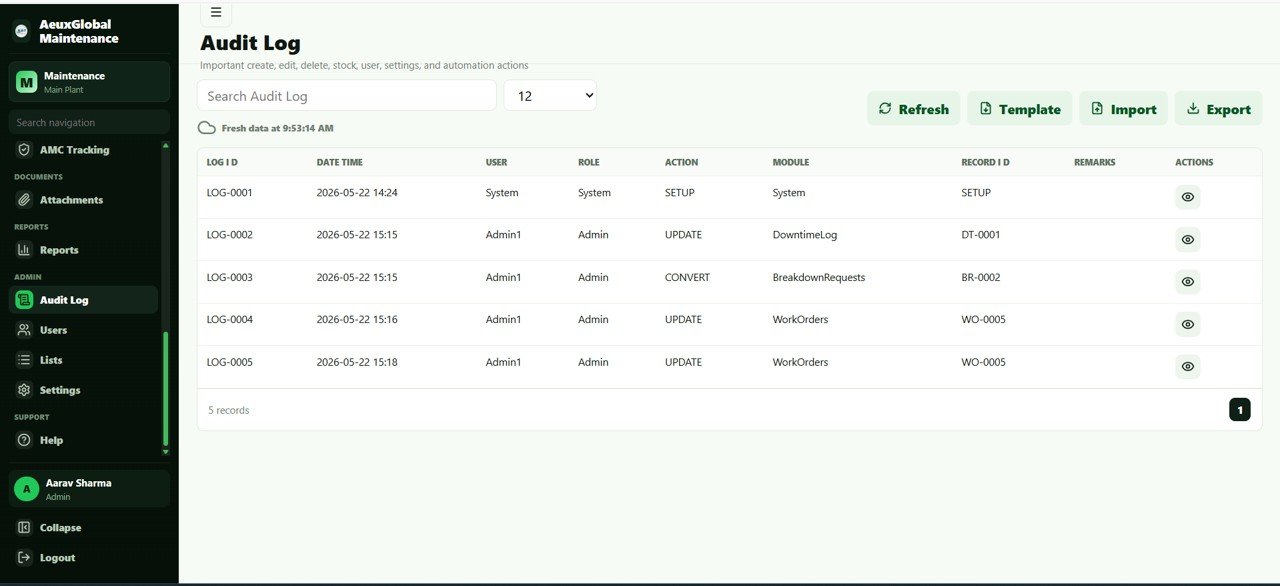
Audit Log
Records important create, edit, delete, user, settings and automation actions. Columns include Date Time, User, Role, Action, Module, Record ID and Remarks.
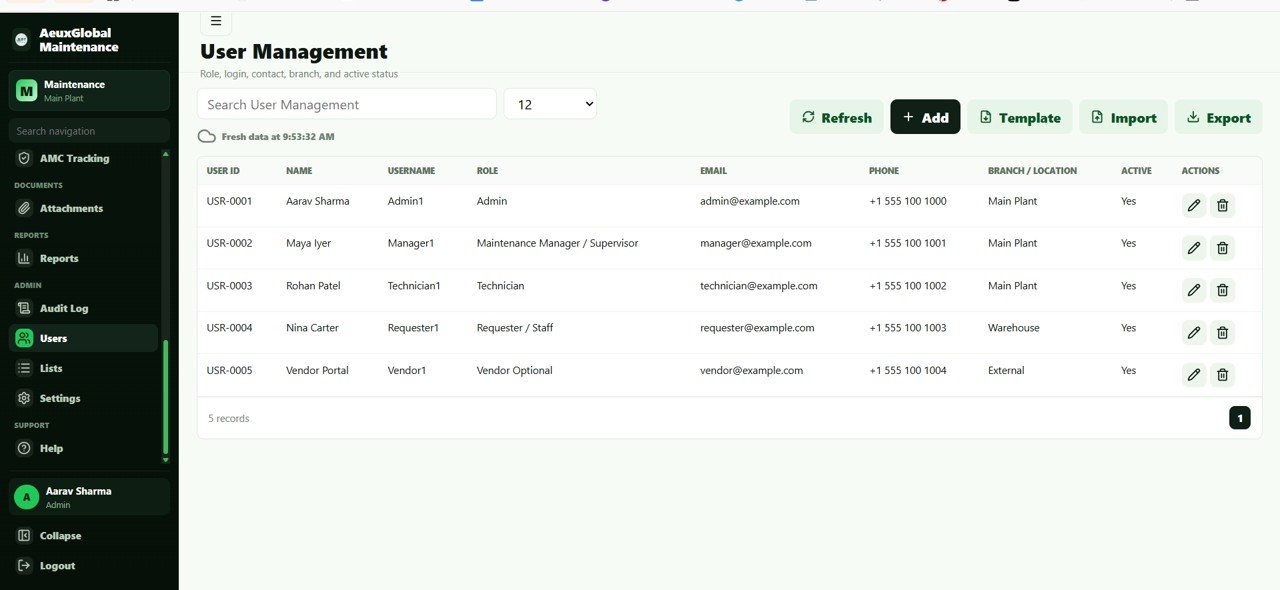
User Management
Manages roles, login, contact, branch and active status of users. Columns include Name, Username, Role, Email, Phone, Branch / Location and Active status.
List Management
Controls the dropdown values used across all modules. Columns include List Type, Value, Active and Sort Order.

Settings
The control centre for company profile, QR base URL, calendar, email reminders, triggers and password. It includes Company Profile and Logo, Default Currency, Default PM Reminder Days, AMC Renewal Reminder Days, Calendar Sync and Calendar ID, Email Reminder Settings, Setup Daily Trigger, Generate Due PM Work Orders, Send AMC Renewal Reminders, Send Overdue Work Order Reminders, Sync Google Calendar and Change Password.

📊 Equipment Maintenance Management System vs. Excel vs. Paid CMMS – Where This Fits
Here is how this Google Sheets web app compares with a standard Excel maintenance template and with subscription CMMS platforms such as UpKeep, Fiix or Limble.
| Feature | Equipment Maintenance Management System (Google Sheets) | Excel Maintenance Template | Paid CMMS (UpKeep / Fiix / Limble) |
|---|---|---|---|
| Cost | $39.99 one-time ✅ | $5 to $20 one-time | $20 to $100 / user / month |
| Platform | Google Sheets web app | Desktop Excel file | Cloud SaaS |
| Setup time | Under 15 minutes ✅ | 10 to 30 minutes | Days to weeks |
| Multi-user login and roles | Yes, Admin and User ✅ | No | Yes |
| Real-time team collaboration | Yes ✅ | Limited | Yes |
| Mobile technician access | Yes ✅ | No | Yes |
| Preventive maintenance automation | Yes, auto work orders ✅ | Manual | Yes |
| MTTR and MTBF reporting | Built in ✅ | Manual formulas | Yes |
| Year-1 cost at 5 users | $39.99 total ✅ | About $20 total | $1,800 to $6,000 |
For teams that want CMMS-style preventive maintenance, work orders and reliability reporting without paying per user every month, the Equipment Maintenance Management System sits in the sweet spot.
👥 Who This Template Is For – and Who It Is Not For
✅ This template is built for:
- Maintenance and facilities managers at factories, plants, hospitals, hotels, schools and property firms with 20 to 1,000 assets.
- Small and mid-size operations teams that have outgrown a single maintenance spreadsheet but do not want a costly per-seat CMMS.
- Service and AMC businesses that track equipment, breakdowns, spare parts and contract renewals in one place.
❌ This template is NOT for:
- Enterprises needing IoT sensor integration, SCADA connectivity or automated condition monitoring.
- Organisations that require SOC 2, SSO and dedicated on-premise hosting for compliance.
- Teams managing tens of thousands of assets across many plants who need a heavyweight enterprise asset management suite.
⚙️ How to Use the Equipment Maintenance Management System
- Open the included PDF guide and click the Google Sheets copy link to create your own editable copy in Google Drive.
- Open Extensions then Apps Script, run the setup function, and authorise the script when prompted.
- Deploy as a web app and open the generated URL, then sign in with the default admin credentials.
- Add your company profile, locations, equipment and users in Settings and the master screens.
- Create PM schedules and let the daily trigger auto-generate due work orders.
- Share the web app link with your team so technicians can handle jobs and report breakdowns from any device.
💼 Real-World Use Cases
Ramesh manages maintenance at a mid-size manufacturing plant. He loads 300 machines into the equipment master, sets PM schedules per machine, and lets the daily trigger create due work orders. His technicians pick up jobs from the mobile task view, and he reviews downtime and MTBF on the dashboard every Monday – without paying for a per-user CMMS.
Sana runs facilities for a 4-hotel group. She separates sites with Location and Branch Management, tracks AMC renewals for HVAC and elevators, and gets email reminders before contracts expire. When a guest-room AC fails, staff log a breakdown from their phone and it becomes a tracked work order in seconds.
David owns an equipment service company. He controls stock and reorder levels in the spare-parts module, links part consumption to each work order, and prints clean cost reports for clients – turning a messy spreadsheet into a professional, auditable system.
❓ Frequently Asked Questions
What is the Equipment Maintenance Management System?
The Equipment Maintenance Management System is a Google Sheets and Apps Script web app that manages preventive maintenance, work orders, breakdowns, spare parts, vendors, AMC contracts and reliability reporting across 21 connected screens with secure multi-user login.
How long does setup take?
Setup takes under 15 minutes. You copy the Google Sheet, open Apps Script, run the setup, deploy the web app, then add your equipment and users. A PDF guide with the copy link is included in your download.
How does it compare to paid CMMS software?
Paid CMMS platforms like UpKeep, Fiix or Limble charge $20 to $100 per user per month. The Equipment Maintenance Management System gives you PM automation, work orders and MTTR/MTBF reporting for a one-time $39.99, with your data stored in your own Google Drive.
Does it support multiple users and roles?
Yes. The Equipment Maintenance Management System has secure login with Admin and User roles, plus a User Management screen, so technicians and managers each get the right level of access.
Can technicians use it on a phone?
Yes. The Technician Task View and Breakdown Request screens are mobile-friendly, so field staff can start jobs, hold for parts, complete work and report breakdowns from their phones.
What KPIs does the dashboard track?
The Equipment Maintenance Management System dashboard tracks 12 KPIs including total equipment, under maintenance, open and overdue work orders, PM due, downtime hours, average MTTR, average MTBF and low-stock parts.
Do I need to know how to code?
No coding is required to use it. The system is built on Google Apps Script, but day-to-day use is entirely point and click in Google Sheets.
👤 About the Author
Built by PK – Microsoft Certified Professional with 15+ years of Excel, Google Sheets and Power BI experience. Founder of NextGenTemplates, reaching 300K+ subscribers across YouTube channels (@PK-AnExcelExpert, @NextGenTemplates, @NeoTechNavigators). Every template is hand-built and tested before release.
🔗 Explore Related Templates
Pair this web app with the Inventory Management System V3.0 to control wider stock and suppliers, or start simpler with the Maintenance Tasks Calendar in Google Sheets.
Also available as: an Equipment Maintenance Schedule in Excel and a Bridge Maintenance Dashboard in Power BI for teams on other platforms.
💎 Save more with a bundle – get the Manufacturing Excellence Bundle and pack premium plant and operations templates together at a large discount.
📖 Click here to read the Detailed Blog Post
🎥 Visit our YouTube channel for step-by-step video tutorials
👉 YouTube.com/@NextGenTemplates
Watch the step-by-step video tutorial:
📅 Last updated: June 2026













Reviews
There are no reviews yet.