
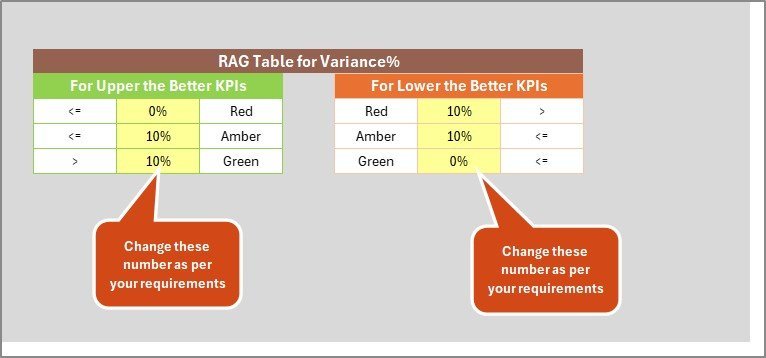
Convenience Store KPI Scorecard in Excel tracks 20+ store performance KPIs across 4 structured worksheets, with MTD and YTD comparisons, trend charts, and color-coded status indicators. Setup takes under 10 minutes — replace the sample data and every metric recalculates automatically.
🌍 Join 8,400+ teams in 40+ countries using NextGenTemplates to replace paid SaaS tools with one-time-purchase Excel, Google Sheets, Power BI, and HTML templates.
✅ Instant download · One-time payment · No subscription · No per-user fees · Lifetime access
🔑 Key Features of Convenience Store KPI Scorecard in Excel
📌 4 Purpose-Built Worksheets — Scorecard, KPI Trend, Input Data, and KPI Definition sheets give you end-to-end control of convenience store performance tracking in one Excel file.
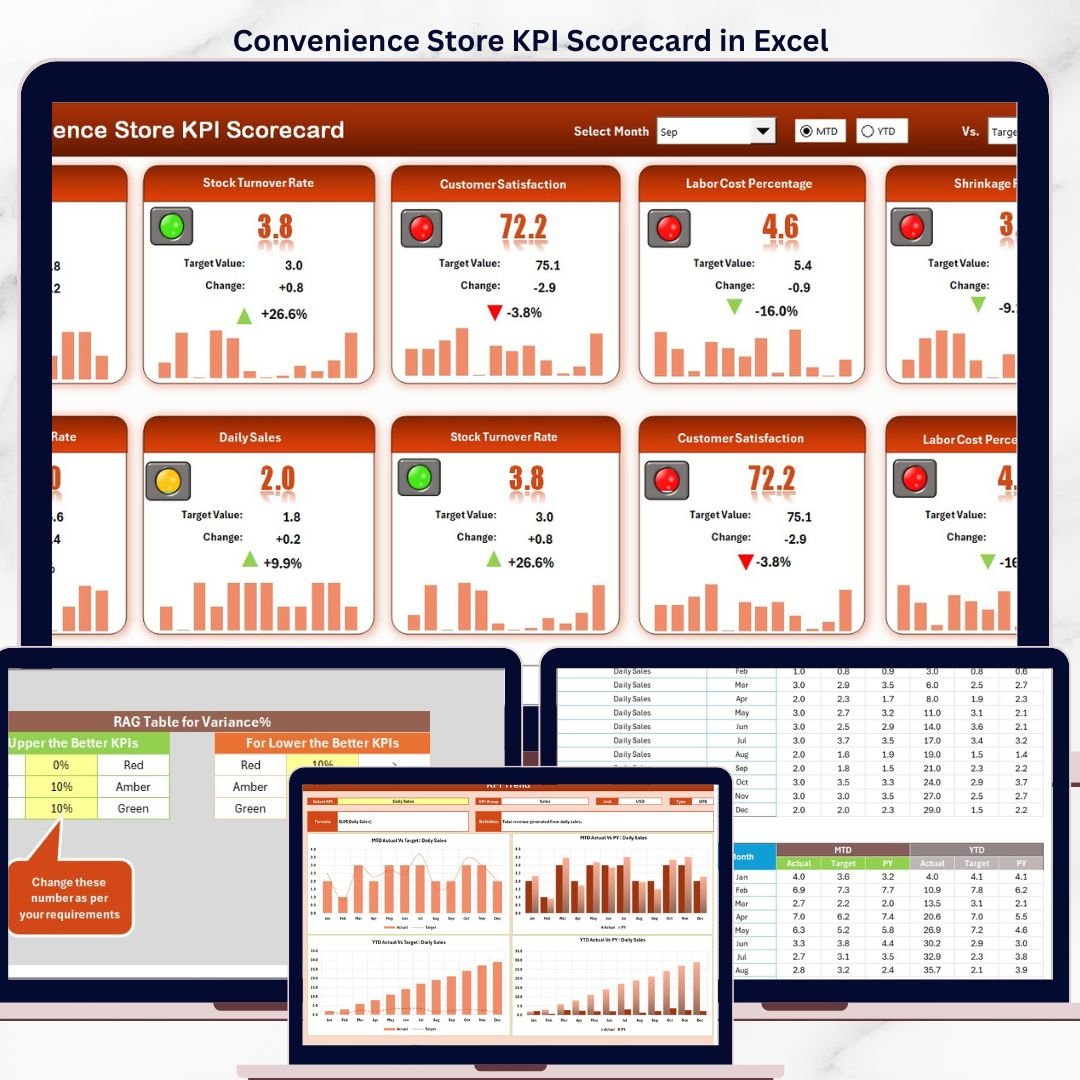
📌 MTD and YTD Comparisons with Visual Indicators — The Scorecard sheet displays MTD Actual, Target, and Previous Year data alongside YTD equivalents. Color-coded conditional formatting instantly flags whether each KPI is on track, at risk, or falling behind target.
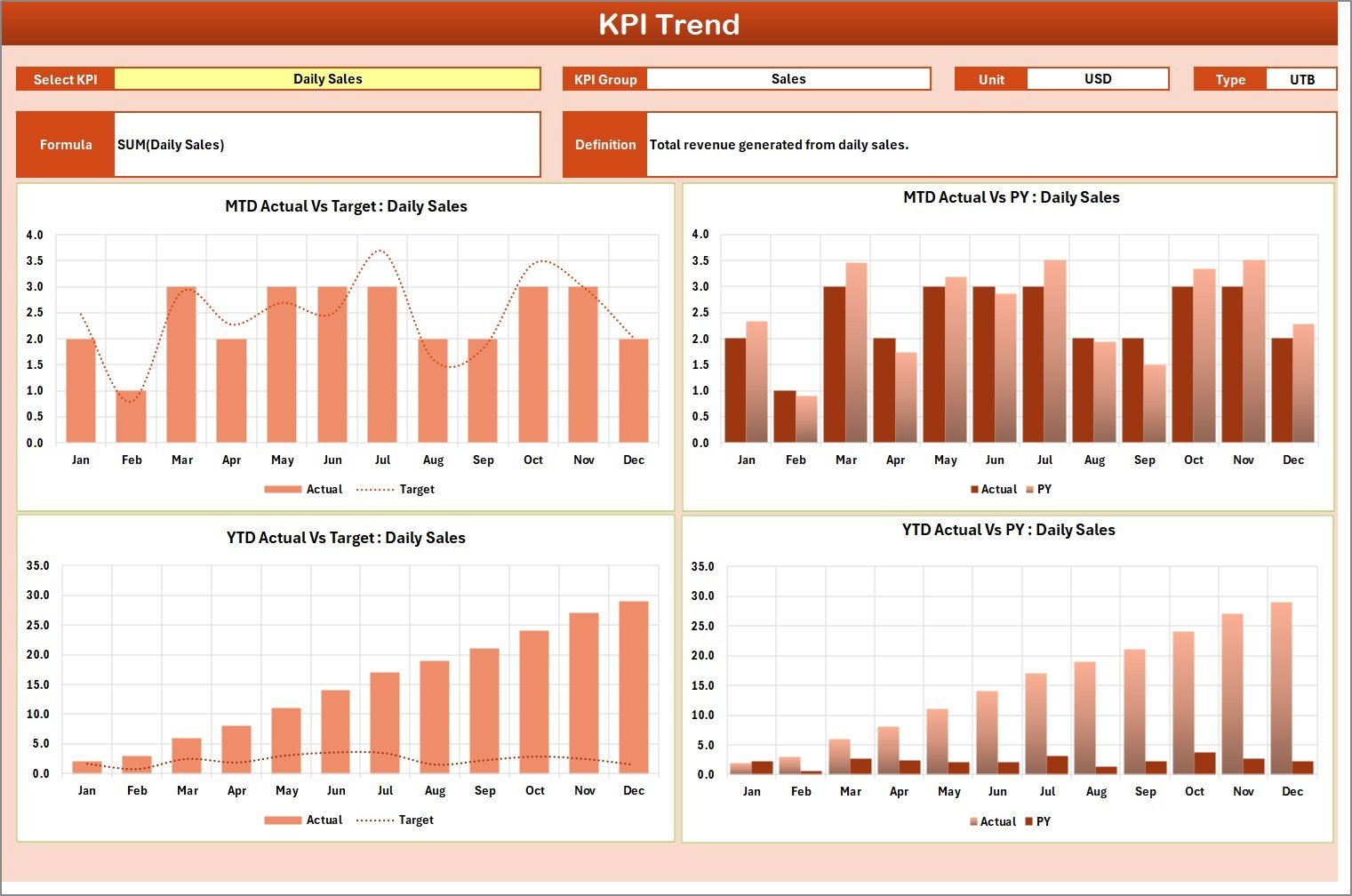
📌 Interactive KPI Trend Analysis — Select any KPI from the dropdown on the KPI Trend sheet to view its definition, formula, unit type (LTB or UTB), and monthly trend charts comparing Actual vs Target vs Previous Year for both MTD and YTD periods.
📌 Month and Period Selector — Dropdown menus on the Scorecard sheet let you switch between any month, MTD, or YTD view instantly — no pivot tables, no slicers, no VBA required.
📌 Structured KPI Definition Sheet — Enter each KPI’s name, group, unit, formula, definition, and type (Lower the Better or Upper the Better) in one centralized sheet. The KPI Trend sheet pulls this metadata automatically.
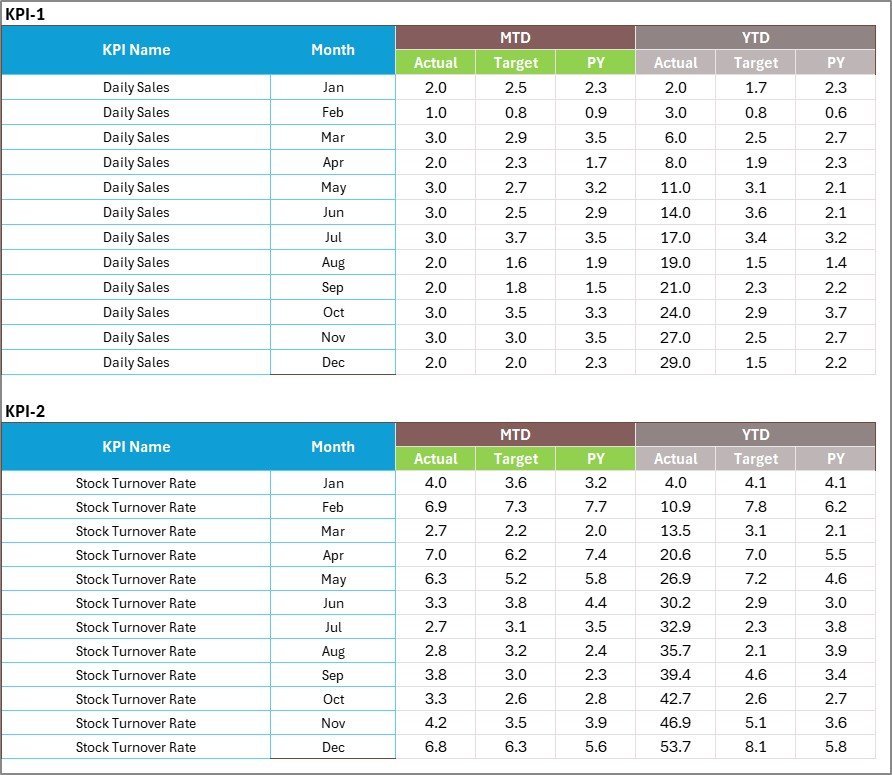
📌 Clean Input Data Sheet — One organized sheet for entering actual values, targets, and previous year numbers. Update monthly data and the Scorecard reflects changes immediately.
📌 Retail-Specific KPIs Out of the Box — Pre-loaded with convenience store metrics including Sales Per Square Foot, Inventory Turnover, Average Transaction Value, Shrinkage Rate, Customer Footfall, Basket Size, and Gross Margin Percentage.
📦 What’s Inside the Convenience Store KPI Scorecard
The template includes 4 worksheets designed specifically for convenience store operations monitoring:
📊 Scorecard Sheet — The main interface displaying all KPIs with Actual vs Target comparisons, percentage variance, and color-coded status indicators for both MTD and YTD periods.
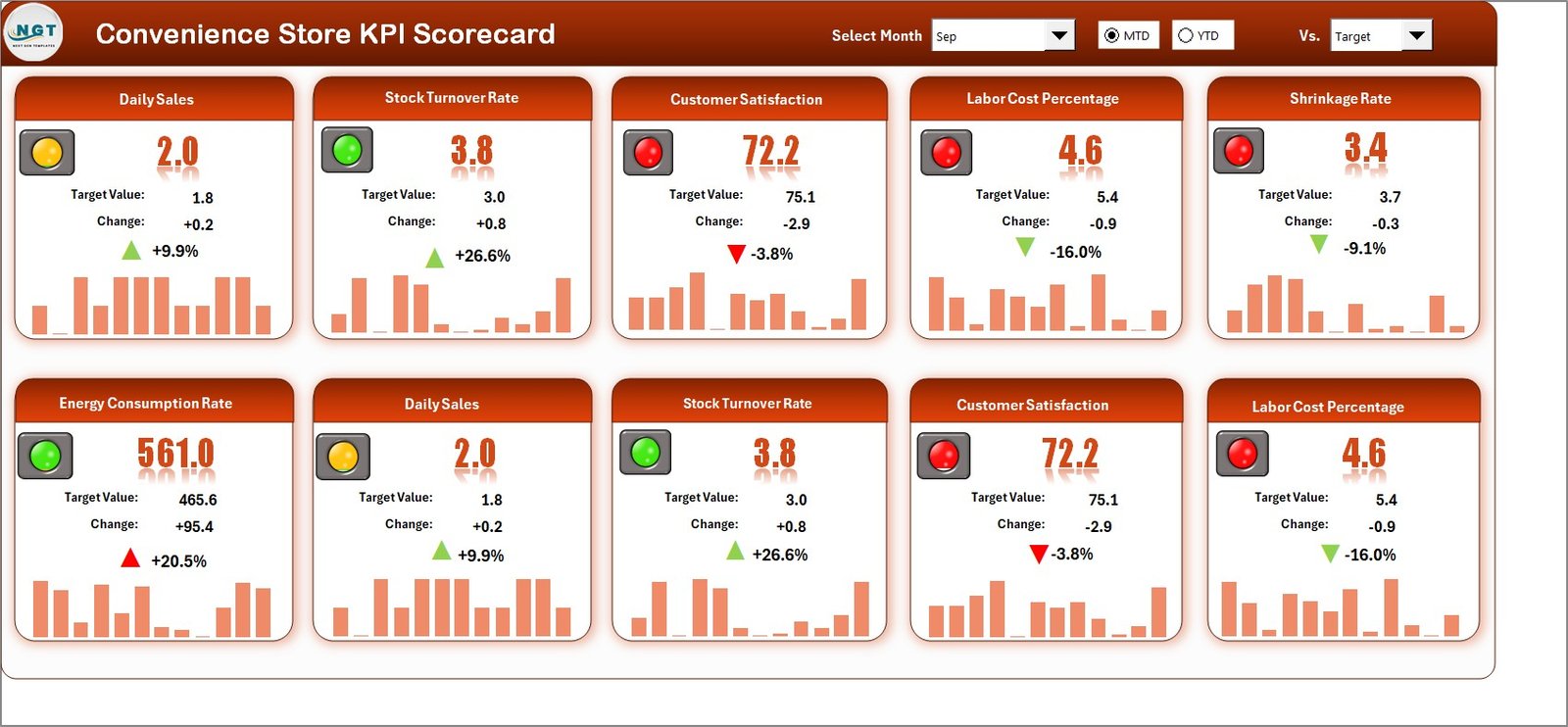
Convenience Store KPI Scorecard in Excel
📈 KPI Trend Sheet — Select any KPI from the dropdown to see its group, unit, formula, definition, and 12-month trend charts for Actual, Target, and Previous Year.
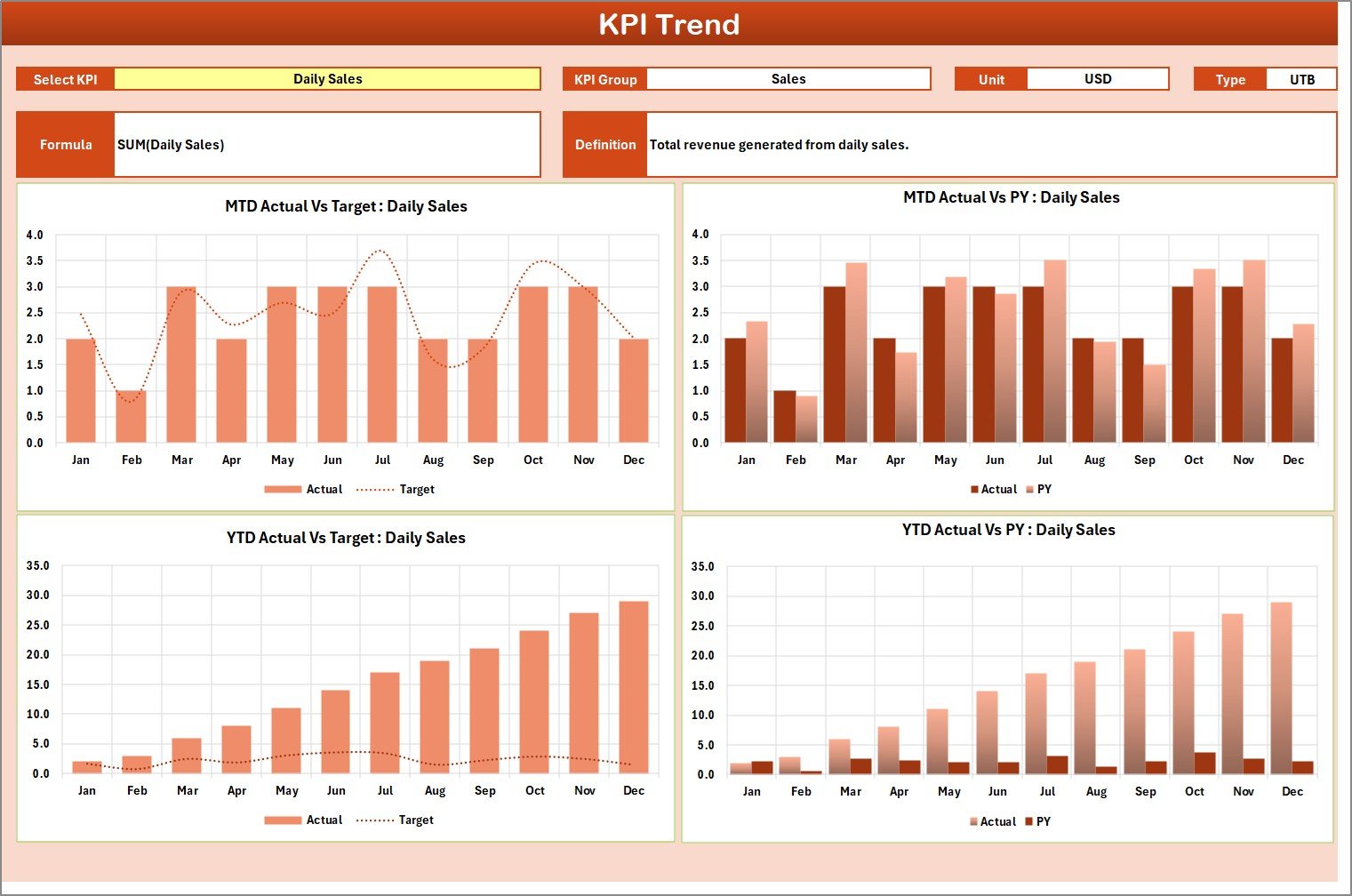
KPI Trend Sheet
📝 Input Data Sheet — Enter actual values, targets, and historical data in a clean, organized layout.
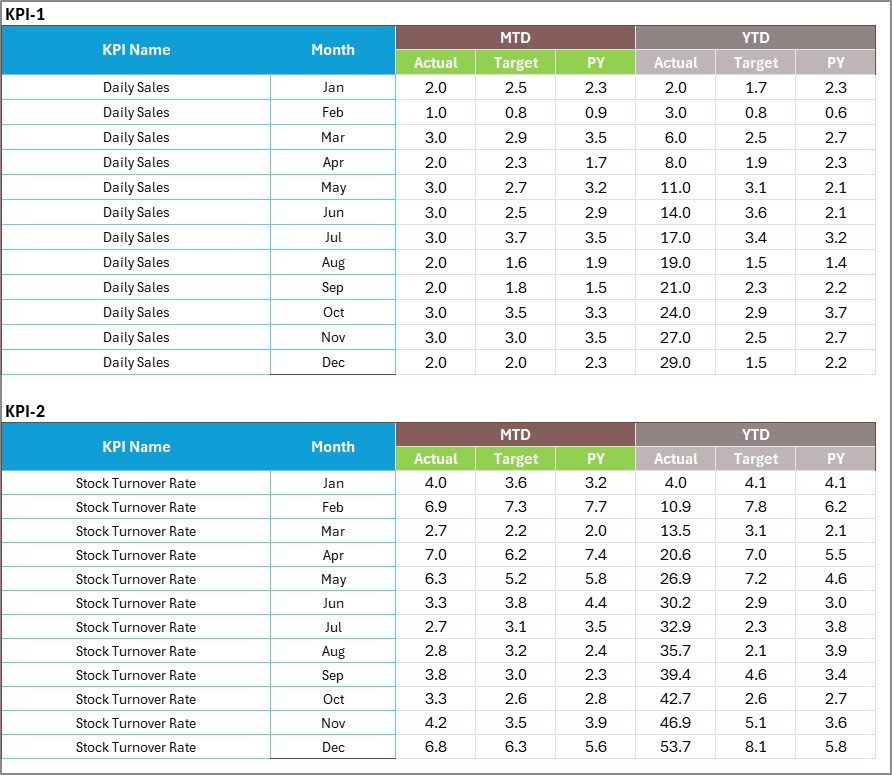
Input Data Sheet
📋 KPI Definition Sheet — Define each KPI’s name, group, unit, formula, and description. This serves as the single source of truth for all scorecard metadata.

KPI Definition Sheet
📊 Convenience Store KPI Scorecard vs. Google Sheets Equivalent vs. Lightspeed POS — Where This Fits
| Feature | Convenience Store KPI Scorecard in Excel | Google Sheets Scorecard | Lightspeed POS Analytics |
|---|---|---|---|
| Cost | $8.99 one-time | Free (build from scratch) | $89–199/month |
| Platform | Microsoft Excel (desktop + web) | Google Sheets (web only) | Cloud SaaS |
| Setup Time | Under 10 minutes | 4–8 hours (manual build) | 1–3 days (onboarding) |
| MTD/YTD Comparison | ✅ Built-in with dropdowns | Manual formulas needed | ✅ Yes |
| KPI Trend Charts | ✅ Automatic per KPI | Build manually per chart | ✅ Yes |
| Customizable KPIs | ✅ Unlimited — add your own | ✅ Yes (manual) | Limited to POS metrics |
| Offline Access | ✅ Full offline | Limited offline mode | ❌ Internet required |
| Year-1 Cost (5 users) | $8.99 total | $0 (DIY effort) | $1,068–2,388 |
| No Vendor Lock-in | ✅ Your file, your data | ✅ Yes | ❌ Data in their cloud |
For convenience store owners who want structured KPI tracking without paying $100+/month for POS analytics, the Convenience Store KPI Scorecard in Excel sits in the sweet spot.
👥 Who This Template Is For — and Who It’s Not For
✅ This template is built for:
- Convenience store owners and managers tracking monthly performance against targets
- Multi-location operators comparing store KPIs across branches
- Retail analysts who need a quick, customizable scorecard without SaaS subscriptions
- Franchise operators monitoring individual store metrics against corporate benchmarks
❌ This template is NOT for:
- Businesses needing real-time POS integration with live transaction feeds
- Enterprise chains with 50+ locations requiring cloud-based multi-user dashboards
- Stores that only need a simple revenue tracker without KPI definitions or trend analysis
⚙️ How to Use the Convenience Store KPI Scorecard
1️⃣ Open the Excel file — Download and open the file in Microsoft Excel. No macros or add-ins required.
2️⃣ Define your KPIs — Go to the KPI Definition sheet and enter your store’s KPI names, groups, units, formulas, and definitions.
3️⃣ Enter your data — Switch to the Input Data sheet and fill in monthly actual values, targets, and previous year numbers.
4️⃣ Review the Scorecard — Navigate to the Scorecard sheet, select the month from the dropdown, and review your store’s performance with color-coded indicators.
5️⃣ Analyze KPI trends — Use the KPI Trend sheet dropdown to drill into any individual metric’s 12-month performance trend.
💼 Real-World Use Cases
Raj runs 3 convenience stores in suburban Delhi. He uses the Convenience Store KPI Scorecard in Excel to compare monthly Sales Per Square Foot and Inventory Turnover across all three locations. Each store manager updates the Input Data sheet weekly, and Raj reviews the Scorecard every Monday morning — replacing a ₹6,000/month POS analytics subscription he no longer needs.
Maria manages a 24-hour convenience store in Houston. She tracks Shrinkage Rate, Average Transaction Value, and Customer Footfall using this scorecard. The KPI Trend sheet helps her spot seasonal dips in foot traffic so she can time promotions better — all without learning a new software platform.
Tom operates a franchise convenience store in Melbourne. Corporate sends monthly targets, and Tom enters them into the Input Data sheet alongside his actual numbers. The Scorecard’s YTD comparison gives him a clear view of where he stands against annual goals during quarterly franchise reviews.
❓ Frequently Asked Questions
What KPIs does the Convenience Store KPI Scorecard track?
The Convenience Store KPI Scorecard in Excel tracks 20+ retail KPIs including Sales Per Square Foot, Inventory Turnover, Average Transaction Value, Shrinkage Rate, Customer Footfall, Basket Size, and Gross Margin. All metrics update automatically when you replace sample data.
Does this template require macros or VBA?
No. The Convenience Store KPI Scorecard in Excel runs entirely on standard Excel formulas and conditional formatting. No macros, no VBA, and no add-ins are needed — it works in Excel 2016 and later versions.
Can I add my own custom KPIs to the scorecard?
Yes. The KPI Definition sheet lets you add unlimited custom KPIs with their name, group, unit, formula, and definition. The Scorecard and KPI Trend sheets automatically reflect new entries.
How does this compare to Lightspeed POS analytics?
Lightspeed POS Analytics costs $89–199/month and focuses on real-time transaction data. The Convenience Store KPI Scorecard in Excel costs $8.99 one-time and focuses on structured monthly MTD/YTD performance tracking with trend analysis — ideal for stores that already have POS data exported.
Can I use this template for multiple store locations?
Yes. Duplicate the file for each location, or track all locations in one file by adding a location column to the Input Data sheet. Many multi-store operators maintain one scorecard per branch for clearer tracking.
How long does setup take?
Setup takes under 10 minutes. Enter your KPI definitions, replace the sample data with your own monthly numbers, and the Scorecard and KPI Trend sheets update automatically.
Does it work on Mac and Excel Online?
Yes. The Convenience Store KPI Scorecard in Excel is fully compatible with Excel for Mac and Excel Online (Microsoft 365). All formulas and conditional formatting work across platforms.
👤 About the Author
Built by PK — Microsoft Certified Professional with 15+ years of Excel, Google Sheets, and Power BI experience. Founder of NextGenTemplates, reaching 300K+ subscribers across YouTube channels (@PK-AnExcelExpert, @NextGenTemplates, @NeoTechNavigators). Every template is hand-built and tested before release.
🔗 Explore Related Templates
📌 Meal Prep Business KPI Scorecard in Excel — Track food cost percentage, order accuracy, and delivery KPIs with the same scorecard format.
📌 Digital Wallets KPI Dashboard in Excel — Monitor 15+ fintech KPIs with MTD/YTD comparisons and trend analysis.
📌 Browse all KPI Dashboard Templates — 600+ industry-specific KPI templates in Excel, Google Sheets, and Power BI.
💎 Looking for more retail templates? Explore our KPI Dashboard collection with scorecards for every industry.
📖 Click here to read the Detailed Blog Post
🎥 Visit our YouTube channel for step-by-step video tutorials
👉 YouTube.com/@NextGenTemplates