



Key Features of Food Delivery KPI Scorecard
Introducing the Food Delivery KPI Scorecard, a ready-to-use, comprehensive digital template designed to help food delivery businesses track, analyze, and improve their key performance indicators (KPIs) efficiently. This scorecard empowers managers and operators to make data-driven decisions with ease and precision. With an intuitive interface and highly visual components, it’s perfect for monitoring monthly and yearly performance trends, ensuring your food delivery service stays ahead of the competition.
This scorecard includes four well-structured worksheets that provide a holistic view of your KPIs:
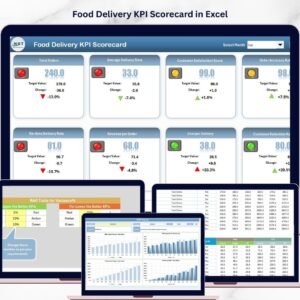
- 📊 Scorecard Sheet: The main dashboard where you can select the month and view Month-to-Date (MTD) or Year-to-Date (YTD) performance. It features dropdown menus to filter data, side-by-side comparisons of actual vs. target values, and color-coded visual indicators to instantly assess KPI status. This dynamic overview puts all critical information at your fingertips.
- 📈 KPI Trend Sheet: Allows you to select any KPI via dropdown and view detailed information such as KPI group, unit of measurement, KPI type (whether a lower or higher value is better), formula, and definition. This sheet also presents MTD and YTD trend charts comparing actual, target, and previous year (PY) data, making it easy to spot performance trends over time.
- 📝 Input Data Sheet: This is your data entry hub where actual values, targets, and other relevant metrics for each KPI are recorded. The sheet is user-friendly and flexible, enabling quick updates as new results come in, so your scorecard always reflects the latest business performance.
- 📚 KPI Definition Sheet: Here, you input essential KPI details such as the KPI name, group, unit, formula, and a clear definition. This ensures everyone on your team understands what each KPI measures and how it’s calculated.

Food Delivery KPI Scorecard in Excel
What’s Inside the Food Delivery KPI Scorecard
The Food Delivery KPI Scorecard is packed with features that make tracking and improving your food delivery operations seamless. You’ll find a fully customizable template with:
- 📅 Dropdown menus for easy period selection (Monthly, MTD, YTD).
- 🎯 Actual vs Target comparisons with clear, color-coded visual cues.
- 📊 Trend charts that visualize performance trajectories for all KPIs.
- 🔍 Detailed KPI metadata including formula and definitions for transparency.
- ✍️ A dedicated data input area for quick and intuitive updates.
- 💡 Conditional formatting and visual indicators to highlight performance gaps.
- 📑 Four well-organized sheets that simplify navigation and analysis.
How to Use the Food Delivery KPI Scorecard
Getting started with this KPI Scorecard is straightforward and requires minimal setup:
- 🖱️ Open the template and navigate to the Input Data Sheet to enter your actual and target KPI values.
- 📅 Use the dropdown menus on the Scorecard Sheet to select the time frame you want to analyze (monthly, MTD, or YTD).
- 🔍 Review the color-coded indicators and actual vs. target comparisons to gauge your performance quickly.
- 📈 Switch to the KPI Trend Sheet to explore detailed trends and understand how your KPIs have evolved over time.
- 📚 Update or add new KPIs using the KPI Definition Sheet to keep your scorecard relevant and comprehensive.
- 💾 Save your updated scorecard regularly to maintain an accurate record of your food delivery performance metrics.
Who Can Benefit from This Food Delivery KPI Scorecard
This digital KPI Scorecard is ideal for a wide range of users in the food delivery ecosystem, including:
- 🚚 Food Delivery Managers: Monitor operational efficiency, delivery times, and customer satisfaction metrics to improve service quality.
- 🍽️ Restaurant Owners: Track order accuracy, repeat customer rates, and profitability KPIs to optimize business growth.
- 📊 Business Analysts: Analyze trends and identify performance gaps with clear data visualization and KPI definitions.
- 🧑💻 Operations Teams: Use real-time performance insights to implement process improvements swiftly.
- 🚀 Startups & SMEs: Leverage a cost-effective, ready-made solution to measure and scale food delivery operations efficiently.
Whether you’re managing a single outlet or a multi-location food delivery service, this KPI Scorecard template will transform how you monitor your performance and make data-backed decisions.

Food Delivery KPI Scorecard

KPI Trend Sheet

Input Data Sheet

KPI Definition sheet tab
Click here to read the Detailed blog post.
Visit our YouTube channel to learn step-by-step video tutorials.
Compatibility and Requirements
- Works in Microsoft Excel desktop (Excel 2016 or later, or Microsoft 365).
- You pick the month and the MTD or YTD view from dropdown menus, and the KPI Trend sheet has a KPI dropdown. Microsoft explains dropdowns in Create a drop-down list.
Frequently Asked Questions
Which sheets are included?
Four sheets: the Scorecard sheet, the KPI Trend sheet, the Input Data sheet and the KPI Definition sheet.
How do I update the scorecard?
Enter your actual and target values for each KPI on the Input Data sheet. Then choose the month and the MTD or YTD view on the Scorecard sheet.
How do I see the trend for one KPI?
Open the KPI Trend sheet and select the KPI from the dropdown. It shows the KPI group, unit, type (whether a lower or higher value is better), formula and definition. MTD and YTD charts compare actual, target and previous year values.
Can I add or change KPIs?
Yes. Enter the KPI name, group, unit, formula and definition on the KPI Definition sheet.
Is there a Google Sheets or Power BI version?
There are dashboard versions of this topic: see the Food Delivery Dashboard in Google Sheets and the Food Delivery Dashboard in Power BI.
Related Food Delivery Templates
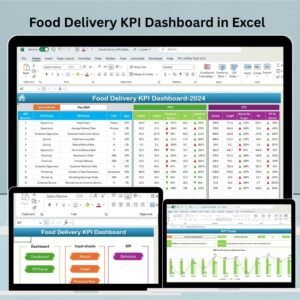
- Food Delivery KPI Dashboard in Excel: a dashboard view of the same topic in Excel
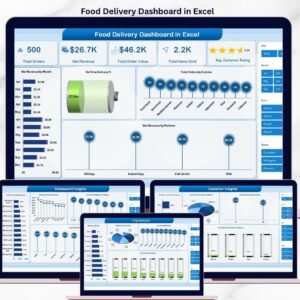
- Food Delivery Dashboard in Excel: another Excel dashboard for delivery operations
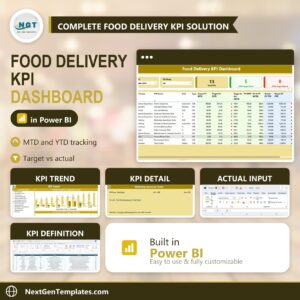
- Food Delivery KPI Dashboard in Power BI: the Power BI edition
- Food Delivery KPI Dashboard in Google Sheets: the Google Sheets edition
- Food Delivery Log Data Entry System in Excel: a log for recording deliveries
Browse all Excel KPI dashboards.




Reviews
There are no reviews yet.