



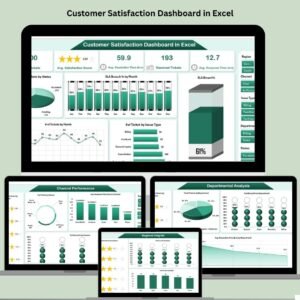
The Customer Satisfaction Improvement KPI Dashboard in Excel is a robust tool designed to help businesses monitor and improve customer satisfaction over time. This easy-to-use Excel dashboard allows you to track key performance indicators (KPIs) that directly impact customer satisfaction, such as response times, customer feedback, resolution times, and more. By analyzing these KPIs, businesses can make informed decisions to enhance customer experiences, increase retention, and boost overall satisfaction.
With visually appealing charts, real-time data updates, and a user-friendly interface, this template makes it easy to track customer satisfaction trends and take actionable steps towards continuous improvement. Whether you’re in retail, service, or any other customer-facing industry, this dashboard provides essential insights to help you stay focused on what matters most—your customers.

Key Features of the Customer Satisfaction Improvement KPI Dashboard in Excel
📊 KPI Tracking: Track critical KPIs that influence customer satisfaction, such as response times, issue resolution time, customer feedback, and more.
⚙️ Real-Time Data: Get live updates on your customer satisfaction metrics as data is entered, providing a clear picture of performance.
📈 Visual Charts and Graphs: View key metrics through visually engaging charts, graphs, and color-coded visuals that highlight trends and performance gaps.
💼 Customizable Fields: Modify KPIs, data fields, and targets based on your business’s specific customer satisfaction goals and metrics.
📅 Trend Analysis: Analyze customer satisfaction trends over time to identify areas of improvement or success.
🔄 Easy Collaboration: Share the dashboard with your team or management for collaborative updates and decision-making.
Why You’ll Love the Customer Satisfaction Improvement KPI Dashboard in Excel
✅ Real-Time Insights: Get instant access to updated data to monitor how well your business is meeting customer expectations.
✅ Actionable Data: Use the insights from the KPIs to take actionable steps toward improving your customer service and satisfaction.
✅ Customizable to Your Needs: Tailor the dashboard to fit your business’s unique KPIs and customer satisfaction goals.
✅ Boost Customer Retention: Track customer satisfaction improvements over time and make changes that will enhance customer loyalty and satisfaction.
✅ Easy to Use: The intuitive layout makes it simple to enter data and analyze key metrics, even for non-Excel experts.
What’s Inside the Customer Satisfaction Improvement KPI Dashboard in Excel?
📊 Customer Satisfaction KPIs: A comprehensive list of KPIs designed to track customer satisfaction, including feedback scores, response times, and issue resolution metrics.
📈 Visual Dashboards: Use charts and graphs to visualize your customer satisfaction performance and identify areas for improvement.
⚙️ Target Setting: Set customer satisfaction targets and monitor progress toward achieving them.
💼 Customization: Modify the dashboard to reflect the specific KPIs relevant to your business, industry, or department.
📅 Trend Analysis: Track the progress of customer satisfaction over time and adjust strategies based on insights.
How to Use the Customer Satisfaction Improvement KPI Dashboard in Excel
1️⃣ Download the Template – Get access to the pre-configured KPI dashboard in Excel.
2️⃣ Input Data: Enter your customer satisfaction data such as survey scores, response times, and customer feedback.
3️⃣ Monitor KPIs: Track key performance metrics and monitor real-time data to assess your customer satisfaction levels.
4️⃣ Visualize Trends: Use charts and graphs to see how customer satisfaction trends are evolving over time.
5️⃣ Adjust Strategies: Based on data insights, refine your strategies to continually improve customer satisfaction.
Who Can Benefit from the Customer Satisfaction Improvement KPI Dashboard in Excel?
🔹 Customer Service Managers
🔹 Operations Managers
🔹 Business Owners
🔹 Project Managers
🔹 Customer Support Teams
🔹 Marketing and Sales Teams
🔹 HR Managers (for employee satisfaction metrics)
Track customer satisfaction, improve service quality, and monitor performance with the Customer Satisfaction Improvement KPI Dashboard in Excel. Ensure your business is consistently meeting customer expectations and continuously improving service quality.
Click here to read the Detailed blog post
Visit our YouTube channel to learn step-by-step video tutorials
Youtube.com/@PKAnExcelExpert
Compatibility and Requirements
- Works in Microsoft Excel desktop (Excel 2016 or later, or Microsoft 365).
- Trends are shown in charts and color-coded visuals. Microsoft explains Excel charts in Create a chart from start to finish.
Frequently Asked Questions
Which KPIs does the dashboard track?
It tracks KPIs that affect customer satisfaction, such as response times, issue resolution time, feedback scores and survey results.
Can I set targets?
Yes. You set customer satisfaction targets and the dashboard shows progress toward them.
Can I change the KPIs?
Yes. You can modify the KPIs, data fields and targets to match your own goals.
Does it show trends over time?
Yes. Trend analysis shows how satisfaction changes over time, so you can spot gaps and gains.
Is there a Google Sheets version?
Yes. The Customer Satisfaction Improvement KPI Dashboard in Google Sheets works in a browser.
Related Customer Satisfaction Templates
- Customer Satisfaction Improvement KPI Dashboard in Google Sheets: the same KPIs in Google Sheets
- Customer Satisfaction Dashboard in Excel: a full satisfaction dashboard in Excel
- Customer Satisfaction Survey Tracker in Excel: log survey responses
- Customer Service Dashboard in Excel: support team performance
- Customer Satisfaction Dashboard in Power BI: the topic in Power BI
Browse all Excel KPI dashboards or the Excel sales and marketing templates.































Reviews
There are no reviews yet.