



In the aviation industry, maintenance performance is not just about efficiency—it is about safety, compliance, reliability, and cost control. Aviation Maintenance KPI Dashboard in Excel Even small delays or overlooked KPIs can lead to aircraft downtime, regulatory risks, and rising maintenance costs. Aviation Maintenance KPI Dashboard in Excel Yet many aviation teams still depend on manual spreadsheets and disconnected reports that slow down decision-making.
Aviation Maintenance KPI Dashboard in Excel That is exactly where the Aviation Maintenance KPI Dashboard in Excel becomes a powerful and practical solution.
This professionally designed Excel dashboard transforms complex maintenance data into clear, structured, and actionable insights. Instead of reacting after issues occur, this dashboard helps maintenance teams track performance continuously, identify risks early, and make confident, data-driven decisions—all within Microsoft Excel.
🚀 Key Features of Aviation Maintenance KPI Dashboard in Excel
📊 Fully Excel-Based Dashboard – No Power BI, no macros, no complex setup
📅 Dynamic Month Selection – Change reporting month instantly using dropdowns
🎯 MTD & YTD Performance Tracking – Monitor short-term results and long-term trends
📈 Target vs Actual Comparison – Identify gaps and achievements quickly
🔁 Previous Year Comparison – Measure real improvement year over year
⬆️⬇️ Conditional Formatting Indicators – Instantly spot performance risks
📉 KPI Trend Analysis – Visualize MTD and YTD trends clearly
📘 Dedicated KPI Definition Section – Understand every KPI without confusion
📦 What’s Inside the Aviation Maintenance KPI Dashboard
This Excel product includes seven well-structured worksheets; each designed for clarity and usability.
🔹 Home Sheet

Acts as the navigation hub with six buttons that let users jump instantly to any worksheet.
🔹 Dashboard Sheet
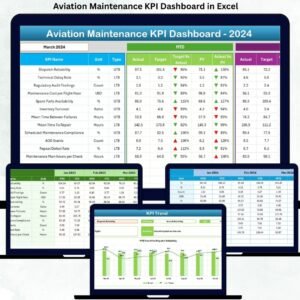
The main performance overview page displaying:
MTD Actual, Target, and Previous Year values
YTD Actual, Target, and Previous Year values
Target vs Actual and PY vs Actual percentages
Visual up/down arrows for instant status checks
🔹 KPI Trend Sheet
Provides deep KPI-level analysis with:
KPI selection dropdown
KPI Group, Unit, Type, Formula, and Definition
MTD and YTD trend charts for Actual, Target, and Previous Year
🔹 Actual Numbers Input Sheet
Used to enter current-year MTD and YTD actual values in a structured format.
🔹 Target Sheet
Stores MTD and YTD target values aligned with maintenance objectives.
🔹 Previous Year Number Sheet
Captures historical data to support accurate year-over-year analysis.
🔹 KPI Definition Sheet
Acts as a single source of truth for KPI names, units, formulas, and definitions.
🛠️ How to Use the Aviation Maintenance KPI Dashboard
Using this dashboard is simple and user-friendly.
1️⃣ Enter actual performance data in the Actual Numbers Input Sheet
2️⃣ Update targets in the Target Sheet
3️⃣ Maintain historical data in the Previous Year Number Sheet
4️⃣ Select the reporting month using dropdowns
5️⃣ Instantly analyze performance on the Dashboard and Trend sheets
Because everything runs inside Excel, updates are fast, controlled, and cost-effective.
👥 Who Can Benefit from This Aviation Maintenance KPI Dashboard?
This dashboard is ideal for:
✈️ Aviation Maintenance Managers
🛠️ Aircraft Engineers & Technical Teams
📊 Maintenance Planning & MIS Teams
🧾 Compliance & Safety Teams
💼 Aviation Operations Leadership
🏢 Airlines, MROs, and Charter Operators
If your organization needs better visibility, stronger compliance, and improved maintenance efficiency, this dashboard is built for you.
🔎 Click here to read the Detailed blog post
👉 Visit our YouTube channel to learn step-by-step video tutorials
Watch the step-by-step video tutorial:
Compatibility and Requirements
- Works in Microsoft Excel desktop (Excel 2016 or later, or Microsoft 365).
- The dashboard has no macros and no Power BI setup.
- You pick the reporting month from a dropdown, and conditional formatting shows the up and down arrows. Microsoft explains the feature in Use conditional formatting to highlight information in Excel.
Frequently Asked Questions
How many worksheets are included?
Seven worksheets: Home, Dashboard, KPI Trend, Actual Numbers Input, Target, Previous Year Number and KPI Definition.
How do I update the dashboard?
Enter your current-year MTD and YTD values in the Actual Numbers Input sheet, your goals in the Target sheet and last year’s values in the Previous Year Number sheet. Then choose the reporting month from the dropdown.
Can I compare this year with last year?
Yes. The Dashboard shows MTD and YTD Actual, Target and Previous Year values, with Target vs Actual and PY vs Actual percentages and up or down arrows.
How do I see the trend for a single KPI?
Open the KPI Trend sheet and select the KPI from the dropdown. It shows the KPI Group, Unit, Type, Formula and Definition, plus MTD and YTD trend charts for Actual, Target and Previous Year.
Is there a Power BI version?
Yes. See the Aviation Maintenance KPI Dashboard in Power BI.
Related Aviation and Maintenance Templates
- Aviation Maintenance KPI Dashboard in Power BI: the same KPIs in Power BI
- Aviation Maintenance Dashboard in Excel: another Excel dashboard for aviation maintenance
- Aviation Operations KPI Dashboard in Excel: KPIs for the operations side of aviation
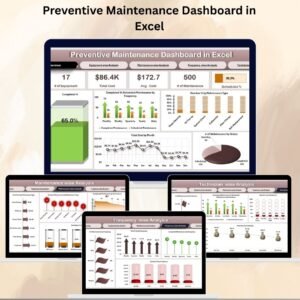
- Preventive Maintenance Dashboard in Excel: a general maintenance dashboard
- KPI Dashboard Library (Excel): 15 KPI dashboards in one download
Browse all Excel KPI dashboards.


















Reviews
There are no reviews yet.