


In today’s digital landscape, data privacy is more critical than ever. Whether you’re a business handling customer information or an organization ensuring internal compliance, managing data privacy tasks effectively is crucial.
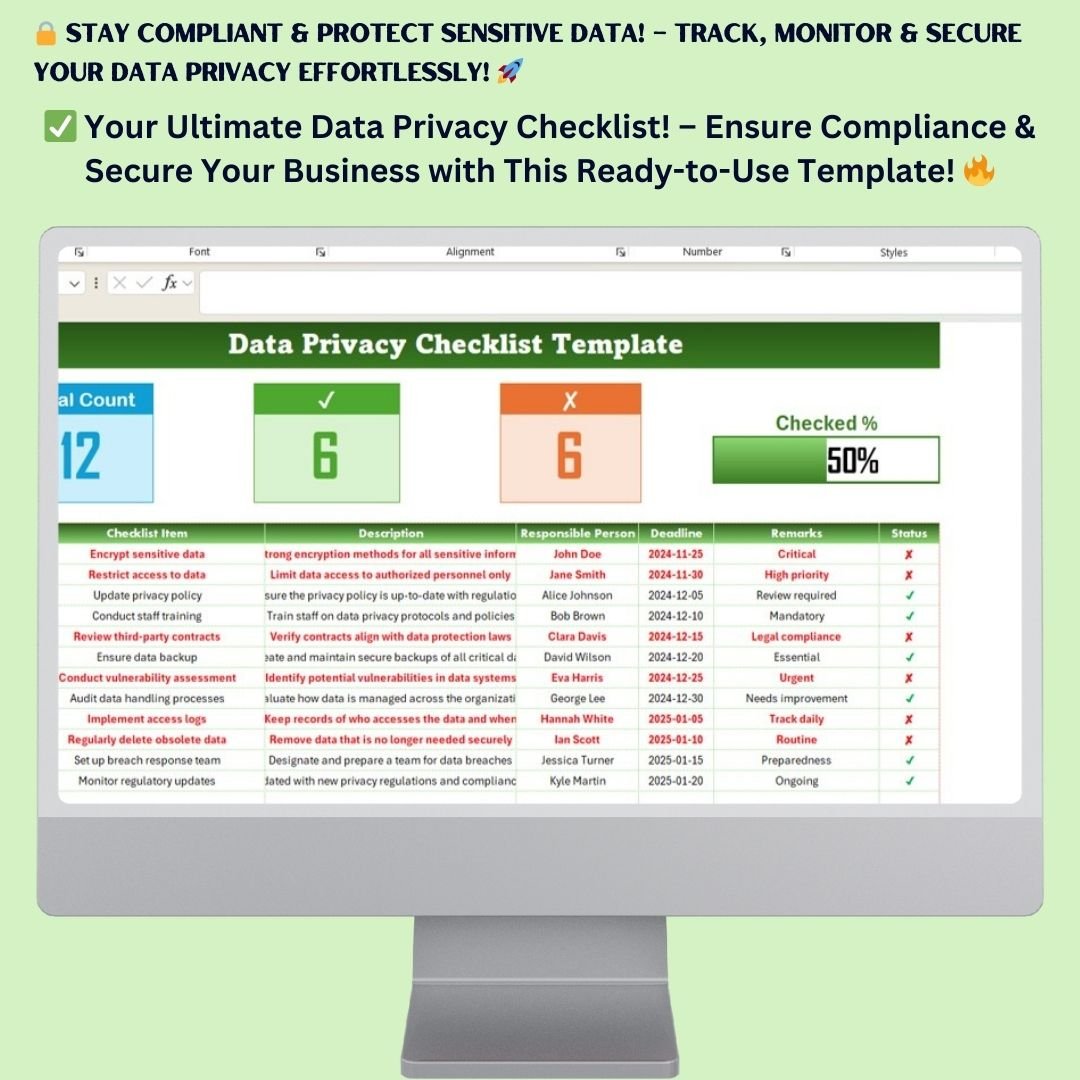
The Data Privacy Checklist Template in Excel is a powerful, easy-to-use tool designed to help you organize and track all essential data privacy measures in one structured format. This checklist ensures you stay compliant with regulations like GDPR, HIPAA, and CCPA while maintaining a secure data management framework.
Key Features of the Data Privacy Checklist Template

This template includes two essential worksheets designed to streamline your data privacy management:
1. Data Privacy Checklist Tab
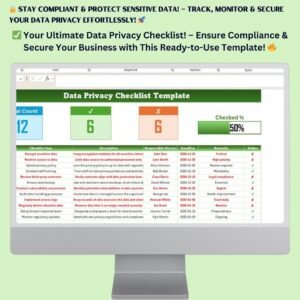
This is the primary worksheet where you track your data privacy tasks and progress.
✔️ Key Metrics at a Glance
- Total Count – Displays the total number of checklist items.
- Checked Count – Tracks the number of completed tasks.
- Crossed Count – Shows pending or incomplete tasks.
- Progress Bar – Provides a visual representation of completion status.
✔️ Detailed Checklist Table
Each row in the checklist gives you a comprehensive view of every privacy-related task:
- Serial No. – Unique identifier for each task.
- Checklist Item – The task title.
- Description – Brief details about the task.
- Responsible Person – Assign the person accountable for execution.
- Deadline – Due date for task completion.
- Remarks – Notes on progress, issues, or compliance status.
- Status – Indicates whether the task is completed ✅ or pending ❌.
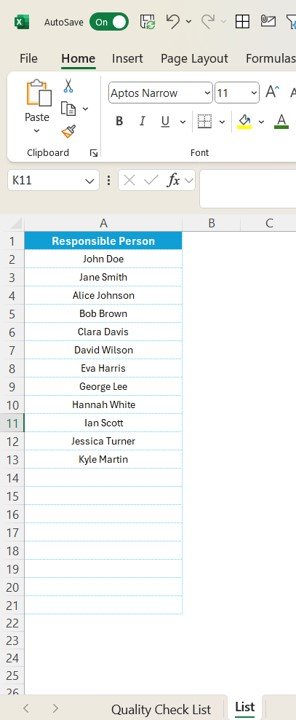
2. List Sheet Tab
- A dedicated sheet where all responsible persons are listed.
- Helps in assigning tasks efficiently through a drop-down selection.
- Keeps records organized and structured for easy updates.
Why You Need This Data Privacy Checklist
This Excel-based Data Privacy Checklist Template is designed to help businesses, compliance officers, and IT teams manage their data security and privacy policies. Below are some compelling reasons why you need this template:
✅ Ensure Compliance with Privacy Regulations
- Stay compliant with GDPR, CCPA, HIPAA, and other global data protection laws.
- Organize all privacy-related tasks in a structured and accessible format.
- Reduce the risk of fines, breaches, and non-compliance penalties.
✅ Improve Data Security & Protection
- Monitor and track sensitive data encryption and access restrictions.
- Ensure data retention and deletion policies are followed correctly.
- Keep records of third-party contracts and audits to ensure legal compliance.
✅ Enhance Team Coordination & Accountability
- Assign specific tasks to team members responsible for data privacy.
- Track progress and deadlines with an easy-to-read dashboard.
- Identify gaps and address incomplete tasks before compliance audits.
How to Use the Data Privacy Checklist Template
Step 1: Add Your Data Privacy Tasks
- Open the Data Privacy Checklist tab.
- List all tasks related to data protection, encryption, and compliance monitoring.
Step 2: Assign Responsibilities
- Use the drop-down list to assign tasks to team members.
- Refer to the List Sheet for available personnel.
Step 3: Set Deadlines & Track Progress
- Define clear deadlines for each task.
- Mark tasks as completed ✅ or pending ❌ to track real-time progress.
Step 4: Use the Progress Dashboard
- The Progress Bar updates automatically based on completed tasks.
- Regularly review and update the checklist to maintain compliance.
Who Can Benefit from This Template?
This Data Privacy Checklist Template in Excel is perfect for: ✔️ IT & Security Teams – Monitor encryption, access logs, and data protection protocols.
✔️ Compliance Officers – Ensure your organization follows data protection laws.
✔️ Legal & Risk Management Teams – Track contracts, audits, and risk assessments.
✔️ Small Businesses & Enterprises – Implement structured data privacy processes.
Advantages of Using This Template
🛡️ Saves Time & Effort
- No need to create a checklist from scratch—this template is ready-to-use.
- Automates progress tracking and organizes compliance tasks efficiently.
📊 Provides Clear & Visual Insights
- The interactive progress dashboard allows quick monitoring of tasks.
- Color-coded status indicators help identify pending and completed tasks.
🔐 Improves Data Security Measures
- Helps in implementing stronger security policies and encryption methods.
- Ensures third-party compliance and audit readiness.
Why Choose This Excel-Based Template?
Unlike other complicated software solutions, this Excel template is: ✔️ User-Friendly – Simple and intuitive interface for easy task tracking.
✔️ Fully Customizable – Modify fields to fit your organization’s compliance needs.
✔️ Cost-Effective – No expensive subscriptions, just a one-time purchase.
🔽 Frequently Asked Questions (FAQ)
1. Can I customize this checklist for my specific industry?
Yes! The template is fully editable to suit any industry’s data privacy requirements.
2. Is this template suitable for small businesses?
Absolutely! Whether you’re a startup, SME, or enterprise, this checklist keeps your data privacy tasks organized.
3. How do I update the checklist?
Simply enter new tasks, update deadlines, and mark completed items. The progress bar updates automatically.
4. What software is required to use this template?
You only need Microsoft Excel or Google Sheets to start using it immediately.
📥 Instant Download & Lifetime Access
- Instant Access: Download immediately after purchase.
- Lifetime Use: No recurring fees—pay once and use forever.
- Free Bug Fixes: Get free bug fixes – if something does not work as described, we fix it and send the corrected file.
Click hare to read the Detailed blog post
Visit our YouTube channel to learn step-by-step video tutorials
Compatibility and Requirements
- Works in Microsoft Excel desktop (Excel 2016 or later, or Microsoft 365).
- Responsible people are picked from a drop-down that reads the List sheet, so no add-ins are needed.
- Microsoft explains how drop-down lists work in Create a drop-down list.
Related Data Privacy Templates
- Data Privacy Tracking Checklist in Excel: track privacy tasks over time
- Data Privacy Monitoring Checklist in Excel: regular privacy monitoring checks
- GDPR Compliance To-Do Checklist in Excel: GDPR tasks as a to-do list
- Cybersecurity Checklist in Excel: basic security checks
- Checklist & SOP Pack: 12 Excel and Google Sheets checklists in one bundle
Browse all Excel checklists or the Excel IT templates.




























Reviews
There are no reviews yet.