


Running a yoga centre is not just about offering great classes—it also requires clear visibility into attendance, memberships, revenue, and trainer performance. But many yoga studio owners struggle with scattered data, manual reports, and inconsistent tracking. This leads to confusion, missed opportunities, and slow decision-making. That’s exactly where the Yoga Centres KPI Dashboard in Excel becomes your most valuable management tool.
This ready-to-use dashboard turns raw yoga studio data into meaningful insights. It helps you monitor Month-to-Date (MTD), Year-to-Date (YTD), and Previous Year (PY) performance in a clean, simple, and fully automated Excel interface. Yoga Centres KPI Dashboard in Excel Whether you’re tracking membership renewals, class occupancy, trainer utilization, customer satisfaction, or revenue growth—everything is displayed neatly in one place. No coding. No advanced software. Just Excel.
The dashboard is built with powerful formulas, dynamic charts, conditional formatting, and drop-down selections that refresh automatically when you enter new values. This means you get real-time clarity without spending hours building reports. Perfect for both small studios and multi-branch yoga centres, this dashboard helps you shift from guesswork to confident, data-driven decisions.
✨ Key Features of the Yoga Centres KPI Dashboard in Excel
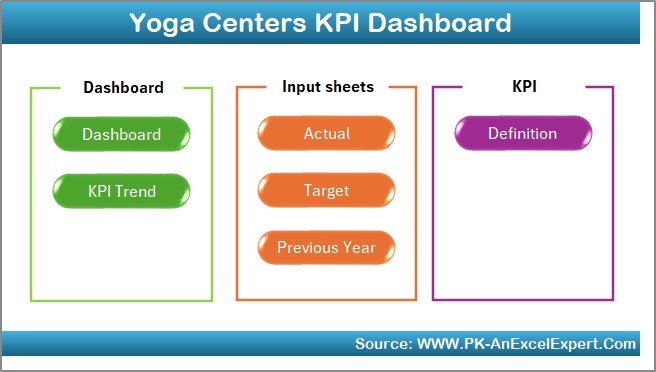
This dashboard contains seven professionally designed worksheets, each playing a unique role in performance tracking.
📌 Home Sheet – Your Navigation Control Panel
The Home Sheet is the main index of the file. It includes quick-access buttons to jump between sheets easily. This keeps the dashboard organized, user-friendly, and perfect even for non-technical users.
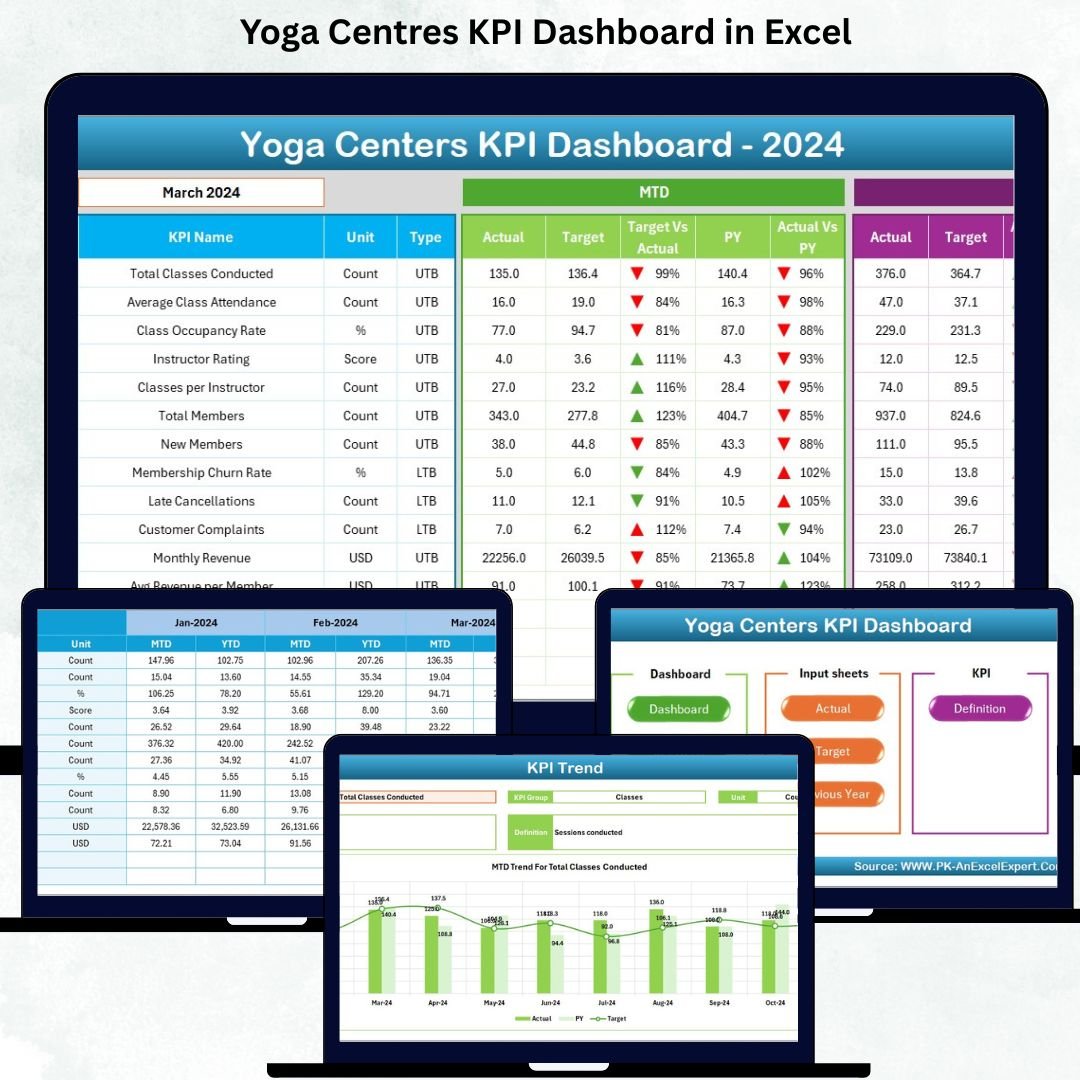
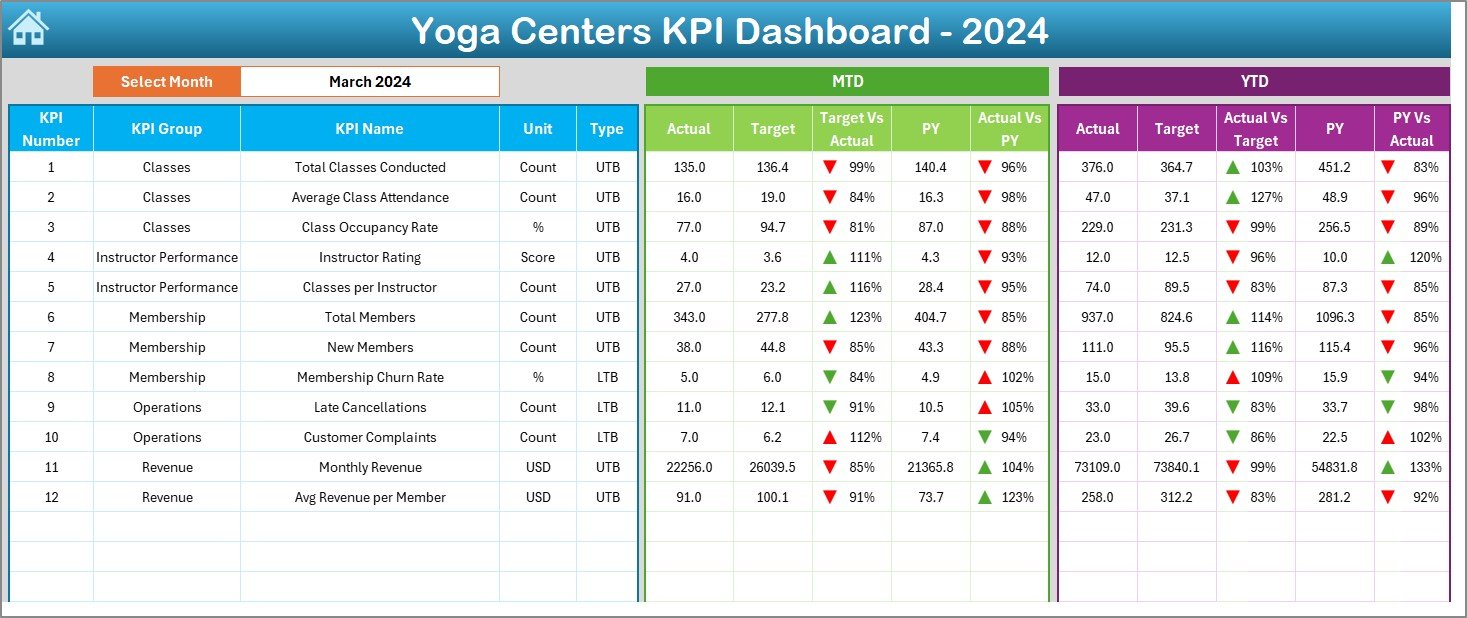
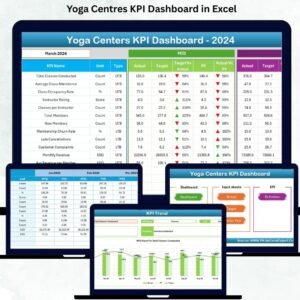
📌 Dashboard Sheet – Complete View of Yoga Centre Performance
This is the most important page of the file. A month selector allows you to choose any month, and all KPIs update instantly.
You can view:
✔ MTD Actual, Target, PY Values
✔ YTD Actual, Target, PY Values
✔ Target vs Actual (% Performance)
✔ PY vs Actual (% Comparison)
✔ Green/Red arrows for improvement or decline
This sheet provides clarity in one glance and helps owners identify areas that need attention.
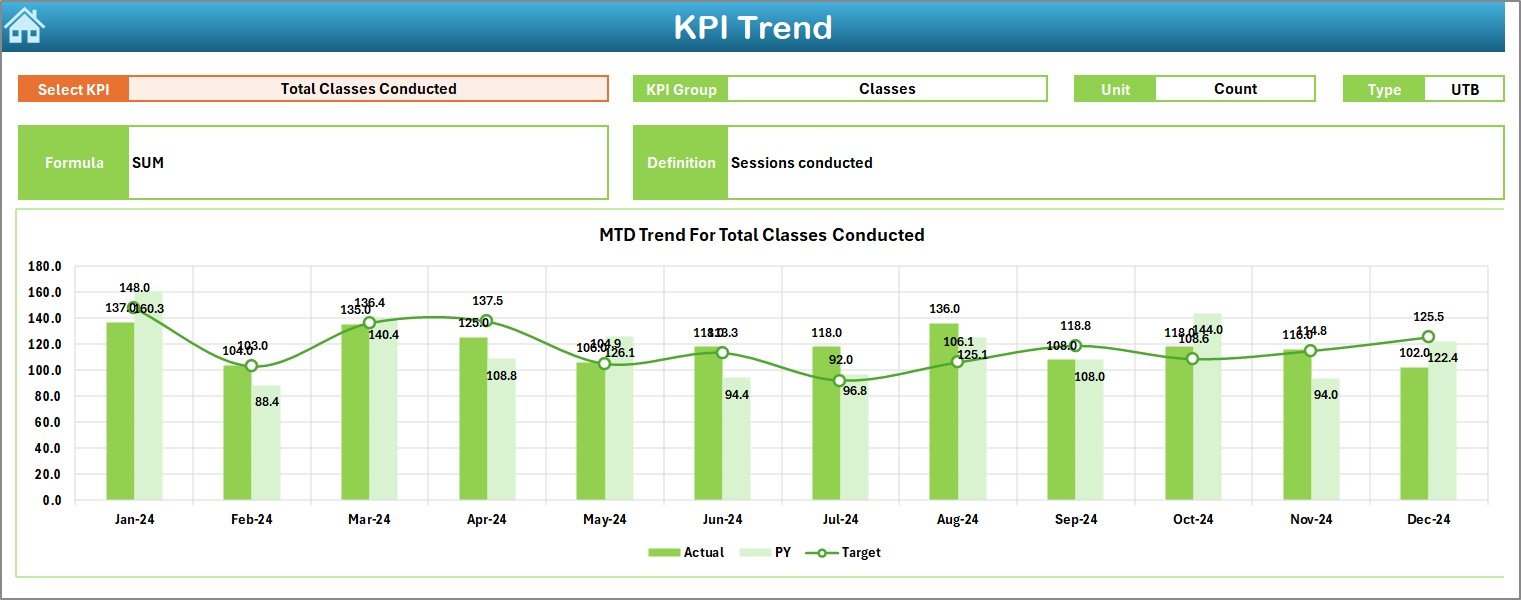
📌 KPI Trend Sheet – Track KPI Behaviour Over Time
A dynamic analysis page with:
✔ KPI selection drop-down
✔ KPI group, unit, formula, type (UTB/LTB)
✔ MTD trend chart
✔ YTD trend chart
You can study seasonal patterns, performance shifts, and long-term improvements.
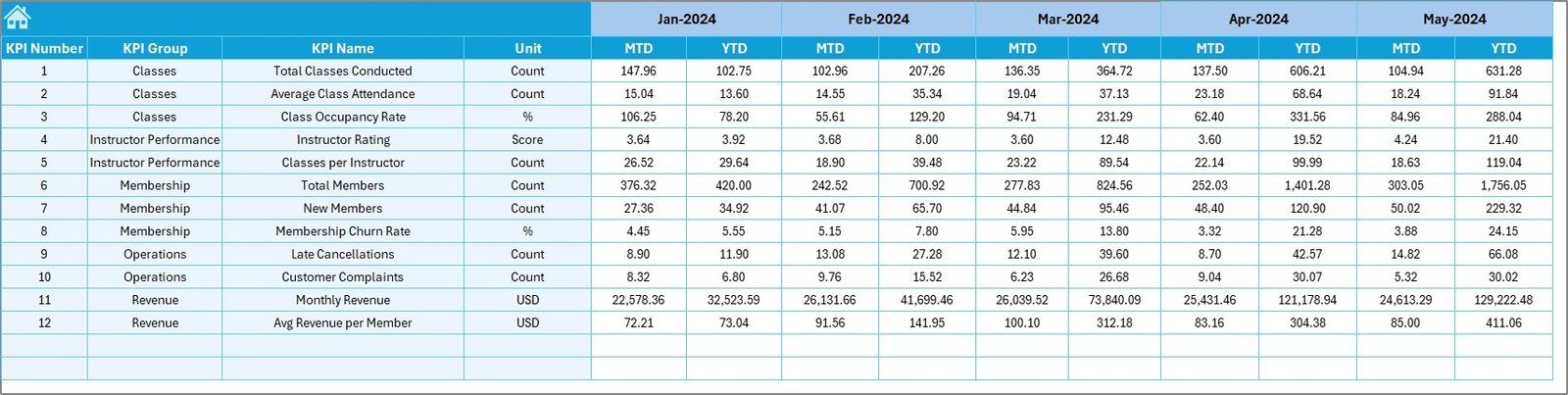
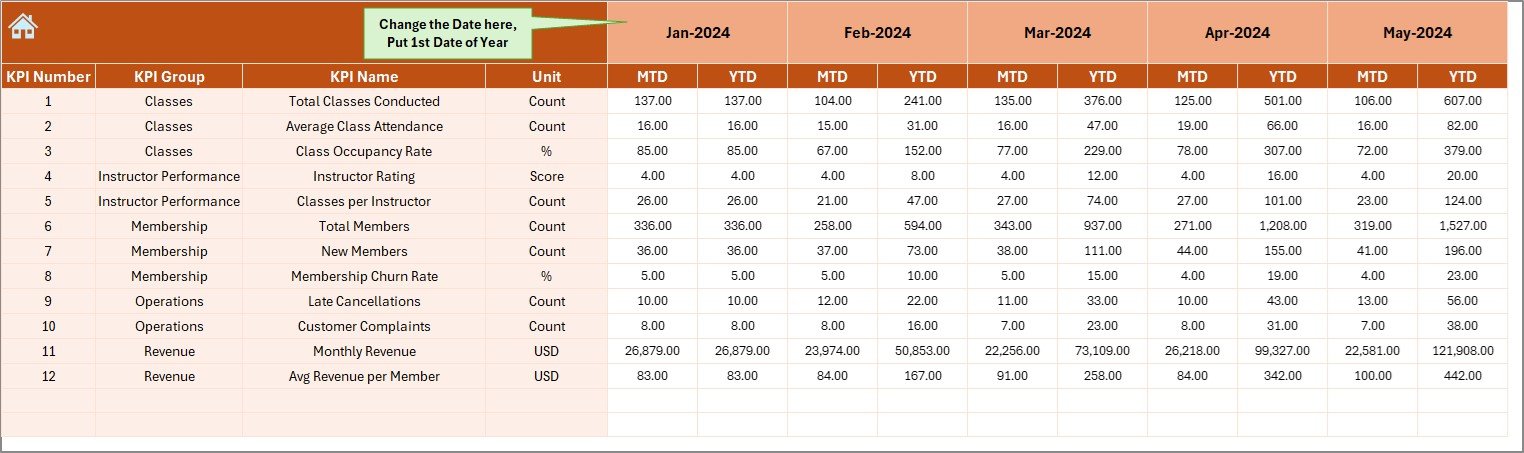
📌 Actual Numbers Input Sheet – Enter Monthly Performance Data
This sheet stores:
✔ MTD Actual
✔ YTD Actual
✔ Starting month of the year
Everything automatically flows into the dashboard.
📌 Target Sheet – Set Expectations Clearly
Enter monthly targets for every KPI. This sheet helps you measure whether performance meets the studio’s goals.
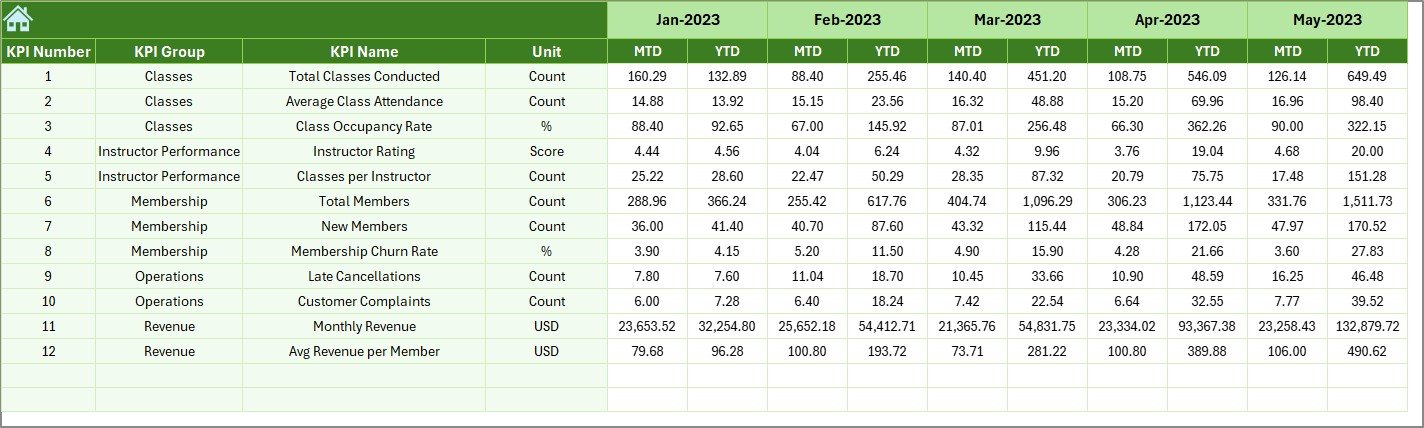
📌 Previous Year Data Sheet – Compare with Last Year
Stores last year’s MTD and YTD data to provide meaningful comparisons between PY and CY.
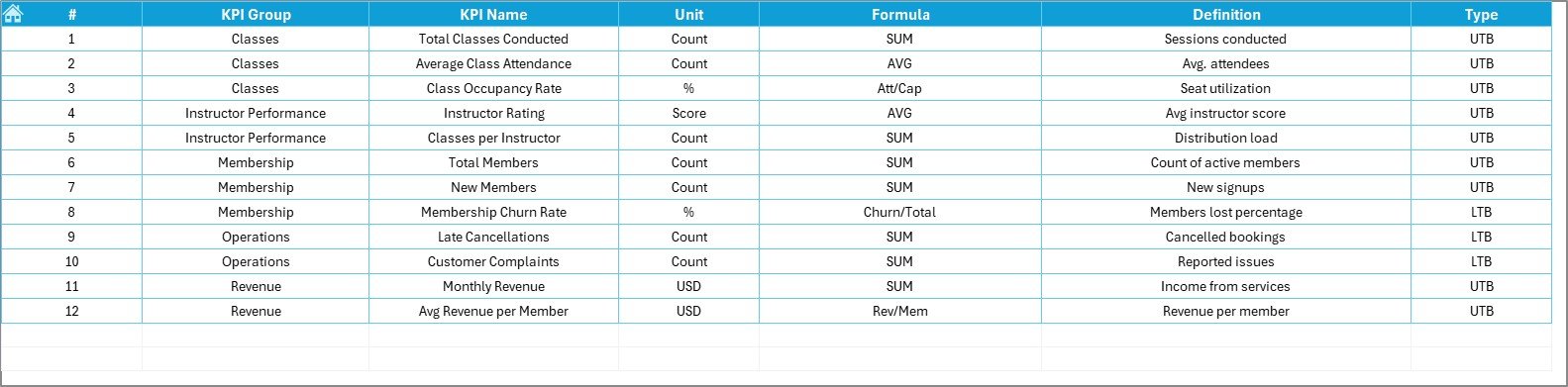
📌 KPI Definition Sheet – Understand Every KPI Clearly
This sheet includes:
✔ KPI Name
✔ KPI Group
✔ Unit
✔ Formula
✔ Definition
This ensures everyone—from owners to trainers—understands exactly what each KPI measures.
📦 What’s Inside the Yoga Centres KPI Dashboard in Excel
Your downloadable Excel file includes:
✔ Fully interactive dashboard page
✔ KPI trend analysis page
✔ KPI definition reference page
✔ Input sheets for Actual, Target, and Previous Year data
✔ Automatic charts, conditional icons, and formulas
✔ Clear MTD/YTD/PY comparisons
Everything is structured to make management simple and professional.
🛠️ How to Use the Yoga Centres KPI Dashboard in Excel
👉 Step 1: Enter Actual Data
Update MTD and YTD values monthly.
👉 Step 2: Enter Targets
Define monthly expectations for every KPI.
👉 Step 3: Select Month in Dashboard
All visuals refresh automatically.
👉 Step 4: Study Trends
Use the KPI Trend sheet for a deeper understanding of performance.
👉 Step 5: Review KPI Definitions
Ensure every team member knows what each KPI means.
👉 Step 6: Use Insights to Improve Operations
Optimize trainer schedules, improve class occupancy, plan memberships, and boost revenue.
🎯 Who Can Benefit from This Yoga Centres KPI Dashboard?
This dashboard is perfect for:
🧘♂️ Yoga Centre Owners
Get clarity on attendance, revenue, and business performance.
📅 Studio Managers
Monitor scheduling, occupancy, and member behaviour.
🏋️♀️ Trainers & Instructors
Track class ratings, utilization, and performance.
📈 Business Consultants
Use structured KPIs to advise yoga centres.
💼 Multi-Branch Yoga Chains
Maintain consistent performance tracking across locations.
If your goal is better planning, higher revenue, and a more engaged customer base—this dashboard is made for you.
### Click here to read the Detailed blog post
Visit our YouTube channel to learn step-by-step video tutorials
Watch the step-by-step video tutorial:
Compatibility and Requirements
- Works in Microsoft Excel desktop (Excel 2016 or later, or Microsoft 365).
- You choose the month from a dropdown on the Dashboard sheet, and the KPI Trend sheet has a KPI dropdown. Microsoft explains how in Create a drop-down list.
Frequently Asked Questions
Which sheets are included?
Seven sheets: Home, Dashboard, KPI Trend, Actual Numbers, Target, Previous Year Data and KPI Definition.
How do I update the dashboard?
Enter your MTD and YTD actual figures in the Actual Numbers sheet and your monthly goals in the Target sheet. Then select a month on the Dashboard sheet and everything refreshes.
Can I compare this year with last year?
Yes. Enter last year’s MTD and YTD figures in the Previous Year Data sheet. The Dashboard shows actual against both target and previous year, with green and red arrows for improvement or decline.
How do I see the trend for one KPI?
Open the KPI Trend sheet and pick a KPI from the dropdown. It shows the KPI group, unit, formula and type (UTB or LTB), plus an MTD trend chart and a YTD trend chart.
Is there a Power BI or Google Sheets version?
There is a Yoga Centres KPI Dashboard in Power BI. For Google Sheets, see the Yoga Studio KPI Dashboard in Google Sheets.
Related Yoga and Wellness Templates
- Yoga Centres KPI Dashboard in Power BI: the same KPIs as a Power BI report
- Yoga Centres Dashboard in Excel: another dashboard layout for yoga centres in Excel
- Yoga Studio KPI Dashboard in Excel: a KPI dashboard built for single studios
- Yoga Studio KPI Scorecard in Excel: a scorecard view of studio metrics
- Spas and Wellness Centres KPI Dashboard in Excel: a similar dashboard for wellness businesses
Browse all Excel KPI dashboards.





















Reviews
There are no reviews yet.