



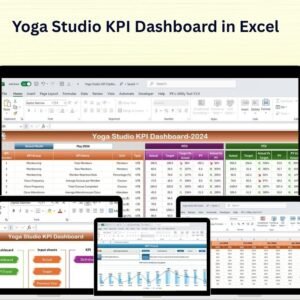
The Yoga Studio KPI Dashboard in Excel is a powerful tool designed for yoga studio owners, managers, and instructors to track key performance indicators (KPIs) and optimize the performance of their yoga studio. Whether you’re managing a single-location studio or overseeing multiple facilities, this Excel-based dashboard provides real-time insights into student attendance, class popularity, revenue generation, and overall studio performance.
With customizable features and interactive tracking, this dashboard helps you monitor essential metrics, improve studio operations, and make data-driven decisions to grow your yoga business and enhance your students’ experience.
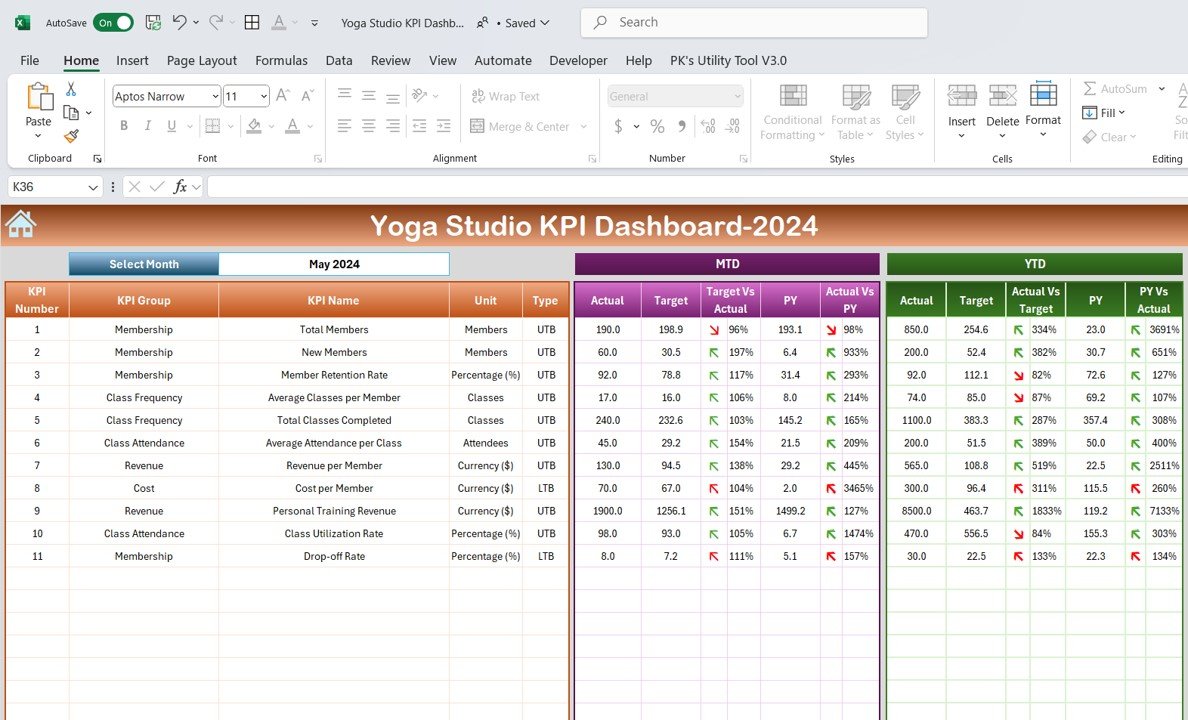
Key Features of the Yoga Studio KPI Dashboard in Excel:
🧘 Class and Attendance Tracking
Monitor attendance trends, track the number of students in each class, and assess which classes are most popular to optimize your class schedule and instructor allocation.
💰 Revenue and Profitability Monitoring
Track revenue from membership sales, class fees, workshops, and merchandise to evaluate the financial health of your studio.
📊 Instructor Performance Analysis
Evaluate instructor performance by tracking class attendance and student feedback, ensuring that your instructors are effectively engaging students.
📅 Class Scheduling and Booking Management
Monitor class schedules, track booked classes, and ensure your studio is effectively utilizing space and time for optimal class offerings.
🌍 Student Retention and Satisfaction
Track student retention rates, monitor satisfaction through surveys, and assess student feedback to improve the overall experience at your yoga studio.
🚀 Why You’ll Love the Yoga Studio KPI Dashboard in Excel:
✅ Track Class Attendance and Trends – Monitor attendance rates and track which classes are most popular to optimize your schedule and offerings.
✅ Evaluate Financial Health – Track studio revenue from memberships, classes, and workshops to ensure your business remains financially sustainable.
✅ Assess Instructor Performance – Monitor class attendance and student feedback to evaluate the effectiveness of each instructor and ensure high-quality instruction.
✅ Manage Class Scheduling Efficiently – Track your class schedule and booking trends to optimize studio time and resources.
✅ Enhance Student Retention – Monitor student retention rates and track satisfaction surveys to ensure that your students continue to practice at your studio.
✅ Fully Customizable and Interactive – Tailor the dashboard to suit your specific yoga studio needs, with real-time tracking of key metrics and performance indicators.
What’s Inside the Yoga Studio KPI Dashboard in Excel:
Class and Attendance Tracking: Track the number of students attending each class, identify class popularity, and adjust class schedules based on demand.
Revenue Monitoring: Monitor revenue from different income streams, including memberships, class fees, and workshops, to track financial performance.
Instructor Performance: Track instructor effectiveness by evaluating attendance rates and student feedback to ensure high-quality teaching.
Scheduling and Booking Management: Manage and monitor class schedules, track booking trends, and optimize class offerings to maximize studio space and time.
Student Retention and Feedback: Monitor student retention rates and track satisfaction survey results to improve student experience and retention.
Custom Reports: Generate detailed reports summarizing attendance, revenue, instructor performance, and student feedback to inform decision-making.
How to Use the Yoga Studio KPI Dashboard in Excel:
1️⃣ Download the Template – Instantly access your Excel file upon purchase.
2️⃣ Input Data – Enter data for attendance, revenue, instructor performance, and student feedback to begin tracking key metrics.
3️⃣ Monitor Key Metrics – Use the dashboard to track class attendance, revenue, instructor performance, and student satisfaction in real-time.
4️⃣ Generate Financial Reports – Track revenue, profit, and expenses to ensure your studio remains financially healthy.
5️⃣ Optimize Studio Operations – Analyze attendance trends, instructor performance, and student feedback to improve operations and optimize your schedule.
Who Can Benefit from the Yoga Studio KPI Dashboard in Excel:
Yoga Studio Owners and Managers
Yoga Instructors
Fitness and Wellness Coaches
Business Managers in Fitness Industry
Studio Marketing Teams
HR and Operations Managers
Financial Analysts in Fitness and Wellness
Event Coordinators for Yoga Workshops
Yoga Enthusiasts and Community Leaders
The Yoga Studio KPI Dashboard in Excel is the perfect tool for managing and optimizing your yoga studio operations. By tracking key performance metrics such as class attendance, revenue, instructor performance, and student satisfaction, this dashboard helps ensure that your studio operates efficiently and effectively, offering a great experience for your students.
Click here to read the Detailed blog post
https://www.pk-anexcelexpert.com/yoga-studio-kpi-dashboard-in-excel/
Visit our YouTube channel to learn step-by-step video tutorials
Youtube.com/@PKAnExcelExpert
Compatibility and Requirements
- Works in Microsoft Excel desktop (Excel 2016 or later, or Microsoft 365).
- Microsoft’s guide Create a chart from start to finish explains the Excel feature this file is built on.
Frequently Asked Questions
Which studio KPIs does the dashboard track?
Class attendance and popularity, revenue from memberships, class fees, workshops and merchandise, instructor performance, class bookings, and student retention and satisfaction.
What data do I enter?
Attendance, revenue, instructor performance and student feedback figures.
Can I compare instructors?
Yes. Instructor performance is measured by class attendance and student feedback.
Does it work for more than one studio?
Yes. It suits a single studio or several locations, and you can customize it to your own classes and metrics.
Related Yoga and Fitness Templates
- Yoga Studio KPI Dashboard in Google Sheets: the same KPI dashboard in Google Sheets
- Yoga Studio KPI Dashboard in Power BI: the same KPI dashboard in Power BI
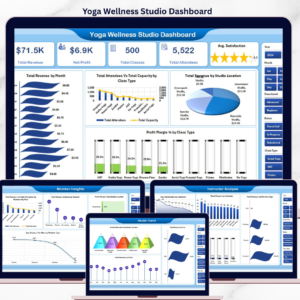
- Yoga & Wellness Studio Dashboard in Excel: a full yoga and wellness studio dashboard
- Yoga Studio KPI Scorecard in Excel: a scorecard view of yoga studio KPIs
- Fitness Studio KPI Dashboard in Excel: KPIs for fitness studios
Browse all Health and Safety templates or the Excel KPI dashboards.























Reviews
There are no reviews yet.