

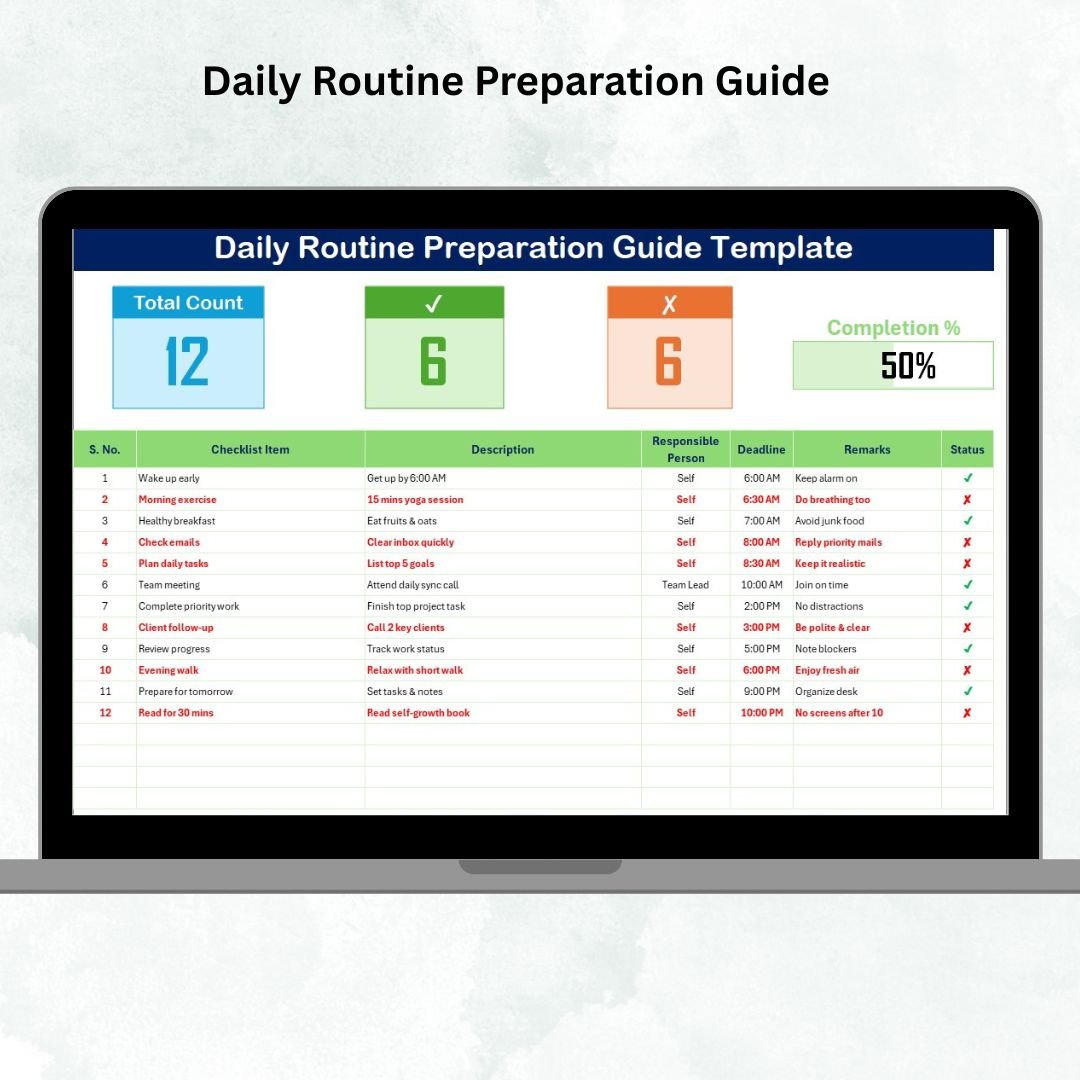


Staying productive and organized every day is a challenge for students, professionals, and businesses alike. Without a clear routine, tasks pile up, deadlines are missed, and focus is lost. That’s where the Daily Routine Preparation Guide Template in Excel comes in—a ready-to-use tool that helps you manage daily tasks, track progress, and stick to your goals.Daily Routine Preparation Guide Template in Excel
This Excel-based guide is designed to simplify routine planning. Whether you’re building personal habits, managing professional tasks, or organizing a team’s schedule, this template ensures that every detail is captured, tracked, and completed on time. With its structured format and beginner-friendly design, you can transform your daily routine into a system for maximum productivity.
✨ Key Features of Daily Routine Preparation Guide Template in Excel
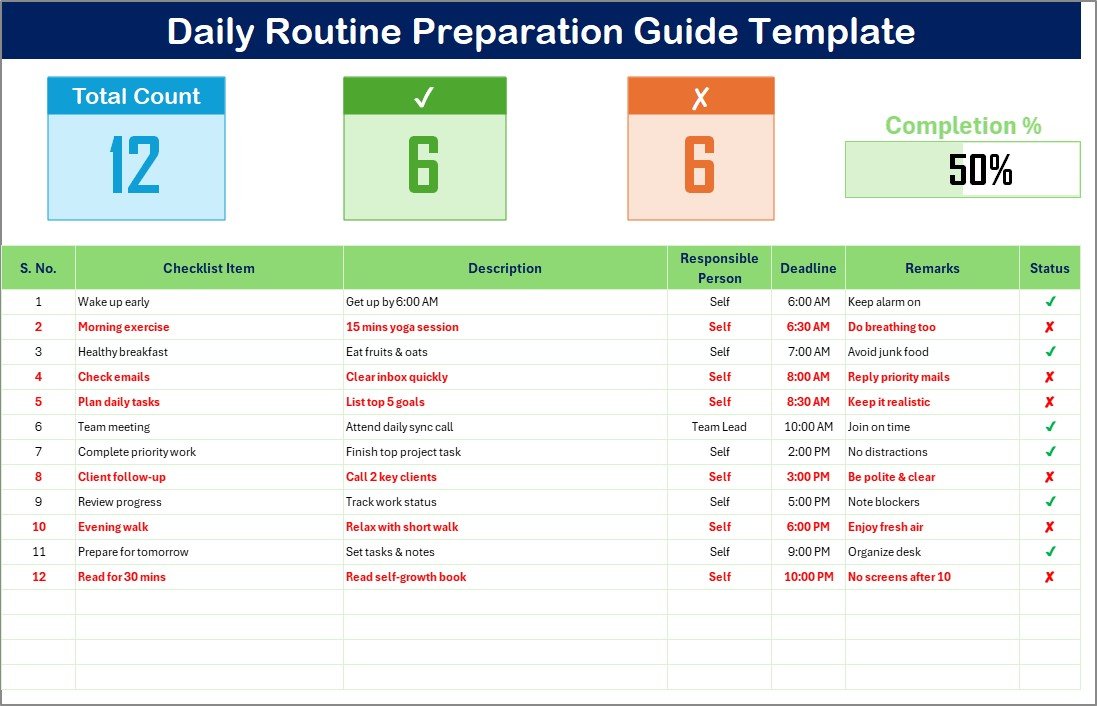
✅ Dashboard Overview – Get an instant view of total tasks, completed activities, pending items, and progress percentage.
✅ Checklist Table – Organize your day with structured columns for activity, description, deadline, responsible person, and status.
✅ Drop-Down List of Responsible Persons – Assign accountability quickly and avoid repetition.
✅ Visual Progress Bar – Monitor your completion rate with a glance.
✅ Customizable Layout – Adapt the table to personal goals, team schedules, or work projects.
✅ Beginner-Friendly – No advanced Excel skills required, just plug in your tasks and get started.
📂 What’s Inside the Daily Routine Preparation Guide Template in Excel
This template is designed with simplicity and functionality in mind. When you download it, you’ll get:
Main Planner Sheet
Overview cards at the top for quick task insights.
Checklist table to log activities, assign responsibilities, and add notes.
List Sheet Tab
Store names of responsible persons once.
Use them in drop-down menus inside the main sheet for quick assignment.
This system saves time, minimizes errors, and ensures that your daily routine stays clear and consistent.
🛠 How to Use the Daily Routine Preparation Guide Template in Excel
Getting started is quick and easy:
Download and open the Excel file.
In the List Sheet Tab, enter names of responsible persons (if needed).
Switch to the Main Planner Sheet and list your daily activities.
Add descriptions, set deadlines, and assign accountability.
Mark activities as ✅ done or ✘ pending.
Track progress using the dashboard cards and progress bar.
Review at the end of the day or week to evaluate productivity.
That’s it—no complex setup, just a simple, practical guide to keep your day on track.
👥 Who Can Benefit from This Template?
This Excel-based routine planner is versatile and suitable for:
🎓 Students – Organize study schedules, assignments, and exam prep.
💼 Professionals – Manage daily work tasks, meetings, and deadlines.
🏠 Individuals – Plan personal goals, chores, or fitness routines.
🏢 Businesses & Teams – Assign responsibilities and track task progress.
👨💻 Freelancers – Stay on top of client deadlines and personal productivity.
If you want to take control of your daily routine and work smarter, this template is your perfect partner.
🔗 Click here to read the Detailed blog post
Visit our YouTube channel to learn step-by-step video tutorials
Compatibility and Requirements
- Works in Microsoft Excel desktop (Excel 2016 or later, or Microsoft 365).
- You pick each responsible person from a dropdown list on the Main Planner Sheet. Microsoft explains how in Create a drop-down list.
Frequently Asked Questions
Which sheets does the template have?
Two: a Main Planner Sheet with the overview cards and the checklist table, and a List Sheet Tab where you store the names of responsible persons.
How do I assign a task to someone?
Enter the name once in the List Sheet Tab. Then choose it from the dropdown in the Responsible Person column of the checklist table.
How do I track progress?
Mark each activity as done or pending. The overview cards and the progress bar at the top of the Main Planner Sheet show total, completed and pending tasks and the completion rate.
Can I change the columns and tasks?
Yes. The layout is customizable, so you can adapt the table to personal goals, team schedules or work projects.
Is there a Google Sheets version of a daily routine checklist?
Yes. See the Daily Routine Action Plan Checklist in Google Sheets.
Related Daily Routine Templates
- Daily Routine Outline Checklist in Excel: an outline of your day’s routine
- Daily Routine Tracking Checklist in Excel: track routine tasks as you complete them
- Daily Routine Planner Checklist in Excel: plan the day ahead
- Daily Routine Action Plan Checklist in Google Sheets: the same topic in Google Sheets
- Task Management Preparation Guide Checklist in Excel: a preparation guide for managing tasks
Browse all Excel checklist templates.
































Reviews
There are no reviews yet.