



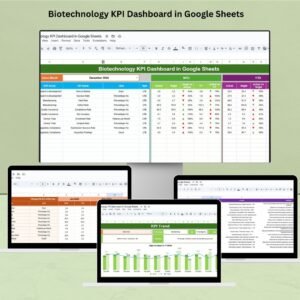
The Biotechnology KPI Dashboard in Google Sheets is a comprehensive tool designed to help biotech companies streamline their data management and performance tracking. This easy-to-use, customizable template provides real-time insights into key performance indicators (KPIs) crucial for decision-making in the biotechnology industry.
Whether you’re tracking research progress, clinical trials, production yields, or compliance metrics, this Google Sheets dashboard ensures you have all the data you need in one place. The user-friendly interface allows you to monitor critical metrics like R&D progress, regulatory compliance, and financial health, all while maintaining complete control over your data.

Key Features of the Biotechnology KPI Dashboard in Google Sheets:
📊 Real-Time Performance Tracking
This dashboard includes Month-to-Date (MTD) and Year-to-Date (YTD) KPIs, allowing you to easily monitor the performance of your biotechnology processes. With real-time updates, you can instantly see where your organization stands on key metrics.
🔄 Customizable Dashboard
The template is fully customizable. Adjust the KPI names, values, and formulas to match your specific requirements. Use the dropdowns to select data and track your progress across multiple variables, including budget, research milestones, and employee performance.
📉 KPI Trend Analysis
Visualize trends in your data with easy-to-read charts. Whether you’re analyzing the success rate of clinical trials or the efficiency of research teams, the dashboard provides a clear view of your trends, helping you make informed decisions.
🎯 Target and Budget Management
Set monthly, quarterly, and annual targets to benchmark your team’s performance. Track both financial and non-financial targets, ensuring your biotech projects stay within scope and budget. The dashboard highlights deviations from targets, making it easy to identify and address potential issues.
📚 Clear KPI Definitions and Visual Indicators
The dashboard includes detailed definitions for each KPI, ensuring you understand exactly what is being tracked. Additionally, visual indicators like arrows and color-coded charts make it easy to spot performance deviations at a glance.
🔧 Ease of Use
With intuitive navigation and well-structured sheets, this dashboard is easy to set up and use. It’s designed for both beginners and experts, making it accessible for a wide range of users in the biotech field.
🚀 Why You’ll Love the Biotechnology KPI Dashboard:
✅ Centralized Data Management – Track all critical data in one place, eliminating the need for multiple tools.
✅ Real-Time Decision-Making – Access up-to-date data instantly, empowering you to make quicker and smarter decisions.
✅ Customizable and Scalable – Tailor the dashboard to your organization’s specific needs, whether you’re a small biotech firm or a large enterprise.
✅ Improves Transparency – Monitor the progress of research and clinical trials with clarity and confidence.
✅ Boosts Accountability – Assign responsibility for KPIs to team members and track their performance.
What’s Inside the Biotechnology KPI Dashboard?
R&D Progress Tracking – Monitor the status of ongoing research and development projects, ensuring they stay on track.
Clinical Trial Management – Track the progress of clinical trials, including recruitment status, testing phases, and outcomes.
Financial Health Metrics – Keep an eye on budget allocation, spending, and financial forecasts for your biotech projects.
Regulatory Compliance Monitoring – Ensure your company meets regulatory requirements by tracking deadlines and compliance tasks.
Employee Performance – Evaluate team productivity and performance, assigning key tasks to the right personnel.
How to Use the Biotechnology KPI Dashboard:
1️⃣ Download the Template – Instantly access the Google Sheets dashboard after purchase.
2️⃣ Customize the Dashboard – Adjust KPIs and values based on your company’s goals and objectives.
3️⃣ Track and Monitor KPIs – Use the dashboard to continuously track performance and make data-driven decisions.
4️⃣ Set Targets and Deadlines – Define goals for your team and ensure progress is made within the designated time frames.
5️⃣ Stay Audit-Ready – Keep a record of your performance and compliance data for future audits or reporting needs.
🎯 Who Can Benefit from This Biotechnology KPI Dashboard?
Biotechnology Companies – Track R&D progress, financials, and regulatory compliance with ease.
Pharmaceuticals & Healthcare – Monitor clinical trial progress and employee performance.
Regulatory Bodies – Ensure compliance with industry regulations and track task completion.
Click here to read the Detailed blog post
Biotechnology KPI Dashboard in Google Sheets Blog Post
Visit our YouTube channel to learn step-by-step video tutorials
YouTube.com/@PKAnExcelExpert
Watch the step-by-step video Demo:
Compatibility and Requirements
- Works in Google Sheets. You need a free Google account and a web browser.
- You pick values from dropdowns on the dashboard. Google explains dropdowns in Create an in-cell dropdown list.
Frequently Asked Questions
Which KPIs does this dashboard track?
It covers Month-to-Date (MTD) and Year-to-Date (YTD) KPIs for R&D progress, clinical trial management, financial health, regulatory compliance and employee performance.
Can I change the KPI names and formulas?
Yes. You can adjust the KPI names, values and formulas to match your own goals, and use the dropdowns to select the data you want to see.
Does it show trends over time?
Yes. The dashboard has charts for KPI trend analysis, so you can follow things like clinical trial success rates or research team efficiency.
Can I set targets?
Yes. You can set monthly, quarterly and annual targets for financial and non-financial KPIs. The dashboard highlights deviations from those targets.
Is there an Excel or Power BI version?
Yes. See the Biotechnology KPI Dashboard in Excel and the Biotechnology KPI Dashboard in Power BI.
Related Biotechnology Templates
- Biotechnology KPI Dashboard in Excel: the same KPI dashboard in Excel
- Biotechnology KPI Dashboard in Power BI: the Power BI edition
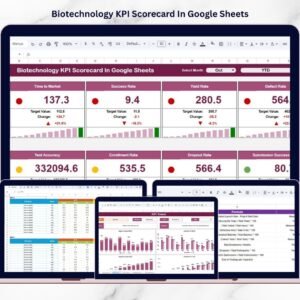
- Biotechnology KPI Scorecard in Google Sheets: a scorecard view of your biotech metrics
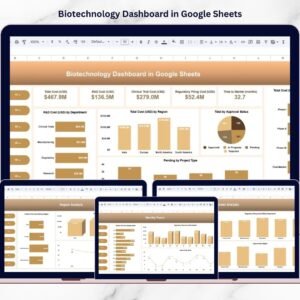
- Biotechnology Dashboard in Google Sheets: a lower-priced dashboard in Google Sheets
Browse all Google Sheets KPI dashboards.


























Reviews
There are no reviews yet.