



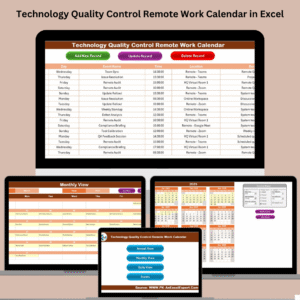
The Quality Control Remote Work Calendar in Excel is a versatile and efficient tool designed to help quality control teams and remote workers stay organized and on track with their tasks. This Excel-based calendar is tailored to assist in planning, managing, and tracking quality control activities, ensuring that all tasks are completed efficiently and within the designated timeframes.
Whether you are managing quality control processes remotely, tracking project milestones, or simply looking to streamline workflow management, this calendar helps ensure that your team remains productive and aligned with key performance indicators (KPIs). It provides a centralized, easy-to-use interface that simplifies scheduling, task tracking, and reporting, making it ideal for teams that work in quality assurance, compliance, and other related fields.
Key Features of the Quality Control Remote Work Calendar in Excel
📅 Customizable Calendar
The calendar is fully customizable, allowing you to input key quality control tasks, deadlines, and project milestones. Track day-to-day activities and ensure nothing is missed while working remotely.
📝 Task & Activity Tracking
Easily track quality control activities, inspections, audits, and other essential tasks. Each task is assigned a specific date and time, ensuring you stay on top of deadlines and deliverables.
⚙️ Quality Control Reporting
Generate real-time reports based on scheduled tasks and completed activities. Track progress and identify potential bottlenecks or delays in your quality control processes.
📊 Time-Based Monitoring
Monitor quality control activities across different time periods. Whether you need to track daily, weekly, or monthly tasks, the calendar allows for easy time-based performance tracking.
💼 Remote Work Integration
Designed for remote teams, this calendar provides a collaborative platform for managing remote quality control activities. Share it with your team members and update tasks in real-time.
⚙️ Workflow Optimization
Streamline quality control processes by identifying gaps, optimizing task allocation, and improving efficiency. The calendar helps monitor team performance and ensures deadlines are met.
Why You’ll Love the Quality Control Remote Work Calendar in Excel

✅ Streamline Quality Control Activities
Organize and manage quality control tasks in one centralized location, making it easy to track, update, and share progress.
✅ Enhance Remote Team Collaboration
Facilitate collaboration among remote team members by sharing the calendar and ensuring that all tasks are completed on time and within guidelines.
✅ Optimize Workflows & Reduce Errors
By staying on top of your quality control activities, you reduce the risk of errors and improve overall process efficiency.
✅ Real-Time Reporting & Monitoring
Track progress in real-time and monitor key performance metrics such as task completion rates, delays, and overall project status.
✅ Customizable to Fit Your Needs
Adapt the calendar to fit your specific quality control processes, whether you’re managing inspections, audits, or testing phases.
What’s Inside the Quality Control Remote Work Calendar in Excel?
Customizable Calendar: Input quality control tasks, deadlines, and project milestones.
Task & Activity Tracking: Keep track of tasks, inspections, and audits with specific due dates.
Real-Time Reporting: Generate reports based on completed activities and performance metrics.
Time-Based Monitoring: Track performance across different timeframes (daily, weekly, monthly).
Remote Work Integration: Share the calendar with your team and work collaboratively in real-time.
Optimized Workflows: Identify bottlenecks, track progress, and optimize task management.
How to Use the Quality Control Remote Work Calendar in Excel
1️⃣ Download the Template: Access the Quality Control Remote Work Calendar in Excel instantly.
2️⃣ Customize Tasks & Deadlines: Enter quality control tasks, deadlines, and key milestones for your projects.
3️⃣ Track & Update Progress: Monitor tasks, track their completion, and update statuses in real-time.
4️⃣ Analyze Performance: Use the reporting features to generate insights and analyze performance across various time periods.
5️⃣ Collaborate with Your Team: Share the calendar with your remote team members and ensure everyone is aligned and on track.
Who Can Benefit from the Quality Control Remote Work Calendar in Excel?
🔹 Quality Control Teams
🔹 Remote Teams in Manufacturing, Warehousing, or Service Industries
🔹 Project Managers & Operations Managers
🔹 Remote Quality Control Specialists & Consultants
🔹 Small & Medium Enterprises (SMBs)
🔹 Enterprises with Remote Quality Assurance Teams
🔹 E-commerce & Retail Companies with Remote Operations
Ensure your quality control activities run smoothly and efficiently, even when working remotely. The Quality Control Remote Work Calendar in Excel helps you track tasks, optimize workflows, and collaborate effectively with your team, all in one user-friendly tool.
Click here to read the Detailed blog post
Visit our YouTube channel to learn step-by-step video tutorials
Youtube.com/@PKAnExcelExpert
Watch the step-by-step video Demo:
Compatibility and Requirements
- Works in Microsoft Excel desktop (Excel 2016 or later, or Microsoft 365).
- You can share the file with your team so everyone works from the same schedule. Microsoft explains dropdown lists, useful for adding your own task types, in Create a drop-down list.
Frequently Asked Questions
What can I schedule in the calendar?
You can enter quality control tasks, inspections, audits, deadlines and project milestones, each on its own date.
Can I view tasks by day, week or month?
Yes. The calendar tracks quality control activities across daily, weekly and monthly periods.
Does it help me spot delays?
Yes. It summarizes scheduled and completed activities, so you can see task completion and find bottlenecks or delays.
Is it only for remote teams?
No. It is designed for remote quality control work, but any quality team can use it to plan inspections, audits and testing.
Can I change the tasks and layout?
Yes. The calendar is fully customizable, so you can match it to your own quality control process.
Related Quality Control and Remote Work Templates
- Quality Control Customer Experience Calendar in Excel: a quality calendar focused on customer experience
- Compliance Remote Work Calendar in Excel: a remote work calendar for compliance teams
- HR Remote Work Calendar in Excel: a remote work calendar for HR
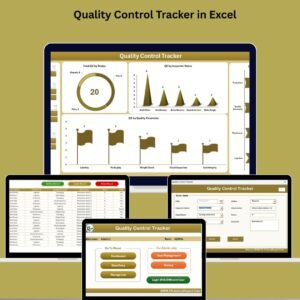
- Quality Control Tracker in Excel: log quality checks and results
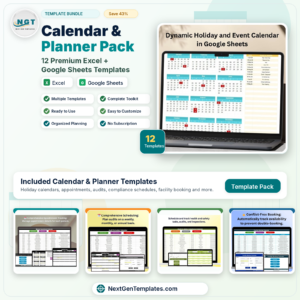
- Calendar & Planner Pack: 12 premium Excel and Google Sheets calendars and planners
Browse all Excel calendars or the Excel quality control templates.







Reviews
There are no reviews yet.