



The IT Hardware Replacement Calendar in Excel is a vital tool for organizations looking to streamline the management of their IT assets. By centralizing the tracking of hardware usage, maintenance schedules, and replacement timelines, this calendar helps ensure that your organization’s IT infrastructure remains up to date, cost-effective, and fully functional. The calendar allows organizations to avoid unnecessary downtime, optimize the lifecycle of hardware, and prevent issues related to outdated equipment.
This Excel-based calendar can be customized to meet your organization’s specific needs and can handle a variety of IT assets, including desktops, laptops, servers, and peripherals. The tool enables you to efficiently monitor and plan for IT hardware replacement, helping you stay on top of maintenance schedules and ensure timely upgrades.
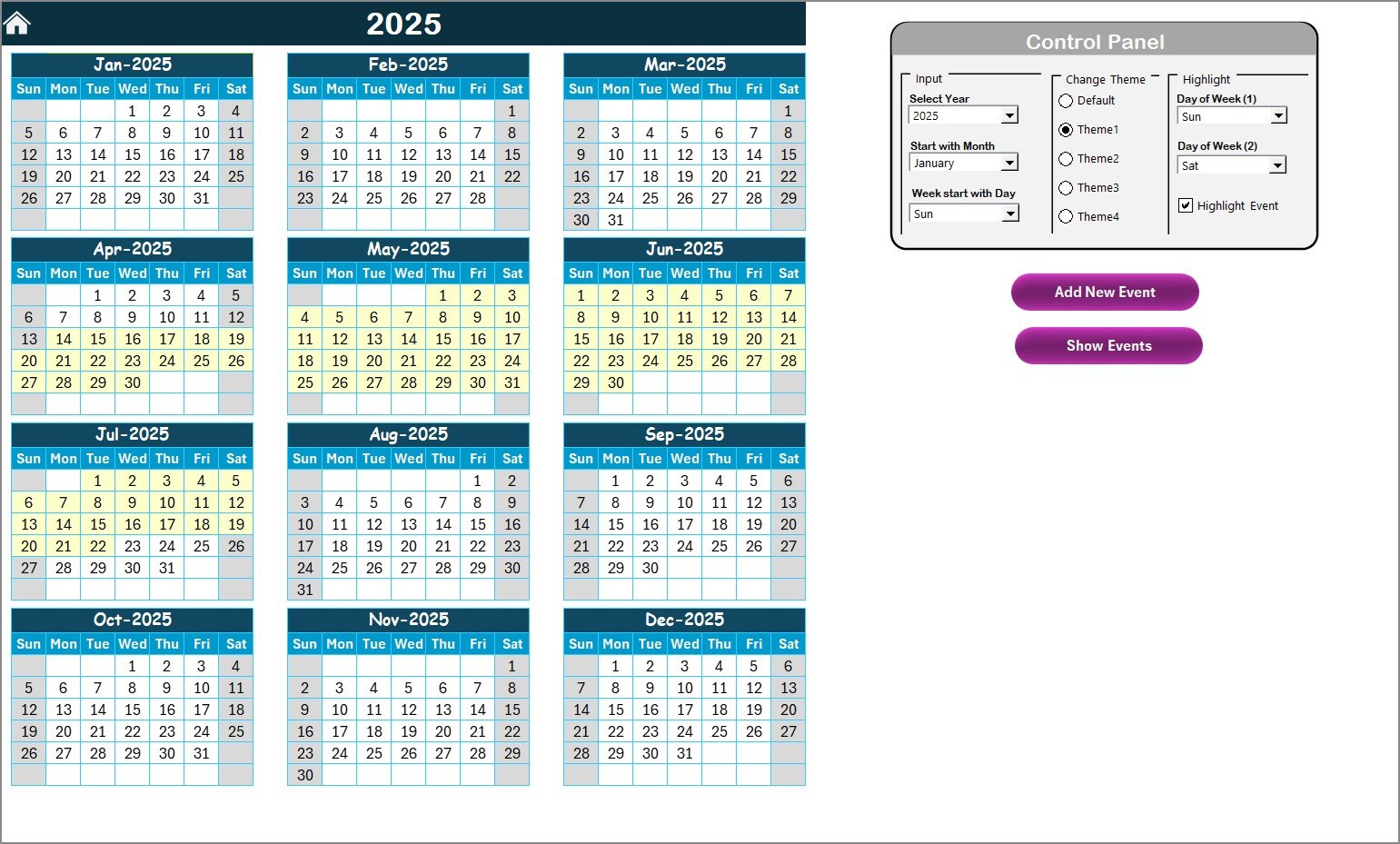
Key Features of the IT Hardware Replacement Calendar in Excel
🖥️ Asset Tracking
Complete IT Asset Inventory: Maintain a detailed list of all IT assets, such as desktops, laptops, servers, and peripherals, with essential information like asset ID, model, purchase date, warranty expiration, and condition.
Comprehensive Asset Details: Capture critical asset information, including manufacturer details, serial numbers, and any associated costs.
⏳ Replacement Schedule
Timely Replacement Alerts: Set up notifications and alerts for upcoming hardware replacements, ensuring that no equipment reaches its end of life without replacement.
Staggered Replacement Strategy: Use the calendar to manage a staggered replacement schedule, ensuring that hardware is replaced efficiently and in line with organizational budgets.
📅 Maintenance & Warranty Tracking
Track Warranty Expirations: Monitor warranty expiration dates and plan for necessary repairs or replacements before warranties run out.
Scheduled Maintenance: Keep track of hardware maintenance schedules to ensure that each asset receives the proper care and attention, extending its useful life.
📊 Data Visualization
Charts and Graphs: Use built-in Excel features to generate visual representations of asset data, including pie charts or bar graphs that display the current status of hardware, upcoming replacements, and warranty expirations.
Historical Data Tracking: Maintain and compare past asset data, helping to identify trends and optimize replacement cycles for maximum efficiency.
🔧 User-Friendly Interface and Customization
Interactive Dashboard: A centralized dashboard with easy navigation allows you to access all relevant information at a glance, making it easier to manage your IT asset portfolio.
Customizable Fields: Tailor the calendar to your organization’s specific asset management needs, including the ability to modify categories, add custom fields, and integrate data sources.
Benefits of Using the IT Hardware Replacement Calendar in Excel
✅ Cost-Effective Solution
Google Sheets offers a free, robust solution for managing your IT hardware lifecycle, eliminating the need for expensive software.
✅ Improved Operational Efficiency
With everything in one place, you can quickly identify hardware that requires maintenance or replacement, reducing the risk of unexpected failures and costly downtimes.
✅ Proactive Asset Management
By implementing a proactive hardware replacement strategy, you can ensure that your IT infrastructure remains reliable and up to date.
Getting Started with Your IT Hardware Replacement Calendar in Excel
Define Your Hardware Assets: List all the IT assets your organization uses, including desktops, laptops, servers, and peripherals.
Set Up the Calendar: Organize the calendar by asset category and include key details such as purchase date, warranty expiry, and maintenance schedules.
Track Maintenance and Warranty Dates: Input warranty expiration dates and schedule maintenance reminders to stay ahead of potential issues.
Plan for Hardware Replacement: Based on the asset lifecycle and replacement schedule, input estimated replacement dates and budget forecasts.
Monitor and Update: Regularly review and update the calendar to ensure it remains up-to-date with any changes in asset status or planned replacement activities.
By using the IT Hardware Replacement Calendar in Excel, your organization can improve asset management, reduce operational costs, and ensure your IT infrastructure is always running at peak performance.
Click here to read the Detailed blog post
IT Hardware Replacement Calendar in Excel
Visit our YouTube channel to learn step-by-step video tutorials
YouTube.com/@PKAnExcelExpert
Compatibility and Requirements
- Works in Microsoft Excel desktop (Excel 2016 or later, or Microsoft 365).
- Charts and graphs use standard Excel features. Microsoft explains them in Create a chart from start to finish.
Frequently Asked Questions
What details can I record for each asset?
You can record the asset ID, model, purchase date, warranty expiration and condition, plus manufacturer details, serial numbers and costs.
Which types of hardware does it cover?
It handles desktops, laptops, servers and peripherals. You can add your own categories and custom fields.
Can I plan replacements in stages?
Yes. The calendar supports a staggered replacement schedule, so you can spread hardware replacements across your budget periods.
Does it track warranties and maintenance?
Yes. You can track warranty expiration dates and scheduled maintenance for each asset, so you can plan repairs or replacements in time.
Can I see the asset data in charts?
Yes. You can show hardware status, upcoming replacements and warranty expirations in pie charts or bar graphs.
Related IT Asset Templates
- IT Asset Management Report in Excel: a report view of your IT assets
- IT Asset Management Dashboard in Excel: a full dashboard for asset data
- IT Equipment Maintenance Checklist in Excel: a checklist for routine maintenance
- IT Hardware Upgrade Request Tracker in Excel: logs and tracks upgrade requests
- IT Manager & CISO Toolkit: 10 premium IT templates in one bundle
Browse all Excel calendar templates or the Excel IT templates.







Reviews
There are no reviews yet.