



The Client Appointment Calendar in Excel is a powerful tool designed to help businesses, freelancers, and professionals manage their client appointments efficiently. This Excel-based calendar allows you to schedule and track appointments, meetings, and consultations with ease. Whether you’re managing a busy office, handling multiple clients as a consultant, or running a medical practice, this tool ensures that you stay organized and on top of your appointments.
This calendar not only tracks your appointments but also provides a comprehensive view of your schedule, allowing you to optimize your time and provide better service to your clients. With easy-to-use features and customizable options, you can tailor it to your specific needs, ensuring seamless client management and smooth day-to-day operations.
Key Features of the Client Appointment Calendar in Excel
📅 Time-Based Appointment Scheduling
Schedule client appointments by day, week, or month. Organize appointments at different times of the day and get a clear overview of your entire schedule.
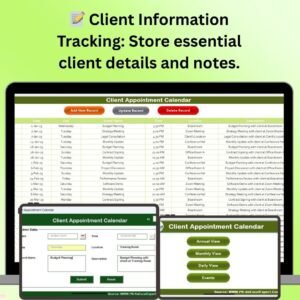
📝 Client Information Tracking
Record key client details such as name, contact information, and appointment notes. Keep all important information organized in one place for easy access.
⚠️ Appointment Reminders & Alerts
Set reminders for upcoming appointments to ensure you never miss an important meeting. Automated notifications help you stay on track with your schedule.
📈 Appointment Analytics & Reporting
Track the number of appointments and cancellations over a set period. Gain insights into trends, appointment patterns, and client preferences for better service.
📊 Customizable Calendar Layout
Customize the calendar to fit your business needs. You can adjust appointment duration, include specific appointment categories, and personalize the layout for your type of work.
🔄 Multiple View Options
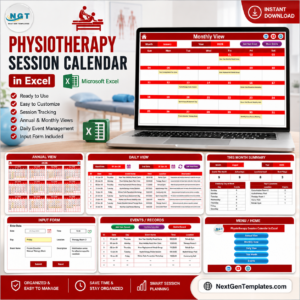
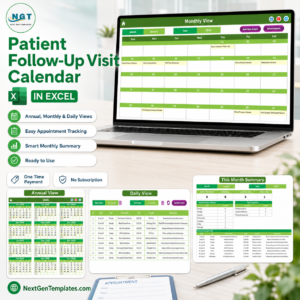
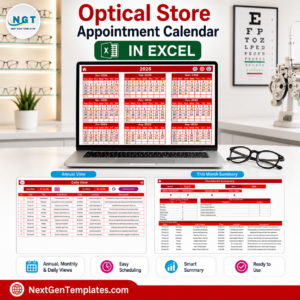
View your appointments in different formats such as daily, weekly, or monthly. This flexibility allows you to choose the view that best suits your needs for effective time management.
Why You’ll Love the Client Appointment Calendar in Excel

✅ Stay Organized & Efficient
Keep track of all client appointments in one place and avoid overlapping or missed appointments. Stay organized and ensure smooth client interactions.
✅ Easily Accessible & Editable
The Excel format makes it simple to access, update, and edit your appointments. Make quick adjustments and customize the calendar based on your needs.
✅ Time Management Made Easy
Manage your day more effectively by clearly visualizing your schedule. Optimize your time and focus on high-priority clients and tasks.
✅ Better Client Communication
Keep your clients informed and engaged by tracking all necessary details, from appointment times to any special requests or notes.
✅ Customizable & Scalable
Whether you’re a solo consultant or running a large team, the calendar is adaptable to your specific needs. Scale it as your business grows and your appointment volume increases.
What’s Inside the Client Appointment Calendar in Excel?
Time-Based Appointment Scheduling: Track appointments by time, day, week, or month.
Client Information Tracking: Store essential client details and appointment notes.
Appointment Reminders & Alerts: Set automatic reminders for upcoming appointments.
Analytics & Reporting: Track and analyze appointment data to optimize scheduling.
Customizable Layout: Personalize the calendar for your business needs.
Multiple View Options: Choose from daily, weekly, or monthly calendar views.
How to Use the Client Appointment Calendar in Excel
1️⃣ Download the Template: Instantly access the Client Appointment Calendar in Excel.
2️⃣ Input Client Details: Add client names, contact information, and appointment notes.
3️⃣ Schedule Appointments: Assign appointments to specific times and dates, and track them using the calendar.
4️⃣ Set Reminders: Use the reminder feature to ensure you don’t miss any important appointments.
5️⃣ Track & Analyze Data: Use reporting tools to track appointment trends and adjust your scheduling for efficiency.
Who Can Benefit from the Client Appointment Calendar in Excel?
🔹 Consultants & Freelancers
🔹 Medical Professionals (Doctors, Dentists, Therapists)
🔹 Event Planners & Coordinators
🔹 Coaches & Mentors
🔹 Small Business Owners
🔹 Customer Service & Support Teams
🔹 Anyone Managing Client Appointments
Stay organized and efficient with the Client Appointment Calendar in Excel. Keep track of your appointments, reduce scheduling conflicts, and improve client satisfaction with a fully customizable solution.
Click here to read the Detailed blog post
Visit our YouTube channel to learn step-by-step video tutorials
Youtube.com/@PKAnExcelExpert
Compatibility and Requirements
- Works in Microsoft Excel desktop (Excel 2016 or later, or Microsoft 365).
- Microsoft’s guide Create a chart from start to finish explains the Excel feature this file is built on.
Frequently Asked Questions
What can I record for each appointment?
The client’s name, contact information and appointment notes, along with the date and time of the appointment.
Can I see my schedule by day, week or month?
Yes. The calendar has daily, weekly and monthly views, so you can pick the one that suits how you plan.
Does it track cancellations?
Yes. The reporting part counts appointments and cancellations over a set period so you can see patterns.
Can I change the appointment categories?
Yes. You can adjust appointment duration, add your own appointment categories and change the layout for your type of work.
Related Appointment and Booking Templates
- Client Appointment Calendar in Google Sheets: the same calendar in Google Sheets
- Medical Appointment Calendar in Excel: built for clinics and practices
- Facility Booking Calendar in Excel: book rooms and shared spaces
- Universal Appointment Booking System Web App Template: online booking as a web app
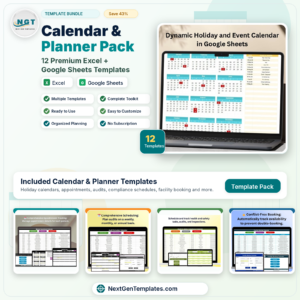
- Calendar & Planner Pack: 12 calendar and planner templates in one download
Browse all Excel calendar templates or the Google Sheets calendars.










Reviews
There are no reviews yet.