

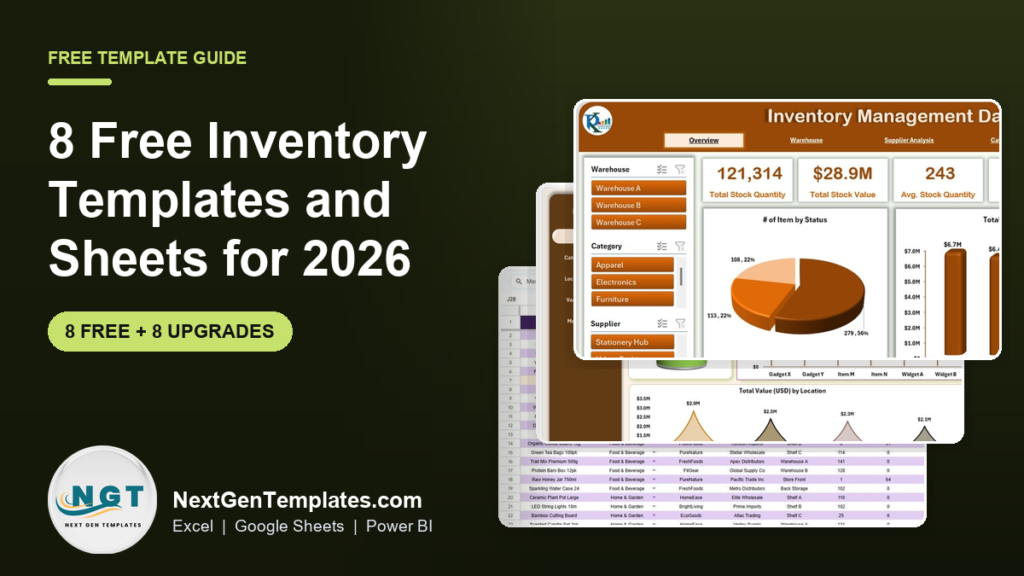
The best free inventory template in 2026 is Smartsheet’s Stock Inventory Control Template for Excel. It flags items to reorder, adds up your stock value, keeps a vendor list and records where each item sits, with a sample sheet and a blank one. It downloads directly with no form. For Google Sheets, Smartsheet’s simple Inventory Template is the runner-up.
Last updated: October 2026
This guide is for shop owners, warehouse leads, office managers and anyone who has been counting stock on paper or in a messy spreadsheet. First come the 8 free inventory templates and sheets worth downloading. We opened every page in October 2026 and downloaded the Excel files where a direct link was offered, to check that they really are free and to see what is inside. Then comes an honest section on when a free template stops being enough, with 8 paid upgrades from NextGenTemplates. If you already track stock and want to know which numbers to watch, read our guide to the inventory KPIs worth tracking alongside this one.
Key takeaways
- All 8 free inventory templates in this list cost nothing and need no email address. The Google Sheets ones need a Google account, because they open as a copy in your Drive.
- Best overall free inventory template: Smartsheet’s Stock Inventory Control Template for Excel, with reorder flags, stock locations and a vendor list in one workbook.
- Vertex42’s Inventory Control Template is no longer free. It now costs $9.95, so we left it off the free list.
- Free templates hold a good item list. They do not log every sale and purchase, update the balance for you or chart stock by warehouse. Those gaps are why businesses upgrade.
- The 8 paid NextGenTemplates upgrades below cost $6.99 to $19.99 each, paid once with no subscription, and the 8-template kit costs $69.99. The Inventory Management Template for Store costs $6.99.
 Launch offer
SUMIFS, XLOOKUP, FILTER, LAMBDA and checking AI-written formulas, with real business projects. 11h 47m of video by PK, with practice files, quizzes and a capstone.
Free inventory templates compared
Every free source in this guide, side by side. One row is flagged best overall. All eight are free to download.
| # | Template | Source | Format | Best For | Price |
|---|---|---|---|---|---|
| 1 | Stock Inventory Control Template (Best overall) | Smartsheet | Excel | Small shops and stockrooms that need reorder flags and vendor details | Free |
| 2 | Small Business Inventory Spreadsheet | Spreadsheet Daddy | Excel, Google Sheets, PDF | A small business that wants stock, suppliers and margins in one sheet | Free |
| 3 | Inventory Template for Google Sheets | Smartsheet | Google Sheets | A simple shared stock list in one tab | Free |
| 4 | Inventory Management Template | Smartsheet | Excel | Tracking products, purchases and sales with a small dashboard | Free |
| 5 | Warehouse and Stockroom Inventory Template | Smartsheet | Google Sheets | Recording stock received and issued, with a running balance | Free |
| 6 | Multi-Location Inventory Template | Smartsheet | Google Sheets | Stock spread across several stores or storage areas | Free |
| 7 | Asset Tracking Template | Vertex42 | Excel, Google Sheets | Equipment, tools and computer hardware a business owns | Free |
| 8 | Office Supplies Inventory List Template | Smartsheet | Excel | Office supplies across several departments, with approvals | Free |
Here are the paid upgrades we recommend once a free inventory sheet runs out of road. One row is best overall and one is the best value.
| Upgrade | Format | Best For | Price |
|---|---|---|---|
| Inventory Management Template for Store (Best overall) | Excel | A shop that wants stock in and out, low-stock alerts and a dashboard | $6.99 |
| Inventory Tracker in Google Sheets | Google Sheets | A shared stock list with low-stock alerts and a summary dashboard | $6.99 |
| Inventory Management Template for Multiple Locations | Excel | Stock balances and transfers across stores or warehouses | $6.99 |
| Inventory Management System V3.0 | Excel VBA | Form-based purchase and sales entry with automatic stock updates | $19.99 |
| Inventory Management Dashboard in Excel | Excel | Stock by warehouse, supplier and category, with restock pages | $17.99 |
| Product Inventory Dashboard in Excel | Excel | Product, vendor and location analysis with monthly trends | $17.99 |
| Warehouse Efficiency Dashboard in Excel | Excel | Order fulfilment, shipping and worker productivity in a warehouse | $17.99 |
| Inventory & Warehouse Master Kit (Best value) | Excel, Google Sheets, VBA, Power BI | 8 inventory templates in one download, 36% below the single prices | $69.99 |
How we picked these free inventory templates
We started where people really look: the big template libraries (Smartsheet and Vertex42), smaller free template sites, inventory software blogs and the Microsoft template gallery. We loaded every page in October 2026. Smartsheet’s Stock Inventory Control template came down as a 286 KB Excel file, its Inventory Management template as a 365 KB file and its Office Supplies list as a 268 KB file, with no form to fill in. Spreadsheet Daddy’s Excel file downloaded directly, and the Smartsheet Google Sheets links opened as public files ready to copy.
A source made the list only if the file is free to get and does the job: it lists items with quantities and costs, and works out stock value or flags what to reorder. Vertex42’s Inventory Control Template used to be the classic free pick, but it now sells for $9.95, so it is out. Microsoft’s template search now sends visitors to a Microsoft 365 sign-in and Copilot page, so it is out too. An inventory software blog we checked described free templates but offered no files to download, so we left it off rather than guess.
Search data shaped the list. In the US, “inventory template excel” is searched about 2,400 times a month and “inventory sheet” about 1,900. “Google sheets inventory template” and “inventory spreadsheet” get about 1,600 each, and “inventory list template”, “inventory sheet template” and “inventory template” about 1,300 each. “Inventory tracking spreadsheet” gets about 880, “free inventory template” about 480 and “inventory count sheet” about 210. So the list covers a stock control sheet, a Google Sheets list, a purchases and sales workbook, a warehouse log, a multi-location sheet, an asset register and an office supplies list. We took the paid upgrades from the NextGenTemplates inventory range and matched each one to a gap that free files leave open.
The 8 best free inventory templates for 2026
1. Stock Inventory Control Template (Smartsheet): best overall
Smartsheet’s article by Andy Marker, dated 31 March 2025, lists 15 free Excel inventory templates, and this is the one most businesses should open first. The main sheet records the last sold date, item number, date of last order, item name, vendor, stock location, description, cost per item, stock quantity, total value and reorder level for every item. A formula in the first column compares stock with the reorder level and shows REORDER or OK, and a total at the top adds up the value of everything you hold.
The workbook has an example sheet, a blank sheet and three extra tabs: a stock tracking sheet, an item template and a vendor list. Smartsheet pitches it at retail stores watching reorder points and small warehouses tracking locations and purchases, and that is exactly where it fits. There are no macros.
Best for: small shops, stockrooms and small warehouses. Free: get Smartsheet’s free Excel inventory templates (it is the first one on the page).
2. Small Business Inventory Spreadsheet (Spreadsheet Daddy)
Spreadsheet Daddy’s page by Daniel Smith, updated 25 September 2026, offers one well-built inventory file in three formats: an Excel download, a Google Sheets copy and a printable PDF. Each item gets an item code, name, category, brand, condition, storage location and unit of measure, with quantity on hand and a par level so you can see what is running low.
It goes further than most free sheets on money. Supplier columns hold contact details, purchase dates, order numbers and payment terms, and built-in formulas work out profit margin, total value in stock, total potential revenue and the days left before a product expires. That last one makes it a good fit for food, cosmetics and anything else with a shelf life.
Best for: a small business that wants stock, suppliers and margins in one file. Free: get the Spreadsheet Daddy small business inventory template.
3. Inventory Template for Google Sheets (Smartsheet)
Smartsheet’s Google Sheets collection, dated 17 November 2025, holds 15 inventory templates, and the plain Inventory Template is the best place to start. It keeps everything in one tab: item number, name, manufacturer and description, then cost per item and stock quantity. The sheet works out inventory value for you and highlights restock needs with Reorder (Auto-Fill), Reorder Level, Days Per Reorder, Item Reorder Quantity and Item Discontinued? columns.
Because it lives in Google Sheets, the person counting stock and the person ordering it can work in the same file. Smartsheet also points out that Google Sheets has no built-in inventory template of its own, which is why a free copy like this one is useful.
Best for: small teams, classrooms and side businesses that want one shared stock list. Free: get Smartsheet’s free Google Sheets inventory templates.
4. Inventory Management Template (Smartsheet)
Most free inventory sheets are a list. This one is a small system. Separate tabs hold product details, purchase details and sales details, and a dashboard tab reads from all three. It shows total inventory value and the top 5 items sold in each quarter, so you can see which products move and which sit on the shelf.
Smartsheet offers a sample version, filled in so you can see how the formulas connect, and a blank version to start your own. It is a good step up when you want to know what you sold, not just what you have left.
Best for: sellers who want purchases and sales next to stock. Free: get Smartsheet’s Excel inventory management template (third on the same page as pick 1).
5. Warehouse and Stockroom Inventory Template (Smartsheet)
This Google Sheets template works like a stock ledger. For each item you enter the description, item ID, category, supplier, quantity received and quantity issued, and the sheet works out the balance quantity and total value at the unit price. Smartsheet describes it for warehouses, retail stores and supply teams that want to see movement and reorder needs without buying software.
The received and issued columns are what make it different from a plain list. When the balance does not match a physical count, you can see whether the gap came from goods in or goods out.
Best for: stockrooms that issue items to staff or production. Free: get the warehouse and stockroom inventory template (on the same page as pick 3).
6. Multi-Location Inventory Template (Smartsheet)
Once stock sits in more than one place, a single quantity column stops telling the truth. This Google Sheets template records item name, category, SKU, supplier, location name, quantity at that location, reorder level, unit cost and inventory value. Totals and subtotals run by location, so you can see overall stock and spot a store that is running low while another has plenty.
That makes it useful for deciding transfers before you place a new order. It is still a manual sheet, so someone has to update each location’s count.
Best for: businesses with two or more stores, vans or storage areas. Free: get the multi-location inventory template (on the same page as pick 3).
7. Asset Tracking Template (Vertex42)
Not all inventory is for sale. Jon Wittwer’s free Asset Tracking Template, last updated 4 November 2021, is built for the equipment a business owns: computers, tools, repair equipment and other fixed assets. The Asset Inventory sheet records name, description, ID tag and category, then department and room, purchase date, supplier, warranty expiration and price, followed by condition, unit value, quantity, total value, model number, serial number and a link to a photo.
A Suppliers sheet keeps contact details for repairs, maintenance and warranty claims. It comes as an Excel file for Excel 2007 or later or as a Google Sheets copy, has no macros, and uses a private-use licence.
Best for: offices, schools and workshops tracking what they own. Free: get the Vertex42 asset tracking template.
8. Office Supplies Inventory List Template (Smartsheet)
Office supplies get ordered by many people and tracked by nobody. This Excel list fixes that with columns for item name, description, quantity on hand, total quantity needed, order quantity, cost per unit, total cost, supplier, status, department and who approved the order. A reorder column flags items that need ordering, and a total at the top shows the value of everything listed.
The status column is colour-coded for ordered, received and delayed, so it doubles as a simple purchase tracker for the office manager.
Best for: office managers buying for several departments. Free: get Smartsheet’s office supplies inventory list (on the same page as pick 1).
Also free and worth knowing: Vertex42’s Software Inventory Tracking Template counts licences used and remaining for IT teams, and its Home Inventory List records belongings for insurance. Smartsheet’s two pages also carry free food, restaurant, bar, retail clothing, barcode and e-commerce versions.
Want a free production tracker by email?
If you make what you sell, stock starts on the production line. We will send you our free Production Tracker in Excel: log each shift’s target, actual and rejected quantity, and watch 5 KPI cards and 3 charts show output against target, scrap rate and achievement by line. It is a plain .xlsx with no macros and a 32-step guide to how it was built. No payment, no card, and you can unsubscribe at any time.
When does it pay to upgrade from a free inventory template?
A free template is a good place to start. It stops being enough when one of these is true:
- You type the stock balance by hand. Free lists hold a quantity you overwrite after each count. A template with a stock in and stock out log updates the balance from every purchase and sale.
- You keep running out. A REORDER flag only helps if someone looks at it. A dashboard with low-stock alerts puts the problem on the first screen.
- Stock sits in several places. Transfers between stores or warehouses are easy to lose in a single sheet.
- Several people enter data. Forms and drop-downs stop typing errors that break formulas in a shared list.
- You report to someone. An owner or a manager wants stock value by category, supplier and warehouse on one page, not a list to scroll.
8 paid inventory template upgrades for when free stops working
1. Inventory Management Template for Store: best overall ($6.99)

This is the template that fixes the biggest gap in free sheets: a stock balance you have to keep typing. It keeps a product master with product name, cost per unit, stock location (down to the drawer number) and reorder level. A stock in and out worksheet records every movement, and the inventory tracking sheet updates current stock from it with formulas.
A dashboard shows current stock levels, stock value, stock cost and alerts for low-stock or out-of-stock items, and search and filters help you find a product fast. It needs no advanced Excel skills.
Best for: retail shops, small e-commerce sellers and stockrooms moving off a free list. See the Inventory Management Template for Store ($6.99).
2. Inventory Tracker in Google Sheets ($6.99)
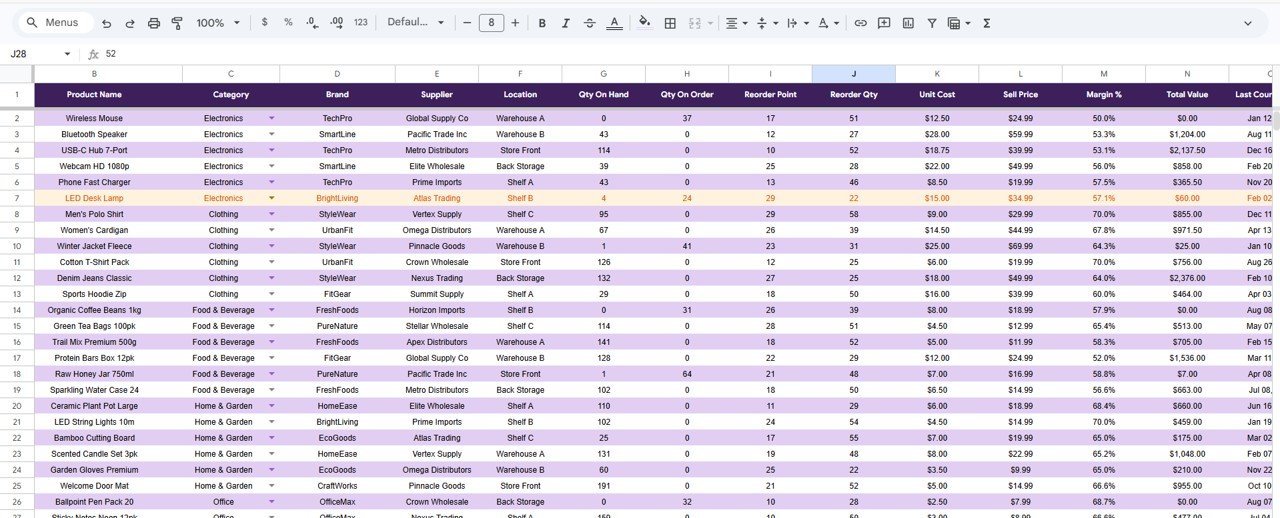
The step up from the free Smartsheet Google Sheets list. Four worksheets hold more than 50 sample items with name, SKU, category, location, quantity on hand, unit cost, total value, reorder level, supplier and last updated date. Conditional formatting turns a row red when stock drops below its reorder level, and search and drop-down filters find any item by name, category or SKU.
The dashboard shows total stock value, items in stock, items below reorder level and the split by category and location. It works on a phone or tablet as well as a desktop, with no macros.
Best for: teams that share one stock file in Google Drive. See the Inventory Tracker in Google Sheets ($6.99).
3. Inventory Management Template for Multiple Locations ($6.99)
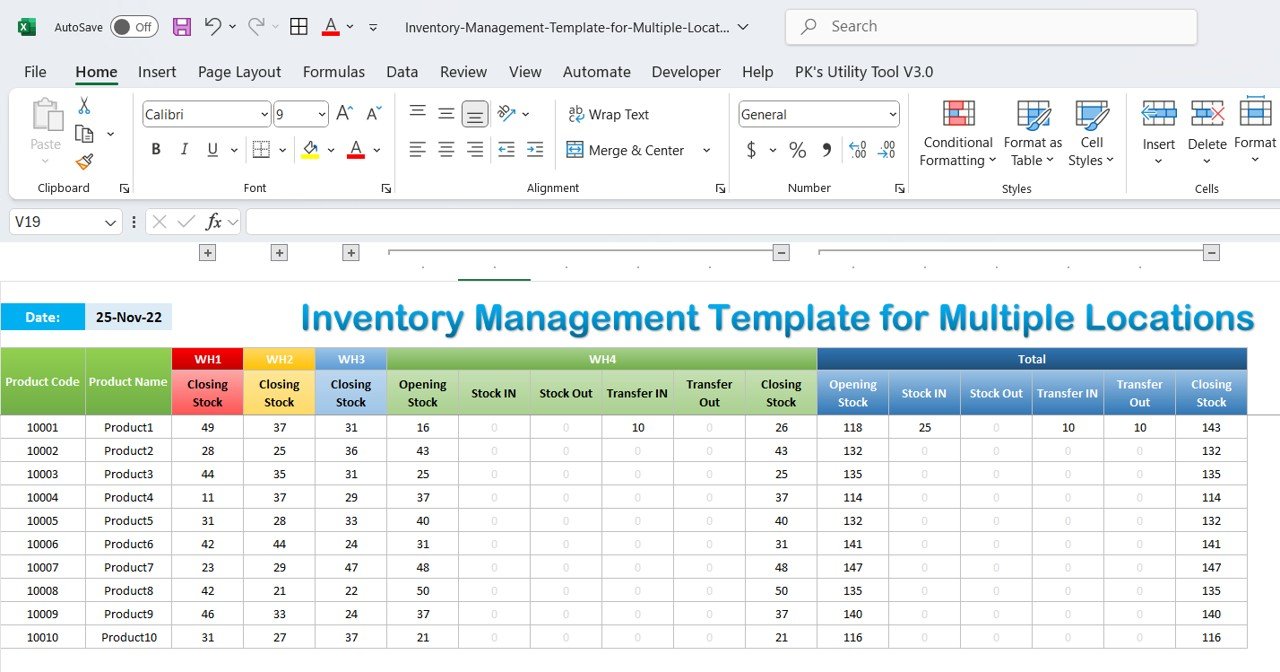
The upgrade for the free multi-location sheet. You enter product details and opening stock, then record purchases, sales and transfers between locations. The workbook works out stock at each site from those movements, with daily stock trend reports for each product, inventory summaries and charts with conditional formatting that point out low stock.
Best for: businesses with several stores or warehouses that move stock between them. See the Inventory Management Template for Multiple Locations ($6.99). There is also a Multi-Location Inventory Management in Google Sheets version ($6.99).
4. Inventory Management System V3.0 ($19.99)
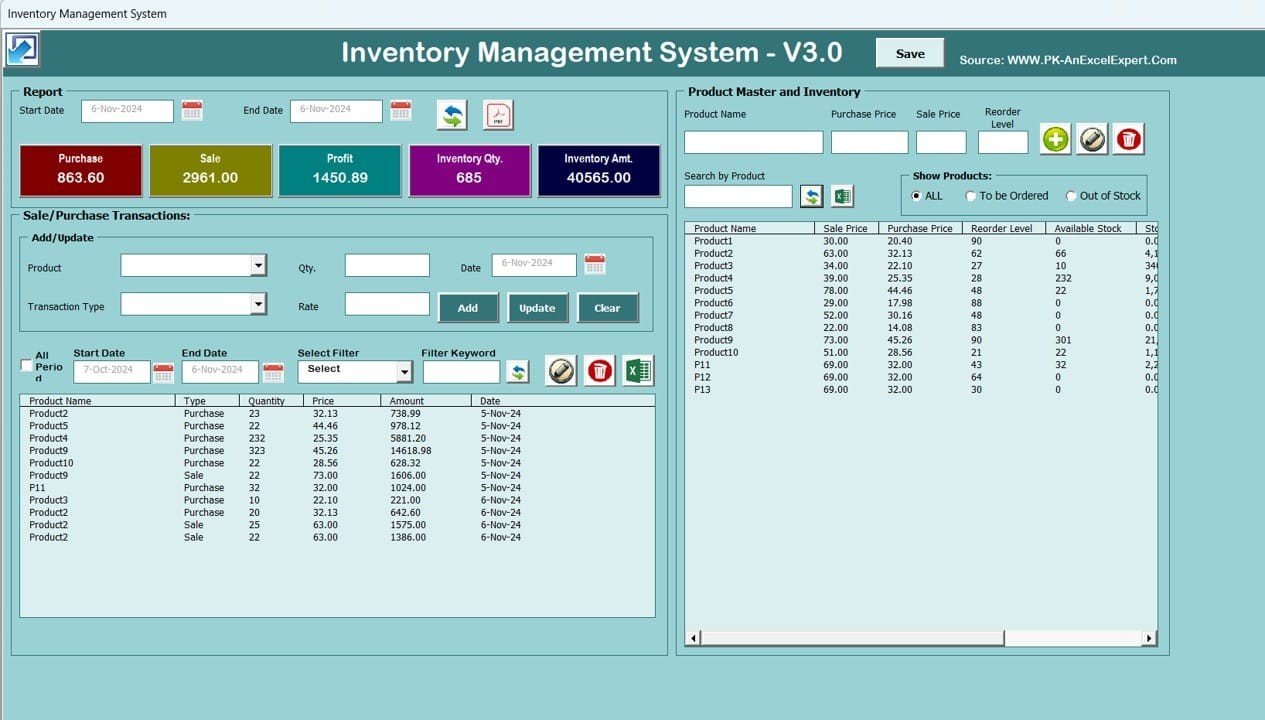
For when a spreadsheet needs to behave like software. This Excel VBA application has a login screen, a navigation menu and form-based data entry, so staff click buttons instead of typing into cells. It keeps a product master, logs purchases and sales, adds every purchase to stock and takes every sale away, and warns you when a product reaches its reorder level.
Date-filtered stock reports export to Excel or PDF in one click. It runs offline in Excel 2016 to 365 on Windows.
Best for: small and mid-sized businesses with several people entering stock. See the Inventory Management System V3.0 ($19.99).
5. Inventory Management Dashboard in Excel ($17.99)
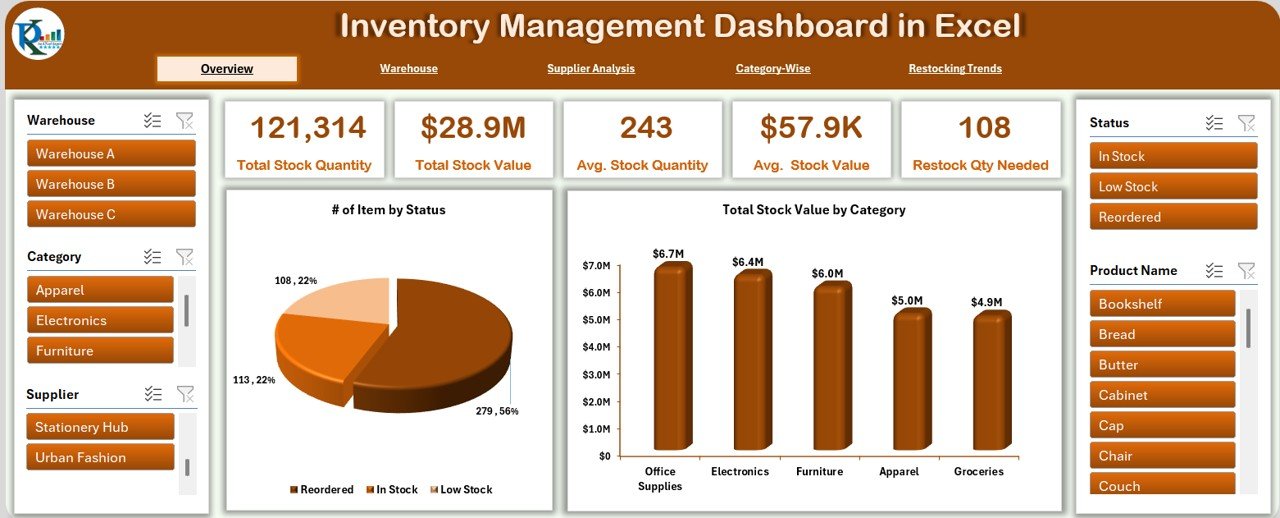
Once the data is clean, this dashboard turns it into answers. Five pages cover Overview, Warehouse, Supplier, Category and Restock. The overview shows stock status, total quantity, total value, low-stock count and restocking needs, and the warehouse page compares units, value, average value, stock movement and low-stock alerts by site. Slicers filter every page by category, status or warehouse.
Best for: retail, wholesale and multi-location businesses that report on stock. See the Inventory Management Dashboard in Excel ($17.99). A Power BI version costs $17.99 too.
6. Product Inventory Dashboard in Excel ($17.99)
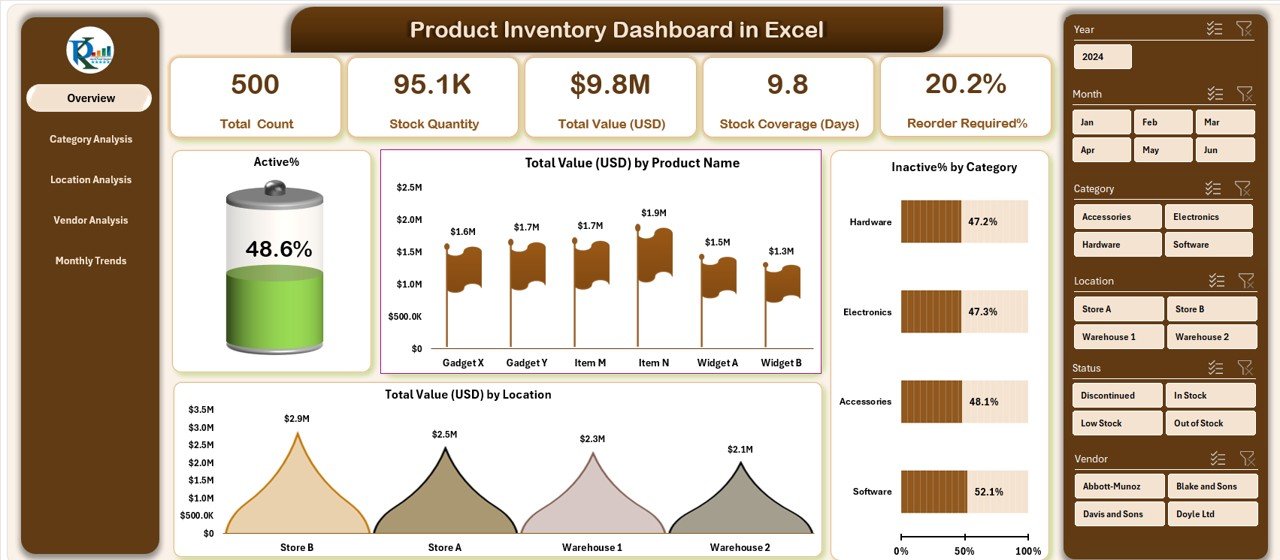
This one looks at stock product by product. Five pages cover Overview, Category Analysis, Location Analysis, Vendor Analysis and Monthly Trends, with KPI cards for total products, active and inactive products, total inventory value and reorder alerts. The vendor page shows supply volume and reorder frequency by supplier, and the monthly page tracks inventory value and stock movement month by month for seasonal planning.
Best for: product businesses that buy from several vendors. See the Product Inventory Dashboard in Excel ($17.99). It also comes in Google Sheets ($6.99).
7. Warehouse Efficiency Dashboard in Excel ($17.99)
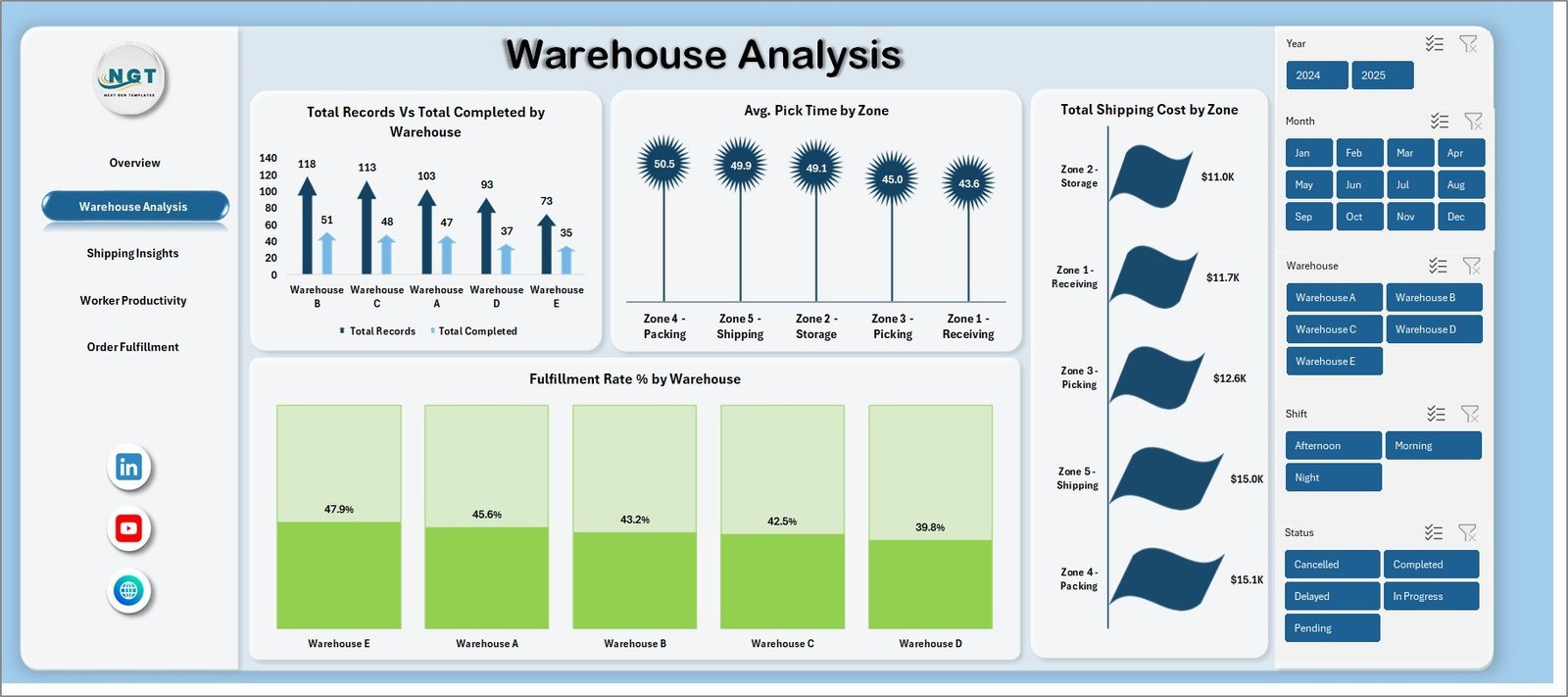
For a warehouse, stock levels are only half the story. This dashboard tracks how well the building runs across five pages: Overview, Warehouse Analysis, Shipping Insights, Worker Productivity and Order Fulfillment. KPI cards show total orders, units shipped, order fulfillment rate, average processing time and on-time shipment percentage, and slicers filter by zone, category, shift, worker, order status and period.
Best for: warehouse managers and logistics coordinators. See the Warehouse Efficiency Dashboard in Excel ($17.99). A Power BI version costs $17.99 as well.
8. Inventory & Warehouse Master Kit: best value ($69.99)
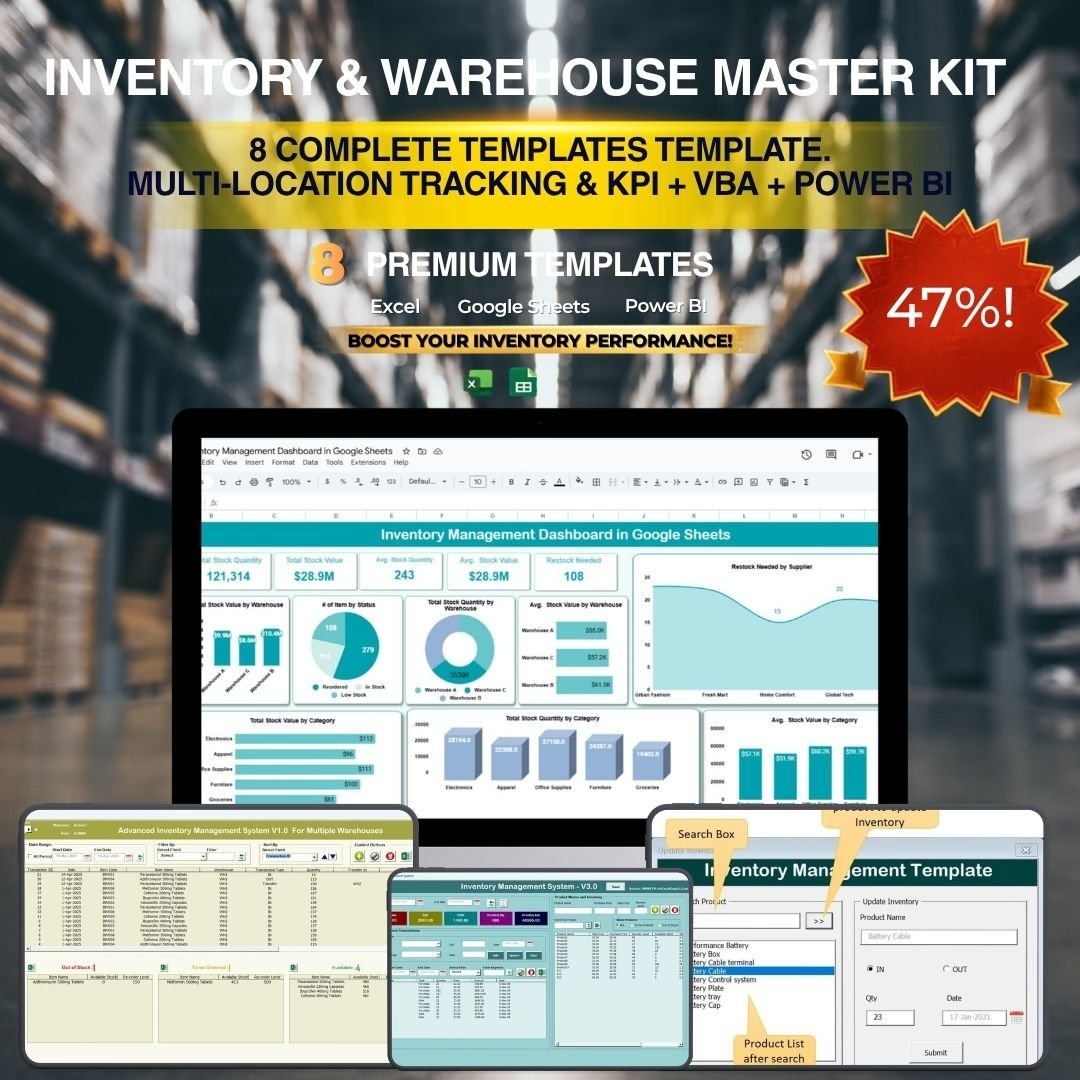
If you need more than one of these tools, the kit is the cheaper route. It bundles 8 templates: the Advanced Inventory Management System V1.0 and the Inventory Management System V3.0 (both VBA), Multi-Location Inventory Management in Google Sheets, the Inventory Management Template for Multiple Locations, the Inventory Management Form, the Inventory Management Dashboard in Power BI, the Inventory Management Dashboard in Google Sheets and the Warehouse Management KPI Dashboard in Excel. Bought one by one they cost $109.92; the kit costs $69.99, a saving of $39.93.
Best for: inventory managers who want systems, dashboards and KPIs in one purchase. See the Inventory & Warehouse Master Kit ($69.99).
Also worth a look: the Office Supply Inventory Update Tracker in Excel ($6.99) is the upgrade for pick 8, with a user login, a data entry form and a dashboard of quantity by category, location and item.
How to choose between a free and a paid inventory template
| Your situation | Start with | Upgrade when |
|---|---|---|
| You run one small shop or stockroom | Smartsheet Stock Inventory Control Template | You want stock in and out to update the balance: Inventory Management Template for Store |
| Your team shares one file | Smartsheet Inventory Template for Google Sheets | You want alerts and a dashboard: Inventory Tracker in Google Sheets |
| You sell products with a shelf life | Spreadsheet Daddy Small Business Inventory Spreadsheet | You need vendor and monthly analysis: Product Inventory Dashboard in Excel |
| Stock sits in several locations | Smartsheet Multi-Location Inventory Template | You move stock between sites: Inventory Management Template for Multiple Locations |
| Several staff record purchases and sales | Smartsheet Inventory Management Template | You want forms and a login: Inventory Management System V3.0 |
| You run a warehouse | Smartsheet Warehouse and Stockroom Template | You report on fulfilment and staff: Warehouse Efficiency Dashboard in Excel |
What goes into an inventory sheet template?
Whatever template you choose, a useful inventory sheet holds the same core columns:
- Item details: item number or SKU, name, description, category and supplier.
- Location: the store, warehouse, shelf or bin where the item sits.
- Quantity on hand: the units you hold right now, ideally worked out from stock received minus stock issued.
- Unit cost and total value: cost per item times quantity, added up for the whole sheet.
- Reorder level and reorder quantity: the point at which you order and how much you order.
- Dates: last ordered, last sold and, for perishable goods, expiry date.
The reorder level is the number to get right. A common rule is reorder point = average daily usage times lead time in days, plus safety stock. Say you sell 12 units a day, your supplier takes 5 days to deliver and you keep 20 units as a buffer. Your reorder point is 12 times 5 plus 20, which is 80 units. When stock falls to 80, you order.
The second number worth watching is inventory turnover = cost of goods sold divided by average inventory. A shop with $120,000 of cost of goods sold in a year and $30,000 of average stock turns its inventory 4 times, which means stock sits for about 91 days (365 divided by 4) before it sells. Our inventory KPIs guide covers 12 of these measures, with formulas and benchmark ranges.
Inventory also matters at tax time. If you are a US business, IRS Publication 538 explains when you must keep inventories and the methods you can use to value them, such as cost or lower of cost or market. Keeping cost per item in your sheet makes year-end valuation much easier.
When a free inventory template is NOT the right answer
- You sell across several online channels. If orders come from your website, Amazon and a shop till at once, a spreadsheet will always lag behind. Inventory software that syncs with each channel is worth paying for. Our Fishbowl alternatives and Cin7 alternatives guides compare when software wins and when a template is enough.
- You need barcode scanning at speed. Free sheets can store barcodes, but they do not read a scanner into a stock movement. A VBA system or dedicated software does.
- You have thousands of SKUs. Large lists slow a spreadsheet down and make errors easy to miss.
- Your problem is buying, not counting. If orders go out without approval, start with a purchase order process. See our free purchase order templates guide.
For video walkthroughs of Excel and Google Sheets inventory templates, see the NextGenTemplates YouTube channel. For a wider choice of paid tools, our roundup of inventory management Excel templates and our list of free Excel dashboard templates are good next reads.
Frequently asked questions
What is the best free inventory template?
Smartsheet’s Stock Inventory Control Template for Excel is the best free option for most small businesses. It flags items to reorder, totals your stock value, records stock locations and keeps a vendor list, with a sample sheet and a blank one. It downloads directly from Smartsheet with no form and no email address.
Is there a free inventory template in Excel?
Yes. Smartsheet offers 15 free Excel inventory templates, including stock control, inventory management, office supplies and IT versions. Spreadsheet Daddy’s small business inventory spreadsheet and Vertex42’s asset tracking template are also free Excel downloads. Vertex42’s Inventory Control Template, once free, now costs $9.95.
Does Google Sheets have an inventory template?
Google Sheets has no built-in inventory template in its own gallery. Free copies are easy to find, though. Smartsheet publishes 15 free Google Sheets inventory templates, from a simple stock list to warehouse, multi-location and e-commerce versions, and Spreadsheet Daddy offers a Google Sheets copy of its small business template.
How do I make a simple inventory sheet?
Create columns for item number, name, category, location, quantity on hand, cost per item, total value and reorder level. Multiply quantity by cost to get total value, and add a formula such as IF(quantity less than reorder level, “REORDER”, “OK”) to flag items to buy. Then count your stock and fill in each row.
What is the difference between an inventory list and an inventory tracker?
An inventory list records what you hold at one moment, and you overwrite quantities after each count. An inventory tracker logs every item received and issued, so the balance updates itself and you can see where stock went. Free templates are mostly lists; paid templates usually add the tracking log.
How often should I count inventory?
Most small businesses do a full count at least once a year for their accounts, and cycle counts in between. A cycle count checks a few items each week, starting with your fastest sellers and most valuable stock, so errors are caught early without closing the shop for a full count.
Can I track inventory for several locations in one spreadsheet?
Yes. Smartsheet’s free Multi-Location Inventory Template for Google Sheets lists quantity by location with subtotals for each site. If you also move stock between locations, the NextGenTemplates Inventory Management Template for Multiple Locations records transfers and works out each site’s balance for $6.99, paid once.
When should I upgrade from a free inventory template?
Upgrade when you are tired of typing stock balances by hand, keep running out of items, hold stock in several places, have several people entering data, or need to report stock value by category and warehouse. NextGenTemplates inventory templates cost $6.99 to $19.99 each, paid once with no subscription.
Get your free inventory template
Download Smartsheet’s Stock Inventory Control Template if you want one good free file today. Use Smartsheet’s Google Sheets Inventory Template if your team shares the list, or Spreadsheet Daddy’s version if you sell products with an expiry date. When you want stock in and out to update the balance, with low-stock alerts and a dashboard, the Inventory Management Template for Store ($6.99) is our top pick, and the Inventory & Warehouse Master Kit ($69.99) is the best value if you need several tools.