

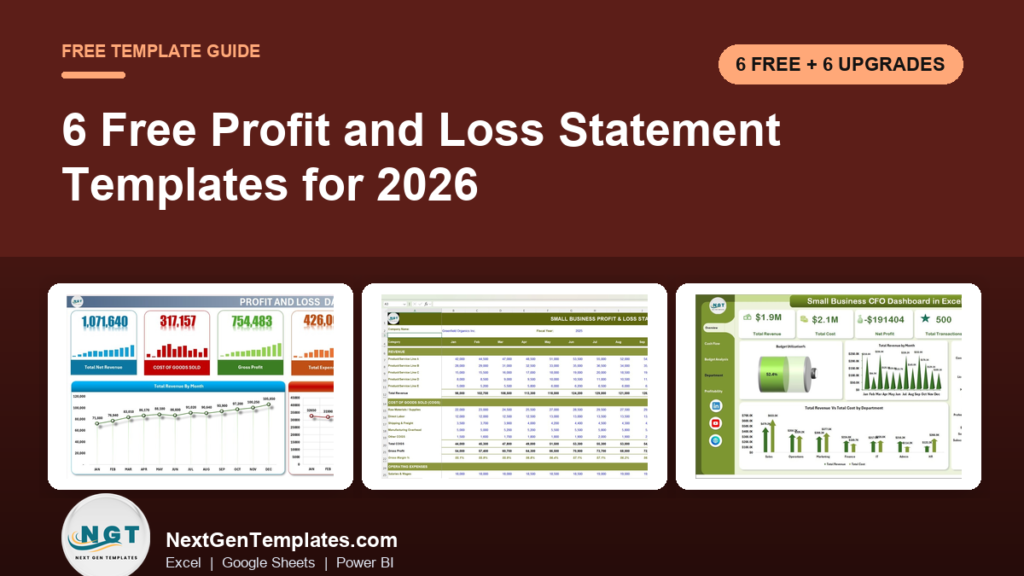
The best free profit and loss statement template in 2026 is Vertex42’s Income Statement. It gives you a simple single-step P&L and a multi-step one with gross profit and operating income, opens in Excel or Google Sheets, and asks for no sign-up. If you want more layouts, Smartsheet’s free collection of 13 P&L templates is the runner-up.
Last updated: October 2026
This guide is for small-business owners, freelancers, bookkeepers and anyone who has been asked for a P&L by a bank, a partner or the tax office. First come the 6 free profit and loss templates worth downloading. We opened every page in October 2026 and downloaded the Excel files where a direct link was offered, to check that they really are free and to see what is inside. Then comes an honest section on when a free template stops being enough, with 6 paid upgrades from NextGenTemplates. If you mostly want to know which margins to watch, read our guide to the profitability KPIs worth tracking alongside this one.
Key takeaways
- All 6 free profit and loss templates in this list cost nothing and need no email address. Only SCORE’s needs a Google account, because it opens as a Google Sheets copy.
- Best overall free profit and loss statement template: Vertex42’s Income Statement, with a single-step sheet and a multi-step sheet in one workbook.
- A profit and loss statement and an income statement are the same report. Search for both names, because good templates hide under either one.
- Free templates add up your numbers well. They do not compare budget with actual, track margins month by month or chart the trend for you. Those gaps are why owners upgrade.
- The 6 paid NextGenTemplates upgrades below cost $4.99 to $17.99, paid once with no subscription. The Small Business Profit and Loss Template in Excel costs $4.99.
 Launch offer
SUMIFS, XLOOKUP, FILTER, LAMBDA and checking AI-written formulas, with real business projects. 11h 47m of video by PK, with practice files, quizzes and a capstone.
Free profit and loss templates compared
Every free source in this guide, side by side. One row is flagged best overall. All six are free to download.
| # | Template | Source | Format | Best For | Price |
|---|---|---|---|---|---|
| 1 | Income Statement (Best overall) | Vertex42 | Excel, Google Sheets, OpenOffice | A small business P&L in single-step or multi-step format | Free |
| 2 | Free Profit and Loss Templates (13 files) | Smartsheet | Excel, Google Sheets, Word, PDF | Choosing between weekly, monthly, quarterly, annual and industry layouts | Free |
| 3 | 12-Month Profit and Loss Projection | SCORE | Google Sheets | Startups writing a business plan or loan request | Free |
| 4 | Income Statement Template | Corporate Finance Institute | Excel | A formal monthly and annual statement down to EBIT and net earnings | Free |
| 5 | Profit and Loss Projection | Vertex42 | Excel, Google Sheets, OpenOffice | A 3-year forecast for a service or a goods business | Free |
| 6 | Self-Employed Profit and Loss Statement | Smartsheet | Excel, Google Sheets, PDF | Freelancers and contractors with income from several clients | Free |
Here are the paid upgrades we recommend once a free P&L template runs out of road. One row is best overall and also the best value.
| Upgrade | Format | Best For | Price |
|---|---|---|---|
| Small Business Profit and Loss Template in Excel (Best overall, best value) | Excel | A 12-month P&L with budget vs actual, EBITDA and a trend dashboard | $4.99 |
| Profit and Loss (P&L) Template in Excel | Excel | Monthly and YTD profit down to EBIT, tax and net profit, with a dashboard | $6.99 |
| Profit and Loss Templates in Google Sheets | Google Sheets | A shared monthly P&L with YTD totals and charts | $6.99 |
| Profitability Analysis KPI Dashboard in Excel | Excel | Margins, ROA and ROE against target and last year | $12.99 |
| Small Business CFO Dashboard in Excel | Excel | Revenue, cost, net profit, budgets and receivables on one dashboard | $17.99 |
| Restaurant P&L Dashboard in Google Sheets | Google Sheets | Food cost, labor cost and gross profit across several locations | $9.99 |
How we picked these free profit and loss statement templates
We started where people really look: the big template libraries (Vertex42 and Smartsheet), the US small-business mentoring network SCORE, finance training sites that give a template away, and the Microsoft template gallery. We loaded every page in October 2026. Smartsheet’s Simple Profit and Loss Statement came down as a 325 KB Excel file, its Self-Employed template as a 373 KB file and its Monthly template as a 458 KB file, each with an example sheet and a blank sheet and no form to fill in. The Corporate Finance Institute’s template downloaded as a 76 KB workbook with a cover page, monthly and annual statements, and blank copies of both.
A source made the list only if the file is free to get and does the job: it lists revenue, cost of goods sold and expenses, and works out profit for the period. Microsoft’s template search now sends visitors to a Microsoft 365 sign-in page, so it is out. TemplateLab lists dozens of P&L forms, but its files sit behind script-driven download buttons we could not check, so we left it off rather than guess.
Search data shaped the list. In the US, “profit and loss statement template” is searched about 8,100 times a month and “profit and loss template” about 4,400 times. “Profit and loss template excel” gets about 2,900 searches, “free profit and loss statement template” about 2,400 and “income statement template” about 1,600. “Simple profit and loss template” gets about 880, “self employed profit and loss template” and “small business profit and loss template” about 390 each, and “profit and loss template google sheets” about 320. So the list covers a simple statement, a monthly view, a business-plan projection, a formal income statement and a self-employed version. We took the paid upgrades from the NextGenTemplates profit and loss range and matched each one to a gap that free files leave open.
The 6 best free profit and loss templates for 2026
1. Income Statement (Vertex42): best overall
Jon Wittwer’s workbook is the cleanest free starting point because it shows you two ways to lay out the same report. The single-step sheet lumps all revenue together and all expenses together, except income tax, which is how many service businesses think about money. The multi-step sheet breaks out gross profit first, by taking cost of goods sold away from net sales, then operating income, then interest and tax, ending at income from continuing operations. Revenue lines cover sales, service, interest and other income, and you are meant to rename them to match your own business.
It downloads as an Excel file for Excel 2007 or later, opens as a Google Sheets copy, and also comes in OpenOffice format. There are no macros. The licence is private use and the page was last updated on 11 May 2020. Below the download block, the page explains each line, from COGS to EBIT, in plain English, which makes it a good teaching file too.
Best for: a small business that wants a proper P&L in a standard format. Free: get the Vertex42 income statement template.
2. Free Profit and Loss Templates (Smartsheet)
Smartsheet’s page by Andy Marker, dated 30 April 2025, is the widest free collection we found, with 13 P&L templates and links straight to each file. The set covers a Simple Profit and Loss Statement, an Annual Small Business P&L that compares up to three years, Quarterly, Monthly and Weekly statements, a Pro Forma P&L, and industry versions for restaurants, rental property, realtors, hotels and construction, plus a nonprofit statement of financial activities.
The Simple template is the one most owners should open first. It separates revenue, COGS and operating expenses, works out gross profit and net income, and lets you choose a quarterly or annual reporting period. It comes as Excel, Word, PDF and Google Sheets. The Monthly template goes further: you enter each month’s amounts and the year-to-date tab, the graph and the trend lines fill in on their own.
Best for: anyone who wants to compare layouts, or needs an industry version, before settling on one. Free: browse Smartsheet’s free profit and loss templates.
3. 12-Month Profit and Loss Projection (SCORE)
SCORE mentors small-business owners for free, and this is the P&L projection they recommend as a first step in business planning. It runs month by month across a full year: revenue by stream, cost of sales, gross profit, a long list of operating expenses from salaries and rent to software subscriptions and depreciation, a tax section, and net profit at the bottom.
The detail that sets it apart is the industry averages column. You can put your projected margins and costs next to typical figures for your industry, which is a quick sanity check before you show the numbers to a lender. The download button opens a copy in Google Sheets, so you need a Google account, but there is no form and no email request.
Best for: startups that need a P&L page for a business plan or a loan application. Free: get SCORE’s 12-month profit and loss projection.
4. Income Statement Template (Corporate Finance Institute)
CFI trains financial analysts, and its free template looks like the income statement in a company’s annual report. Each sheet runs from two revenue streams, less returns, refunds and discounts, to total net revenue, cost of goods sold and gross profit. Below that come eleven expense lines, from advertising and depreciation to rent, salaries, travel and utilities, then earnings before interest and taxes, interest expense, earnings before taxes, income taxes and net earnings.
The workbook has a monthly statement, an annual statement and blank copies of both, so you can study the worked example and then type your own numbers into a clean sheet. The sample is labelled in millions of dollars; change the label for a small business. The Download Now button on the page may ask for an email address, but the article also links the Excel file directly in its text, and that link downloads with no form.
Best for: anyone who wants the formal EBIT-to-net-earnings layout an accountant or investor expects. Free: get the CFI income statement template.
5. Profit and Loss Projection (Vertex42)
Where the first pick looks back, this one looks forward. It is a 3-year projection of income and expenses that uses the same categories as Vertex42’s business budget, with extra columns showing each line as a percentage of total sales. That makes it easy to see whether cost of goods sold or overheads are eating a growing share of revenue.
The workbook holds two versions. The Services sheet suits consultants and agencies, and the Goods sheet adds a cost of goods sold section for inventory and purchases so it can work out gross profit. Vertex42 also suggests relabelling the year columns as months if you want a monthly P&L. It comes as Excel, Google Sheets and OpenOffice, with a private-use licence, and the page was updated on 30 August 2021.
Best for: owners planning the next three years. Free: get the Vertex42 profit and loss projection.
6. Self-Employed Profit and Loss Statement (Smartsheet)
Freelancers often get asked for a P&L when they apply for a mortgage, a lease or a loan, and a company-style statement is overkill. This template lists income by client, with room for twelve clients, then splits business expenses into categories such as rent, insurance and professional services. A tax section gives total expenses with taxes and your final net income, and a summary box at the top shows net profit at a glance.
It comes as Excel, Google Sheets and PDF, with an example sheet and a blank one. Keep it next to your bookkeeping, because the same figures feed your tax return.
Best for: freelancers, contractors and sole traders. Free: get Smartsheet’s self-employed profit and loss template (it is on the same page as pick 2).
Want a free expense tracker by email?
A P&L is only as good as the expense figures you feed it. We will send you our free Weekly Expense Tracker Template in Google Sheets: log daily spending across 8 categories, watch daily and weekly totals update live, and compare actual with budget in a bar chart beside a category pie chart and 4 KPI cards. No payment, no card, and you can unsubscribe at any time.
When does it pay to upgrade from a free profit and loss statement template?
A free template is a good place to start. It stops being enough when one of these is true:
- You want to compare actual results with a budget. Free statements record what happened. A template with a budget column shows where you went off plan and by how much.
- You need margins every month. Gross margin, operating margin and net margin tell you more than the profit figure. Free files rarely calculate them for you.
- You need to see the trend. A grid of twelve monthly numbers is hard to read. Charts and KPI cards make a slow slide in profit obvious before it becomes a loss.
- You report to someone. A partner, a lender or a board wants one clean page, not a spreadsheet to decode.
- You run several sites or departments. One P&L for the whole business hides which branch makes money and which loses it.
6 paid profit and loss template upgrades for when free stops working
1. Small Business Profit and Loss Template in Excel: best overall and best value ($4.99)
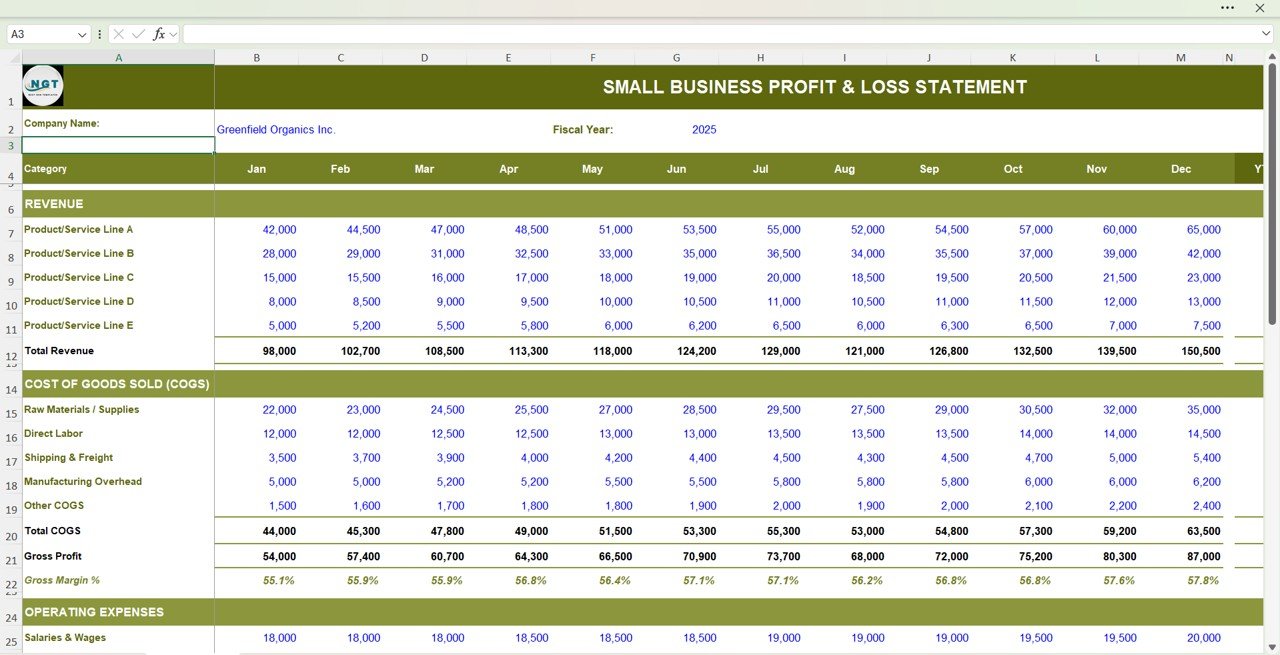
This is the template that fixes the two biggest gaps in free files: budget vs actual and monthly margins. It holds a 12-month income statement with five revenue lines, cost of goods sold by category (materials, direct labor, shipping and manufacturing overhead) and eight operating expense categories. It automatically calculates gross profit, gross margin, EBITDA, operating income and net profit for every month.
Next to the statement sits a budget vs actual report, so you can see where you overspent and where sales beat the plan, and a performance dashboard charts revenue, gross profit, EBITDA and net income across the year beside a panel of year-to-date metrics. Blue cells take your inputs and black cells hold the formulas, and a How to Use sheet walks you through each row. It needs no advanced Excel skills.
Best for: small businesses that want a P&L with budget vs actual and margins, without paying for software. See the Small Business Profit and Loss Template in Excel ($4.99).
2. Profit and Loss (P&L) Template in Excel ($6.99)
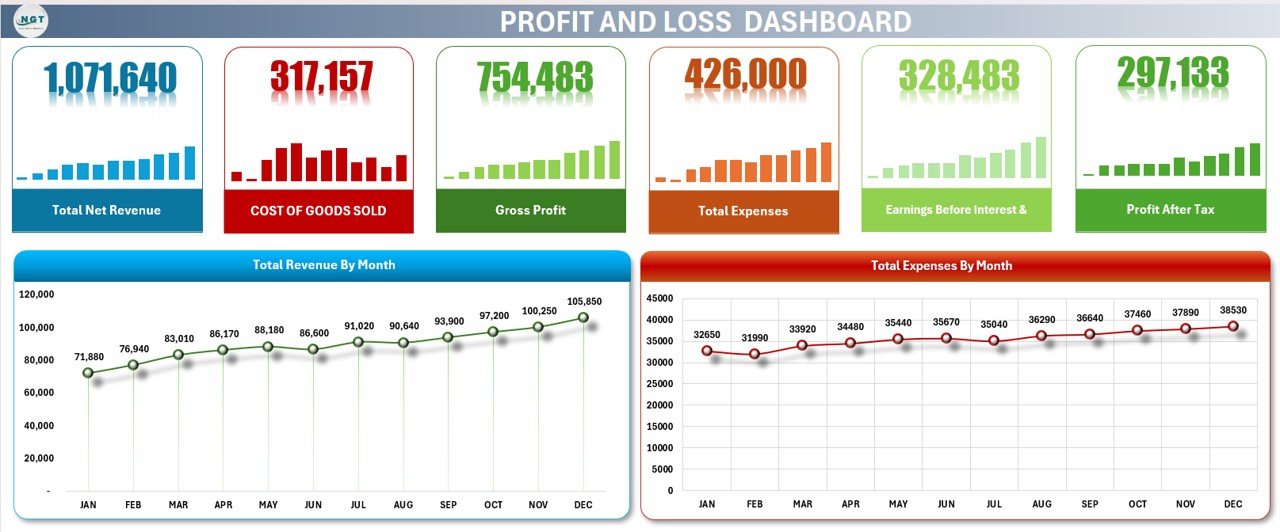
The natural step up from the Vertex42 multi-step statement. You record monthly revenue by stream, with returns and discounts handled as negative values, then cost of goods sold and a full list of expense categories such as rent, salaries, utilities, travel, maintenance, insurance and marketing. The template works out gross profit, EBIT, profit before tax and net profit for every month, plus year-to-date totals.
A dashboard sheet turns the numbers into summary cards for total net revenue, COGS, gross profit, total expenses, EBIT and profit after tax, with charts of revenue and expenses by month. You can add revenue or expense categories whenever you need them.
Best for: owners who want a monthly and YTD P&L with a ready-made dashboard. See the Profit and Loss (P&L) Template in Excel ($6.99).
3. Profit and Loss Templates in Google Sheets ($6.99)
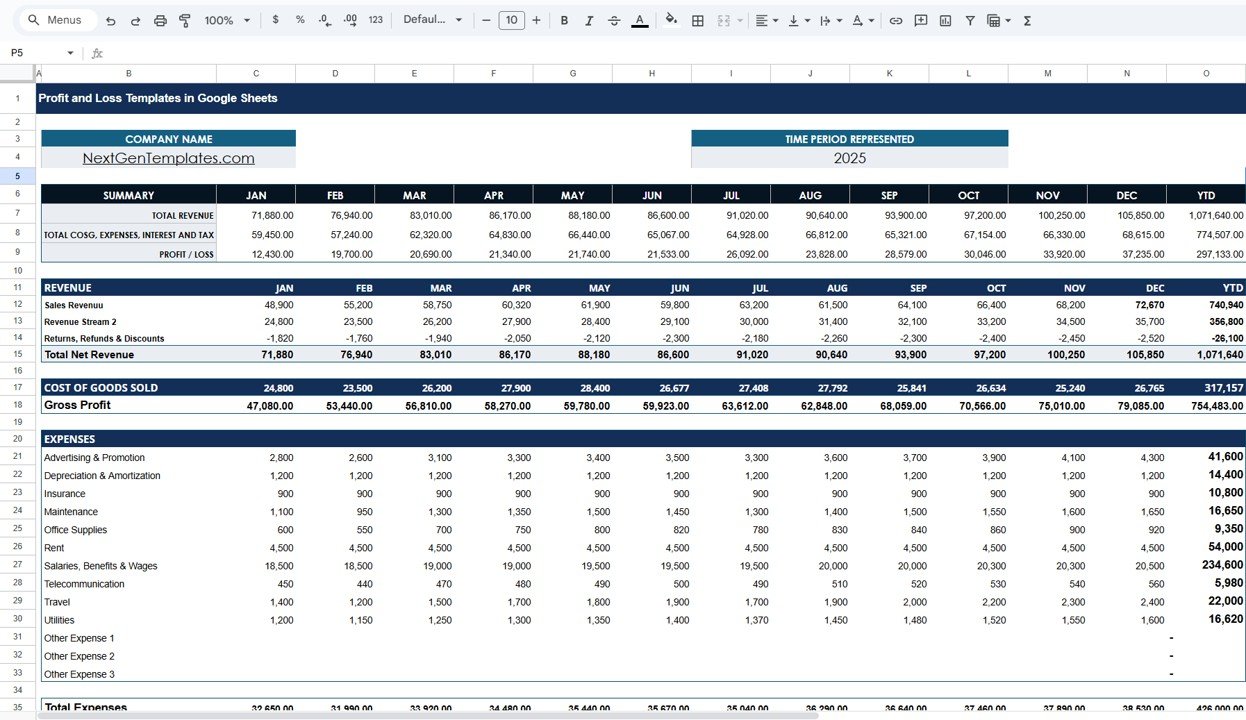
The same idea for teams that live in Google Drive. The template sheet runs from January to December with automatic year-to-date totals: a summary block, a revenue section with returns and refunds, a COGS section, an expense section covering advertising, salaries, utilities, rent, travel and depreciation, and an earnings section down to EBIT, interest, profit before tax, income tax and net profit.
The dashboard sheet shows total net revenue, COGS, gross profit, total expenses, EBIT and profit after tax, with charts of revenue and expenses by month. Because it is a Google Sheet, your bookkeeper and your partner can look at the same file you update.
Best for: startups and small teams that share one P&L file. See the Profit and Loss Templates in Google Sheets ($6.99).
4. Profitability Analysis KPI Dashboard in Excel ($12.99)
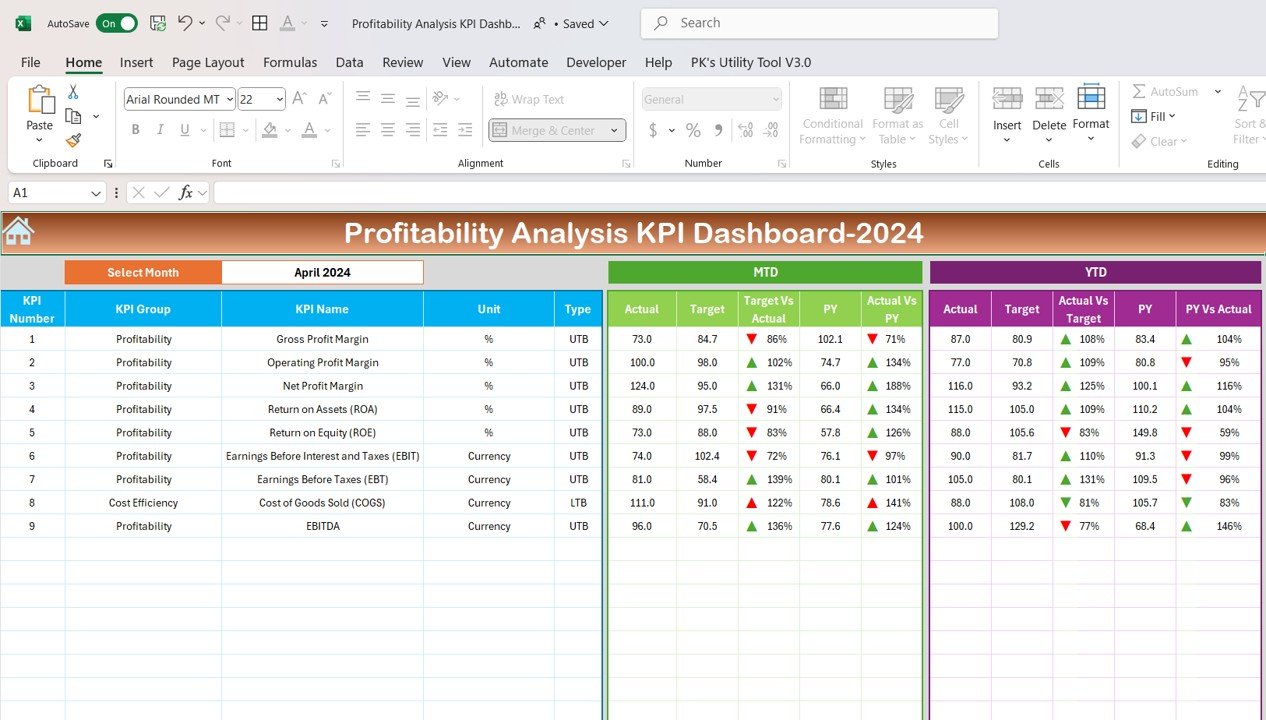
Once the P&L is in place, the next question is whether profitability is getting better or worse. This dashboard tracks KPIs such as gross profit margin, operating profit margin, net profit margin, return on assets, return on equity, EBIT, EBT and EBITDA. For each one it compares month-to-date and year-to-date actuals with target and with last year, and a KPI trend page shows the formula and definition next to the chart.
Best for: finance managers who report margins every month. See the Profitability Analysis KPI Dashboard in Excel ($12.99). A Google Sheets version costs $12.99 too.
5. Small Business CFO Dashboard in Excel ($17.99)
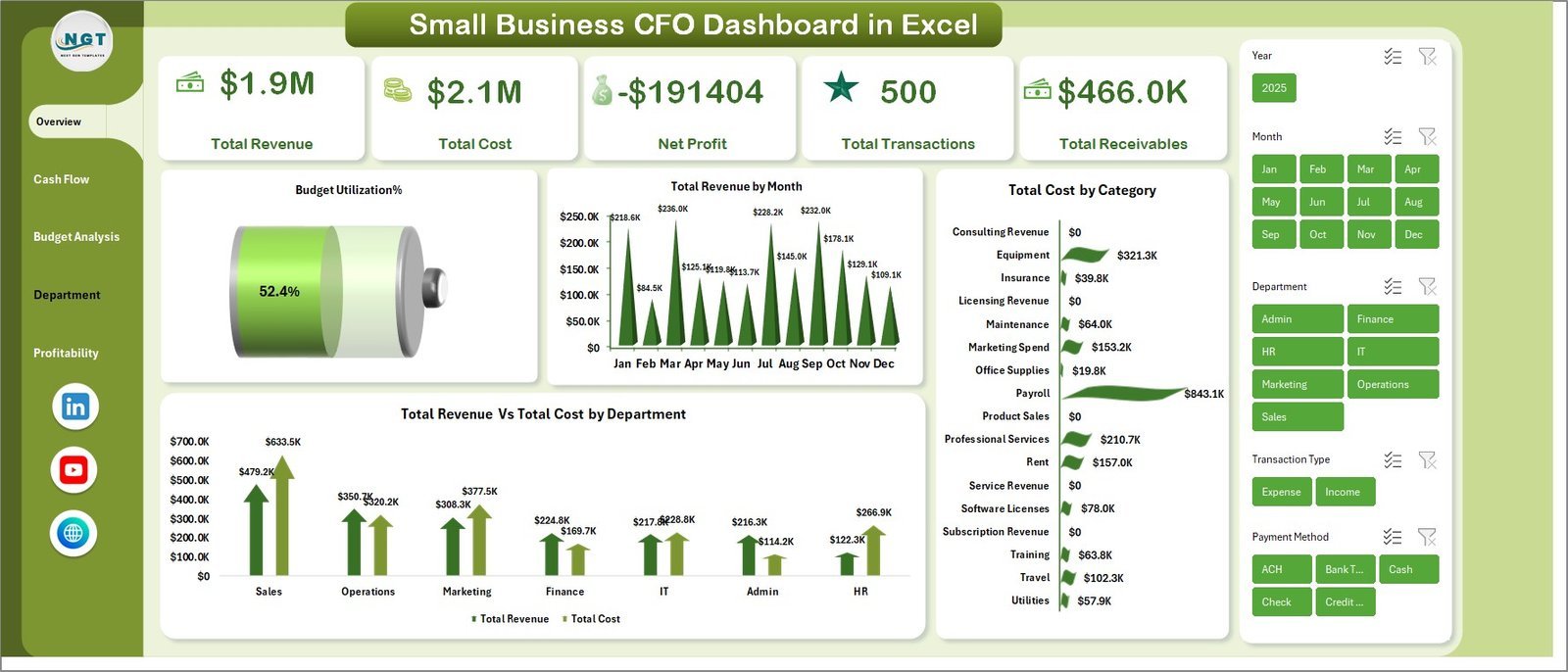
For owners who have outgrown a single statement and want the whole financial picture. Five dashboard pages cover overview, cash flow, budget analysis, department spend and profitability, with five KPI cards for total revenue, total cost, net profit, total transactions and total receivables, and 18 charts across the pages. The budget page compares budget allocation with actual cost by department and month, and the cash flow page tracks receivables, payables and payment status.
Best for: small business owners and finance managers who want P&L, budget and cash on one screen. See the Small Business CFO Dashboard in Excel ($17.99).
6. Restaurant P&L Dashboard in Google Sheets ($9.99)
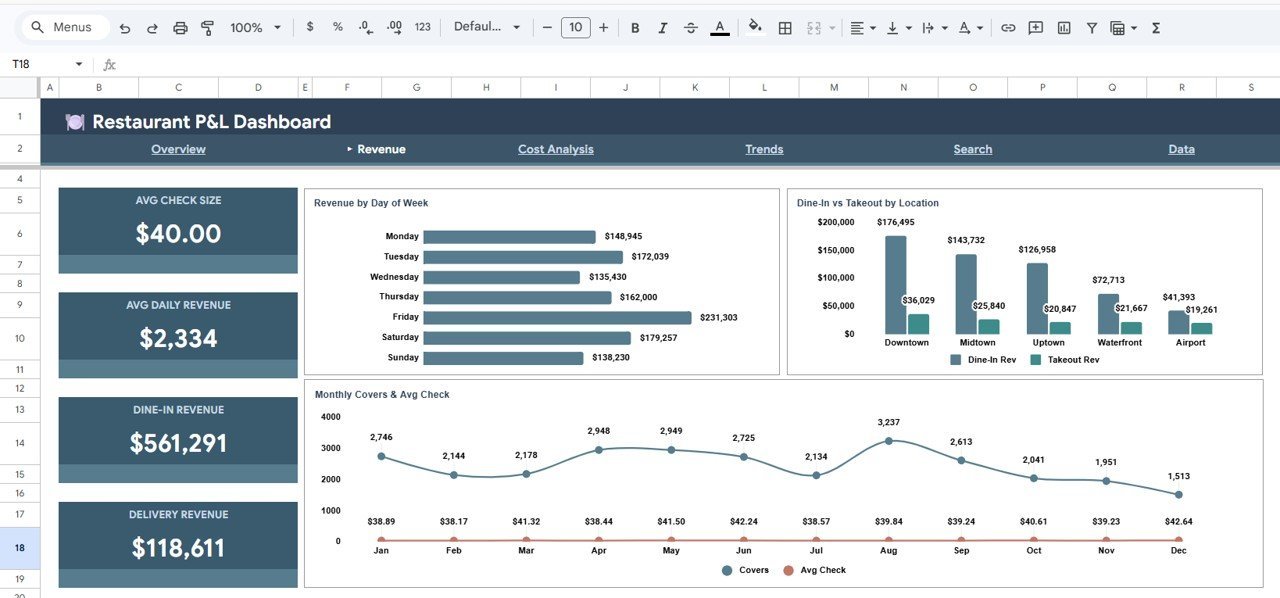
The upgrade for the free Smartsheet restaurant statement. Restaurants live and die on food cost and labor cost, and this dashboard puts both next to revenue and gross profit. Five KPI cards cover total revenue, food cost, labor cost, gross profit and covers, and six tabs (Overview, Revenue, Cost Analysis, Trends, Search and Data) hold more than 13 charts, from revenue by location to cumulative YTD profit. Slicers filter by location, category and period, so a group can compare branches.
Best for: restaurant owners and multi-location operators. See the Restaurant P&L Dashboard in Google Sheets ($9.99). There is also a Restaurant P and L Dashboard in Excel ($17.99).
Also worth a look: the Profit and Loss Chart in Excel with Examples ($4.99) charts income, expenses and profit with month-to-date and year-to-date views. If you need a whole finance toolkit, the FP&A Financial Planning and Analysis Pack bundles 9 Excel, Google Sheets and Power BI finance dashboards for $85.99, 40% less than buying them one by one.
How to choose between a free and a paid profit and loss template
| Your situation | Start with | Upgrade when |
|---|---|---|
| You need a P&L for a business plan or loan | SCORE 12-Month Profit and Loss Projection | You also want budget vs actual once you open: Small Business Profit and Loss Template in Excel |
| You want a standard statement for last month or last year | Vertex42 Income Statement | You want monthly, YTD and a dashboard: Profit and Loss (P&L) Template in Excel |
| Several people update the numbers | Smartsheet Simple or Monthly P&L, opened in Google Sheets | You want one shared file with charts: Profit and Loss Templates in Google Sheets |
| You are self-employed | Smartsheet Self-Employed P&L | Your expenses grow and you want margins: Small Business Profit and Loss Template in Excel |
| You report margins to managers | Any free statement | You need actual vs target vs last year: Profitability Analysis KPI Dashboard in Excel |
| You run a restaurant | Smartsheet Restaurant P&L | You have several locations: Restaurant P&L Dashboard in Google Sheets |
What goes into a profit and loss statement template?
Every P&L, whatever the template, follows the same order from top line to bottom line:
- Revenue: sales of products and services, less returns, refunds and discounts, giving net revenue.
- Cost of goods sold: the direct cost of what you sold, such as materials, direct labor and shipping. Service businesses often have little or none.
- Gross profit: net revenue minus cost of goods sold.
- Operating expenses: rent, salaries, marketing, insurance, utilities, software and depreciation.
- Operating income (EBIT): gross profit minus operating expenses.
- Net profit: operating income minus interest and income tax.
A short worked example makes the arithmetic clear. Say a shop has $50,000 of net revenue and $20,000 of cost of goods sold in a month. Gross profit is $30,000, a gross margin of 60%. Take away $18,000 of operating expenses and operating income is $12,000. After $1,000 of interest and $2,500 of tax, net profit is $8,500, a net margin of 17%.
The margins are the numbers to watch: gross margin = gross profit divided by net revenue, and net margin = net profit divided by net revenue. A falling gross margin points at prices or supplier costs; a falling net margin with a steady gross margin points at overheads. Our profitability KPIs guide covers 12 of these measures, with formulas and benchmark ranges.
If you are self-employed in the US, your profit and loss figures map closely onto IRS Schedule C (Form 1040), the form sole proprietors use to report business profit or loss. Grouping your expenses the same way in your template saves time at tax time.
When a free profit and loss template is NOT the right answer
- You already use accounting software. QuickBooks, Xero and similar tools produce a profit and loss report from your books in seconds. Use a spreadsheet for budgets and forecasts, not to retype what the software already knows. Our bookkeeper template stack shows where spreadsheets still help.
- You need audited or filed accounts. A template helps you prepare, but statutory accounts and tax returns should go through your accountant.
- Your real worry is running out of cash. A profitable business can still miss payroll if customers pay late. Pair your P&L with one of our free cash flow statement templates.
- You are planning spending, not measuring profit. A budget is the better tool for that. See our free budget templates guide, and track receipts with our free expense report templates.
For video walkthroughs of Excel and Google Sheets finance templates, see the NextGenTemplates YouTube channel. For a wider finance toolkit, the CFO dashboard template stack and our roundup of finance dashboard Excel templates are good next reads.
Frequently asked questions
What is the best free profit and loss statement template?
Vertex42’s Income Statement is the best free option for most small businesses. It includes a single-step and a multi-step P&L in one workbook, opens in Excel or Google Sheets, and asks for no sign-up. If you want more choice, Smartsheet offers 13 free P&L templates, including monthly, self-employed and restaurant versions.
Is a profit and loss statement the same as an income statement?
Yes. Profit and loss statement, P&L and income statement are three names for the same report. It shows revenue, costs and expenses over a period and ends with net profit or loss. That is why some of the best free templates in this list are called income statements.
Does Excel have a profit and loss template?
Microsoft’s template gallery has offered P&L templates, but its search now sends many visitors to a Microsoft 365 sign-in page. The quicker route is a free Excel file from Vertex42, Smartsheet or the Corporate Finance Institute, all of which download directly with no account.
How do I make a simple profit and loss statement?
List your revenue for the period and subtract returns and discounts. Subtract cost of goods sold to get gross profit. Then subtract operating expenses such as rent, wages and utilities to get operating income, and take away interest and tax to reach net profit. A template does each step for you.
Is there a free profit and loss template for self-employed people?
Yes. Smartsheet’s Self-Employed Profit and Loss Statement lists income by client, groups business expenses into categories, and includes a tax section and a net profit summary box. It comes as Excel, Google Sheets and PDF, free and with no email address needed.
Can I make a profit and loss statement in Google Sheets?
Yes. SCORE’s 12-month projection opens straight in Google Sheets, and Vertex42 and Smartsheet both offer Google Sheets copies. If you want a shared file with YTD totals and a dashboard, the NextGenTemplates Profit and Loss Templates in Google Sheets cost $6.99, paid once.
How often should a small business prepare a P&L?
Monthly is the best habit. A monthly P&L shows problems such as rising supplier costs or a slow season while you can still act, and twelve monthly statements add up to the annual figures your accountant needs. Lenders usually ask for the last year or two plus year to date.
When should I upgrade from a free profit and loss template?
Upgrade when you want budget vs actual, need margins calculated every month, have to present the numbers to a lender or partner, or run several branches. NextGenTemplates profit and loss templates cost $4.99 to $17.99, paid once with no subscription.
Get your free profit and loss statement template
Download Vertex42’s Income Statement if you want one good free file today. Add SCORE’s 12-month projection if you are writing a business plan, or Smartsheet’s self-employed version if you freelance. When you want budget vs actual, margins and a dashboard in one file, the Small Business Profit and Loss Template in Excel ($4.99) is our top pick, and the Profit and Loss Templates in Google Sheets ($6.99) is the one to share with your team.