

The best SaaS dashboard template for most subscription businesses in 2026 is the SaaS Metrics Dashboard in Excel ($17.99). It puts MRR, ARR, churned accounts and expansion revenue on one overview page, with four more pages for revenue, customer health, churn and growth. The Google Sheets version costs $9.99.
Last updated: October 2026
Key takeaways
- Our top pick is the SaaS Metrics Dashboard ($17.99 in Excel or Power BI, $12.99 in HTML, $9.99 in Google Sheets), with KPI cards for Total MRR, Total ARR, Total Churned Accounts and Total Expansion Revenue.
- For board and investor reporting, the SaaS Financial Model Dashboard ($17.99) adds profitability, CAC by plan and revenue by sales channel.
- Churn and renewals have their own tools: the Subscription Retention KPI Dashboard and the SaaS Renewal KPI Dashboard, each from $9.99 in Google Sheets.
- All eight picks cost $4.99 to $17.99 once, while SaaS analytics platforms bill every month and often price by the revenue you track.
- Most picks come in Excel, Power BI and Google Sheets, so a Microsoft 365 team and a Google Workspace team can each pick a native file.
 Launch offer
From your first Pivot Table to the Data Model, DAX, Power Query and a one-page KPI dashboard. 11h 51m of video by PK, with practice files, quizzes and a capstone.
SaaS dashboard templates compared
| Template | Format | Best For | Price |
|---|---|---|---|
| SaaS Metrics Dashboard (Best overall) | Excel, Power BI, Google Sheets, HTML | MRR, ARR, churn and expansion in one view | $9.99 to $17.99 |
| SaaS Financial Model Dashboard | Excel, Power BI | Founders and CFOs reporting revenue and profitability | $17.99 |
| Subscription Business Dashboard | Excel, Power BI | Non-software subscriptions: plans, channels, cancellations | $17.99 |
| Subscription Retention KPI Dashboard | Excel, Power BI, Google Sheets | Churn, CLV, renewal rate and cohort tracking | $9.99 to $14.99 |
| SaaS Business KPI Dashboard | Excel, Power BI, Google Sheets | Unit economics: MRR, ARPU, CAC and LTV | $12.99 to $14.99 |
| SaaS Customer Success Dashboard | Excel, Power BI | CSM teams watching health scores and at-risk accounts | $17.99 |
| SaaS Onboarding Dashboard | Excel, Power BI, Google Sheets | Activation speed and onboarding manager performance | $9.99 to $17.99 |
| SaaS Renewal KPI Dashboard + Renewal Calendar (Best value) | Excel, Power BI, Google Sheets | Renewal dates, renewal rate and churn on a small budget | $4.99 to $14.99 |
SaaS and subscription teams share one reporting problem. Billing data sits in Stripe, Chargebee or Paddle, customer notes sit in the CRM, support tickets sit in the help desk, and product usage sits somewhere else again. When the founder asks for MRR by plan, net churn for the quarter or the accounts most likely to cancel, someone spends an afternoon exporting CSVs and rebuilding the same pivot tables.
The usual paid fix is a subscription analytics platform such as ChartMogul, Baremetrics or the analytics inside your billing tool. They are good products, and they connect to billing automatically. But they bill every month, and several price their plans by the MRR you track, so the cost climbs as you grow (check each vendor’s current pricing page). A SaaS dashboard template that you buy once for $4.99 to $17.99 will not sync with Stripe on its own, but it gives you the same core views from a monthly export, and you own the file.
How we picked these
We searched the NextGenTemplates catalog for products built for software as a service and subscription businesses, then kept the ones that model recurring revenue: MRR, ARR, churn, renewals, retention, activation and customer health. Development and engineering dashboards were left out because they serve a different buyer, and so was a generic employee onboarding dashboard that the first shortlist carried.
Each of the eight picks has a live product page, a one-time price and a documented list of pages and KPIs. Where the same tool exists in several formats we list it once and give every price. Ranking weighs how many core SaaS metrics a template covers first, then fit for one specific job, then price.
The 8 best SaaS dashboard templates for 2026
1. SaaS Metrics Dashboard: best overall
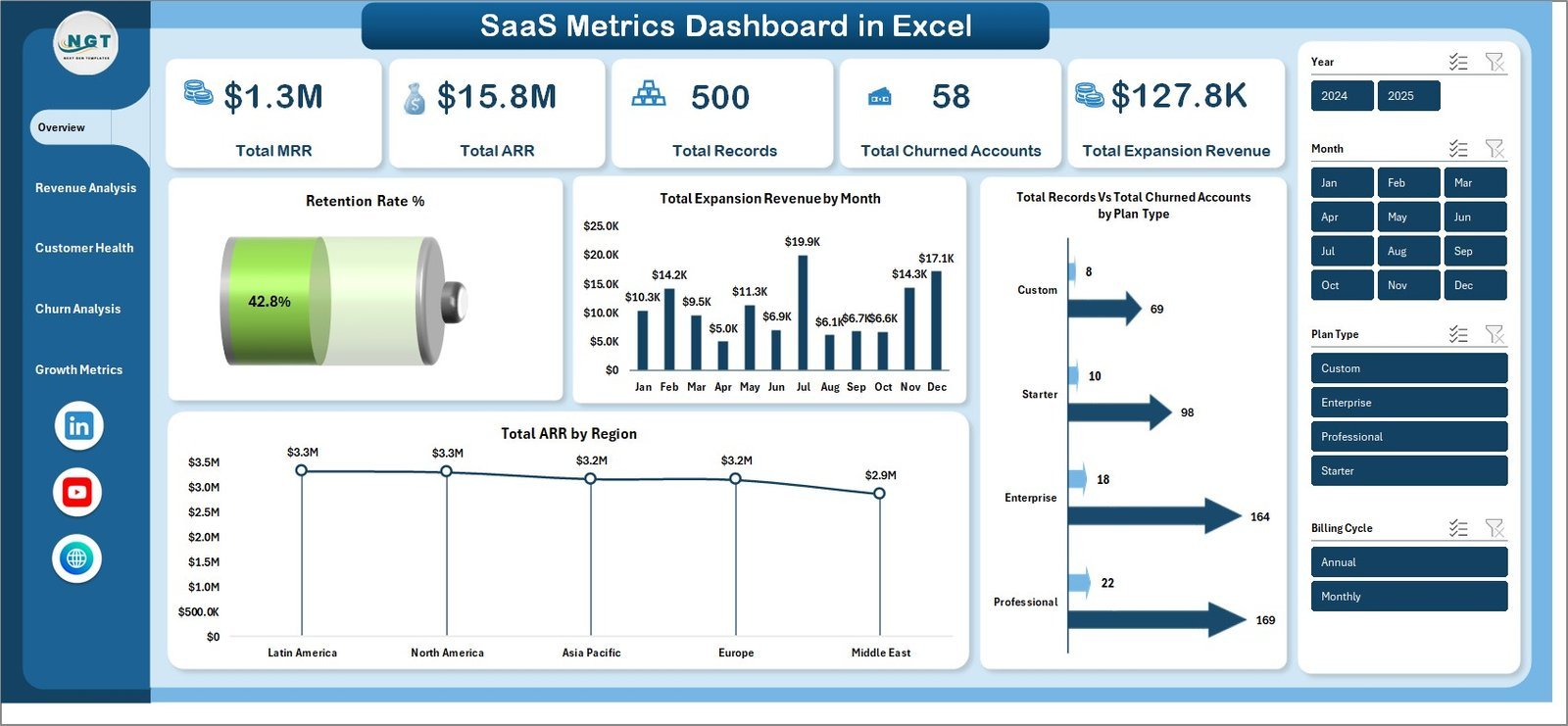
This is the SaaS metrics dashboard template we would hand to a founder first, because it answers the questions every board pack asks: how much recurring revenue do we have, how much did we lose, and how much did existing customers expand. One data sheet feeds five dashboard pages through pivot tables, so you replace the sample data, click Refresh All and every chart updates.
Who it is for: SaaS founders, RevOps managers, customer success leads and finance teams who want one view of revenue and churn.
What is inside:
- Five pages: Overview, Revenue Analysis, Customer Health, Churn Analysis and Growth Metrics
- KPI cards for Total MRR, Total ARR, Total Records, Total Churned Accounts and Total Expansion Revenue
- MRR by industry, billing cycle and customer, ARR by account manager, and expansion revenue by company
- Customer health views: churn risk, CSAT by renewal status, support tickets by region and NPS by plan type
- Slicers for plan type, region, industry, account manager and billing cycle
Use it to see which plan type carries the highest churn rate, which account managers hold the most ARR, and whether expansion revenue is covering the MRR you lose each month. It comes in Excel ($17.99), Power BI ($17.99), Google Sheets ($9.99) and a browser-based HTML version ($12.99).
Best for: any SaaS company that wants MRR, ARR, churn and expansion on one page.
2. SaaS Financial Model Dashboard: best for founders and CFOs
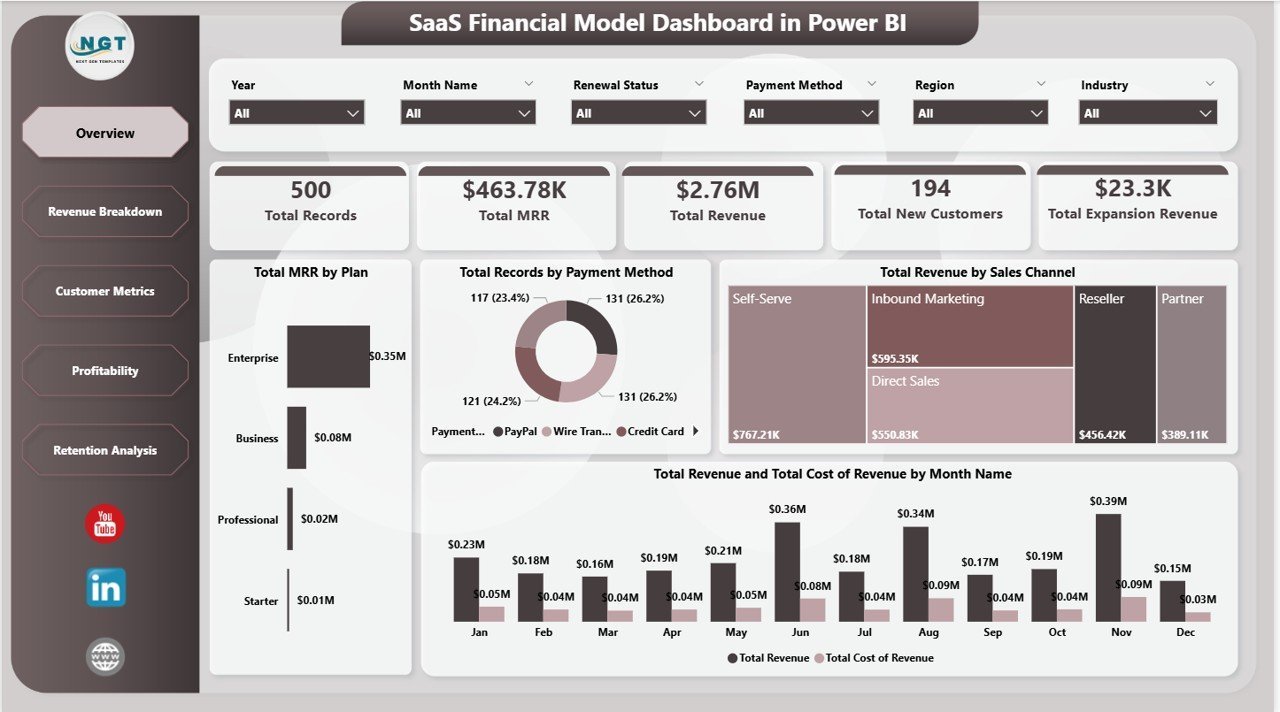
Where the metrics dashboard is about the customer base, this one is about the money. It tracks Total MRR, Total Revenue, Total New Customers, Total Churned and Total Expansion Revenue, then breaks revenue down by plan, billing cycle, sales channel and industry.
Who it is for: founders preparing investor updates, CFOs and finance analysts at subscription companies.
What is inside:
- Five pages: Overview, Revenue Breakdown, Customer Metrics, Profitability and Retention Analysis
- More than 20 charts, including revenue by plan, MRR by region, churned customers by month and CAC by plan
- Retention views for CAC and renewal status
- Slicers for plan, region, industry, billing cycle and payment method
A typical use: compare CAC by plan against the revenue each plan brings in, so you can see whether your cheapest tier pays back its acquisition cost. Buy it in Excel or Power BI, both $17.99.
Best for: monthly finance reviews and investor reporting.
3. Subscription Business Dashboard: best for non-software subscriptions
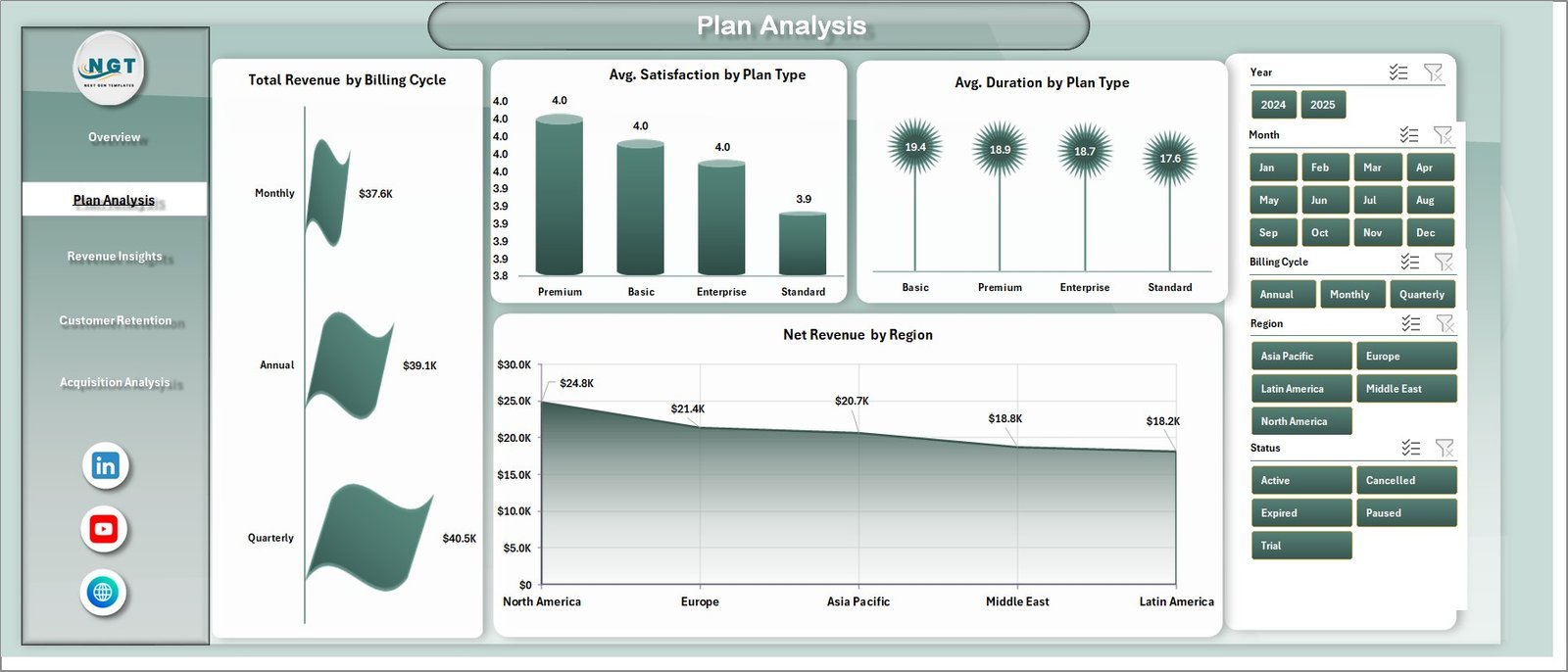
Not every recurring-revenue business sells software. Memberships, service plans, content subscriptions and boxes all need the same core numbers, and this dashboard uses plain subscription language rather than SaaS jargon.
Who it is for: subscription business owners, revenue operations and finance leads.
What is inside:
- Five pages: Overview, Plan Analysis, Revenue Insights, Customer Retention and Acquisition Analysis
- KPI cards for Total Revenue, Total Records, Total Active, Avg. Satisfaction and Total Cancelled
- Revenue by industry and acquisition channel, revenue vs support cost by year, and active vs cancelled by region
- Churn rate by industry, records by renewal status and net revenue by channel
It is the one to pick if you want to know which acquisition channel brings customers who stay, and whether support cost is eating into revenue. Available in Excel and Power BI, both $17.99.
Best for: membership and subscription businesses outside pure software.
4. Subscription Retention KPI Dashboard: best for churn and cohorts
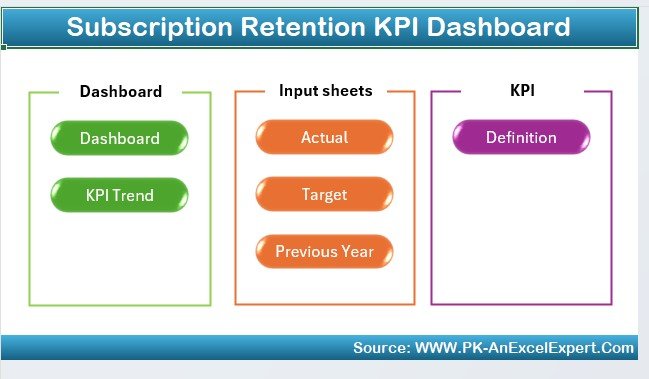
Retention is where most subscription businesses win or lose, so it deserves its own file. This KPI dashboard tracks churn rate, customer lifetime value, renewal rate and subscription revenue, and adds cohort analysis by signup period.
Who it is for: retention and customer success managers, and founders who review churn monthly.
What is inside:
- Churn rate and retention tracking
- Customer lifetime value (CLV) analysis
- Renewal rate tracking
- Cohort analysis by signup period and behaviour over time
- Revenue tracking across upsells, renewals and cancellations
Use the cohort view to check whether customers who joined after a pricing change churn faster than earlier ones. Pick Excel ($14.99), Power BI ($11.99) or Google Sheets ($9.99).
Best for: teams whose main question is “why are customers leaving?”
5. SaaS Business KPI Dashboard: best for unit economics

This KPI dashboard focuses on the ratios investors ask about: MRR, average revenue per user (ARPU), churn rate, customer acquisition cost (CAC) and customer lifetime value (LTV). It is lighter than the five-page dashboards above, which makes it quick to update every month.
Who it is for: early-stage founders and growth leads who track a short list of KPIs against targets.
What is inside:
- Subscription metrics: MRR, ARPU and churn rate
- CAC analysis for marketing and sales efficiency
- LTV tracking for long-term revenue potential
- Revenue growth and profitability views
- Customizable metrics you can tailor to your model
Put LTV and CAC side by side to test the common 3:1 rule of thumb before you raise ad spend. Choose Excel ($14.99), Power BI ($12.99) or Google Sheets ($12.99).
Best for: a monthly KPI check on growth efficiency.
6. SaaS Customer Success Dashboard: best for CSM teams
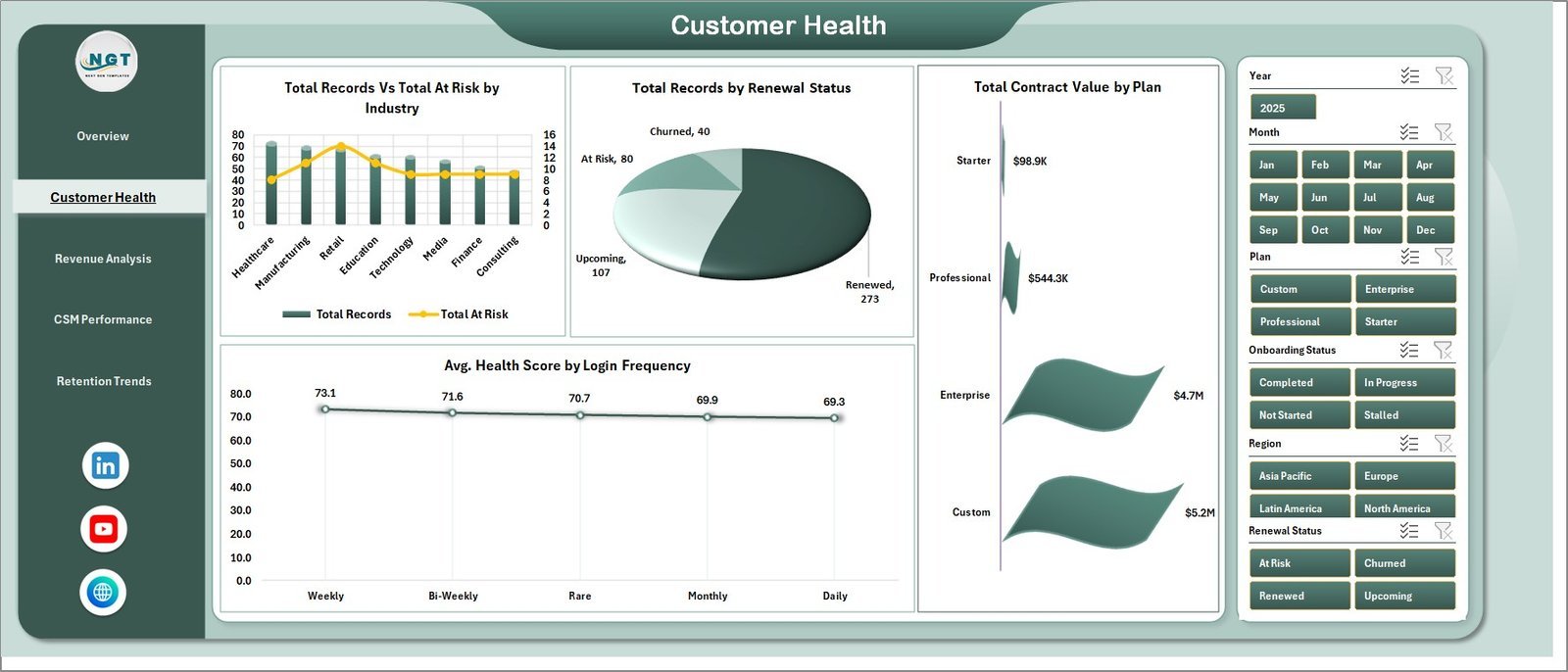
Customer success teams lose hours every month stitching together CRM exports, billing files and support reports. This dashboard turns those into one workbook with health scores, renewals and ticket load per CSM.
Who it is for: CS leaders, CSMs and RevOps teams who run weekly account reviews.
What is inside:
- Five pages: Overview, Customer Health, Revenue Analysis, CSM Performance and Retention Trends
- KPI cards for Total MRR, Total Contract Value, Total Records, Total Tickets and Avg. Health Score
- At-risk accounts by plan, health score by plan and login-frequency views
- Portfolio MRR, ticket load and average health score per CSM
- Slicers for plan, industry, region, CSM, renewal status and month
Bring it to the weekly standup to see which CSM carries the most at-risk MRR, and which plan has the weakest health score before renewal season. It costs $17.99 in Excel or Power BI.
Best for: customer success teams without a CS platform budget.
7. SaaS Onboarding Dashboard: best for activation
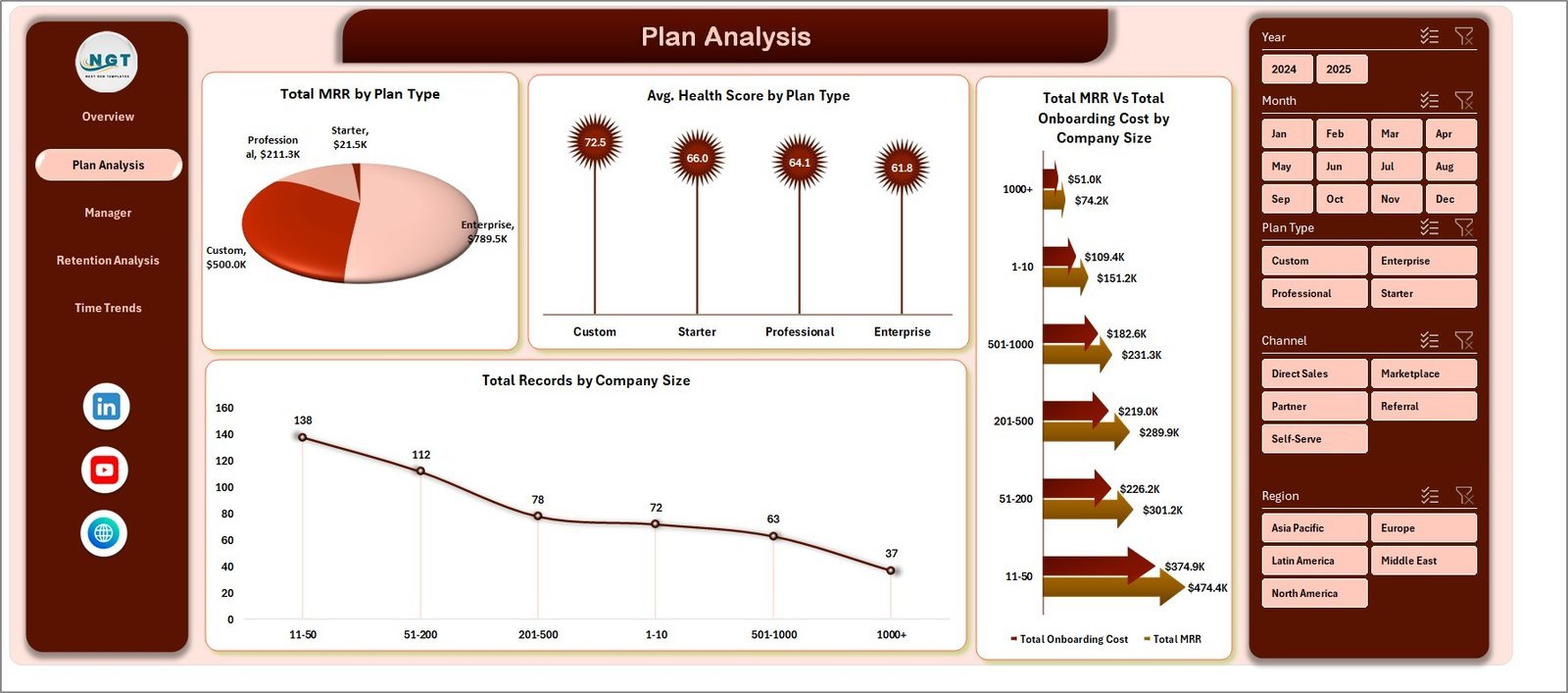
Churn often starts in the first weeks, when a new account never gets set up properly. This dashboard watches the post-signup journey: how many accounts activated, how long it took and which onboarding manager is getting customers live fastest.
Who it is for: onboarding and implementation teams, and CS leaders who own activation.
What is inside:
- Five pages: Overview, Plan Analysis, Manager Performance, Retention Analysis and Time Trends
- KPI cards for Total MRR, Total Records, Avg. Days To Activate, Avg. Health Score and Total Activated
- 20 pivot charts, four on each page
- A manager scorecard comparing days to activate, health score, completed and churned accounts
- No macros or VBA in the Excel file, so it works in Excel for Windows, Mac and the web
Use it to spot the plan type where days to activate keep rising. Buy it in Excel ($17.99), Power BI ($17.99) or Google Sheets ($9.99).
Best for: cutting time to value for new customers.
8. SaaS Renewal KPI Dashboard and Renewal Calendar: best value
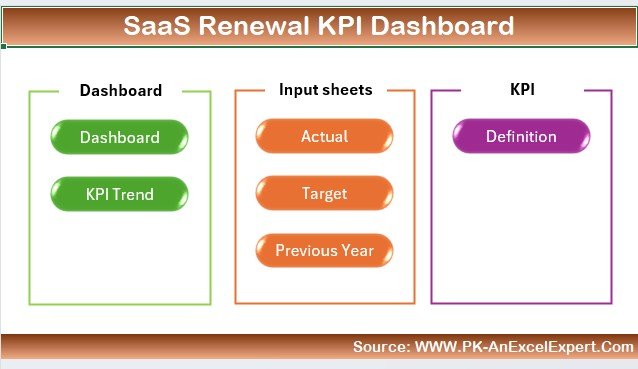
Renewals are where recurring revenue is confirmed, and a missed renewal date is the cheapest churn to prevent. The renewal KPI dashboard tracks renewal rate, churn rate, CLV, subscription growth and upcoming renewal and payment due dates.
Who it is for: account managers and finance teams who own renewals, and small SaaS teams on a tight budget.
What is inside:
- Renewal rate and churn monitoring
- CLV tracking for pricing and retention decisions
- Subscription growth analysis: new sign-ups, renewals and upgrades
- Renewal and payment due date tracking
Get it in Excel ($14.99), Power BI ($11.99) or Google Sheets ($9.99). If you only need the dates, the Subscription and SaaS Renewal Calendar in Excel costs $4.99: annual, monthly and daily views, VBA forms to add or edit events, and an auto-generated ID for every renewal. It also works the other way round, for tracking the SaaS tools your own company pays for.
Best for: never missing a renewal, for less than $15.
Short on time? Start with the SaaS Metrics Dashboard in Excel ($17.99) or its Google Sheets version ($9.99). It covers MRR, ARR, churn and expansion, which is what most monthly reviews need.
Which SaaS metrics should a dashboard track?
A good SaaS metrics dashboard template does not need fifty KPIs. It needs the handful that explain growth, and a clear formula for each. These are the ones our picks cover:
| Metric | Formula | Common benchmark |
|---|---|---|
| MRR | Sum of monthly subscription revenue from active customers | Track the trend; split into new, expansion and churned MRR |
| ARR | MRR x 12 | Used for annual planning and valuation talk |
| Customer churn rate | Customers lost in period / customers at start of period | Often quoted as under 1% to 2% a month for mid-market B2B SaaS |
| Net revenue retention | (Start MRR + expansion – contraction – churned MRR) / start MRR | Above 100% means existing customers grow revenue on their own |
| ARPU | MRR / active customers | Compare by plan to find pricing gaps |
| CAC | Sales and marketing spend / new customers won | Read it against LTV, not on its own |
| LTV | ARPU x gross margin % / monthly churn rate | An LTV to CAC ratio near 3:1 is a widely used target |
| CAC payback | CAC / (ARPU x gross margin %) | Under 12 months is a common goal for SMB SaaS |
Benchmarks vary by segment and price point, so treat them as a starting point for your own targets. For a deeper look at churn maths, see our guide to customer churn rate and retention metrics, and for the sales side, the sales pipeline metrics to track and our CRM metrics guide.
How to choose between them
| If your main question is… | Choose |
|---|---|
| “What is our MRR, ARR and churn this month?” | SaaS Metrics Dashboard |
| “Are we profitable, and which plan pays back CAC?” | SaaS Financial Model Dashboard |
| “We sell memberships or boxes, not software” | Subscription Business Dashboard |
| “Why are customers leaving, and which cohort is worst?” | Subscription Retention KPI Dashboard |
| “Is our LTV to CAC ratio healthy?” | SaaS Business KPI Dashboard |
| “Which accounts are at risk this quarter?” | SaaS Customer Success Dashboard |
| “How fast do new accounts go live?” | SaaS Onboarding Dashboard |
| “Which renewals are due next month?” | SaaS Renewal KPI Dashboard or Renewal Calendar |
On format: pick Excel if your team works in Microsoft 365 and wants pivot-table control; Power BI if you already publish reports to the Power BI service; Google Sheets if several people need to view or edit the same file by link. Many teams buy the metrics dashboard plus one specialist file, for example metrics plus customer success, for under $36.
Template vs SaaS analytics tool: what does it cost?
The template is a one-time cost: $17.99 buys the SaaS Metrics Dashboard in Excel for as long as you use it. A subscription analytics platform is a monthly cost, and plans that scale with tracked MRR get more expensive exactly when you succeed. Even a modest tool at a few hundred dollars a month adds up to thousands over three years, while the template still costs $17.99. If budget is the main constraint, our roundup of cheap Excel dashboard templates under $15 lists more low-cost options.
The trade-off is time. A platform syncs with your billing system on its own; a template needs a monthly export pasted into the data sheet, which takes about 10 to 20 minutes once the column mapping is set.
When a template is NOT the right answer
- You need real-time, automatic billing sync. If MRR must update the moment a Stripe charge clears, a connected analytics platform is the better buy.
- You have thousands of accounts and complex contracts. Usage-based pricing, multi-currency revenue recognition and audited ASC 606 reporting belong in finance software.
- Your CS team needs automated playbooks. A dashboard shows at-risk accounts; it does not send emails or create tasks. CS platforms do.
- Nobody will own the monthly update. A template is only as current as its last data paste. If no one has 20 minutes a month for it, the numbers will go stale.
For most seed to Series A SaaS companies and small subscription businesses, none of these apply yet, which is why a template is usually the right first step.
Frequently asked questions
What is a SaaS dashboard template?
A SaaS dashboard template is a pre-built Excel, Google Sheets or Power BI file that turns subscription data into charts and KPI cards. You paste in an export of customers, plans and revenue, and the template shows MRR, ARR, churn, expansion and retention without you building formulas or pivot tables yourself.
Which SaaS metrics should I track every month?
Track MRR and its movement (new, expansion, contraction and churned MRR), customer churn rate, net revenue retention, ARPU, CAC and LTV. Those seven explain whether you are growing, whether customers stay and whether growth is efficient. The SaaS Metrics Dashboard and SaaS Business KPI Dashboard cover them between them.
How do I calculate MRR in Excel?
Convert every subscription to its monthly value, so an annual plan of $1,200 counts as $100, then sum the monthly values of all active customers. In a template, that is a SUMIFS on the data sheet filtered to active status, or a pivot table on the monthly value column, which is how our dashboards do it.
What is a good churn rate for a SaaS business?
It depends on who you sell to. Monthly customer churn under about 1% to 2% is often quoted for mid-market B2B SaaS, while SMB and consumer subscriptions usually run higher. Compare your own trend over time and by plan, which matters more than a single industry number.
Can I build a SaaS metrics dashboard in Google Sheets?
Yes. The SaaS Metrics Dashboard, Subscription Retention KPI Dashboard, SaaS Business KPI Dashboard, SaaS Onboarding Dashboard and SaaS Renewal KPI Dashboard all come in Google Sheets versions priced $9.99 to $12.99. Google Sheets is the better choice when several people need to view or edit the file by link.
Is Excel or Power BI better for SaaS reporting?
Excel suits teams that want to edit the data and pivots directly and share a file. Power BI suits teams that publish reports to a workspace and refresh them on a schedule. Our main SaaS picks come in both formats at the same price, so choose the tool your team already uses.
Can these templates replace ChartMogul or Baremetrics?
For reporting, mostly yes: they show the same core views of MRR, churn and retention from a monthly export. They do not connect to Stripe automatically, send alerts or benchmark you against other companies. If you need live billing sync, keep the platform; if you need monthly reporting, a template is far cheaper.
How much do these SaaS templates cost?
Prices run from $4.99 for the Subscription and SaaS Renewal Calendar to $17.99 for the five-page Excel and Power BI dashboards. Google Sheets versions cost $9.99 to $12.99. Each is a one-time payment with an instant download and no monthly fee.
Do I need technical skills to use them?
No. You replace the sample rows in the data sheet with your own export, keep the column headers, and refresh. Basic comfort with copying data between files is enough. The dashboards use slicers for filtering, so nobody has to edit formulas to answer everyday questions.
Can I track subscription renewals in Excel?
Yes. The SaaS Renewal KPI Dashboard tracks renewal rate, churn and upcoming renewal and payment due dates, and the $4.99 Subscription and SaaS Renewal Calendar shows every renewal in annual, monthly and daily views with forms to add and update events.
Get more SaaS and subscription templates
Ready to stop rebuilding the same MRR report every month? The SaaS Metrics Dashboard in Excel ($17.99) is our best overall SaaS dashboard template, and the Google Sheets version ($9.99) is the best value for shared teams. Add the SaaS Customer Success Dashboard ($17.99) if your CS team needs its own view, or the SaaS Product Usage Dashboard ($17.99) to track sessions and active users.
See our dashboards in action on the YouTube channel, @NextGenTemplates, and browse more ready-made tools in our Power BI dashboard templates ranked by industry, the profitability KPIs guide our list of 25 best-selling business templates, and our ranked furniture & home decor dashboard templates.