



The Workshop Planning Checklist is an essential tool for organizers, event planners, and corporate teams to ensure a smooth and efficient workshop experience. Whether you are hosting a small training session or a large professional development event, this checklist helps you cover every detail, from initial planning and venue setup to attendee management and post-workshop evaluations.
With an easy-to-use, customizable structure, the checklist ensures that all aspects of workshop planning are addressed, reducing stress and improving the overall quality of your event. Stay organized and focused on delivering an impactful workshop by following this comprehensive checklist.
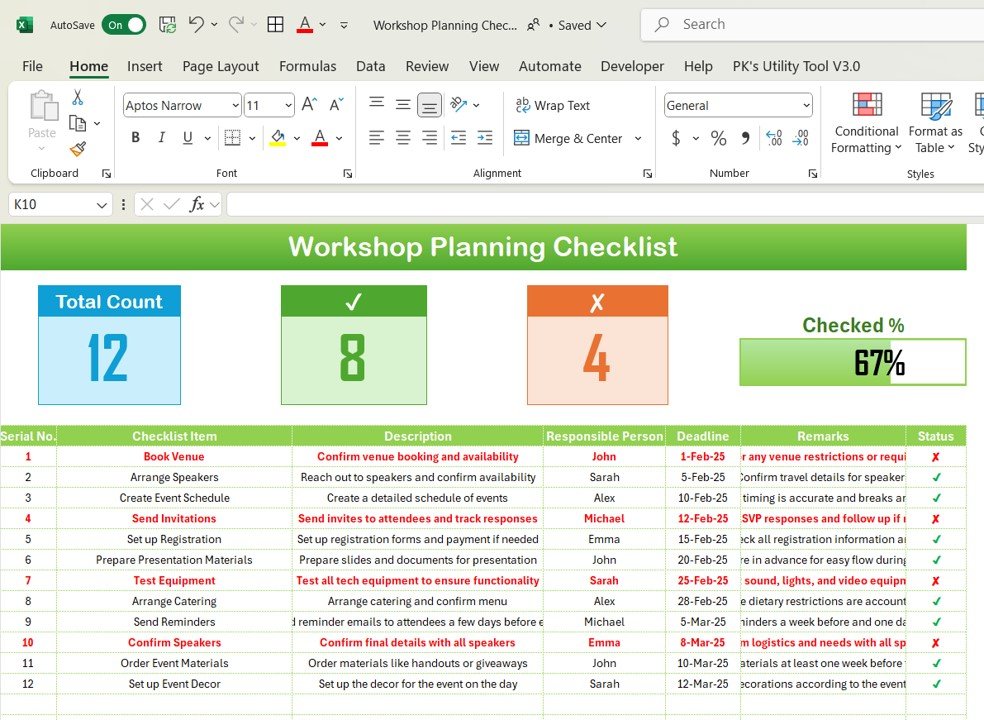
Key Features of the Workshop Planning Checklist:
📅 Detailed Event Timeline
Create a timeline with deadlines for each task, ensuring everything from booking the venue to sending out post-event surveys is completed on time.
📝 Task Management
Organize tasks such as preparing materials, confirming speakers, setting up the venue, and coordinating refreshments, ensuring nothing is overlooked.
🎤 Speaker and Session Management
Track speaker details, session topics, and presentation materials to ensure a well-rounded and engaging agenda for your workshop attendees.
🔑 Venue and Equipment Coordination
Ensure the venue is properly set up with the necessary equipment, technology, seating arrangements, and refreshments for a seamless experience.
📧 Attendee and Registration Tracking
Track registrations, attendee details, and special requests to ensure you are fully prepared for the number of participants and their needs.
🎯 Post-Workshop Evaluation and Feedback
Plan for post-workshop surveys and evaluations to gather feedback from attendees and measure the success of the event for continuous improvement.
🚀 Why You’ll Love the Workshop Planning Checklist:
✅ Organize Event Logistics – Manage every aspect of your workshop from start to finish with a structured, easy-to-follow checklist.
✅ Track Speakers and Sessions – Ensure all sessions are well-planned, with speaker details, topics, and materials prepared in advance.
✅ Optimize Venue Setup – Coordinate venue requirements, including equipment, seating, and refreshments to ensure a smooth event experience.
✅ Manage Attendees Effectively – Track attendee registration, special requests, and dietary restrictions to ensure personalized service for each participant.
✅ Evaluate Workshop Success – Gather attendee feedback to assess workshop effectiveness and improve future events.
✅ Customizable and Easy to Use – Tailor the checklist to your specific workshop needs, with interactive features that allow real-time updates and monitoring.
What’s Inside the Workshop Planning Checklist:
Event Timeline: Plan out each step of the workshop, with deadlines for tasks like booking speakers, securing the venue, preparing materials, and more.
Task Checklist: Organize tasks such as creating presentation materials, setting up AV equipment, arranging refreshments, and more to ensure smooth execution.
Speaker Details: Track speaker information, session topics, and presentation materials to ensure an engaging and informative agenda.
Venue Setup: Ensure the venue is fully equipped with the necessary seating, technology, and equipment for a successful workshop.
Attendee Registration: Keep track of attendee registrations, dietary preferences, and any special requests to ensure an organized event.
Post-Event Evaluation: Plan for post-event surveys and feedback to measure success and gather insights for improvement.
How to Use the Workshop Planning Checklist:
1️⃣ Download the Template – Instantly access your Excel file upon purchase.
2️⃣ Customize the Checklist – Tailor the checklist to fit the specifics of your workshop, including tasks, deadlines, and attendee details.
3️⃣ Track Progress – Monitor the completion of each task and ensure everything is ready before the workshop starts.
4️⃣ Manage Speakers and Sessions – Organize speaker details and session schedules to ensure smooth flow and engagement during the event.
5️⃣ Evaluate the Workshop – Use the post-workshop evaluation section to gather feedback from attendees and assess the event’s success.
Who Can Benefit from the Workshop Planning Checklist:
Event Planners
Corporate Trainers
Workshop Organizers
Conference and Seminar Coordinators
HR and Learning Development Teams
Small Business Owners
Nonprofit Organizations
Education Institutions
The Workshop Planning Checklist is the ideal tool for anyone involved in planning, organizing, and executing workshops, training sessions, or corporate events. With this checklist, you can ensure that every detail is covered, leaving you free to focus on delivering a valuable and successful event.
Click here to read the Detailed blog post
https://www.pk-anexcelexpert.com/workshop-planning-checklist/
Visit our YouTube channel to learn step-by-step video tutorials
Youtube.com/@PKAnExcelExpert
Compatibility and Requirements
- Works in Microsoft Excel desktop (Excel 2016 or later, or Microsoft 365).
- You tick off tasks as you finish them. Microsoft explains check boxes in Using check boxes in Excel.
Frequently Asked Questions
What can I track with this checklist?
You can track the event timeline, tasks, speaker details, venue setup, attendee registrations and post-event evaluation.
Can I use it for a small training session?
Yes. It fits a small training session as well as a large professional development event, and you can edit tasks and deadlines to match your workshop.
Does it help with attendee needs?
Yes. The attendee registration section records dietary preferences and special requests, so you know what to prepare before the day.
How do I measure whether the workshop went well?
Use the post-event evaluation section to plan surveys and collect feedback from attendees after the workshop.
Is there a Google Sheets version?
Yes. See the Workshop Planning Checklist in Google Sheets.
Related Event and Planning Templates
- Workshop Planning Checklist in Google Sheets: the same checklist for Google Sheets
- Event Planning Checklist in Google Sheets: a checklist for wider event planning
- Training and Workshop Calendar in Google Sheets: schedule your sessions on a calendar
- Corporate Event Planning Report in Excel: a report view for corporate events
- Checklist & SOP Pack: 12 checklist templates in one download
Browse all Excel checklists.
































Reviews
There are no reviews yet.