



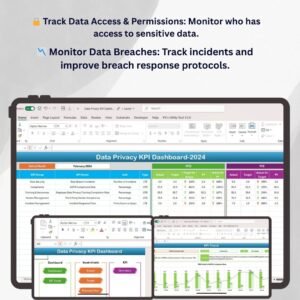
The Data Privacy KPI Dashboard in Excel is a powerful tool designed to help organizations manage and monitor key performance indicators (KPIs) related to data privacy and protection. This Excel-based dashboard tracks critical privacy metrics such as data access controls, compliance with privacy regulations (e.g., GDPR, CCPA), data breach incidents, and risk management efforts. By using this dashboard, businesses can ensure they meet data privacy requirements, mitigate risks, and protect sensitive information.
Whether you’re working in IT, compliance, legal, or data protection, the Data Privacy KPI Dashboard in Excel provides real-time insights into your organization’s data privacy performance. It helps streamline monitoring, reduce the likelihood of breaches, and maintain compliance with various privacy standards, ultimately supporting the security and trust of your organization’s stakeholders.
Key Features of the Data Privacy KPI Dashboard in Excel
🔒 Track Data Access & User Permissions
Monitor who has access to sensitive data and ensure proper controls are in place. Track user roles and permissions to prevent unauthorized access and mitigate the risk of data breaches.
⚡ Compliance Tracking for Privacy Regulations
Ensure your organization is in compliance with data privacy regulations such as GDPR, CCPA, and HIPAA. Track your compliance progress, identify gaps, and avoid penalties for non-compliance.
📉 Data Breach Incident Monitoring
Track and document any data breach incidents, assess their severity, and monitor the effectiveness of breach response protocols. Use this data to strengthen future security measures and prevent incidents.
📊 Risk Management & Mitigation
Monitor and manage privacy risks by assessing the probability of potential breaches or data misuse. Track risk mitigation efforts and ensure that appropriate security measures are in place.
🖥️ Interactive & Real-Time Data Insights
The Excel dashboard provides real-time data on key privacy KPIs, allowing you to make informed decisions about data security, access controls, and compliance. It includes dynamic charts, slicers, and filters for in-depth analysis.
Why You’ll Love the Data Privacy KPI Dashboard in Excel

✅ Monitor Data Access & User Permissions
Track and control access to sensitive data to ensure it’s only available to authorized users. Monitor permissions and prevent unauthorized access, safeguarding your organization’s data.
✅ Stay Compliant with Privacy Regulations
Ensure ongoing compliance with GDPR, CCPA, and other relevant privacy laws. Monitor and track compliance measures to avoid penalties and protect customer data.
✅ Track Data Breach Incidents
Monitor any data breaches and track the effectiveness of response measures. Use the data to improve your breach response protocols and strengthen data security practices.
✅ Manage Data Privacy Risks
Assess privacy risks and monitor risk mitigation efforts. Ensure that your organization’s data security measures are up-to-date and effectively address potential threats.
✅ Data-Driven Privacy Decisions
Leverage real-time insights from the dashboard to make informed decisions about data privacy practices and improve security efforts across your organization.
What’s Inside the Data Privacy KPI Dashboard Template?
- Data Access & Permissions Tracking: Monitor user access to sensitive data and manage permissions effectively.
- Compliance Monitoring: Track progress towards compliance with GDPR, CCPA, and other privacy regulations.
- Data Breach Incident Tracking: Record and analyze data breaches, assess their impact, and improve response protocols.
- Risk Management & Mitigation: Assess privacy risks and track the effectiveness of your risk mitigation strategies.
- Real-Time Insights: Get up-to-date data on key privacy metrics to support decision-making.
- Customizable KPIs: Tailor the dashboard to meet the specific data privacy and security needs of your organization.
How to Use the Data Privacy KPI Dashboard in Excel
1️⃣ Download the Template: Get instant access to your Data Privacy KPI Dashboard in Excel.
2️⃣ Input Your Data: Enter your data access, compliance, breach, and risk management data into the dashboard.
3️⃣ Track & Monitor KPIs: Use the dashboard to track compliance, data access, and breach incidents in real time.
4️⃣ Analyze & Optimize: Use insights to optimize your data privacy practices and improve security measures.
Who Can Benefit from the Data Privacy KPI Dashboard in Excel?
🔹 IT & Security Teams
🔹 Compliance & Legal Departments
🔹 Data Privacy Officers & Consultants
🔹 Risk & Audit Managers
🔹 Business Owners & Executives in Charge of Data Protection
🔹 Anyone Responsible for Ensuring Data Privacy & Security
Optimize your organization’s data privacy strategy with the Data Privacy KPI Dashboard in Excel. Track critical KPIs such as data access, compliance, breach incidents, and risk mitigation to ensure ongoing protection of sensitive information.
Click here to read the Detailed blog post
Visit our YouTube channel to learn step-by-step video tutorials
Youtube.com/@PKAnExcelExpert






























Reviews
There are no reviews yet.