


Are you still juggling spreadsheets, emails, and sticky notes to track your contracts? Say goodbye to scattered data and missed renewal dates. The Contract Management Tracker in Excel is your all-in-one tool to monitor, manage, and maintain your entire contract lifecycle—right from your Excel interface! 🔐📈
Built using Excel and VBA, this template combines automation, dynamic dashboards, and secure access to offer you a centralized, customizable, and professional-grade solution for contract oversight.
✨ Key Features of the Contract Management Tracker
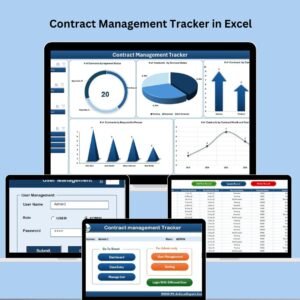
🔐 Login Form with User Access
Secure login with default credentials (Admin1/abcd)
Add/edit/delete users via User Management module
Keep sensitive contract data protected from unauthorized access
🖥️ Main Form Navigation
One central hub to access all functions
Add/Update/Delete records
Manage dropdown lists and system settings
Navigate directly to dashboard or data entry
📊 Dynamic Dashboard Sheet
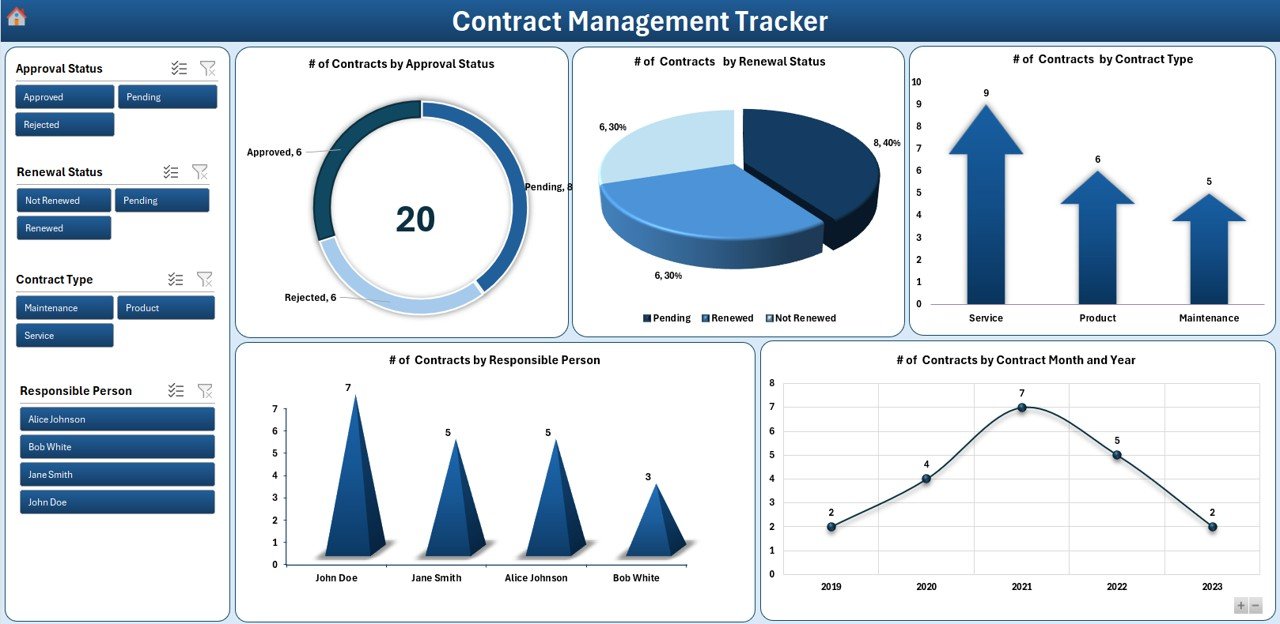
5 Interactive Charts:
Contracts by Approval Status (Doughnut)
Contracts by Renewal Status (Pie)
Contracts by Contract Type (Arrow)
Contracts by Responsible Person (Column)
Contracts by Start Date (Line)
4 Powerful Slicers: Filter by Status, Type, Person, or Renewal instantly
📝 Data Entry Sheet
Integrated with form buttons to Add, Update, or Delete records
Any update auto-refreshes dashboard visualizations
All records stored in a clean, structured format
🧾 Manage List Sheet
Maintain dropdowns for:
Renewal Status
Contract Type
Responsible Person
Approval Status
Modify lists using buttons—no manual editing of ranges needed!
📂 Support Sheet
Houses the pivot data source for dashboards
Optional to hide or extend as needed for advanced users
👥 User Management & Settings
Add/modify/delete users
Update default passwords
Adjust tracker themes or global settings
📦 What’s Inside the Contract Management Tracker
✔️ Excel file with integrated VBA
✔️ Login Form for controlled access
✔️ Dashboard with 5 interactive charts
✔️ Data entry forms for smooth record-keeping
✔️ Customizable dropdowns
✔️ Backup-ready structure
✔️ User management system
✔️ Support and setup sheets
🧭 How to Use the Contract Management Tracker
1️⃣ Login – Enter your credentials to unlock access
2️⃣ Navigate Main Form – Choose to manage contracts, users, or dashboard
3️⃣ Add New Contracts – Use the form to submit detailed entries
4️⃣ Update or Delete – Edit or remove records as needed
5️⃣ Track KPIs – View auto-refreshing dashboard insights
6️⃣ Customize Lists – Tailor statuses and categories to match your business
7️⃣ Manage Access – Assign roles with the user management system
8️⃣ Backup & Archive – Save versions and move old records to keep your file lean
👥 Who Can Benefit from This Contract Tracker?
📁 Legal Teams – Centralize contract documentation and compliance
💼 Procurement Managers – Track vendor agreements, dates, and terms
🏢 Small Business Owners – Manage contracts without expensive software
🧾 Finance Departments – Monitor obligations and renewal liabilities
🛠️ Operations Teams – Ensure timely approvals and contract renewals
👨💻 IT & Admins – Maintain access control and system governance
Whether you’re overseeing 10 or 1,000 contracts, this template adapts to your workflow seamlessly.
💡 Why Choose This Excel-Based Tracker?
✅ No Extra Software Required – Uses tools you already have
✅ Customizable and Scalable – Add new fields, extend charts, modify visuals
✅ Secure Access Control – Built-in login and user-level restrictions
✅ Instant Visibility – Real-time charts and slicers for decision-making
✅ Cost-Effective – Avoid paying for expensive contract management systems
✅ Fully Automated – Forms, charts, and logic built-in using VBA
✅ Archive-Ready – Easily store closed contracts separately
✅ Click here to read the Detailed blog post
🔗 Visit our YouTube channel to learn step-by-step video tutorials
Watch the step-by-step video tutorial:
Compatibility and Requirements
- Made for Microsoft Excel desktop on Windows (Excel 2016 or later, or Microsoft 365).
- Macros must be enabled, because the login, forms and buttons run on VBA. Microsoft explains how in Enable or disable macros in Microsoft 365 files.
- Excel for the web, Google Sheets and the Excel mobile apps can’t run VBA, so use the Excel desktop app. For a browser-based option, see the Contract Management Tracker in Google Sheets.
Frequently Asked Questions
What is the default login for the Contract Management Tracker?
The file comes with default credentials (Admin1 / abcd). Change the password and add your own users in the User Management module before you enter real contracts.
What does the dashboard show?
Five charts: contracts by approval status, renewal status, contract type, responsible person and start date. Four slicers filter by status, type, person or renewal.
Can I change the contract types and statuses?
Yes. The Manage List sheet holds the dropdowns for Renewal Status, Contract Type, Responsible Person and Approval Status. Add or remove items with the buttons, with no manual range editing.
How do I keep the file small as contracts close?
Save versions as backups and move old or closed records to an archive, as described in the How to Use steps above.
Is there a Google Sheets version?
Yes. The Contract Management Tracker in Google Sheets is available for teams that work in the browser.
Related Contract Management Templates
- Contract Management Tracker in Google Sheets: the same tracker in the browser.
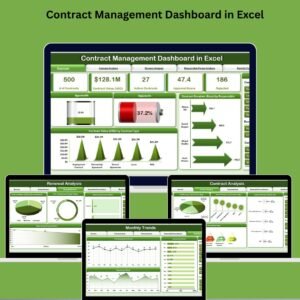
- Contract Management Dashboard in Excel: a dashboard view of your contract portfolio.
- Contract Management Dashboard in Power BI: for teams that report in Power BI.
- Vendor Contract Renewal Calendar in Excel: see upcoming renewal dates on a calendar.
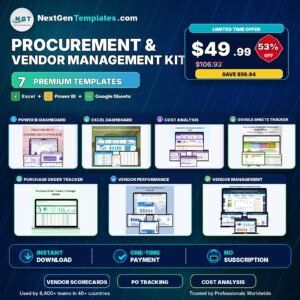
- Procurement and Vendor Management Kit: 7 procurement and vendor templates in one bundle.
Browse all Excel tracker templates or the Excel VBA tools.









Reviews
There are no reviews yet.