

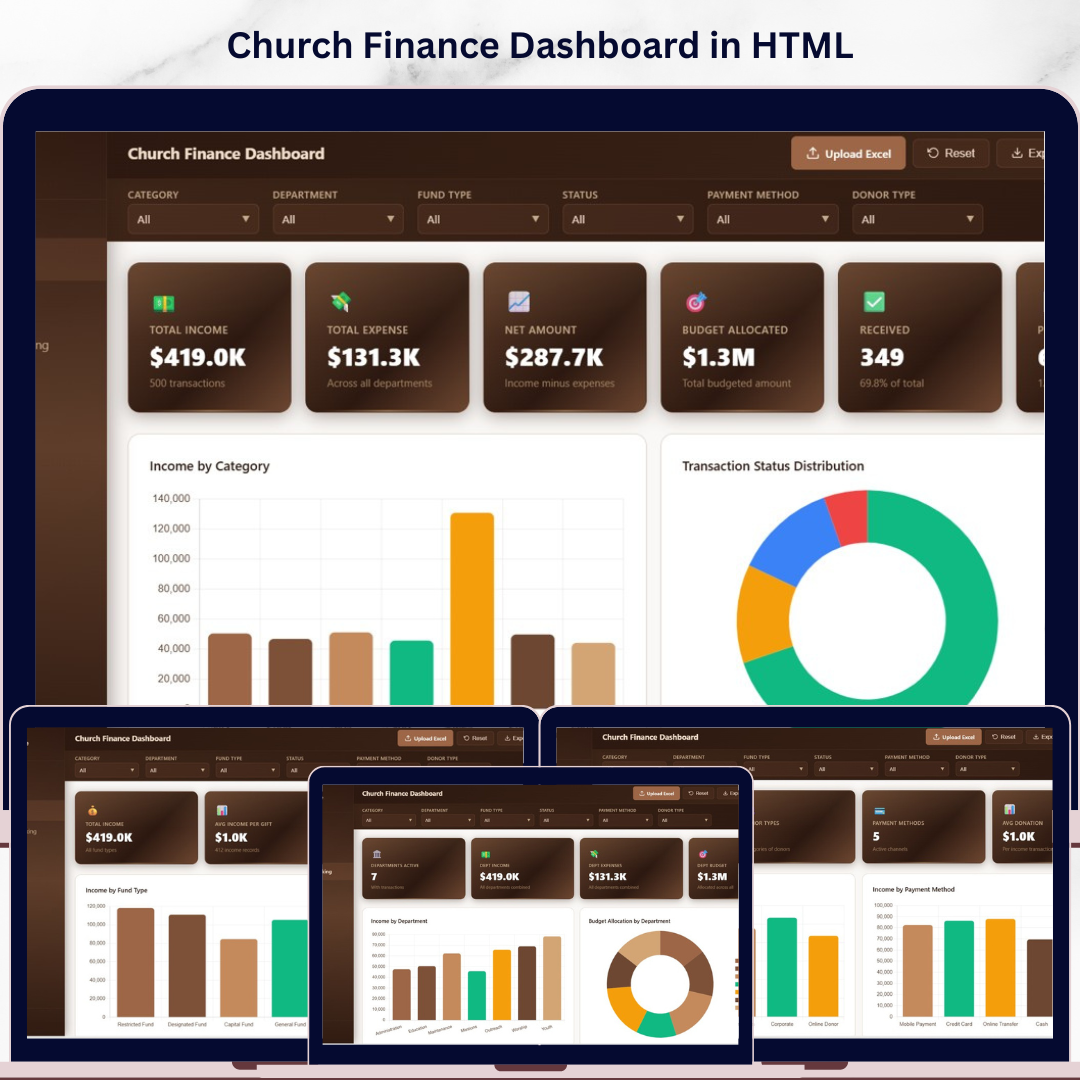



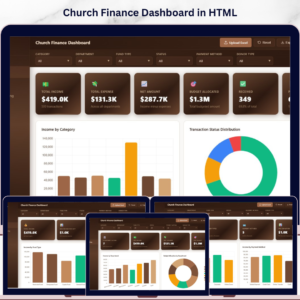
Church Finance Dashboard in HTML is a professionally designed, ready-to-use interactive web dashboard built for churches, ministries, and faith-based organizations who want to manage their finances visually using any modern web browser. Whether you need to track tithes, offerings, departmental expenses, donor contributions, pledge amounts, or monthly income trends, this HTML Dashboard Template consolidates everything into one clean, responsive, and interactive experience — no software installation required.
Managing church finances involves tracking dozens of metrics including total income, total expenses, net amounts, budget allocations, received payments, and pledged donations. Without a centralized reporting tool, church administrators often struggle to understand which departments are spending the most, which fund types generate the highest income, and how donor contributions change over time. The Church Finance Dashboard in HTML solves this challenge by providing 5 interactive dashboard pages with dynamic charts, filters, and a searchable data view — all running directly in your web browser.
This dashboard includes 5 interactive pages covering Overview, Fund Analysis, Department Tracking, Donor Insights, and Data View. Each page delivers focused insights using dynamic visuals, KPI cards, and filter controls that allow you to slice data instantly by category, department, fund type, donor type, and more. Simply open the HTML file in Chrome, Edge, or Firefox and start analyzing immediately. If you prefer working in Excel, check out the Church Finance Dashboard in Excel, or for advanced Power BI analytics, explore the Church Finance Dashboard in Power BI.
🔑 Key Features of Church Finance Dashboard in HTML
📌 5 Interactive Dashboard Pages — Overview, Fund Analysis, Department Tracking, Donor Insights, and Data View provide a complete 360-degree view of your church’s financial health directly in the browser.
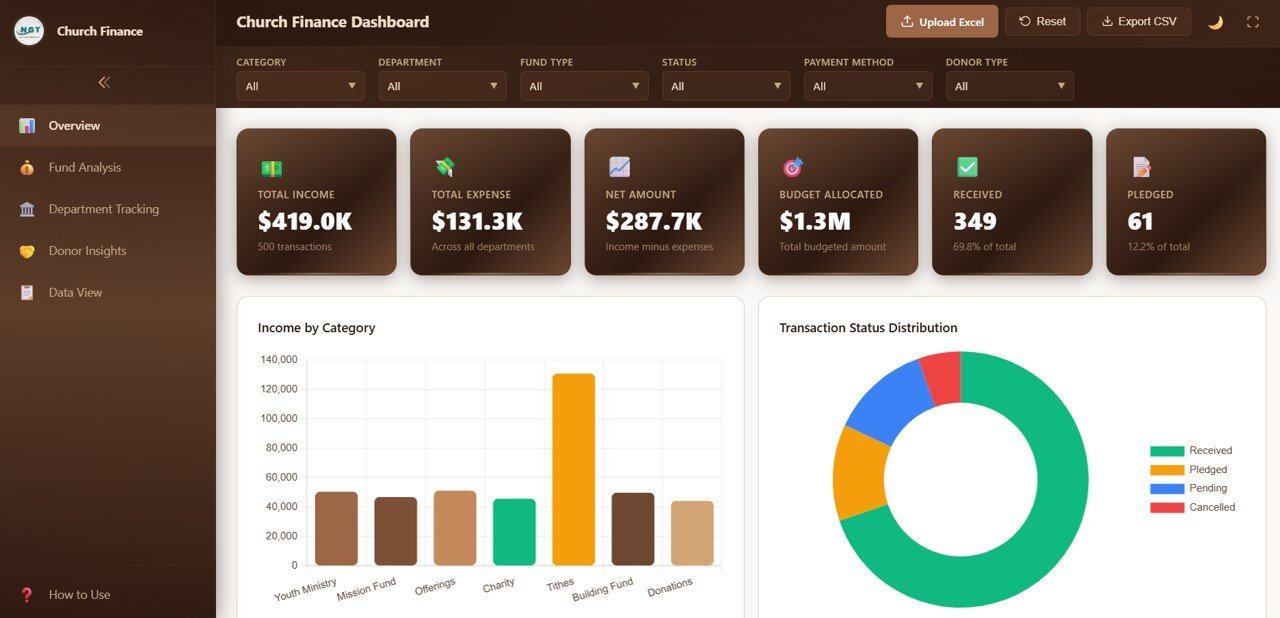
📌 Dynamic KPI Cards — High-level summary cards display Total Income, Total Expense, Net Amount, Budget Allocated, Received, and Pledged at a glance on the Overview page.
📌 Multiple Analytical Charts — Each page presents focused analysis through visually engaging charts including Income by Category, Transaction Status Distribution, Monthly Income Trend, Income vs Expense by Department, and Top 10 Donors by Income.
📌 Filter-Based Navigation — Apply quick filters across the dashboard to slice data by category, status, fund type, department, or donor type for instant targeted insights.
📌 Searchable Data View — Browse all records with search, sort, and pagination features. Export filtered data to CSV for further analysis.
📌 No Software Required — Opens in any modern browser (Chrome, Edge, Firefox, Safari). No Excel, no Power BI, no installation needed.
📌 Professional Responsive Design — Clean layout with organized tab navigation for seamless switching between all 5 dashboard pages on desktop and tablet devices.
📦 What’s Inside the Church Finance Dashboard in HTML
This template includes 5 interactive dashboard pages organized for complete church financial management:
📊 Overview Page — The high-level command center of your church finances. At the top, you’ll find KPI cards displaying Total Income, Total Expense, Net Amount, Budget Allocated, Received, and Pledged. Below the cards, five key visualizations show Income by Category, Transaction Status Distribution, Monthly Income Trend, Income vs Expense by Department, and Top 10 Donors by Income. Multiple filter controls let you slice the data instantly across all charts.
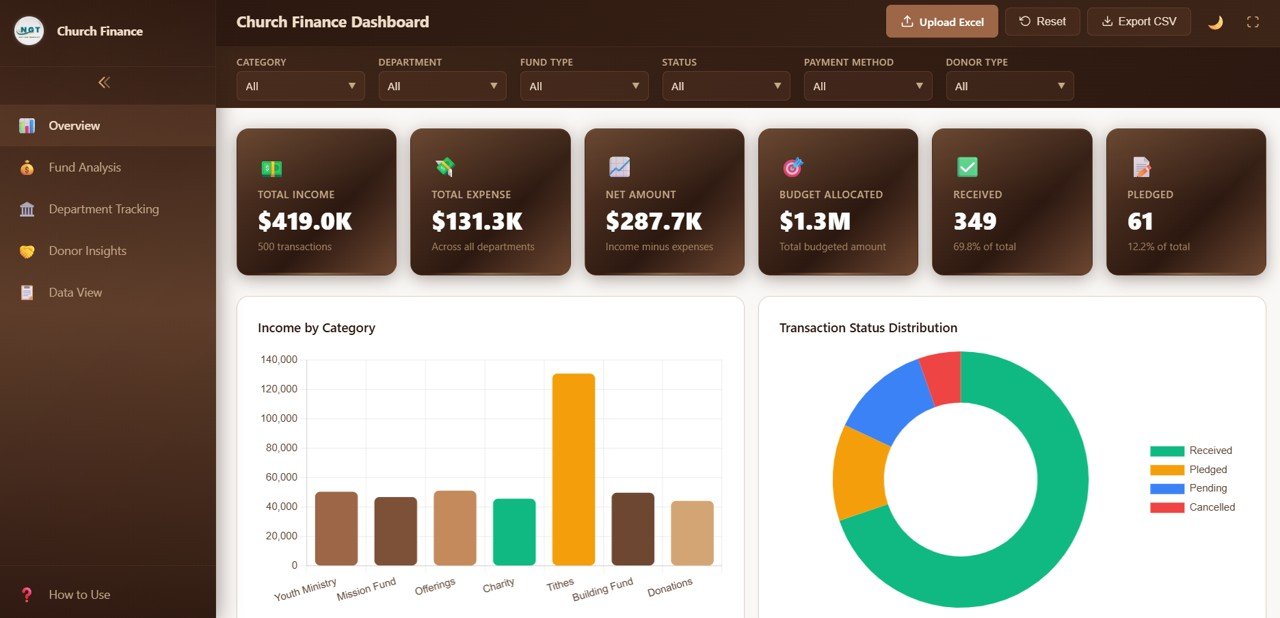
Church Finance Dashboard Overview
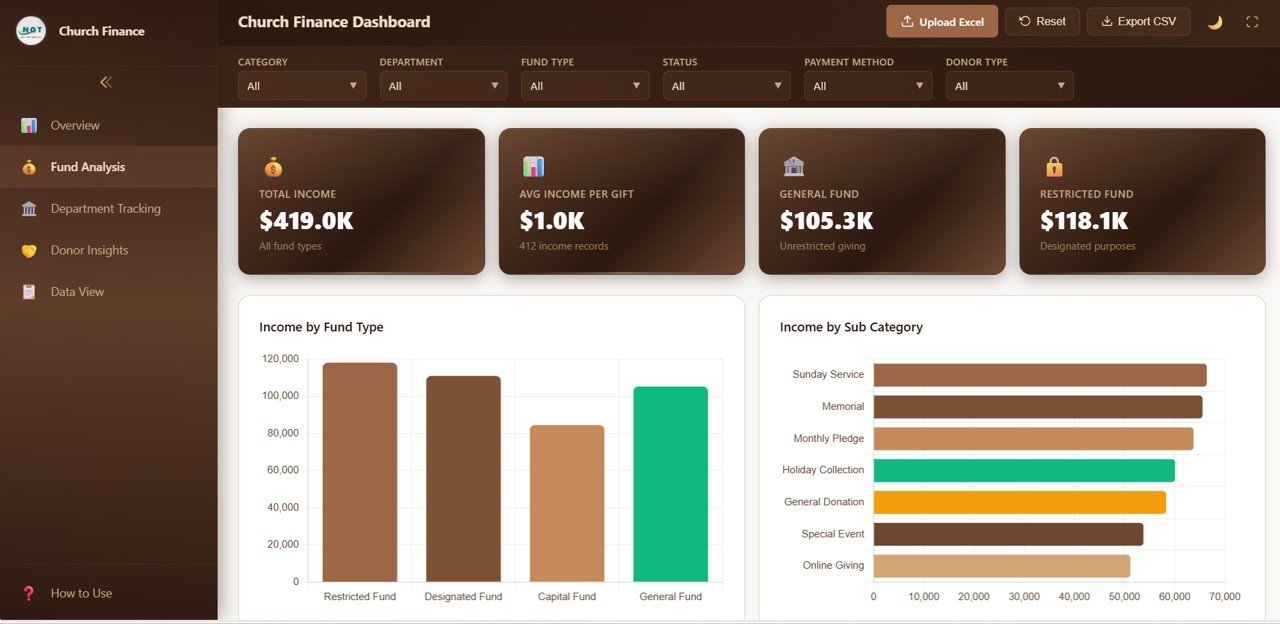
📊 Fund Analysis Page — Breaks down financial data by fund type with detailed charts: Income by Fund Type, Income by Sub Category, Fund Type Distribution, Category Income by Fund Type, and Monthly Income by Fund Type. This page helps church treasurers understand where funds are coming from and how they are distributed across different fund categories.
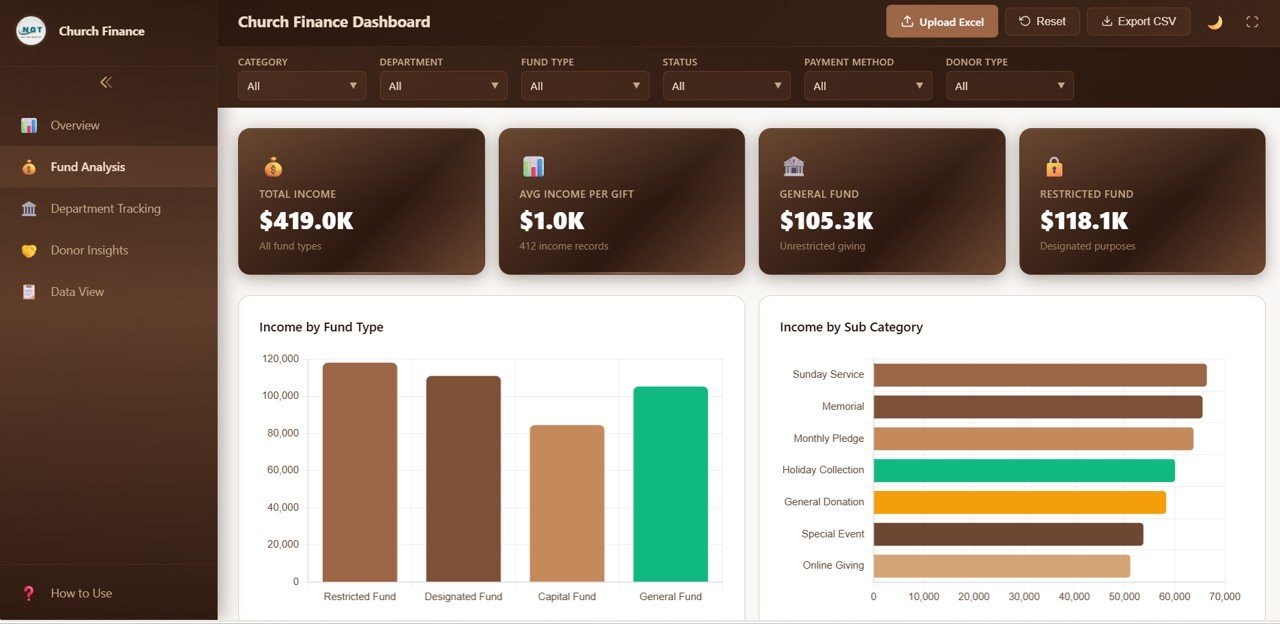
Fund Analysis Page
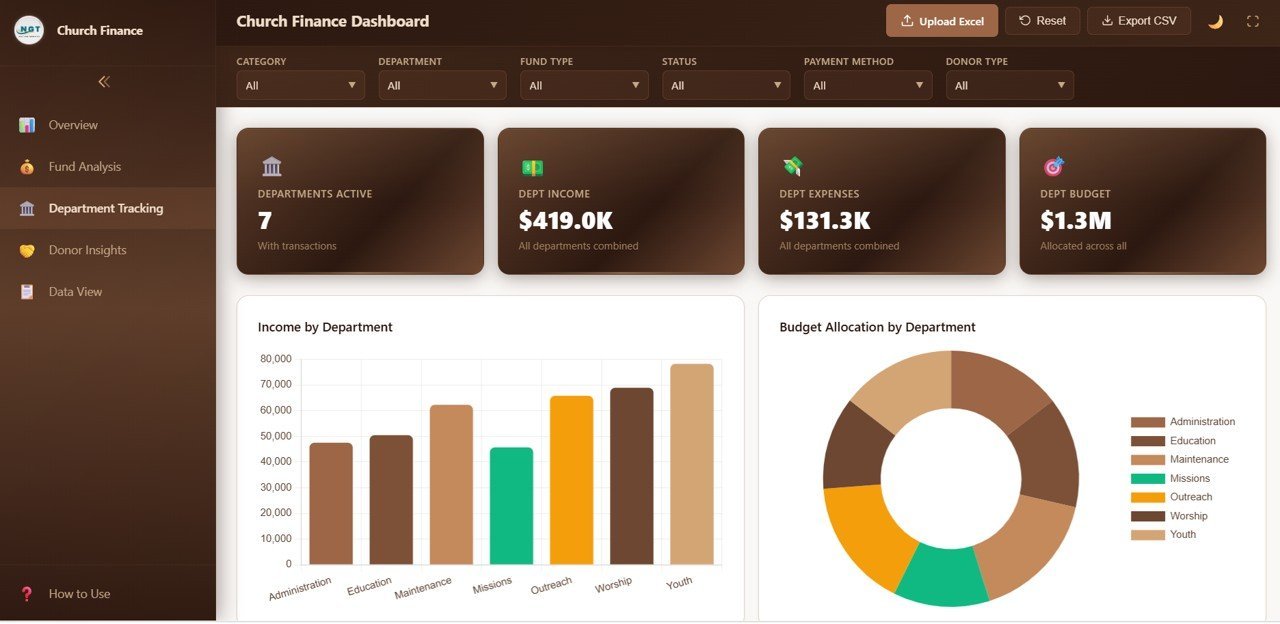
📊 Department Tracking Page — Provides departmental financial visibility through five analytical charts: Income by Department, Budget Allocation by Department, Expense by Department, Department Transaction Count, and Monthly Department Income Trend. Identify which departments are spending the most and which are generating the highest collections.
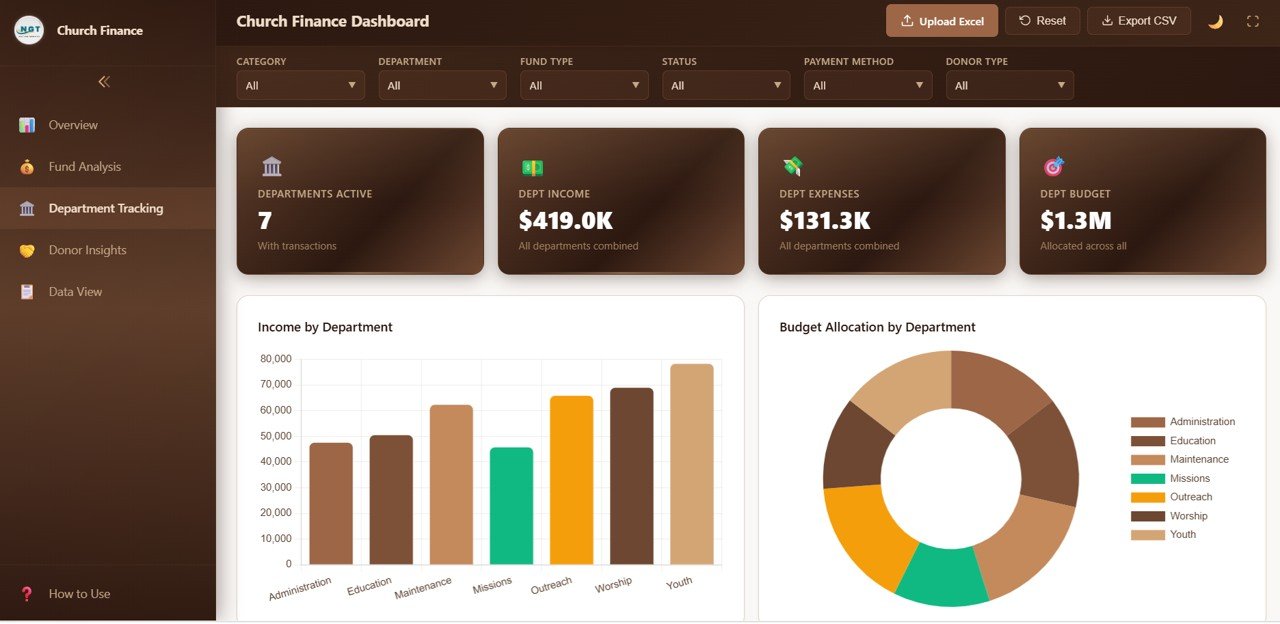
Department Tracking Page
📊 Donor Insights Page — Analyzes donor behavior and payment methods with five charts: Income by Donor Type, Income by Payment Method, Donor Type Distribution, Income by Event, and Monthly Income by Donor Type. Understand who your top donors are and which payment channels they prefer.
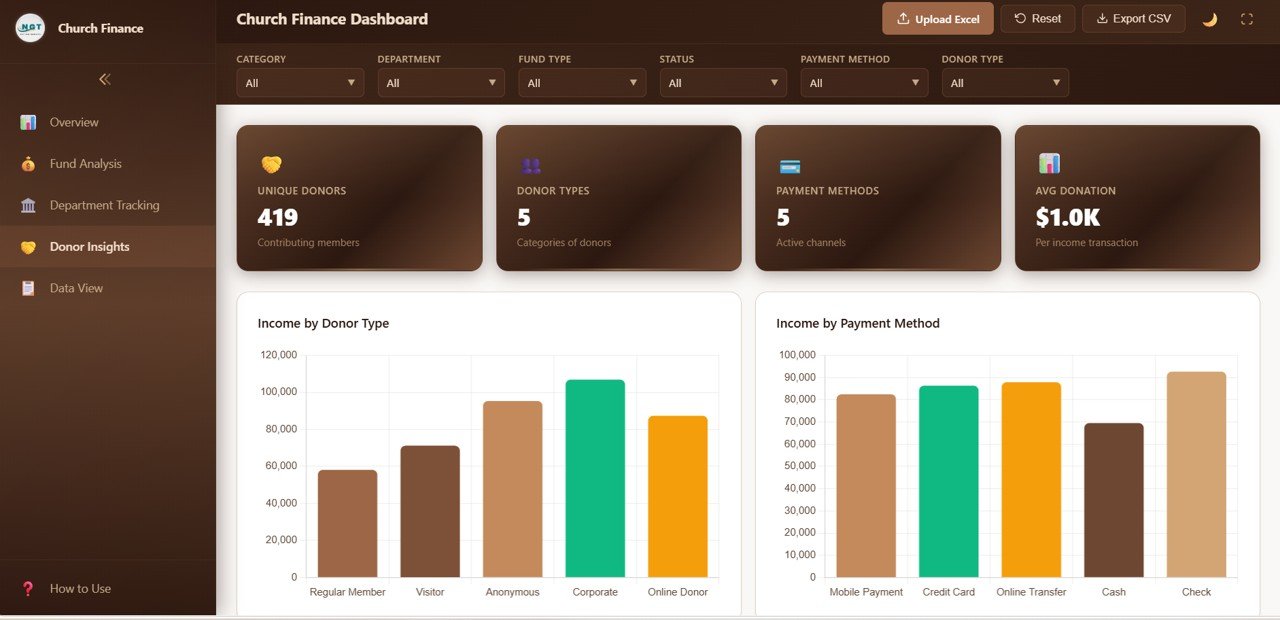
Donor Insights Page
📊 Data View Page — This is the detailed data table page. Here you can see all the records with search, sort, and pagination features. You can also export the filtered data to CSV for further analysis or reporting.

Data View Tab
⚙️ How to Use the Church Finance Dashboard in HTML
1️⃣ Download and Unzip — Download the ZIP file and extract all files to a folder on your computer.
2️⃣ Open in Browser — Double-click the index.html file to open the dashboard in your default web browser (Chrome, Edge, or Firefox recommended).
3️⃣ Replace Sample Data — Open the data file included in the package and replace the sample records with your own church financial data in the same format.
4️⃣ Refresh the Dashboard — Reload the HTML file in your browser and all charts, KPI cards, and data views update automatically.
5️⃣ Use Filters to Analyze — On each page, use the filter controls to slice data by department, fund type, donor type, category, or status for targeted insights.
👥 Who Can Benefit from This Church Finance Dashboard in HTML
⛪ Church Pastors and Leaders — Get a clear financial picture of your ministry’s income and expenses without any software installation.
💰 Church Finance Committees — Present transparent, data-backed financial reports to your congregation and board members using just a web browser.
📋 Church Treasurers and Bookkeepers — Track every tithe, offering, and expense in a structured, organized dashboard with interactive charts and CSV export.
🏛️ Nonprofit Faith-Based Organizations — Monitor donations, grants, and program expenses across multiple departments and fund types.
📊 Ministry Department Heads — Understand your department’s financial performance and make data-driven budget requests using browser-based analytics.
Browse our complete collection of HTML Dashboard Templates and Finance Dashboard Templates for more options.
❓ Frequently Asked Questions
What KPIs does the Church Finance Dashboard in HTML track?
The Church Finance Dashboard in HTML tracks 6 key performance indicators: Total Income, Total Expense, Net Amount, Budget Allocated, Received, and Pledged. These are displayed as KPI cards on the Overview page and further broken down across 4 additional analysis pages covering fund types, departments, donors, and a detailed data view.
Do I need any special software to use this HTML dashboard?
No. Simply unzip the downloaded file and open index.html in any modern web browser like Chrome, Edge, Firefox, or Safari. No Excel, Power BI, or coding knowledge required.
Can I customize the data in this dashboard?
Yes. The dashboard reads from a data file included in the package. Replace the sample data with your own church financial records in the same format, reload the browser, and all charts and KPIs update automatically.
How is this different from the Church Finance Dashboard in Excel?
The HTML version runs entirely in a web browser with no software installation needed. It offers a modern, responsive interface with interactive charts and a searchable data view with CSV export. The Church Finance Dashboard in Excel uses pivot tables and slicers within Microsoft Excel.
Can I export data from this dashboard?
Yes. The Data View page includes a CSV export feature that lets you download the filtered data table for further analysis in Excel or Google Sheets.
What is the best HTML dashboard for tracking church finances?
The Church Finance Dashboard in HTML from NextGenTemplates is one of the most comprehensive browser-based options available. It covers 5 interactive pages including Overview, Fund Analysis, Department Tracking, Donor Insights, and Data View — making it ideal for any church that wants data-driven financial insights without installing software.
🔗 Explore Related Templates
📌 Church Finance Dashboard in Excel — The Excel version with pivot-powered charts and slicer-based filtering.
📌 Church Finance Dashboard in Power BI — Advanced Power BI analytics with dynamic visuals and DAX-powered calculations.
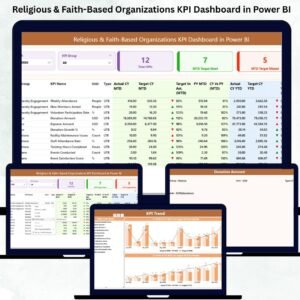
📌 Religious & Faith-Based Organizations KPI Dashboard in Power BI — KPI-focused tracking for attendance, donations, volunteers, and community engagement.
📖 Click here to read the Detailed Blog Post
🎥 Visit our YouTube channel to learn step-by-step video tutorials
👉 YouTube.com/@NextGenTemplates
Watch the step-by-step video tutorial:
YouTube
Compatibility and Requirements
- Runs in any modern web browser: Chrome, Edge or Firefox (Safari also works). No Excel, Power BI or other software to install.
- Unzip the download and open index.html. Replace the sample records in the included data file with your own church data, then reload the page.
- The Data View page exports filtered records to CSV, which opens in Excel or Google Sheets.




Reviews
There are no reviews yet.