



Religious and faith-based organizations manage several activities every single day—events, donations, volunteer programs, community outreach, and member support. But without a proper tracking system, leaders often struggle to understand growth, performance, and impact. The Religious & Faith-Based Organizations KPI Dashboard in Power BI is designed to solve exactly this challenge. It brings all essential KPIs together into a single, interactive dashboard that helps you make smarter decisions and improve your organization’s overall efficiency and community engagement.
This dashboard transforms complex data into easy-to-understand visuals. Whether you are tracking attendance trends, volunteer involvement, donation patterns, or outreach programs, the dashboard presents everything in a clean and structured format. It is ideal for churches, temples, mosques, ministries, and nonprofit faith-based institutions that want clarity, transparency, and real-time insights.Religious & Faith-Based Organizations KPI Dashboard in Power BI
✨ Key Features of Religious & Faith-Based Organizations KPI Dashboard in Power BI
📊 1. Fully Interactive Summary Page
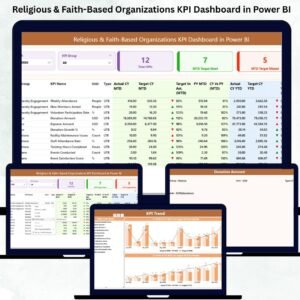
The Summary Page displays all performance indicators in one place. With dynamic slicers for Month and KPI Group, you can instantly analyze KPIs such as donations, attendance, membership, or volunteer activity. It also includes:
🔹 Total KPI Count
🔹 MTD Target Met
🔹 MTD Target Missed
A detailed KPI table shows Actuals, Targets, YTD, Previous Year comparison, and icon-based performance indicators.
📈 2. Trend Analysis Using Dynamic Combo Charts
The Trend Page helps leaders track performance improvements month by month. By selecting any KPI from the slicer, you can instantly compare:
Current Year vs Previous Year
Monthly Targets vs Actuals
YTD Patterns
This helps identify growth areas, seasonal trends, and performance gaps.
📘 3. KPI Definition Drill-Through Page
Every KPI is defined clearly through a powerful drill-through page. It includes:
KPI Name
KPI Number
KPI Group
KPI Definition
Unit
Formula
Type (UTB or LTB)
This ensures all teams follow consistent measurement standards.

📦 What’s Inside the Religious & Faith-Based Organizations KPI Dashboard in Power BI
This digital product includes:
✨ Power BI Dashboard File (.PBIX)
✨ Excel Data Source with Three Sheets:
KPI Definition
Input_Actual
Input_Target
✨ Interactive Visuals:
KPI Cards
Line/Column Charts
Trend Charts
Conditional Format Icons
Month & KPI Group Slicers
✨ Clean and Easy-to-Use Interface
Everything is structured so even beginners can update data easily.Religious & Faith-Based Organizations KPI Dashboard in Power BI
🛠️ How to Use the Religious & Faith-Based Organizations KPI Dashboard in Power BI
➡️ Step 1: Open the provided Excel file
Fill in the MTD and YTD values in the Input_Actual sheet and update targets in the Input_Target sheet.
➡️ Step 2: Open the Dashboard in Power BI
Power BI loads the updated Excel file automatically.
➡️ Step 3: Use the slicers
Select month or KPI group to analyze specific areas such as donations, events, members, volunteers, or finances.
➡️ Step 4: Review performance icons
Green ▲ means the KPI met the target.
Red ▼ indicates the KPI missed the target.
➡️ Step 5: Explore trend charts
Click on any KPI to compare current year vs previous year performance.
➡️ Step 6: Drill-through for KPI definitions
Right-click any KPI on the Summary Page to learn its formula, unit, and definition.
👥 Who Can Benefit from This Religious & Faith-Based Organizations KPI Dashboard in Power BI
This dashboard is designed for anyone involved in managing faith-based operations, including:
✨ Pastors and Spiritual Leaders – Track community engagement and program success.
✨ Church/Temple/Mosque Administrators – Monitor attendance, events, finances, and volunteer activity.
✨ Finance Committees – Understand donation trends and manage financial transparency.
✨ Program Coordinators – Improve outreach, youth programs, and community events.
✨ Volunteer Managers – Track volunteer hours, participation, and impact.
✨ Nonprofit Leadership Teams – Analyze performance for grants and donor reporting.
✨ Data-Driven Organizations – Use KPIs to strengthen trust and accountability.
Whether you run a small group or a large multi-location institution, this dashboard helps you organize operations, improve planning, and create a stronger community impact.
### Click here to read the Detailed blog post
Watch the step-by-step video tutorial:
Visit our YouTube channel to learn step-by-step video tutorials
👉 Youtube.com/@PKAnExcelExpert
Compatibility and Requirements
- Works in Power BI Desktop, which is free to download. Get it from Get Power BI Desktop.
- The data lives in an Excel file with three sheets: KPI Definition, Input_Actual and Input_Target. You type your figures there and Power BI loads them.
Frequently Asked Questions
What files come with this dashboard?
A Power BI dashboard file (.PBIX) and an Excel data source with three sheets: KPI Definition, Input_Actual and Input_Target.
How do I add my own numbers?
Enter your MTD and YTD values in the Input_Actual sheet and your goals in the Input_Target sheet. Then open the dashboard in Power BI and it loads the updated Excel file.
Can I look at one KPI group at a time?
Yes. The Summary Page has slicers for Month and KPI Group, so you can focus on areas such as donations, events, members or volunteers.
How do I compare this year with last year?
Open the Trend Page and pick a KPI in the slicer. The combo chart shows the current year against the previous year, plus monthly targets against actuals.
Where can I see how a KPI is calculated?
Right-click a KPI on the Summary Page to open the drill-through page. It shows the KPI name, number, group, definition, unit, formula and type (UTB or LTB).
Is there an Excel or Google Sheets version?
Yes. See the Religious & Faith-Based Organizations KPI Dashboard in Excel and the Religious & Faith-Based Organizations Dashboard in Google Sheets.
Related Faith-Based and Nonprofit Templates
- Religious & Faith-Based Organizations Dashboard in Power BI: the full dashboard edition in Power BI
- Religious & Faith-Based Organizations KPI Dashboard in Excel: the same KPI dashboard in Excel
- Religious & Faith-Based Organizations Dashboard in Google Sheets: a Google Sheets version
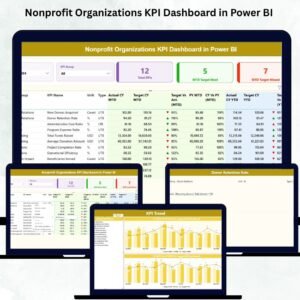
- Nonprofit Organizations KPI Dashboard in Power BI: KPI tracking for general nonprofits
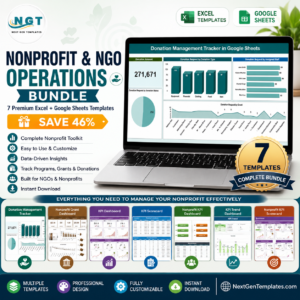
- Nonprofit & NGO Operations Bundle: 7 nonprofit templates in one download
Browse all Power BI KPI dashboards.































Reviews
There are no reviews yet.