
Managing attendance for meetings, workshops, training sessions, and corporate events often becomes complicated when organizations rely on manual registers or scattered spreadsheets. Teams spend valuable time calculating participation, verifying records, and preparing reports manually. As a result, productivity decreases and decision-making slows down.
The Attendance Tracking System for Events and Meetings in Excel provides a smart, ready-to-use solution that simplifies attendance management through automation, structured data entry, and interactive dashboards. Instead of handling multiple files, organizations can record attendance once and instantly generate performance insights.
This Excel-based system transforms raw attendance records into meaningful analytics that help managers monitor participation, improve engagement, and optimize event planning.
⭐ Key Feature of Attendance Tracking System for Events and Meetings in Excel
📋 Centralized Attendance Recording – Manage all meetings and events in one structured workbook.
📊 Interactive Dashboard – View real-time attendance KPIs and participation trends instantly.
📅 Automated Attendance Calculations – Attendance %, absentees, and totals calculate automatically.
📈 Monthly Performance Analysis – Track event-wise participation for selected periods.
🎯 Conditional Formatting Indicators – Instantly identify low or high attendance events.
🔄 Dropdown-Based Data Entry – Prevent duplicate entries using master data validation.
⚡ Real-Time Updates – Dashboards refresh automatically after data entry.
🧭 Easy Navigation Home Page – One-click access to all system sheets.
📂 What’s Inside the Attendance Tracking System for Events and Meetings in Excel
This ready-to-use template contains multiple structured worksheets designed for efficient attendance management.
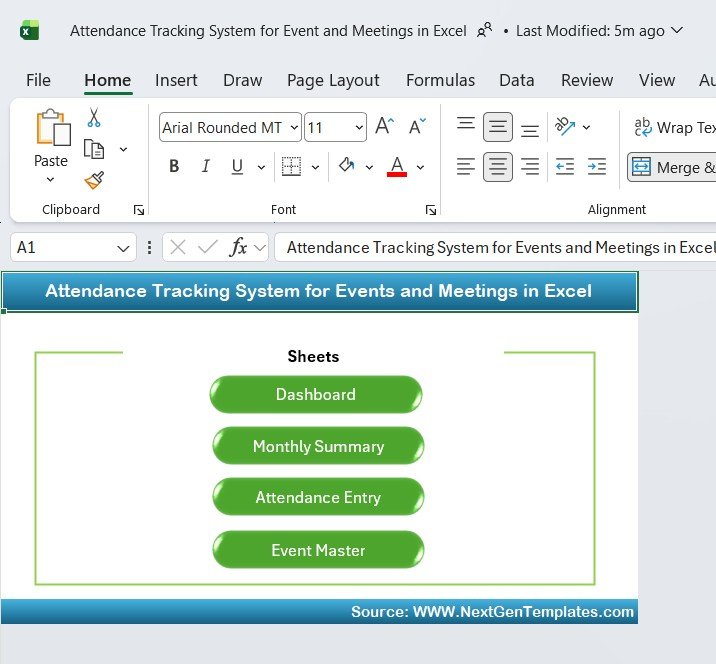
🏠 Home Navigation Sheet
Acts as the starting interface of the workbook.
Clean dashboard-style layout
Quick navigation buttons
Direct access to:
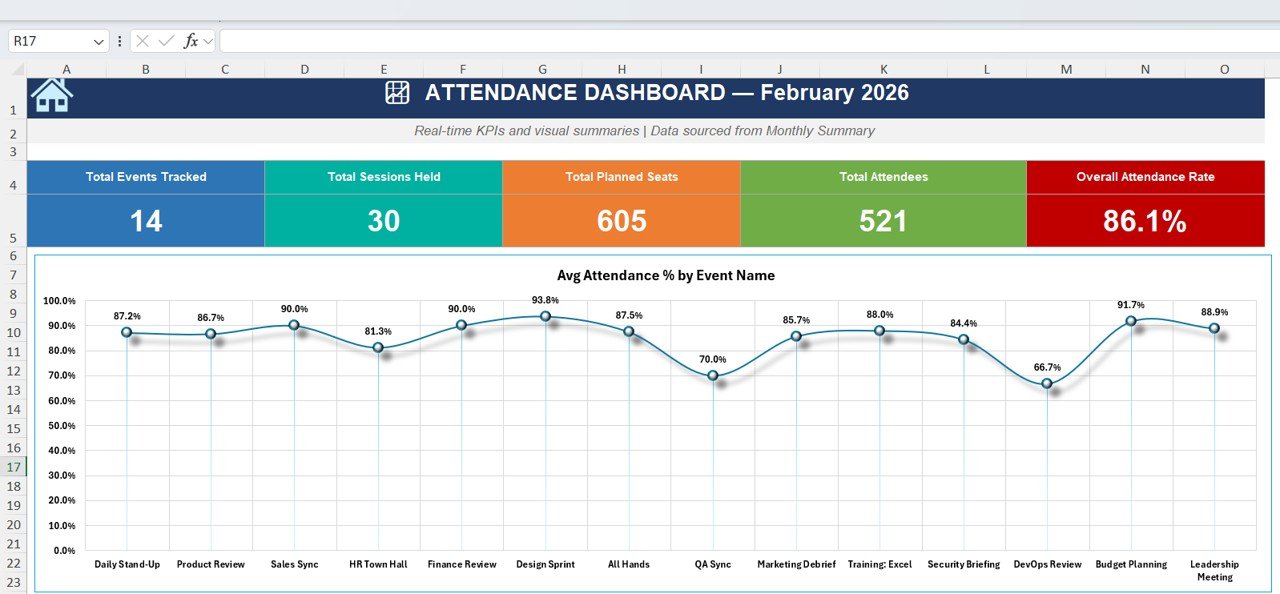
Dashboard
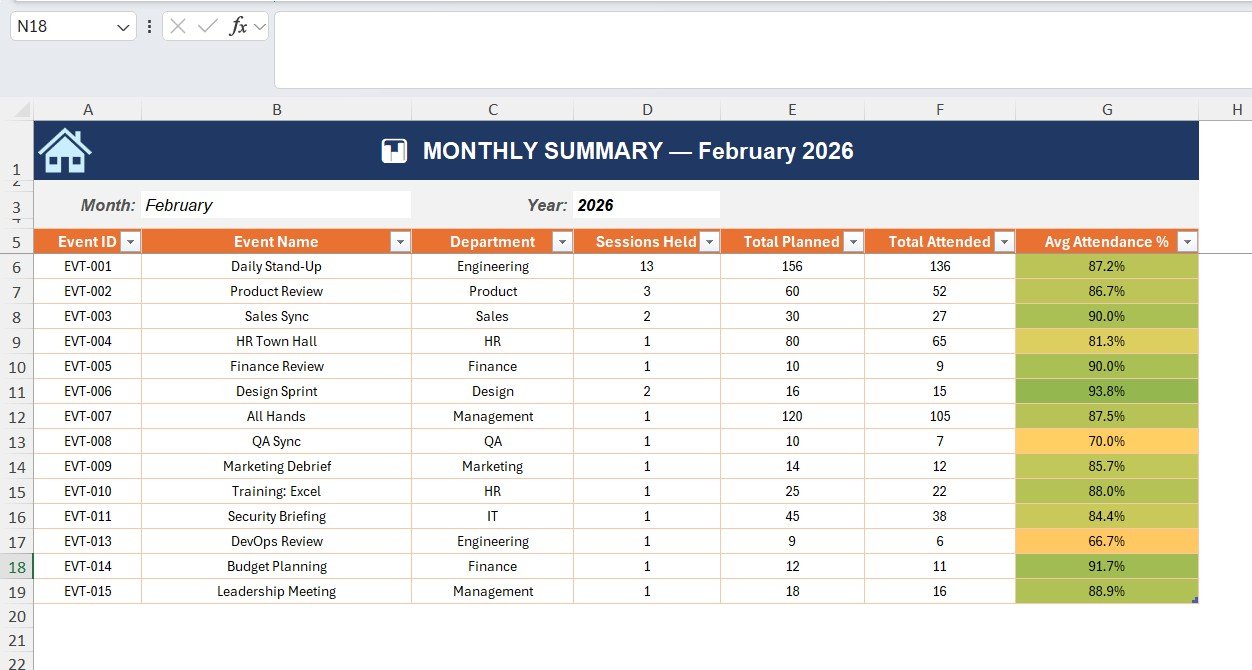
Monthly Summary
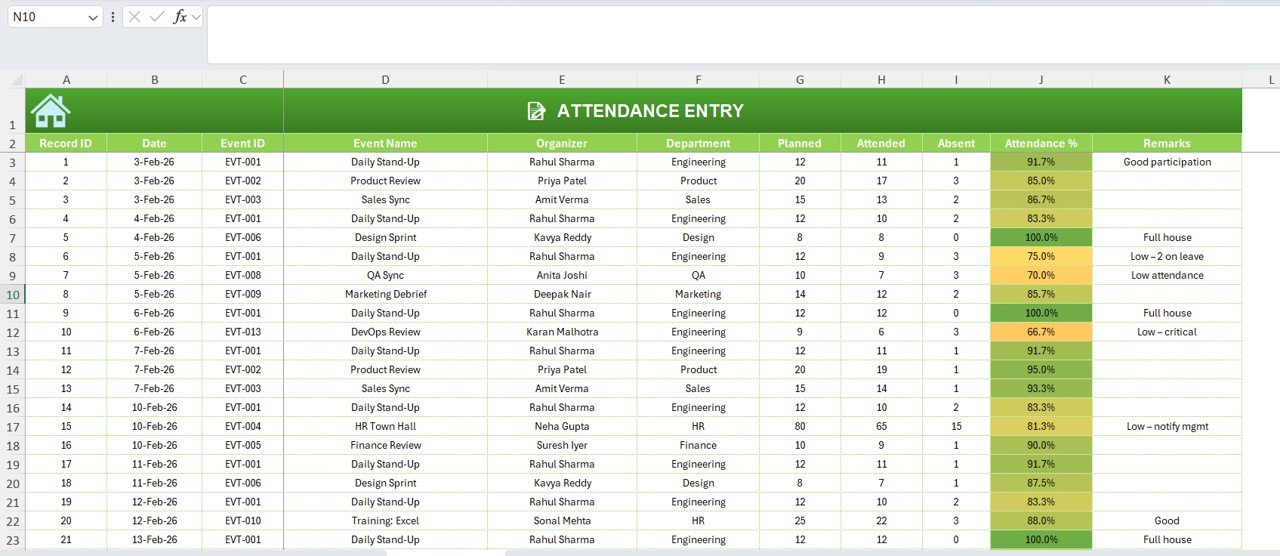
Attendance Entry
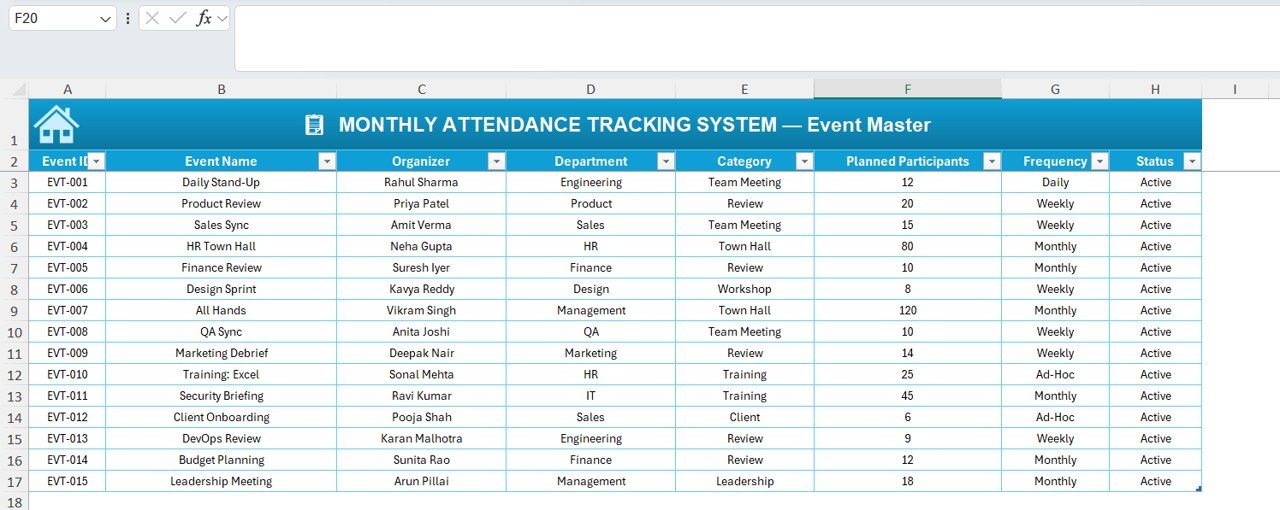
Event Master
Users move between sheets easily without confusion.
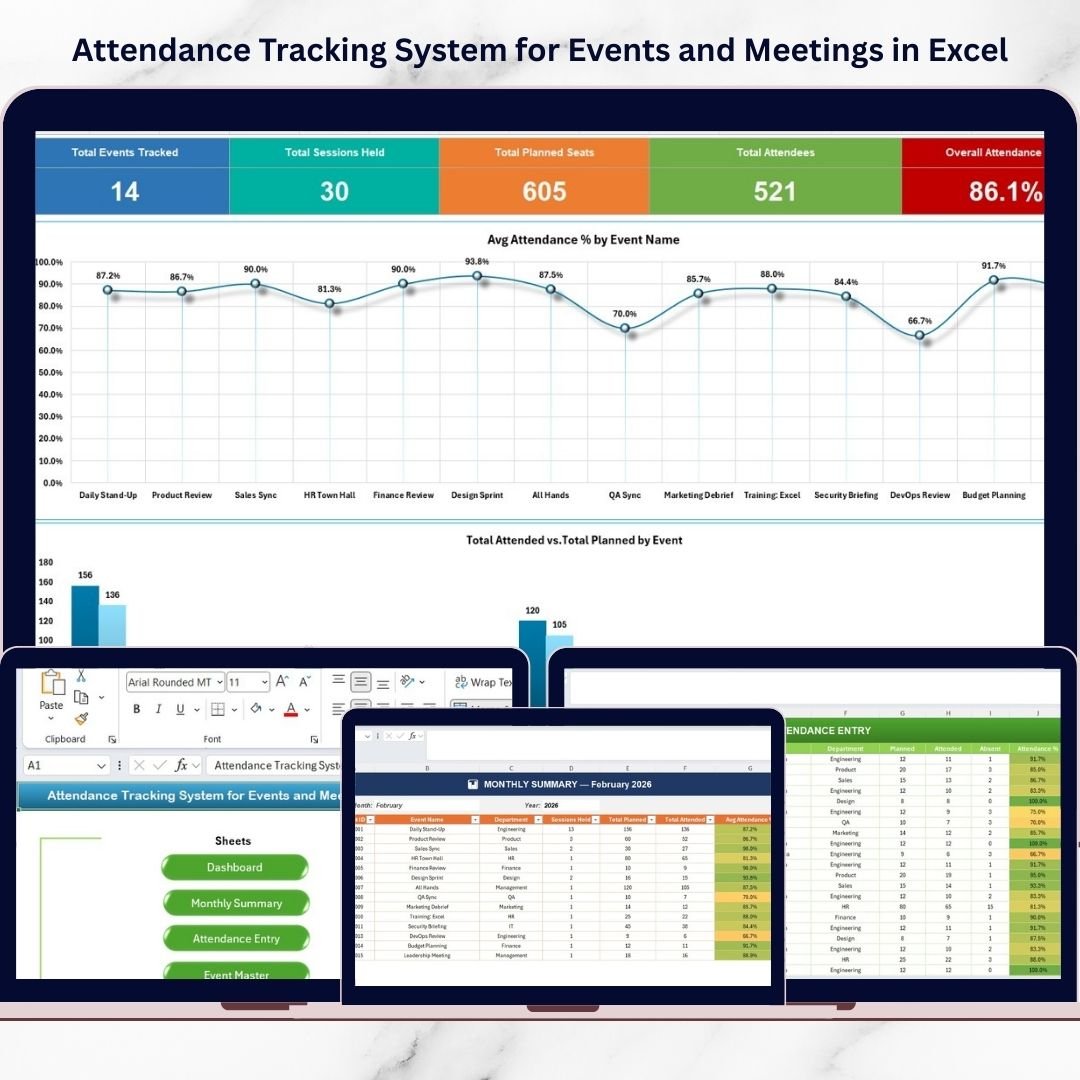
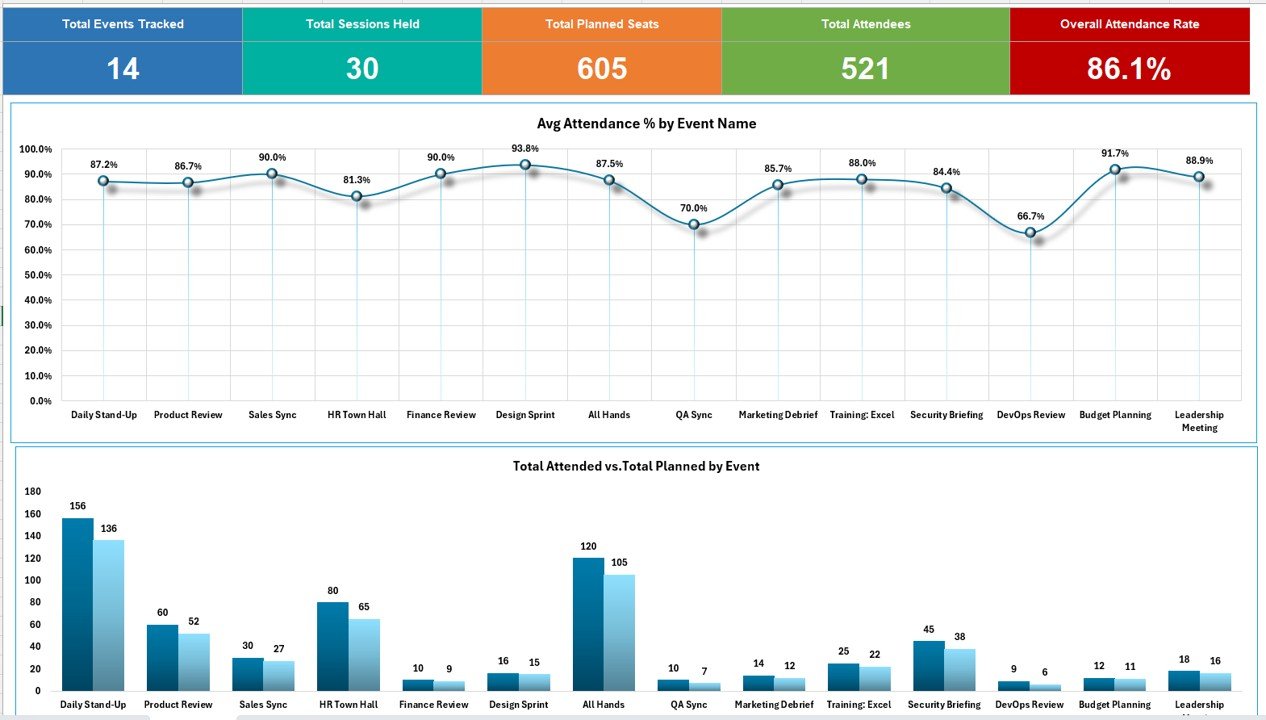
📊 Dashboard Sheet – Real-Time Attendance Overview
Provides instant participation insights.
KPI Cards Included
Total Events Tracked
Total Sessions Held
Total Planned Seats
Total Attendees
Overall Attendance Rate
Visual Charts
Average Attendance % by Event (Line Chart)
Attended vs Planned Participants (Column Chart)
Managers quickly identify engagement trends through visual analytics.
📅 Monthly Summary Sheet – Event Performance Analysis
Aggregates attendance data based on selected Month and Year.
Displayed Information
Event ID
Event Name
Department
Sessions Held
Planned Participants
Total Attended
Average Attendance %
Conditional formatting highlights performance automatically.
📝 Attendance Entry Sheet – Daily Attendance Recording
Primary data entry area.
Fields Included
Record ID
Date
Event ID & Name
Organizer
Department
Planned Participants
Attended
Absent
Attendance % (Auto-calculated)
Remarks
Color indicators help managers quickly detect participation issues.
🗂️ Event Master Sheet – Central Event Database
Maintains standardized event information.
Data Stored
Event ID
Event Name
Organizer
Department
Category
Planned Participants
Frequency (Daily/Weekly/Monthly)
Status
Dropdown lists pull data from this sheet to ensure consistency.
🚀 How to Use the Attendance Tracking System for Events and Meetings in Excel
1️⃣ Add event details in the Event Master Sheet
2️⃣ Record attendance daily in Attendance Entry
3️⃣ Review participation in the Dashboard
4️⃣ Analyze monthly performance in Monthly Summary
5️⃣ Take corrective action for low attendance events
Because calculations are automated, reporting becomes fast and accurate.
👥 Who Can Benefit from This System
This template works across multiple industries:
Corporate Offices
HR Departments
Training Teams
Educational Institutions
Event Managers
Project Teams
Workshop Coordinators
Any organization conducting recurring meetings or sessions can use it effectively.
✅ Advantages of Attendance Tracking System for Events and Meetings in Excel
✔ Centralized attendance management
✔ Automated calculations and reporting
✔ Real-time dashboard insights
✔ Reduced manual errors
✔ Improved event planning decisions
✔ Transparent participation tracking
✔ Easy customization without coding
💡 Best Practices for Using the Attendance Tracking System
Maintain accurate Event Master data
Record attendance daily
Use consistent event naming conventions
Review dashboard weekly
Investigate low attendance events
Backup the Excel file regularly
Train users on correct data entry
Following these practices ensures reliable analytics and better engagement tracking.
📌 Why Excel Is Ideal for Attendance Tracking
Excel remains one of the most practical tools because it offers:
Easy customization
Automated formulas
Interactive dashboards
No additional software cost
Flexible reporting capabilities
Therefore, organizations can implement attendance analytics immediately without complex systems.
🏁 Conclusion
The Attendance Tracking System for Events and Meetings in Excel provides a powerful yet simple solution for managing attendance records and analyzing participation performance. Instead of manual tracking, organizations gain automated dashboards, structured summaries, and actionable insights.
By centralizing attendance data and visualizing engagement trends, businesses improve planning, increase participation, and save significant reporting time. Because Excel is accessible and customizable, organizations of any size can adopt this system quickly.
Ultimately, structured attendance tracking leads to better engagement, improved productivity, and smarter operational decisions.
### Click hare to read the Detailed blog post
Watch the step-by-step video tutorial: