


The best free attendance sheet template in 2026 is the Monthly Attendance Sheet in Excel with Check Boxes from NextGenTemplates. You tick one box per person per day, and it works out present days, absent days, leave and attendance percentage on its own. It is free, has no macros and handles up to 30 people. Vertex42 and Smartsheet also offer good free attendance sheets.
Last updated: October 2026
Need more than a sheet? Our guide to attendance tracker templates that replace an HRIS covers paid systems only. This page starts with free files.
Key takeaways
- All 8 templates in the free list cost nothing to download. Two are NextGenTemplates files and six come from Vertex42 and Smartsheet. We opened every source page and checked every link in October 2026.
- Best overall free pick: the Monthly Attendance Sheet in Excel with Check Boxes. It already ranks in Google’s top three for “monthly attendance sheet in Excel”, and it calculates attendance % with no formulas to write.
- Best for schools: Vertex42’s Class Attendance Template, which covers a full school year (August to June) with a year-to-date summary. It works in Excel or Google Sheets.
- A free attendance sheet records who was present. It does not record clock-in and clock-out times, overtime or leave balances, and it is not built for several people to edit at once. Those four gaps are why people upgrade.
- The 8 paid NextGenTemplates upgrades below cost $6.99 to $39.99, paid once with no subscription. The HR and Payroll Template Bundle includes an attendance and leave tracker plus 9 more HR tools for $14.99.
 Launch offer
SUMIFS, XLOOKUP, FILTER, LAMBDA and checking AI-written formulas, with real business projects. 11h 47m of video by PK, with practice files, quizzes and a capstone.
Free attendance sheet templates compared
Every free attendance sheet template in this guide, side by side. One row is flagged best overall. All eight are free.
| # | Template | Source | Format | Best For | Price |
|---|---|---|---|---|---|
| 1 | Monthly Attendance Sheet with Check Boxes (Best overall) | NextGenTemplates | Excel | Monthly attendance for up to 30 staff or students | Free |
| 2 | Weekly Attendance Sheet | NextGenTemplates | Excel | One-week register for up to 15 employees, with summary cards | Free |
| 3 | Class Attendance Template (full school year) | Vertex42 | Excel, Google Sheets | Teachers tracking a class from August to June | Free |
| 4 | Attendance Tracking Forms (monthly and weekly) | Vertex42 | Excel, Google Sheets | Daily student attendance, any month or year | Free |
| 5 | Employee Attendance Tracker | Smartsheet | Excel | Shifts, sick leave, vacation and a points system | Free |
| 6 | Attendance Spreadsheet Templates (12 designs) | Smartsheet | Excel, Google Sheets | Event, shift, training and team check-ins | Free |
| 7 | Mobile Attendance Sheet | Vertex42 | Excel, Google Sheets | Taking attendance on a phone | Free |
| 8 | Employee Leave Tracker | Vertex42 | Excel | Six leave types with a yearly summary | Free |
Here are the paid upgrades we recommend once a free sheet runs out of road. One row is best overall and one is best value.
| Upgrade | Format | Best For | Price |
|---|---|---|---|
| Attendance Management System – Lite (Best overall) | Excel VBA | Form-based attendance for up to 100 employees | $19.99 |
| Employee Attendance Dashboard in Google Sheets (Best value) | Google Sheets | Shared attendance and overtime charts for a team | $6.99 |
| Attendance and Overtime Dashboard in Excel | Excel VBA | In and out times, overtime and leave by supervisor | $17.99 |
| Employee Attendance Payroll Management System | Web app | Logins, check-in and check-out, leave approvals and payroll | $39.99 |
| Leave Management System | Excel VBA | Multi-date and half-day leave entry | $6.99 |
| Automated Employee Timesheet Template in Excel | Excel VBA | Time-stamped start, end and break times | $6.99 |
| Dynamic Attendance Sheet Using Power Pivot | Excel | Large attendance logs with pivot reports | $6.99 |
| Absenteeism Report in Excel | Excel | Planned vs unplanned absence and no call no shows | $6.99 |
How we picked these free attendance sheet templates
We started where people really look for a free attendance sheet template: the big template libraries (Vertex42, Smartsheet and Microsoft Create), the attendance roundups that rank in search, and the free files in our own catalogue. We opened every source page in October 2026 and checked every link in this post.
A file made the list only if it downloads free with no card details and has a working attendance grid, not just a blank table. It also had to do at least one useful calculation or summary, or carry a clear printable layout. We left out pages that hide the download behind a “free trial” sign-up. We also left out Microsoft Create this year: its attendance template pages now redirect to a Microsoft 365 sign-in page, so we could not check the files without an account.
Search data shaped the order too. Our own free monthly sheet already ranks in Google’s top three for queries like “monthly attendance sheet in excel with formula” (195 impressions in the last 90 days). Vertex42’s attendance pages have been maintained since 2014, with bug fixes logged on the page. The paid upgrades come from the NextGenTemplates HR range. We matched each one to a gap the free files leave open, so every upgrade is a direct next step.
The 8 best free attendance sheet templates for 2026
1. Monthly Attendance Sheet in Excel with Check Boxes (NextGenTemplates) – best overall free
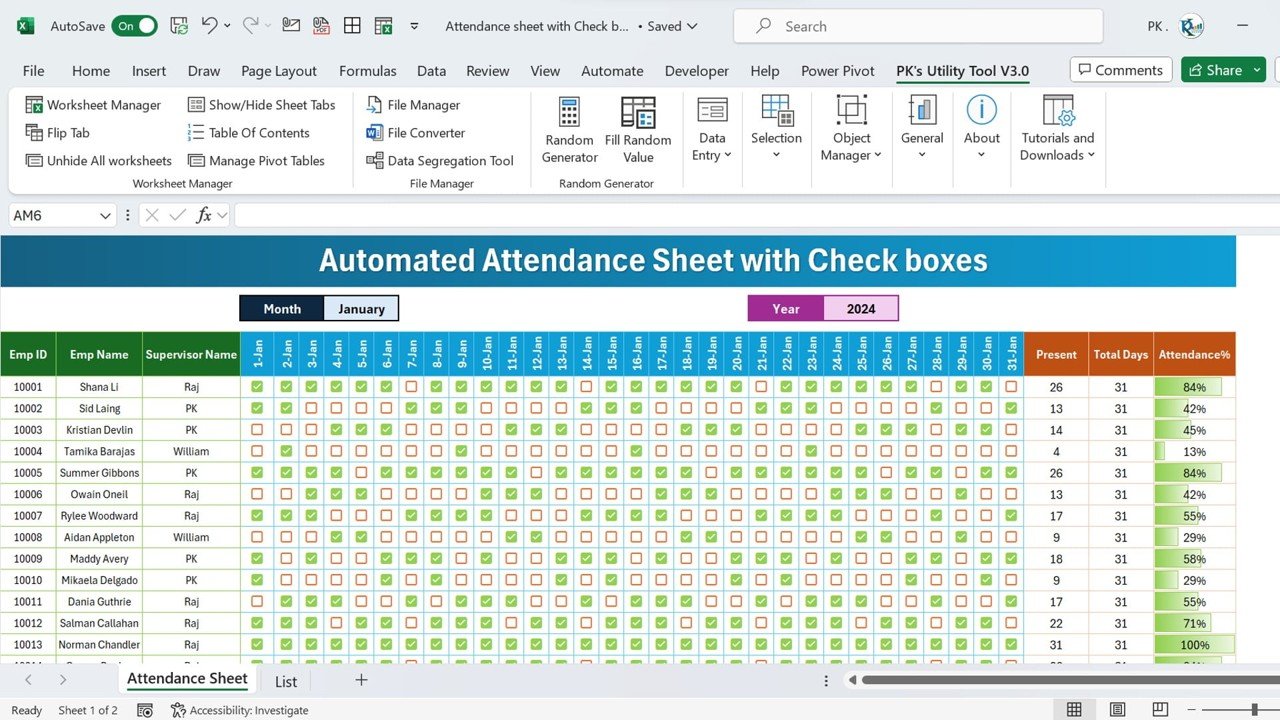
You record daily attendance for up to 30 employees or students by clicking checkboxes. You type no codes, write no formulas and enable no macros. Add the names, pick the month and year, and the sheet calculates present days, total days and an attendance percentage for each person. The percentage column is colour-scaled, so low attendance stands out. It opens in Excel 2016, 2019, 2021, Microsoft 365 and Excel for Mac.
It is our pick for best overall because it removes the most common error in a free attendance sheet: mistyped codes that break the totals. A checkbox is either ticked or not.
Best for: small businesses, schools, NGOs and site supervisors. Free – download the monthly attendance sheet.
2. Weekly Attendance Sheet in Excel (NextGenTemplates)
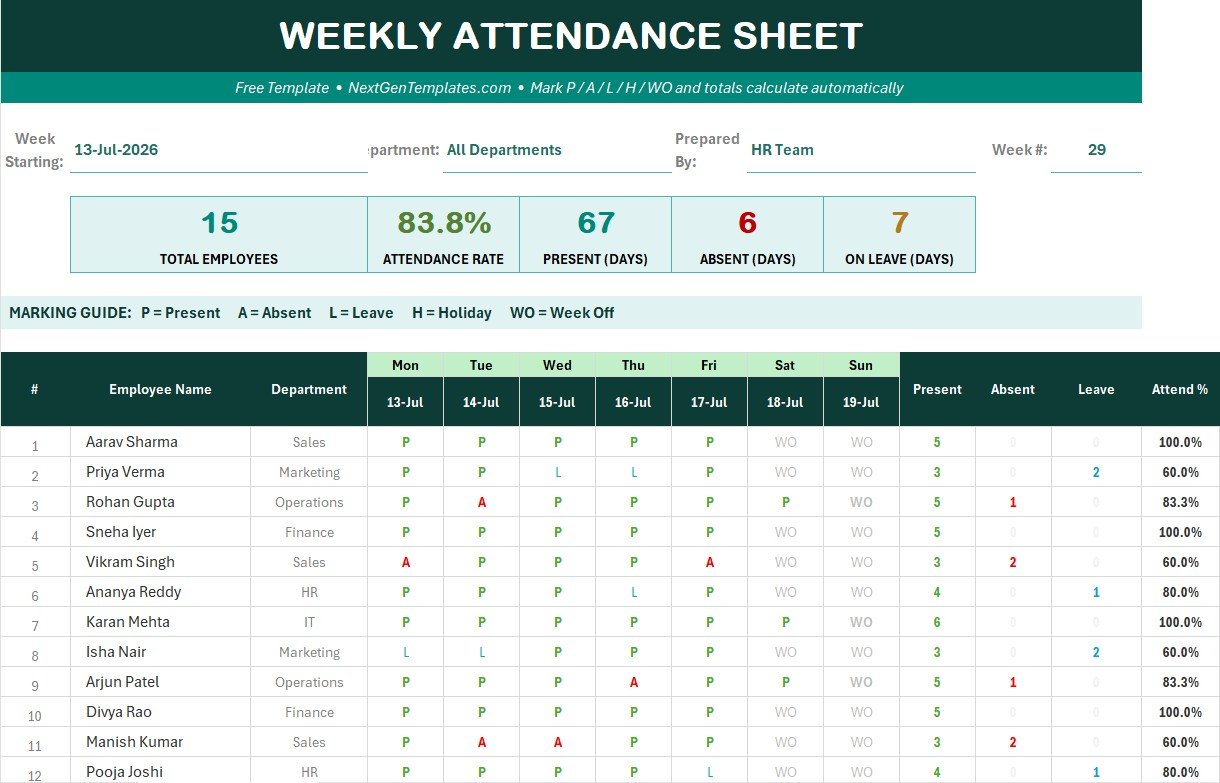
A one-week register for up to 15 employees per sheet. You mark each day from a dropdown limited to five codes: P (Present), A (Absent), L (Leave), H (Holiday) and WO (Week Off). Five summary cards at the top show total employees, attendance rate, present, absent and on-leave days. The attendance % is Present / (Present + Absent + Leave), so holidays and week-offs do not drag the rate down. There are no macros, and setup takes about five minutes.
Best for: shift teams and shops that review attendance weekly. Free – download the weekly attendance sheet.
3. Class Attendance Template – full school year (Vertex42)
This workbook holds one monthly attendance form for each month from August to June, plus a YearToDate sheet. The YearToDate sheet totals absences, tardies and other codes for each student using lookups on a Student ID. Because IDs drive the totals, you can add a student mid-year or sort names alphabetically without breaking anything. The page also explains how to turn the data into student attendance reports with a Word mail merge.
Best for: teachers and tutors. Free under Vertex42’s private-use licence – get the Class Attendance Template. For whole-school tools, see our K-12 school administration templates.
4. Attendance Tracking Forms – monthly and weekly (Vertex42)
Two simple forms, one monthly and one weekly, that work for any month and year. You change the month from a dropdown, and a setting lets you shade Friday and Saturday as the weekend instead of Saturday and Sunday. Vertex42 suggests copying the worksheet each month so the workbook builds into a year of tabs. Both forms also print well as blank paper registers.
Best for: daily class or meeting registers. Free – get Vertex42’s attendance tracking forms.
5. Employee Attendance Tracker (Smartsheet)
Smartsheet’s Excel tracker records daily, weekly and monthly attendance, including shifts, sick leave, vacation days and personal time. Its stand-out feature is a points system for no-shows, late arrivals and early departures, which suits a written attendance policy. The same page has a monthly employee attendance sheet, an attendance dashboard and a student tracker. It also explains how to calculate attendance percentage and average attendance in Excel.
Best for: HR teams that enforce an attendance points policy. Free – get Smartsheet’s Excel attendance trackers.
6. Attendance Spreadsheet Templates – 12 designs (Smartsheet)
A collection of 12 free attendance spreadsheet templates: simple, employee, monthly, daily, weekly, student, tracking, event, shift, dashboard, team and training. Each one comes with a short note on when to use it. Several have Google Sheets versions as well as Excel. It is the widest free choice on this list. Use it when your need is specific, like a training sign-in sheet or a shift roster check-in.
Best for: events, training sessions and volunteer programmes. Free – browse Smartsheet’s attendance spreadsheet templates.
7. Mobile Attendance Sheet (Vertex42)
This attendance sheet is laid out to be used on a phone or tablet. You take attendance in a class or meeting without a laptop, then review it on a computer later. Download it for Excel or open it in Google Sheets. The page also lists symbols you can use instead of plain letters, such as ticks and stars, if you prefer a visual register.
Best for: coaches, club leaders and trainers on the move. Free – get the mobile attendance sheet.
8. Employee Leave Tracker (Vertex42)
Strictly a leave tracker rather than a daily register, but it is the free file people most often need next to an attendance sheet. It has one worksheet per month, up to six leave types with editable labels (vacation, sick and so on), daily or half-day entries, and a yearly summary for each employee. You can also use it as a leave plan by entering booked leave in advance. For more options, see our full list of free leave tracker Excel templates.
Best for: tracking vacation and sick days alongside attendance. Free under Vertex42’s private-use licence – get the Employee Leave Tracker.
Also free: Vertex42’s Attendance Record for clubs, church and Sunday school, and its printable attendance sheets if you want a paper register.
Want the free attendance sheet by email?
Enter your email and we will send you our free Monthly Attendance Sheet in Excel with Check Boxes (template #1 above). It covers up to 30 people and calculates attendance % automatically. No payment, no card, and you can unsubscribe at any time.
When does it pay to upgrade from a free attendance sheet template?
A free attendance sheet template is perfect for recording who turned up. The same five gaps push teams to a paid tool, usually when attendance starts to feed payroll or HR decisions:
- No times, only marks. Free sheets record P or A. They do not record clock-in, clock-out, breaks or overtime hours, and payroll needs those.
- One person edits at a time. An emailed Excel file soon turns into five versions. Several supervisors need a shared sheet, or a system with logins.
- No leave balances. Marking someone “L” does not tell you how many vacation or sick days they have left, or whose leave is waiting for approval.
- No analysis. Free sheets total each row. They do not show absence by supervisor or department, planned against unplanned absence, or the trend across months. For the metrics worth tracking, see our guide to absenteeism rate and attendance metrics.
- Typing errors at scale. Above about 30 people, typed codes and copied monthly tabs start to break. Forms that check each entry and write it to a data sheet stay clean.
If two or more of these apply, the hours spent patching a free sheet cost more than a one-time template. The 8 upgrades below map onto those gaps.
8 paid attendance upgrades for when free stops working
1. Attendance Management System – Lite – best overall upgrade
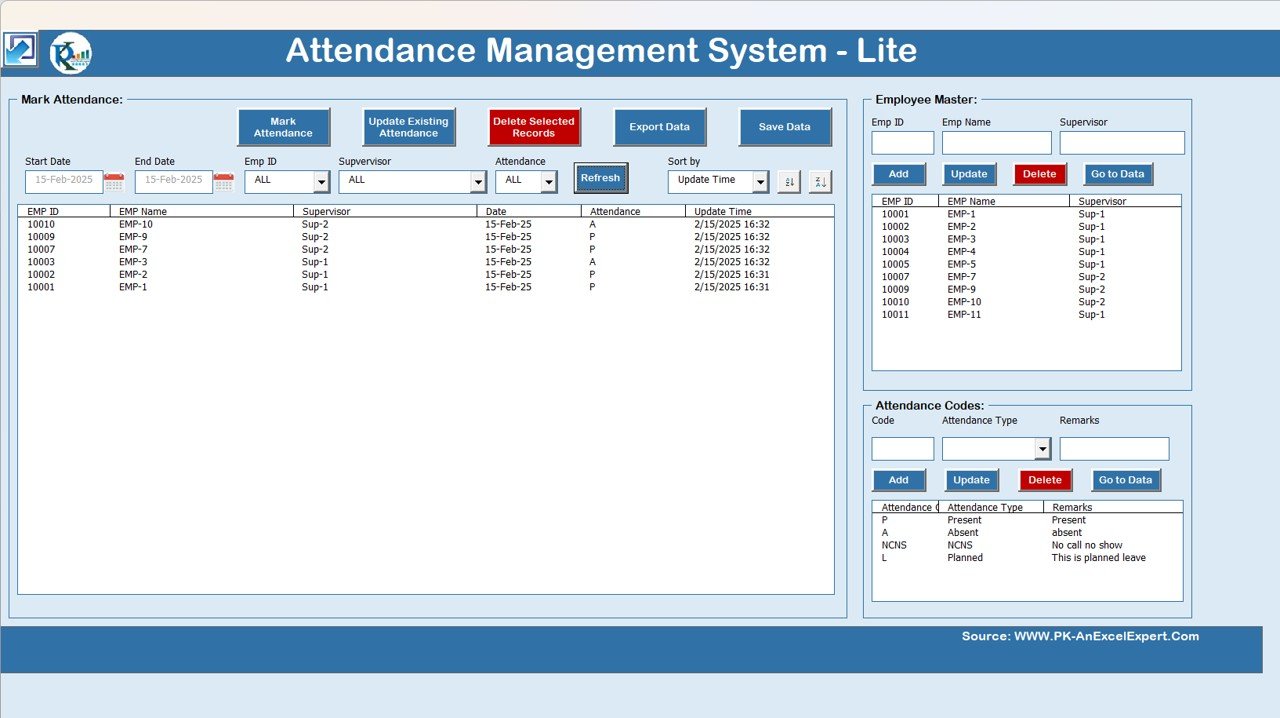
The direct step up from the free monthly sheet. It is a single .xlsm workbook with a login-style attendance form, an employee master, an attendance codes manager and an export engine. The export writes clean records to a sheet for reports, payroll and audit. It handles teams of up to 100 employees, and entries are checked as they go in, so the data stays clean. It runs on your own laptop with no cloud subscription and no per-user licence.
What it adds over free: form-based entry, filters by date, employee and supervisor, and a proper attendance database in place of a grid of ticks.
Best for: HR and office managers with 30 to 100 staff. $19.99 – view the Attendance Management System.
2. Employee Attendance Dashboard in Google Sheets – best value
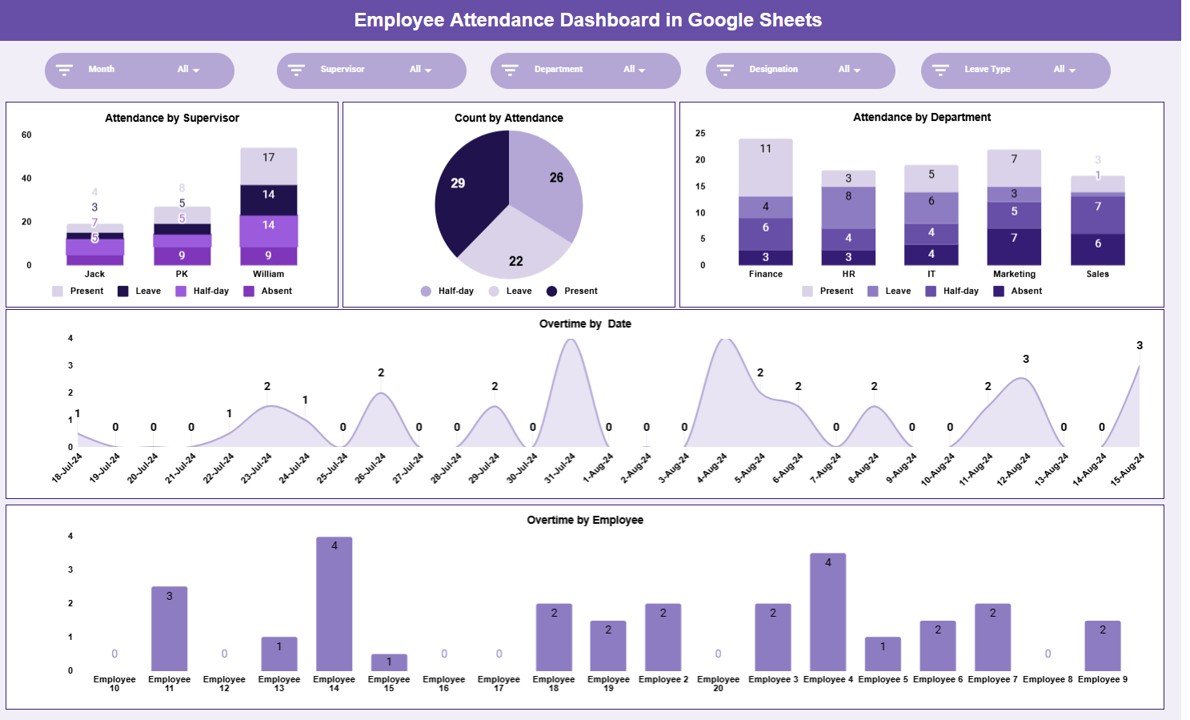
This fixes the “one person edits at a time” problem for $6.99. It is a Google Sheets attendance dashboard that the whole team can share. Charts show attendance by supervisor, count by attendance status, attendance by department, overtime by date and overtime by employee. Slicers filter by month, supervisor, department and designation.
What it adds over free: real-time sharing and visual attendance and overtime analysis, with nothing to install.
Best for: remote and multi-site teams. $6.99 – view the Google Sheets attendance dashboard.
3. Attendance and Overtime Dashboard in Excel
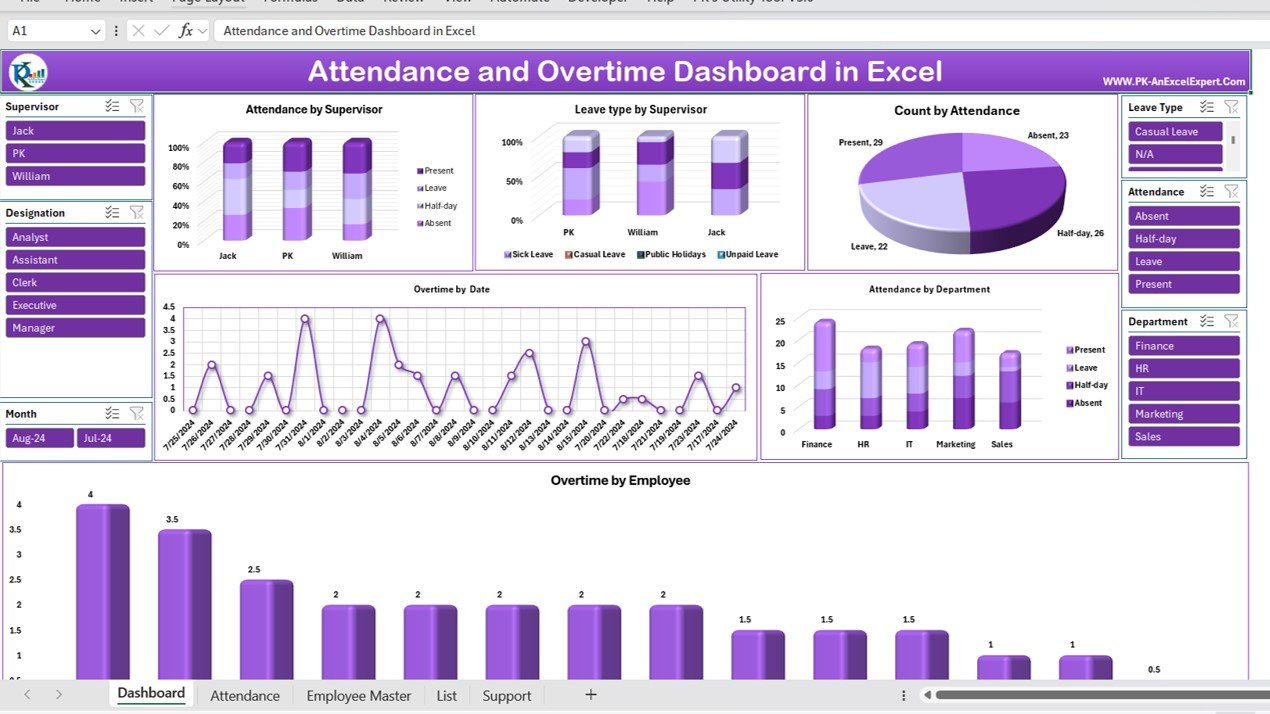
This combines an attendance entry form, an Employee Master sheet and a dashboard. Each record holds attendance status, in and out times, regular hours, overtime and leave type. The dashboard charts attendance and leave type by supervisor, overtime by date and by employee, and attendance by department. Slicers filter by supervisor, designation, department and month.
What it adds over free: in and out times and overtime hours, the two things a tick-box sheet cannot hold.
Best for: operations and factory teams that pay overtime. $17.99 – view the attendance and overtime dashboard.
4. Employee Attendance Payroll Management System (HR web app)
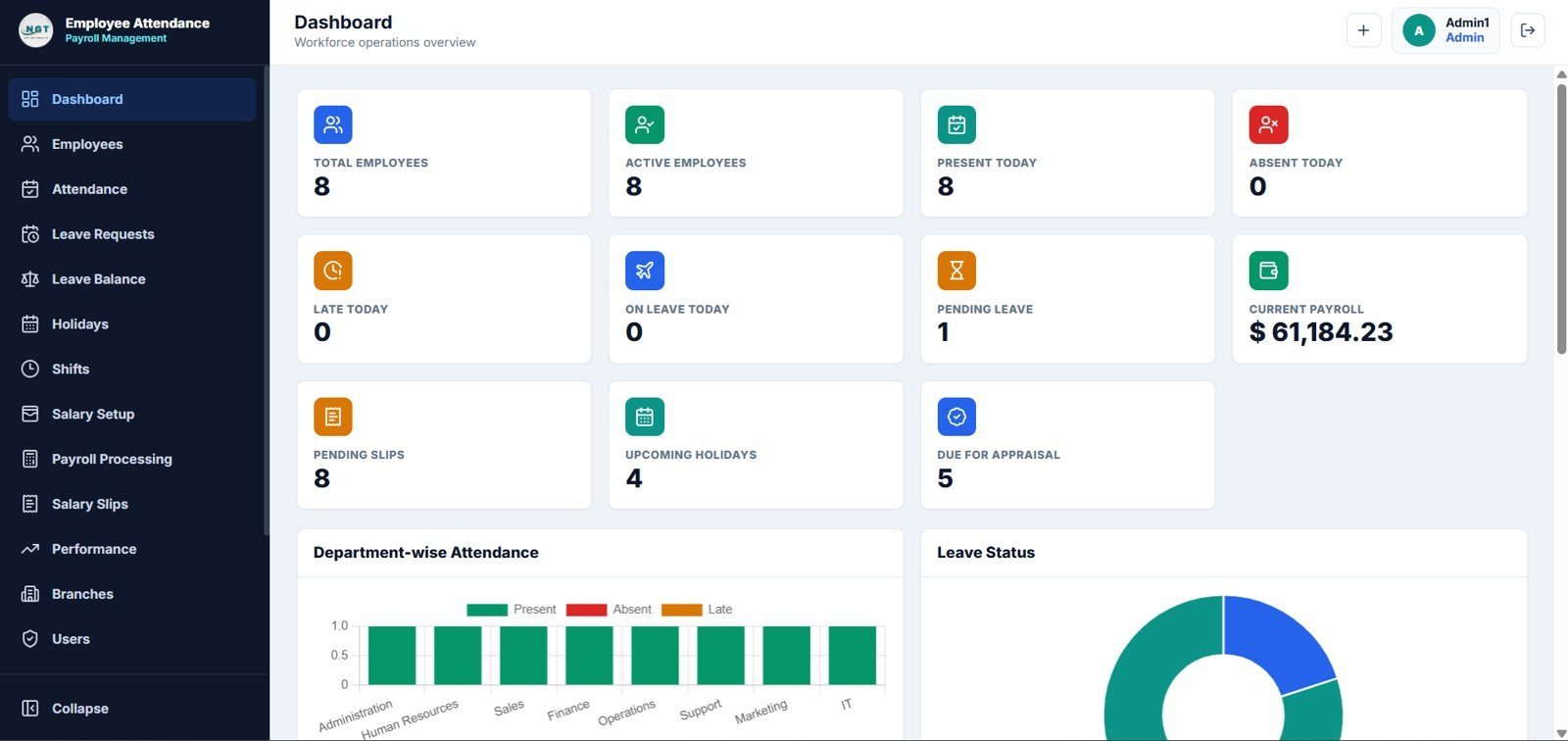
The biggest jump on this list: a 15-page HR web app with sign-in, a dashboard, employees, attendance, leave, payroll, salary slips, performance reviews, branches and users. The attendance module captures check-in, check-out, shift, status, late minutes, early leave, overtime and total hours. The dashboard shows present, absent, late and on-leave counts for today, plus pending leave requests.
What it adds over free: multi-user logins, leave approvals and payroll in one connected system, for a one-time price instead of a monthly HR subscription. For SaaS comparisons, see our BambooHR alternatives guide.
Best for: small businesses, clinics, schools and branch offices. $39.99 – view the HR web app.
5. Leave Management System

An Excel workbook with a VBA form for entering leave. You can mark several leave dates at once, record half-days and edit the leave categories. You get daily and monthly views of who is away, colour-coded by leave type, and a leave total for each employee across categories such as privilege, sick, casual and maternity leave.
What it adds over free: fast leave entry and a by-type leave grid next to your attendance sheet.
Best for: HR teams that track several leave types. $6.99 – view the Leave Management System.
6. Automated Employee Timesheet Template in Excel

When you need hours, not just marks. VBA buttons stamp the current time for time in, two breaks and time out. The sheet calculates total hours, break hours and total productive hours for each day. Only the current day can be entered, which stops backdated or future entries.
What it adds over free: real time records for payroll, without retyping hours.
Best for: hourly staff and contractors. $6.99 – view the automated timesheet. Prefer to start free? See our list of free timesheet templates.
7. Dynamic Attendance Sheet Using Power Pivot
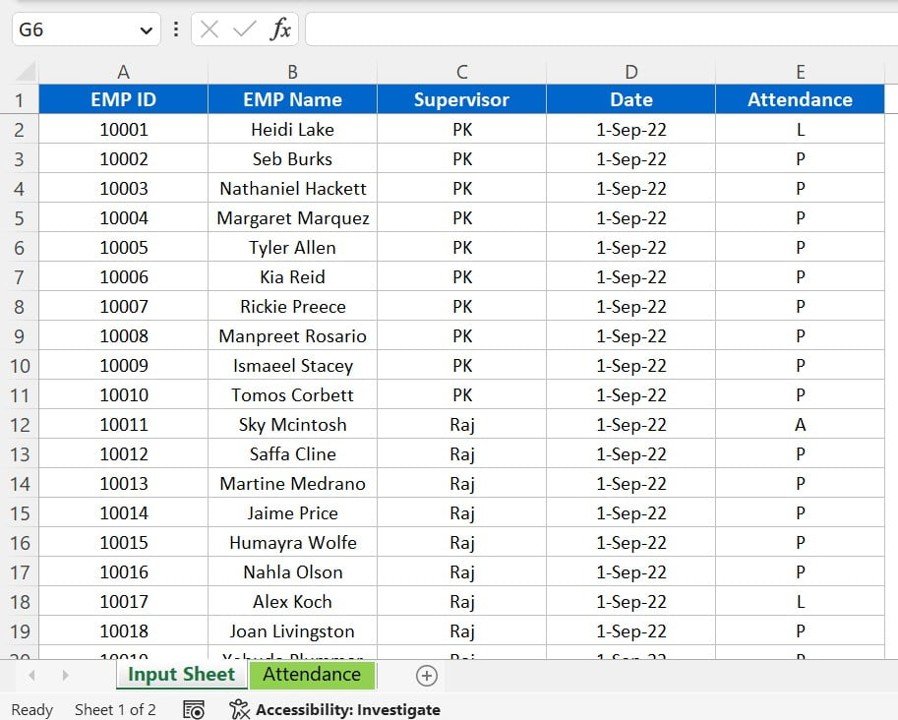
This is built for volume. You log attendance as a simple list (employee ID, name, supervisor, date, code), and Power Pivot models it into interactive pivot tables. You can filter by employee, department, date or supervisor. The codes (P, A, L, WO) can be customised. It avoids the “copy last month’s tab” problem that breaks big free sheets.
What it adds over free: one clean data table that scales to thousands of rows, with pivot reports on top.
Best for: analysts reporting on large teams. $6.99 – view the Power Pivot attendance sheet.
8. Absenteeism Report in Excel
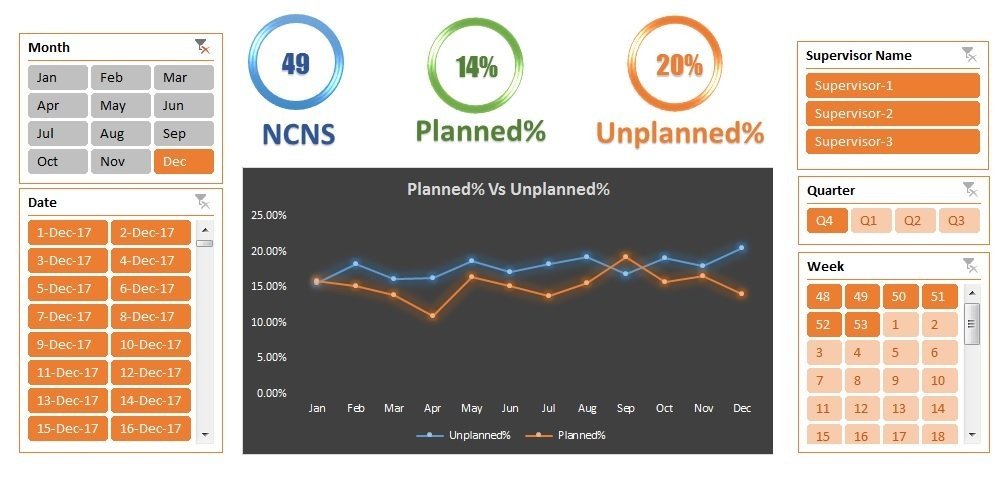
This turns attendance into management information. It compares planned and unplanned absence, tracks No Call No Show (NCNS) counts and uses traffic-light formatting. Slicers filter by month, date, supervisor, quarter and week, and an index sheet links summary, monthly, weekly and supervisor views.
What it adds over free: absence trends and supervisor accountability, which no free register shows.
Best for: HR leads reporting absence to management. $6.99 – view the absenteeism report.
Best-value bundle: the HR and Payroll Template Bundle includes an attendance and leave tracker, a payroll template, an onboarding checklist and a performance tracker among its 10 Excel tools for $14.99. For analytics across Excel, Google Sheets and Power BI, the HR & Workforce Analytics Bundle includes 10 premium templates for $89.99, against $138.90 bought separately.
How to choose between a free and a paid attendance sheet
| Your situation | Pick | Cost |
|---|---|---|
| Under 30 people, one person keeps the register | Free monthly or weekly sheet (#1, #2) | Free |
| A class for a full school year | Vertex42 Class Attendance Template (#3) | Free |
| Several supervisors need to update the same sheet | Employee Attendance Dashboard in Google Sheets | $6.99 |
| Payroll needs in and out times or overtime | Automated Timesheet or Attendance and Overtime Dashboard | $6.99 – $17.99 |
| 30 to 100 staff, clean records for audit | Attendance Management System – Lite | $19.99 |
| Logins, leave approvals and payroll in one place | Employee Attendance Payroll Management System | $39.99 |
A simple rule: if attendance only answers “who was here?”, stay free. If it answers “how much do we pay?” or “who is often absent?”, a template built for that question pays for itself in the first month.
When an attendance sheet template is NOT the right answer
- You must keep legal time records. In the US, the Fair Labor Standards Act requires employers to keep records of hours worked each day and week for non-exempt employees (see the US Department of Labor recordkeeping fact sheet). A present or absent mark is not an hours record. Use a timesheet or time clock.
- You have hundreds of employees across sites. At that scale, a biometric or HRIS time system with integrations is worth its subscription. Spreadsheets and Excel VBA tools are best for teams of up to about 100.
- Employees need to clock in themselves. A free spreadsheet assumes one person enters the data. Self-service clock-in needs an app, such as the HR web app above, or a time-clock service.
- Your school system mandates its own register. Many schools must record attendance in their student information system. Use a spreadsheet only as a backup or for clubs and extra classes.
Frequently asked questions
Where can I download a free attendance sheet template?
NextGenTemplates offers two free Excel attendance sheets, one monthly with checkboxes and one weekly, with no card required. Vertex42 has free class, student, mobile and leave templates for Excel and Google Sheets. Smartsheet has 12 attendance spreadsheet designs plus an employee tracker with a points system.
How do I make an attendance sheet in Excel?
Put names in column A and one date per column across row 1. Add a data validation dropdown with codes such as P, A and L. Then add a Present column with =COUNTIF(B2:AF2,”P”) and an attendance % column. A ready-made attendance sheet template does all of this for you in minutes.
How do I calculate attendance percentage in Excel?
Divide days present by the days that count, then format the cell as a percentage. For example: =COUNTIF(B2:AF2,”P”)/(COUNTIF(B2:AF2,”P”)+COUNTIF(B2:AF2,”A”)+COUNTIF(B2:AF2,”L”)). This leaves holidays and week-offs out of the rate. Our free weekly sheet uses exactly this method.
Is there a free attendance sheet template for Google Sheets?
Yes. Vertex42’s Class Attendance Template, Attendance Tracking Forms and Mobile Attendance Sheet all open in Google Sheets, and several of Smartsheet’s 12 attendance spreadsheet templates have Google Sheets versions. For a shared team dashboard with charts, the paid Employee Attendance Dashboard in Google Sheets costs $6.99.
What is the best attendance sheet template for employees?
For up to 30 employees, the free Monthly Attendance Sheet in Excel with Check Boxes is the easiest. If you need shifts, sick leave and a points policy, use Smartsheet’s Employee Attendance Tracker. For 30 to 100 employees with clean records, the Attendance Management System – Lite costs $19.99, paid once.
What is the best attendance sheet template for students?
Vertex42’s Class Attendance Template covers a full school year from August to June, with a year-to-date summary that tracks absences and tardies by Student ID. For a single month, the free NextGenTemplates monthly sheet or Vertex42’s monthly attendance form works well.
What codes should an attendance sheet use?
Most sheets use P for present, A for absent, L for leave, H for holiday and WO for week off. Some add HD for half-day, T for tardy or NCNS for no call no show. Keep the list short and limit cells to a dropdown so totals never break on a typo.
Can a free attendance sheet track overtime?
Not really. Free attendance sheets record a mark per day, not hours. To track overtime you need in and out times. The Automated Employee Timesheet Template ($6.99) and the Attendance and Overtime Dashboard in Excel ($17.99) both calculate hours and overtime.
Are Vertex42 attendance templates free for business use?
Vertex42 offers them free under a private-use licence, which lets you use and edit the files yourself but not redistribute or resell them. That covers normal internal use in a team. Check the licence line on each download page if you plan to share the file outside your organisation.
When should I upgrade from a free attendance sheet template?
Upgrade when several people need to edit at once, when payroll needs hours and overtime, when you need leave balances, or when management wants absence trends by supervisor or department. Paid NextGenTemplates attendance tools cost $6.99 to $39.99, paid once.
Get your attendance sheet template
Start free with the Monthly Attendance Sheet with Check Boxes or the Weekly Attendance Sheet. When attendance has to feed payroll or HR reports, the Attendance Management System – Lite is our top upgrade at $19.99, the Employee Attendance Dashboard in Google Sheets is the best value at $6.99, and the HR and Payroll Template Bundle gives you 10 HR tools for $14.99.
Looking for dashboards rather than registers? See our lists of free Excel dashboard templates and free Google Sheets dashboard templates. Prefer to watch first? Our YouTube channel has walk-throughs and Excel tutorials: youtube.com/@NextGenTemplates.