

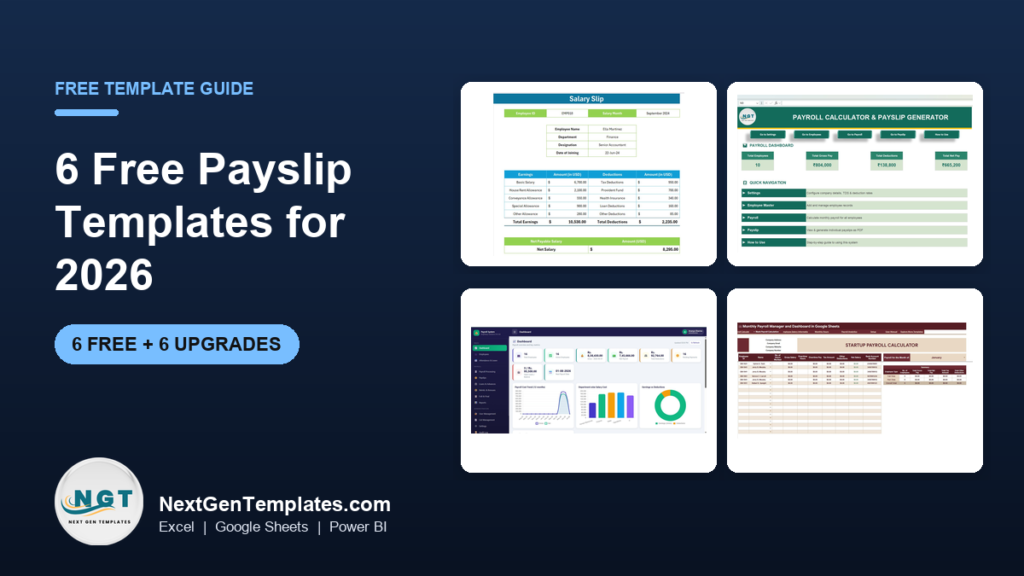
The best free payslip template in 2026 is Vertex42’s Payslip Template for Excel. It keeps every pay run on a year-to-date sheet and builds the payslip from a pay-date drop-down. For US pay stubs, Smartsheet’s free set of 10 pay stub templates covers hourly, salaried and contractor pay in Excel, Word, PDF and Google Sheets.
Last updated: October 2026
Payslip or pay stub? They are the same document. “Payslip” and “salary slip” are the usual words in the UK, India and Australia, and “pay stub” or “paycheck stub” is the US term. This guide covers both, because a good payslip template works in any country once you change the deduction lines. If you also track hours, see our free timesheet templates. For days off, see our free leave tracker Excel templates.
Key takeaways
- All 6 payslip template sources in the free list cost nothing. Vertex42, Smartsheet (two pages), Zoho Payroll, TemplateLab and Xero all give them away. We opened every source page and checked every link in October 2026.
- Best overall free payslip template: Vertex42’s Payslip Template for Excel. It has a year-to-date sheet and a pay-date drop-down, and it uses no macros.
- Best free pay stub templates for US employers: Smartsheet’s 10 free pay stub templates, with hourly, corporate and organisation layouts plus Word, PDF and Google Sheets versions.
- A free payslip template formats one payslip. It does not work out tax, make a PDF for every employee in one click, or keep payroll, attendance and loans together. Those gaps are why payroll teams upgrade.
- The 6 paid NextGenTemplates upgrades below cost $6.99 to $39.99, paid once with no subscription. The bulk salary slip generator costs $6.99.
 Launch offer
SUMIFS, XLOOKUP, FILTER, LAMBDA and checking AI-written formulas, with real business projects. 11h 47m of video by PK, with practice files, quizzes and a capstone.
Free payslip templates compared
Every free payslip template source in this guide, side by side. One row is flagged best overall. All six are free.
| # | Template | Source | Format | Best For | Price |
|---|---|---|---|---|---|
| 1 | Payslip Template (Best overall) | Vertex42 | Excel | A payslip per pay date, pulled from a year-to-date record | Free |
| 2 | Free Pay Stub Templates (10 files) | Smartsheet | Excel, Word, PDF, Google Sheets | US pay stubs for hourly, salaried and contract staff | Free |
| 3 | Payroll Check Stub Template | Smartsheet | Excel, Word, PDF, Google Sheets | A check stub with gross pay and deductions side by side | Free |
| 4 | Payslip Templates (6 designs) | Zoho Payroll | Excel | Indian salary slips with PF and UAN details | Free |
| 5 | 24 Free Pay Stub Templates | TemplateLab | Word, Excel, PDF | Weekly, biweekly, year-end and check stub layouts | Free |
| 6 | Pay Stub (US) and Payslip (AU) Templates | Xero | Editable PDF | A clean fill-in PDF with no spreadsheet at all | Free (short form) |
Here are the paid upgrades we recommend once a free payslip template runs out of road. One row is best overall and one is best value.
| Upgrade | Format | Best For | Price |
|---|---|---|---|
| Payroll Calculator and Payslip Generator in Excel (Best overall) | Excel VBA | Salary calculation, deductions and PDF payslips in one file | $14.99 |
| Automatic Bulk Salary Slips Generator in Excel (Best value) | Excel VBA | One PDF salary slip per employee in one click | $6.99 |
| Payroll and Salary Management System Web App | Web app | Payroll runs, payslips, loans and email with logins | $39.99 |
| Monthly Payroll Manager and Dashboard in Google Sheets | Google Sheets | Hourly and overtime payroll, shared in the cloud | $9.99 |
| Startup Payroll Calculator in Google Sheets | Google Sheets | Founders checking gross, net, tax and deductions | $6.99 |
| Payroll Management Dashboard in Power BI | Power BI | Payroll cost by department, region and branch | $17.99 |
How we picked these free payslip templates
We started where people actually look for a payslip template: the big template libraries (Vertex42, Smartsheet, TemplateLab), the payroll software companies that give templates away (Zoho Payroll and Xero), and our own catalogue. We opened every source page in October 2026, checked every link in this post, and downloaded the direct files where a page offered one.
A source made the list only if the payslip downloads at no cost and does more than a blank table: it lays out earnings and deductions, works out net pay, or keeps year-to-date figures. We left out the pages that rank for “free pay stub template” but turn out to be paid pay stub generators. We also left out Microsoft Create’s pay stub page this year, because it now sends you to a Microsoft 365 sign-in, so we could not check the file without an account. Several other payslip template pages we tried now return “page not found”, so they are not here either.
Search data shaped the list too. In the US, “pay stub template” is searched about 5,400 times a month and “free pay stub template” about 3,600 times. “Payslip template” and “payslip excel” get about 320 searches each. So the list covers US pay stubs as well as UK, Indian and Australian payslips. We took the paid upgrades from the NextGenTemplates payroll range and matched each one to a gap the free files leave open.
The 6 best free payslip templates for 2026
1. Payslip Template (Vertex42) – best overall free payslip template for Excel
The best-built free payslip template we found. You enter each pay run on a YearToDate worksheet: pay date, pay period, hours, rates and amounts. Then you pick a pay date from a drop-down on the Payslip sheet, and lookup formulas fill in the earnings, deductions and net pay for that run. The header holds company, employee and payment details, plus a message box for notes such as remaining vacation days. You can unhide extra rows and columns if you need more earning or deduction categories.
It is our pick for best overall because the year-to-date sheet gives you a running record, not just a single printout. Two cautions from the page itself. It was designed for UK businesses, so it has Tax Code, payroll number and National Insurance fields that you would relabel elsewhere. And it does not calculate tax or deductions; you type those amounts in. Vertex42 last updated it on 18 August 2021. It works in Excel 2007 or later and Excel for iPad and iPhone, with no macros.
Best for: small employers who want a tidy payslip and a year-to-date record. Free under Vertex42’s private-use licence – get the Vertex42 payslip template.
2. Free Pay Stub Templates (Smartsheet) – best free pay stub templates for US employers
One page, ten free files. The Simple Pay Stub Template in Excel calculates totals for you. The Corporate version looks like a traditional earnings statement, with current and year-to-date totals. The Hourly Wage version itemises hours and rates by shift type. The Organization version adds benefits and vacation and sick leave balances. There is also a payroll register that works as a multi-employee wage sheet, a Google Sheets pay stub, two printable PDFs (one combines an invoice with a remittance stub for contractors), and basic and modern Word layouts.
Best for: US small businesses that want a pay stub in the format they already use. Free – get Smartsheet’s free pay stub templates (skip the trial pop-up to reach the download links).
3. Payroll Check Stub Template (Smartsheet)
This one sits on Smartsheet’s newer free payroll templates page (September 2025). It is an itemised statement of earnings and withholdings, with employee details, earnings, taxes and net pay, and gross pay shown next to deductions. It comes in Excel, Word, PDF and Google Sheets, each in a blank and a filled-in sample version, so you can see a finished stub before you edit your own. The same page has a free simple payroll template and a payroll register if you need the calculation behind the stub.
Best for: employers who still pay by paper check. Free – get Smartsheet’s payroll check stub template.
4. Payslip Templates (Zoho Payroll)
Zoho Payroll shows six payslip designs: Standard, Mini (for interns and trainees), Simple, Lite (for small Indian businesses), Simple Spreadsheet (a salary slip format for Excel) and Professional. When we checked, the Excel file downloaded straight away, with no sign-up. The page also explains what a full Indian salary slip should carry: organisation logo and address, employee name and designation, date of joining, pay period and pay date, statutory account details such as PF and UAN, the salary structure, taxes and deductions, and a gross-to-net calculation.
Best for: Indian employers who need a familiar salary slip format. Free – get Zoho Payroll’s payslip templates.
5. 24 Free Pay Stub Templates (TemplateLab)
The biggest free collection on this list: 24 pay stub templates in Word, Excel and PDF. The page groups them by type, so you can find a weekly pay stub, a biweekly one, a year-end payroll stub or a check stub without opening every file. It also explains what a pay stub should include, which helps if you are designing your first one. Layouts vary in quality, so open two or three and keep the one that matches your pay frequency.
Best for: anyone who wants to compare many layouts before choosing. Free – browse TemplateLab’s free pay stub templates.
6. Pay Stub (US) and Payslip (AU) Templates (Xero)
Xero gives away an editable PDF for each market. The US pay stub template covers employer and employee details, pay period and pay date, regular and overtime hours, pre-tax deductions such as insurance and retirement, tax withholdings, post-tax deductions, reimbursements and net pay. The Australian payslip template covers gross and net pay, tax, superannuation and reimbursements. Its page also sums up the Fair Work rules, including that a payslip is due within one working day of payday. You fill in a short form (first name, email, location, industry and number of staff) to get the file. No paid plan is needed.
Best for: one-off payslips when you do not want a spreadsheet at all. Free – get Xero’s US pay stub template or Xero’s Australian payslip template.
Want our free payroll information form by email?
A payslip is only as good as the employee details behind it. Enter your email and we will send you our free Payroll Information Form Template for Word and Google Docs. It collects employee details, salary type (monthly, biweekly or weekly), payment method, tax ID and bank details, with employee and HR signature lines. No payment, no card, and you can unsubscribe at any time.
When does it pay to upgrade from a free payslip template?
A free payslip template is fine for a business with three people on payroll. The same five gaps push employers to a paid tool, usually once payroll runs every month for ten or more people:
- One payslip at a time. Free templates format a single payslip. With 25 employees, someone changes the name, saves a PDF and repeats it 25 times every pay day.
- No calculation. Most free files expect you to type in tax and deductions. Allowances worked out as a percentage of basic pay, overtime at a multiple of the daily rate, and statutory deductions all have to be done somewhere else.
- Payroll lives in many files. Attendance, loans, advances and bonuses sit in separate sheets, and each one is retyped into the payslip.
- No review step. Nobody can see total gross pay, deductions and net pay for the month before money leaves the bank. For the numbers worth checking, see our guide to payroll KPIs to track.
- No access control. A payslip template shared by email exposes everyone’s salary. Payroll needs logins and an audit trail once more than one person touches it.
If two or more of these apply, the hours spent filling in free payslips cost more than a one-time template. The 6 upgrades below map onto those gaps.
6 paid payslip template upgrades for when free stops working
1. Payroll Calculator and Payslip Generator in Excel – best overall upgrade
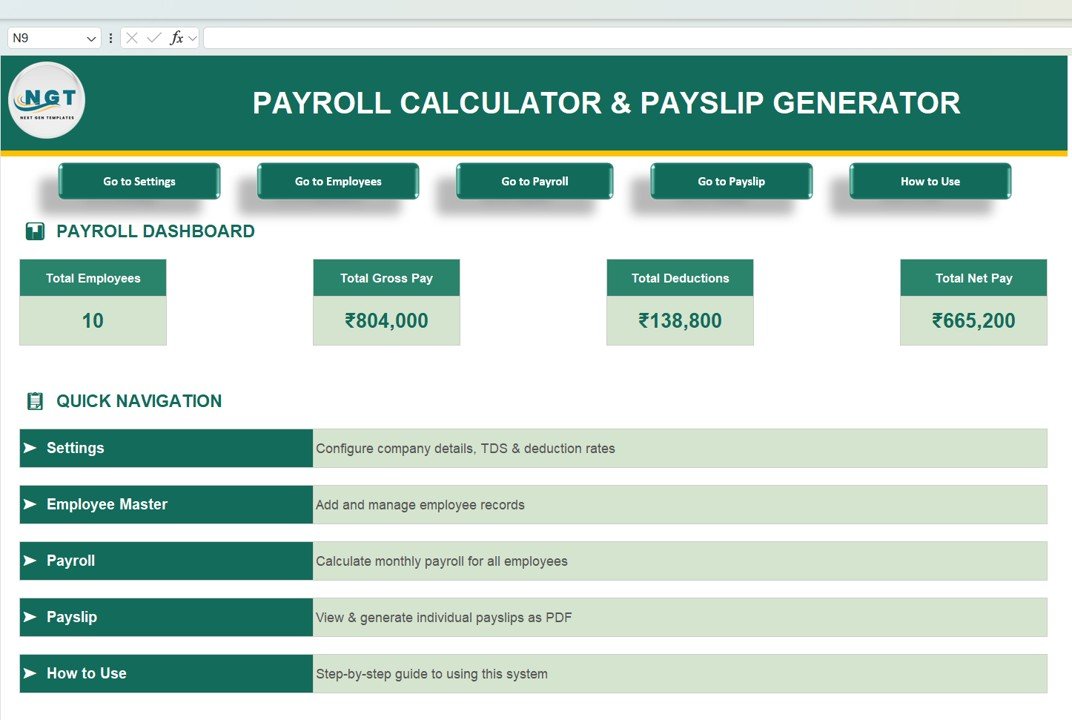
The direct fix for “no calculation”. The home screen shows total employees, gross pay, total deductions and net pay. Navigation buttons lead to Settings, Employees, Payroll, Payslip and How to Use. In Settings you enter company details, working days in the month, shift hours, an overtime rate, and salary component rates such as HRA and DA as a percentage of basic pay. The employee master holds ID, department, designation, PAN, Aadhaar and bank details. Each month the file works out earnings (Basic, HRA, DA, Conveyance, Medical and Special Allowance) and deductions (PF, ESI, Professional Tax and TDS). Then you pick an employee and save the payslip as a PDF, one at a time or in bulk.
What it adds over free: salary and deduction maths built in, so the payslip fills itself. It is set up for Indian payroll, so employers elsewhere should swap the deduction rates for their own.
Best for: small businesses running monthly payroll in Excel. $14.99 – view the Payroll Calculator and Payslip Generator.
2. Automatic Bulk Salary Slips Generator in Excel – best value
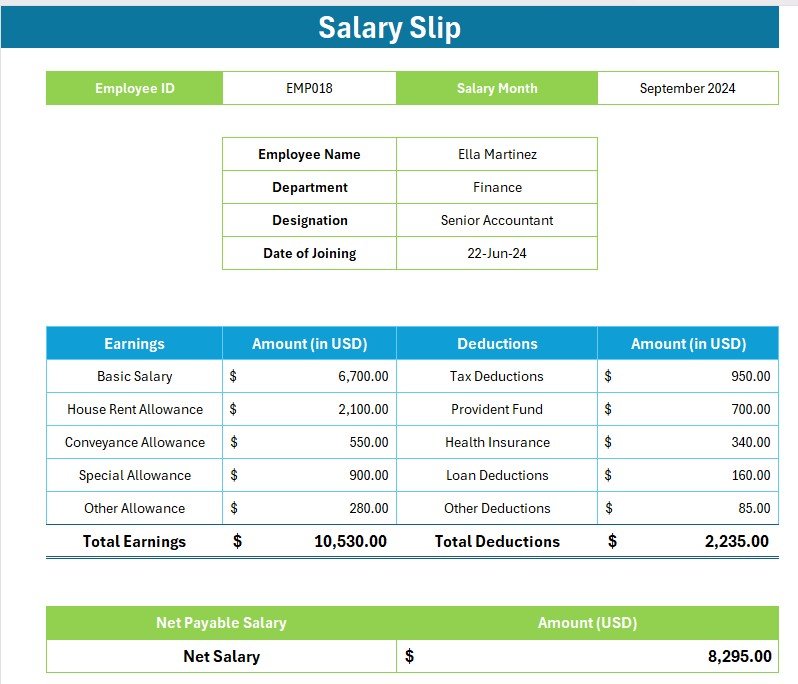
The fix for “one payslip at a time”. On the Setting sheet you choose the folder where PDFs are saved and the salary month. On the Data sheet you enter each employee’s ID, name, department and designation, with basic salary, house rent, conveyance and special allowances, plus tax, provident fund, health insurance, loan and other deductions. The Template sheet holds a one-page salary slip that fills itself from the Employee ID. Click “Create Salary Slips” and the file saves a separate PDF for every employee.
What it adds over free: a whole month of salary slips in one click, for $6.99.
Best for: HR and accounts staff who already calculate pay elsewhere. $6.99 – view the Bulk Salary Slips Generator.
3. Payroll and Salary Management System Web App
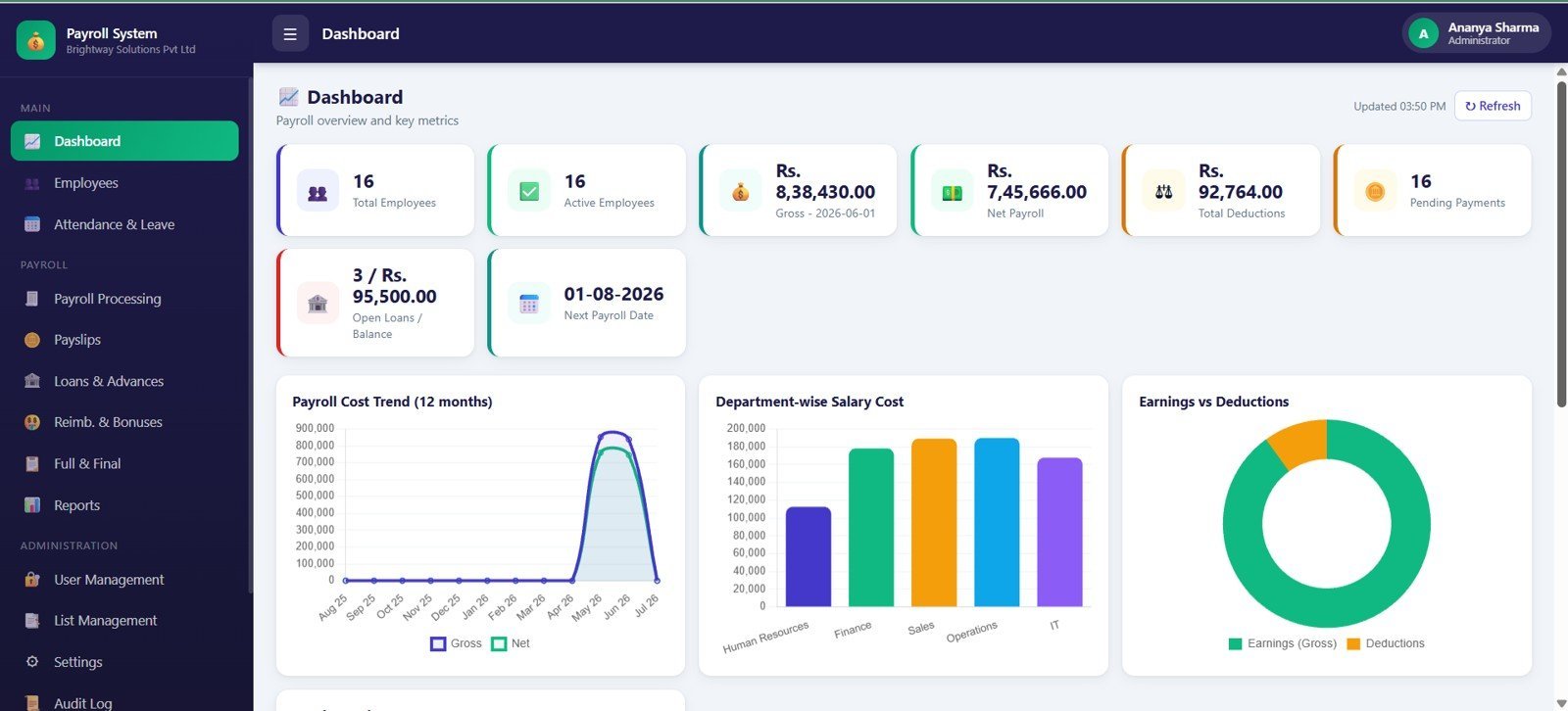
The biggest jump on this list: a 14-page browser app with username and password login. The dashboard shows employees, gross and net payroll, deductions, pending payments, loans and the next payroll date. Attendance inputs cover working days, present days, paid leave, unpaid loss-of-pay days and overtime hours. Payroll runs feed a payslip page where you view, print or email each payslip, or email them in bulk. Loans, advances, reimbursements, bonuses and full and final settlements are tracked too, and admin pages handle roles, users, payroll rules, Google Drive backup and an audit log.
What it adds over free: payroll, payslips and adjustments in one system with logins, for a one-time price. For SaaS comparisons, see our Gusto alternatives guide.
Best for: growing firms that want payroll off email. $39.99 – view the Payroll and Salary Management System.
4. Monthly Payroll Manager and Dashboard in Google Sheets
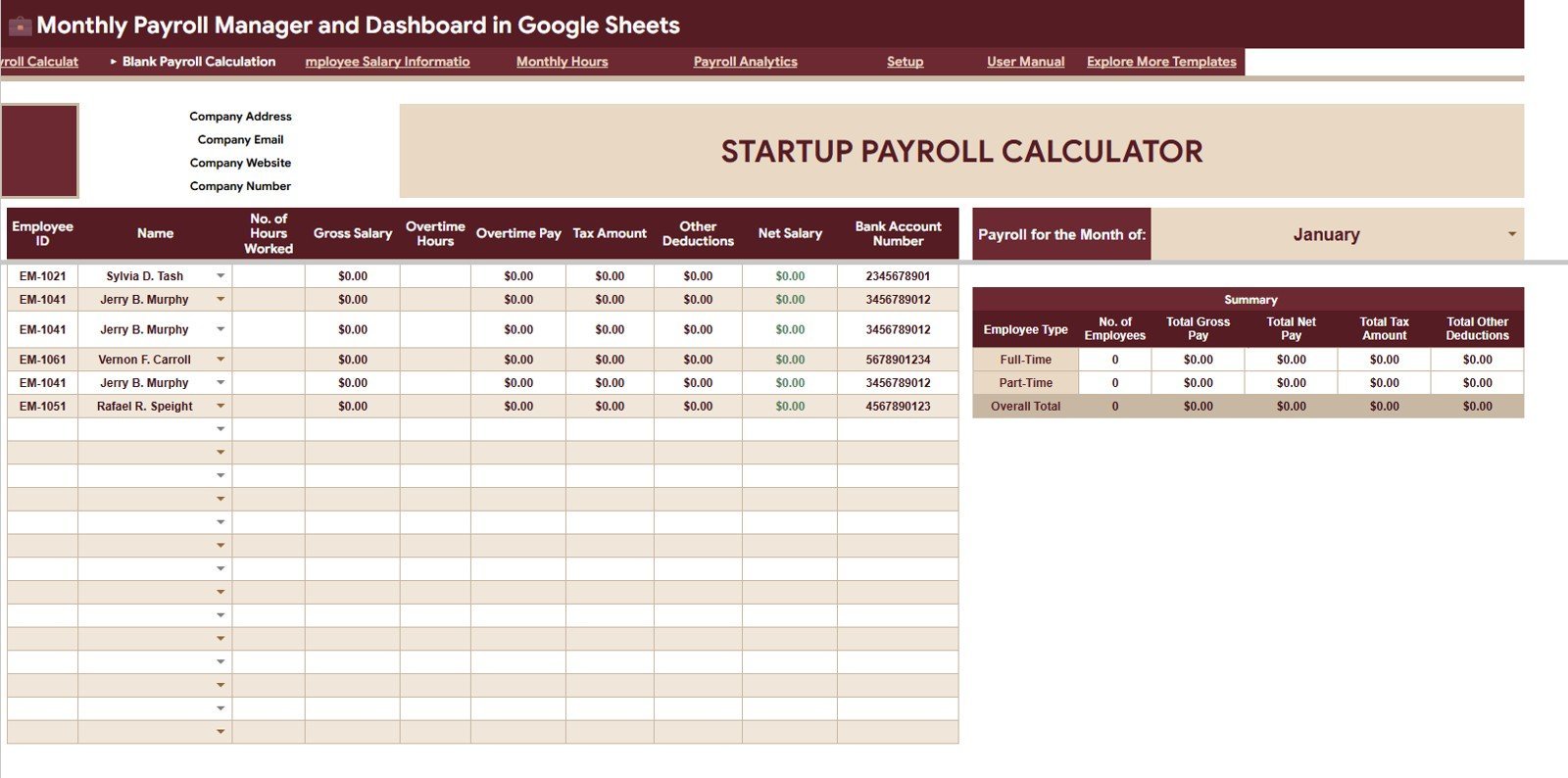
For hourly teams. An employee salary sheet holds employee type, position, hourly rate, overtime rate, monthly salary and deductions. The payroll calculation page works out gross pay, overtime pay, tax, other deductions and net salary for each employee, with totals for the month at the top. A monthly hours view tracks regular and overtime hours, and an analytics tab compares net pay, headcount and pay components. Slicers filter everything during the payroll review.
What it adds over free: hours-to-net-pay calculation in a sheet everyone can open.
Best for: remote teams on Google Workspace. $9.99 – view the Monthly Payroll Manager in Google Sheets.
5. Startup Payroll Calculator in Google Sheets
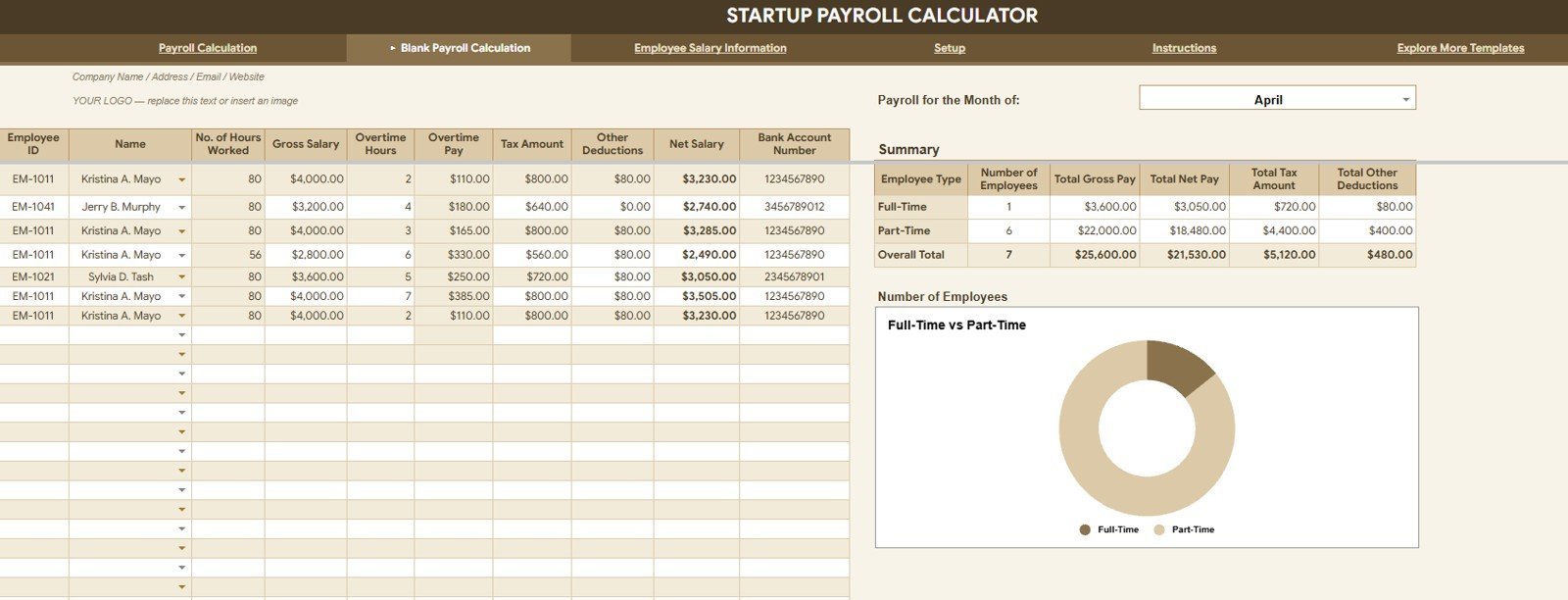
A check before money leaves the business. Overview cards show the number of employees, total gross pay, net pay, tax and other deductions. Charts compare them by employee type, a blank calculation sheet gives you a clean view for each pay cycle, and a salary information tab breaks pay down by position, with full-time and part-time shares. Setup lists keep positions, months and names consistent.
What it adds over free: a monthly payroll review that founders and accountants can share.
Best for: startups with a small mixed team. $6.99 – view the Startup Payroll Calculator.
6. Payroll Management Dashboard in Power BI
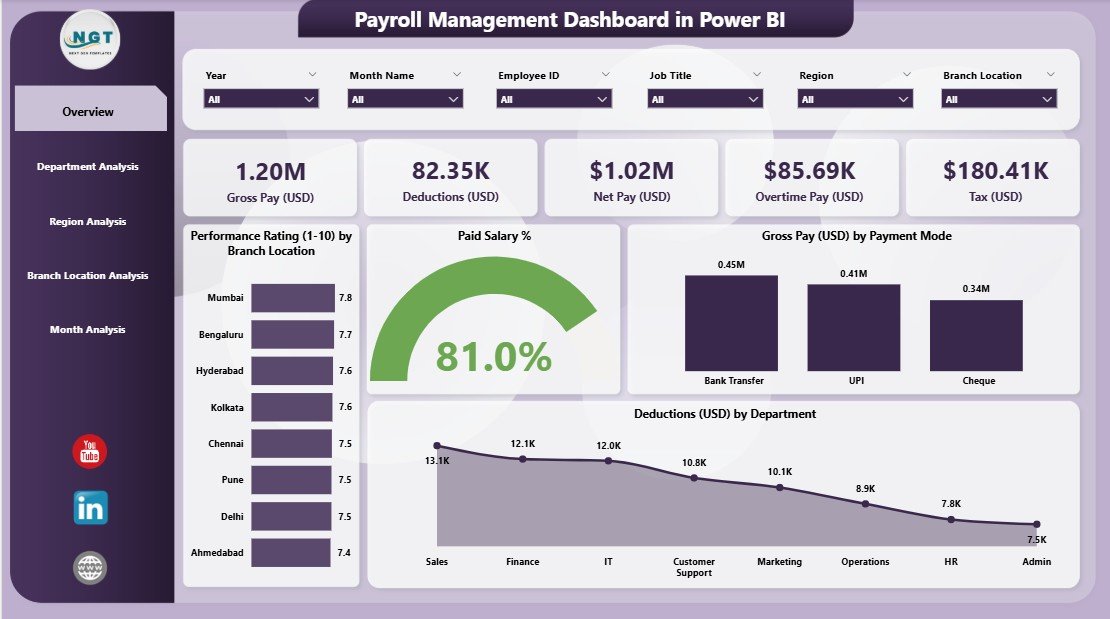
For when leadership asks what payroll costs, not just what one payslip says. Five pages: an overview with KPI cards, paid salary percentage, gross pay by payment mode and deductions by department, then department, region, branch and monthly trend pages covering allowances, net pay, overtime pay, deductions and gross pay. Refresh the data and every visual updates.
What it adds over free: payroll cost reporting across the whole organisation.
Best for: HR and finance teams that report in Power BI. $17.99 – view the Power BI payroll dashboard.
Also worth a look: the Employee Attendance Payroll Management System ($39.99) if you want attendance, leave, payroll and salary slips in one 15-page web app. The Payroll Management Dashboard in Excel ($17.99) is the Excel twin of upgrade #6. The Payroll Accuracy KPI Dashboard in Excel ($14.99) tracks how often payroll goes wrong. The HR and Payroll Template Bundle is the best-value bundle at $14.99 for 10 Excel HR tools.
How to choose between a free and a paid payslip template
| Your situation | Pick | Cost |
|---|---|---|
| A few employees, one payslip per pay date | Vertex42 Payslip Template (free #1) | Free |
| US hourly or salaried pay stubs | Smartsheet Free Pay Stub Templates (free #2) | Free |
| Indian salary slip format with PF and UAN | Zoho Payroll payslip templates (free #4) | Free |
| A PDF salary slip for every employee in one click | Automatic Bulk Salary Slips Generator in Excel | $6.99 |
| Salary, allowances, statutory deductions and payslips in one file | Payroll Calculator and Payslip Generator in Excel | $14.99 |
| Hourly and overtime payroll in Google Sheets | Monthly Payroll Manager and Dashboard in Google Sheets | $9.99 |
| Payroll, payslip email, loans and an audit log with logins | Payroll and Salary Management System Web App | $39.99 |
A simple rule: if you only need to show one person what they were paid, stay free. If the payslip has to be calculated, sent to the whole team or audited later, a template built for that job pays for itself in the first pay run.
Payslip template formulas that matter in Excel
Most payslip errors come from small formula slips. If you build or edit your own payslip template in Excel or Google Sheets, these six formulas cover almost every case:
- Gross pay for hourly staff: =ROUND(Hours*Rate+OTHours*Rate*1.5,2) pays overtime at time and a half. Change 1.5 to your own multiple.
- Allowance as a share of basic: =ROUND(Basic*40%,2) works out an allowance such as HRA from basic pay. Keep the percentage in a settings cell, not in the formula.
- Net pay: =Gross-SUM(Deductions) subtracts every deduction line. Check that the deductions range covers every row, including any you unhide later.
- Pull an employee onto the payslip: =XLOOKUP(EmpID,Employees[ID],Employees[Name]) fills the name, and the same pattern fills department and bank details.
- Year-to-date earnings: =SUMIFS(Pay[Gross],Pay[EmpID],B2,Pay[PayDate],”<=”&D2) totals everything paid so far this year up to the pay date in D2.
- Pay period label: =TEXT(StartDate,”d mmm”)&” – “&TEXT(EndDate,”d mmm yyyy”) prints a readable pay period on the payslip.
For US federal, state and FICA maths, see our walk-through of payroll calculation in Excel. Our payroll Excel template toolkit lists the wider set of payroll files. Want to see payroll formulas in action? Our YouTube channel has Excel walk-throughs: youtube.com/@NextGenTemplates.
When a payslip template is NOT the right answer
- You need to file payroll taxes. A payslip template shows what was paid. It does not file returns, pay over tax or produce year-end forms. In the US, the Department of Labor’s FLSA recordkeeping fact sheet also requires employers to keep payroll records for three years and wage computation records such as time cards for two. Your payroll records need to hold up long after the payslip is printed.
- Your country sets payslip content by law. In the UK, GOV.UK says employees and workers must get a payslip on or before payday. It must show pay before and after deductions, the deductions that change each period, and hours worked when pay varies with time. Many US states have their own pay statement rules too. Check yours before relying on any template.
- You run payroll for many staff across states or countries. At that scale, payroll software that files taxes and handles multi-state withholding is worth the monthly fee. Spreadsheets work best for teams up to about 50.
- Someone wants a pay stub as “proof of income”. A payslip must show real pay that was actually made. Making a pay stub for pay that never happened is fraud, whatever template is used.
Frequently asked questions
Where can I download a free payslip template?
Vertex42’s Payslip Template for Excel is the best-built free file, with a year-to-date sheet and a pay-date drop-down. Smartsheet gives away 10 free pay stub templates plus a payroll check stub. Zoho Payroll, TemplateLab and Xero also offer free payslip or pay stub templates. None of them needs a card.
Is a payslip the same as a pay stub?
Yes. Both are the statement an employee gets with their pay, showing earnings, deductions and net pay for the period. “Payslip” and “salary slip” are used in the UK, India and Australia. “Pay stub” or “paycheck stub” is the US term. Any of the templates here can be relabelled for either use.
Is there a free payslip template for Google Sheets?
Yes. Smartsheet’s free pay stub set includes a Google Sheets pay stub, and its Payroll Check Stub Template also comes as a Google Sheets file. You can also upload Vertex42’s Excel payslip to Google Drive and open it in Sheets. For a shared payroll sheet with calculations, NextGenTemplates’ Google Sheets version costs $9.99.
How do I make a payslip template in Excel?
Put company and employee details at the top, then two columns: earnings and deductions. Total each column with SUM and work out net pay as gross minus deductions. Keep pay runs on a separate sheet and pull them onto the payslip with XLOOKUP, so one layout serves every employee and every pay date.
What must a payslip include?
Most payslips show the employer and employee names, the pay period and pay date, gross pay, each deduction, and net pay. Hourly staff should also see hours and rates. Exact rules depend on where you are: the UK, Australia and many US states set out the items a payslip has to show.
Can I generate payslips for all employees at once in Excel?
Not with a free template, which formats one payslip at a time. A VBA tool can loop through every employee and save a separate PDF for each one. NextGenTemplates’ Automatic Bulk Salary Slips Generator does this for $6.99, and the Payroll Calculator and Payslip Generator does it with salary calculation built in.
Do free payslip templates calculate tax?
Mostly not. Vertex42’s payslip template says plainly that it does not calculate taxes or deductions; you type them in. Smartsheet’s simple pay stub totals the amounts you enter. Tax rules change each year and differ by country and state, so work out tax with your payroll provider or official tables, then record it on the payslip.
Are Vertex42 payslip templates free for business use?
Vertex42 offers its Payslip Template free under a private-use licence. You can use and edit it inside your own business, but you may not distribute or resell the file. Check the licence line on each download page before sharing a template outside your organisation.
When should I upgrade from a free payslip template?
Upgrade when you are filling in more than a handful of payslips each month, when allowances and deductions need calculating, when payslips need emailing in bulk, or when payroll needs logins and an audit trail. Paid NextGenTemplates payroll tools cost $6.99 to $39.99, paid once with no subscription.
Get your payslip template
Start free with Vertex42’s Payslip Template or Smartsheet’s free pay stub templates. When payslips have to be calculated and sent for the whole team, the Payroll Calculator and Payslip Generator in Excel is our top upgrade at $14.99. The Automatic Bulk Salary Slips Generator is the best value at $6.99, and the Payroll and Salary Management System runs the whole cycle for $39.99.
Building out a full HR toolkit? See our HR templates for directors, the HR KPIs to track in 2026, and our list of free attendance sheet templates. Billing clients as well? See our free invoice templates.