

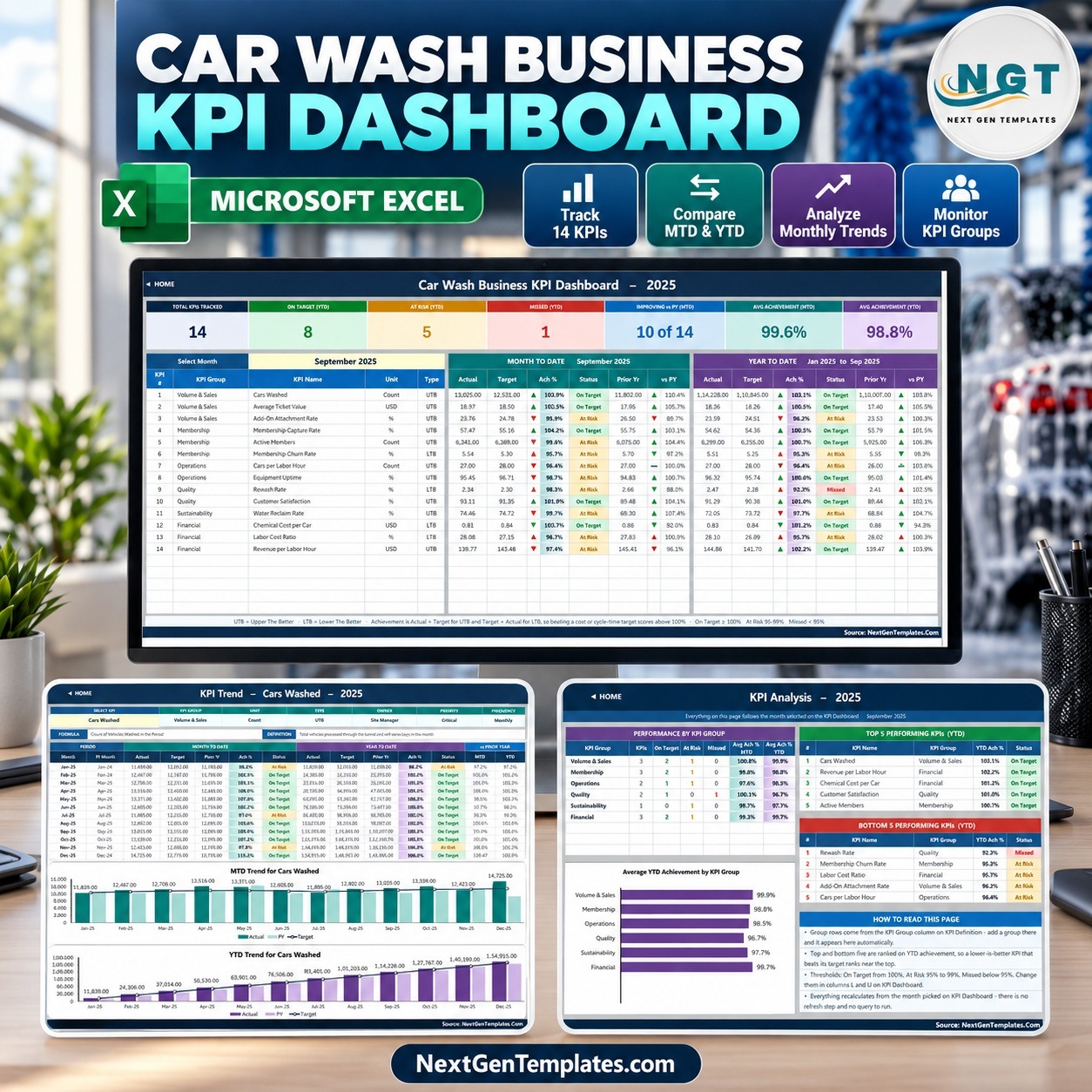
The Car Wash Business KPI Dashboard in Excel tracks 14 car wash KPIs across 6 KPI groups on 10 worksheets, and scores every one of them month-to-date and year-to-date against target and prior year. Pick a month in one dropdown and the 7 summary cards, the 14-row KPI table, the KPI Trend charts and the KPI Analysis page all update together. It is 100% worksheet formulas – no macros, no Power Query, no add-ins.
🌍 Join 8,400+ teams in 40+ countries using NextGenTemplates to replace paid SaaS tools with one-time-purchase Excel, Google Sheets, Power BI and HTML templates.
✅ Instant download · One-time payment · No subscription · No per-user fees · Lifetime access
This is the month-picker KPI DASHBOARD family. It is a different template from the Car Wash Business KPI Scorecard in Google Sheets, which is a separate scorecard with its own KPI set.
🔑 Key Features of the Car Wash Business KPI Dashboard in Excel
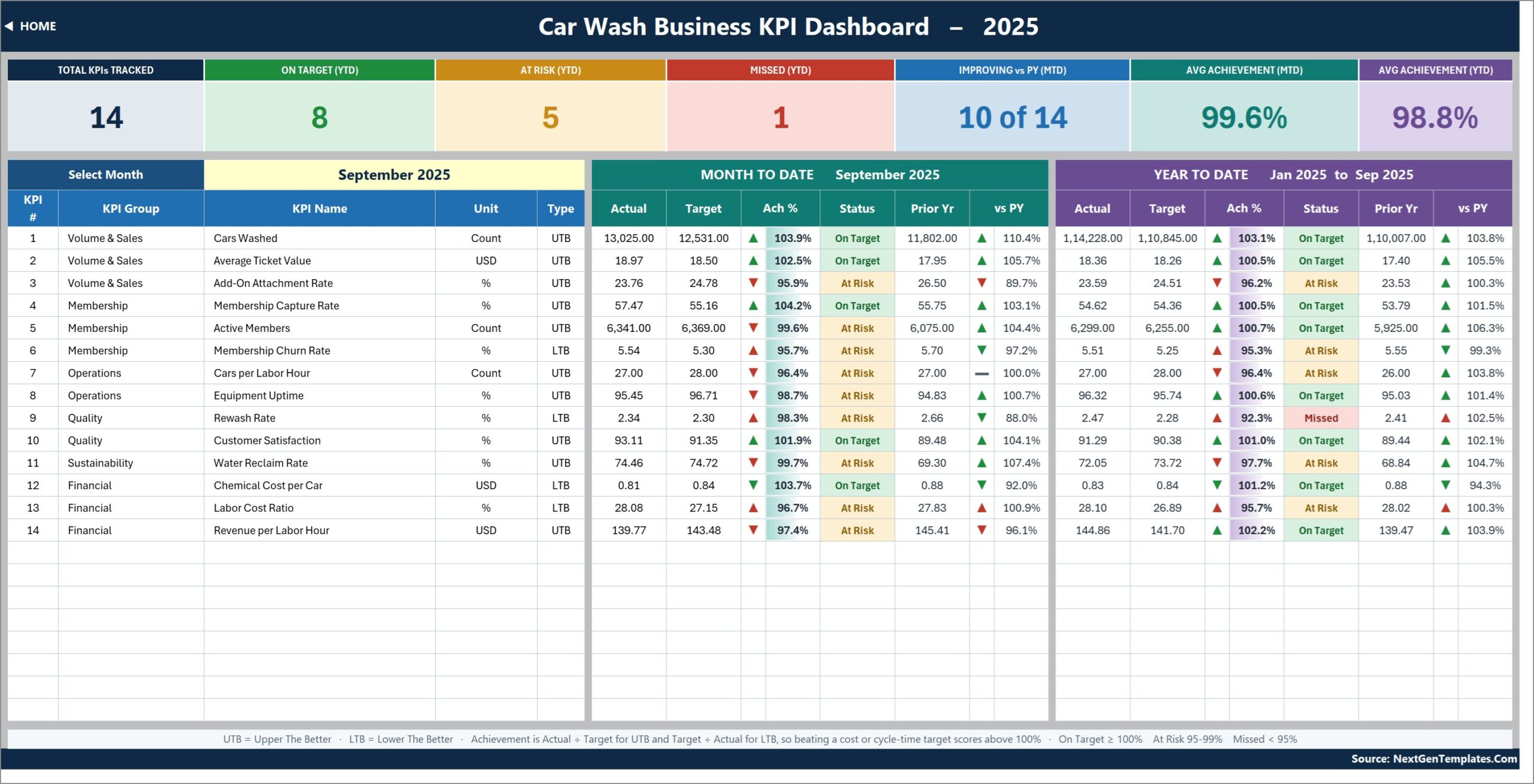
📅 One month picker drives everything. Cell D6 on the KPI Dashboard sheet lists the twelve months of the reporting year. Choose September 2025 and every KPI shows its MTD and YTD actual, target, achievement %, status, prior-year value and year-on-year movement for that month.
🚗 14 car wash KPIs out of the box. Cars Washed, Average Ticket Value, Add-On Attachment Rate, Membership Capture Rate, Active Members, Membership Churn Rate, Cars per Labor Hour, Equipment Uptime, Rewash Rate, Customer Satisfaction, Water Reclaim Rate, Chemical Cost per Car, Labor Cost Ratio and Revenue per Labor Hour.
🔄 Direction-aware scoring. Each KPI is flagged UTB (upper the better) or LTB (lower the better). Four KPIs are LTB – Membership Churn Rate, Rewash Rate, Chemical Cost per Car and Labor Cost Ratio – so beating a cost or churn target scores above 100% instead of looking like a miss.
🚦 Traffic-light status. On Target from 100%, At Risk from 95% to 99%, Missed below 95%. Arrows show the raw direction and their colour shows whether that direction is good for the KPI.
➕ Add or rename KPIs without formula work. The sheets are wired for 22 KPIs; 14 are filled. Type a new row on KPI Definition and it flows into the input sheets, the dashboard, KPI Trend and KPI Analysis.
📦 What’s Inside the Car Wash KPI Template
Home
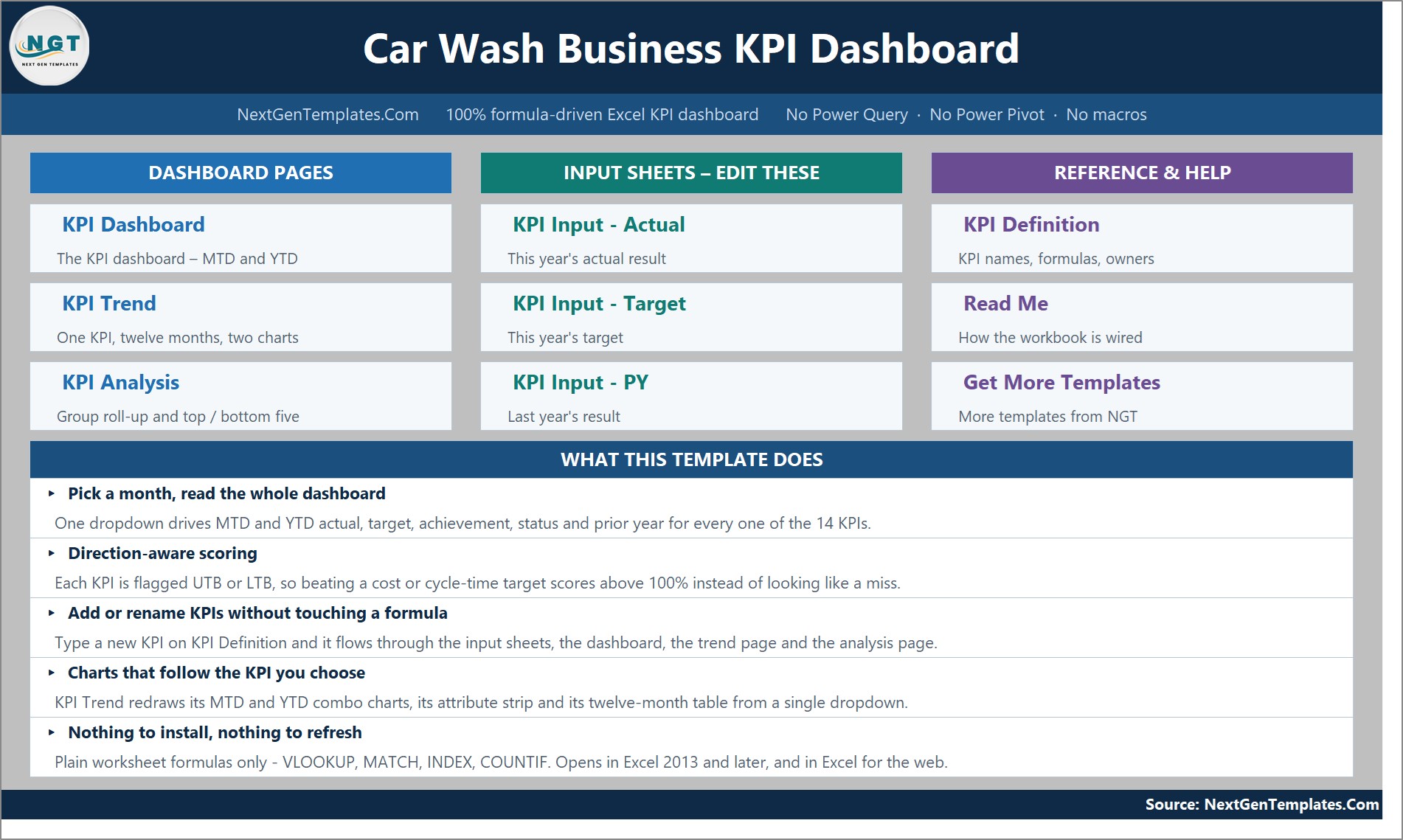
A navigation page with links to the three dashboard pages, the three input sheets and the reference sheets, plus a five-point summary of what the car wash KPI dashboard does.
KPI Dashboard
Seven summary cards – Total KPIs Tracked, On Target (YTD), At Risk (YTD), Missed (YTD), Improving vs PY (MTD), Avg Achievement (MTD) and Avg Achievement (YTD) – above one row per KPI with MTD and YTD actual, target, Ach %, status, prior year and vs PY.
KPI Trend
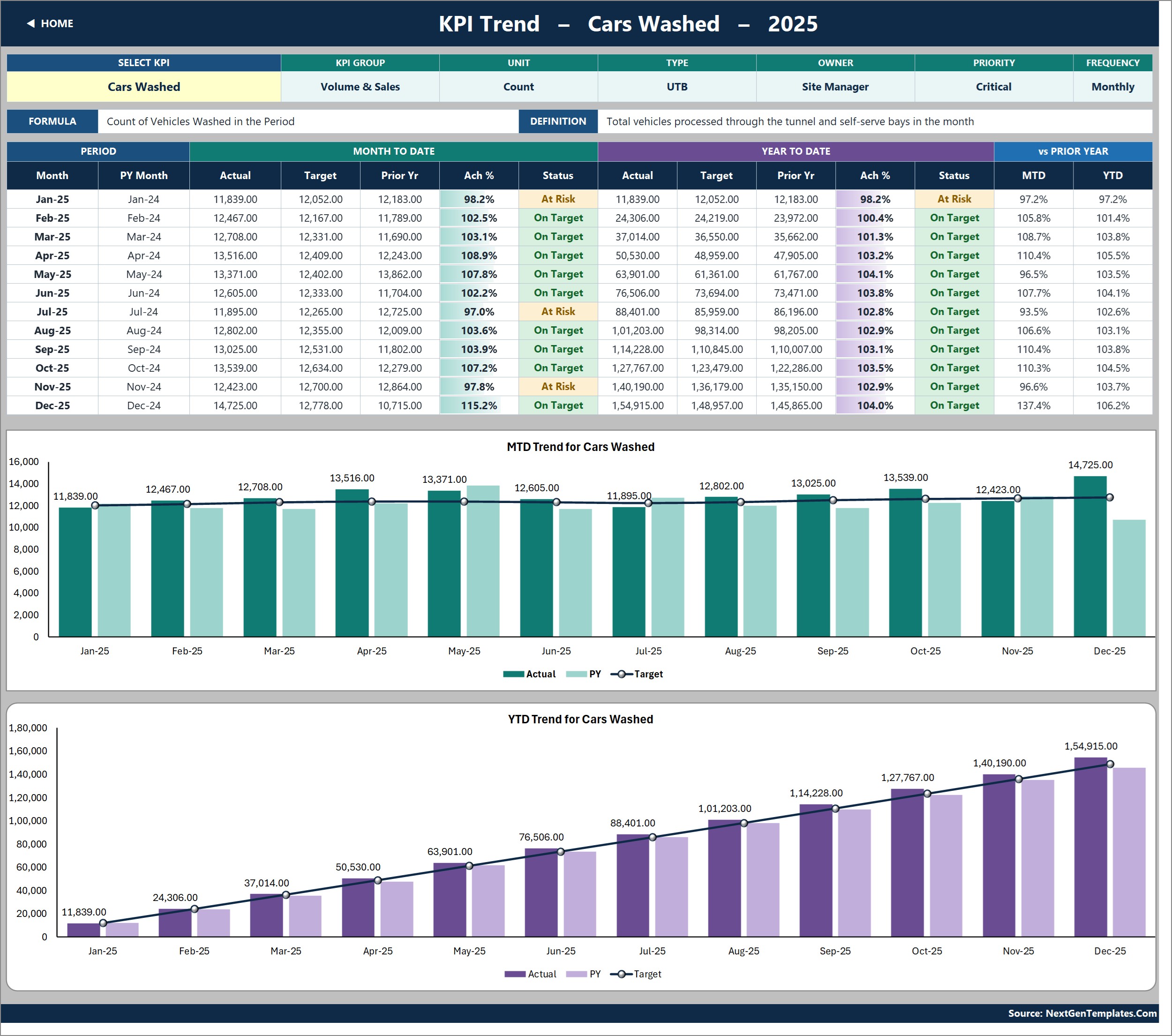
Pick one KPI in cell B4 to see its group, unit, type, owner, priority, frequency, formula and definition, a twelve-month MTD/YTD table, and two charts: MTD Trend by Month and YTD Trend by Month, each with Actual and PY columns and a Target line.
KPI Analysis
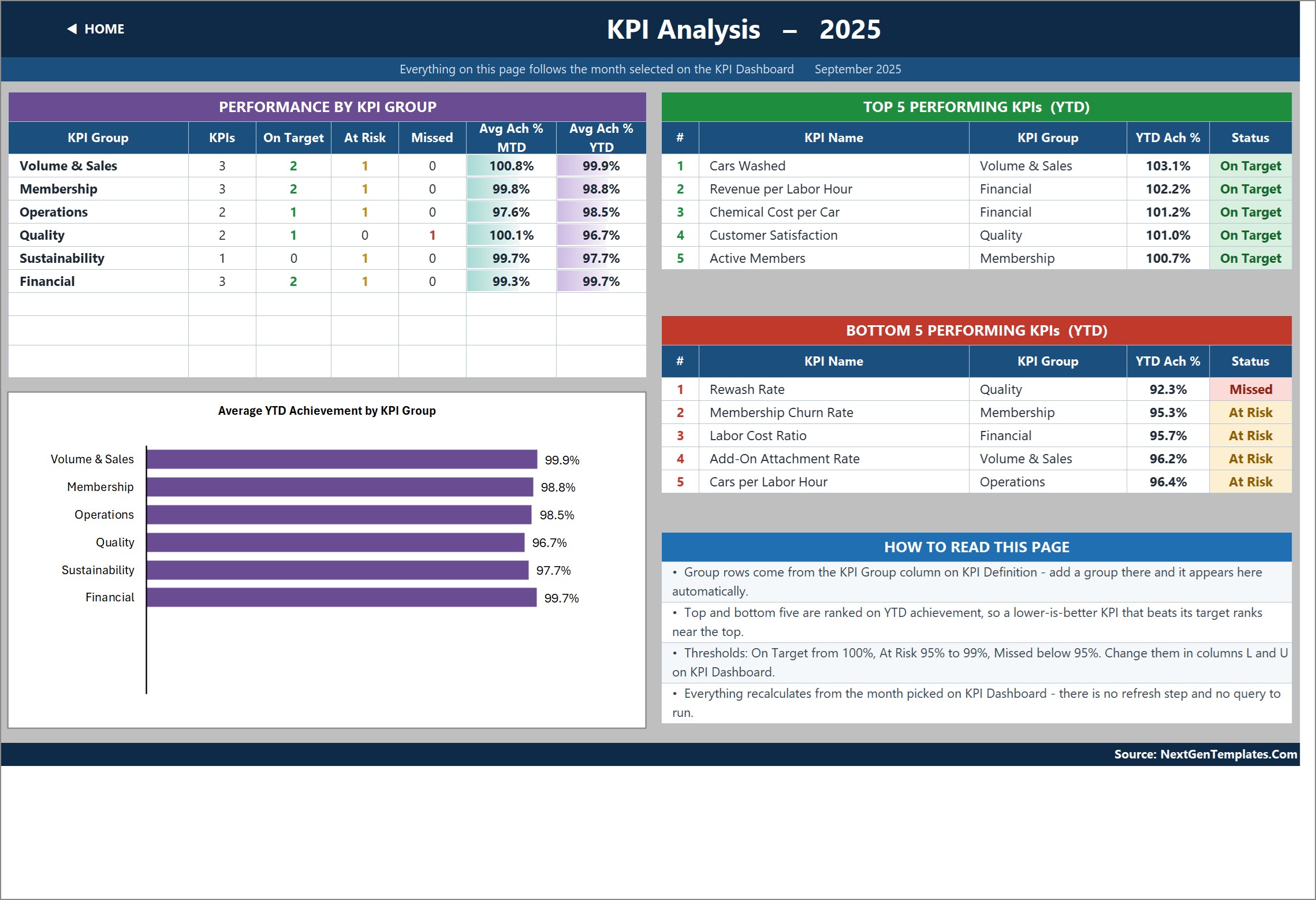
Performance by KPI Group (KPIs, On Target, At Risk, Missed, Avg Ach % MTD and YTD), a chart of Average YTD Achievement by KPI Group, and the Top 5 and Bottom 5 KPIs ranked on YTD achievement.
KPI Input – Actual, Target and PY
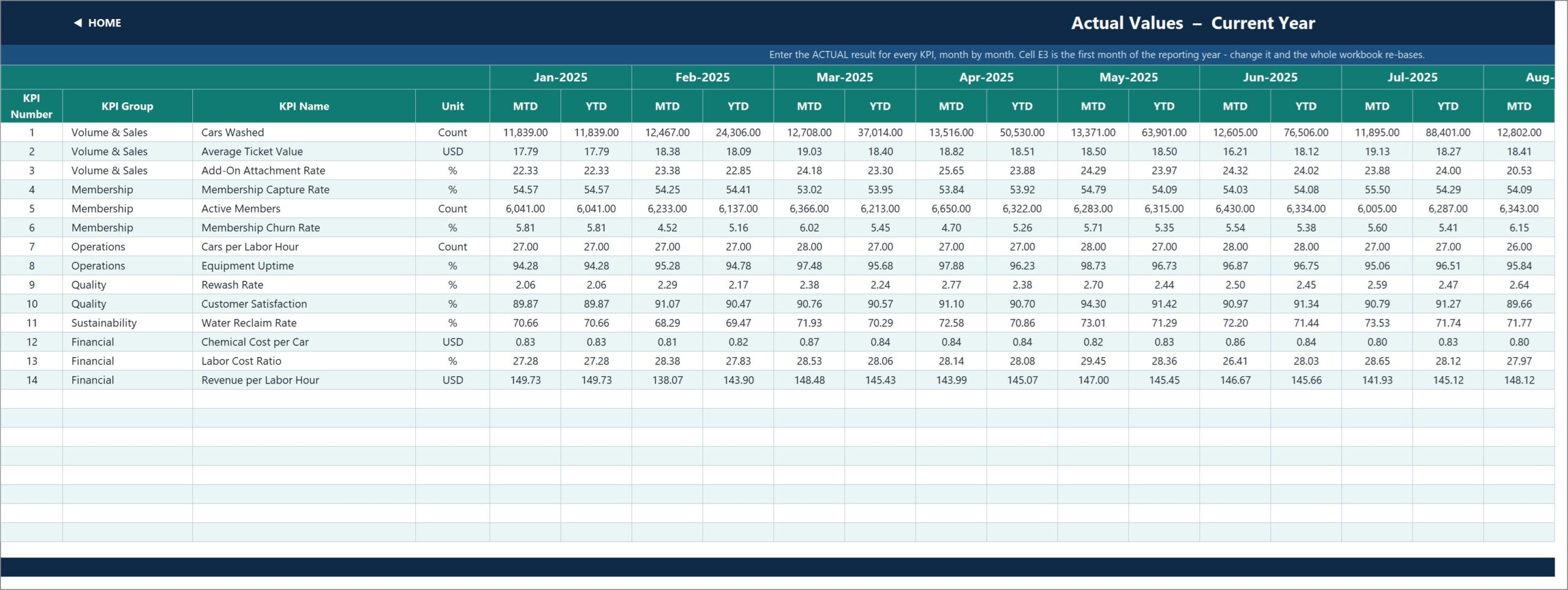
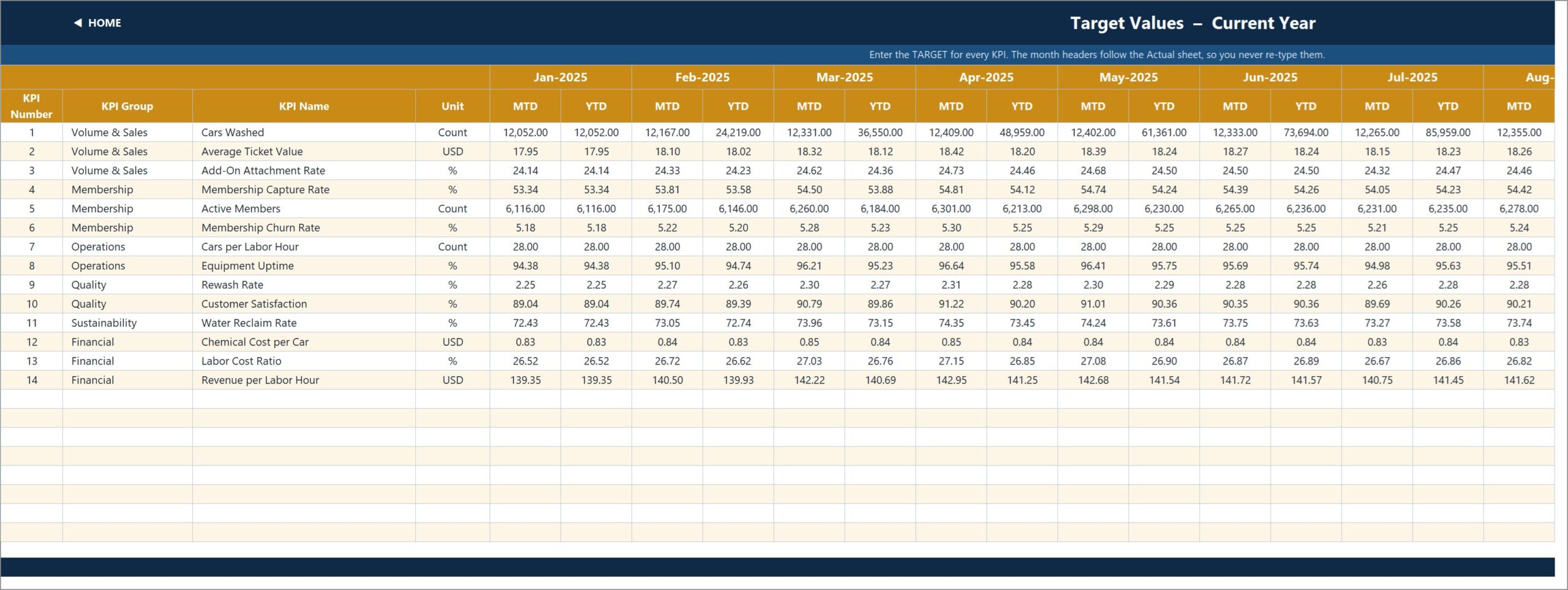
Three input grids with an MTD and a YTD column for every month. Cell E3 on KPI Input – Actual sets the first month of the reporting year; the Target and Prior Year sheets re-base from it.
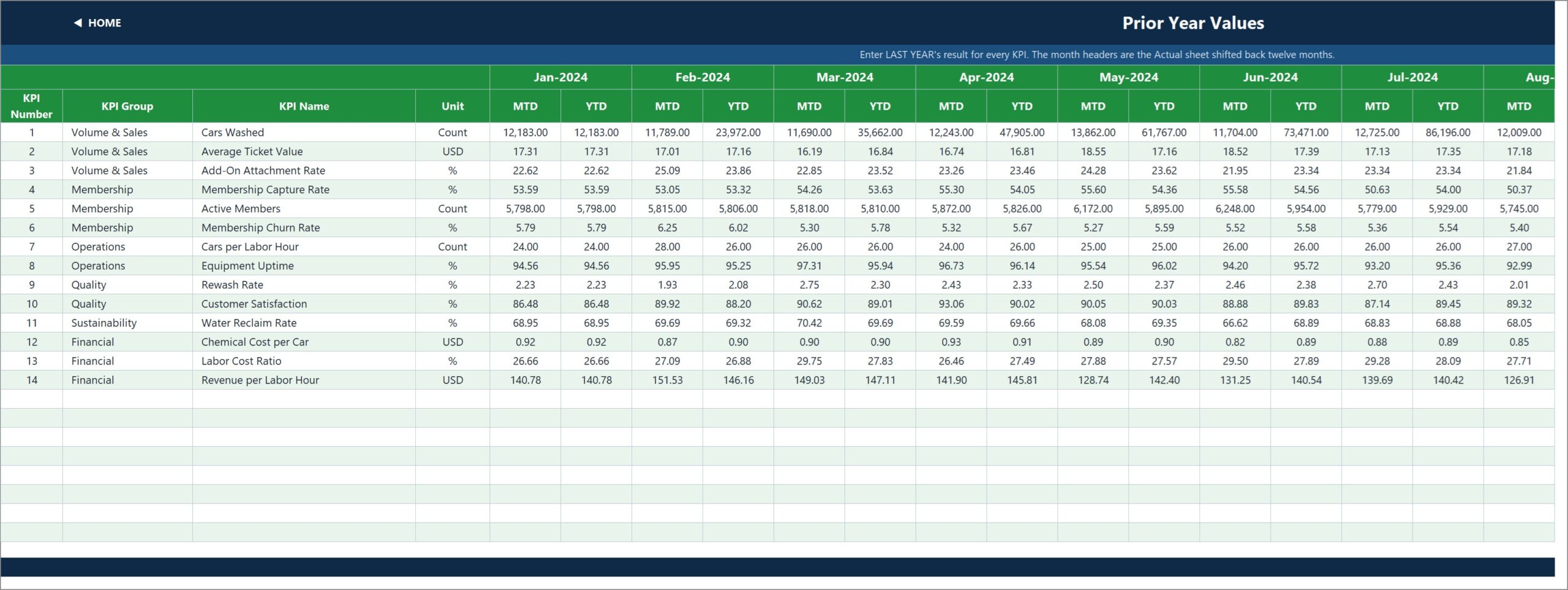
KPI Definition, Read Me and Get More Templates
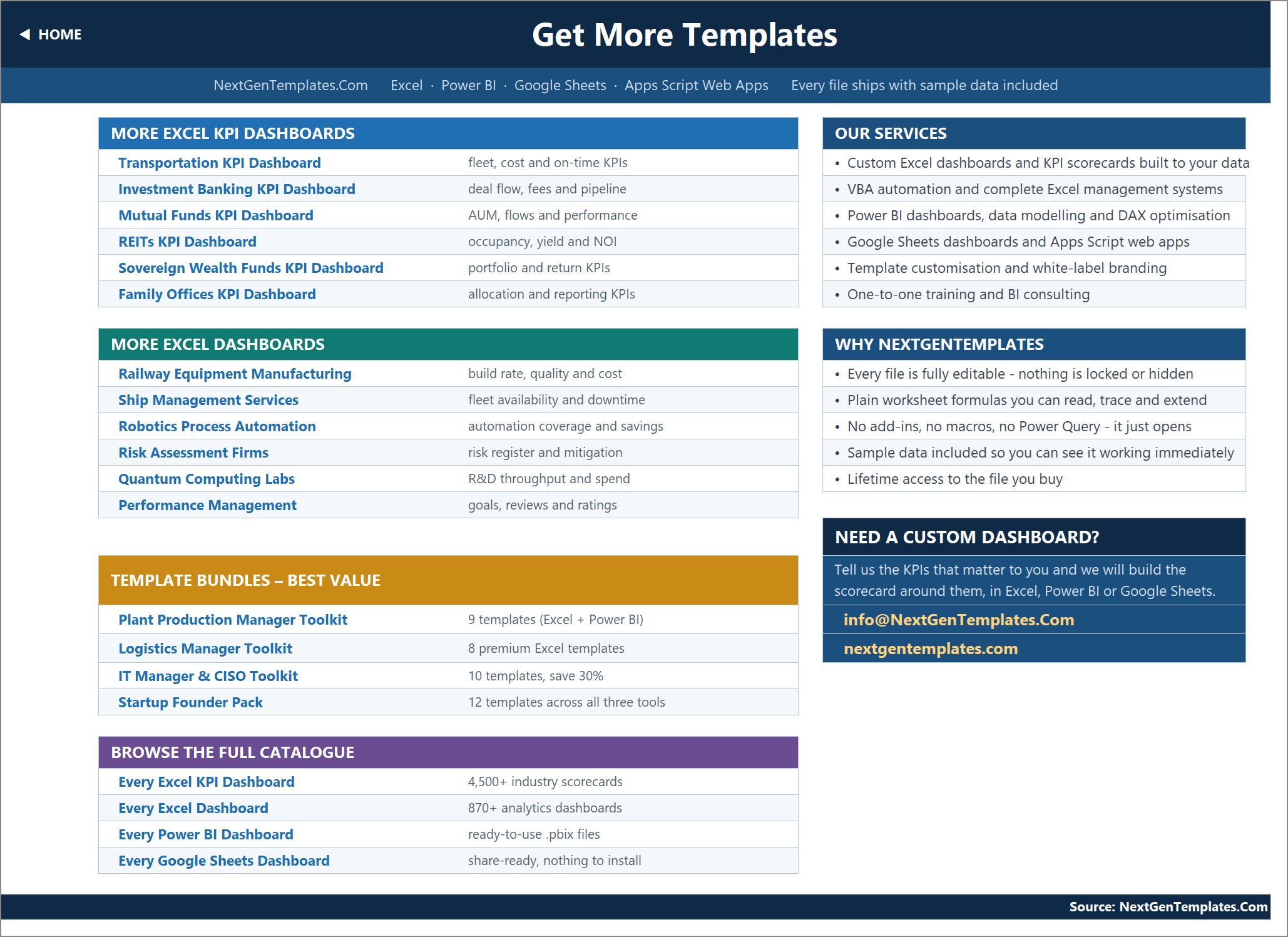
KPI Definition is the master list: group, name, unit, formula, definition, UTB/LTB type, owner, priority and frequency for all 14 KPIs. Read Me explains how the workbook is wired; Get More Templates links to the wider catalogue.
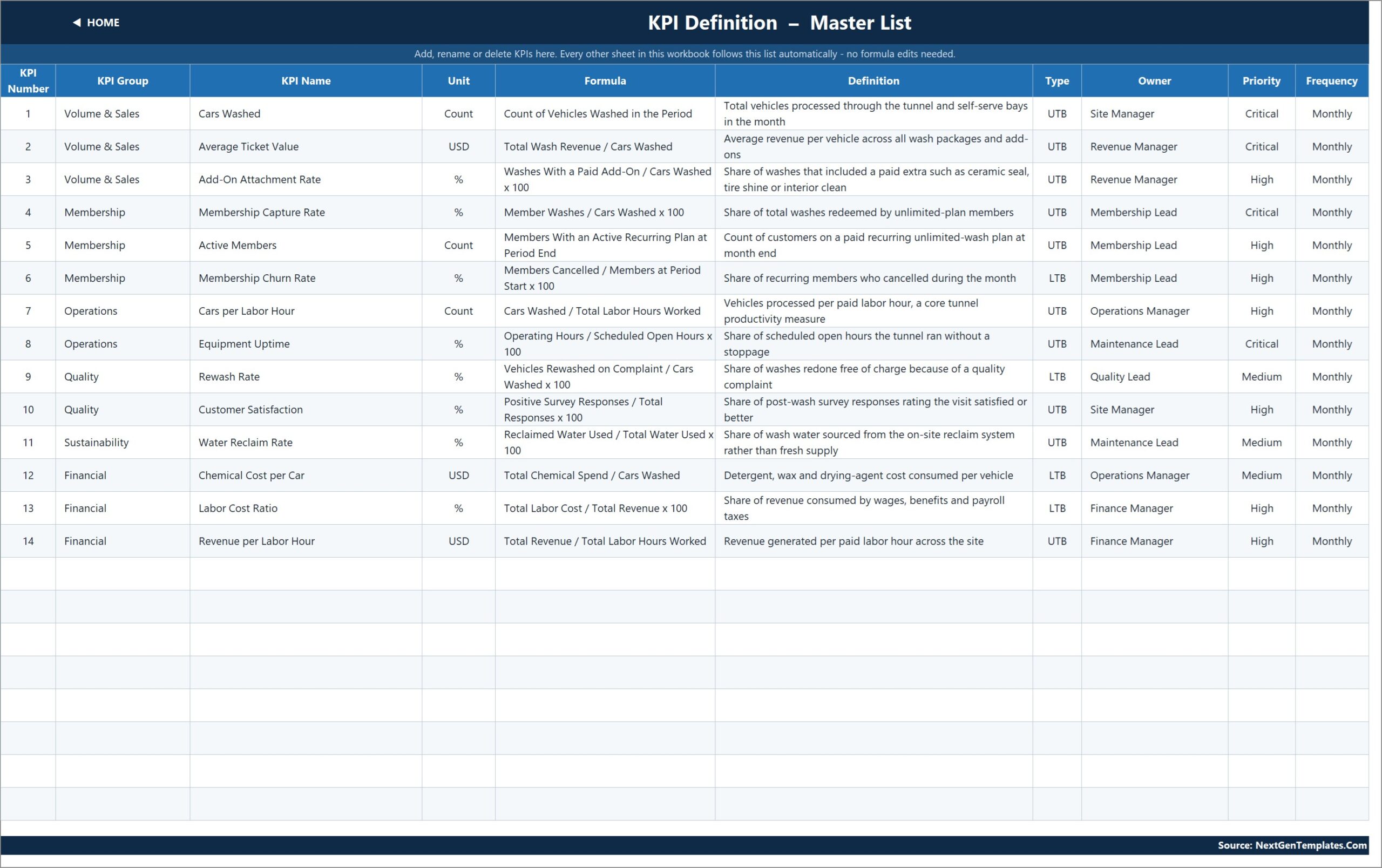
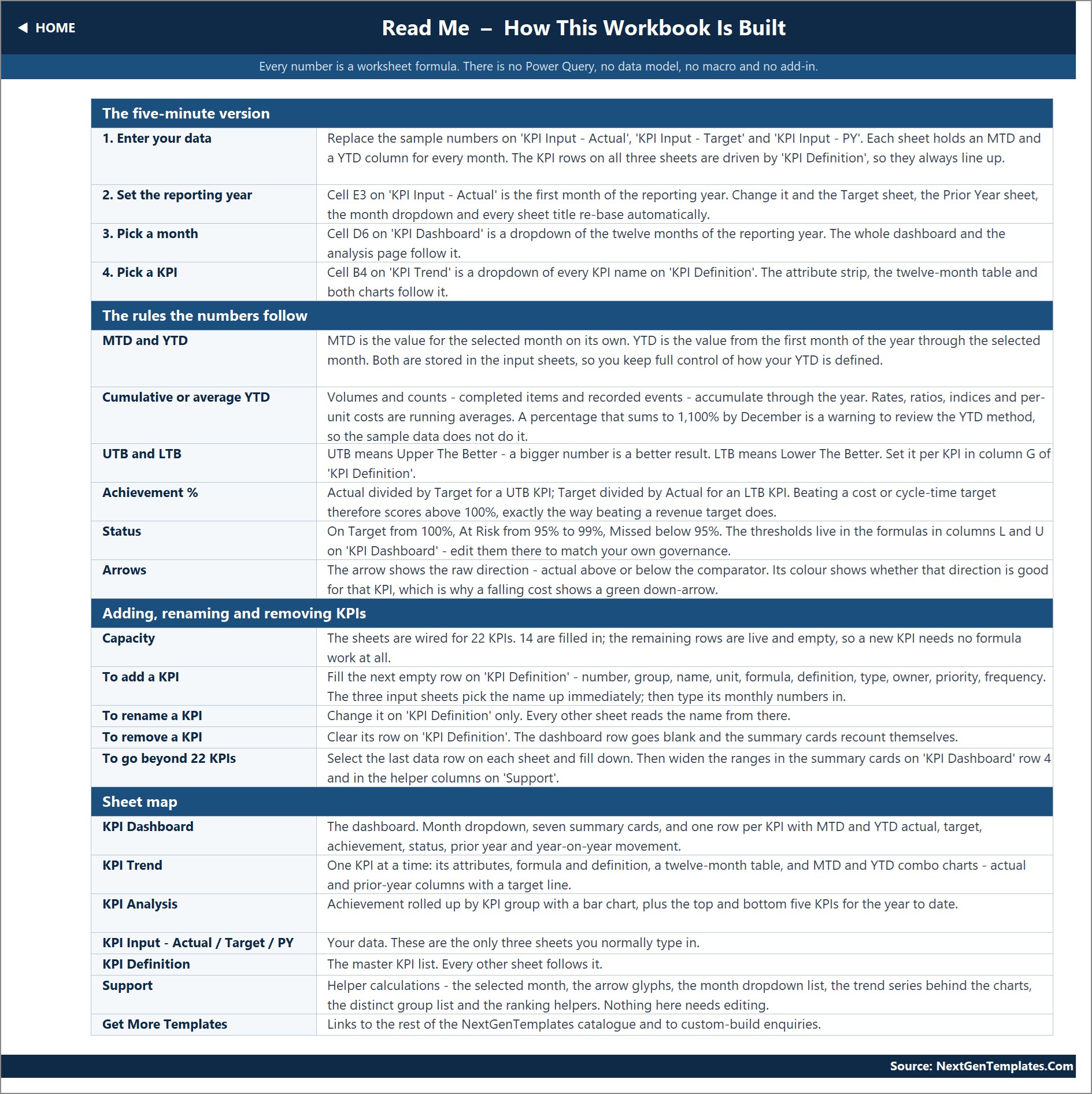
Good to know: MTD and YTD are both typed on the input sheets, so you decide how YTD is built (sums for Cars Washed, running averages for rates). The snapshots were captured on a PC with Indian regional settings, so large numbers show as 1,14,228.00; the cells use a standard #,##0.00 format and follow your own Windows number settings. It does not connect to a POS, membership billing or tunnel controller, and it does not keep environmental, water-discharge or chemical-safety compliance records – it is a management KPI dashboard.
📊 This Car Wash KPI Template vs. Google Sheets Equivalent vs. Paid Car Wash Management Software
| Feature | This template | Google Sheets equivalent | Paid car wash management software |
|---|---|---|---|
| Cost | ✅ One-time purchase | Free to build, hours of setup | Monthly subscription per site |
| Platform | Microsoft Excel (desktop, per the Home page also Excel for the web) | Browser | Vendor cloud / hardware |
| Setup time | ✅ Under 30 minutes | Days to build | Weeks of onboarding |
| MTD + YTD + prior year per KPI | ✅ Built in | Build it yourself | Varies by plan |
| UTB / LTB direction scoring | ✅ Yes | Build it yourself | Rarely configurable |
| Customizable KPIs | ✅ Up to 22, no formula edits | Yes, manual | Fixed report set |
| Live POS / tunnel data feed | No – manual monthly entry | No | ✅ Yes |
| Works offline | ✅ Yes | Limited | No |
For owners who want a monthly KPI review without paying for another platform, the Car Wash Business KPI Dashboard in Excel sits in the sweet spot.
👥 Who This Template Is For – and Who It’s Not For
✅ This template is built for:
- Owners and site managers of express tunnel, flex-serve or self-serve car washes reviewing performance monthly
- Multi-site operators who want the same car wash KPIs for each location (one workbook per site)
- Membership leads watching capture rate, active members and churn side by side
❌ This template is NOT for:
- Teams that need daily or live data pulled from a POS or tunnel controller
- Anyone looking for a booking, billing or membership management system
⚙️ How to Use the Car Wash KPI Template
- Unzip the download and open the .xlsx in Microsoft Excel.
- Set the first month of your reporting year in cell E3 on KPI Input – Actual.
- Review the 14 KPIs on KPI Definition; rename, add or clear rows as needed.
- Type monthly MTD and YTD actuals, targets and prior-year values on the three input sheets.
- Pick a month in cell D6 on KPI Dashboard and a KPI in cell B4 on KPI Trend.
New to dropdowns and lookups? Microsoft’s guide to creating a drop-down list in Excel covers the same data-validation feature the month picker uses.
💼 Real-World Use Cases
Marco runs a single express tunnel. Each month he types in cars washed, ticket value and labor hours, then checks KPI Analysis: in the sample year Rewash Rate is the only Missed KPI at 92.3% YTD achievement, which tells him where to look first.
Dana manages memberships for a three-site operator. She keeps one copy per site and compares Membership Capture Rate, Active Members and Membership Churn Rate on KPI Trend before the monthly owners’ meeting.
❓ Frequently Asked Questions
What KPIs does the Car Wash Business KPI Dashboard in Excel track?
It tracks 14 KPIs in six groups: Volume & Sales, Membership, Operations, Quality, Sustainability and Financial. They include Cars Washed, Average Ticket Value, Membership Churn Rate, Equipment Uptime, Rewash Rate, Chemical Cost per Car and Revenue per Labor Hour.
Does it need macros or add-ins?
No. The workbook uses plain worksheet formulas such as VLOOKUP, MATCH, INDEX and COUNTIF. There is no VBA, no Power Query and no data model to refresh.
How long does setup take?
Most owners are working in under 30 minutes: set the start month in cell E3, check the KPI list, then type or paste twelve months of actuals, targets and prior-year values over the sample numbers.
Is YTD calculated automatically?
No – YTD is a typed column next to each MTD column on the input sheets. That lets you sum volumes like Cars Washed and average rates like Customer Satisfaction, but you must enter both values each month.
Does it connect to my POS or membership system?
No. The template does not connect to a POS, tunnel controller or membership billing system. You enter monthly figures yourself, usually from your POS month-end reports.
How does it compare to paid car wash software?
Car wash software runs the site – payments, memberships, tunnel control. This template is a one-time-purchase monthly KPI review layer on top: targets, prior year and traffic lights in a workbook you fully own.
👤 About the Author
Built by PK – Microsoft Certified Professional with 15+ years of Excel, Google Sheets and Power BI experience. Founder of NextGenTemplates, reaching 300K+ subscribers across YouTube channels (@PK-AnExcelExpert, @NextGenTemplates, @NeoTechNavigators). Every template is hand-built and tested before release.
🔗 Explore Related Templates
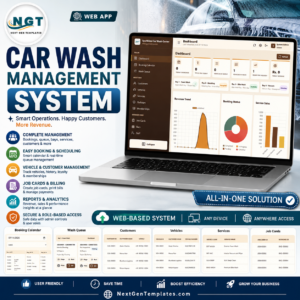
🧽 Car Wash Management System Web App – a day-to-day operations system for bookings and jobs, where this dashboard is a monthly KPI review.
📋 Car Wash Business KPI Scorecard in Google Sheets – a different scorecard template with its own KPI set, for teams working in Google Sheets.
💦 Pressure Washing Services KPI Dashboard in Excel – the same month-picker KPI dashboard design for mobile washing services.
🚗 Automotive KPI Dashboard in Excel and more in our KPI Dashboard templates and MS Excel templates collections.
📖 Click here to read the Detailed Blog Post
🎥 Visit our YouTube channel for step-by-step video tutorials
👉 YouTube.com/@NextGenTemplates
📅 Last updated: September 2026































Reviews
There are no reviews yet.