

The 25 best-selling business templates on NextGenTemplates in 2026 are ready-made Excel, Google Sheets and Power BI systems priced from $6.99 to $19.99. The best overall is the Supply Chain Management KPI Dashboard in Excel ($14.99); the best value is the Task Management Tracker in Google Sheets ($6.99). Each ships fully built, so you skip weeks of setup.
Last updated: September 2026
Key takeaways
- All 25 templates are one-time purchases between $6.99 and $19.99 — no subscriptions, no per-seat fees, and you own the file forever.
- The catalogue splits three ways: Excel dashboards and KPI systems, Google Sheets trackers, and Power BI dashboards — pick the format your team already lives in.
- Best overall: the Supply Chain Management KPI Dashboard in Excel ($14.99) for its Actual-vs-Target-vs-Previous-Year structure across every metric.
- Best value: the Task Management Tracker in Google Sheets ($6.99) — a full charted tracker for the price of a coffee.
- Do not buy a template if you need multi-user, permission-controlled software with an audit trail — that is a job for a database app, not a spreadsheet.
 Launch offer
SUMIFS, XLOOKUP, FILTER, LAMBDA and checking AI-written formulas, with real business projects. 11h 47m of video by PK, with practice files, quizzes and a capstone.
Best-selling Excel templates for 2026 compared
| # | Template | Format | Best for | Price |
|---|---|---|---|---|
| 1 | Supply Chain Management KPI Dashboard (Best overall) | Excel | Ops & logistics leads | $14.99 |
| 2 | Returns Management KPI Dashboard | Excel | E-commerce & retail | $14.99 |
| 3 | Territory Management KPI Dashboard | Excel | Sales managers | $14.99 |
| 4 | Reputation Management KPI Dashboard | Excel | Brand & PR teams | $14.99 |
| 5 | Grant Management KPI Dashboard | Excel | Nonprofits | $14.99 |
| 6 | Theater Management KPI Dashboard | Excel | Venues & events | $14.99 |
| 7 | Investment Management KPI Dashboard | Power BI | Finance & PE teams | $11.99 |
| 8 | Freight Management KPI Dashboard | Power BI | 3PL & carriers | $11.99 |
| 9 | Waste Management KPI Dashboard | Power BI | Facilities & utilities | $11.99 |
| 10 | Beauty Products Distributor Tracker | Google Sheets | Distributors | $9.99 |
| 11 | Blood Bank Management System Tracker | Google Sheets | Clinics & NGOs | $9.99 |
| 12 | Buffet Restaurant Management Tracker | Google Sheets | Restaurants | $9.99 |
| 13 | Social Media Performance Dashboard | Google Sheets | Marketing teams | $9.99 |
| 14 | Cybersecurity KPI Dashboard | Excel | IT & security | $12.99 |
| 15 | Finance Summary Dashboard | Excel | Founders & CFOs | $17.99 |
| 16 | Project Management Dashboard | Excel | PMs | $17.99 |
| 17 | Procurement Dashboard | Excel | Purchasing teams | $17.99 |
| 18 | Manufacturing Dashboard | Excel | Production leads | $17.99 |
| 19 | Transportation & Logistics Dashboard | Excel | Fleet managers | $17.99 |
| 20 | Employee Performance Rating & Dashboard | Excel | HR teams | $17.99 |
| 21 | Inventory Management System V3.0 | Excel | Warehouses | $19.99 |
| 22 | Advanced Inventory Management System | Excel | Multi-location stock | $19.99 |
| 23 | Leave Management System | Excel | Small-team HR | $6.99 |
| 24 | Cash Flow Template | Excel | Owner-operators | $6.99 |
| 25 | Task Management Tracker (Best value) | Google Sheets | Any small team | $6.99 |
How we picked these 25 templates
We searched the full NextGenTemplates catalogue of 300-plus paid products and ranked by two signals only: real sales volume across 2025–2026 and how self-contained each file is out of the box. A template earned a place if a buyer can open it, drop in their own numbers, and get a working dashboard or tracker the same day — no add-ons, no macros to enable, no external services.
We excluded free downloads, single-chart novelty files, and anything that needed a paid connector to function. Where the same tool exists in more than one format — Excel, Google Sheets and Power BI — we noted it so you can self-select the version that matches the software your team already opens every morning.
The 25 best-selling business templates for 2026
1. Supply Chain Management KPI Dashboard in Excel — best overall
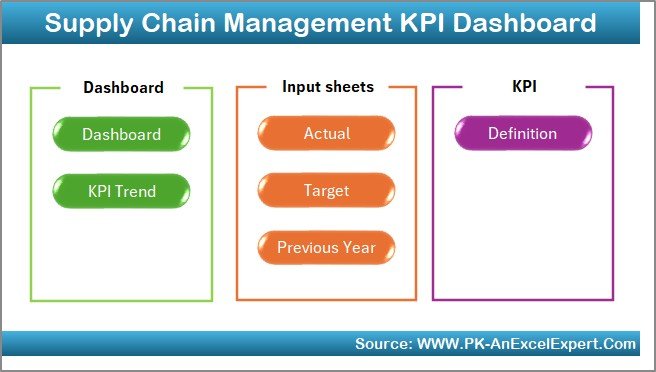
What it is: a single-file Excel KPI dashboard that tracks every supply-chain metric against a target and last year’s figure. Who it is for: operations, procurement and logistics leads who report to a leadership team monthly.
- Separate input sheets for Actual, Target and Previous Year, so variance is calculated for you.
- Dedicated Dashboard and KPI Trend views driven by a definition sheet.
- Traffic-light conditional formatting on every metric.
Use it to watch on-time delivery slipping from 96% to 91% before it becomes a customer complaint, to flag a supplier whose lead time crept from 7 to 12 days, or to show the board a 3-point inventory-turn gain quarter over quarter. It is the best overall because the Actual/Target/Previous-Year skeleton fits almost any business, not just supply chain. Best for: anyone who reports operational KPIs on a monthly cadence. $14.99. Get the Supply Chain KPI dashboard.
2. Returns Management KPI Dashboard in Excel

What it is: an Excel dashboard purpose-built to track return rate, refund value, reason codes and restocking outcomes. Who it is for: e-commerce and retail operators bleeding margin to returns.
- Return-rate trend by month and by product category.
- Refund value vs. gross sales, so you see the true net.
- Reason-code breakdown to spot a defective SKU fast.
If returns are running at 22% and you cut them to 17%, this dashboard is where you prove it. Best for: retailers where returns quietly eat profit. $14.99. View the Returns dashboard.
3. Territory Management KPI Dashboard in Excel

What it is: a sales-territory dashboard comparing quota attainment, coverage and pipeline across regions. Who it is for: sales managers running multiple reps or regions.
- Attainment vs. quota per territory and per rep.
- Coverage and win-rate side by side.
- Target vs. Actual vs. Previous Year on every measure.
Use it to rebalance a rep carrying a $2M quota against one at $600K, or to catch a region where pipeline is healthy but close rate collapsed. Pair it with our sales dashboard templates for 2026 for a full revenue view. Best for: multi-region sales teams. $14.99. View the Territory dashboard.
4. Reputation Management KPI Dashboard in Excel
What it is: a brand-health dashboard tracking review scores, sentiment, response time and mentions. Who it is for: PR, brand and customer-experience teams.
- Average rating trend across platforms.
- Response-time and resolution KPIs.
- Positive/negative sentiment split over time.
When a 4.6-star average drifts to 4.2, this is where you see it and act before it costs bookings. Best for: teams whose revenue lives and dies by online reviews. $14.99. View the Reputation dashboard.
5. Grant Management KPI Dashboard in Excel
What it is: a nonprofit dashboard tracking grants by status, budget vs. spend, and reporting deadlines. Who it is for: nonprofit finance and program managers.
- Awarded, pending and spent amounts per grant.
- Budget-utilisation percentage with over/under flags.
- Upcoming report-deadline tracker.
Miss a funder deadline and you can lose the next tranche — this dashboard makes those dates impossible to ignore. Best for: grant-funded organisations. $14.99. View the Grant dashboard.
6. Theater Management KPI Dashboard in Excel
What it is: a venue dashboard tracking occupancy, ticket revenue, show performance and concession sales. Who it is for: theatres, cinemas and event venues.
- Seat-occupancy rate per show and per night.
- Revenue by ticket type and by production.
- Concession and add-on revenue per attendee.
Use it to compare a 78%-full matinee against a 94%-full evening run and price accordingly. Best for: venue operators. $14.99. View the Theater dashboard.
7. Investment Management KPI Dashboard in Power BI

What it is: a Power BI report tracking portfolio returns, allocation and risk metrics with full interactivity. Who it is for: finance, wealth and private-equity teams that already run Power BI.
- Return, ROI and yield measures across holdings.
- Asset-allocation and exposure visuals.
- Interactive slicers by fund, class and period.
Because it is Power BI, you can drill from a portfolio-level 8.4% return into the two positions dragging it down in a couple of clicks. Best for: data teams standardised on Power BI. $11.99. View the Investment dashboard.
8. Freight Management KPI Dashboard in Power BI
What it is: a Power BI dashboard for freight cost, on-time performance, lane analysis and carrier scorecards. Who it is for: 3PLs, brokers and shipping teams.
- Cost per mile and per shipment by lane.
- On-time pickup and delivery percentages.
- Carrier scorecard with drill-through.
Use it to find the lane where cost-per-mile jumped 14% and renegotiate before the quarter closes. Best for: logistics teams managing multiple carriers. $11.99. View the Freight dashboard.
9. Waste Management KPI Dashboard in Power BI
What it is: a Power BI dashboard tracking waste volume, diversion rate, cost and compliance. Who it is for: facilities, utilities and sustainability teams.
- Waste tonnage and recycling-diversion rate.
- Disposal cost per site and per period.
- Compliance and target tracking.
Prove a diversion rate climbing from 41% to 55% to hit an ESG target the board actually reads. Best for: operations teams with sustainability reporting. $11.99. View the Waste dashboard.
10. Beauty Products Distributor Management Tracker in Google Sheets
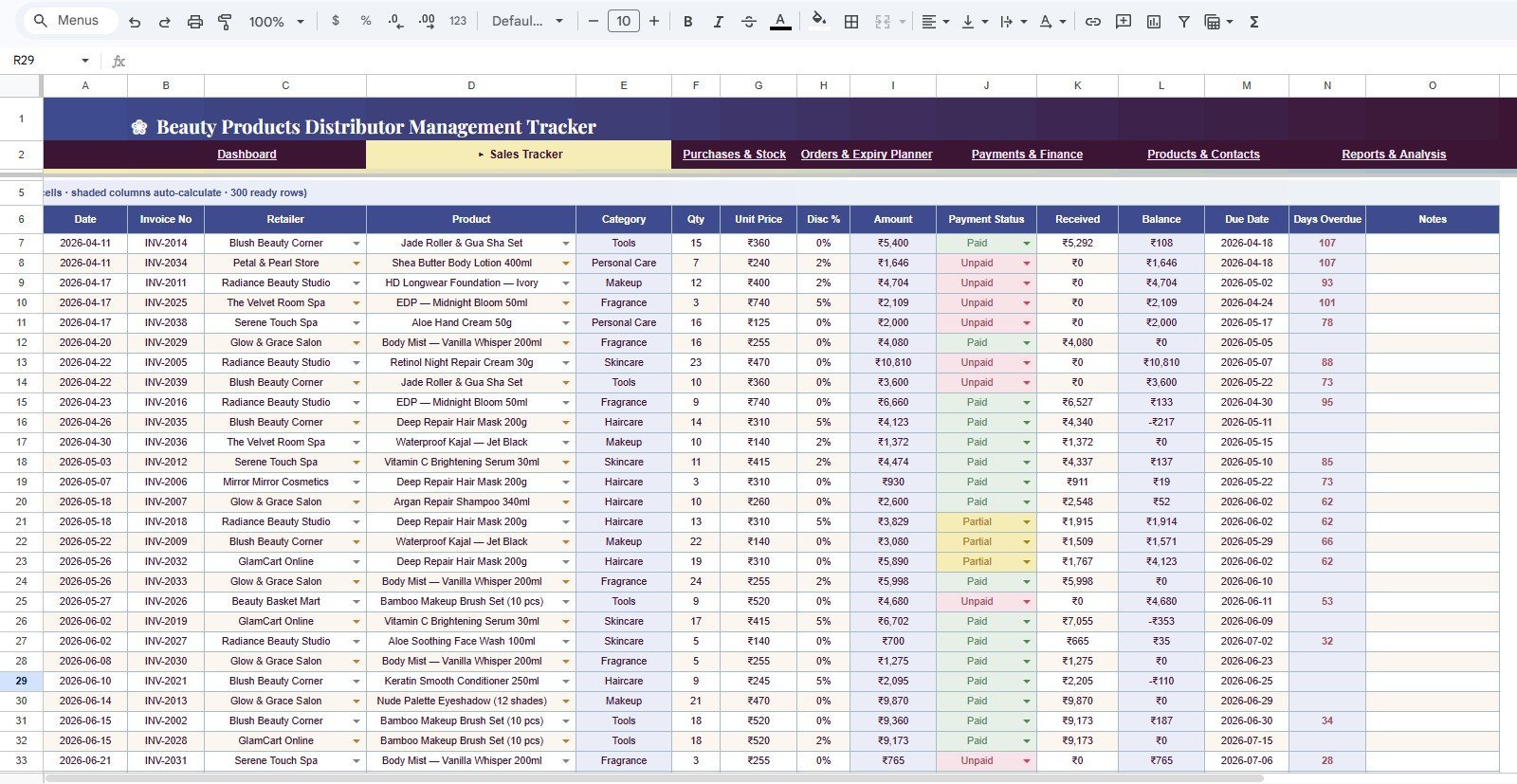
What it is: a Google Sheets tracker for distributor orders, stock, payments and reps. Who it is for: distributors and reps who work from a phone and want live cloud access.
- Order and payment logs with running balances.
- Stock-on-hand per SKU with reorder flags.
- Rep-level sales summary.
Because it is in Google Sheets, three reps in three cities update one file at once — no emailed spreadsheet versions. Best for: field-sales distribution. $9.99. View the Distributor tracker.
11. Blood Bank Management System Tracker in Google Sheets
What it is: a Google Sheets system tracking donors, blood units, inventory by type and expiry. Who it is for: clinics, hospitals and NGO blood drives.
- Donor register and donation history.
- Unit inventory by blood group with expiry alerts.
- Issue and request logs.
Expiry tracking alone justifies it — an O-negative unit wasted is a genuine cost. Best for: small blood-bank and clinic operations. $9.99. View the Blood Bank tracker.
12. Buffet Restaurant Management System Tracker in Google Sheets
What it is: a Google Sheets tracker for covers, food cost, inventory and daily sales in a buffet operation. Who it is for: restaurant owners and managers.
- Daily covers and revenue per session.
- Food-cost percentage against sales.
- Inventory usage and reorder tracking.
Hold food cost under 30% and this is where you watch it every service. Best for: buffet and casual-dining venues. $9.99. View the Buffet tracker.
13. Social Media Performance Dashboard in Google Sheets
What it is: a Google Sheets dashboard tracking reach, engagement, follower growth and top posts across channels. Who it is for: social and content marketers. Best for: lean marketing teams reporting weekly. $9.99. View the Social Media dashboard.
14. Cybersecurity KPI Dashboard in Excel
What it is: an Excel dashboard for incident counts, mean-time-to-respond, patch status and risk scores. Who it is for: IT and security managers who report to leadership. Best for: in-house security teams. $12.99. View the Cybersecurity dashboard.
15. Finance Summary Dashboard in Excel
What it is: a one-page Excel financial dashboard — revenue, expenses, profit, margin and cash trend. Who it is for: founders and CFOs who want the whole picture on one screen. Best for: monthly leadership reviews. $17.99. View the Finance dashboard.
16. Project Management Dashboard in Excel
What it is: an Excel project dashboard covering tasks, milestones, budget and progress. Who it is for: project managers who do not want to buy a SaaS PM tool. Best for: single-project or small-portfolio tracking. $17.99. View the Project dashboard.
17. Procurement Dashboard in Excel
What it is: an Excel dashboard for spend, supplier performance, PO status and savings. Who it is for: purchasing and procurement teams. Best for: tracking spend against budget by category. $17.99. View the Procurement dashboard.
18. Manufacturing Dashboard in Excel
What it is: an Excel dashboard for output, downtime, OEE and defect rate. Who it is for: production and plant leads. Best for: shop-floor performance reviews. $17.99. View the Manufacturing dashboard.
19. Transportation & Logistics Dashboard in Excel
What it is: an Excel dashboard for fleet cost, delivery performance and utilisation. Who it is for: fleet and dispatch managers who prefer Excel to Power BI. Best for: owner-run fleets. $17.99. View the Logistics dashboard.
20. Employee Performance Rating Card and Dashboard in Excel
What it is: an Excel appraisal system — rating cards plus a roll-up dashboard by team. Who it is for: HR teams running structured reviews. Pair it with our HR dashboard templates for 2026. Best for: annual and quarterly appraisals. $17.99. View the Performance dashboard.
21. Inventory Management System V3.0 in Excel
What it is: a full Excel inventory system — stock in/out, valuation, reorder points and reports. Who it is for: warehouses and shops that outgrew a plain stock list. See our best inventory management Excel templates for the full comparison. Best for: single-warehouse stock control. $19.99. View Inventory System V3.0.
22. Advanced Inventory Management System V1.0 in Excel
What it is: a heavier Excel inventory system built for multiple locations and larger SKU counts. Who it is for: businesses running stock across two or more sites. For a lighter cloud option, compare it with our Fishbowl inventory alternatives. Best for: multi-location inventory. $19.99. View the Advanced Inventory System.
23. Leave Management System in Excel
What it is: an Excel system for leave requests, balances and an annual calendar view. Who it is for: small-team HR without dedicated software. Best for: teams under ~50 people. $6.99. View the Leave Management System.
24. Cash Flow Template in Excel
What it is: an Excel cash-flow model — inflows, outflows and a running weekly/monthly balance. Who it is for: owner-operators managing runway by hand. Best for: forecasting when cash gets tight. $6.99. View the Cash Flow template.
25. Task Management Tracker in Google Sheets — best value
What it is: a charted Google Sheets task tracker — status, owner, priority and due date with live summary charts. Who it is for: any small team that wants shared tasks without paying per seat for SaaS. At $6.99 for a fully charted, multi-user cloud tracker, it is the best value on this list. Best for: shared to-do and project tracking on a budget. $6.99. View the Task Management Tracker.
How to choose between them
| If you… | Buy this | Format |
|---|---|---|
| Report monthly KPIs to leadership | Supply Chain KPI Dashboard | Excel |
| Need several people editing live | Task Management Tracker | Google Sheets |
| Already run Power BI | Investment or Freight dashboard | Power BI |
| Manage physical stock | Inventory Management System V3.0 | Excel |
| Want the cheapest useful tool | Cash Flow or Task Tracker ($6.99) | Excel / Sheets |
The rule of thumb: choose Excel when one owner maintains the file and needs deep formulas; choose Google Sheets when several people edit at once from anywhere; choose Power BI when the data is large and you want click-through interactivity. A key performance indicator only helps if the person who owns it can actually open and update the file, so match the format to your team, not the other way round.
When a template is NOT the right answer
Be honest with yourself before you buy. A spreadsheet template is the wrong tool when:
- You need real multi-user permissions and an audit trail. Ten people editing one Excel file will corrupt it. If you need row-level access control and a log of who changed what, buy database software, not a template.
- You are processing thousands of transactions a day. Excel slows and breaks past a few hundred thousand rows. High-volume operations need a proper system.
- The process must be automated end to end. Templates are manual by design — you enter the data. If you want automatic syncing from your bank, CRM or POS, you need an integrated app.
- Compliance demands certified, locked records. Regulated finance and healthcare records often cannot legally live in an editable spreadsheet.
For everything short of those thresholds — which is most small and mid-size teams — a $7–$20 template beats a $50/month subscription that does the same job. If you are weighing a template against a SaaS tool, our Pipedrive alternatives and Zendesk alternatives guides show exactly where each one wins.
Frequently asked questions
What are the best-selling Excel templates in 2026?
The best-selling Excel templates in 2026 on NextGenTemplates are KPI dashboards — led by the Supply Chain, Returns and Territory Management dashboards at $14.99 each — plus the Inventory Management System V3.0 at $19.99. Each ships pre-built so you add your data and get a working dashboard the same day.
How much do these business templates cost?
Every template in this roundup is a one-time purchase between $6.99 and $19.99. There are no subscriptions and no per-user fees. The Excel and Power BI KPI dashboards sit at $11.99–$19.99, Google Sheets trackers at $9.99, and the entry-level tools like the Cash Flow template are $6.99.
Should I buy the Excel, Google Sheets or Power BI version?
Choose Excel if one owner maintains the file and needs rich formulas. Choose Google Sheets if several people edit live from different locations. Choose Power BI if your data is large and you want interactive drill-through. The underlying metrics are similar; the right pick is whichever software your team already opens daily.
Do these templates work in Microsoft 365 and older Excel?
The Excel templates are built for Microsoft 365 and work in Excel 2016 and later. A few advanced dashboards use dynamic-array functions that need a recent version. The Google Sheets trackers run in any browser for free, and the Power BI files open in the free Power BI Desktop.
Can I customise the templates for my business?
Yes. Every template is fully editable — you can change labels, add rows, adjust formulas, recolour the theme and insert your logo. Nothing is locked or password-protected. If you would rather have it customised for you, NextGenTemplates offers a paid customisation service on request.
Are these one-time purchases or subscriptions?
They are one-time purchases. You pay once, download the file, and own it forever — including for commercial use in your own business. There is no recurring charge, no seat limit and no expiry, which is the core reason a template beats a comparable monthly SaaS subscription for small teams.
Which template is the best value for money?
The Task Management Tracker in Google Sheets at $6.99 is the best value — a fully charted, multi-user cloud tracker for the price of a coffee. The Cash Flow Template in Excel, also $6.99, is the best value single-owner tool. Both deliver far more than their price suggests.
Do I get support or instructions with the templates?
Yes. Templates come ready to use with sample data showing how each sheet works, and most include a user guide. You can also watch walkthroughs on the NextGenTemplates YouTube channel, which demonstrates dashboards and trackers in action.
Is there a bundle instead of buying templates one by one?
Yes. If you need several tools, a bundle is cheaper than buying individually. See our small business template bundle for 15 Excel tools at one combined price, which works out far below the sum of the single-template prices.
Can multiple people use the same template at once?
The Google Sheets trackers support real-time multi-user editing natively through Google Drive sharing. The Excel templates are best maintained by one owner, or shared through OneDrive co-authoring for light concurrent use. For heavy multi-user needs with permissions, a database app is the better fit.
Get more business templates for 2026
Buying two or three of these separately? A bundle almost always costs less. Start with the small business template bundle — 15 Excel tools for one price — then fill gaps with the single dashboards above from $6.99. For scheduling and shift tools, our Deputy alternatives guide has more options, and if you run an agency, see our insurance agency templates roundup.
New templates launch every week. Subscribe to the NextGenTemplates YouTube channel to see each dashboard and tracker demonstrated before you buy, and browse the full catalogue on NextGenTemplates.com.