

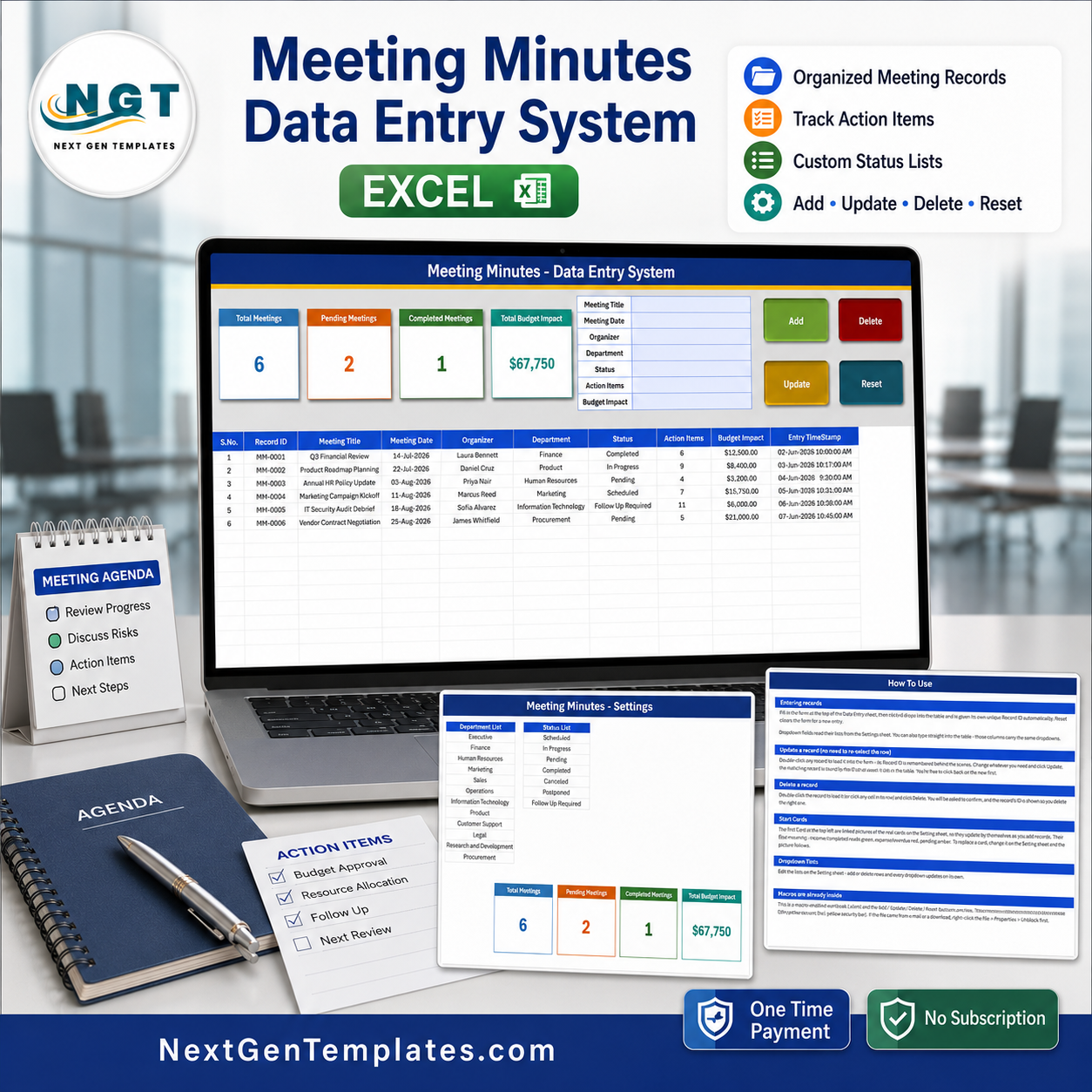
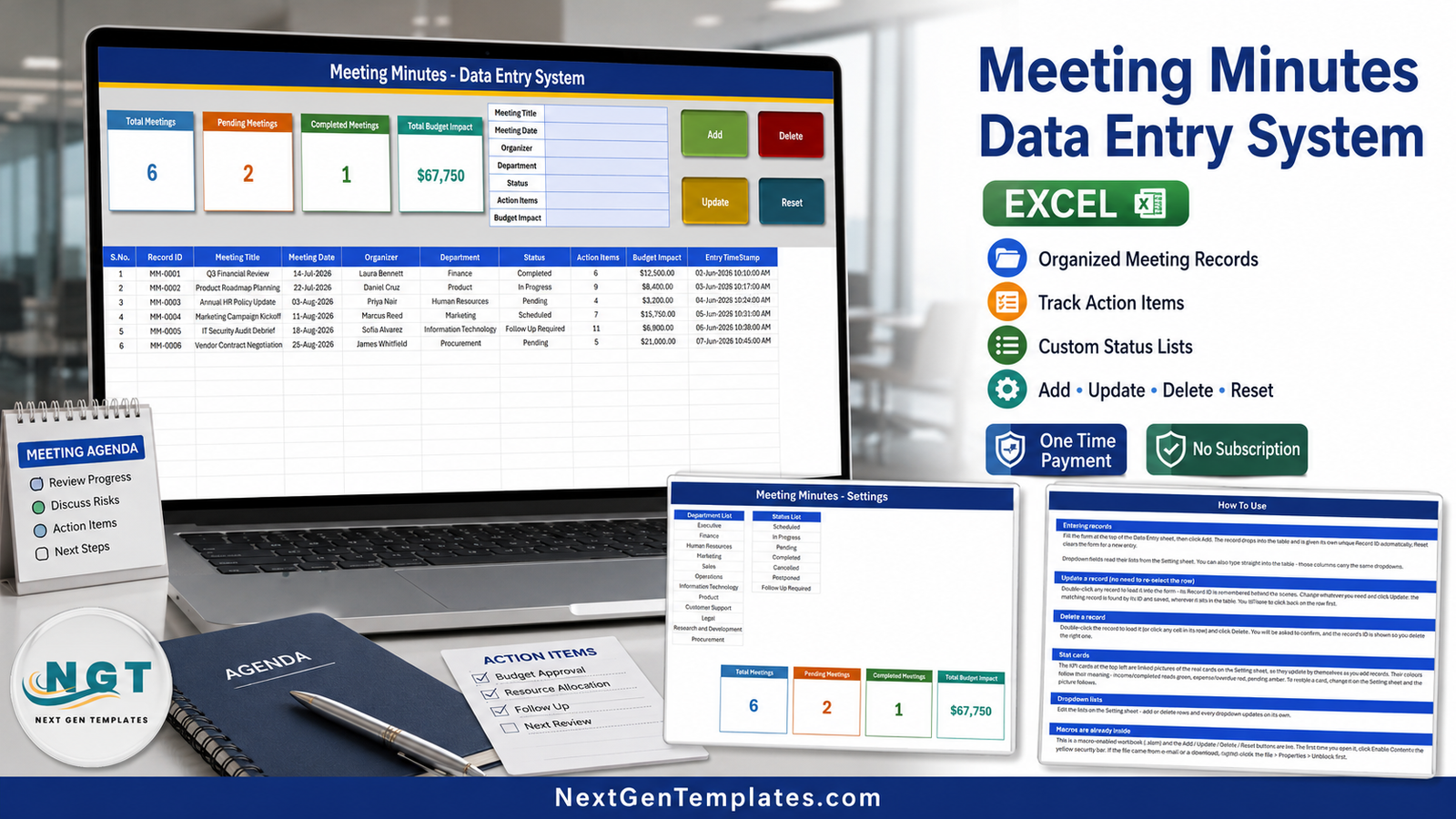

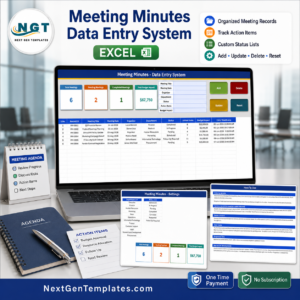
The Meeting Minutes Data Entry System in Excel is a single macro-enabled workbook (.xlsm) that turns scattered meeting notes into one clean register. Fill a 7-field form, click Add, and the record drops into a 10-column table with its own auto-generated Record ID (MM-0001, MM-0002 and so on) and a date-and-time stamp you never have to type. Four live stat cards sit above the form, two editable dropdown lists keep Department and Status consistent, and the whole thing is four sheets and 54 KB. One-time payment, no subscription, no add-ins, no login screen. Built and tested by PK, a Microsoft Certified Professional, and delivered as an instant download you own forever.
Key Features of the Meeting Minutes Data Entry System in Excel
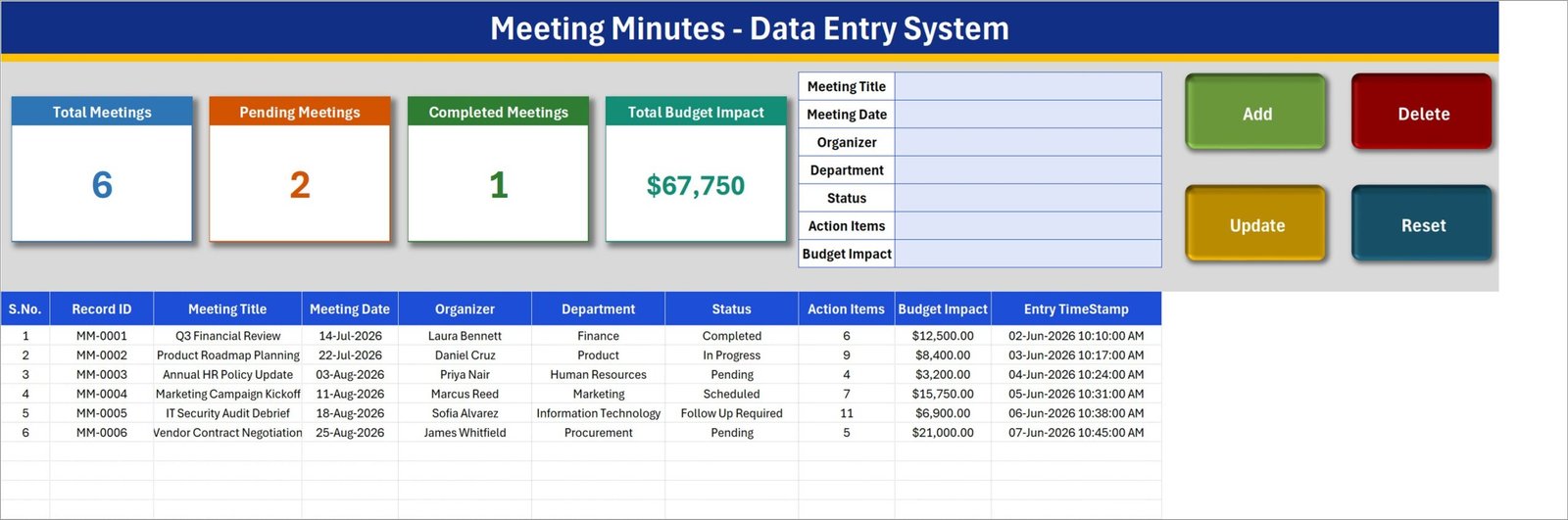
- Seven-field entry form – Meeting Title, Meeting Date, Organizer, Department, Status, Action Items and Budget Impact, all on the Data Entry sheet next to the table.
- Four VBA buttons – Add, Update, Delete and Reset. Double-click any row to load it back into the form; the macro remembers its Record ID, so Update finds the record wherever it has moved to.
- Automatic Record ID and timestamp – every saved row gets an MM-0000 style ID in column B and an Entry TimeStamp in column J, formatted dd-mmm-yyyy hh:mm:ss AM/PM.
- Four live stat cards – Total Meetings, Pending Meetings, Completed Meetings and Total Budget Impact. They are linked pictures of real formula cells on the Setting sheet, so they refresh as records change.
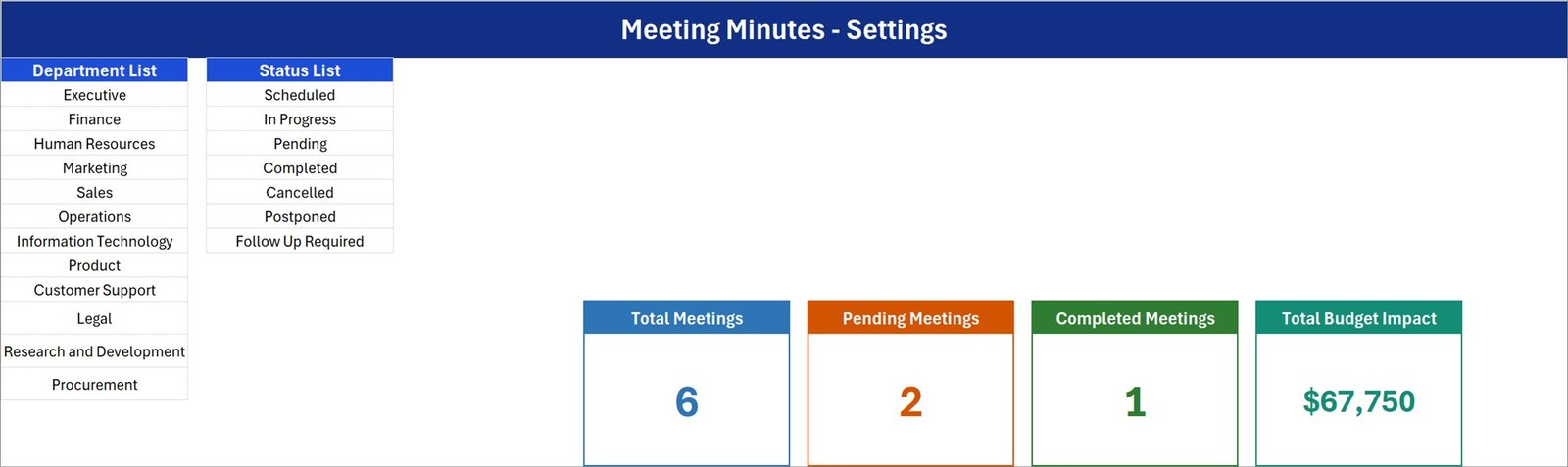
- Two dropdown lists you control – a 12-entry Department List (Executive, Finance, Human Resources, Marketing, Sales, Operations, Information Technology, Product, Customer Support, Legal, Research and Development, Procurement) and a 7-entry Status List (Scheduled, In Progress, Pending, Completed, Cancelled, Postponed, Follow Up Required).
- Action Items count per meeting – a numeric column so you can see at a glance which meeting generated eleven follow-ups and which generated four.
- Budget Impact in currency – stored as a $#,##0.00 amount per meeting, so cost-bearing decisions sit in the same register as the notes.
- Six worked sample records – a Q3 Financial Review, a Product Roadmap Planning session, an HR policy update, a marketing kickoff, an IT security audit debrief and a vendor contract negotiation. Delete them and start typing.
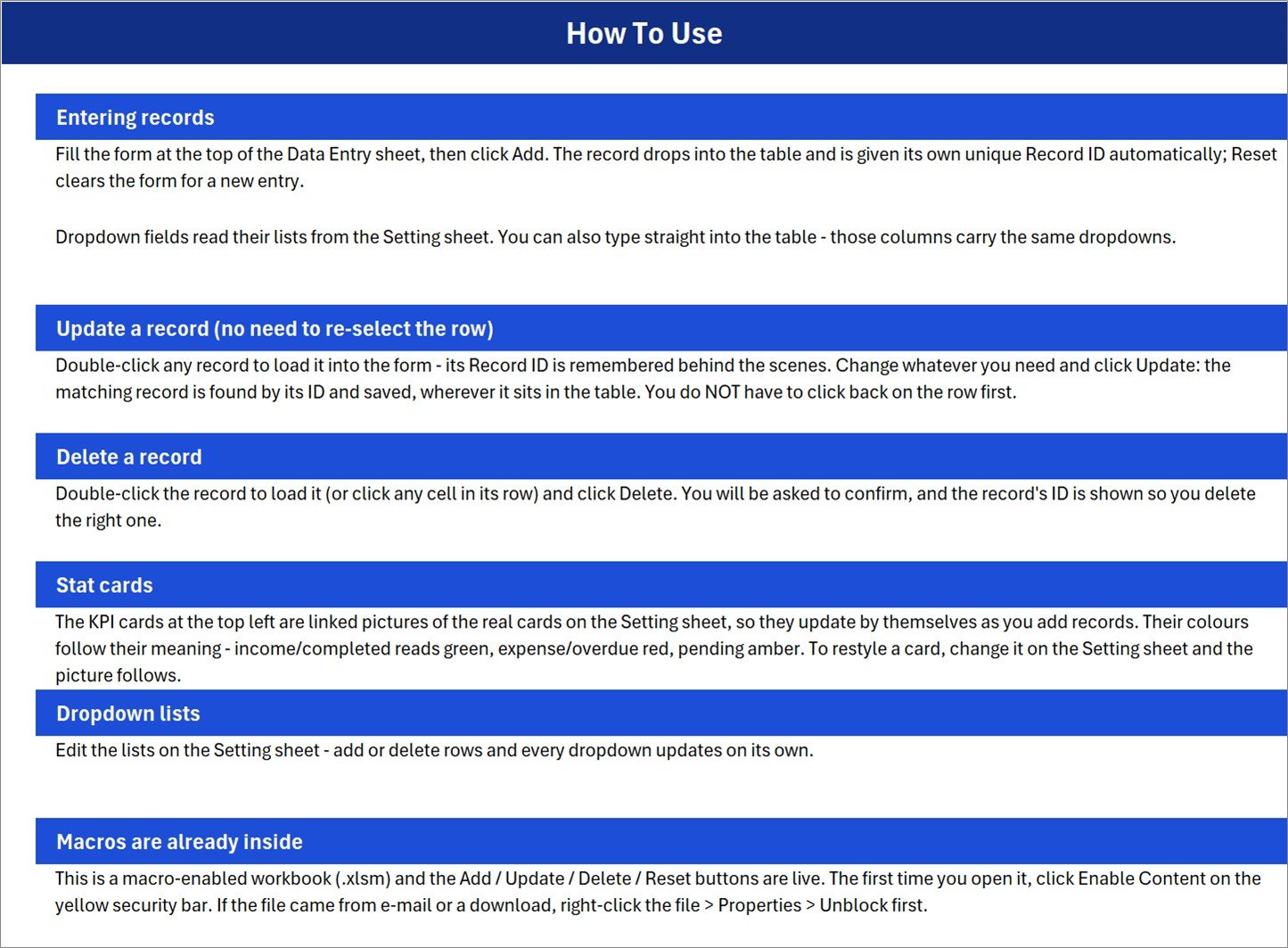
- A built-in How To Use sheet – six short blocks covering entry, update, delete, the stat cards, the dropdown lists and enabling macros.
What’s Inside the Meeting Minutes Data Entry System in Excel
1. Data Entry. The working sheet. A blue title bar, the four stat cards, the seven-field form, the four macro buttons, and the records table beneath. Table columns, in order: S.No., Record ID, Meeting Title, Meeting Date, Organizer, Department, Status, Action Items, Budget Impact, Entry TimeStamp. The S.No. column is a formula that numbers only filled rows, so it never leaves stray digits behind.
2. Setting. Your two dropdown lists and the four card formulas. Edit the Department List or the Status List here and the Data Entry dropdowns follow (see the honest note below about how far that stretches).
3. Instructions (How To Use). Plain-English steps for each button, plus the macro-security note.
4. Get More Templates. Links back to the NextGenTemplates store.
Meeting Minutes System vs. Google Sheets vs. Paid Meeting SaaS – Where This Fits
| This Excel workbook | Google Sheets equivalent | Paid SaaS (Asana, Monday.com, Fellow) | |
|---|---|---|---|
| Cost | $6.99 once | Free sheet, your own build time | $10-$25 per user per month |
| Platform | Excel for Windows desktop, macros enabled | Any browser | Browser and mobile apps |
| Setup time | Under 5 minutes | Hours to build the form and formulas | Days, plus onboarding |
| Real-time team collaboration | No – single-file, one editor | Yes | Yes |
| Mobile access | No – the VBA buttons need desktop Excel | Yes | Yes |
| Customizable fields | Yes, it is your workbook | Yes | Only within the vendor’s model |
| Share with a link | No – you send the file | Yes | Yes |
| Year-1 cost at 5 users | $6.99 | $0 plus build time | $600-$1,500 |
| Auto Record ID and timestamp | Yes, via VBA | Needs a script | Yes |
| Automated reminders or notifications | No | No | Yes |
| Attach the actual minutes document | No – this is a register, not a document store | Link only | Yes |
Who This Template Is For – and Who It’s Not For
It fits a project coordinator, an EA or an office administrator who runs 5 to 50 meetings a month and needs one searchable, sortable list of what was discussed, who owned it, how many actions came out, and what it cost. It fits a department head who wants a Completed-versus-Pending read on the meetings their team called. It fits anyone who already lives in Excel and does not want another login.
It does not fit you if several people must edit the register at the same time – it is one file with one editor. It does not fit you if you need the minutes themselves stored inside the tool; this records the meeting’s metadata and an action count, not the paragraphs. It does not fit Mac, Excel for the web, or a phone: the Add, Update, Delete and Reset buttons are VBA and need Excel for Windows desktop with macros enabled. And it sends no reminders – there is no alert engine anywhere in the file.
What This Workbook Does Not Do – read before you buy
We open the file before we write the listing, and we would rather you know the edges up front:
- Total Budget Impact is an unfiltered sum. The card formula is
SUM('Data Entry'!$I$15:$I$1048576)over every row, whatever its status. In the shipped sample it reads $67,750, but only the $12,500 Q3 Financial Review is Completed – the other $55,250 sits in Pending, Scheduled, In Progress and Follow Up Required rows. Treat it as “budget in play”, not “budget spent”. ASUMIFon the Status column turns it into a completed-only figure in one edit. - The status cards do not add up to the total. Seven statuses exist; only Pending and Completed are carded. In the sample that is 2 + 1 against a Total Meetings of 6. The four missing statuses are simply not shown, so the cards are never meant to reconcile.
- Total Meetings counts the Meeting Title column. The formula is
COUNTA('Data Entry'!$C$15:$C$1048576), not a count of Record IDs in column B. A row saved with a blank title is stored and given an ID, but the card will not count it. Point the COUNTA at column B if that matters to you. - The dropdown ranges are fixed. DepartmentList is
Setting!$A$3:$A$14and StatusList isSetting!$C$3:$C$9. The How To Use sheet says every dropdown updates on its own when you add rows – it does not. Add a 13th department at A15 and you must extend the named range to see it. The validation itself is applied to table rows 15-214, so a 201st record needs the range dragged down too. - Action Items is never totalled, and the How To Use sheet’s “Stat cards” paragraph carries a generic line about income, expense and overdue colours that belongs to another workbook in the same family. It is stale text, not a hidden feature.
How to Use the Meeting Minutes Data Entry System in Excel
- Unzip the download and open the .xlsm in Excel for Windows desktop. If the file came by e-mail, right-click it first, choose Properties, and tick Unblock.
- Click Enable Content on the yellow security bar. The buttons do nothing without macros.
- Open the Setting sheet and replace the twelve departments and seven statuses with your own wording. Keep the list lengths the same, or extend the named ranges to match.
- Back on Data Entry, delete the six sample rows.
- Fill the form and click Add. The Record ID and Entry TimeStamp are written for you.
- To correct a record, double-click its row, edit the form and click Update. To remove one, load it and click Delete – you get a confirmation showing the ID.
- Watch the four cards at the top left recalculate as you go, and read Total Budget Impact as an all-status figure.
Real-World Use Cases
Priya, HR operations lead. She logs every policy and grievance meeting under the Human Resources department, uses the Action Items count as her follow-up backlog, and filters the table by Status = Follow Up Required before her Monday stand-up.
Marcus, marketing manager. He records campaign kickoffs with a Budget Impact figure so his director can see, in one column, what the quarter’s meeting decisions committed. He edits the card formula to a SUMIF on Completed within his first hour.
James, procurement officer. Vendor negotiations get one row each, with the organizer named and the contract value in Budget Impact. When an auditor asks when a decision was taken, the Entry TimeStamp answers it.
Frequently Asked Questions
Does this store the actual minutes text?
No. It records the meeting’s metadata – title, date, organizer, department, status, an action-item count and a budget figure – not the body of the minutes. Keep the document itself in your usual folder and use this as the index.
Why doesn’t $67,750 match my completed meetings?
Because Total Budget Impact sums the whole Budget Impact column regardless of status. It is intentional in the build, and it is a one-formula change to a SUMIF if you want completed-only. We say so here rather than let you find it after purchase.
Will it work on Mac or Excel for the web?
The sheets will open, but the Add, Update, Delete and Reset buttons are VBA macros and need Excel for Windows desktop. Treat Windows Excel as a requirement.
Can I add more departments or statuses?
Yes – edit the lists on the Setting sheet. If you go beyond twelve departments or seven statuses you must also extend the named range (Formulas > Name Manager), because the ranges are fixed rather than dynamic.
How many records can it hold?
The card formulas read the whole column, so the table itself is not capped. The dropdown validation is pre-applied to rows 15-214, so past about 200 records you copy the validation down.
How is this different from the Team Meeting Minutes Tracker in Excel?
The Team Meeting Minutes Tracker in Excel is the larger tool – a login screen, user management and a slicer-driven dashboard. This one is deliberately small: one entry sheet, four cards, no login, no charts. Buy the tracker if you want reporting; buy this if you want a fast, clean register.
Is there a subscription?
No. One payment, instant download, and the file is yours to edit and reuse.
About the Author
Built by PK – Microsoft Certified Professional with 15+ years of Excel, Google Sheets, and Power BI experience. Founder of NextGenTemplates, reaching 300K+ subscribers across YouTube channels. Every template is hand-built and tested before release.
Explore Related Templates
- Team Meeting Minutes Tracker in Excel – the dashboard-and-login version of the same idea.
- Work Progress Data Entry System in Excel – log the tasks that come out of your meetings.
- Employee Document Data Entry System in Excel – the same form pattern for HR paperwork.
- Job Work Order Data Entry System in Excel – turn decisions into tracked work orders.
- Class Schedule Data Entry System in Excel – the education-side sibling.
- Browse more in VBA Tools and MS Excel templates.
Get the Meeting Minutes Data Entry System in Excel for $6.99 (regular $11.99) – instant download, one macro-enabled workbook, yours to keep. Add it to your cart and you will be entering your first meeting within five minutes.
Last updated: 30 August 2026.
Watch the demo video:
Compatibility and Requirements
- Works in Microsoft Excel desktop on Windows with macros enabled. The Add, Update, Delete and Reset buttons are VBA and do not run in Excel for the web, Google Sheets or on mobile.
- If the file arrives by e-mail, right-click it, open Properties and tick Unblock before opening. Microsoft explains macro settings in Enable or disable macros in Microsoft 365 files.















Reviews
There are no reviews yet.