

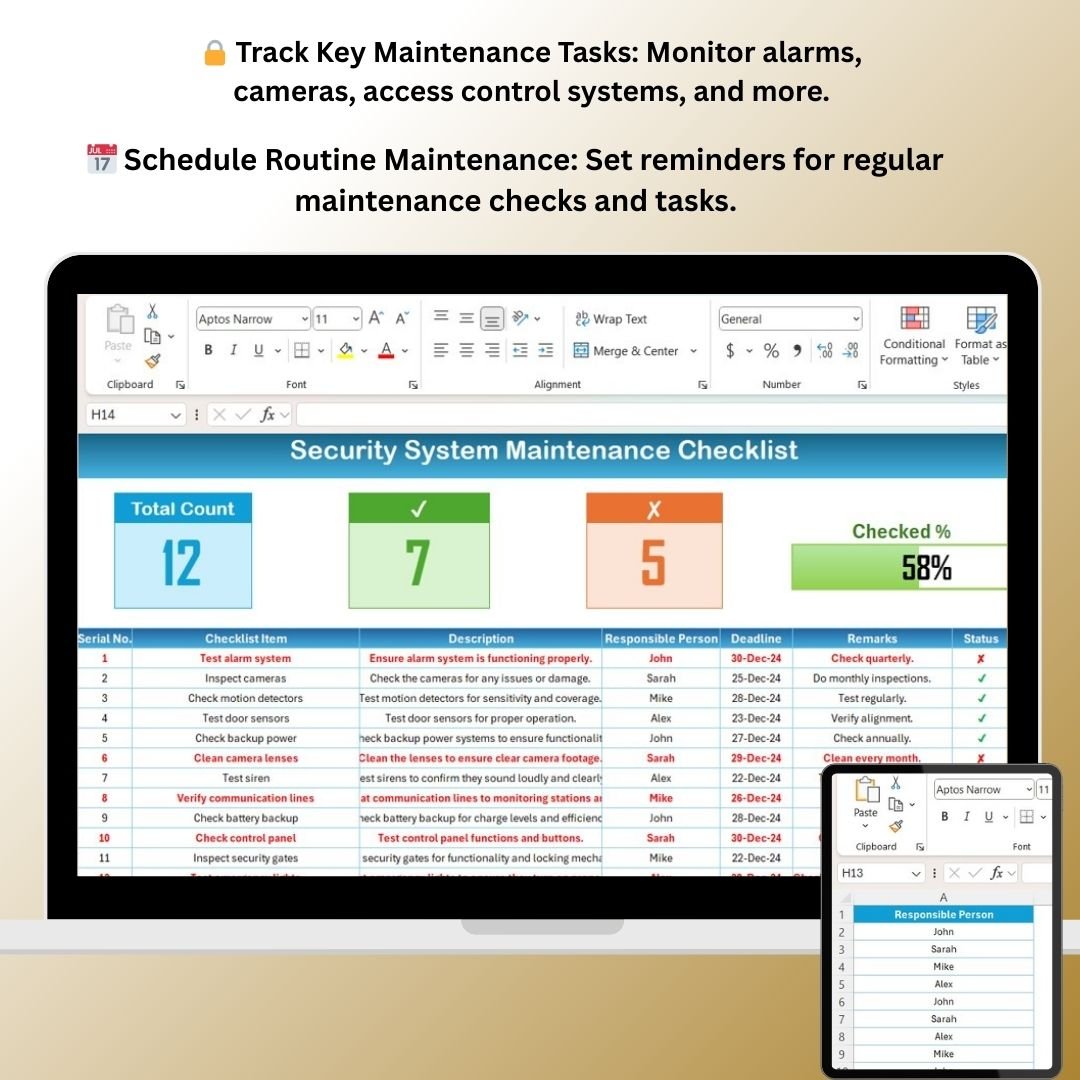


The Security System Maintenance Checklist in Excel is a comprehensive tool designed to help businesses, property managers, and security personnel track and maintain the performance of security systems. This Excel-based checklist ensures that all critical components of your security system—such as alarms, cameras, and access control systems—are functioning optimally and remain up to date.
Whether you’re managing a small office, a commercial property, or a large enterprise, this checklist provides an organized and efficient way to keep track of regular maintenance, troubleshoot issues, and ensure compliance with safety standards. With customizable features and real-time tracking, you can proactively address potential security risks and maintain a secure environment.
Key Features of the Security System Maintenance Checklist in Excel
🔒 Comprehensive Maintenance Tasks
Track key maintenance tasks for all components of your security system, including cameras, alarms, access controls, motion detectors, and more. Ensure that every aspect of your system is properly maintained.
📅 Routine & Scheduled Maintenance
Schedule regular maintenance tasks, such as testing alarm systems, cleaning cameras, and inspecting wiring. Set reminders for recurring tasks to stay on top of system upkeep.
📝 Track System Performance & Issues
Document any performance issues or malfunctions, including repairs made, and track the status of ongoing problems. This feature helps identify recurring issues that require further attention.
📊 Real-Time Maintenance Logs
Maintain a real-time log of all maintenance activities performed on your security system. Keep track of who performed the task, what was done, and when it was completed for compliance and reference.
⚙️ Customizable Task List
The checklist is fully customizable, allowing you to add specific tasks relevant to your security system. Modify the template based on your system’s unique needs and features.
📈 Compliance & Safety Tracking
Ensure that your security systems are compliant with industry standards and regulations. Track system updates and maintenance schedules to meet legal requirements and avoid potential issues.
Why You’ll Love the Security System Maintenance Checklist in Excel
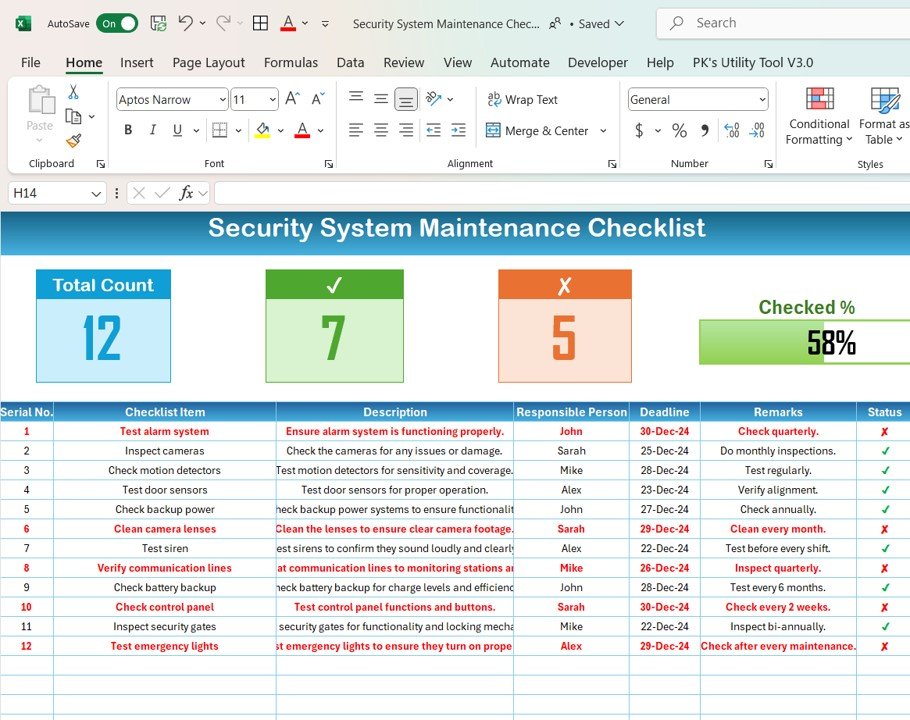
✅ Ensure Optimal System Performance
Regular maintenance ensures that your security system is always working efficiently. Stay on top of routine checks to reduce the risk of system failure when you need it most.
✅ Improve System Reliability
By tracking repairs, maintenance, and testing, you can identify and resolve issues before they become major problems, leading to a more reliable and efficient security system.
✅ Stay Compliant with Safety Standards
The checklist helps you stay compliant with industry regulations, ensuring that your security system meets all necessary legal and safety requirements.
✅ Easily Monitor & Track Progress
Track the completion of tasks and the status of ongoing issues in real-time. Keep all maintenance records in one place for quick reference and better decision-making.
✅ Fully Customizable & Easy to Use
This checklist is designed to be user-friendly and fully customizable. Add or remove tasks based on your specific security system needs, and tailor the template to fit your organization’s requirements.
What’s Inside the Security System Maintenance Checklist Template in Excel?
- Maintenance Tasks: Track key tasks such as testing alarms, cleaning cameras, checking motion detectors, and more.
- Scheduled Maintenance Reminders: Set up reminders for regular maintenance checks and inspections.
- System Performance Logs: Document any issues or repairs made to the security system.
- Customizable Checklist: Add or remove tasks to suit your specific security system and needs.
- Compliance & Safety Tracking: Ensure your system is compliant with regulations and meet safety standards.
How to Use the Security System Maintenance Checklist in Excel
1️⃣ Download the Template: Get instant access to the Security System Maintenance Checklist in Excel.
2️⃣ Enter System Details: Input details of your security system, including components, service providers, and key maintenance tasks.
3️⃣ Track & Complete Tasks: Use the checklist to monitor regular maintenance activities and ensure they’re completed on time.
4️⃣ Monitor & Troubleshoot: Document any issues with system components and track repairs or updates made to the system.
5️⃣ Generate Reports & Stay Compliant: Create maintenance logs to ensure your system stays compliant with legal standards and safety regulations.
Who Can Benefit from the Security System Maintenance Checklist in Excel?
🔹 Property Managers & Security Personnel
🔹 Facilities Managers & Operations Teams
🔹 Business Owners & Commercial Property Managers
🔹 Security System Technicians & Installers
🔹 Industrial & Corporate Security Teams
🔹 Residential Communities & Apartment Complex Managers
Ensure your security system is always running at its best with the Security System Maintenance Checklist in Excel. Stay organized, track tasks, and maintain a secure environment for your business or property.
Click here to read the Detailed blog post
Visit our YouTube channel to learn step-by-step video tutorials
Youtube.com/@PKAnExcelExpert





























Reviews
There are no reviews yet.