



The Employee Benefits Open Enrolment Calendar in Excel is an essential tool for HR professionals, benefits administrators, and business owners to streamline the open enrollment process for employee benefits. This Excel-based calendar helps you efficiently track and manage important deadlines, employee benefits elections, and enrollment periods, ensuring a smooth and organized benefits administration process for your company.
With this calendar template, you can stay on top of all the essential tasks involved in employee benefits open enrollment, such as informing employees about their options, collecting enrollment forms, and tracking eligibility. It’s fully customizable, allowing you to tailor the calendar to your organization’s specific needs. Keep track of deadlines, plan benefit communications, and manage multiple enrollment periods, all in one user-friendly, interactive Excel template.
Key Features of the Employee Benefits Open Enrollment Calendar in Excel
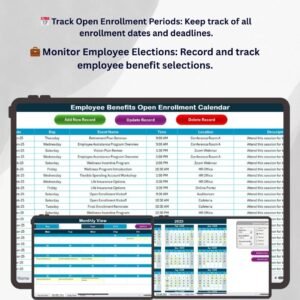
📅 Track Open Enrollment Periods
Easily track the start and end dates for open enrollment periods. This calendar ensures that no important enrollment date is missed, allowing HR teams to stay organized and on schedule.
💼 Manage Benefits Elections & Employee Data
Track employee elections, including health insurance, retirement plans, and other benefit options. The calendar allows you to manage employee data effectively and ensure everyone is enrolled in the right benefits.
📈 Monitor Eligibility & Coverage
Ensure that employees are eligible for the benefits they are choosing. Track their eligibility status and confirm that they are making informed decisions during the enrollment process.
🔄 Communication Planning & Tracking
Plan and monitor communication activities, such as sending benefits information, reminders, and instructions. Keep track of all communication sent to employees to ensure they are well-informed throughout the enrollment process.
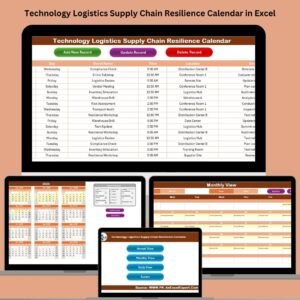
🖥️ Interactive & Customizable Calendar
With interactive features like dropdown menus, color-coded sections, and customizable fields, this template allows HR professionals to easily adjust the calendar to their specific needs. It’s designed for easy use and complete flexibility.
Why You’ll Love the Employee Benefits Open Enrollment Calendar in Excel

✅ Stay Organized & On Schedule
Track important dates, deadlines, and tasks related to open enrollment. This helps you stay on top of the enrollment process and ensure that employees are enrolled in their desired benefits on time.
✅ Streamline Benefits Administration
Simplify the benefits enrollment process by organizing all tasks, deadlines, and employee data in one place. This makes it easier for HR teams to manage the entire process efficiently.
✅ Improve Communication & Employee Engagement
Plan and track communication efforts, ensuring that all employees receive the information they need to make informed decisions about their benefits. Stay proactive in sending reminders and instructions.
✅ Ensure Eligibility & Coverage Accuracy
Track eligibility criteria and ensure that employees are selecting benefits they qualify for. This helps prevent mistakes and ensures a smoother enrollment process.
✅ Customizable for Your Organization
Customize the calendar template to match your company’s specific enrollment dates, benefits options, and communication strategies.
What’s Inside the Employee Benefits Open Enrollment Calendar Template?
- Enrollment Period Tracking: Track the start and end dates of open enrollment for each benefit offering.
- Employee Election Tracking: Record employee elections for different benefits, such as health insurance, retirement, and more.
- Eligibility Tracking: Monitor eligibility for employees to participate in different benefit programs.
- Communication Planning: Track the communication sent to employees, including information and reminders about the enrollment process.
- Customizable Fields: Tailor the template to your organization’s specific benefits and processes.
- Real-Time Updates: Use dynamic features to update your calendar as new enrollment periods approach or change.
How to Use the Employee Benefits Open Enrollment Calendar in Excel
1️⃣ Download the Template: Get instant access to your Employee Benefits Open Enrollment Calendar in Excel.
2️⃣ Input Your Enrollment Dates: Enter your company’s open enrollment start and end dates, as well as any other key dates related to benefits.
3️⃣ Track Employee Elections: Use the template to monitor employee benefits selections and ensure they are enrolled in the correct plans.
4️⃣ Plan & Monitor Communication: Use the calendar to track communication efforts, ensuring all employees are informed about their benefits options and deadlines.
Who Can Benefit from the Employee Benefits Open Enrollment Calendar in Excel?
🔹 HR Managers & Benefits Administrators
🔹 Small & Medium Business Owners
🔹 E-commerce & Large Enterprises Offering Employee Benefits
🔹 Companies with Multiple Enrollment Periods
🔹 Anyone Responsible for Managing Employee Benefits & Open Enrollment
Streamline your employee benefits enrollment process with the Employee Benefits Open Enrollment Calendar in Excel. Keep track of enrollment dates, manage employee elections, and communicate effectively to ensure a smooth, efficient benefits open enrollment process.
Click here to read the Detailed blog post
Visit our YouTube channel to learn step-by-step video tutorials
Youtube.com/@PKAnExcelExpert
Watch the step-by-step video Demo:
Compatibility and Requirements
- Works in Microsoft Excel desktop (Excel 2016 or later, or Microsoft 365).
- Microsoft’s guide Create a drop-down list explains how the dropdown menus work.
Frequently Asked Questions
What does the Employee Benefits Open Enrolment Calendar track?
Open enrollment start and end dates, employee benefit elections such as health insurance and retirement plans, eligibility status and benefit communications.
Can I plan employee communications?
Yes. You can plan and log information, reminders and instructions sent to employees during enrollment.
How is the calendar laid out?
It uses dropdown menus, color-coded sections and customizable fields.
How do I get started?
Enter your open enrollment start and end dates and other key benefit dates, then record employee elections as they come in.
Related Employee Benefits Templates
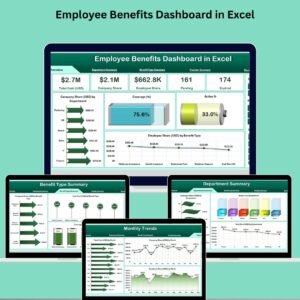
- Employee Benefits Dashboard in Excel: analyze benefit costs and uptake
- Employee Benefits Utilization KPI Dashboard in Excel: KPIs for benefit use
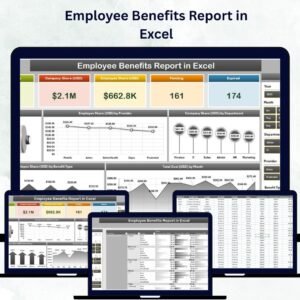
- Employee Benefits Report in Excel: a printable benefits report
- Employee Benefits Dashboard in Google Sheets: a browser-based dashboard
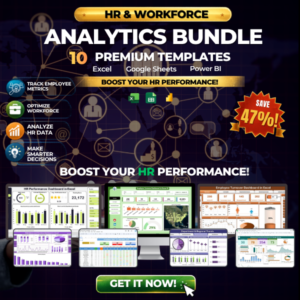
- HR & Workforce Analytics Bundle: 10 HR templates in one bundle
Browse all Excel calendars or the Excel HR and payroll templates.
















Reviews
There are no reviews yet.