

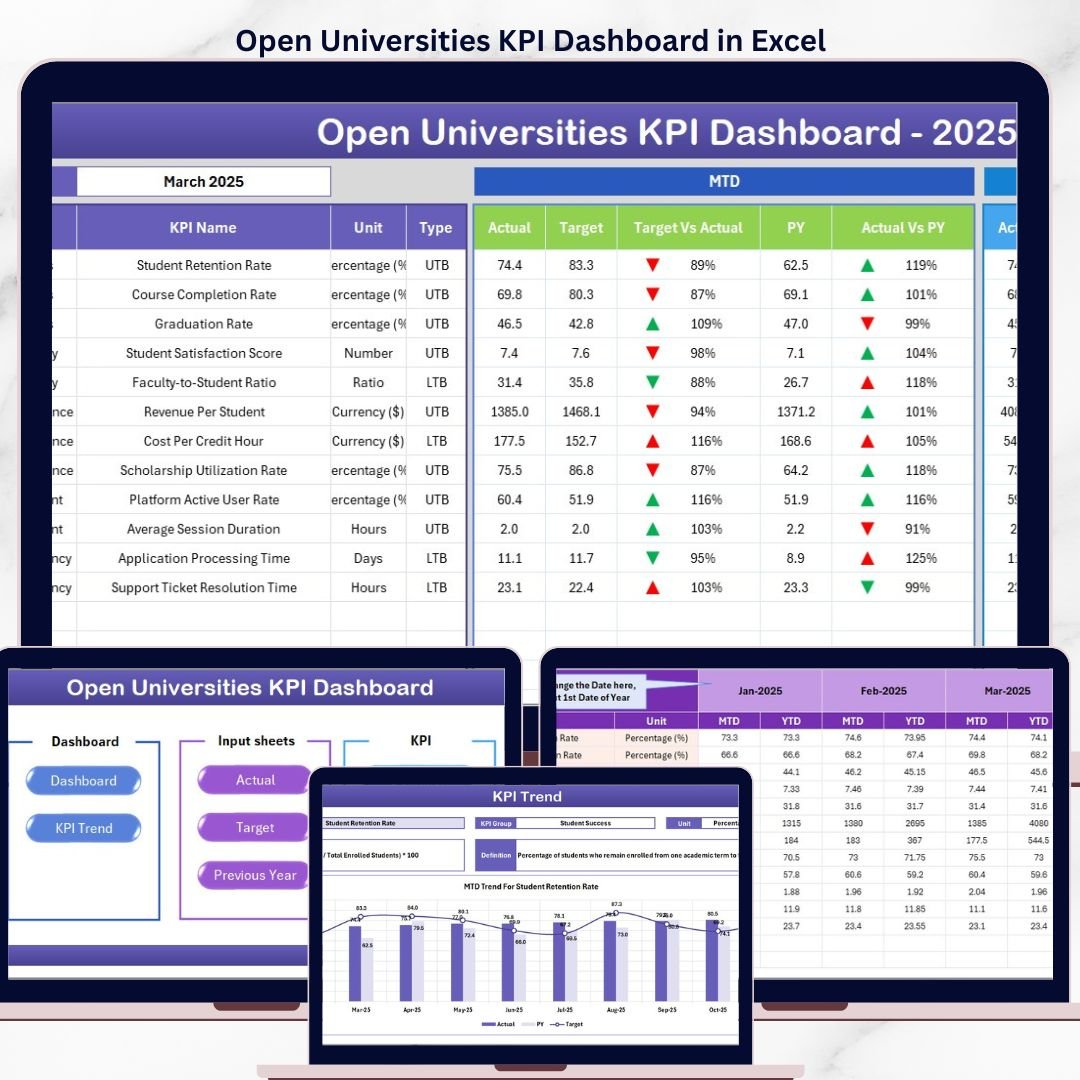


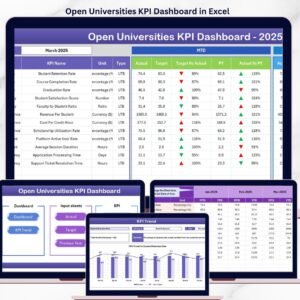
The Open Universities KPI Dashboard in Excel tracks 20+ university performance KPIs across 7 structured worksheets, with MTD and YTD trend charts, conditional formatting indicators, and built-in KPI definitions. Setup takes under 10 minutes — just replace the sample data and every metric updates automatically.
🌍 Join 8,400+ teams in 40+ countries using NextGenTemplates to replace paid SaaS tools with one-time-purchase Excel, Google Sheets, Power BI, and HTML templates.
✅ Instant download · One-time payment · No subscription · No per-user fees · Lifetime access
🔑 Key Features of Open Universities KPI Dashboard in Excel
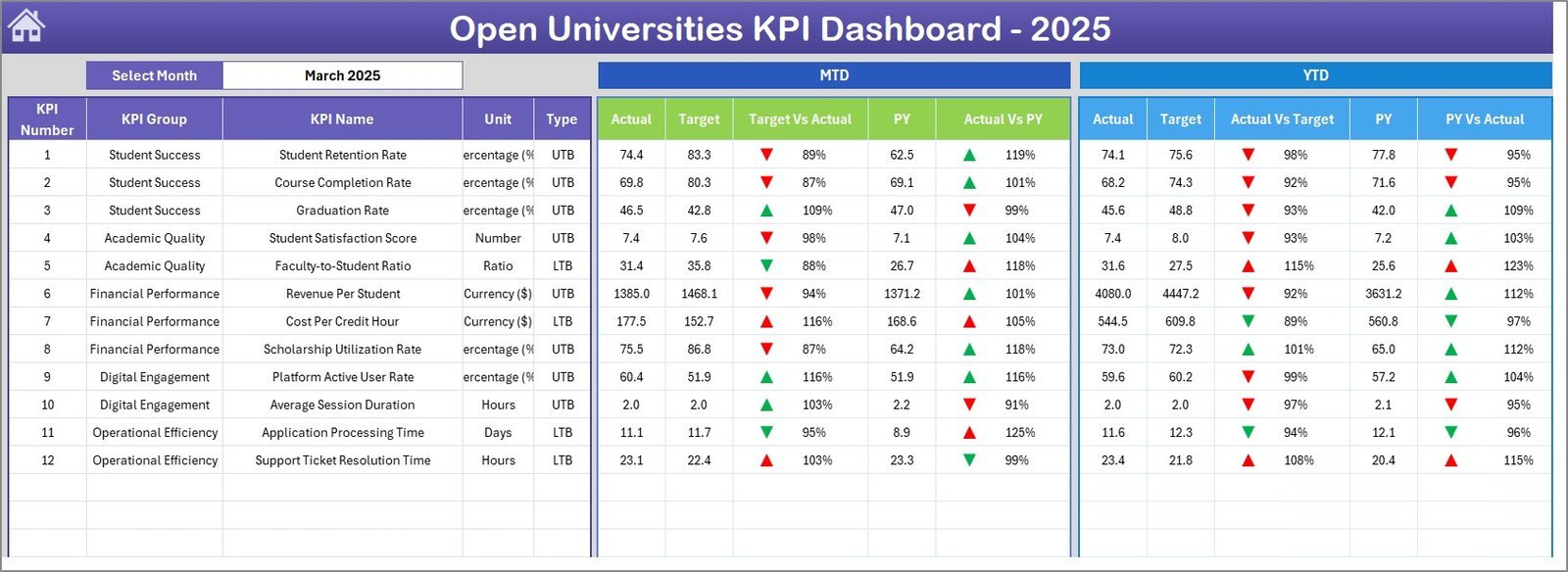
📊 Dynamic Dashboard View — The Dashboard sheet displays all KPIs with MTD Actual, Target, and Previous Year data alongside YTD comparisons. Select any month from the dropdown on cell D3 and the entire dashboard refreshes instantly.
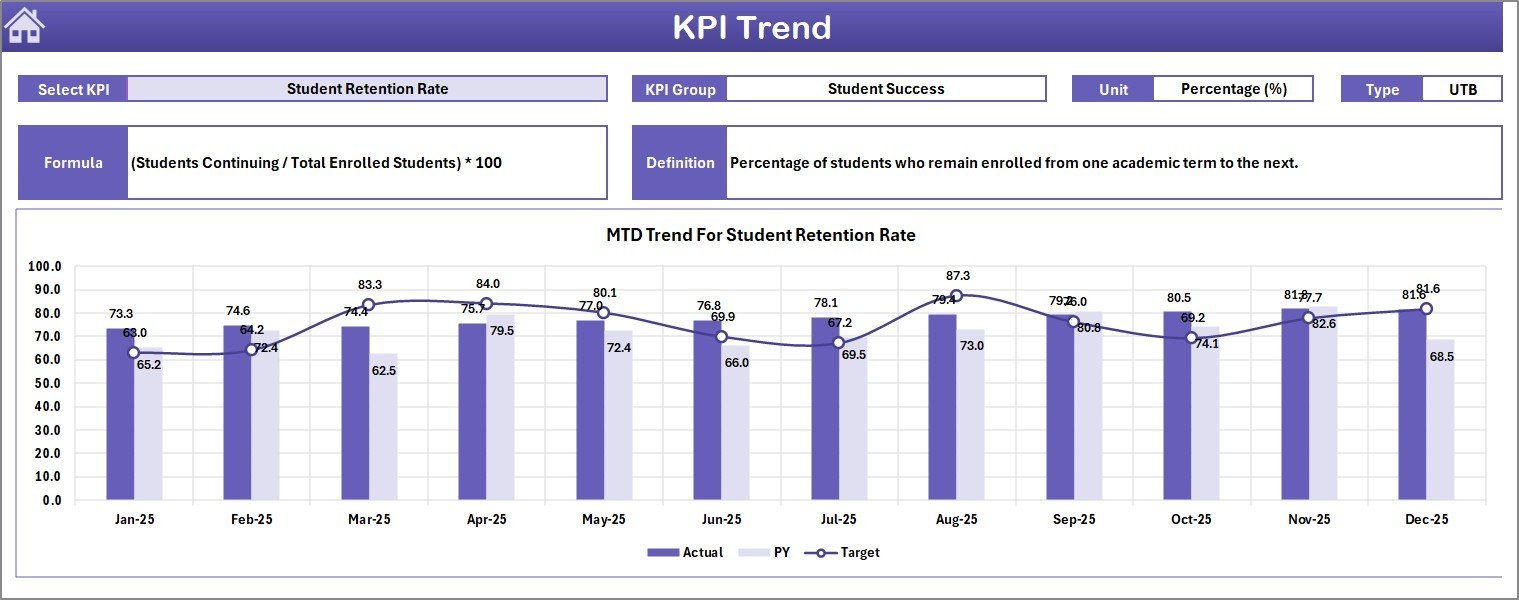
📈 Individual KPI Trend Analysis — The KPI Trend sheet lets you pick any KPI from a dropdown and view its Group, Unit, Type (LTB or UTB), Formula, and Definition alongside MTD and YTD trend charts comparing Actual, Target, and Previous Year numbers side by side.
🏠 One-Click Navigation Home Page — The Home sheet provides 6 quick-access buttons to jump directly to the Dashboard, KPI Trend, Actual Input, Target Input, Previous Year, and KPI Definition sheets.
✏️ Structured Data Entry — Three separate input sheets for Actual Numbers, Target Numbers, and Previous Year Numbers keep data organized and error-free. Change the starting month on cell E1 to align the fiscal calendar.
📚 Built-in KPI Knowledge Base — The KPI Definition sheet stores each KPI’s name, group, unit, formula, definition, and type (LTB or UTB) so every stakeholder understands what each metric measures and how it is calculated.
⬆️⬇️ Conditional Formatting Arrows — Up and down arrows with color coding instantly highlight whether Target vs Actual and Previous Year vs Actual performance is improving or declining, saving analysis time.
⚡ Zero-Macro, Formula-Driven — All calculations run on native Excel formulas with no VBA macros required, ensuring compatibility with Excel 2016+, Microsoft 365, Mac, and Excel Online.
This dashboard is a direct fit for open universities, distance learning institutions, online education providers, and accreditation offices that need to track enrollment rates, graduation rates, student satisfaction scores, course completion percentages, and faculty performance indices in one place. Explore more KPI Dashboard Templates in our catalog.
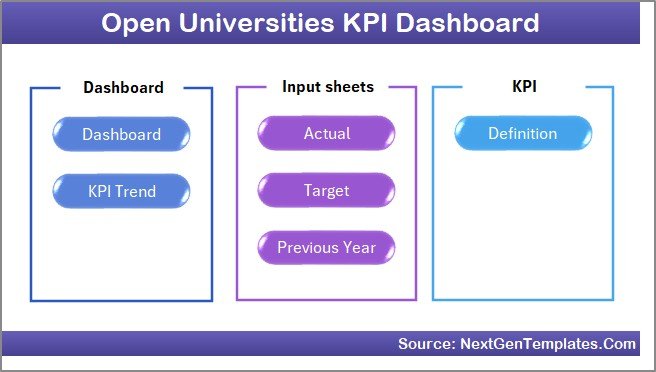
Home Page
📦 What’s Inside the Open Universities KPI Dashboard in Excel
The template includes 7 worksheets designed for structured university performance monitoring:
🏠 Home Sheet — Central index page with 6 navigation buttons for instant access to all sections.
📊 Dashboard Sheet — Main performance view showing all KPIs with MTD Actual, Target, Previous Year data and YTD Actual, Target, Previous Year data. Conditional formatting arrows indicate performance direction at a glance.
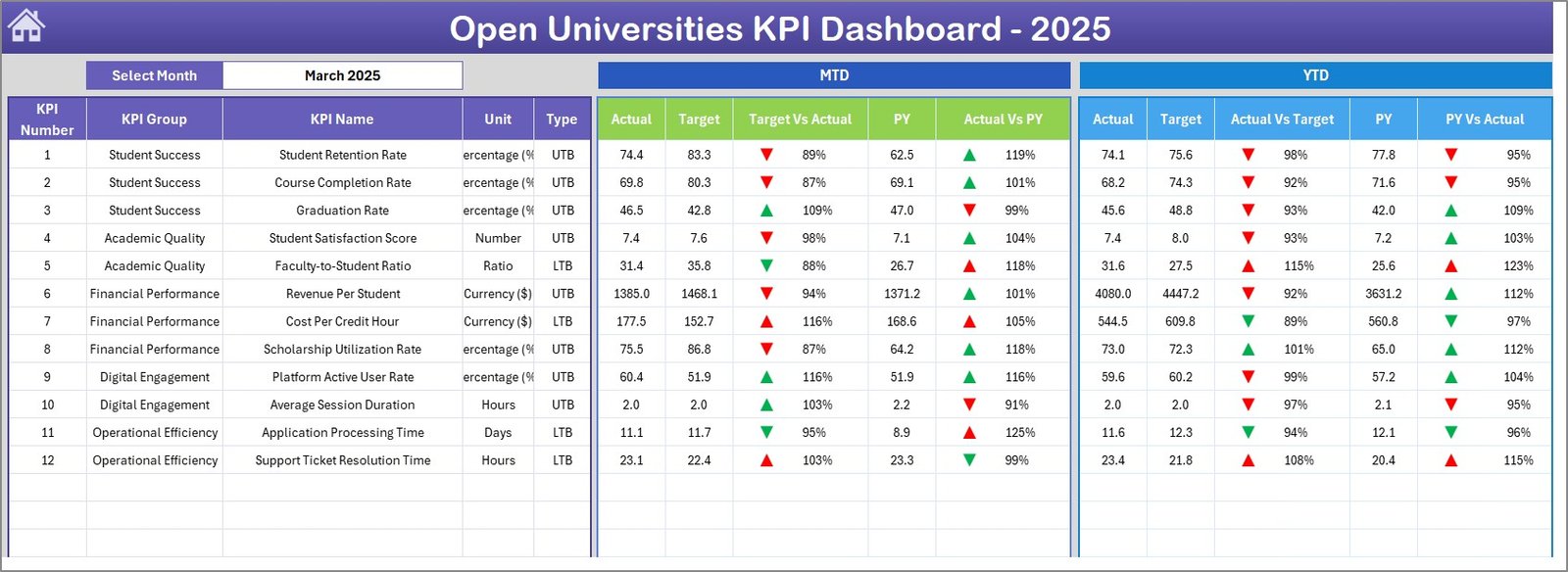 Open Universities KPI Dashboard
📈 KPI Trend Sheet — Select any KPI from the dropdown on cell C3 to view its Group, Unit, Type, Formula, and Definition alongside MTD and YTD trend charts.
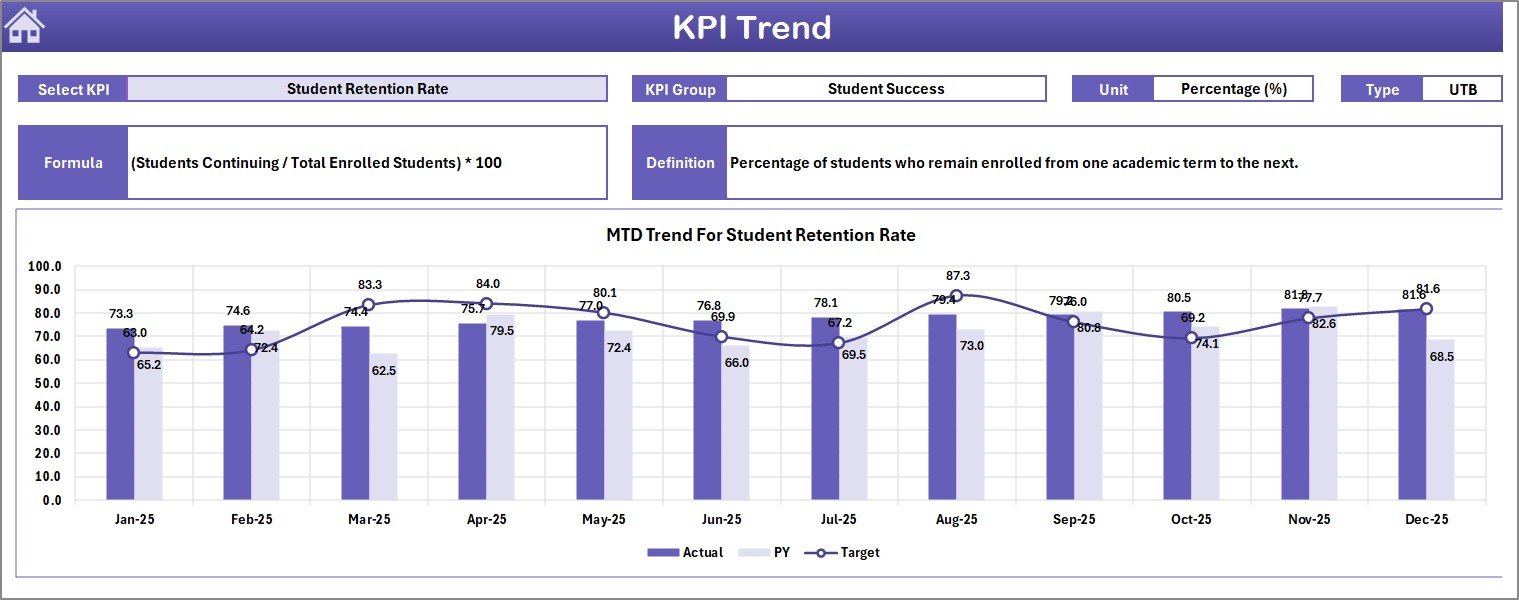 KPI Trend Sheet
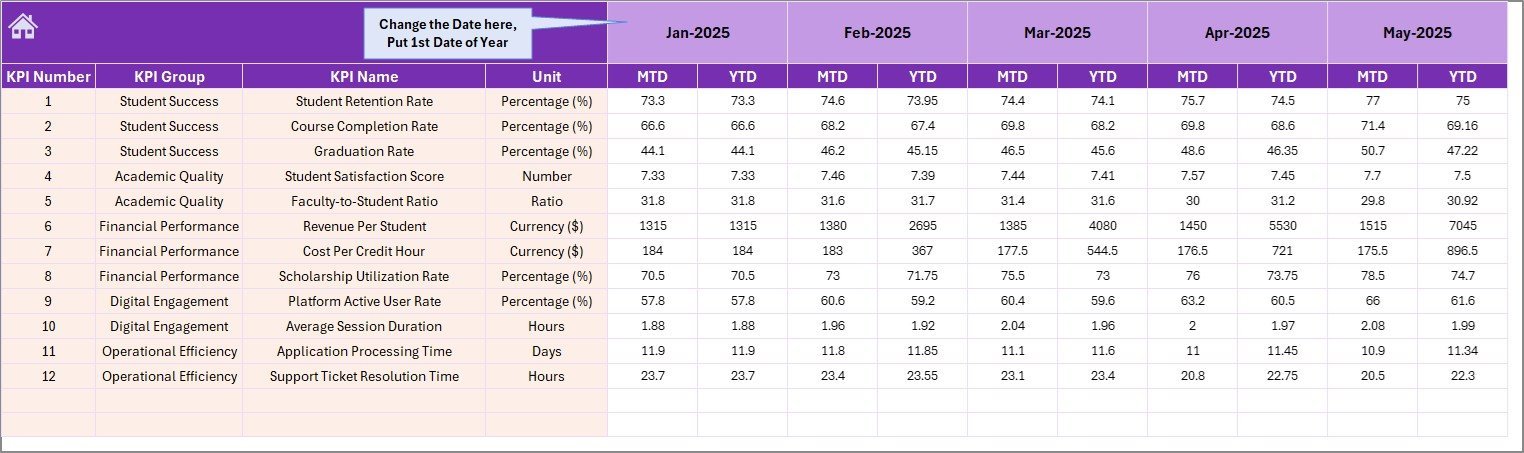
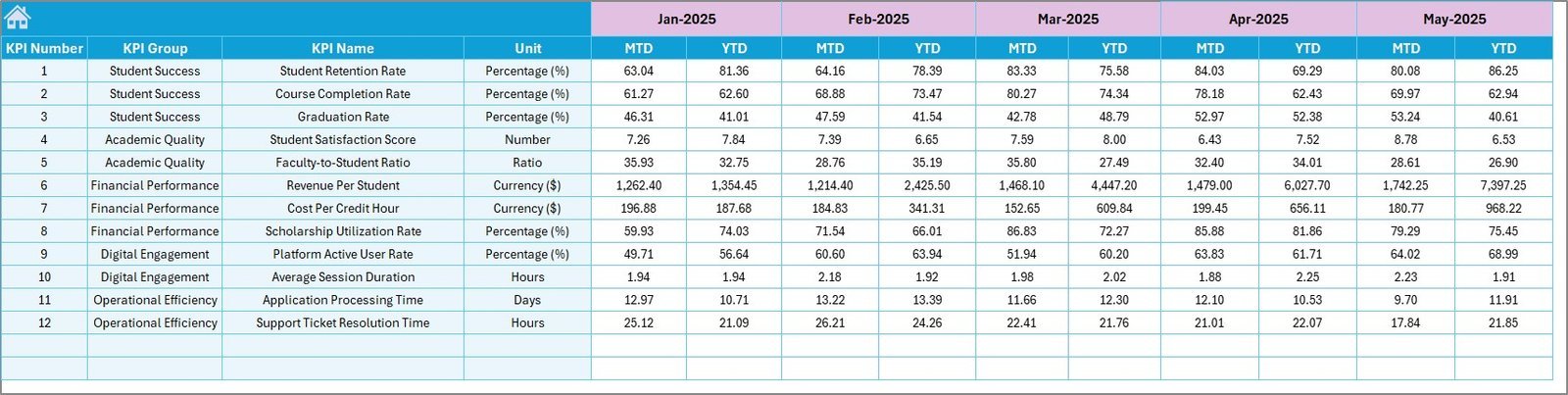
✏️ Actual Numbers Input Sheet — Enter actual numbers for MTD and YTD for each month. Change the starting month on cell E1.
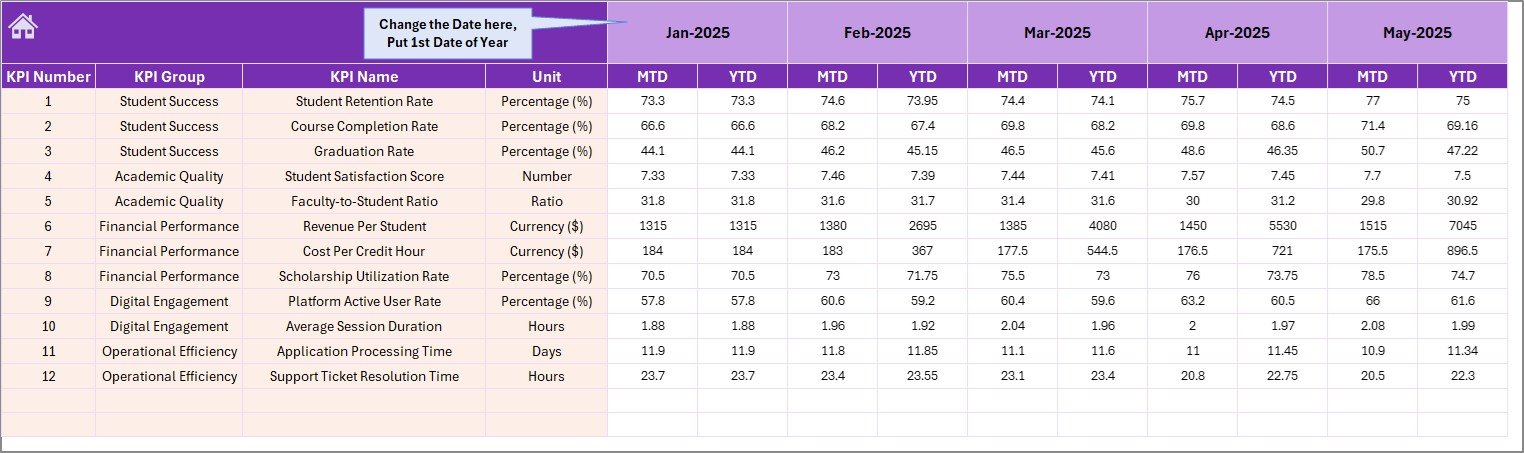 Actual Numbers Input Sheet
🎯 Target Number Input Sheet — Enter target numbers for each KPI per month as MTD and YTD values.
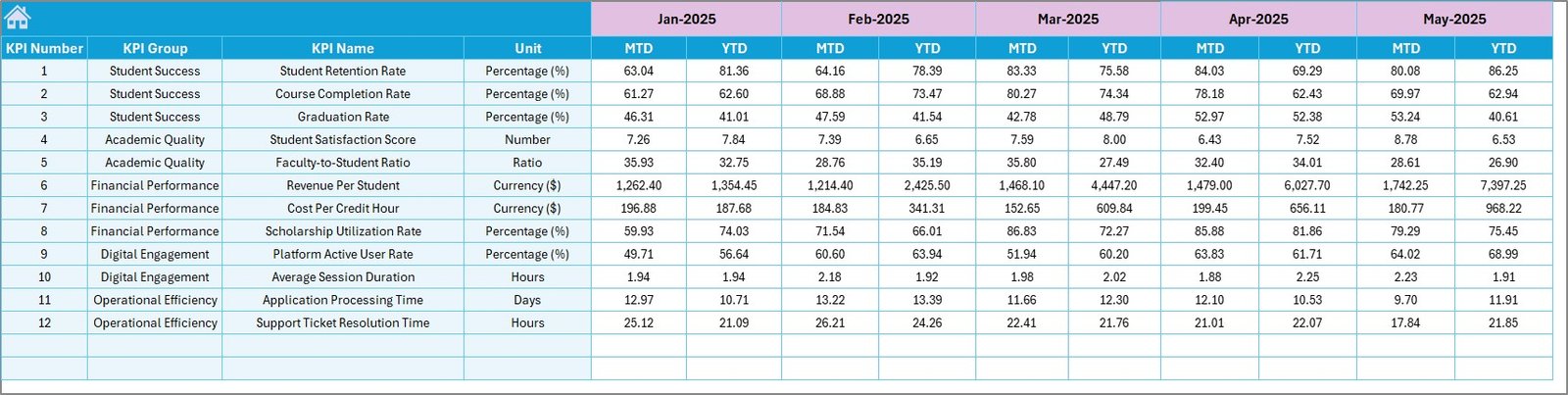 Target Number Input Sheet
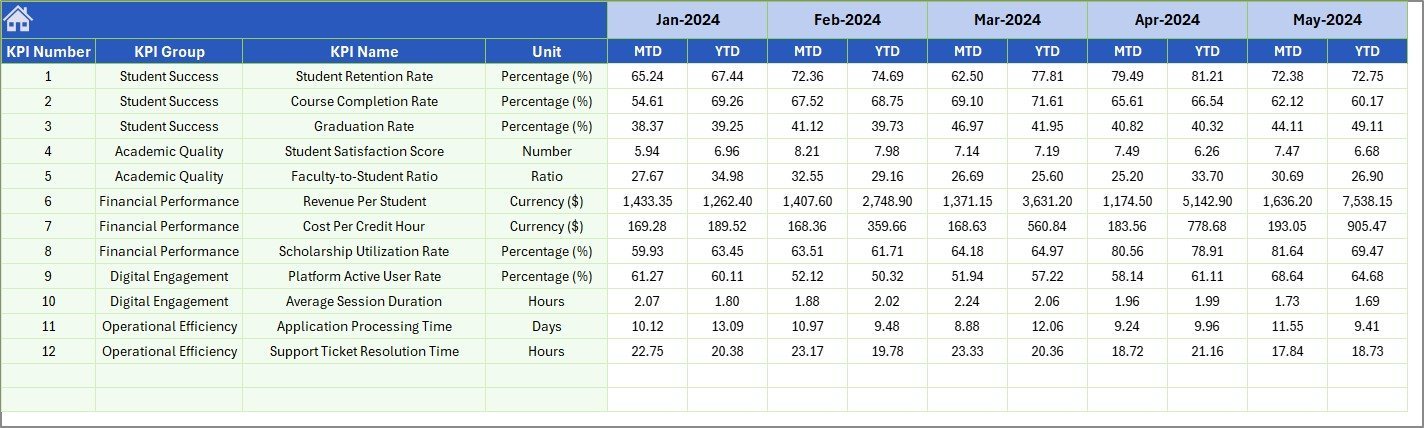
📅 Previous Year Number Sheet — Enter prior year data using the same format as the current year for accurate year-over-year comparisons.
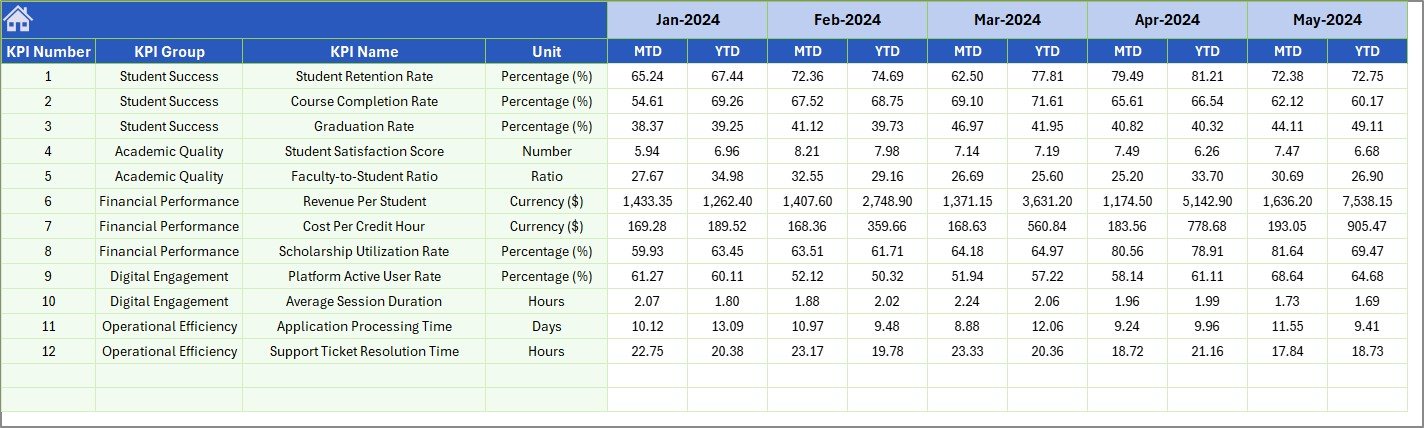 Previous Year Number Input Sheet
📚 KPI Definition Sheet — Enter KPI Name, KPI Group, Unit, Formula, KPI Definition, and KPI Type as LTB (Lower the Better) or UTB (Upper the Better).
 KPI Definition Sheet
📊 Open Universities KPI Dashboard vs. Google Sheets Dashboard vs. Blackboard Analytics — Where This Fits
| Feature | Open Universities KPI Dashboard in Excel | Google Sheets Dashboard | Blackboard Analytics |
|---|---|---|---|
| Cost | $14.99 one-time | Free (build from scratch) | $5,000-25,000/year |
| Platform | Microsoft Excel (desktop + web) | Google Sheets (web only) | Cloud-based SaaS |
| Setup Time | Under 10 minutes | 4-8 hours (manual build) | 4-12 weeks onboarding |
| Real-time Collaboration | Via SharePoint/OneDrive | ✅ Native | ✅ Native |
| Offline Access | ✅ Full offline | ❌ Requires internet | ❌ Requires internet |
| Customizable KPIs | ✅ Unlimited | ✅ Manual setup | Limited to plan tier |
| MTD/YTD Trend Charts | ✅ Built-in | Manual chart creation | ✅ Built-in |
| KPI Definition Library | ✅ Included | ❌ Not included | Partial |
| Year-1 Cost (5 users) | $14.99 total | $0 | $5,000-25,000 |
For open university teams that want structured KPI tracking without paying thousands for enterprise analytics software, the Open Universities KPI Dashboard in Excel sits in the sweet spot.
👥 Who This Template Is For — and Who It’s Not For
✅ This template is built for:
- Open university administrators tracking enrollment, retention, and graduation KPIs across programs
- Distance learning coordinators monitoring course completion rates and student satisfaction scores
- Academic quality assurance teams comparing actual performance against accreditation targets
- Education consultants reporting university KPIs to boards and funding agencies
❌ This template is NOT for:
- Large multi-campus universities needing real-time LMS integration with automated data feeds — consider Blackboard Analytics or Power BI
- Institutions requiring SOC 2 compliance and role-based access controls at the dashboard level
⚙️ How to Use the Open Universities KPI Dashboard in Excel
1. Open the Excel file and navigate to the Home sheet for quick access to all sections.
2. Go to the KPI Definition sheet and enter or customize KPI names, groups, units, formulas, definitions, and types (LTB or UTB).
3. Enter your institution’s target numbers in the Target Number Input sheet for each KPI per month.
4. Add prior year data in the Previous Year Number sheet for year-over-year benchmarking.
5. Input actual performance numbers in the Actual Numbers Input sheet — change the starting month on cell E1.
6. Go to the Dashboard sheet, select any month from the dropdown on D3, and view all KPIs with automatic variance calculations and conditional formatting arrows.
7. Use the KPI Trend sheet to analyze individual KPI trends with MTD and YTD charts.
💼 Real-World Use Cases
Dr. Meera runs academic affairs at a 15,000-student open university in Southeast Asia. She uses this dashboard to track 22 KPIs including enrollment growth rate, dropout rate, course completion percentage, and faculty-to-student ratio. Each quarter, she selects the latest month from the dropdown and presents the auto-generated MTD and YTD comparisons to the Vice Chancellor — replacing a 3-day manual report process with a 10-minute review.
James coordinates distance learning programs at a UK-based open university. He tracks student satisfaction scores, assignment submission rates, and tutor response times across 8 programs. The conditional formatting arrows immediately flag KPIs that dropped below target, allowing his team to intervene before the semester ends.
Fatima works as an education consultant advising 3 open universities in the Middle East. She uses the Online Universities KPI Dashboard alongside this template to benchmark performance across institutions. The KPI Definition sheet ensures all universities measure metrics using identical formulas, making cross-institutional comparisons consistent.
❓ Frequently Asked Questions
What KPIs does the Open Universities KPI Dashboard in Excel track?
The Open Universities KPI Dashboard in Excel tracks 20+ KPIs including enrollment rate, graduation rate, student satisfaction score, course completion percentage, dropout rate, faculty-to-student ratio, and research output index. All metrics update automatically when you replace sample data.
How long does it take to set up this dashboard?
Setup takes under 10 minutes. Enter your KPI definitions, targets, and actual numbers in the input sheets. The Dashboard and KPI Trend sheets update automatically through built-in Excel formulas.
Can I customize the KPIs for my specific university?
Yes. The KPI Definition sheet lets you add, rename, or modify any KPI including its group, unit, formula, and definition. The dashboard structure adapts to whatever metrics your institution needs.
Does this dashboard work on Mac and Excel Online?
Yes. The Open Universities KPI Dashboard in Excel uses native Excel formulas with no VBA macros. It works on Excel 2016+, Microsoft 365, Mac Excel, and Excel Online without compatibility issues.
How does this compare to Blackboard Analytics or Canvas Data?
Blackboard Analytics costs $5,000-25,000 per year and requires weeks of onboarding. This dashboard costs $14.99 one-time, works offline, and is ready in 10 minutes. For institutions that need structured KPI tracking without LMS integration, this template delivers 90% of the insight at 0.1% of the cost.
Can I share this dashboard with my team?
Yes. Save the file on OneDrive or SharePoint for real-time team collaboration. There are no per-user fees — your entire department can use it at no extra cost.
Do you offer other education dashboard templates?
Yes. NextGenTemplates offers the Student Exchange Programs KPI Dashboard, Education Services Dashboard in Power BI, and Corporate Universities Dashboard in Power BI for different education analytics needs.
👤 About the Author
Built by PK — Microsoft Certified Professional with 15+ years of Excel, Google Sheets, and Power BI experience. Founder of NextGenTemplates, reaching 300K+ subscribers across YouTube channels (@PK-AnExcelExpert, @NextGenTemplates, @NeoTechNavigators). Every template is hand-built and tested before release.
🔗 Explore Related Templates
📊 Online Universities KPI Dashboard in Excel — Track online university KPIs with the same 7-sheet structure
📊 Student Exchange Programs KPI Dashboard in Excel — Monitor student exchange applications, participation, and outcomes
📊 Education Services Dashboard in Power BI — Advanced multi-page education analytics with interactive slicers
📊 Browse all KPI Dashboard Templates
📖 Click here to read the Detailed Blog Post
🎥 Visit our YouTube channel for step-by-step video tutorials
👉 YouTube.com/@NextGenTemplates
Compatibility and Requirements
- Works in Microsoft Excel desktop (Excel 2016 or later, or Microsoft 365).
- You pick the month and the KPI from dropdown lists. Microsoft explains how they work in Create a drop-down list.





























Reviews
There are no reviews yet.