Waste management has become a critical responsibility for municipalities, environmental agencies, and organizations worldwide. As cities expand and industrial activities increase, the volume of waste generated continues to rise. Without proper monitoring systems, waste management operations can quickly become inefficient, leading to environmental challenges, higher operational costs, and regulatory compliance risks.
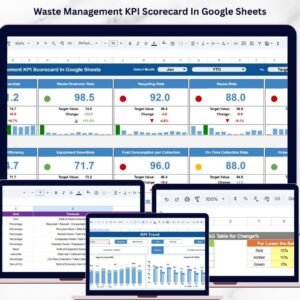
The Waste Management KPI Scorecard in Google Sheets is a ready-to-use analytics template designed to help organizations monitor waste management performance using structured Key Performance Indicators (KPIs). This powerful scorecard enables managers to track operational efficiency, recycling performance, landfill reduction, and sustainability metrics through an interactive dashboard.
Instead of relying on scattered spreadsheets and manual reports, this scorecard consolidates performance data into a single centralized platform. Managers can easily compare Actual values, Target performance, and Previous results, allowing them to quickly identify areas that require improvement.
The template includes 10 different KPIs designed specifically for waste management operations. These KPIs help organizations measure collection efficiency, recycling rates, waste diversion, landfill reduction, and overall environmental performance.
Because this scorecard is built in Google Sheets, users can access it from anywhere and collaborate with their teams in real time. With automated calculations, visual indicators, and dynamic dashboards, decision-makers can analyze waste management performance quickly and make informed decisions that support sustainability goals.

Key Feature of Waste Management KPI Scorecard in Google Sheets ♻️
The Waste Management KPI Scorecard in Google Sheets includes several powerful features that simplify environmental performance monitoring.
📊 Interactive KPI Monitoring Dashboard
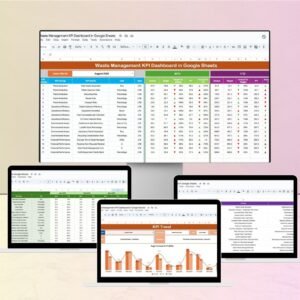
The dashboard provides a structured overview of all waste management KPIs, helping managers monitor operational performance instantly.
📅 Monthly Performance Selection
Users can select any month from a dropdown menu, and the entire dashboard automatically updates based on the selected period.
📈 MTD and YTD Performance Analysis
The scorecard allows users to analyze both Month-To-Date (MTD) and Year-To-Date (YTD) performance for better insights.
🚦 Traffic Light Performance Indicators
Color-coded indicators (Green, Yellow, Red) help users quickly understand whether KPI performance is on target.
⬆️⬇️ Performance Trend Arrows
Up and down arrows display performance improvement or decline compared to targets or previous results.
📊 Actual vs Target Comparison
Managers can easily compare actual KPI values with targets to evaluate operational performance.
📉 KPI Trend Analysis
The template includes a dedicated sheet to analyze KPI performance trends over time.
📘 KPI Definition Documentation
Each KPI includes detailed definitions, formulas, and measurement units to ensure accurate interpretation.
☁️ Cloud-Based Collaboration
Because the template runs in Google Sheets, multiple team members can access and update data simultaneously.
⚙️ Automated Calculations
Built-in formulas automatically calculate performance metrics, reducing manual work.
What’s Inside the Waste Management KPI Scorecard in Google Sheets 📂
This template includes several structured sheets designed to support KPI monitoring and performance analysis.
📊 Dashboard Sheet
The main page of the scorecard where users can monitor all KPI performance indicators in a structured format.
📈 KPI Trend Sheet
Allows users to select a specific KPI and analyze its performance trend over time.
📘 KPI Definition Sheet
Stores detailed information about each KPI including formula, definition, group, and measurement unit.
📥 Data Input Sheet
The primary area where users enter waste management performance data.
🎨 Colour Settings Sheet
Allows users to customize traffic light indicators and conditional formatting colors used in the dashboard.
Together, these sheets create a comprehensive KPI monitoring system that supports environmental performance management.
How to Use the Waste Management KPI Scorecard in Google Sheets ⚙️
Using this scorecard is simple and requires minimal setup.
1️⃣ Open the template in Google Sheets.
2️⃣ Enter performance data in the Data Input Sheet.
3️⃣ Update KPI definitions in the KPI Definition Sheet if necessary.
4️⃣ Select a month from the dashboard dropdown menu.
5️⃣ Choose MTD or YTD view to analyze performance.
6️⃣ Review traffic light indicators and performance arrows to evaluate results.
7️⃣ Use the KPI Trend Sheet to analyze performance trends.
Because the scorecard automatically calculates KPI results, managers can quickly monitor waste management performance.
Who Can Benefit from This Waste Management KPI Scorecard in Google Sheets 👥
This scorecard is ideal for organizations responsible for waste management and environmental monitoring.
🏙 Municipal Waste Departments – Monitor city waste management operations.
🌱 Environmental Agencies – Track sustainability and recycling performance.
🏭 Industrial Waste Management Teams – Monitor waste generation and disposal efficiency.
♻️ Recycling Organizations – Track recycling rates and waste diversion metrics.
🏢 Corporate Sustainability Teams – Monitor environmental performance and compliance.
📊 Consultants and Analysts – Evaluate waste management performance for clients.
Organizations that aim to improve sustainability, reduce environmental impact, and optimize waste operations can benefit greatly from this scorecard.
Click hare to read the Detailed blog post
Visit our YouTube channel to learn step-by-step video tutorials
🔗 https://youtube.com/@NeotechNavigators
Compatibility and Requirements
- Works in Google Sheets. You need a free Google account and a web browser.
- You pick the month from a dropdown on the dashboard. Google explains dropdowns in Create an in-cell dropdown list.
Frequently Asked Questions
Which sheets are included?
Five sheets: Dashboard, KPI Trend, KPI Definition, Data Input and Colour Settings.
How many KPIs does the scorecard track?
It tracks 10 KPIs for waste management, covering collection efficiency, recycling rates, waste diversion and landfill reduction.
How do I update the scorecard?
Enter your figures in the Data Input sheet, then select a month from the dropdown on the Dashboard. You can switch between MTD and YTD views.
Can I change the traffic light colors?
Yes. The Colour Settings sheet lets you change the colors used for the traffic light indicators and conditional formatting.
Is there an Excel or Power BI version?
Yes. See the Waste Management KPI Scorecard in Excel and the Waste Management Dashboard in Power BI.
Related Waste and Environmental Templates
- Waste Management KPI Dashboard in Google Sheets: a dashboard view of the same topic in Google Sheets
- Waste Management KPI Scorecard in Excel: the scorecard for Excel users
- Waste Management KPI Dashboard in Power BI: the Power BI edition
- Environmental KPI Scorecard in Excel: broader environmental metrics
Browse all Google Sheets KPI dashboards.