



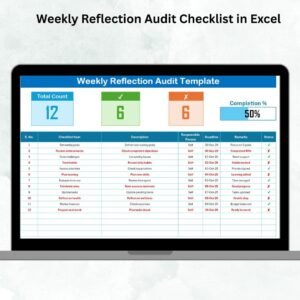
The Weekly Reflection Planner Checklist in Excel is an essential tool for anyone looking to reflect on their week, set goals, and stay organized. Whether you’re focused on personal growth, work-related achievements, or overall productivity, this checklist helps you track your progress, identify areas for improvement, and plan for the week ahead.
This easy-to-use Excel template enables you to organize your weekly tasks, reflect on accomplishments, and set meaningful goals. By reflecting on your week regularly, you can boost productivity, maintain motivation, and ensure you’re moving closer to your long-term objectives.
Key Features of the Weekly Reflection Planner Checklist in Excel
📝 Comprehensive Weekly Tracking
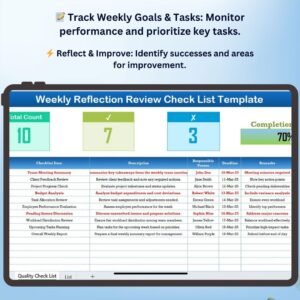
Track your weekly activities, tasks, and goals. Reflect on your accomplishments and challenges and use that insight to plan for the upcoming week.
⚡ Real-Time Progress Monitoring
Monitor your progress throughout the week. Log completed tasks, evaluate setbacks, and identify key areas for improvement in real time.
📈 Weekly Goals Setting & Review
Set weekly goals and track your progress toward achieving them. Reflect on your performance at the end of the week to assess whether you’ve met your targets and plan adjustments for the future.
📅 Task Management & Prioritization
Prioritize your tasks for the week, ensuring that your time is spent on the most important activities. Track deadlines, accomplishments, and any outstanding tasks that need to be carried over to the next week.
🖥️ User-Friendly Interface
The template’s simple and intuitive design makes it easy to use, helping you stay organized without feeling overwhelmed by complicated tools.
Why You’ll Love the Weekly Reflection Planner Checklist

✅ Reflect on Your Week Effectively
Review your weekly progress and identify what went well and what didn’t. Use that information to improve your performance in the following week.
✅ Stay Organized and Focused
Track your goals, tasks, and priorities in one place. Stay organized and ensure that you’re always working toward what matters most.
✅ Boost Productivity & Motivation
Set meaningful goals each week and monitor your progress to maintain focus and motivation. Reflect on your achievements to stay inspired and keep pushing forward.
✅ Easily Track Tasks & Deadlines
Prioritize your tasks, monitor deadlines, and make sure you’re staying on track with your weekly schedule. Stay productive and achieve more each week.
✅ Achieve Long-Term Goals with Consistent Reflection
Regular weekly reflection helps you build momentum, refine your goals, and make steady progress toward your long-term objectives.
What’s Inside the Weekly Reflection Planner Checklist Template?
- Weekly Goal Tracker: Set goals at the beginning of each week and track your progress toward achieving them.
- Task Management & Prioritization: Prioritize tasks for the week, set deadlines, and track completed tasks.
- Weekly Reflection Section: Reflect on your successes and challenges each week and use that information to improve.
- Weekly Progress Monitoring: Monitor your performance throughout the week and assess your achievements at the end.
- Customizable Sections: Tailor the template to focus on the aspects that matter most to you, whether personal, work-related, or both.
How to Use the Weekly Reflection Planner Checklist
1️⃣ Download the Template: Get instant access to your Weekly Reflection Planner.
2️⃣ Set Your Weekly Goals: Define what you aim to achieve in the week ahead.
3️⃣ Track Progress and Tasks: Log completed tasks, prioritize pending ones, and manage your deadlines throughout the week.
4️⃣ Reflect and Adjust: At the end of the week, reflect on your achievements, challenges, and areas for improvement to adjust your goals for the upcoming week.
Who Can Benefit from the Weekly Reflection Planner Checklist?
🔹 Individuals Looking to Improve Personal Productivity
🔹 Professionals Managing Multiple Projects or Tasks
🔹 Students and Learners Who Want to Stay on Top of Their Studies
🔹 Entrepreneurs and Small Business Owners
🔹 Anyone Looking to Set Goals, Reflect on Their Progress, and Improve Time Management
Reflect on your progress, set actionable goals, and stay on track with the Weekly Reflection Planner Checklist in Excel. Stay organized, boost your productivity, and achieve more each week.
Click here to read the Detailed blog post
Visit our YouTube channel to learn step-by-step video tutorials
Youtube.com/@PKAnExcelExpert
Compatibility and Requirements
- Works in Microsoft Excel desktop (Excel 2016 or later, or Microsoft 365).
- New to Excel? Microsoft covers the basics in Excel for Windows training.
Frequently Asked Questions
What does the weekly planner checklist include?
It includes a weekly goal tracker, task management with priorities and deadlines, a weekly reflection section and weekly progress monitoring.
How do I use it each week?
Set your goals at the start of the week, log tasks as you finish them, then reflect on successes and challenges at the end.
Can I carry unfinished tasks forward?
Yes. You track outstanding tasks and carry them over to the next week.
Can I use it for work and personal goals?
Yes. The sections are customizable for personal goals, work goals or both.
Related Weekly Reflection and Planning Templates
- Weekly Reflection To-Do List Checklist in Excel: a weekly to-do list with reflection
- Weekly Reflection Tracking Checklist in Excel: track weekly progress and well-being
- Weekly Reflection Review Checklist in Excel: review your week
- Weekly Reflection Checklist in Google Sheets: a weekly reflection checklist in Google Sheets
- Checklist & SOP Pack: 12 checklist templates in one download
Browse all Excel checklists or the Google Sheets checklists.




















Reviews
There are no reviews yet.