


Healthcare organizations operate in an environment where quality of care, operational efficiency, patient safety, and cost control must stay perfectly balanced. Hospitals, clinics, and diagnostic centers track dozens of performance indicators every month. However, when KPI data is scattered across multiple spreadsheets and reports, leaders struggle to identify risks, delays, and improvement opportunities in time.
That is exactly why the Healthcare KPI Scorecard in Google Sheets becomes an essential performance management tool.
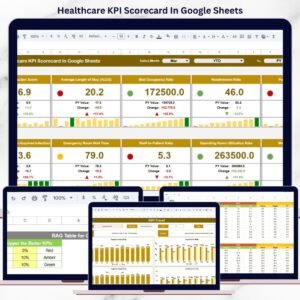
This ready-to-use scorecard converts complex healthcare performance data into a clear, visual, and decision-ready scorecard. It allows healthcare administrators, operations managers, finance teams, and quality leaders to monitor 10 critical healthcare KPIs using MTD (Month-to-Date) and YTD (Year-to-Date) views with traffic light indicators and trend arrows. Instead of reacting to problems late, teams gain instant visibility into what is performing well and what needs attention.
Because the scorecard is built entirely in Google Sheets, it supports real-time collaboration, cloud-based access, automatic calculations, and full customization—without the need for expensive healthcare BI tools.

🏥 Key Features of the Healthcare KPI Scorecard in Google Sheets
📊 1. One-Page Healthcare Performance Snapshot
View all critical healthcare KPIs in a single scorecard without navigating multiple dashboards.
🚦 2. Traffic Light Performance Indicators
Red, Amber, and Green indicators instantly show KPI health and risk levels.
📈 3. Trend Arrows & Percentage Change
Up and down arrows highlight performance improvement or decline compared to previous periods.
📅 4. MTD & YTD Performance Toggle
Switch easily between monthly performance tracking and cumulative yearly analysis.
🤝 5. Google Sheets-Based Collaboration
Multiple teams can update and review KPIs simultaneously with secure access controls.
📦 What’s Inside the Healthcare KPI Scorecard
🖥️ KPI Scorecard Sheet – Main Dashboard
This is the central performance view used by leadership and managers.
📌 What You See on the Scorecard
Month dropdown to select reporting period
10 predefined healthcare KPIs
MTD Actual & YTD Actual values
Target vs Actual comparison
Performance trend indicators
Traffic light status for each KPI
With one click, users can shift between monthly insights and yearly performance trends.
📊 KPI Trend Sheet Tab
This sheet provides deeper KPI understanding and transparency.
🔍 KPI Selection
Select a KPI from the dropdown in cell C3
📘 KPI Information Displayed
KPI Group (Clinical, Financial, Operational, Quality)
Unit of Measurement
KPI Type:
UTB (Upper the Better)
LTB (Lower the Better)
KPI Formula
Clear KPI Definition
This sheet is ideal for audits, leadership reviews, and compliance discussions.
📘 KPI Definition Sheet Tab
This sheet acts as the KPI master reference, ensuring consistency across teams.
🔹 Information Included
KPI Name
KPI Group
Unit
Formula
KPI Definition
KPI Type (LTB / UTB)
It eliminates confusion and standardizes performance reporting.
📄 Data Input Sheet Tab
This is where users enter actual KPI data.
🔹 How It Works
Enter monthly KPI values once
MTD and YTD calculations update automatically
Scorecard, trends, and indicators refresh instantly
No advanced formulas are required from the user side.
🎨 Colour Settings Sheet
This optional sheet controls scoring logic.
🔹 Purpose
Define Red / Amber / Green thresholds
Customize performance rules
Align scoring with healthcare standards
This flexibility allows adaptation across hospitals and clinics.
📊 Common Healthcare KPIs Included
Patient Satisfaction Score (UTB)
Average Length of Stay (LTB)
Bed Occupancy Rate (UTB)
Readmission Rate (LTB)
Cost per Patient (LTB)
Staff Utilization Rate (UTB)
Treatment Turnaround Time (LTB)
Revenue per Patient (UTB)
Infection Rate (LTB)
Claims Approval Rate (UTB)
Each KPI includes definition, formula, unit, and performance logic.
🎯 Who Can Benefit from This Healthcare KPI Scorecard
🏥 Hospitals & Clinics
Monitor quality, cost, and operational efficiency.
📊 Healthcare Administrators
Track performance without manual reporting.
🛡️ Quality & Compliance Teams
Identify risks and improvement areas early.
💼 Finance & Operations Managers
Control costs and improve resource utilization.
🚀 Growing Healthcare Organizations
Scale performance tracking with clarity.
### Click here to read the Detailed blog post
Watch the step-by-step video tutorial:
Visit our YouTube channel to learn step-by-step video tutorials — Youtube.com/@NeotechNavigators
Compatibility and Requirements
- Works in Google Sheets. You need a free Google account and a web browser.
- You pick the reporting month from a dropdown on the scorecard, and a KPI from a dropdown on the KPI Trend sheet. Google explains dropdowns in Create an in-cell dropdown list.
Frequently Asked Questions
How many KPIs does the scorecard track?
It has 10 predefined healthcare KPIs, including Patient Satisfaction Score, Average Length of Stay, Bed Occupancy Rate, Readmission Rate and Infection Rate.
Where do I enter my KPI data?
Enter your monthly values once on the Data Input sheet. The MTD and YTD figures, trend arrows and traffic lights update from there.
Can I change what counts as red, amber or green?
Yes. The optional Colour Settings sheet holds the Red, Amber and Green thresholds, so you can set the scoring rules to match your own standards.
Can I switch between monthly and yearly views?
Yes. The scorecard shows both MTD and YTD actuals, and you can switch between monthly performance and the cumulative yearly view.
Is there an Excel version?
Yes. See the Healthcare KPI Scorecard in Excel.
Related Healthcare Templates
- Healthcare KPI Scorecard in Excel: the same scorecard for Excel
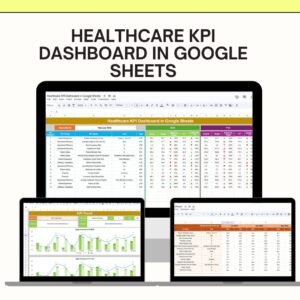
- Healthcare KPI Dashboard in Google Sheets: a dashboard view of healthcare KPIs
- Healthcare Dashboard in Google Sheets: another Google Sheets healthcare dashboard
- Hospital Operations KPI Scorecard in Excel: a scorecard focused on hospital operations
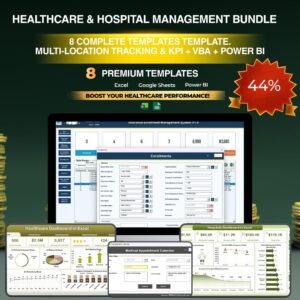
- Healthcare & Hospital Management Bundle: 8 templates for healthcare teams in one download
Browse all Google Sheets KPI dashboards.









Reviews
There are no reviews yet.