


Pricing is one of the most powerful growth levers in any business. Even small pricing adjustments can significantly impact revenue, profitability, and market positioning. However, many organizations still evaluate pricing decisions using intuition, static reports, or fragmented spreadsheets. As a result, margin erosion goes unnoticed, discounting becomes uncontrolled, and pricing strategies drift away from business goals.
That is exactly why the Pricing Strategy KPI Dashboard in Google Sheets becomes a critical decision-support tool.
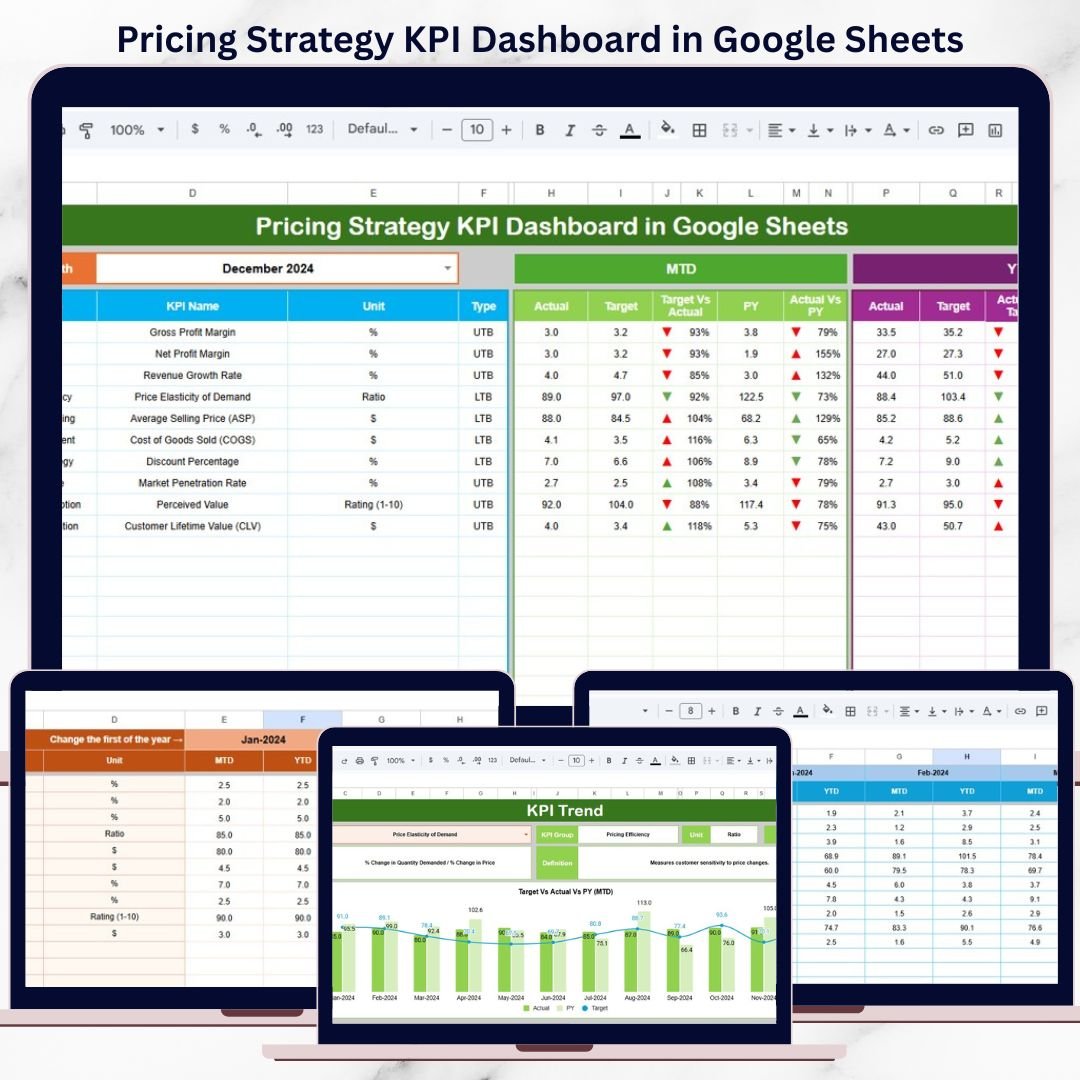
This ready-to-use dashboard transforms pricing data into structured KPIs, comparisons, and trends that reveal how pricing strategies actually perform. It helps pricing managers, finance teams, sales leaders, and executives monitor margin health, revenue impact, discount effectiveness, and pricing consistency—using real data instead of assumptions. With automated calculations and visual indicators, teams can react faster to market changes and protect profitability without relying on expensive analytics software.
Because the dashboard is built entirely in Google Sheets, it remains simple, collaborative, and flexible for organizations of all sizes.
✨ Key Features of the Pricing Strategy KPI Dashboard in Google Sheets
📊 1. MTD & YTD Pricing Performance Tracking
Track Month-to-Date and Year-to-Date pricing KPIs to understand short-term performance and long-term strategy effectiveness at the same time.
🎯 2. Target vs Actual & Previous-Year Comparison
Compare actual pricing results against defined targets and last year’s benchmarks to identify gaps, improvements, or pricing risks.
📈 3. Visual Performance Indicators
Conditional formatting arrows provide instant clarity:
🟢 Green arrow → favorable pricing trend
🔴 Red arrow → unfavorable pricing movement
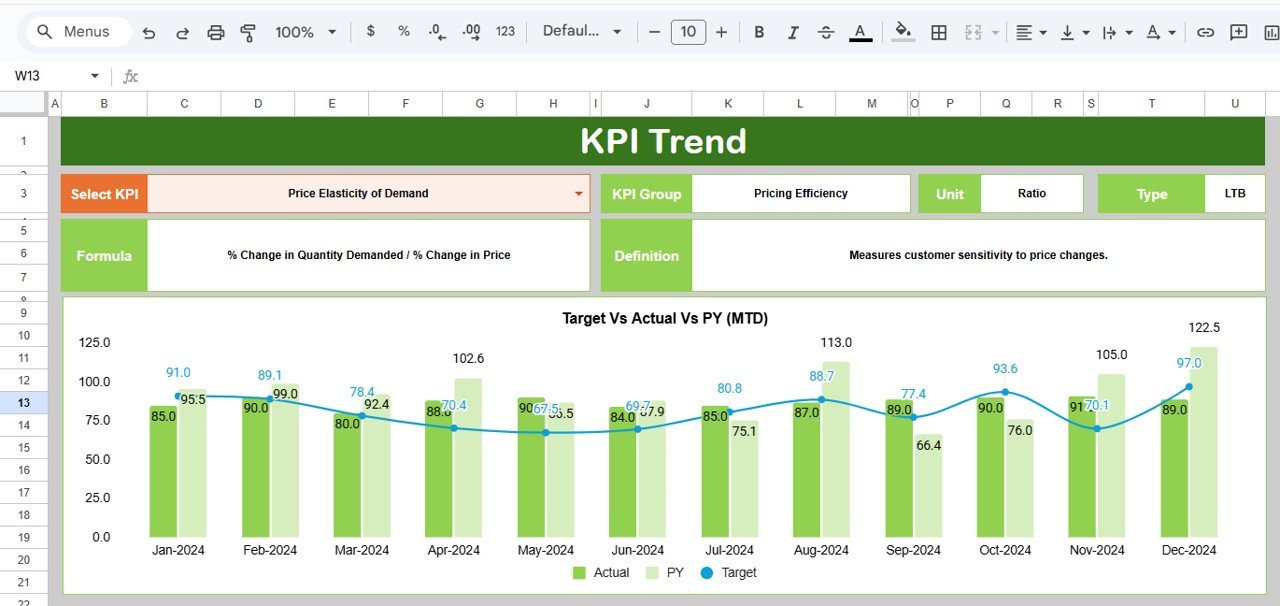
📉 4. KPI Trend Analysis
Analyze month-wise pricing KPI trends to detect margin pressure, discount creep, or revenue opportunities early.
☁️ 5. Google Sheets-Based & Collaborative
Enable real-time collaboration across pricing, finance, sales, and leadership teams using a single shared dashboard.
📦 What’s Inside the Pricing Strategy KPI Dashboard in Google Sheets
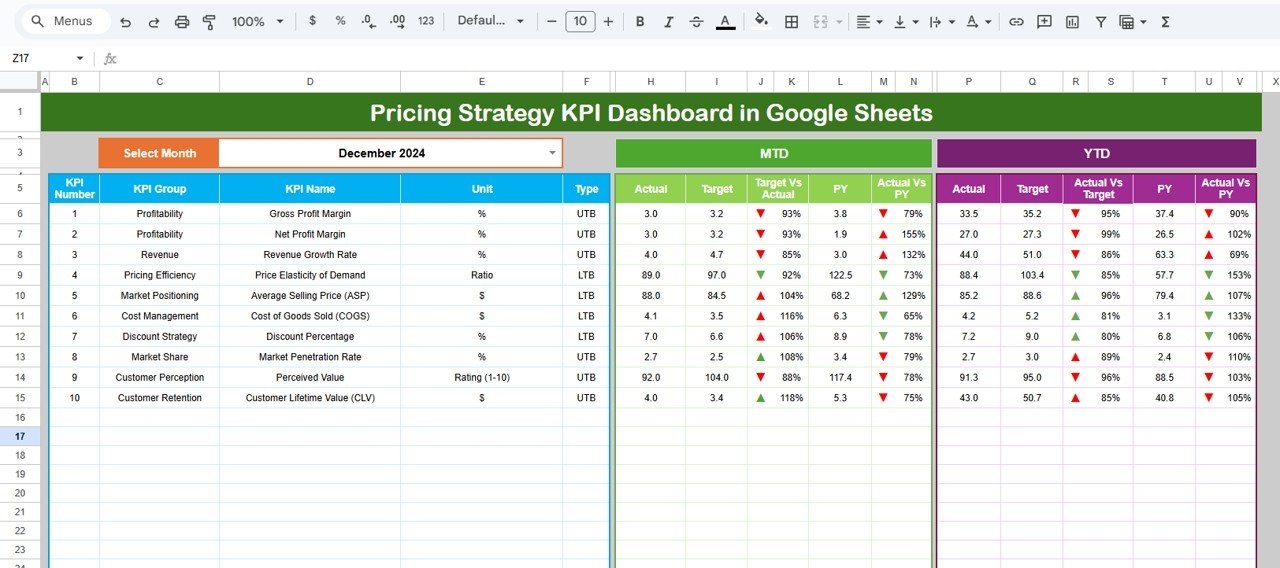
🖥️ Dashboard Sheet Tab (Main Pricing Overview)
This is the executive control panel used during pricing reviews.
Month Selector
Located in cell D3
Automatically refreshes all KPIs
MTD Metrics Displayed
Actual
Target
Previous Year
Target vs Actual
Previous Year vs Actual
YTD Metrics Displayed
Actual
Target
Previous Year
Target vs Actual
Previous Year vs Actual
This structure allows leadership to evaluate pricing performance at a glance.
📊 KPI Trend Sheet Tab
This sheet supports detailed analysis of individual pricing KPIs.
How It Works
Select a KPI from the dropdown in cell C3
Details Displayed
KPI Group
KPI Unit
KPI Type (UTB / LTB)
KPI Formula
KPI Definition
Trend Visualization
Month-wise KPI movement
Pricing volatility patterns
Early warning signs
This sheet helps teams understand why pricing performance changes over time.
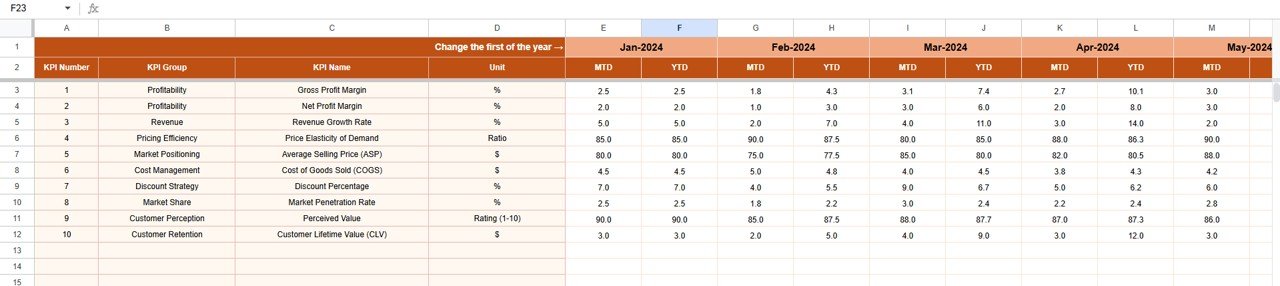
📋 Actual Number Sheet Tab
This is the structured data-entry sheet for pricing results.
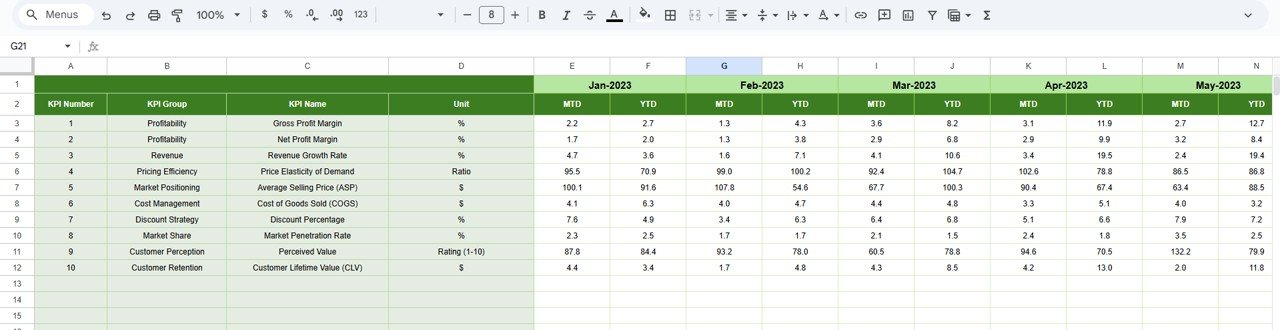
Enter MTD Actual values
Enter YTD Actual values
Define the first month of the year in cell E1
All calculations and charts update automatically.
🎯 Target Sheet Tab
This sheet stores pricing goals and benchmarks.
Monthly (MTD) pricing targets
Annual (YTD) pricing targets
Targets align teams with revenue growth and margin protection objectives.
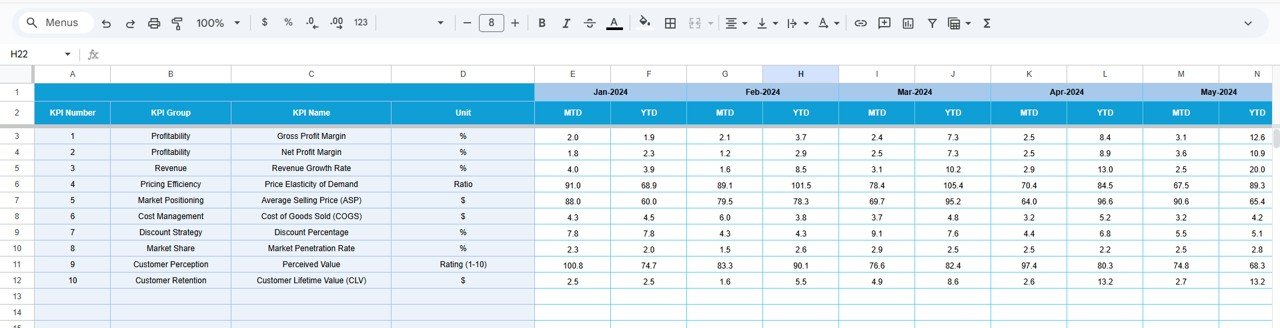
📆 Previous Year Number Sheet Tab
Stores last year’s pricing performance data to support:
Year-over-year analysis
Market trend evaluation
Seasonal pricing insights
Historical context improves strategic pricing decisions.
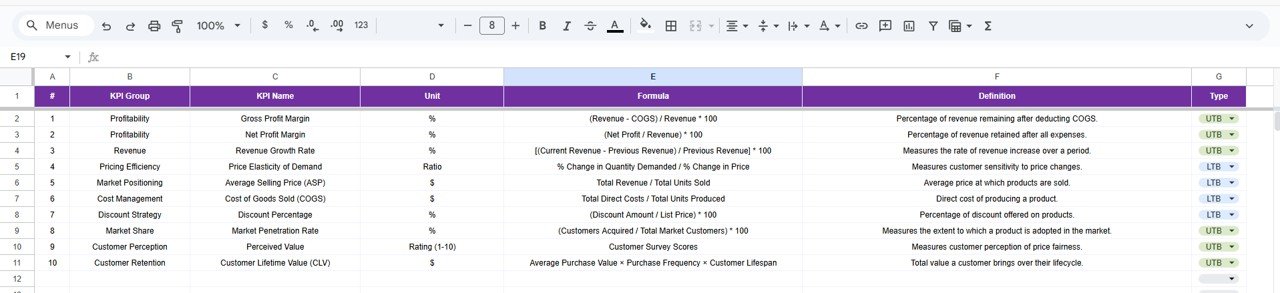
📘 KPI Definition Sheet Tab
This is the governance backbone of the dashboard.
It contains:
KPI Name
KPI Group
Unit
Formula
KPI Definition
KPI Type (UTB / LTB)
This ensures consistent KPI interpretation across all stakeholders.
🎯 Who Can Benefit from This Pricing Strategy KPI Dashboard
💰 Pricing Managers
Monitor pricing effectiveness and protect margins.
📊 Finance Teams
Track profitability impact and pricing discipline.
📈 Sales Leadership
Align discounting behavior with pricing strategy.
🏢 Business Owners & Executives
Make confident, data-driven pricing decisions.
🚀 Organizations of Any Size
Improve pricing maturity without complex tools.
### Click here to read the Detailed blog post
Watch the step-by-step video tutorial:
Visit our YouTube channel to learn step-by-step video tutorials — Youtube.com/@NeotechNavigators
Compatibility and Requirements
- Works in Google Sheets with a free Google account and a web browser. Nothing to install.
- The month selector and the KPI picker are dropdown lists. Google explains how these work in Create an in-cell dropdown list.
Frequently Asked Questions
What sheet tabs are in the Pricing Strategy KPI Dashboard?
Six: Dashboard, KPI Trend, Actual Number, Target, Previous Year Number and KPI Definition.
How do I change the month on the dashboard?
Pick the month in cell D3 of the Dashboard tab. All MTD and YTD figures update for that month.
How do I look at one KPI in detail?
Select the KPI from the dropdown in cell C3 of the KPI Trend tab. It shows the KPI group, unit, type, formula, definition and its month-wise trend.
What do UTB and LTB mean?
They set the KPI type. UTB means upper the better and LTB means lower the better, so the arrows show the right direction for each KPI.
Is there an Excel or Power BI version?
Yes. See the Pricing Strategy KPI Dashboard in Excel and the Pricing Strategy KPI Dashboard in Power BI.
Related Pricing and Sales Templates
- Pricing Strategy KPI Dashboard in Excel: the same KPI set in Excel.
- Pricing Strategy KPI Dashboard in Power BI: the same KPI set in Power BI.
- Pricing Calculator in Google Sheets: work out prices before you track them.
- Sales KPI Scorecard in Google Sheets: track sales KPIs next to pricing.
- Google Sheets Business Pack (Pro): 14 Google Sheets business templates in one bundle.
Browse all Google Sheets KPI dashboard templates or the Google Sheets sales and marketing templates.



















Reviews
There are no reviews yet.