



Clinic Project Management in a clinic environment is never simple. Clinics run multiple projects at the same time—facility upgrades, IT implementations, equipment installations, compliance initiatives, and operational improvements. Each project has its own budget, timeline, risk level, and responsible team. However, when project data remains scattered across emails, registers, and disconnected Excel files, visibility drops, delays increase, and costs spiral out of control.
That is exactly why Clinic Project Management in Excel becomes a powerful and practical solution.
This ready-to-use Excel-based project management system converts raw project data into clear KPIs, interactive dashboards, and structured performance insights. Instead of manually tracking budgets, costs, risks, and timelines, clinic administrators and project managers can monitor everything from a single centralized Excel dashboard.
Because this solution works entirely in Excel, clinics do not need expensive project management software, technical skills, or complex implementations. You simply update the Data Sheet, and all KPIs, charts, and analysis pages refresh automatically. As a result, clinics save time, reduce errors, and gain full control over project execution.
More importantly, this dashboard enables clinics to answer critical questions instantly:
-
Are projects staying within budget?
-
Which departments manage projects efficiently?
-
Which project managers deliver on time?
-
Which project types carry higher risk?
-
How do project costs and workloads change month by month?
With Clinic Project Management in Excel, project oversight becomes structured, visual, and decision-ready.
🔑 Key Features of Clinic Project Management in Excel
📊 Centralized Project Tracking – All projects in one Excel file
💰 Planned vs Actual Cost Monitoring – Strong budget control
⚠️ Risk Level Identification – Spot high-risk projects early
🏥 Clinic & Department-Wise Analysis – Operational transparency
👤 Project Manager Performance Tracking – Clear accountability
📅 Monthly Trends & Forecasting – Smarter planning
🎛️ Interactive Filters & Page Navigator – Easy navigation
⚡ Automated KPIs & Charts – No manual calculations
📂 What’s Inside the Clinic Project Management Dashboard in Excel
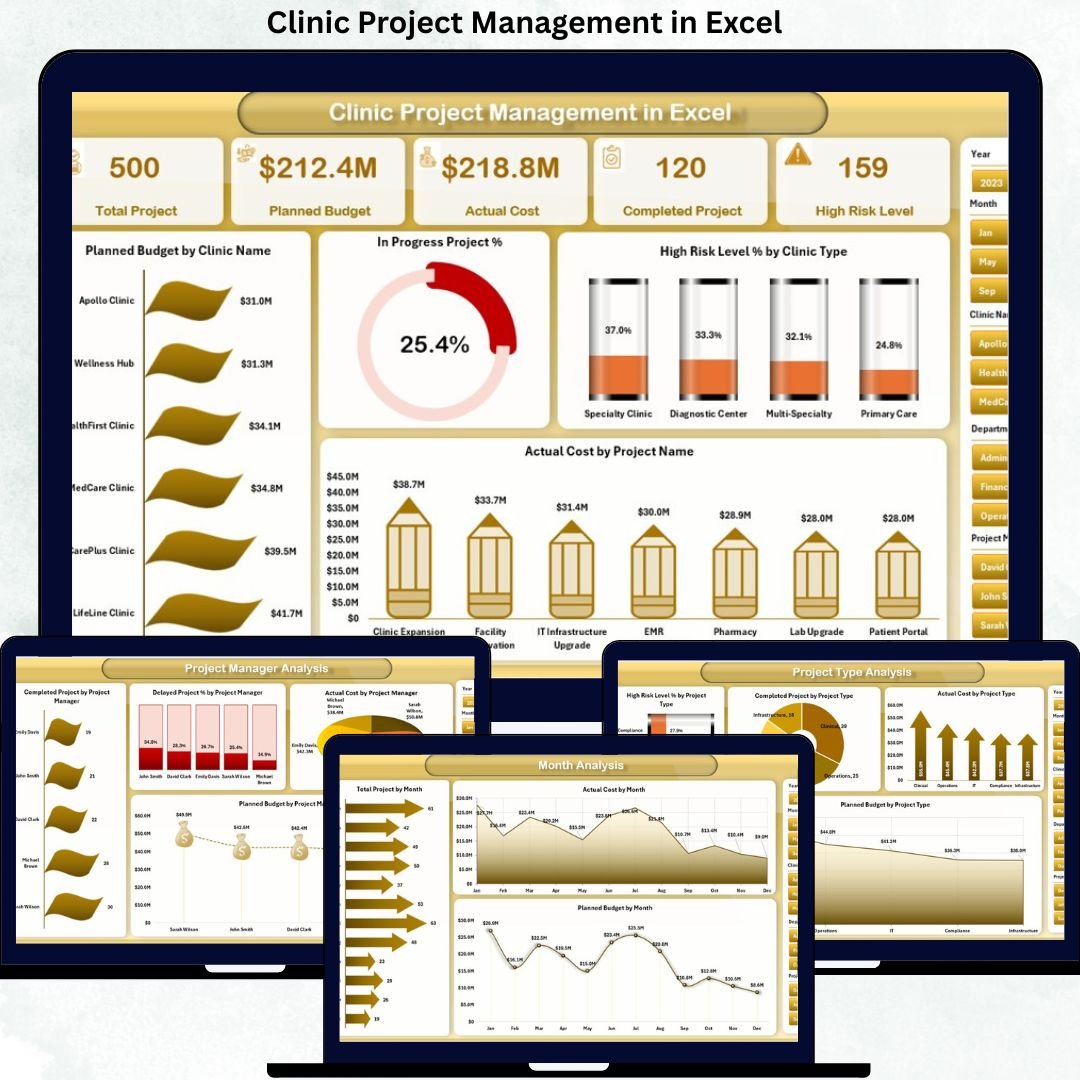
This professionally designed dashboard includes five structured analytical pages, supported by backend data and support sheets.
📊 Overview Page

A complete snapshot of project performance:
-
Total Planned Budget
-
Total Actual Cost
-
Total Projects
-
High-Risk Project %
-
Planned Budget by Clinic Name
-
In-Progress Project % by Clinic Type
-
High-Risk Level % by Clinic Type
-
Actual Cost by Project Name
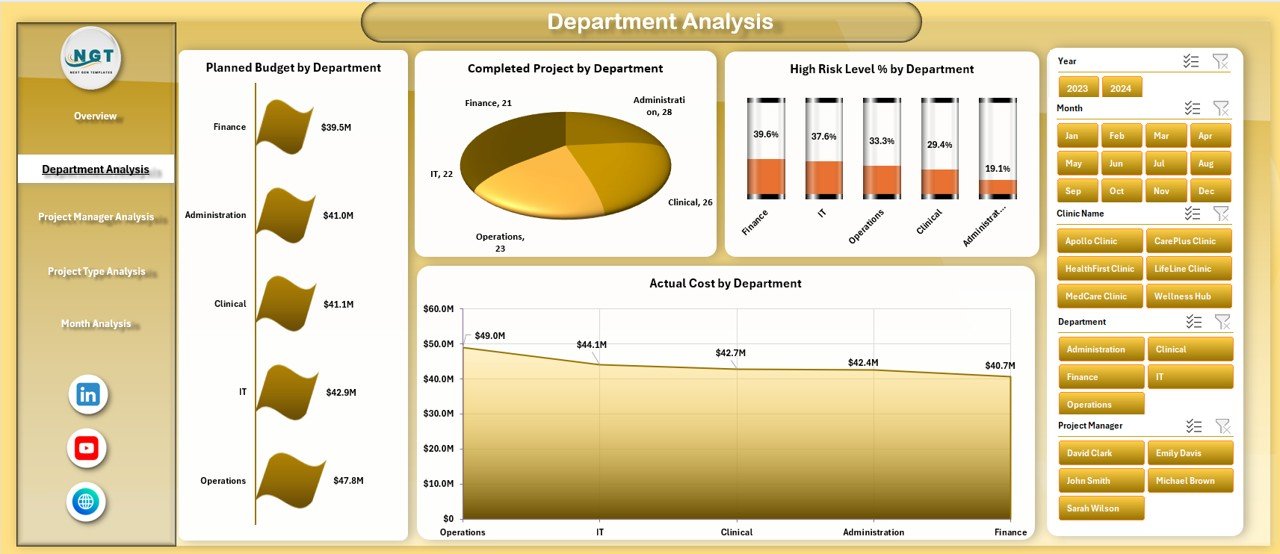
🏢 Department Analysis Page
Evaluate departmental project execution:
-
Planned Budget by Department
-
Completed Projects by Department
-
High-Risk Level % by Department
-
Actual Cost by Department
👤 Project Manager Analysis Page
Measure leadership and accountability:
-
Completed Projects by Project Manager
-
Delayed Project % by Project Manager
-
Actual Cost by Project Manager
-
Planned Budget by Project Manager
🧩 Project Type Analysis Page
Understand behavior by project category:
-
High-Risk Level % by Project Type
-
Completed Projects by Project Type
-
Actual Cost by Project Type
-
Planned Budget by Project Type
📅 Month Analysis Page
Track trends over time:
-
Total Projects by Month
-
Actual Cost by Month
-
Planned Budget by Month
Each page uses visual charts and KPI cards to simplify complex project data.
▶️ How to Use Clinic Project Management in Excel
1️⃣ Enter project details in the Data Sheet
2️⃣ Excel automatically calculates budgets, costs, risks, and status
3️⃣ Use slicers to filter by clinic, department, manager, or month
4️⃣ Review KPIs and charts for instant insights
5️⃣ Make data-driven project decisions
No advanced Excel knowledge is required.
👥 Who Can Benefit from This Dashboard
🏥 Clinic Administrators
📋 Operations & Project Managers
💰 Finance & Cost Control Teams
⚖️ Compliance Officers
🏢 Hospital & Healthcare Management
📊 Healthcare Consultants
### 👉 Click here to read the Detailed Blog Post
Visit our YouTube channel to learn step-by-step video tutorials:
👉 https://www.youtube.com/@PKAnExcelExpert










Reviews
There are no reviews yet.