Customer loyalty is one of the most powerful growth engines for any business. Loyal customers purchase more often, stay longer, trust deeply, and promote your brand organically. But measuring loyalty consistently across months and years requires a structured, visual, and real-time reporting system.
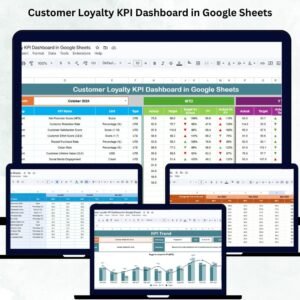
The Customer Loyalty KPI Dashboard in Google Sheets is a ready-to-use, multi-sheet solution designed to track all major loyalty KPIs using MTD, YTD, Target, and Previous Year comparisons. It comes with dynamic formulas, trend analysis, and performance indicators that highlight improvements and declines instantly — all inside a simple Google Sheets interface.
Whether you want to measure churn, retention, upsell activity, repeat purchases, satisfaction, or CLV, this dashboard gives you complete clarity on how well your loyalty strategies are performing.

Key Features of the Customer Loyalty KPI Dashboard in Google Sheets
This dashboard is built with 6 powerful worksheets, each designed to deliver clear insights, fast decisions, and accurate performance tracking.
✨ Dynamic KPI Dashboard (Main Sheet) – View all performance indicators in one place with instant updates.
📅 Month Selector – Select any month from Cell D3 and watch all charts and KPIs refresh automatically.
📊 MTD & YTD Comparison – Compare actual performance against Targets and Previous Year.
⬆️⬇️ Performance Indicator Arrows – Green ↑ for improvement and Red ↓ for decline.
📈 Trend Analysis Sheet – Track historical patterns and long-term KPI movements.
📑 KPI Definition Sheet – Understand KPI formulas, units, and classification (UTB/LTB).
📝 Actual, Target & Previous Year Sheets – Organized structure for accurate data entry.
☁️ 100% Google Sheets – No software needed, fully cloud-based and collaborative.
These features make loyalty measurement easy, visual, and highly actionable.
What’s Inside the Customer Loyalty KPI Dashboard in Google Sheets
🟦 Dashboard Sheet Tab (Main Sheet)
This is the heart of the system. It displays all MTD and YTD metrics for each KPI using a clean and interactive layout.
Key elements include:
Month Selector (D3)
MTD Actual, Target & Previous Year values
YTD Actual, Target & Previous Year values
Green ↑ and Red ↓ indicators for Target and Previous Year comparisons
Every number updates automatically when you change the month, allowing instant insights into customer loyalty performance.
🟧 KPI Trend Sheet Tab
This sheet helps teams analyze monthly trends for every KPI.
It includes:
KPI Dropdown (Cell C3)
KPI Group (Retention, Engagement, Financial, etc.)
Unit (% / Score / Number)
KPI Type (UTB / LTB)
KPI Formula
KPI Definition
This visual trend tracker helps identify behavioral patterns, seasonal shifts, and performance gaps.
🟩 Actual Number Sheet Tab
This is where you enter MTD and YTD actual values for each KPI by month.
Key functions include:
Change start month from Cell E1
Enter monthly actual performance data
Dashboard pulls all metrics automatically
🟨 Target Sheet Tab
Used to set performance targets for both MTD and YTD values.
This sheet helps teams:
Align goals
Track performance gaps
Identify KPIs needing improvement
Targets drive clarity and accountability across departments.
🟪 Previous Year Sheet Tab
This tab stores last year’s MTD and YTD values to provide benchmarking.
Comparing current results with past performance helps evaluate growth, retention success, and strategy effectiveness.
🟫 KPI Definition Sheet Tab
Contains the full library of KPI definitions including:
KPI Name
KPI Group
Unit
Formula
Description
Type (Lower The Better / Upper The Better)
This makes the dashboard professional, easy to follow, and suitable for teams new to loyalty measurement.
How to Use the Customer Loyalty KPI Dashboard in Google Sheets
🔹 Step 1: Enter all KPI actual values in the Actual Number Sheet.
🔹 Step 2: Update Targets for each KPI based on goals.
🔹 Step 3: Enter Previous Year metrics for accurate comparisons.
🔹 Step 4: Open Dashboard Sheet and select a month.
🔹 Step 5: Observe MTD & YTD performance indicators instantly.
🔹 Step 6: Use Trend Sheet for deeper monthly analysis.
🔹 Step 7: Adjust strategies based on indicators and trends.
All sheets update automatically, ensuring accuracy and real-time visibility.
Who Can Benefit from the Customer Loyalty KPI Dashboard in Google Sheets
🛒 Retail Businesses – Track repeat purchases & loyalty program performance.
💻 SaaS Companies – Analyze churn, retention & subscription engagement.
🏦 Financial Institutions – Measure CLV, cross-sell, and referral KPIs.
📱 E-commerce Stores – Track repeat orders, CLV, and customer engagement.
🏥 Service Providers – Monitor satisfaction and renewal-based loyalty.
🏢 Marketing & CRM Teams – Manage loyalty campaigns & customer engagement.
Any business focused on long-term customer value will benefit from this dashboard.
Click here to read the Detailed blog post
Watch the step-by-step video Demo: