



The Code Quality KPI Dashboard in Excel is a powerful and comprehensive tool designed for software developers, development teams, and quality assurance (QA) specialists to track and monitor key performance indicators (KPIs) related to code quality. This Excel-based dashboard offers a structured and easy-to-use way to visualize and analyze crucial code quality metrics such as code coverage, code complexity, defect density, and more.
By using this dashboard, development teams can ensure that their code meets quality standards, identify areas of improvement, and make data-driven decisions to enhance code quality over time. With real-time data tracking and customizable features, this dashboard allows for efficient code reviews, improvements in development practices, and a focus on maintaining high-quality standards in every project.
Key Features of the Code Quality KPI Dashboard in Excel
📊 Comprehensive Code Quality Metrics
Track and monitor important metrics such as code coverage, complexity, defect density, cyclomatic complexity, and code churn. This enables teams to measure the overall health of the codebase and identify areas needing attention.
🔍 Code Review Efficiency
Analyze the efficiency and effectiveness of code reviews by tracking the time spent on reviews, the number of comments, and feedback provided by team members. This helps improve the review process and reduces defects in the final code.
🛠 Bug Tracking & Defect Density Monitoring
Monitor defect density and track bugs and issues that arise during development. This feature allows teams to identify recurring issues and focus on improving areas with high defect rates.
📅 Time-Based Analysis
Analyze code quality over various time periods, such as daily, weekly, and monthly. This feature helps track improvements in code quality and provides insights into the effectiveness of development practices.
⚙️ Customizable KPIs
Tailor the dashboard to track the specific KPIs that are most relevant to your team. Whether you need to track code complexity or the number of automated tests, the dashboard can be customized to suit your project needs.
📈 Real-Time Data Tracking
Integrate real-time data from your version control system, build tools, or bug tracking software to ensure that the information presented in the dashboard is up to date. Track code quality in real time to make timely improvements.
Why You’ll Love the Code Quality KPI Dashboard in Excel

✅ Comprehensive Tracking of Code Quality
Track all essential code quality metrics in one place, from code complexity to defect density. Keep a close eye on how your code is evolving and make necessary improvements.
✅ Data-Driven Decisions for Continuous Improvement
Use insights from the dashboard to drive continuous improvement in your coding practices. Identify areas of weakness and ensure that code quality remains high throughout the development process.
✅ Efficient Code Review Process
Track the efficiency of code reviews, identify bottlenecks, and make adjustments to streamline the review process. This will result in faster development cycles and higher-quality code.
✅ Focus on Reducing Defects
Monitor defect density and bugs to identify problem areas in your code. Focus on improving those areas to reduce the number of defects and improve the overall stability of your product.
✅ Customizable & Scalable
Adapt the dashboard to track the specific code quality metrics that matter most to your project or organization. It’s scalable for teams of all sizes and can grow with your needs.
What’s Inside the Code Quality KPI Dashboard in Excel?
Comprehensive Code Quality Metrics: Track code coverage, complexity, defect density, and more.
Code Review Efficiency: Monitor the effectiveness of code reviews and feedback provided.
Bug & Defect Tracking: Track defects, issues, and bugs during development.
Time-Based Analysis: Analyze trends in code quality over time.
Customizable KPIs: Tailor the dashboard to track your specific code quality metrics.
Real-Time Data Tracking: Keep your data up to date with real-time integrations.
How to Use the Code Quality KPI Dashboard in Excel
1️⃣ Download the Template: Instantly access the Code Quality KPI Dashboard in Excel.
2️⃣ Input Code Quality Data: Enter relevant data such as defect density, coverage, and complexity into the dashboard.
3️⃣ Track & Analyze KPIs: Monitor key metrics like code quality and code review efficiency.
4️⃣ Generate Reports & Insights: Use the time-based analysis feature to generate reports on improvements or areas needing attention.
5️⃣ Optimize Development Practices: Use the data to make decisions that improve code quality and team performance.
Who Can Benefit from the Code Quality KPI Dashboard in Excel?
🔹 Software Developers & Engineers
🔹 Development Teams & Project Managers
🔹 Quality Assurance (QA) Specialists
🔹 IT & Technology Managers
🔹 Small & Medium Enterprises (SMBs)
🔹 Large Development Teams & Corporations
🔹 Startups with a Focus on Software Quality
Ensure your development team maintains high standards with the Code Quality KPI Dashboard in Excel. Track essential code quality metrics, streamline the review process, and improve the overall performance of your codebase.
Click here to read the Detailed blog post
Visit our YouTube channel to learn step-by-step video tutorials
Youtube.com/@PKAnExcelExpert
Compatibility and Requirements
- Works in Microsoft Excel desktop (Excel 2016 or later, or Microsoft 365).
- You enter your code quality figures in the workbook, such as defect density, coverage and complexity. Microsoft explains how to create a chart in Excel if you want to add your own views.
Frequently Asked Questions
Which code quality metrics does the dashboard track?
It tracks code coverage, code complexity, defect density, cyclomatic complexity and code churn. It also covers code review efficiency and bug tracking.
Can I see how code quality changes over time?
Yes. The time-based analysis lets you look at code quality by day, week and month, so you can see whether your development practices are improving results.
Can I track my own KPIs?
Yes. The KPIs are customizable, so you can track the metrics that matter to your project, such as code complexity or the number of automated tests.
What does it show about code reviews?
It tracks the time spent on reviews, the number of comments and the feedback given by team members, which helps you find bottlenecks in the review process.
Is there a Google Sheets version?
Yes. See the Code Quality KPI Dashboard in Google Sheets.
Related Quality and KPI Templates
- Code Quality KPI Dashboard in Google Sheets: the same code quality KPIs in Google Sheets
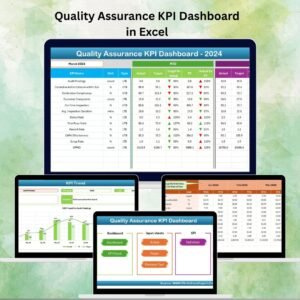
- Quality Assurance KPI Dashboard in Excel: a KPI view for QA teams
- Quality Assurance Dashboard in Excel: a dashboard for quality assurance results
- Quality KPI Dashboard in Excel: general quality KPIs in Excel
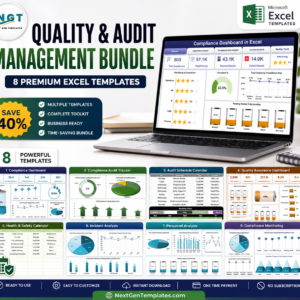
- Quality & Audit Management Bundle: 8 Excel quality templates in one download
Browse all Excel KPI dashboards and IT templates.

















Reviews
There are no reviews yet.