



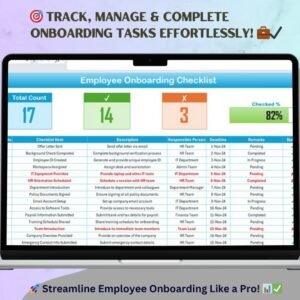
The Employee Onboarding Documentation Checklist in Excel is an essential tool designed to help HR teams, managers, and business owners streamline the employee onboarding process. This Excel-based checklist ensures that all the necessary documentation is completed, reviewed, and signed during the onboarding process, promoting a seamless transition for new hires and helping businesses stay compliant with company policies and legal requirements.
This customizable checklist simplifies the process of collecting and managing employee information, such as contracts, tax forms, confidentiality agreements, and more. By using this tool, HR teams can ensure that all required documents are collected and organized, helping them avoid errors, reduce administrative burdens, and ensure that new hires are fully equipped for success from day one.
Key Features of the Employee Onboarding Documentation Checklist in Excel
📋 Comprehensive Onboarding Documentation
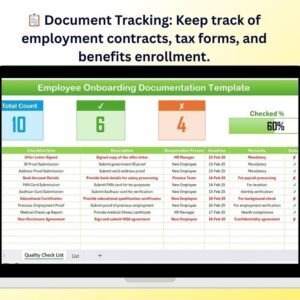
Track all essential onboarding documents such as employment contracts, tax forms, benefit enrollment, and confidentiality agreements. Stay organized by ensuring that nothing is missed.
📝 Customizable Template
Easily tailor the checklist to your company’s specific requirements. Add or remove sections, update document requirements, and modify timelines based on your organization’s needs.
📅 Deadline Tracking
Set deadlines for each document submission and ensure timely completion. The checklist will help you track the status of each form and remind you of pending submissions.
📈 Progress Monitoring
Monitor the progress of each new hire’s onboarding process, ensuring all tasks are completed in a timely manner. The checklist allows you to track which documents have been submitted, signed, or reviewed.
🔑 Compliance Assurance
Ensure that your company meets all legal and regulatory requirements by keeping track of all necessary documentation. Protect both your organization and new employees with a well-documented onboarding process.
⚙️ Easy-to-Use Interface
Designed for simplicity, the checklist offers an intuitive interface, making it easy to use for HR professionals and managers alike. It’s also fully compatible with all versions of Excel.
Why You’ll Love the Employee Onboarding Documentation Checklist in Excel

✅ Streamline the Onboarding Process
Easily manage and track all necessary documentation to ensure a smooth onboarding experience for new employees.
✅ Ensure Compliance
Keep track of all required forms and documents to ensure your company is meeting legal and compliance requirements.
✅ Reduce Administrative Work
Automate the tracking of documentation and reduce the administrative burden of manual checks and reminders.
✅ Improve New Hire Experience
With a streamlined, organized process, your new employees can focus on settling into their roles, while the HR team ensures everything is in place.
✅ Customizable for Your Needs
Adapt the checklist to match the specific needs of your organization, whether it’s adding additional documents or setting unique deadlines for each position.
What’s Inside the Employee Onboarding Documentation Checklist in Excel?
- Comprehensive Document Tracking: Track contracts, tax forms, and benefit enrollment.
- Customizable Fields: Add custom documents or adjust the checklist to your specific company policies.
- Deadline Tracking: Ensure timely document submission with set deadlines.
- Progress Monitoring: Track the completion status of each document and task.
- Compliance Assurance: Keep track of necessary documents for legal and regulatory compliance.
- Easy-to-Use Interface: Simple layout for seamless tracking and usage.
How to Use the Employee Onboarding Documentation Checklist in Excel
1️⃣ Download the Template: Instantly access your Employee Onboarding Documentation Checklist in Excel.
2️⃣ Customize Your Checklist: Modify the fields and sections according to your company’s onboarding process.
3️⃣ Input Employee Information: Add the new hire’s information, including job title, start date, and required documents.
4️⃣ Track Document Submission: Monitor when documents are submitted, signed, and reviewed.
5️⃣ Ensure Timely Completion: Use deadlines to ensure the timely collection and completion of all necessary documents.
Who Can Benefit from the Employee Onboarding Documentation Checklist in Excel?
🔹 HR Professionals & Managers
🔹 Recruitment & Talent Acquisition Teams
🔹 Small & Medium Enterprises (SMBs)
🔹 Large Corporations with HR Departments
🔹 Business Owners & Executives
🔹 New Hires Going Through Onboarding
🔹 Compliance & Legal Departments
Ensure a smooth and compliant onboarding process with the Employee Onboarding Documentation Checklist in Excel. Keep track of all necessary documentation and get new employees up to speed quickly and efficiently.
Click here to read the Detailed blog post
Visit our YouTube channel to learn step-by-step video tutorials
Youtube.com/@PKAnExcelExpert
Compatibility and Requirements
- Opens in Microsoft Excel desktop, including Microsoft 365.
- New to Excel? Microsoft’s Excel for Windows training covers the basics.
Frequently Asked Questions
Which documents can I track?
Onboarding documents such as employment contracts, tax forms, benefit enrollment and confidentiality agreements.
Can I set deadlines?
Yes. You can set a deadline for each document submission and track which forms are still pending.
How do I see each new hire’s progress?
The checklist tracks which documents have been submitted, signed or reviewed for each new hire.
Can I add my own documents?
Yes. You can add or remove sections, add custom documents and change timelines to match your company policies.
Related Onboarding Templates
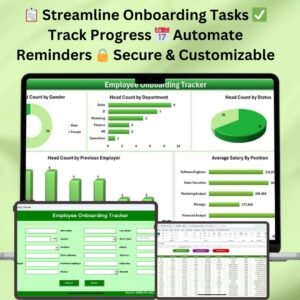
- Employee Onboarding Tracker in Excel: track each new hire through onboarding
- Employee Onboarding Checklist Template in Excel: a general onboarding checklist
- New Hire Onboarding Calendar in Excel: schedule first-week activities
- Employee Onboarding Checklist in Google Sheets: a browser-based checklist
- Recruitment & Talent Acquisition Bundle: 7 hiring templates in one bundle
Browse all Excel checklists or the Excel HR and payroll templates.






























Reviews
There are no reviews yet.