

The best architecture firm dashboard template depends on what you need to control. For a practice-wide system covering fees, timesheets and margin, the Architecture Firm Project Management System Web App ($39.99) is the strongest pick. For reporting only, the Architecture & Design Dashboard in Power BI ($17.99) or in Google Sheets ($9.99) costs far less.
Last updated: October 2026
Key takeaways
- The Architecture Firm Project Management System Web App ($39.99) runs 20 modules and 6 roles, and computes margin from stage percent complete instead of typed figures.
- The Architect Drawing Approval Management System Web App ($39.99) keeps one current revision per sheet and calculates overdue reviews from dates.
- Dashboards for reporting start at $9.99 (Architecture and Design Dashboard in Google Sheets) and top out at $17.99 for the Power BI and Excel project dashboards.
- Engineering firms are covered by the Engineering Dashboard in Excel ($17.99) and the Engineering KPI Dashboard in Power BI ($11.99).
- A dashboard shows you what happened. If you need to issue drawings, bill clients or track approvals, choose one of the two web apps instead.
 Launch offer
From your first Pivot Table to the Data Model, DAX, Power Query and a one-page KPI dashboard. 11h 51m of video by PK, with practice files, quizzes and a capstone.
Architecture firm dashboard templates compared
| Template | Format | Best For | Price |
|---|---|---|---|
| Architecture Firm Project Management System (Best overall) | Web app (Google Apps Script) | Fees, timesheets, margin and invoicing for a whole practice | $39.99 |
| Architect Drawing Approval Management System | Web app (Google Apps Script) | Drawing revisions, transmittals and review deadlines | $39.99 |
| Architecture & Design Dashboard | Power BI | Budget, delay and sector reporting across regions | $17.99 |
| Engineering Dashboard | Excel | Engineering, construction and manufacturing project cost and risk | $17.99 |
| Architecture KPI Scorecard | Excel | Monthly and yearly KPI review against target | $14.99 |
| Architecture and Design KPI Dashboard | Excel | Studios that want separate target and previous-year sheets | $14.99 |
| Engineering KPI Dashboard | Power BI | Engineering leaders tracking KPIs from Excel data | $11.99 |
| Architecture and Design Dashboard (Best value) | Google Sheets | Small studios needing portfolio, hours and billing views | $9.99 |
How we picked these templates
We searched the Next Gen Templates catalog of roughly 6,900 products for anything built for architecture practices or engineering teams. We kept paid products only, and only those whose own description matches the job: project delivery, fees, drawings, KPIs or portfolio reporting.
We wanted three formats represented (Excel, Google Sheets, Power BI) plus two full web apps, so a reader can choose by the software they already use. We left out generic project trackers and construction templates that never mention architecture or engineering firms.
Every price, count and feature below comes from the product listings. Where we give a worked example with other numbers, it is labelled as an illustration.
What are the 8 best architecture and engineering firm templates for 2026?
The list is ranked by how much of a firm’s operation each template controls, then by price. The two web apps lead because they record transactions, not just charts. The five dashboards and scorecards follow, ordered by depth of project analysis.
1. Architecture Firm Project Management System Web App: best overall
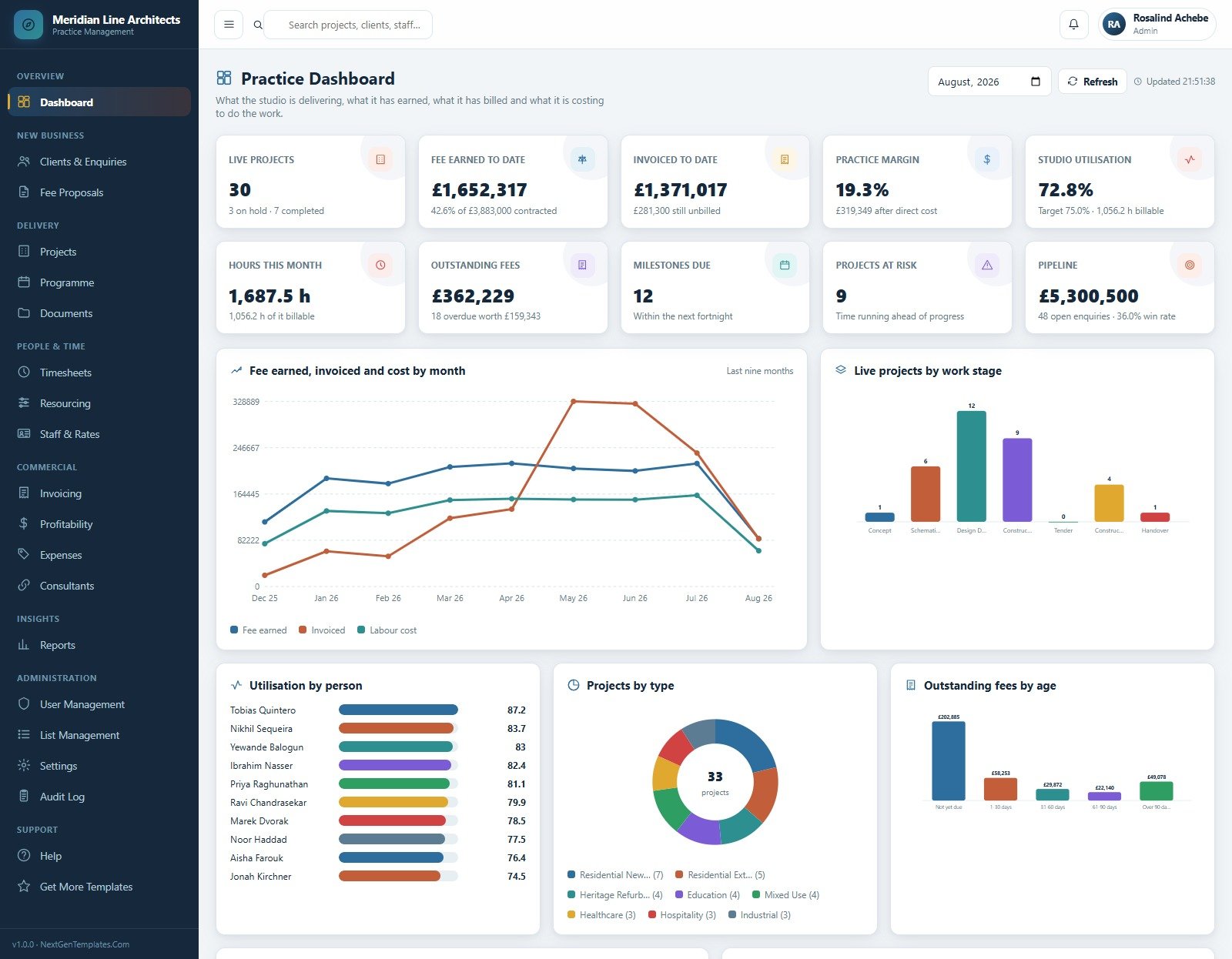
This is a Google Apps Script web app that runs the commercial side of an architecture practice. You deploy it into your own Google account in about 15 minutes, with the full source (Code.gs and Index.html) and a Word user manual. There is no subscription and no per-seat fee.
Who it is for: practice principals and managers who currently run fee proposals, timesheets and invoices in separate files.
It ranks first because it covers the money side that a pure dashboard cannot: the figure that tells you whether a project is making or losing fee.
- 20 modules: clients, enquiries, fee proposals, projects, programme, documents, timesheets, resourcing, staff rates, invoicing, profitability, expenses, consultants and reports.
- Six sign-in roles with server-side permissions: Admin, Practice Principal, Practice Manager, Project Architect, Design Staff and Accounts Officer.
- A seven-stage fee schedule from Concept through Handover, with 308 stage rows already written across 44 demo projects.
- Margin is computed, never typed: fee earned comes from stage percent complete.
- The demo practice holds 10,811 records across 22 sheets, including 7,414 timesheet lines, 173 fee notes and 106 consultant appointments.
Use cases with numbers:
- Check margin at stage level. On an illustrative GBP 120,000 fee at 40% complete, fee earned is GBP 48,000. If cost to date is GBP 41,000, margin is about 14.6%.
- Hide commercial data from juniors. Design Staff never sees a fee, a rate or a margin, so you can open timesheets to the whole studio.
- Track consultant appointments alongside the project instead of in a separate email trail.
- Review the seeded demo practice (44 projects, GBP 3,883,000 of contracted fee) before you replace it with your own records.
Price: $39.99. See the architecture firm project management system. A live demo is linked on the product page.
Best for: a practice that wants fees, time and margin in one place it owns outright.
2. Architect Drawing Approval Management System Web App
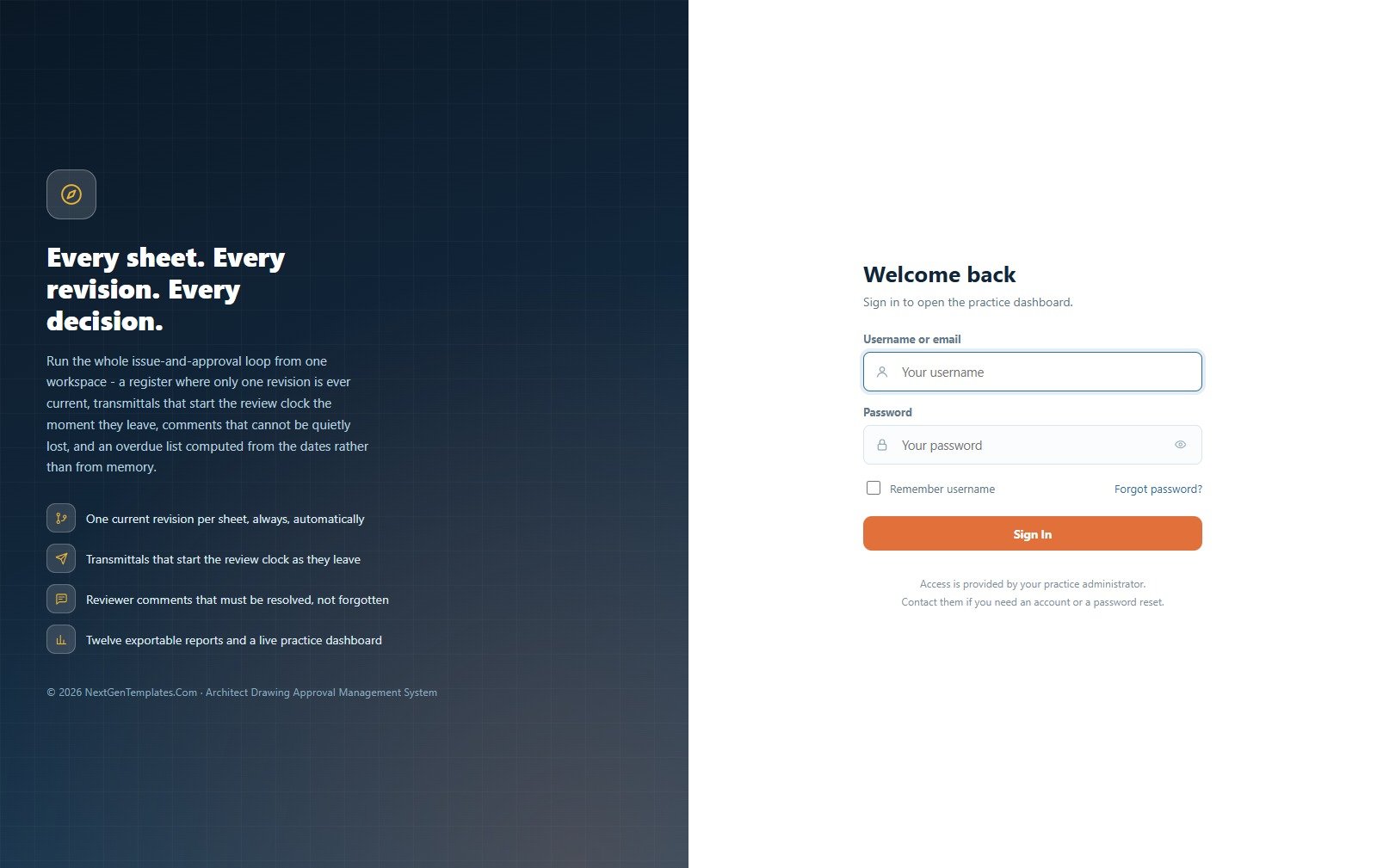
This web app runs the issue-and-approval loop for drawings. It is also a Google Apps Script application (one script file, one HTML file) that you deploy in about fifteen minutes and then own.
Who it is for: document controllers, project architects and practices that lose time to the question of which revision is current.
- One current revision per sheet: raising revision C supersedes B in the same action, so the register never shows two live revisions.
- Transmittals start the clock: issuing stamps every sheet, opens a review per sheet and begins the response countdown.
- A comment closes only with a named resolver, a date and a note.
- Overdue is computed from dates, so the dashboard, the queue and the report show the same figure.
- Six roles with separation of duties: the Document Controller issues but cannot record a decision.
- 15 pages and 12 exportable reports.
Use cases with numbers:
- Audit a revision trail. The demo database carries 632 drawings and 1,627 revisions, so you can see how a register behaves at that volume.
- Chase reviews. With 284 transmittals and 2,178 reviews in the demo, the overdue queue shows what a busy office looks like.
- Keep client reviewers in a narrow lane: the client role sees far less than the admin role.
- Log RFIs alongside drawings (240 in the demo data).
Price: $39.99. Open the drawing approval management system. The seeded data is for evaluation and clears in one menu click.
Best for: controlling revisions and review deadlines where a missed comment has a real cost.
3. Architecture & Design Dashboard in Power BI
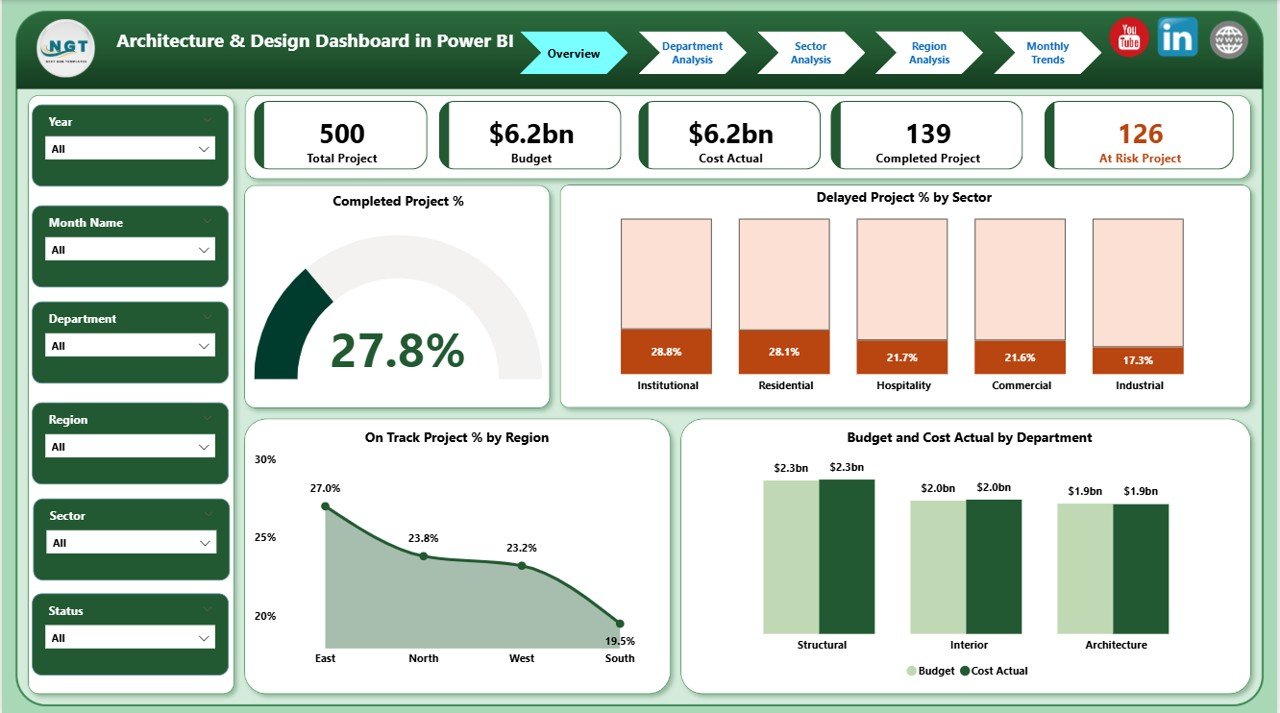
A ready-to-use Power BI report that turns scattered project data into interactive visuals for budgets, delays and departmental performance.
Who it is for: design organisations with several departments, sectors or regional offices that need one reporting view.
- Overview page with cards for Total Projects, Completed %, Delayed %, Total Budget (USD) and Actual Cost (USD).
- Department Analysis page showing at-risk projects by department and completed project % by sector.
- Sector Analysis page comparing commercial, residential, institutional and public works.
- Region Analysis and Monthly Trends pages for workload, budget use and cost variance.
Use cases:
- Find which sector overruns. Budget vs actual by sector shows where cost is leaking.
- Spot an overloaded department through at-risk project counts.
- Compare offices by completed % and budget vs actual by region.
- Read monthly trends before a partners’ meeting.
Price: $17.99. Get the Power BI architecture dashboard.
Best for: multi-office firms already using Power BI.
4. Engineering Dashboard in Excel
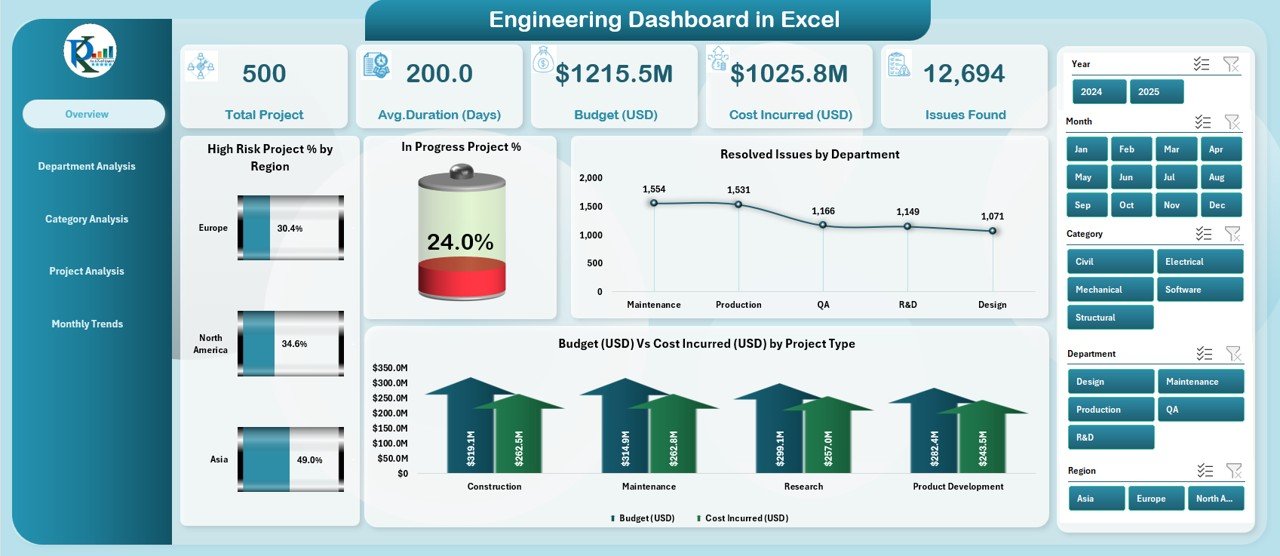
An Excel project dashboard with five analysis pages and a support sheet, built with formulas and pivot charts. Its description covers engineering, construction, manufacturing and software engineering projects.
Who it is for: engineering managers who track cost, risk and progress and do not want to leave Excel.
- Five KPI cards: Total Projects, High-Risk Project %, Completed Projects, Total Budget (USD) and Total Cost (USD).
- Slicers for Region, Department and Project Type.
- Charts for high-risk % by region, resolved issues by department and budget vs cost by project type.
- Department Analysis page with issues found, planned project % and budget vs cost by department.
Use cases:
- Flag risk exposure: slice by region to see where high-risk projects cluster.
- Compare budget against cost incurred by project type before approving new work.
- Count issues found per department as a quality signal.
Price: $17.99. View the engineering dashboard in Excel.
Best for: engineering and construction teams working in Excel.
5. Architecture KPI Scorecard in Excel
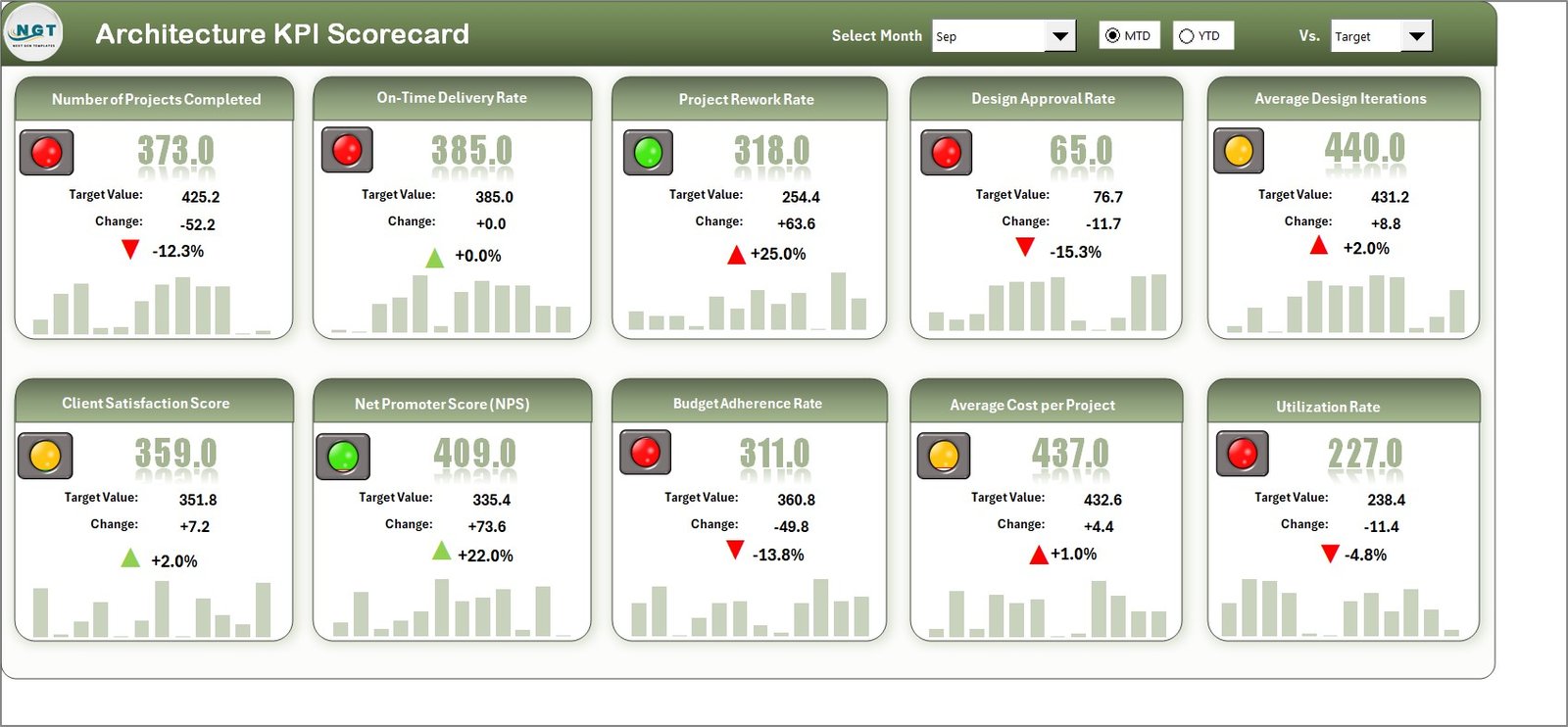
A four-sheet scorecard (Scorecard, KPI Trend, Input Data, KPI Definition) that compares actual, target and previous year results.
Who it is for: architecture firms and project teams that want a scorecard for financial, operational, client and sustainability KPIs.
- MTD and YTD analysis with dropdown filters for month and analysis type.
- Colour-coded arrows that show whether a KPI meets, exceeds or falls below target.
- Customisable KPIs, so you can add or change metrics.
- A KPI Definition sheet so every partner reads a metric the same way.
Use cases:
- Run a monthly partner review from one screen.
- Check YTD against target before setting next year’s goals.
- Standardise what utilisation or client satisfaction means in your firm.
Price: $14.99. Buy the architecture KPI scorecard.
Best for: partners who want a short, target-driven monthly view.
6. Architecture and Design KPI Dashboard in Excel
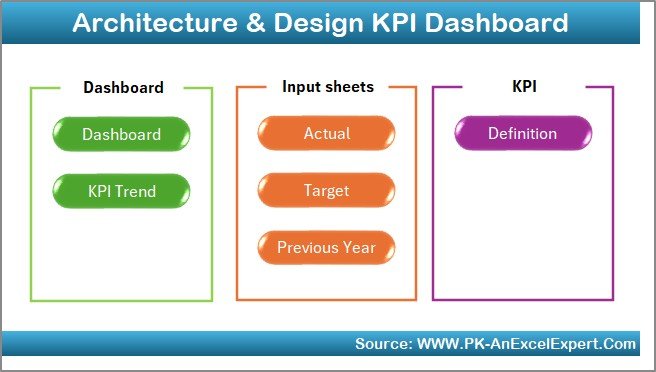
A seven-sheet Excel KPI dashboard: Home, Dashboard, KPI Trend, Actual Numbers Input, Target, Previous Year Numbers and KPI Definition.
Who it is for: studios that want inputs, targets and last year’s numbers kept on their own sheets.
- Home sheet with six navigation buttons.
- MTD and YTD views with Actual, Target and Previous Year comparisons.
- KPI Trend sheet with dropdown selection, formulas and definitions.
- Year-on-year benchmarking from the Previous Year sheet.
Use cases:
- Track delivery timelines, cost efficiency, design quality, client satisfaction and resource utilisation in one workbook.
- Hand the input sheet to an office manager while the partner only opens the dashboard.
- Compare this March with last March without rebuilding a report.
Price: $14.99. Get the architecture and design KPI dashboard.
Best for: small firms who want year-on-year KPI tracking in Excel.
7. Engineering KPI Dashboard in Power BI
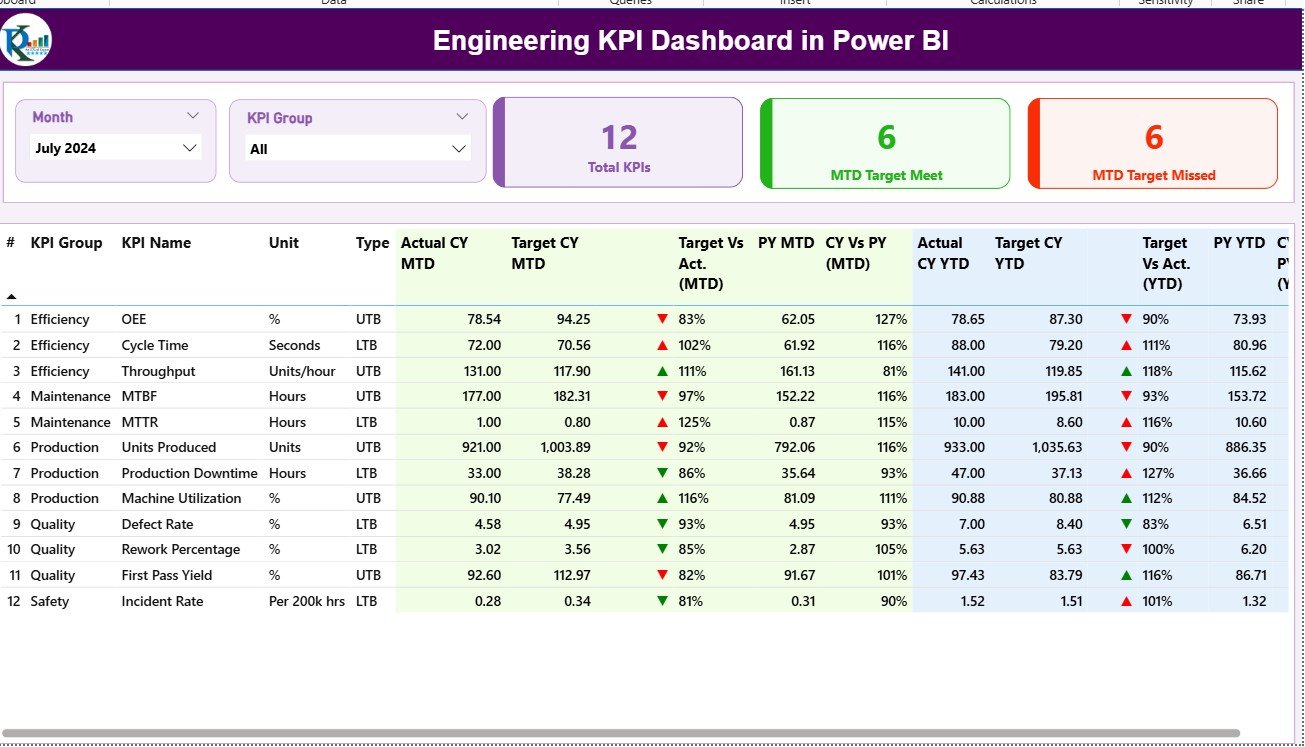
A three-page Power BI report (Summary, KPI Trend, KPI Definition) that reads its data from linked Excel sheets for actuals, targets and definitions.
Who it is for: engineering leaders tracking productivity, efficiency, quality and resource use across projects and departments.
- Cards for Total KPIs, Target Met and Target Missed.
- Month and KPI Group slicers.
- MTD, YTD and previous year comparisons with colour-coded arrows.
- Drill-through from any KPI to its trend and definition.
Use cases:
- Open an engineering review with a count of KPIs missing target this month.
- Add a department or KPI by editing the Excel source, without code.
- Check a KPI definition during the meeting through drill-through.
Price: $11.99. See the engineering KPI dashboard in Power BI.
Best for: engineering teams that keep data in Excel but present in Power BI.
8. Architecture and Design Dashboard in Google Sheets: best value
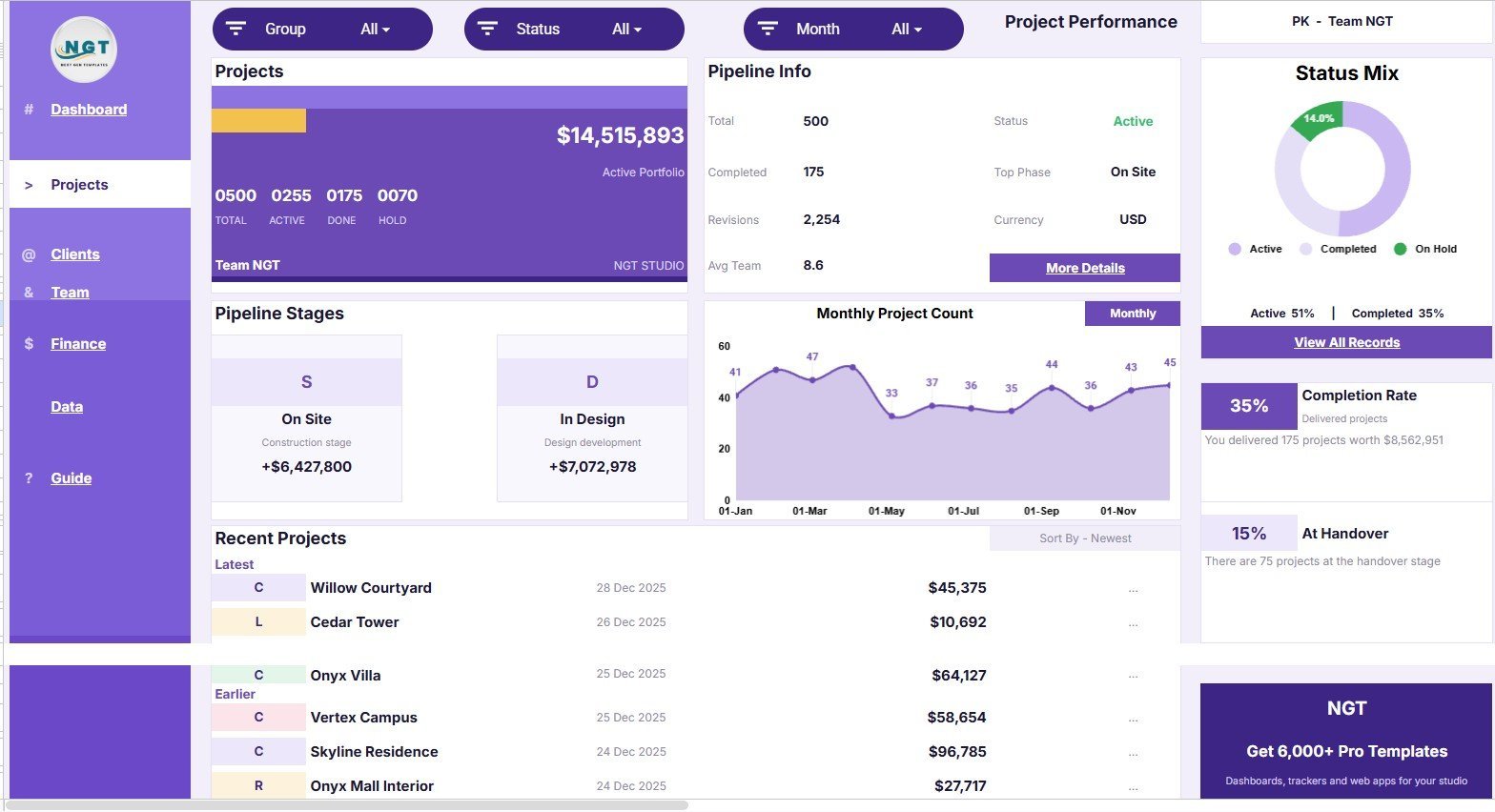
A Google Sheets workbook with six connected tabs: Overview, Project Performance, Client Insights, Team and Hours, Budget and Billing, and Data Sheet. It is the cheapest template here at $9.99.
Who it is for: design studios, interior design teams and project managers who already live in Google Drive.
- 13 overview KPI cards covering total work, active projects, holds, portfolio value and average fee.
- 34 analysis views across project, client, team, budget, billing, margin and delivery.
- Slicer-based filtering by project, client, status, date and style.
- Team capacity and design hours by month, discipline and site status.
Use cases:
- See portfolio value by month, segment and discipline.
- Compare corporate and government client contribution.
- Review cost, revenue and margin in one tab.
Price: $9.99. Get the Google Sheets architecture dashboard.
Best for: small studios who want the broadest views at the lowest price.
Which template should you choose?
| If your main problem is… | Choose | Price |
|---|---|---|
| Not knowing project margin or who has billed what | Architecture Firm Project Management System | $39.99 |
| Revision confusion and late review responses | Architect Drawing Approval Management System | $39.99 |
| Budget and delay reporting by sector and region, in Power BI | Architecture & Design Dashboard in Power BI | $17.99 |
| Engineering cost and risk, in Excel | Engineering Dashboard in Excel | $17.99 |
| A monthly KPI scorecard against target | Architecture KPI Scorecard or Architecture and Design KPI Dashboard | $14.99 |
| Engineering KPIs presented in Power BI | Engineering KPI Dashboard in Power BI | $11.99 |
| Cheapest option in Google Sheets | Architecture and Design Dashboard in Google Sheets | $9.99 |
A short decision path: if people enter data daily and permissions matter, buy a web app. If one person updates numbers monthly and partners read charts, buy a dashboard. Then pick the format your team already opens each morning.
Price maths helps too. Both web apps together cost $79.98. The Google Sheets dashboard plus the Power BI dashboard cost $27.98, and either format alone is under $18.
What KPIs should an architecture firm track?
The dashboards above each rest on a handful of formulas. These are standard definitions, so check them against how your own firm calculates them.
- Utilisation rate: billable hours divided by available hours. For example, 1,300 billable of 1,600 available is 81%.
- Fee earned: contracted fee multiplied by stage percent complete.
- Project margin: (fee earned minus cost) divided by fee earned.
- Budget variance: (actual cost minus budget) divided by budget.
- Delayed project %: delayed projects divided by total projects.
The same logic applies on the engineering side. Budget vs cost and high-risk project % are the core measures in the Engineering Dashboard in Excel. Firms that also run production or supply chains can compare these with our guides to manufacturing KPIs and procurement KPIs.
On the business side, the pipeline of new enquiries matters as much as delivery. Our sales pipeline metrics and sales KPIs guides apply directly to fee proposal conversion. Staffing metrics are covered in HR KPIs and recruitment KPIs. Firms with building-performance work may also like energy management KPIs.
How do these compare with architecture practice software?
Dedicated practice management software such as Deltek Ajera, BQE Core and Monograph charges recurring fees, usually per user. Document platforms such as Autodesk Docs and Bluebeam add their own subscriptions. We have not quoted their prices here because they change, so check each vendor’s page.
The templates in this list are one-time purchases. The two web apps run in your own Google account, and the dashboards open in Excel, Google Sheets or Power BI. For Power BI, check Microsoft’s current Power BI pricing for the sharing licences your team would need, since the template covers the report, not the Power BI licence.
The trade-off is plain. Paid software gives you a vendor, support contracts and integrations. A template gives you ownership and a low cost, and you maintain it yourself. Our YouTube channel has walkthroughs of how these workbooks are set up.
When is a template NOT the right answer?
- You need enterprise integrations. If you must sync with accounting software, BIM platforms or a CRM automatically, buy practice management software. The templates here do not claim those integrations.
- You have hundreds of staff. Large multi-discipline firms usually need vendor support, single sign-on and formal security reviews that a self-deployed Google Apps Script app does not provide.
- You do not own a Google account for the web apps. Both web apps deploy into your own Google account. If your company bans Google Workspace tools, they will not fit.
- Nobody will enter the data. A dashboard is only as good as its inputs. If no one will update the Excel or Sheets data monthly, no template fixes that.
- You want fully automatic data pulls. The dashboards run on data you enter or paste. Pulling live data from other systems needs extra work.
If none of these apply, a template at $9.99 to $39.99 is a cheap way to find out what you actually need before committing to a subscription.
Frequently asked questions
What is an architecture firm dashboard template?
It is a pre-built Excel, Google Sheets or Power BI file that shows an architecture practice’s projects, budgets, delays and KPIs in charts and cards. You replace the sample data with your own. The Architecture and Design Dashboard in Google Sheets ($9.99) is one example, with 6 tabs and 13 overview cards.
Which format is best for an architecture firm: Excel, Google Sheets or Power BI?
Use whichever your team already opens daily. Excel suits solo users and offline work, Google Sheets suits shared editing in Drive, and Power BI suits multi-office reporting with slicers. Prices here are $9.99 for Google Sheets, $14.99 for Excel KPI dashboards and $17.99 for the Power BI project dashboard.
Is there an engineering KPI dashboard template?
Yes. The Engineering KPI Dashboard in Power BI ($11.99) has three pages (Summary, KPI Trend, KPI Definition) and tracks KPIs against target, MTD, YTD and previous year. For project cost and risk, the Engineering Dashboard in Excel ($17.99) has five pages and a support sheet.
Can I track architecture project profitability in a template?
Yes. The Architecture Firm Project Management System Web App ($39.99) computes margin from stage percent complete and cost, with no typed margin figure. It includes a seven-stage fee schedule, timesheets and invoicing. The Google Sheets dashboard also reviews cost, revenue and margin in its Budget and Billing tab.
How do I manage drawing revisions and approvals without expensive software?
The Architect Drawing Approval Management System Web App ($39.99) keeps one current revision per sheet, so raising revision C supersedes B. Transmittals start a response countdown per sheet, and comments close only with a named resolver, date and note. It deploys into your own Google account.
Do the web apps need a subscription?
No. Both web apps are Google Apps Script applications you deploy into your own Google account and own outright. The Architecture Firm Project Management System states no subscription and no per-seat fee, and it comes with source files and a Word user manual. Each costs $39.99 as a one-time purchase.
Can I try the web apps before buying?
Yes. Both product pages link to a live demo deployed by Next Gen Templates, with the full sample database and every role available to test. No signup or email is required. The seeded data is for evaluation, and you clear it before entering your own records.
What KPIs should an architecture KPI dashboard include?
Common ones are utilisation (billable hours divided by available hours), fee earned, project margin, budget variance, delayed project percentage, client satisfaction and on-time delivery. The Architecture KPI Scorecard in Excel ($14.99) covers financial, operational, client and sustainability KPIs with actual vs target vs previous year.
Can I customise these dashboard templates?
Yes. The Excel scorecard and KPI dashboard are described as fully editable and let you add or modify KPIs. The Power BI engineering dashboard lets you add KPIs or departments through its linked Excel source. The Google Sheets version is ready for your own Drive copy.
Get more architecture and engineering templates
Start with the Architecture Firm Project Management System Web App for $39.99. It is our top pick for practices that need fees, time and margin in one workspace. View the architecture firm project management system.
If you only need reporting, the Architecture and Design Dashboard in Google Sheets is $9.99, and the Power BI version is $17.99. Watch setup walkthroughs on the Next Gen Templates YouTube channel.