

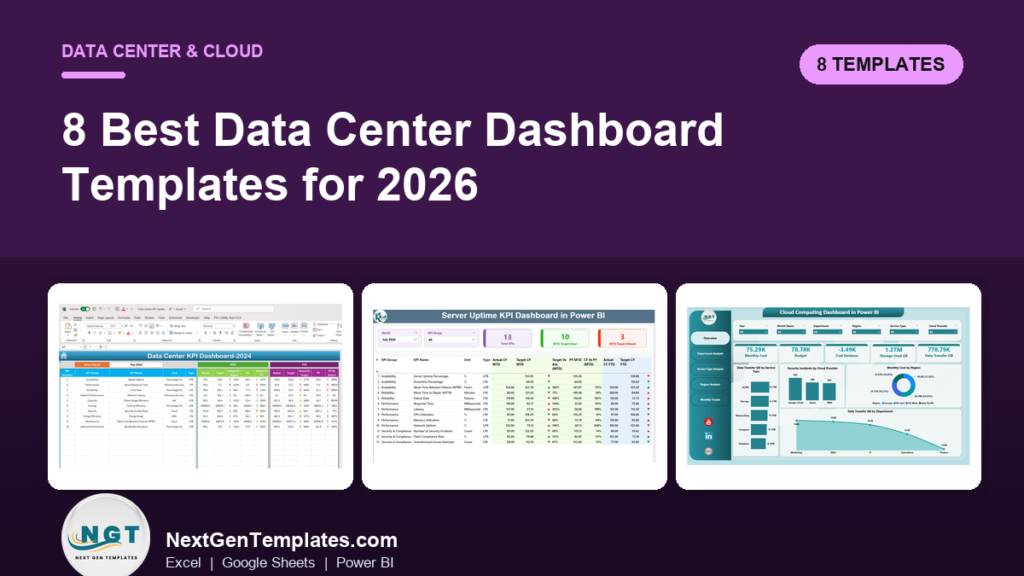
The best data center dashboard template for most operations teams in 2026 is the Data Center KPI Dashboard ($12.99 in Excel, $9.99 in Google Sheets). It tracks ten facility KPIs, including system uptime, PUE, cooling efficiency, network latency and MTBF, against target and last year. Cloud teams should pair it with a cloud cost dashboard.
Last updated: October 2026
Key takeaways
- Our top pick is the Data Center KPI Dashboard: ten facility KPIs with month-to-date and year-to-date results against target and last year, from $9.99.
- Teams that answer for server SLAs get uptime, downtime, MTBF, MTTR, CPU and memory use in one file with the Server Uptime KPI Dashboard.
- Cloud spend sits in the Cloud Computing Dashboard and the FinOps Teams Dashboard, which compare cost to budget by provider, region, team and service.
- Hosting providers and migration teams have their own files: the Cloud Hosting Services Dashboard and the Cloud Migration Services Dashboard.
- Every pick is a one-time purchase, and the IT and Cybersecurity Operations Bundle packs the Data Center KPI Dashboard with 7 other IT templates for $69.99 instead of $117.92.
 Launch offer
From your first Pivot Table to the Data Model, DAX, Power Query and a one-page KPI dashboard. 11h 51m of video by PK, with practice files, quizzes and a capstone.
Data center dashboard templates compared
| Template | Format | Best For | Price |
|---|---|---|---|
| Data Center KPI Dashboard (Best overall) | Excel, Google Sheets | Uptime, PUE, cooling, latency and MTBF against target | $9.99 to $12.99 |
| Server Uptime KPI Dashboard | Excel, Power BI, Google Sheets | Server availability, SLA results and reliability | $9.99 to $12.99 |
| IT Infrastructure KPI Dashboard | Excel, Power BI, Google Sheets | Servers, network and storage in one monthly view | $9.99 to $12.99 |
| Cloud Computing Dashboard | Power BI, Google Sheets | Cloud cost, storage and transfer by region and team | $9.99 to $17.99 |
| FinOps Teams Dashboard | Excel, Power BI | Cloud spend, savings and cost governance by team | $17.99 |
| Cloud Hosting Services Dashboard | Excel, Power BI | Hosting revenue, MRR, instances and SLA cost | $17.99 |
| Cloud Migration Services Dashboard | Excel, Power BI | Migration budget, workloads and downtime | $17.99 |
| IT and Cybersecurity Operations Bundle | Excel, Power BI (8 files) | Data center, help desk, assets and security together | $69.99 |
Why do data center and cloud teams need a dashboard?
Most data center teams are not short of data. The BMS logs temperatures, the power distribution units log load, the monitoring tool logs every ping and the cloud console logs every dollar. The problem is that none of these tools writes the monthly report. Someone still has to pull uptime from one place, PUE from another and cost from a third, line them up against targets and explain why the numbers moved.
The software that promises to do it for you is expensive. Data center infrastructure management (DCIM) suites and observability platforms are usually priced per device, per host or per seat, and cloud cost tools often take a share of the spend they watch. For a small colocation site, a server room or a mid-sized IT team, that is a lot of money to pay for a report. A data center dashboard template does the reporting half of the job for a one-time price, using the totals your existing tools already produce.
How we picked these data center templates
We searched the NextGenTemplates catalog for files built for data centers, servers, IT infrastructure, cloud computing, cloud cost, hosting and cloud migration. We read each product page for what it actually tracks, such as uptime, PUE, cooling efficiency, latency, MTBF, cloud cost against budget and active instances, and left out files built for civil infrastructure such as roads, railways and urban projects, which share the word but not the job.
Where one tool comes in several formats, we list it once with every price. We ranked on three things: how much of a data center or cloud team’s monthly reporting a file covers, how quickly a small team can load its own figures, and price. If you want the IT metric definitions first, read our IT KPIs guide covering MTTR, SLA and uptime and come back here.
The 8 best data center dashboard templates for 2026
1. Data Center KPI Dashboard: best overall
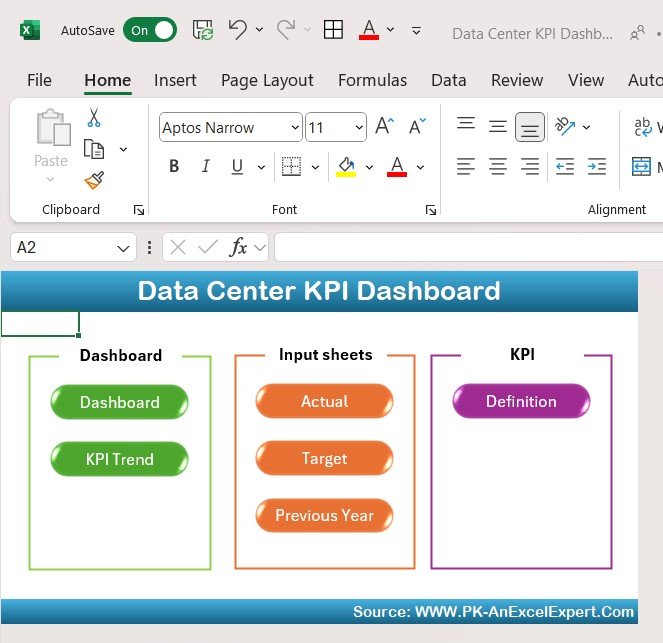
This is the file we would give a new data center manager on day one. It covers the numbers every facility review starts with: is the site up, is it fast, is it efficient, and is it getting better or worse than last year.
Who it is for: data center managers, facility and infrastructure teams, NOC leads and IT managers who run a server room or a small colocation site.
What is inside:
- Ten KPIs out of the box: system uptime, server response time, error rate, network latency, power usage effectiveness, cooling efficiency, security incident rate, energy usage, mean time between failures and bandwidth utilization
- A month selector that updates every month-to-date and year-to-date figure, with actual, target and previous year side by side
- Up and down arrows that respect direction, so falling latency or energy use shows as an improvement
- A KPI Trend sheet with a chart for any KPI you pick, plus Actual, Target and Previous Year input sheets and a KPI Definition sheet
The Google Sheets edition ($9.99) uses the same six-sheet layout with red, amber and green indicators, and lets the whole operations team update one shared file. It is the cheapest way to put a live data center dashboard in front of everyone on the shift rota.
Price: $12.99 in Excel, $9.99 in Google Sheets. Verdict: the best single file if you want one data center dashboard template that covers availability, efficiency and reliability.
2. Server Uptime KPI Dashboard: best for SLA reporting

When customers or internal users hold you to a 99.9% or 99.99% availability promise, server uptime is the number you will be asked about first. This dashboard is built around that conversation: availability, the downtime behind it and the reliability figures that explain it.
Who it is for: system administrators, DevOps and SRE leads, and IT managers who report server availability against an SLA.
- Thirteen sample KPIs across availability, performance, reliability and security, including server uptime %, downtime %, MTBF, MTTR, failure rate, response time, latency, CPU and memory utilization, network uptime and patch compliance rate
- MTD and YTD results against target and previous year, with green and red arrows
- A trend view per KPI and a definition sheet with each formula and unit
The Power BI edition ($11.99) adds a KPI group slicer and cards that count how many KPIs met or missed their monthly target, which makes a quick SLA summary for a service review. The Google Sheets edition costs $9.99.
Price: $12.99. Verdict: the right pick when the question you dread is “why did we miss the SLA last month?”
3. IT Infrastructure KPI Dashboard: best for mixed on-premises estates
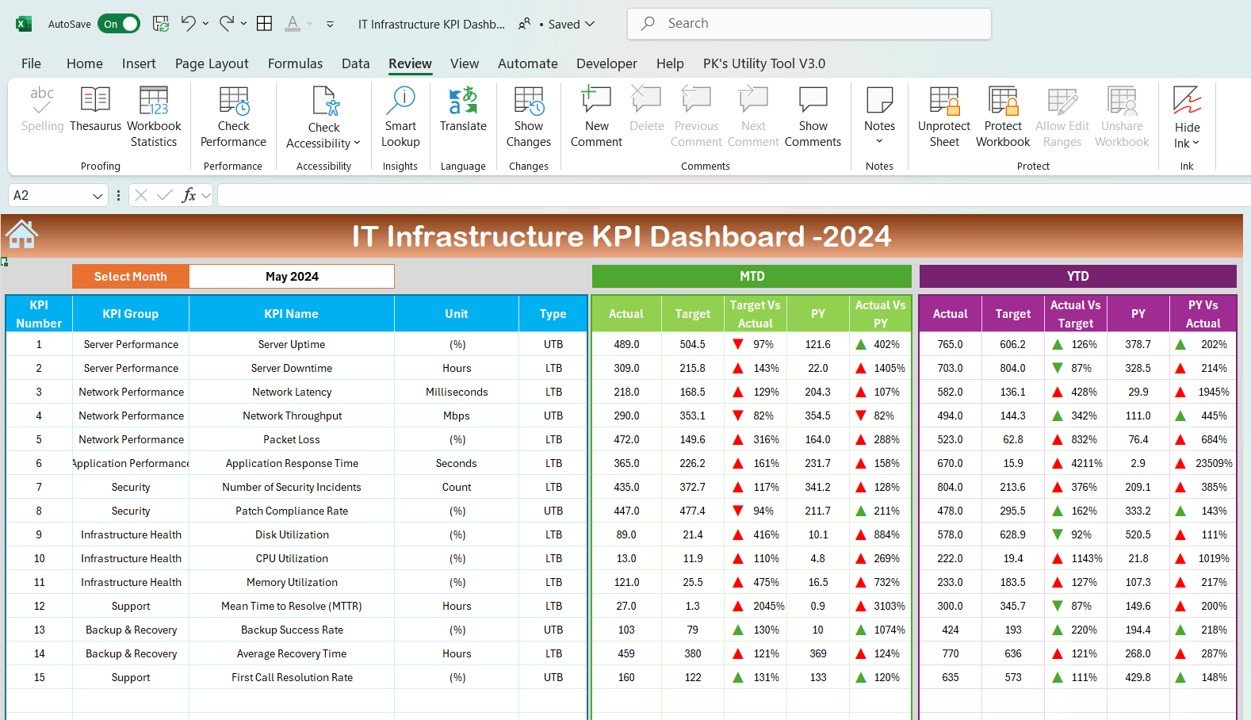
Many teams do not run a data center as such. They run a mix of servers, network gear, storage and a few cloud services, and they need one report that covers the lot. This dashboard tracks the whole estate on a single monthly page.
Who it is for: IT infrastructure managers, network engineers and heads of IT in mid-sized companies.
- KPIs for system uptime, network latency and response times, server performance, storage and bandwidth use, and incident response and resolution times
- Month-to-date and year-to-date results against target and last year, with conditional formatting that flags underperforming KPIs
- Separate Actual, Target and Previous Year sheets, a KPI Trend sheet and a KPI Definition sheet you can extend
It comes in Power BI ($11.99) and Google Sheets ($9.99). For a monitoring angle with CPU, memory, disk, packet loss and bandwidth, look at the IT Infrastructure Monitoring KPI Dashboard ($11.99 in Power BI). Prefer a one-page grid to charts? The IT Infrastructure KPI Scorecard costs $12.99. Network teams can add the Network Performance KPI Dashboard ($12.99) for bandwidth, packet loss and response time.
Price: $12.99. Verdict: the best choice when your “data center” is a server room plus a network plus some cloud.
Not sure yet? Most teams start with the Data Center KPI Dashboard at $12.99, or $9.99 in Google Sheets, and add a cloud cost file later. If you also look after the help desk, IT assets and security, the IT and Cybersecurity Operations Bundle gives you 8 templates, including the Data Center KPI Dashboard, for $69.99.
4. Cloud Computing Dashboard: best for cloud cost and usage
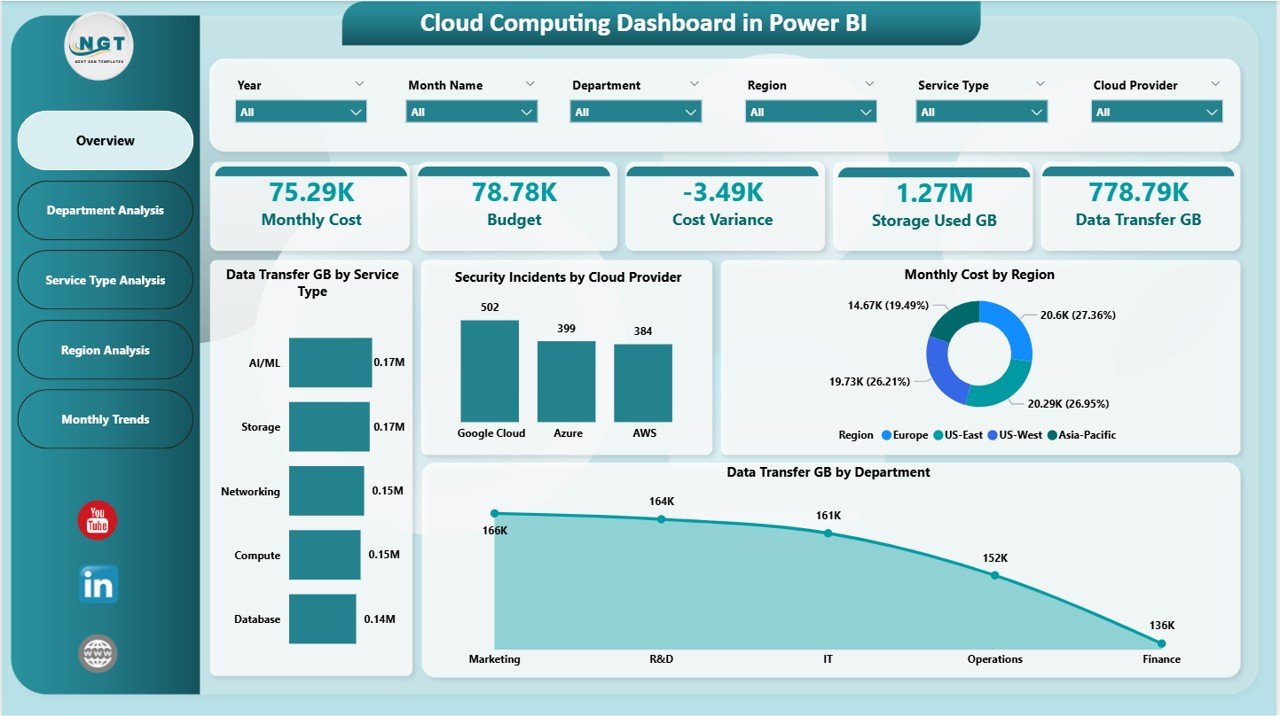
Once workloads move to AWS, Azure or Google Cloud, the facility questions turn into money questions. Which department is using the most storage? Which region costs the most? Are we over budget, and since when? This dashboard answers those from a cloud usage export.
Who it is for: cloud administrators, IT operations teams and the finance partners who sign off cloud invoices.
- Five pages in Power BI: Overview, Department Analysis, Service Type Analysis, Region Analysis and Monthly Trends
- Cards for monthly cloud cost, budget allocation, cost variance, storage used (GB) and data transfer (GB)
- Security incidents by provider, availability % by region and average compute hours by service type
- Slicers for department, service, region and provider
The Google Sheets edition ($9.99) is built for teams that sell cloud services: seven tabs with revenue, running instances, infrastructure cost and average performance, a billing and margin view and an Instance ID lookup. For monthly targets instead of records, the Cloud Computing KPI Dashboard costs $12.99 in Excel and $9.99 in Google Sheets.
Price: $17.99. Verdict: the cloud dashboard to show the CIO and the CFO in the same meeting.
5. FinOps Teams Dashboard: best for cloud cost governance
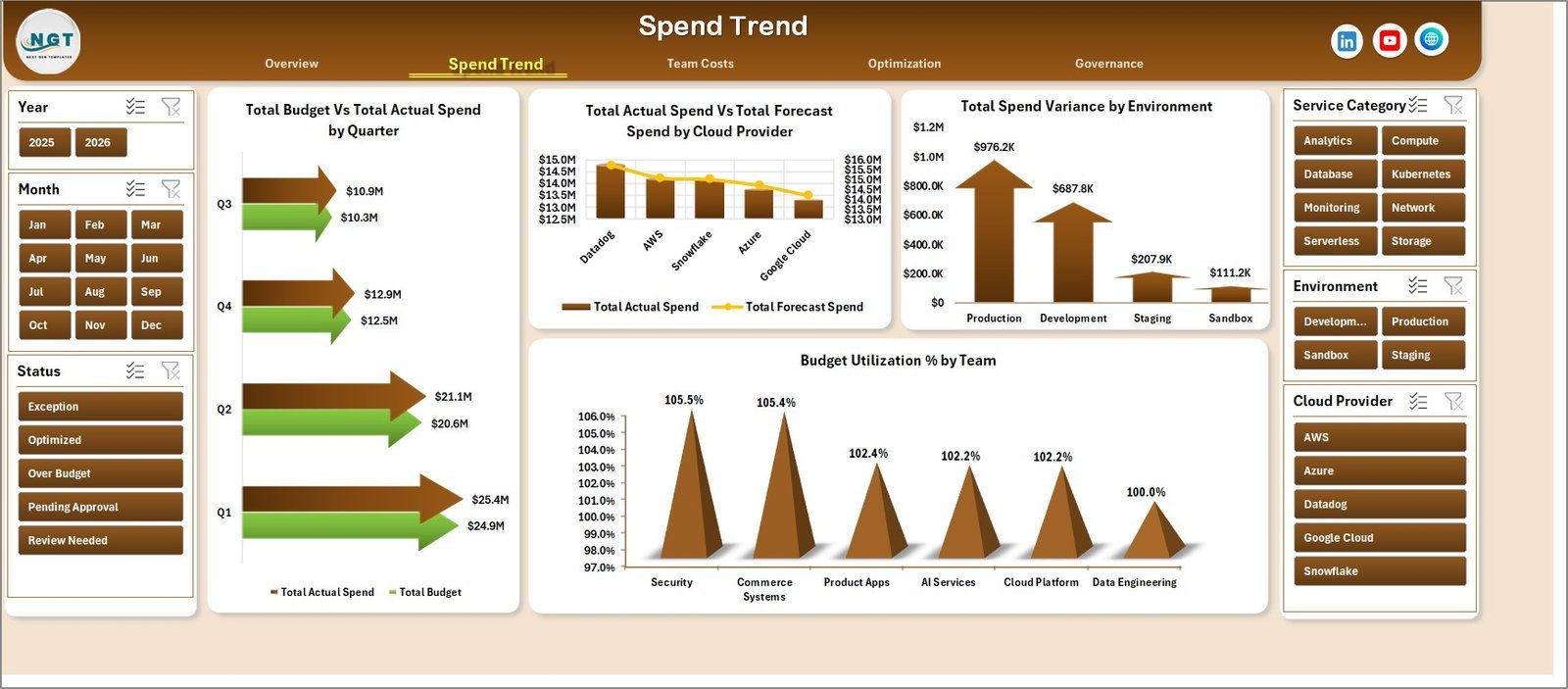
FinOps is the practice of making engineering teams own their cloud bill. That needs more than a cost chart. It needs savings that have been found but not taken, resources nobody has tagged, cost spikes and a clear owner for each of them. This dashboard is built for that weekly review.
Who it is for: FinOps practitioners, platform owners, engineering managers and cloud finance leads.
- Five analysis pages: Overview, Spend Trend, Team Costs, Optimization and Governance
- Cards for total actual spend, total budget, total potential savings, total spend variance and total cost incidents
- 18 charts by team, month, quarter, cloud provider, environment, service category, priority and owner
- Optimization and governance views for savings %, untagged resources and ownership gaps
The Power BI edition ($17.99) adds budget utilization and savings rate cards. For a monthly scorecard of 13 FinOps KPIs, including unit economics and commitment coverage, see the FinOps Teams KPI Dashboard ($12.99).
Price: $17.99. Verdict: pick it when the cloud bill, not the hardware, is what keeps you up at night.
6. Cloud Hosting Services Dashboard: best for hosting and colocation providers

If you sell hosting, the data center is your product. You need to know which data center earns the most margin, which plans fill the racks and whether support cost is eating the profit on smaller customers.
Who it is for: web hosting firms, managed hosting and colocation providers, and MSPs that resell cloud.
- Five pages: Overview, Revenue Analysis, Infrastructure Usage, Support and SLA, and Customer Insights
- Cards for total revenue, total MRR, active instances, support tickets raised and average customer rating
- 20 charts, including revenue against hosting cost by month, gross margin %, active instances by data center and servers provisioned by service category
- Slicers for data center, service category, customer tier, billing cycle, industry and acquisition channel; no macros
The Power BI edition ($17.99) has four pages and a gross profit card. For monthly targets, the Cloud Hosting Services KPI Dashboard costs $14.99 in Excel and $11.99 in Power BI.
Price: $17.99. Verdict: the only pick here that treats the data center as a business with revenue and margin.
7. Cloud Migration Services Dashboard: best for migration projects
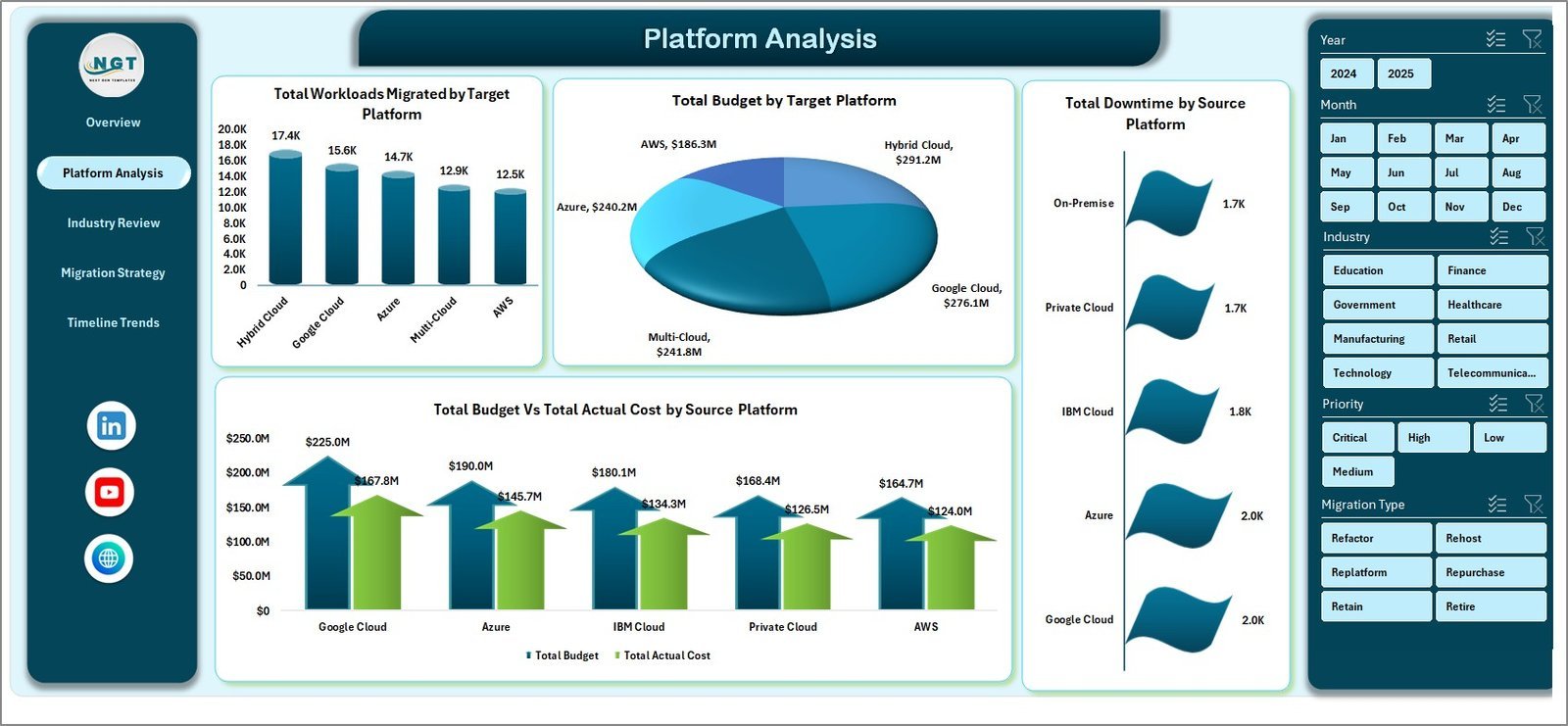
Moving workloads out of a data center is a project with its own risks: cost overruns, downtime during cut-over and unhappy users. This dashboard tracks a portfolio of migrations so you can see which ones are on budget and which ones are hurting.
Who it is for: cloud architects, migration project managers and consulting firms that run migrations for clients.
- Five pages: Overview, Platform Analysis, Industry Review, Migration Strategy and Timeline Trends
- Cards for total budget, total actual cost, total workloads, total downtime and total records
- Budget against actual cost by platform and industry, and workloads across AWS, Azure, Google Cloud and other platforms
- Slicers for industry, platform, migration type and priority, driven by pivot tables you refresh in one click
It also comes in Power BI ($17.99). For one migration tracked against monthly targets, the Cloud Migration KPI Dashboard costs $12.99 in Excel and $11.99 in Power BI.
Price: $17.99. Verdict: the file for the year you move out of the server room.
8. IT and Cybersecurity Operations Bundle: best value
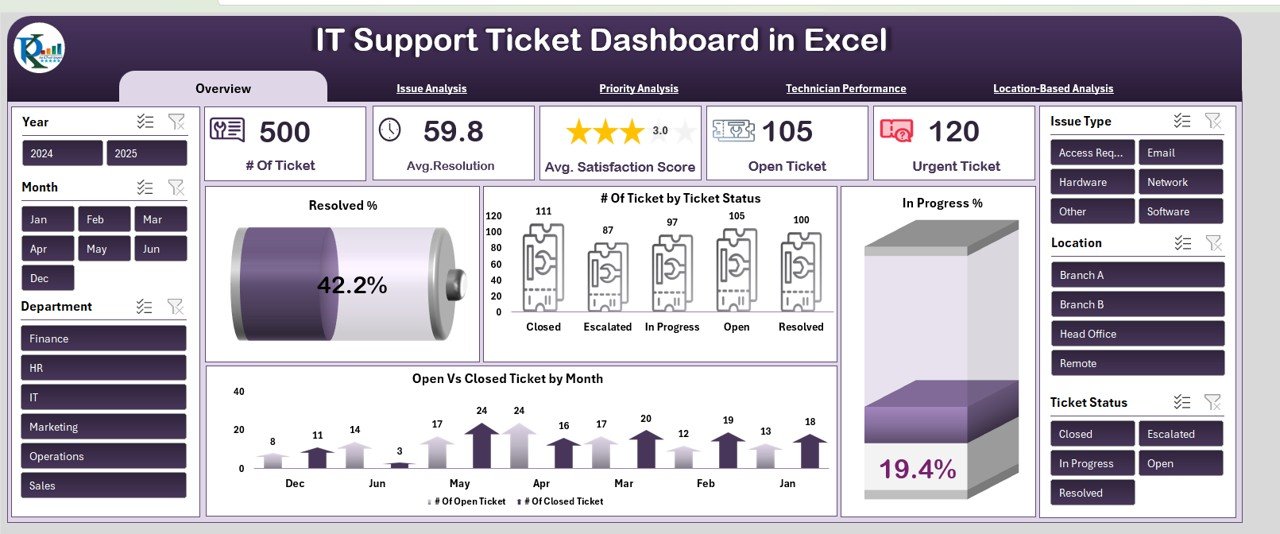
In smaller companies the people who run the data center also run the help desk, the asset register and security. This bundle covers all of it, and the Data Center KPI Dashboard from pick #1 is one of the eight files.
Who it is for: lean IT departments and managed service providers that handle infrastructure, support and security together.
- Data Center KPI Dashboard and IT Operations KPI Dashboard in Excel for uptime, PUE, network health and service availability
- IT Support Ticket dashboards in Excel and Power BI for ticket volume, resolution time, SLAs and technician performance
- IT Asset Management in Power BI, the IT Services Dashboard and the Cybersecurity KPI Dashboard
- A VBA Compliance Audit Tracker with login, entry forms and a live dashboard
Price: $69.99 for all eight, against $117.92 if bought one by one, a saving of $47.93. Security-heavy teams should also read our cybersecurity dashboard templates guide.
Which metrics should a data center dashboard track?
Every template above is built around some mix of these ten metrics. The last column gives common starting points, not rules. Set your own targets from your tier design, your customer contracts and your last twelve months of data.
| Metric | Formula | Common starting target |
|---|---|---|
| Availability (uptime %) | (Total minutes minus unplanned downtime minutes) / Total minutes x 100 | 99.9% or higher, per SLA |
| Power usage effectiveness (PUE) | Total facility energy / IT equipment energy | Below the 1.5 to 1.6 industry average |
| Mean time between failures (MTBF) | Total operating hours / Number of failures | Rising year on year |
| Mean time to repair (MTTR) | Total repair time / Number of repairs | Set by severity, then trend it down |
| Network latency | Average round-trip time between key points (ms) | Stable, with alerts on spikes |
| Rack or capacity utilization | Used capacity / Available capacity x 100 | Planning trigger at about 80% |
| Cooling efficiency | Cooling delivered / Cooling energy used | Improving, inside ASHRAE inlet ranges |
| Cloud cost variance | (Actual spend minus budget) / Budget x 100 | Within plus or minus 5% |
| Patch compliance rate | Critical patches applied in window / Critical patches due x 100 | 95% or higher |
| Change success rate | Changes without incident / Total changes x 100 | 95% or higher |
Two of these are easy to misread. PUE can improve just because IT load went up while the cooling plant wasted the same energy as before, so read it beside cooling efficiency and total energy use. A high uptime figure means little if planned maintenance windows are excluded and keep growing, so log planned downtime too. The Uptime Institute publishes yearly survey results on PUE and outages that make a sensible outside benchmark.
How do you choose the right data center dashboard template?
| If you are… | Start with |
|---|---|
| A data center or facility manager reporting uptime, PUE and cooling | Data Center KPI Dashboard |
| A sysadmin or SRE lead reporting server availability against an SLA | Server Uptime KPI Dashboard |
| A head of IT with servers, network and storage to cover in one report | IT Infrastructure KPI Dashboard |
| A cloud administrator explaining cost and usage by region and department | Cloud Computing Dashboard |
| A FinOps or platform lead chasing savings and untagged spend | FinOps Teams Dashboard |
| A hosting or colocation provider tracking revenue and margin by site | Cloud Hosting Services Dashboard |
| A project lead moving workloads out of the data center | Cloud Migration Services Dashboard |
| A small IT team that runs infrastructure, help desk and security together | IT and Cybersecurity Operations Bundle |
A common setup is one facility file and one cost file: the Data Center KPI Dashboard or the Server Uptime KPI Dashboard for the monthly operations review, and the Cloud Computing or FinOps dashboard for the spend review. Telecom operators that run their own sites should also see our telecom KPI dashboard templates, and teams that run a service desk beside the data center should look at our call center and helpdesk dashboard templates. Energy managers can go deeper with our energy management KPIs guide.
When a template is NOT the right answer
- You need real-time alerts. These files update when you load new figures. Paging an engineer when a CRAC unit fails or a server goes down needs a monitoring tool or a BMS.
- You need rack-level asset mapping. DCIM software tracks every device, port and power feed by rack position. None of these templates is a rack elevation tool.
- You need automatic cloud cost allocation. Native cost tools and FinOps platforms read billing data line by line and allocate it by tag. The cloud dashboards here report the totals you export.
- Nobody owns the monthly load. A dashboard is only as fresh as its last update. If no one will enter the month’s figures, the numbers go stale fast.
For most small and mid-sized data center and cloud teams, a data center dashboard template is the quickest way to get a clean monthly report without paying for more seats. Want to try a free file first? See our free Excel dashboard templates, free Power BI dashboard templates and free Google Sheets dashboard templates. Every paid file here is fully editable, which matters more than it sounds; our guide to editable vs locked templates explains why.
Frequently asked questions
What is a data center dashboard?
A data center dashboard is one screen that shows how a facility is running: uptime, response time, error rate, network latency, power usage effectiveness (PUE), cooling efficiency, energy use and mean time between failures. The templates here do it in Excel, Google Sheets or Power BI from figures you already collect, with targets and last year beside every number.
Which data center dashboard template should I buy first?
Start with the Data Center KPI Dashboard. It costs $12.99 in Excel and $9.99 in Google Sheets and tracks ten facility KPIs, from system uptime and PUE to MTBF and bandwidth use, against target and last year. Add the Server Uptime KPI Dashboard if SLA reporting on servers is your main job.
Can a spreadsheet replace DCIM software?
No. DCIM tools read sensors, power strips and cooling units in real time and map every rack. A data center dashboard template does none of that. It replaces the monthly report you build by hand: you take the totals from your DCIM, BMS or monitoring tool, enter or paste them and the charts update.
Is there a data center dashboard template in Google Sheets?
Yes. The Data Center KPI Dashboard in Google Sheets costs $9.99 and has six sheets: Dashboard, KPI Trend, Actual Number, Target, Previous Year Number and KPI Definition. You pick a month in cell D3 and every MTD and YTD figure, arrow and colour updates. The Server Uptime, IT Infrastructure and Cloud Computing KPI files also come in Google Sheets.
Which template tracks cloud cost rather than facility performance?
Two do. The Cloud Computing Dashboard tracks monthly cloud cost against budget, storage, data transfer and security incidents by provider, region and department. The FinOps Teams Dashboard goes further on cost control, with potential savings, spend variance, cost incidents and untagged resources by team. Both cost $17.99 in Excel or Power BI.
How is PUE calculated?
Power usage effectiveness is total facility energy divided by the energy used by IT equipment. A PUE of 1.0 would mean every watt goes to servers, storage and network gear. Recent Uptime Institute surveys put the industry average at roughly 1.5 to 1.6, and new hyperscale sites report much lower figures.
Do these templates connect to monitoring tools like Zabbix, Datadog or CloudWatch?
Not directly. They are reporting files. Export monthly totals or a CSV from your monitoring, billing or ticketing tool and enter them in the input sheets or the data sheet. The Power BI editions can point at an Excel or CSV export, so a scheduled export to a shared folder keeps them close to current.
Which template suits a hosting or colocation provider?
The Cloud Hosting Services Dashboard. It reports revenue, monthly recurring revenue, active instances, support tickets and customer rating, and lets you slice by data center, service category, customer tier and billing cycle. It costs $17.99 in Excel or Power BI, and a KPI version for monthly targets costs $14.99 in Excel.
Are these data center templates a one-time purchase?
Yes. Single templates cost $9.99 to $17.99 and the eight-template IT and Cybersecurity Operations Bundle, which includes the Data Center KPI Dashboard, costs $69.99. There is no monthly fee, no per-user seat and no charge per monitored device. You download the file, edit it and keep it.
Can I add my own KPIs?
Yes. The KPI dashboards keep their KPI list on an editable definition sheet with the formula, unit and direction (upper the better or lower the better) for each one. Add a row, give it a target and an actual, and it appears on the dashboard and in the trend chart. The analysis dashboards take new rows on their data sheet.
Get your data center dashboard templates
Start with the Data Center KPI Dashboard ($12.99, or $9.99 in Google Sheets) to see uptime, PUE, cooling, latency and MTBF against target in one file. If you look after the help desk, assets and security as well, the IT and Cybersecurity Operations Bundle gives you 8 templates for $69.99. Each one is a one-time purchase that you can edit and keep.
Want to see the dashboards working first? Watch the walkthroughs on our NextGenTemplates YouTube channel.