

The best IT manager dashboard template stack starts with the IT and Cybersecurity Operations Bundle ($69.99, 8 Excel and Power BI templates), then adds single templates for helpdesk tickets, assets, licenses and infrastructure KPIs. Together they cover planning, tracking, reporting and presenting without per-seat SaaS fees.
Last updated: October 2026
Key takeaways
- The IT and Cybersecurity Operations Bundle costs $69.99 for 8 Excel and Power BI templates, against $117.92 bought one by one (a saving of $47.93, or 41%).
- Single IT templates in this stack range from $9.99 (IT Asset Management Dashboard in Google Sheets) to $19.99 (IT Helpdesk Ticket Management System V1.0).
- The stack is grouped by job: plan, track, report and present, so you can buy only the stage you are missing.
- The templates replace the tracking and reporting side of ServiceNow, Jira Service Management, Freshservice, Snipe-IT and Zendesk, not their automation or end-user portals.
- A 30-day rollout plan below takes a lean IT team from empty files to a monthly review pack.
 Launch offer
From your first Pivot Table to the Data Model, DAX, Power Query and a one-page KPI dashboard. 11h 51m of video by PK, with practice files, quizzes and a capstone.
IT manager dashboard templates compared
Every template in the stack, with format, stage, what it replaces and price. Prices are in USD.
| Template | Format | Best For | What it replaces | Price |
|---|---|---|---|---|
| IT and Cybersecurity Operations Bundle (Best value) | Excel + Power BI | Whole IT function in one pack | ServiceNow and Jira Service Management reporting | $69.99 |
| Office IT Helpdesk Dashboard (Best overall single) | Excel | Monthly helpdesk reporting | Freshservice and Zendesk reports | $17.99 |
| IT Asset Management Dashboard | Excel | Hardware, warranty and depreciation review | Snipe-IT reporting | $17.99 |
| Cybersecurity Dashboard | Excel | Incident, risk score and cost tracking | Manual incident reports | $17.99 |
| IT Infrastructure KPI Dashboard | Excel | Uptime and incident KPIs | Monitoring report exports | $12.99 |
| IT Helpdesk Ticket Management System V1.0 | Excel + VBA | Logging tickets offline | Freshservice or Zendesk for small teams | $19.99 |
| Software License Management System V1.0 | Excel + VBA | Licenses, vendors and assignments | Snipe-IT license tracking | $19.99 |
| IT Infrastructure KPI Scorecard | Excel | Actual vs target, MTD and YTD | Hand-built scorecards | $12.99 |
| IT Infrastructure KPI Dashboard | Power BI | Presenting trends to leadership | Slide decks built by hand | $11.99 |
| IT Asset Management Dashboard | Google Sheets | Cloud-shared asset tracking | Snipe-IT for small inventories | $9.99 |
How we picked these
We searched the NGT catalog for IT, helpdesk, cybersecurity, asset and infrastructure templates, then kept only paid products that match what an IT manager does in a normal month. We covered Excel, Google Sheets and Power BI so you can pick your format. We left out loosely related finance and project templates, and anything that duplicated another entry without adding a format.
We did not check search demand for this topic, so the order reflects fit for an IT manager’s workload, not keyword volume.
Which IT manager dashboard templates are worth buying in 2026?
Here are the ten, ranked. The bundle is first because it carries eight templates for $69.99, which is less than the price of four typical singles at $17.99 each. The rest follow by how much of the IT manager’s monthly workload they cover.
1. IT and Cybersecurity Operations Bundle: best value
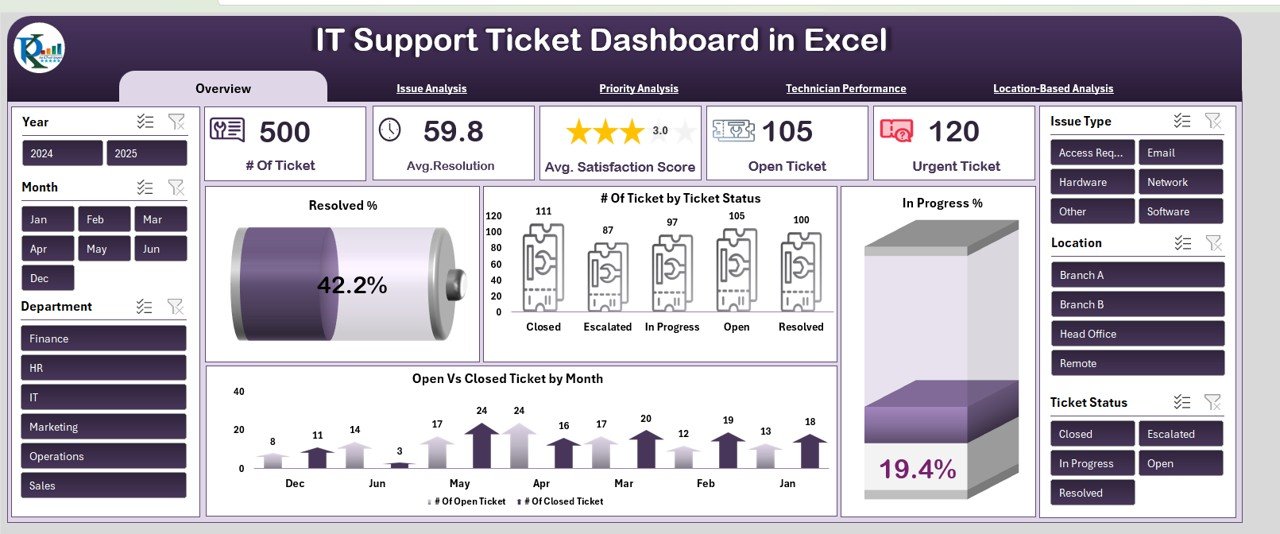
This is 8 premium templates for Excel and Power BI covering IT support, cybersecurity, asset management, data center performance, compliance auditing and IT operations. Stage: all four (plan, track, report, present).
Who it is for: a lean internal IT team, a multi-site help desk or a managed service practice that wants one pack instead of eight separate purchases.
- IT Support Ticket dashboards in both Excel and Power BI (ticket volume, resolution time, SLAs, technician performance)
- Cybersecurity KPI tracking: MTTD, MTTR, phishing click rates, compliance scores, unauthorized access attempts
- Power BI IT asset lifecycle tracking: warranties, net book value, vendor performance
- Data center performance (uptime, PUE, cooling efficiency) and IT operations KPIs
- A VBA Compliance Audit Tracker with login, forms and a live dashboard
Use cases: report SLA breach % by region and priority at the monthly review; show phishing click rates before and after a training round; track data center PUE next to operating cost; keep an audit log for a compliance check. The individual total is $117.92, so the $69.99 bundle saves $47.93.
Price: $69.99. Get the IT and Cybersecurity Operations Bundle.
Best for: the IT manager who wants the whole stack in one download.
2. Office IT Helpdesk Dashboard in Excel: best overall single template
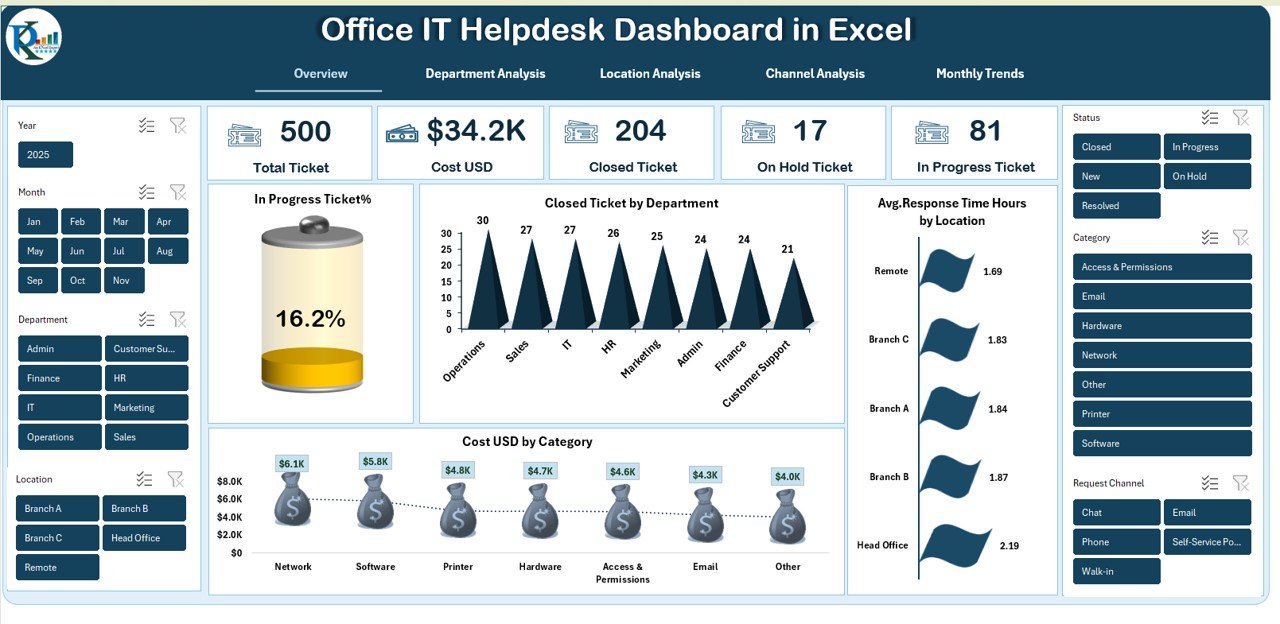
A ready-to-use Excel dashboard that turns monthly helpdesk data into KPIs and charts. You update the data, pick the period and everything refreshes. Stage: report.
Who it is for: IT managers who answer to finance and department heads about ticket load and cost.
- One view of Total Tickets, Closed Tickets, On-Hold Tickets, Cost and In-Progress %
- Charts by department, location, category and channel
- Monthly trend analysis of cost, volume and bottlenecks
- Channel comparison across Email, Phone, Portal and Chat
- No coding, 100% Excel
Use cases: find which department drives the most ticket cost; compare closure speed between the portal and phone; spot a branch that is slower than the rest; justify an extra technician with a monthly volume trend.
Price: $17.99. See the Office IT Helpdesk Dashboard.
Best for: clear monthly helpdesk reporting at the lowest friction.
3. IT Asset Management Dashboard in Excel
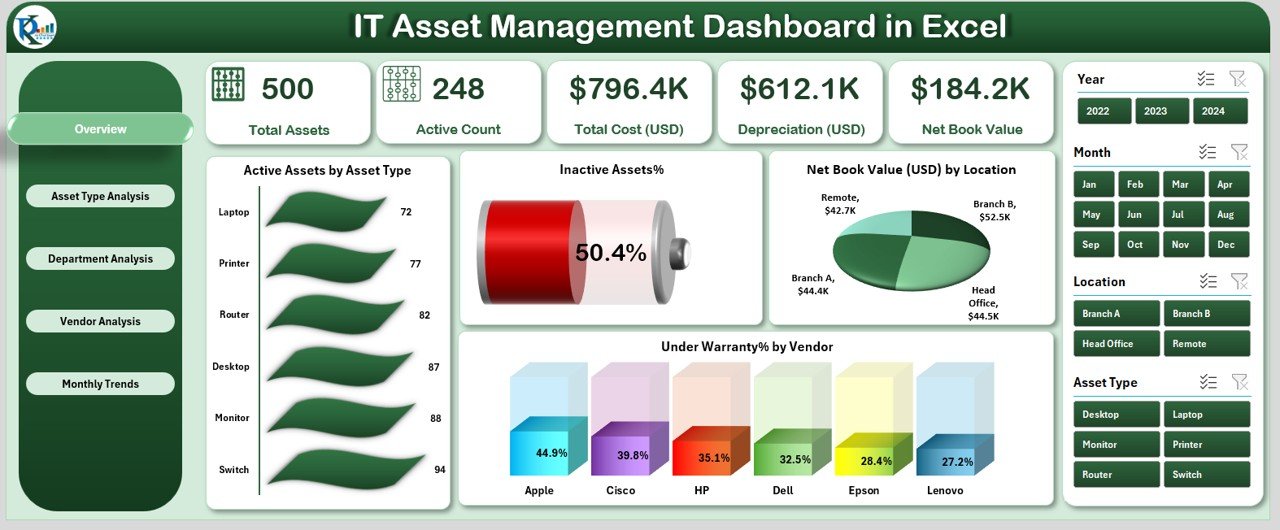
A five-view Excel dashboard: Overview, Asset Type, Department, Location and Monthly Trends. Stage: report.
Who it is for: IT managers, administrators and teams that budget for hardware refresh and face audits.
- 5 KPI cards: Total Assets, Active Assets, Inactive Assets, Net Book Value, Warranty Coverage
- 4 overview charts including Under Warranty % by Vendor
- Slicers for date, department, asset type and vendor
- Warranty and depreciation tracking, with average asset age and warranty days left
Use cases: see which asset type is high value but inactive; split net book value by department for budgeting; plan replacements from warranty days left; bring a vendor comparison to a renewal talk. Net book value is purchase cost minus accumulated depreciation, so a falling figure by location tells you where the aging kit sits.
Price: $17.99. Get the IT asset management Excel dashboard.
Best for: hardware budgeting and audit prep in Excel.
4. Cybersecurity Dashboard in Excel
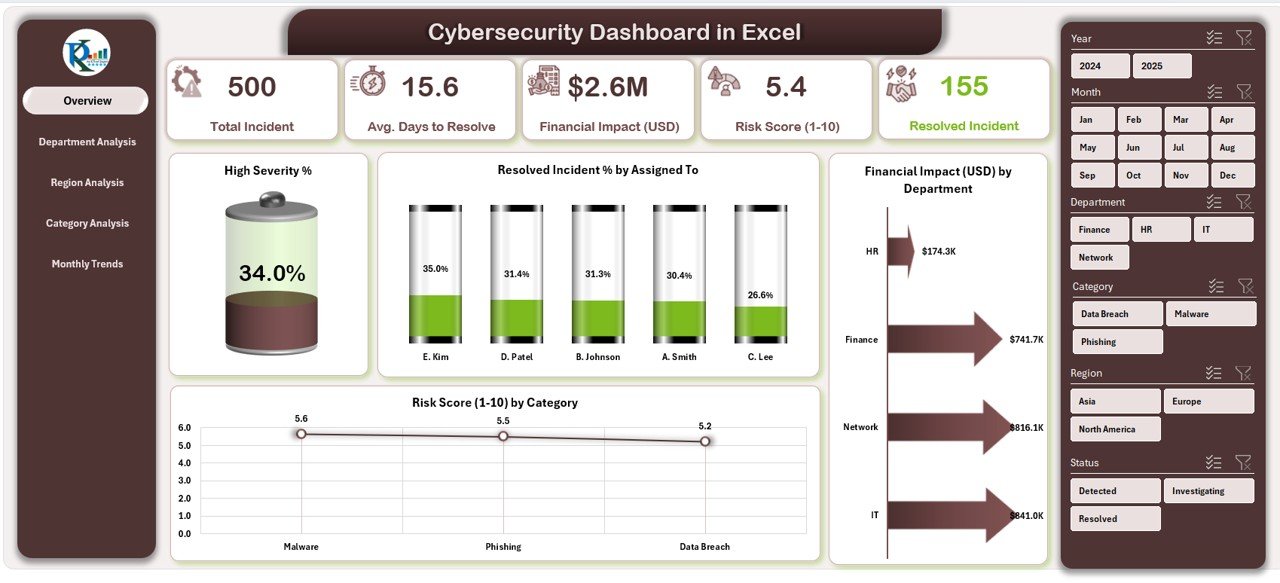
An Excel dashboard with five pages: Overview, Department, Region, Category and Monthly Trends. Stage: report and present.
Who it is for: IT and security teams in small businesses and larger organizations who need to show incident data to non-technical leaders.
- KPI cards for Total Incidents, Resolved %, Financial Losses, Average Resolution Time and Risk Score
- Charts for high severity %, incidents by assigned person and financial impact by department
- Risk Score (1 to 10) by category
- Slicers by department, category and time period
Use cases: show leadership the dollar impact of incidents by department; check whether high-severity incidents close faster than others; compare regions; trend monthly risk score after a policy change.
Price: $17.99. Open the Cybersecurity Dashboard in Excel.
Best for: turning incident logs into a board-ready view.
5. IT Infrastructure KPI Dashboard in Excel
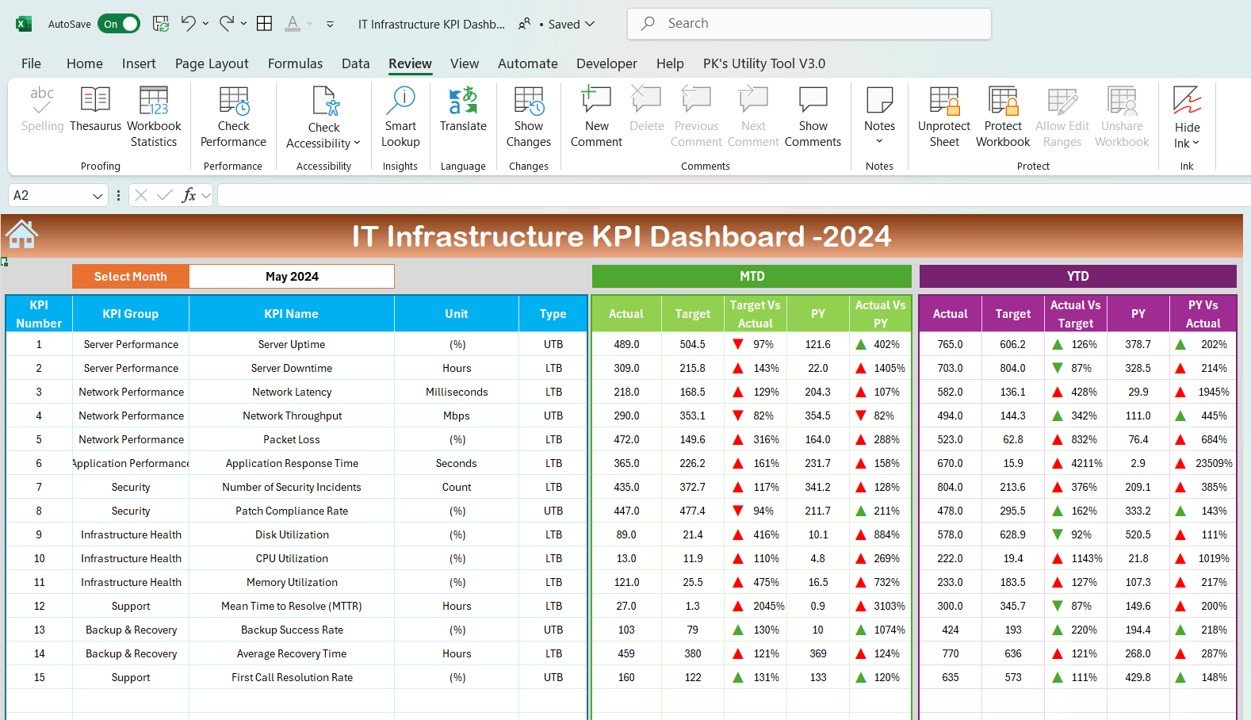
A customizable Excel dashboard for server uptime, network performance, incident response times, system health and resource utilization. Stage: track.
Who it is for: IT managers and system administrators running on-premises, cloud or hybrid systems.
- Server uptime, network health and storage usage
- Incident response times, downtime causes and recovery effort
- Customizable KPIs such as cloud service metrics
- Resource utilization monitoring
Use cases: uptime % is (total time minus downtime) divided by total time, and 99.9% over a 730-hour month allows about 43.8 minutes of downtime, so you can check if a month met target; compare incident response time across teams; spot storage bottlenecks before they bite.
Price: $12.99. Get the IT infrastructure KPI dashboard in Excel.
Best for: a low-cost uptime and incident view.
6. IT Helpdesk Ticket Management System V1.0

An Excel and VBA tool that keeps IT support tickets in one secure file, with no subscription. Stage: track. It is built for Windows Excel Desktop.
Who it is for: small and mid-size teams that log tickets in email threads or loose sheets and want an offline system.
- Role-based login for Admin and User
- Ticket list with date-range and column filters, plus sorting
- Add, update and delete records, with full record history for audit
- Export filtered tickets to Excel; customizable lists and users
Use cases: replace the shared inbox as the system of record; show an audit trail of who changed a ticket; export open tickets for a weekly meeting; feed the helpdesk dashboard with clean data.
Price: $19.99. Get the IT helpdesk ticket management system.
Best for: logging tickets properly without paying per agent.
7. Software License Management System V1.0
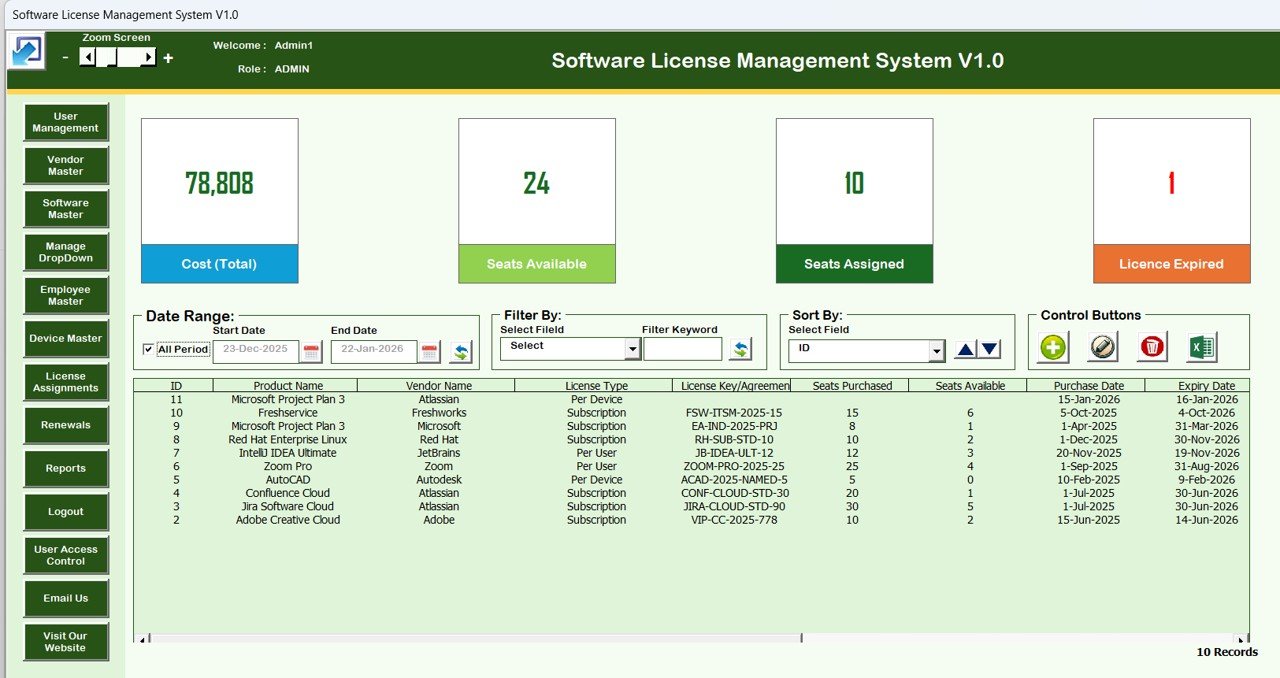
An Excel and VBA desktop tool for software licenses, users, vendors, devices and assignments. Stage: plan.
Who it is for: IT managers who miss renewals, pay for duplicate licenses or face software audits.
- Admin and User login with user management and password resets
- License inventory with filters, sorting and Excel export
- Master data for firm, vendor, software, employee and device
- License assignments and Excel reports by date range
Use cases: assign each license to an employee and device; export a date-range report for an audit; find duplicates before renewal; keep vendor records in one place.
Price: $19.99. See the software license management system.
Best for: renewal control and audit readiness.
8. IT Infrastructure KPI Scorecard in Excel
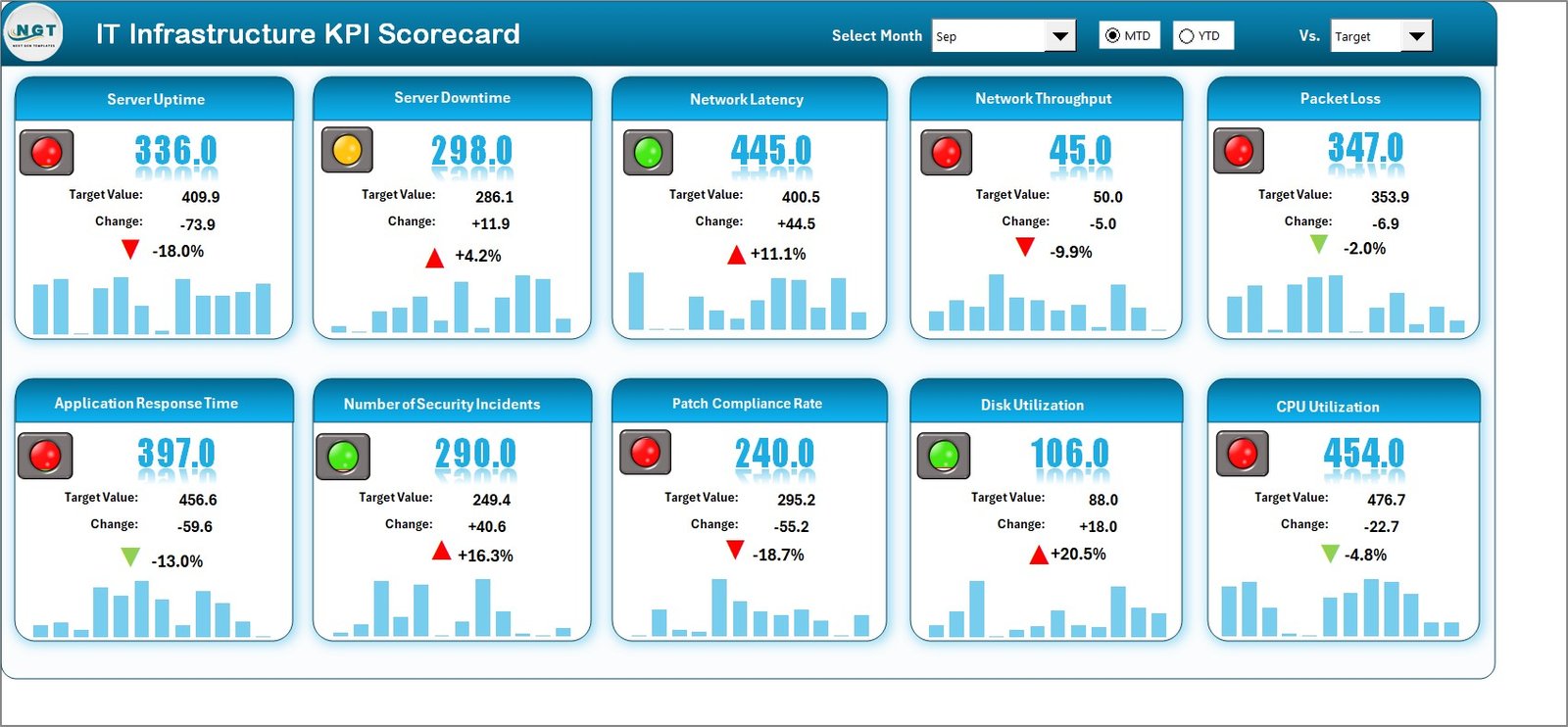
A four-worksheet Excel scorecard comparing actual against target for server uptime, network availability, incident resolution time and compliance. Stage: plan.
Who it is for: IT managers who set targets and want to see gaps quickly.
- Actual vs Target comparison
- MTD and YTD trend tracking
- Color-coded status indicators
- Dropdown-driven KPI selection and built-in KPI definitions
Use cases: set yearly targets, then review red items monthly; keep definitions consistent so two people calculate resolution time the same way; show YTD progress at quarter end.
Price: $12.99. Get the IT infrastructure KPI scorecard.
Best for: target setting and gap tracking.
9. IT Infrastructure KPI Dashboard in Power BI

A Power BI dashboard for uptime, network latency, application performance, bandwidth utilization and system errors, with daily, weekly and monthly views. Stage: present.
Who it is for: IT managers who already use Power BI and want interactive visuals for leadership.
- Server, network and application monitoring
- Time-based analysis for trends
- Customizable layout and real-time data integration
Use cases: show uptime trend in a review meeting; check latency patterns by period; drill into system errors; plan capacity from bandwidth use.
Price: $11.99. Get the IT infrastructure KPI dashboard in Power BI.
Best for: interactive infrastructure reporting at the lowest price in the stack bar one.
10. IT Asset Management Dashboard in Google Sheets
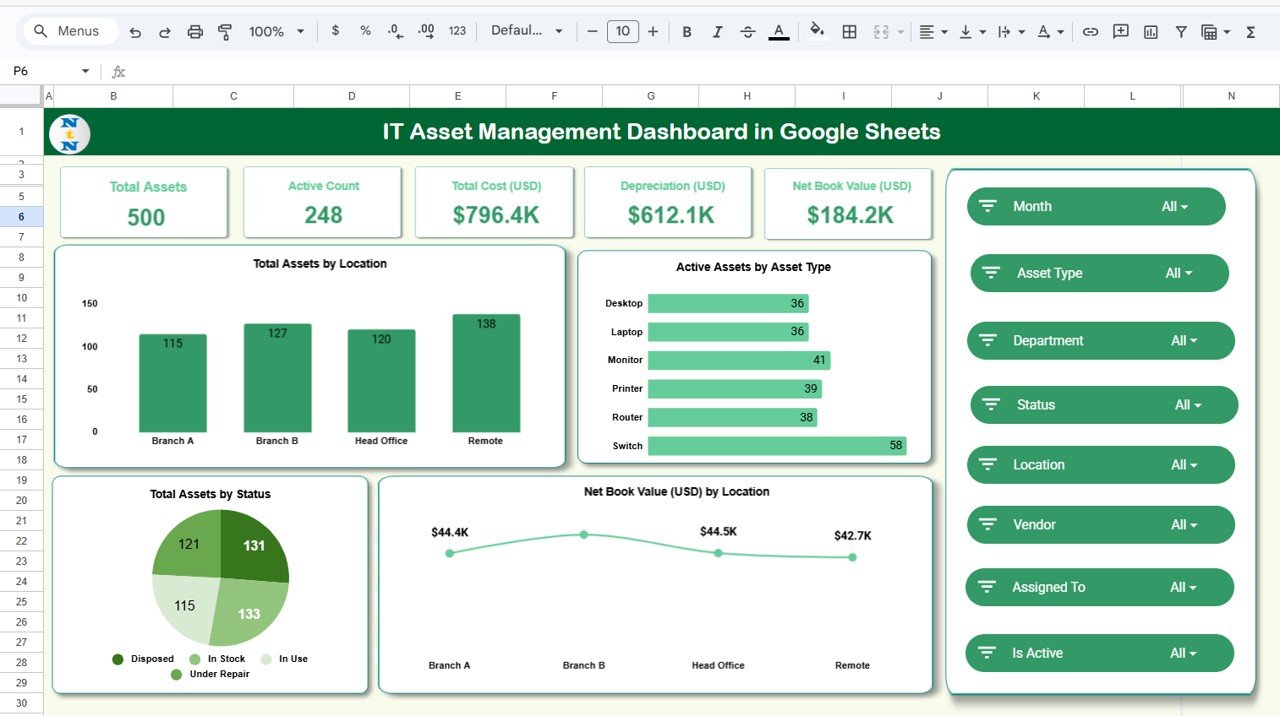
A cloud-based dashboard for total cost, active count, depreciation, net book value, warranty coverage and monthly trend charts. Stage: track.
Who it is for: IT managers, procurement and finance teams who share an asset list online.
- Overview sheet with KPI cards and charts
- Cost and depreciation tracking
- Warranty and vendor analysis
- 100% cloud-based access
Use cases: let finance open the asset list without installing anything; follow depreciation trend; check warranty coverage by vendor; keep a small inventory live.
Price: $9.99. Get the IT asset management dashboard in Google Sheets.
Best for: shared, cloud-first asset tracking at the lowest price.
How do the bundle and singles compare on price?
Buying the nine single templates above costs $141.91 ($12.99 + $17.99 + $17.99 + $19.99 + $19.99 + $17.99 + $11.99 + $12.99 + $9.99). The bundle costs $69.99 for eight templates. If you need helpdesk, security, asset and operations coverage in Excel and Power BI, start with the bundle and fill gaps with a single, such as the license system, which is not listed in the bundle description.
How do I choose between them?
| If you need | Start with | Price |
|---|---|---|
| Everything for IT, in Excel and Power BI | IT and Cybersecurity Operations Bundle | $69.99 |
| Monthly helpdesk report | Office IT Helpdesk Dashboard | $17.99 |
| A place to log tickets offline | IT Helpdesk Ticket Management System V1.0 | $19.99 |
| Hardware and warranty review | IT Asset Management Dashboard (Excel or Google Sheets) | $17.99 or $9.99 |
| License renewals | Software License Management System V1.0 | $19.99 |
| Target vs actual | IT Infrastructure KPI Scorecard | $12.99 |
| Interactive visuals | IT Infrastructure KPI Dashboard in Power BI | $11.99 |
What does a 30-day rollout look like?
Do not load everything at once. This plan adds one layer each week so the data is clean before anyone sees a chart.
| Days | Stage | Do this | Output |
|---|---|---|---|
| 1 to 7 | Plan | Set targets in the KPI scorecard; load licenses and vendors into the license system | Targets agreed, renewal list built |
| 8 to 15 | Track | Start logging tickets in the helpdesk system; import the asset list | One source of truth for tickets and assets |
| 16 to 23 | Report | Feed last month’s data to the helpdesk, asset and cybersecurity dashboards | First baseline for cost, SLA and risk |
| 24 to 30 | Present | Build the infrastructure view in Power BI or the bundle; run a leadership review | A monthly pack you can repeat |
If you also report across the company, see our sibling role stack for the plant manager dashboard templates, and the guides on HR KPIs and dashboards and project management dashboard templates. Overlapping ideas show up in the CRM metrics guide and the sales KPIs guide when you present IT cost to those teams. Fleet-heavy companies may also like the fleet management dashboard templates.
Get the IT stack with the bundle
IT and Cybersecurity Operations Bundle: $69.99. Eight templates, Excel and Power BI, one download. Buy the IT and cybersecurity operations bundle.
Which SaaS tools can these templates replace?
Honest scope first: the templates replace tracking and reporting, not the full workflow of a service desk platform.
| SaaS tool | What you might cancel | Template that covers it |
|---|---|---|
| ServiceNow | Reporting add-ons for a small team | IT and Cybersecurity Operations Bundle |
| Jira Service Management | Dashboards and SLA reports | Office IT Helpdesk Dashboard |
| Freshservice | Basic ticket logging for a small team | IT Helpdesk Ticket Management System V1.0 |
| Snipe-IT | Asset and license lists | IT Asset Management Dashboard, Software License Management System |
| Zendesk | Internal IT ticket reporting | Office IT Helpdesk Dashboard |
Check each vendor’s own pricing page before you cancel, since plans and seat counts differ. For security metrics and controls, the NIST Cybersecurity Framework is a useful reference when you choose KPIs for the Cybersecurity Dashboard.
When a template is NOT the right answer
Buy or keep software when you need automated routing, approval workflows, a self-service portal for employees, or an enterprise-wide CMDB with automatic discovery. Spreadsheet tools rely on someone entering or importing data.
The VBA tools are for Windows Excel Desktop, so teams on Mac or browser-only setups should use the Google Sheets or Power BI options. If your ticket volume is high with many agents editing at once, a platform with proper concurrency will serve you better. These templates also do not monitor live systems on their own; they report on data you supply.
Frequently asked questions
What is the best IT manager dashboard template?
For most IT managers the IT and Cybersecurity Operations Bundle at $69.99 is the best value, with eight Excel and Power BI templates covering support, security, assets and operations. For a single purchase, the Office IT Helpdesk Dashboard in Excel at $17.99 is the most useful starting point.
Can Excel replace ServiceNow for a small IT team?
For tracking and reporting, yes. The IT Helpdesk Ticket Management System V1.0 ($19.99) logs tickets with history and exports, and the helpdesk dashboard reports on them. It does not replace automation, approvals or an employee portal, so larger teams should keep a service desk platform.
What KPIs should an IT manager track?
Track ticket volume, resolution time, SLA breach %, system uptime, incident response time, MTTD and MTTR, phishing click rate, asset net book value and warranty coverage. The IT and Cybersecurity Operations Bundle includes dashboards covering these measures, and the scorecard adds actual versus target.
How do I calculate SLA breach percentage?
SLA breach % equals breached tickets divided by total tickets, multiplied by 100. If 18 of 300 tickets missed their target, the breach rate is 6%. Track it by priority and region, which the IT services analytics in the bundle supports.
Is there an IT asset management dashboard for Google Sheets?
Yes. The IT Asset Management Dashboard in Google Sheets costs $9.99 and tracks total cost, active count, depreciation, net book value, warranty coverage and monthly trends in the cloud. An Excel version with five dashboard views costs $17.99.
Is there a Power BI template for IT infrastructure?
Yes. The IT Infrastructure KPI Dashboard in Power BI costs $11.99 and covers server uptime, network latency, application performance, bandwidth utilization and system errors, with daily, weekly and monthly time analysis. The bundle also adds Power BI IT support and asset dashboards.
Do the helpdesk and license tools work on Mac?
The IT Helpdesk Ticket Management System V1.0 is designed for Windows Excel Desktop, and the Software License Management System V1.0 is Excel Desktop based. Mac or browser-only users should choose the Google Sheets or Power BI templates, or check compatibility before buying.
How much do I save with the IT bundle?
The IT and Cybersecurity Operations Bundle costs $69.99 against $117.92 for the eight templates bought separately. That saves $47.93, about 41%. Compared with the nine single templates listed in this post at $141.91, it is also far cheaper.
How long does it take to set up an IT dashboard stack?
Plan on about 30 days if you go in stages: targets and licenses first, then tickets and assets, then reports, then leadership presentation. A single dashboard such as the Office IT Helpdesk Dashboard only needs your monthly data and a period selection.
How do I track cybersecurity incidents in Excel?
Use the Cybersecurity Dashboard in Excel ($17.99). It reports total incidents, resolved %, financial losses, average resolution time and risk score, with slicers by department, category and period. You supply the incident data and the charts update.
Get more IT manager dashboard templates
Start with the IT and Cybersecurity Operations Bundle at $69.99 and add singles as needed. Walkthroughs are on the NextGen Templates YouTube channel.
Looking for a role-based set? See our project manager Excel templates stack for ten tools grouped by plan, track, report and present.