Inventory Audit Planner Checklist in Excel

MS Excel - instant download

Original price was: ₹799.00.Current price is: ₹349.00.
Details, requirements and demo below
Sale!

Inventory Audit Planner Checklist in Excel

Original price was: ₹799.00.Current price is: ₹349.00.

Take control of your inventory audits with this powerful and ready-to-use Excel Checklist!

🔥 Audit Summary Dashboard – Instantly view total, completed, and pending tasks.
📊 Automatic Progress Bar – See real-time completion percentage.
✔️ Simple Status Updates – Mark tasks as ✔ or ✘ easily.
👤 Responsible Person Assignment – Improve accountability for every task.
📅 Deadline Tracking – Ensure timely audit completion.
📋 Structured Task Table – Organized columns for full clarity.
🔽 Drop-Down Name Control – Prevent typing errors and maintain consistency.
📦 Flexible for Any Industry – Retail, warehouse, manufacturing & more.
⚡ Easy to Customize & Duplicate – Use for multiple audit cycles.

Simplify your inventory audit process today!

- +

💡 Buy any 2 templates and save 20% automatically at checkout.

Pricing country
Prices follow your selected country; checkout uses your billing country.
Excel + AI Mastery: 100 Essential Formulas courseLaunch offer
🎓 NEXTGENTEMPLATES ACADEMY
Want to build templates like this yourself?
Excel + AI Mastery: 100 Essential Formulas

SUMIFS, XLOOKUP, FILTER, LAMBDA and checking AI-written formulas, with real business projects. 11h 47m of video by PK, with practice files, quizzes and a capstone.

Inventory errors cost businesses money. Missed stock counts, incomplete verifications, delayed reconciliations, and poor coordination can create serious financial discrepancies. Inventory Audit Planner Checklist in Excel Whether you manage a retail store, warehouse, manufacturing plant, or distribution center, inventory audits must be structured and controlled.

However, most businesses still manage audits through emails, scattered notes, or manual tracking sheets. As a result, tasks get missed, responsibilities become unclear, and progress remains invisible.

That is exactly why you need the Inventory Audit Planner Checklist in Excel.

Inventory Audit Planner Checklist in ExcelThis ready-to-use Excel template gives you a structured system to plan, assign, track, and monitor every inventory audit activity in one organized workbook. Instead of chaos, you get clarity. Instead of confusion, you get accountability.

It is simple.
It is powerful.
And it keeps your audit process fully under control.


🚀 Key Feature of Inventory Audit Planner Checklist in Excel

📊 Audit Summary Dashboard

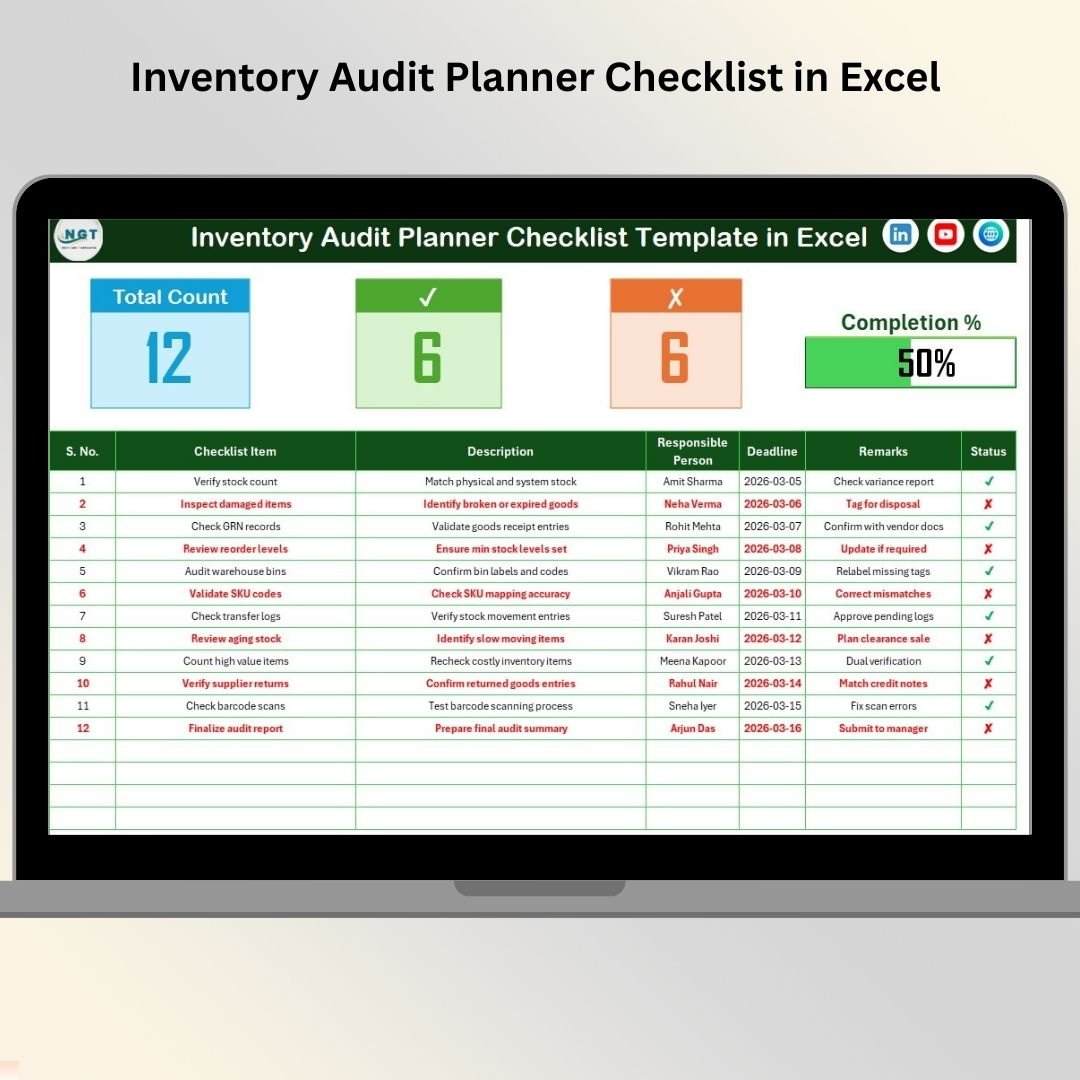
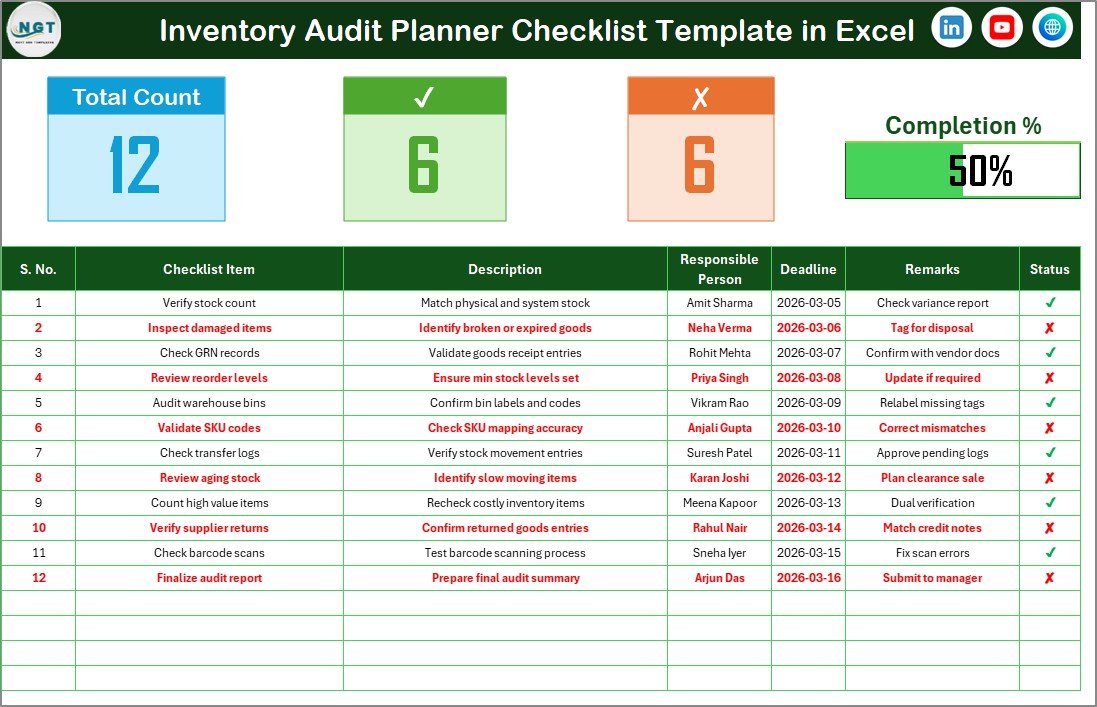
Instantly view Total Tasks, Completed Tasks, Pending Tasks, and Progress Percentage at the top of the sheet.

✔️ Simple Status Tracking

Mark tasks as ✔ Completed or ✘ Not Completed for quick updates.

📈 Automatic Progress Bar

Visual progress bar calculates completion percentage automatically.

👤 Responsible Person Assignment

Assign clear ownership to each audit task.

📅 Deadline Monitoring

Set due dates to ensure timely completion.

📋 Structured Checklist Table

Organized columns for Serial No., Task, Description, Responsible Person, Deadline, Remarks, and Status.

🔽 Drop-Down Control List

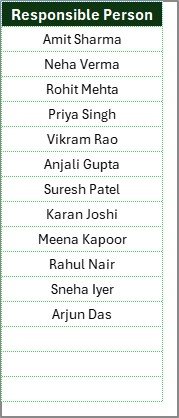
Predefined Responsible Person list prevents typing errors and improves consistency.


📦 What’s Inside the Inventory Audit Planner Checklist in Excel

This template includes 2 structured worksheets designed for maximum control:
Inventory Audit Planner Checklist in Excel

✔️ Inventory Audit Planner Checklist (Main Sheet)
Your central control panel where all audit tasks are created and monitored.

✔️ List Sheet
Stores unique Responsible Person names to create drop-down selections in the main sheet.

🔝 Top Summary Section (Main Sheet)

At the top of the main sheet, you will find:

• Total Count of Tasks
• Checked Count (✔ Completed)
• Crossed Count (✘ Not Completed)
• Progress Bar showing completion percentage

Because of this summary area, managers can review audit status instantly without scrolling.

📋 Checklist Task Table

Below the summary, the structured table contains:

• Serial No.
• Checklist Item
• Description
• Responsible Person
• Deadline
• Remarks
• Status

This structured layout ensures transparency and organized documentation throughout the audit cycle.


🛠️ How to Use the Inventory Audit Planner Checklist in Excel

Using this checklist is extremely simple:

1️⃣ Define your audit objectives.
2️⃣ Enter all audit tasks in the Checklist table.
3️⃣ Assign a Responsible Person from the drop-down list.
4️⃣ Set deadlines for each task.
5️⃣ Update Status as ✔ when completed.

The progress bar updates automatically based on completion.

No formulas to manage. No complex setup required.

Just structured audit control.


🏬 Who Can Benefit from This Inventory Audit Planner Checklist in Excel

This template is ideal for:

🏪 Retail Stores
🏭 Manufacturing Units
📦 Warehouses
🚚 Distribution Centers
🛒 E-commerce Businesses
📊 Internal Audit Teams

If you conduct regular stock audits, cycle counts, physical verifications, or compliance audits — this checklist becomes your essential planning tool.


Instead of dealing with missed checkpoints, you can now:

✔ Track stock verification tasks
✔ Assign accountability clearly
✔ Monitor pending activities
✔ Reduce audit delays
✔ Improve coordination
✔ Strengthen documentation

This is not just a checklist.

It is your audit control system.


⭐ Why This Checklist Will Improve Your Inventory Accuracy

• Structured task sequencing
• Clear responsibility assignment
• Real-time progress monitoring
• Deadline management
• Reduced human error
• Easy duplication for multiple audit cycles

Inventory accuracy protects your profits.

This checklist protects your inventory accuracy.

If you want smoother audit execution, stronger accountability, and better operational control, the Inventory Audit Planner Checklist in Excel will transform your audit workflow.

Stop managing audits manually.
Start auditing professionally. 📦📊

### Click here to read the Detailed blog post

Visit our YouTube channel to learn step-by-step video tutorials

Youtube.com/@PKAnExcelExpert

Watch the step-by-step video tutorial:

Compatibility and Requirements

  • Works in Microsoft Excel desktop (Excel 2016 or later, or Microsoft 365).
  • The Responsible Person column uses a drop-down list fed by the List sheet. Microsoft explains how drop-downs work in Create a drop-down list.

Frequently Asked Questions

How many worksheets does the template have?

Two: the Inventory Audit Planner Checklist main sheet and a List sheet that stores the Responsible Person names.

What columns does the checklist table have?

Serial No., Checklist Item, Description, Responsible Person, Deadline, Remarks and Status.

How is progress calculated?

The top of the main sheet shows the total task count, the checked count and the crossed count. The progress bar shows the completion percentage from those counts.

How do I assign a task to someone?

Add the person’s name on the List sheet, then pick it from the Responsible Person drop-down on the task row.

Is there a Google Sheets version?

There is a related Inventory Audit Checklist in Google Sheets for teams that work in a browser.

Related Inventory Audit Templates

Browse all Excel checklists or Excel inventory management templates.

Frequently asked questions

Which Excel version do I need?
Microsoft Excel 2016 or later on desktop (Microsoft 365 recommended). Many of our formula templates also open in Excel 2013 and Excel for the web - the exact requirement is listed in this product's description.
Does it work on Mac?
Yes. Formula-based Excel templates (no macros) work in Excel for Mac 2016 or later.
Does it work on mobile or Excel Online?
You can view it in the Excel mobile app and Excel for the web, but for entering data, using slicers and refreshing pivots we recommend desktop Excel.
How do I add my own data?
Replace the sample rows on the data sheet with your own (keep the column headers), then click Data > Refresh All so every chart and pivot updates.
Some sheets are protected - how do I edit them or change the logo?
A few of our trackers, data entry systems and dashboards protect sheets so formulas are not overwritten by mistake. Go to Review > Unprotect Sheet - most have no password. If Excel asks for one, message us with your order number and we will share it straight away.
How many records can it handle?
It has been tested with several thousand rows and suits normal small-business volumes. Excel itself handles over 1 million rows.
Is it a one-time payment or a subscription?
One-time payment. No subscription, no per-user fees and nothing to renew - the file is yours to keep.
How do I get the file after payment?
Instantly. The download link appears on screen after checkout, is emailed to you, and stays under My Account > Downloads on our website. If the email does not arrive within a few minutes, check your spam or promotions folder.
Is a user manual included?
Most of our newer products include a PDF user manual in the download. If yours does not have one, message us with your order number and we will send it.
Do I get free updates?
Bug fixes are always free - if something does not work as described, we fix it and send you the corrected file. New versions with new features are not included in the price, unless this product's description says otherwise.
Can you customise it for me?
Yes. Small changes to this template (your columns, categories, logo, colours, minor layout) cost the template price plus $40-80 (Rs 3,000-6,000 + GST), quoted once you send your list. A fully custom build is usually $100-200 (Rs 8,000-18,000 + GST) with two revision rounds. Email your requirements to [email protected] or message us on WhatsApp.
Can I use it for my business or my clients?
Yes, for your own personal or internal business use, for as long as you like. Reselling or redistributing the template is not allowed.
What is your refund policy?
Because these are digital downloads, they are non-refundable once delivered - except when the product does not match its description (report it within 48 hours of purchase) or there is a technical problem our team cannot fix within 72 hours. Email [email protected] with your order number.
How do I get help?
Email [email protected] (Mon-Fri, 10 AM-7 PM IST) or message us on WhatsApp +91 80770 90260 (chat only, no calls). Please include your order number.

Still have a question? Click Need help? at the bottom-left to ask our assistant, or message us on WhatsApp.

Application

MS Excel

Template Type

Checklist

Price

Paid

Business Or Department

Inventory and Warehousing

You may also like…

Inventory Audit Planner Checklist in ExcelInventory Audit Planner Checklist in Excel
Original price was: ₹799.00.Current price is: ₹349.00.
- +
Scroll to Top