



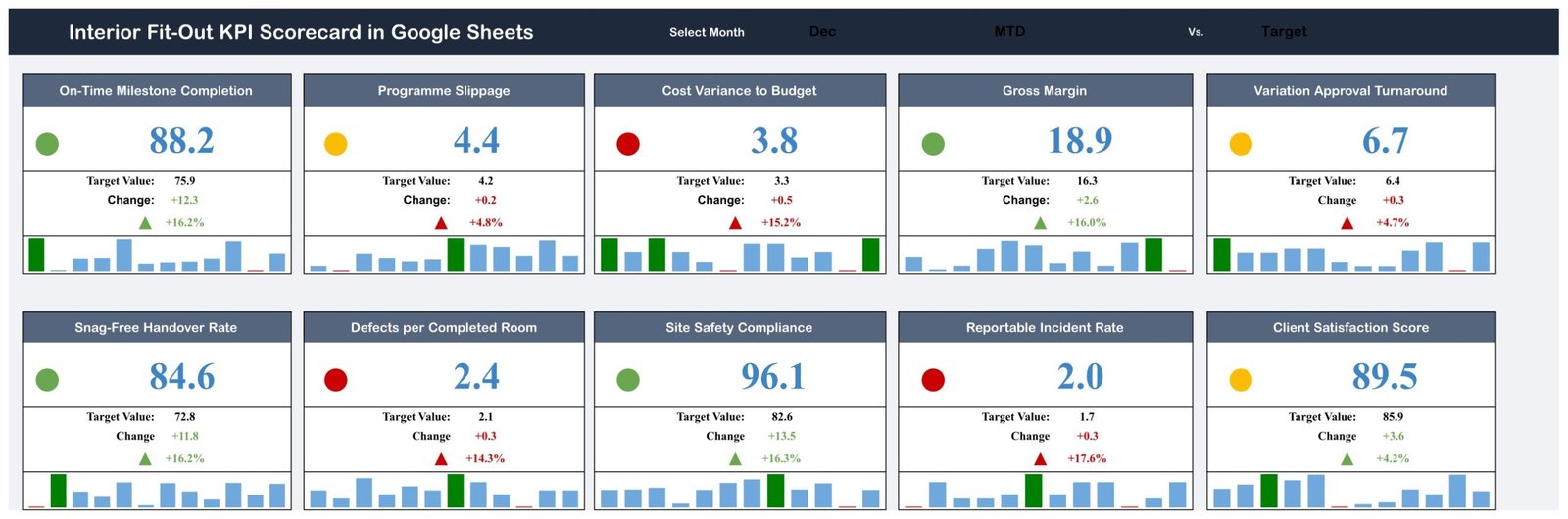
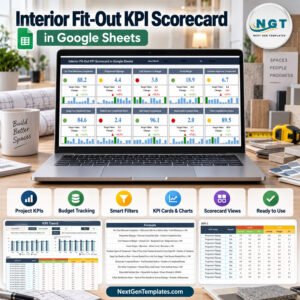
Interior Fit Out KPI Scorecard in Google Sheets turns ten monthly project measures into a visual management review for fit-out contractors, project managers and commercial teams. Enter actual, target and prior-year values, select a month, and the formula-driven scorecard updates each KPI card, change value, status light and mini trend. The template covers programme, cost, quality, safety and client handover without a recurring software subscription. It is backed by support if anything does not work as described, and the downloadable PDF provides the link for creating your own editable Google Sheets copy.
Teams comparing an interior fit-out scorecard, fit-out project KPI template, Google Sheets KPI scorecard or construction project performance tracker can use this workbook as a reporting layer over verified project data.
Key Features of Interior Fit Out KPI Scorecard in Google Sheets
- 10 fit-out KPIs: cover programme, commercial performance, snagging, safety and client handover.
- Monthly selector: choose a month to update the scorecard.
- MTD and YTD comparison: store actual, target and prior-year figures for each KPI.
- Direction-aware status: definitions identify upper-is-better and lower-is-better measures.
- Traffic-light cards: green, amber and red indicators highlight review priorities.
- KPI Trend: compare monthly actual, target and prior-year values for the selected measure.
- Editable definitions: change KPI group, name, unit, formula, definition and type.
- Shared reporting: collaborate using the permissions on your own Google Sheets copy.
What’s Inside the Interior Fit-Out KPI Scorecard
The main scorecard displays On-Time Milestone Completion, Programme Slippage, Cost Variance to Budget, Gross Margin, Variation Approval Turnaround, Snag-Free Handover Rate, Defects per Completed Room, Site Safety Compliance, Reportable Incident Rate and Client Satisfaction Score. The supplied sample is set to December so every card shows the selected month’s actual, target, change, percentage change, status and compact twelve-month trend.

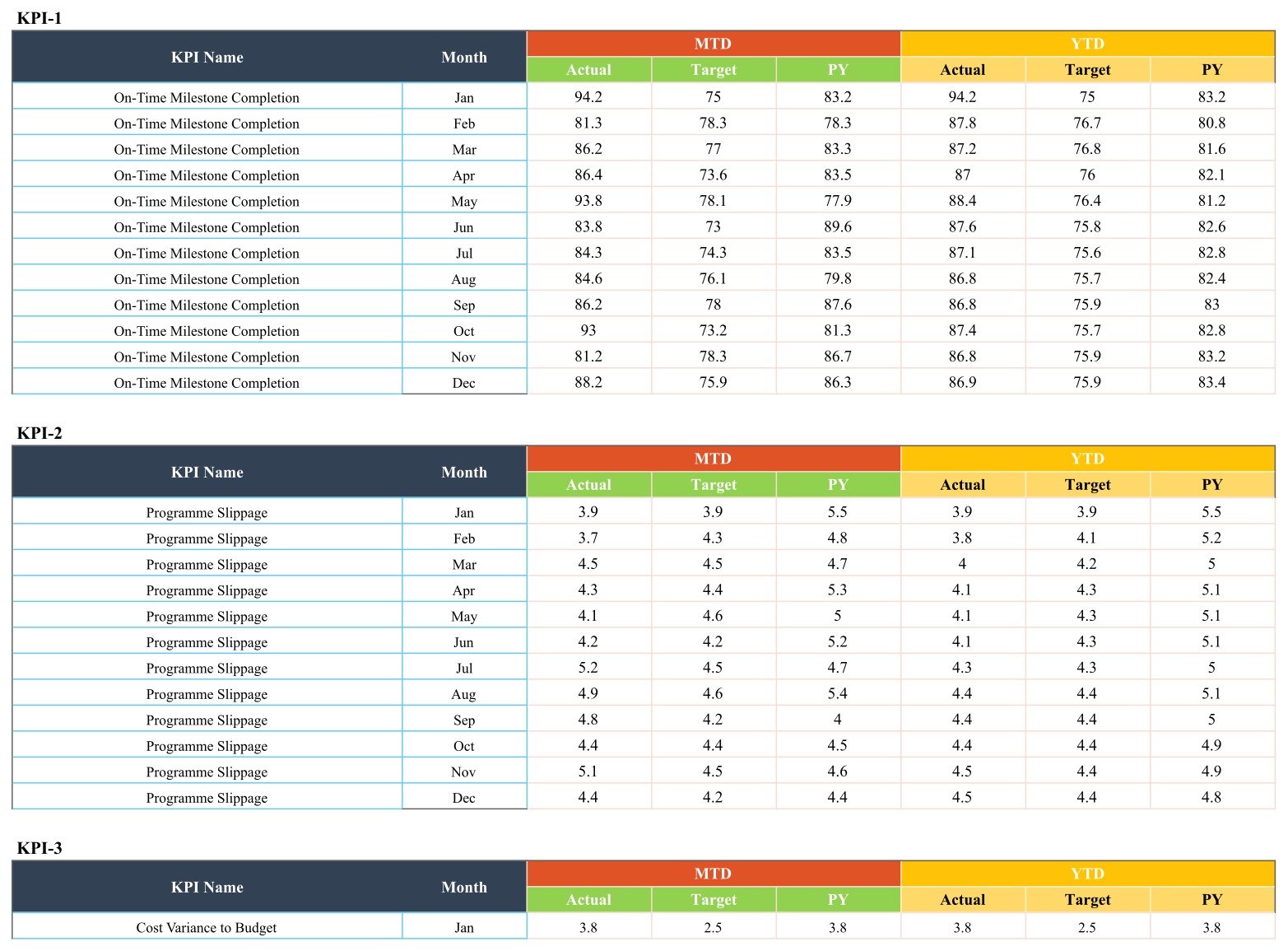
The KPI Trend sheet provides two charts for MTD and YTD values, plus the selected KPI’s group, unit, direction, formula and definition. KPI Definition lists all ten measures and their UTB or LTB treatment. The Input Data sheet stores month-by-month MTD and YTD actual, target and prior-year values.

Interior Fit-Out KPI Scorecard vs. Excel vs. Paid Construction SaaS – Where This Fits
| Factor | This Google Sheets template | Excel alternative | Paid construction SaaS |
|---|---|---|---|
| Sale price | $8.99 one time | Usually a one-time workbook | Usually recurring |
| Collaboration | Native Google sharing | Depends on storage setup | Usually included |
| Setup | Copy, review definitions and enter monthly values | Download and configure locally | Account setup and onboarding |
| KPI flexibility | Editable list and direction | Usually editable | Depends on vendor plan |
| Project workflow | Aggregate KPI reporting only | Aggregate KPI reporting only | May include RFIs, drawings, schedules and site records |
Who This Template Is For – and Who It’s Not For
It suits interior fit-out contractors, commercial managers, programme managers, project directors, quality leads and handover teams that already collect monthly KPI evidence. It is helpful when a business wants consistent reviews across projects while retaining control of definitions and targets.
It is not a project schedule, estimating system, cost ledger, snagging app, safety-management system or compliance certificate. It does not calculate detailed budgets, manage subcontractors, store incident records or verify the source data. The supplied Reportable Incident Rate uses a stated 100,000-hour formula; confirm whether that convention matches your organisation before use.
How to Use This Interior Fit-Out Scorecard
- Download the PDF and click its Google Sheets copy link.
- Review the ten KPI definitions, units, formulas and UTB/LTB direction.
- Replace the sample MTD and YTD actual, target and prior-year figures.
- Select a month on the scorecard and review the traffic-light results.
- Use KPI Trend to investigate changes before agreeing actions.
Use Google’s official instructions for sharing files from Google Drive when assigning viewer, commenter or editor access.
Real-World Use Cases
Programme review
Aisha reviews on-time milestones and programme slippage before the weekly delivery meeting, using the monthly trend to distinguish a recurring delay from a one-off exception.
Commercial review
Ben compares cost variance, gross margin and variation approval turnaround, then validates unexpected results against the underlying cost and change-control records.
Quality and handover review
Meera tracks snag-free handover, defects per completed room and client satisfaction alongside safety measures without mixing detailed case records into the scorecard.
Frequently Asked Questions
How many KPIs are included?
The supplied template contains ten KPIs across five business areas. You can edit the names and definitions.
Does the scorecard update automatically?
Yes. Formula-driven cards and charts update after you replace the monthly input values and select a month.
Does it manage project budgets or schedules?
No. It reports aggregate KPI values; it does not replace a detailed programme, estimate, ledger or project-control system.
Is it a safety compliance tool?
No. Safety measures are reporting fields only. Your organisation remains responsible for definitions, evidence, legal duties and competent review.
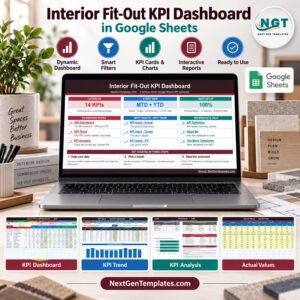
What does Smart Filters mean in the feature artwork?
It refers to the month selector on the scorecard and the KPI selector on the trend sheet. The workbook does not include a separate slicer or automation engine.
What do I receive?
You receive a PDF with the link for creating an editable copy in your Google Drive.
About the Author
Built by PK – Microsoft Certified Professional with 15+ years of Excel, Google Sheets, and Power BI experience. Founder of NextGenTemplates, reaching 300K+ subscribers across YouTube channels. Every template is hand-built and tested before release.
Explore Related Templates
Compare related construction products such as the Home Renovation Contractor KPI Scorecard, Kitchen Remodeling KPI Scorecard, Bathroom Remodeling KPI Scorecard and Flooring Installation KPI Scorecard. Browse more Google Sheets KPI templates.
Turn your verified monthly fit-out figures into a consistent scorecard and a clearer management conversation.
Watch the step-by-step video Demo:
Last updated: September 11, 2026.
Compatibility and Requirements
- Works in Google Sheets. You need a free Google account and a web browser.
- You pick the month from a selector on the scorecard and the KPI from a selector on the KPI Trend sheet. Google explains in-cell dropdown lists in Create an in-cell dropdown list.
More Questions About This Template
Is there an Excel or Power BI version?
Yes. See the Interior Fit-Out KPI Scorecard in Excel. For a dashboard layout, there is the Interior Fit-Out KPI Dashboard in Google Sheets and the Interior Fit-Out KPI Dashboard in Power BI.
Which sheets are in the workbook?
The scorecard, KPI Trend, KPI Definition and Input Data sheets. Input Data holds the monthly MTD and YTD actual, target and prior-year values.
Can I change which KPIs are tracked?
Yes. On the KPI Definition sheet you can edit each KPI’s group, name, unit, formula, definition and type (upper-is-better or lower-is-better).
Do I need Excel to use it?
No. The template runs in Google Sheets. The PDF you download has the link for creating your own editable copy in Google Drive.
Related Fit-Out Templates
- Interior Fit-Out KPI Scorecard in Excel: the same scorecard for Excel
- Interior Fit-Out KPI Dashboard in Google Sheets: a dashboard view of the same topic
- Interior Fit-Out KPI Dashboard in Power BI: the Power BI edition
- Interior Fit-Out Project Management System Web App: a web app for managing fit-out projects
- Google Sheets Business Pack (Pro): 14 business templates in one download
Browse all Google Sheets KPI dashboards.






























Reviews
There are no reviews yet.